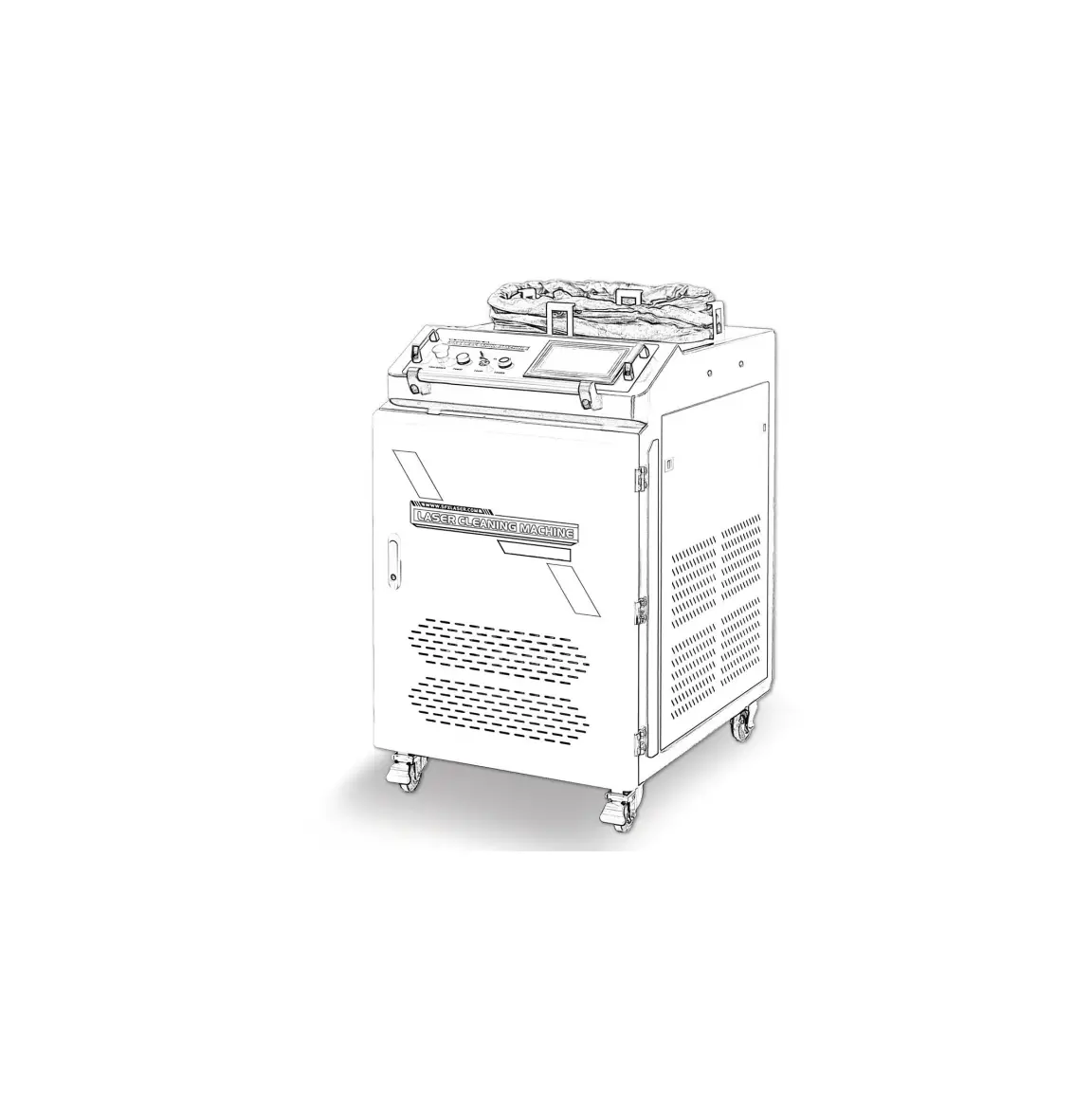
LC Series Laser Cleaning Machine
Product Information:
Before using this product, please ensure that the following
items are in compliance with the product safety operation
requirements:
- Do not use this product in places with flammable and explosive
materials. - When cleaning highly reflective materials (copper, aluminum,
etc.), do not have people stand around to avoid damage caused by
reflected light. - Do not aim the cleaning head at the human body to avoid
injury. - Do not make the tip of the cleaning head upward and pay
attention to the dustproof of the lens. - Ensure that the equipment is reliably grounded.
- Clean combustible items carefully and equip with fire-fighting
equipment. - This product is a Class IV radiation laser. Goggles must be
worn. - Ensure that the dust-proof air blower works normally to keep
the lens clean. - The minimum bending radius of the integrated cable should be
more than 200mm.
Scope of application: This product can be used to remove
attachments or coatings on the surface of objects, including rust,
paint, oil stains, coatings, etc. (High-reflective materials need
to be tested and verified). It has the advantages of non-contact,
no chemical damage, mobility, and high efficiency.
Product Description:
| Model | Laser Power (W) | Laser Wavelength (nm) | Operating Mode | Maximum Modulation Frequency (KHz) | Integrated Cable Length (m) | Scanning Width (mm) | Power Configuration | Cooling Method | Machine Size (mm) | Net Weight (KG) |
|---|---|---|---|---|---|---|---|---|---|---|
| LC-1000 | 1000 | 10 (customizable) | 6kw | Water cooling | 870*560*1050 | 145 | ||||
| LC-1500 | 1500 | 10 (customizable) | 8kw | Water cooling | 870*560*1050 | 165 | ||||
| LC-2000 | 2000 | 10 (customizable) | 10kw | Water cooling | 870*560*1050 | 180 |
Product Usage Instructions:
Installation and Use Instructions:
Installation and use requirements:
- Environment Temperature: 0-35°C
- Environment Humidity: 40%-80%
- Power Configuration: Refer to the technical parameters
- Cooling Medium: Deionized, distilled or pure water
- Grid Ground Requirements: Comply with the national
standard
Operation Precautions:
Dust-proof lens replacement:
- Loosen the screw on the dust-proof air outlet.
- Press the air pipe to remove the dust-proof air outlet.
- Unscrew the compression ring counterclockwise.
- Replace the protective lens.
Operation Process:
- Start-up and preparation:
- Check the water level of the chiller to ensure that the water
level is within the standard range. - Connect the power cord (pay attention to grounding).
- Power on: turn on the main power, emergency stop, laser switch.
Turn on the enable. - Take out the hand-held cleaning head and ensure that the
minimum bending radius of the integrated cable is more than
200mm.
to the target requirements.
interval of 550-600mm (F500 lens).
working.
- Turn off the enable, laser switch, press the emergency stop,
and turn off the main power. - For detailed steps, please watch the video tutorial.
Notice
Before using this product, please ensure that the following items are in compliance with the product safety operation requirements. Otherwise, it is forbidden to turn on the system and perform cleaning operations.
It is prohibited to use this product in places with flammable and explosive materials. When cleaning highly reflective materials (copper, aluminum, etc.), it is forbidden to have people stand around to avoid damage caused by reflected light. It is forbidden to aim the cleaning head at the human body to avoid injury.
It is forbidden to make the tip of the cleaning head upward. Pay attention to the dustproof of the lens.
Make sure that the equipment is reliably grounded.
Clean combustible items carefully and equip with fire-fighting equipment.
This product is a Class IV radiation laser. Goggles must be worn.
Ensure that the dust-proof air blower works normally to keep the lens clean.
The minimum bending radius of the integrated cable should be more than 200mm.
CONTENT
.Scope of application ………………………………………………………………………………………..1 .Product description ……………………………………………………………………………………….1
1. Equipment structure diagram …………………………………………………………………………….1 2. Main technical parameters ………………………………………………………………………………..1 .Installation and use instructions ………………………………………………………………….. 2 1. Installation and use requirements ………………………………………………………………………. 2 2. Operation precautions ……………………………………………………………………………………..2 3. Dust-proof lens replacement ……………………………………………………………………………..3 .Operation process ……………………………………………………………………………………….. 3 .Laser controller interface description …………………………………………………………….3 1. User Management ………………………………………………………………………………………….4 2. Cleaning Management …………………………………………………………………………………….5 .Fault analysis and troubleshooting ……………………………………………………………….6 .Maintenance ……………………………………………………………………………………………….7 .Transportation and storage ………………………………………………………………………. 7 .Warranty terms ………………………………………………………………………………………….. 8
.Scope of application
This product can be used to remove attachments or coatings on the surface of objects, including rust, paint, oil stains, coatings, etc. (High-reflective materials need to be tested and verified). It has the advantages of non-contact, no chemical damage, mobility and high efficiency, etc.
.Product Description
1. Equipment structure diagram
2.Main technical parameters
Model Laser PowerW Laser Wavelength
nm Operating Mode Maximum Modulation FrequencyKHz Integrated Cable
Length(m Scanning Widthmm
Power Configuration
Cooling Method
Machine Sizemm Net WeightKG
LC-1000 1000
LC-1500 1500
1080±1 Continuous
200
LC-2000 2000
10(customizable)
160±10
AC220V±10% AC220V±10% AC220V±10%
6kw
8kw
10kw
Water cooling (distilled water , deionized water or pure
water as medium)
870*560*1050
145
165
180
1
.Installation and use instructions
1.Installation and use requirements
Item Environment Temperature Environment
Humidity Power Configuration
Cooling Medium
Grid Ground
Requirements 035
40%-80% Refer to (2) technical parameters Deionized, distilled or pure water Comply with the national standard
1.1 Ensure that the equipment is installed and used steadily to avoid damage caused by falling or tipping. 1.2 Ensure good ventilation and keep at least 60cm of space around the equipment for heat dissipation to avoid affecting performance due to poor heat dissipation. 1.3 During use, please pay attention to air blowing to avoid damage to the lens caused by dust. 1.4 Check the protective lens before use. If it is dirty, please clean in time. (Use a cotton swab dipped in special cleaning solution and scrub the protective lens counterclockwise from the center to the edge.) When cleaning, pay attention to lens protection and avoid scratches. 1.5 The hand-held cleaning head should be handled with care. Please put the tip of the cleaning head downward or lay flat when stored.
2.Operation precautions
2.1 In the cold environment, please ensure that the cooling medium is not frozen, to avoid the abnormality of the cooling system. 2.2 Protect it from rain and water when outdoor use. 2.3 When the temperature of the water chiller is lower than 22°C, the laser low temperature alarm will occur, and it needs to be preheated. When the temperature reaches 22 ° C, please turn it off and then turn it on again to clear the alarm. 2.4 The laser has safety protection. If the cleaning is suspended for more than 2 minutes, please click “Laser” again to activate it and then it will emit light.
2
3.Dust-proof lens replacement 3.1 Loosen the screw on the dust-proof air outlet. 3.2 Press the air pipe to remove the dust-proof air outlet. 3.3 Unscrew the compression ring counterclockwise. 3.4 Replace the protective lens.
.Operation Process
1.Start-up and preparation 1.1 Check the water level of the chiller to ensure that the water level is within the standard range. 1.2 Connect the power cord (pay attention to grounding). 1.3 Power on: turn on the main power, emergency stop, laser switch.Turn on the enable. Take out the hand-held cleaning head and ensure that the minimum bending radius of the integrated cable is more than 200mm.
2. Set the swing parameters and laser parameters according to the target requirements; 3. Aim the hand-held cleaning head to the target with an interval of 550-600mm (F500 lens). Double-click the cleaning head switch to start working. 4. Shutdown operation: turn off the enable, laser switch, press the emergency stop, and turn off the main power. For detailed steps, please watch the video tutorial.
.Laser controller interface description
After powering it on, the control screen enters the main operation interface of the handheld laser cleaning system.
3
1.User management Click “Settings” to enter the system setting interface (default password: 6), click “User Management”, and set the user type, user name and password in sequence to complete the user creation (the system has created an account: admin, password: 1). Main operation interface
System Setting
User Management
4
2.Cleaning Management Click “Cleaning”, enter the password to enter the interface, and click “Sway” and “Laser” to enter the cleaning preparation state. ” Air ” : it is used for air one-button test (external air source) and it will automatically turn on when cleaning .
Cleaning Management
Swing Par.
Laser Par.
5
Swing Par. and Laser Par. function instruction are as follows:
Item
Name
Function
Note
Swin Sizemm g Par. Speedmm/s
Set the laser width when cleaning Set the laser cleaning speed
160±10 1-30000
Power%
Set laser power percentage
1-100%
Duty%
Laser Par. FrequencyKHz
AirOn Delayms
Sets the duty cycle of the modulation signal period
Set the frequency of the modulating signal
Set the air blowing time in advance before cleaning starts
AirOff Delayms Set the time to keep blowing after cleaning
0-100%
0.001-200
External air source
.Fault analysis and troubleshooting
Fault phenomenon
Cause Analysis
Troubleshooting method
The spot does not swing
1. The control cable connector of the cleaning head is loose. 2. The motor or control card is damaged.
1. Tighten loose joints 2. Please contact us
Sudden loss of 1. There are foreign objects or energy during damage to the optical lens.
cleaning 2. Laser failure or abnormality
1. If it is due to the protective lens, clean or replace it, and for other lenses please contact us.
2. Please contact us.
The cleaning head is hot
1. The optical lens is dirty or damaged
2. Optical path deflection
1. Clean or replace protective lenses. For other lenses, please contact us.
2. Check whether the connection between the optical fiber and the cleaning head is loose.
6
.Maintenance
Note: In order to avoid personal injury and man-made damage, the maintenance of the handheld laser cleaning machine must be carried out by professionals.
1.Handheld cleaning head
1.1 Daily inspection: Check the protective lens. If there is foreign matter, use a special dustfree cotton swab dipped in industrial alcohol to clean it. If there is coating damage or lens damage, please replace the protective lens in time to avoid other optical lenses being burned. 1.2 Regular inspection: When the machine is used or not used for some time, first check the laser module, and make sure that each optical component is free from dust pollution, mildew, and other abnormal phenomena before turning it on. 1.3 Observing the light spot: The operator can check the laser output light spot with black image paper. Once the spot is found to be uneven or skewed, it should be repaired in time.
2.Water chiller
2.1 The dust on the condenser and the dust filter needs to be cleaned regularly. 2.2 When the machine is transported or not used for a long time, the coolant should be drained. 2.3 When the temperature is lower than 2 ° C, please check and ensure that the chiller is working properly before using the machine to avoid damaging the laser tube, output head, and water chiller due to the solidification of the coolant. 2.4 The coolant must be replaced in the following cases
2.4.1 The filter element has been replaced. 2.4.2 After 3 months of use. 2.4.3 Use again after long-term non-use
.Transportation and storage
1. Before moving the equipment, please remove the power cord and drain the coolant inside the system. Do not move or transport it with liquid inside. 2. When transporting or handling the equipment, please do not bump it up and down or excessively tilt it (not more than 45°) to avoid bumping, impacting and overturning. 3. When storing the equipment, drain the cooling liquid in the chiller, and drain the remaining cooling liquid in the water pump, filter, and pipeline. Wipe off the water and oil stains, pack the equipment with a wrapping film to prevent dust and water, and place it in a cool and ventilated
7
place without direct sunlight and dust accumulation.
.Warranty terms
1.The warranty period of this product is one year for the whole machine, and the warranty period for the laser source is two years:
1.1. From the date of purchasing this product, our company provides free warranty within one year. If the machine need to be returned to the factory for repair, the user only needs to bear the cost of two-way transportation. 1.2. This product is repaired free of charge for life, and the user only needs to bear the cost of spare parts and two-way transportation.
2.The following scopes are not covered by warranty: 2.1. Damage caused by improper use such as violent bumping, bending, etc. 2.2. Human-caused damage. 2.3. Laser accessories and consumables are not guaranteed (collimating mirrors, galvanometers, field mirrors and other optical parts, Integrated cables, etc. are not covered by the warranty).
The relevant technical parameters listed in this manual are for reference only. The relevant product information is subject to change without prior notice. All technical parameters and agreements are subject to the terms of the sales contract.
8