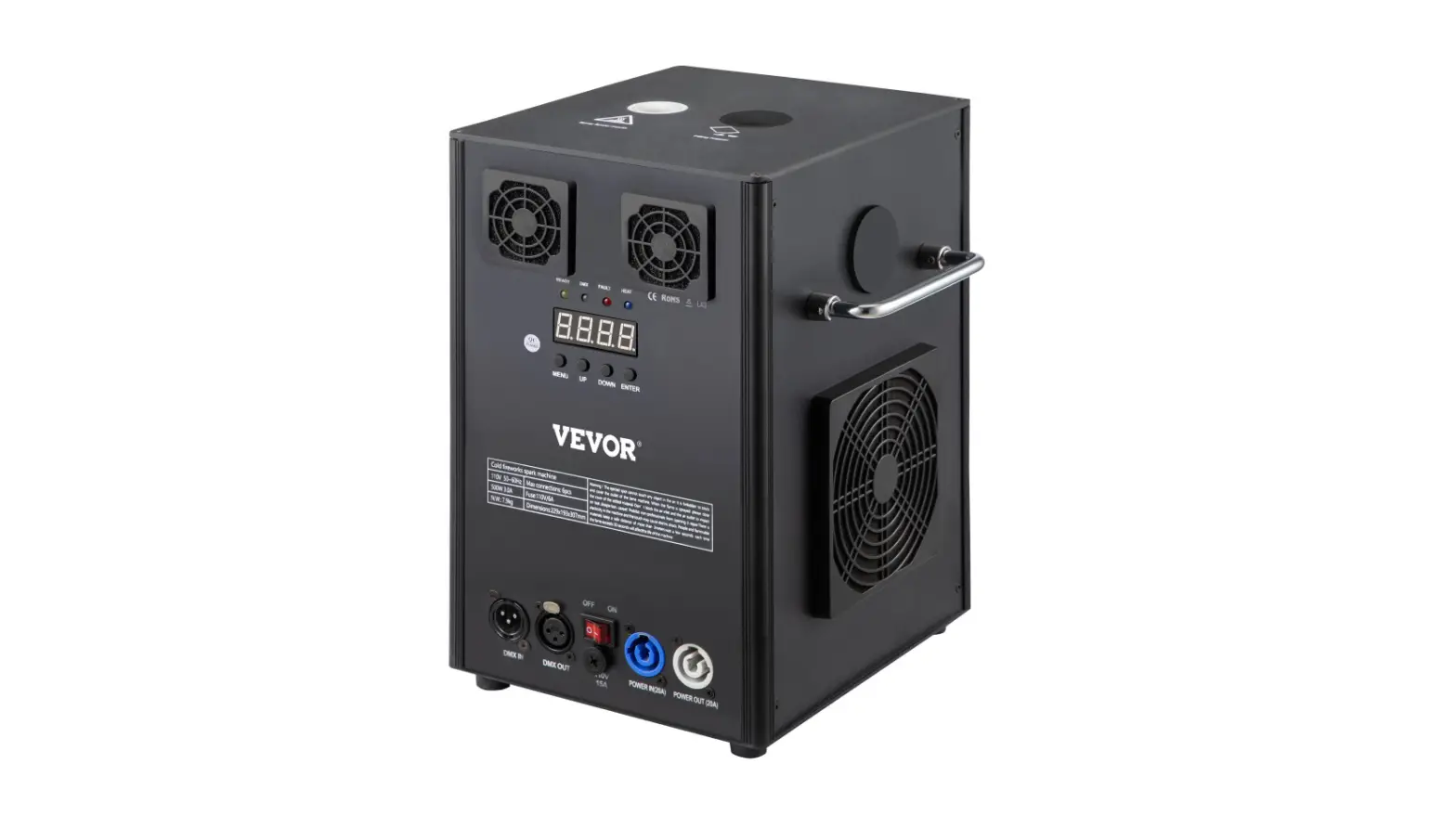
A11 Electronic Fireworks Machine
Upgrade 2021 Electronic Fireworks Machine
An Instruction Manual
Thank you for choosing our electronic firework machine. Our
product requires the use of supplies and equipment provided by the
company. If you do not use provided equipment and components, you
may do damages to the machine. If these rules are not followed, the
company will not be responsible for any damages and issues that may
occur. Please follow the instructions carefully.
Table of Contents:
- Foreword
- Safety Precautions
- Part Description
- Instructions
- Packing Material
- Maintenance Instructions
- After-Sales Service
Operation Instructions:
- Plug in the power cord.
- Remote Control Code Matching: To reboot the R001, press the
MENU key on the display screen to match with page 4. After the
machine with the L code, press and hold the remote control for 3
seconds to display a L–H code match. To repeat the code,
long-press the remote key on the L–H page. - Pour the material into the feeding hole. Don’t add too much or
add into the wrong inlet. - Preheat the temperature and wait until the temperature reaches
550 degrees. Press B/C/D on the remote control to start the
jet.
The remote control and DMX can be configured together to connect
to more than one sprayer for operation. The user will only need to
set up a host by pressing the DOWN button when the machine displays
Ln-H. When the remote control is not needed to control more than
one machine, this machine should be canceled as the host, and then
press the DOWN key until it displays L–H on the screen.
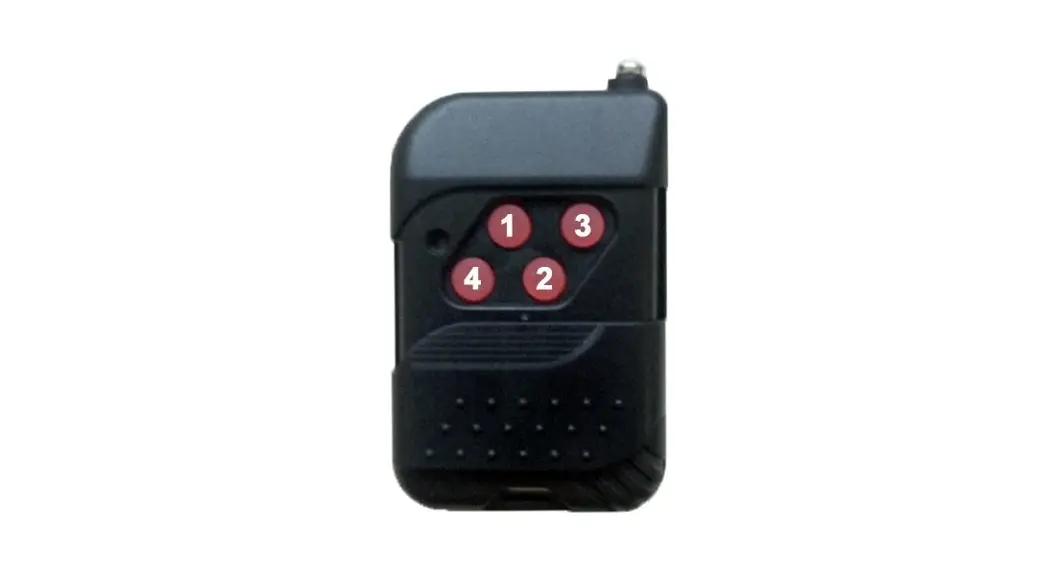
Remote Control Instructions:
- A – Press A to turn on/off
- B – Click to start the spark, and click to stop the jet. 1st
gear reaches 1-1.5 meters high. - C – Click to start the spark, and click to stop the jet. 2nd
gear reaches 2-3 meters high. - D – Click to start the spark, and click to stop the jet. 3rd
gear reaches 3-5 meters high.
Parameters:
- Spray Direction: Top Spray
- Operating Temperature: -10-50
- Heating Temperature
- Working Height
- Power Supply
- Dimensions: 205 cm (L), 210 cm (W), 250 cm (H)
- Net Weight: 4.8 kg
- Maximum Connection: Channel 6
When the temperature reaches 550 degrees, you can press the
B/C/D button to adjust the spark height as desired.
Maintenance Instructions:
Important Dust Cleaning Tips:
- Please thoroughly clean and spray the remaining debris in the
machine after each use, so that optimal performance can be
met. - Note: Remaining debris must not be left in the machine,
problems may occur to the machine’s card. - Remove the dust-proof net to clean up the dust.
- If an open fire occurs, use sand to put out the fire, not
water. - Keep the machine away from children.
After-sales Service:
- One year warranty after use.
- If the product is mishandled, disassembled, or repaired from an
uncertified repair location, the company will not be responsible
for any faults, and warranty services will become invalid.
Upgrade 2021
Electronic Fireworks Machine
An Instruction Manual
1
Thank you for choosing our electronic firework machine, our product requires the use of supplies and equipment provided by the company. If you do not use provided equipment and components, you may do damages to the machine. If these rules are not followed, the company will not be responsible for any damages and issues that may occur.
Please follow the instructions carefully.
Table of Contents:
Foreword
1
Safety Precautions
2
Part Description
3
Instructions
4
Packing Material
5
Maintenance Instructions
6
After-Sales Service
7
Operation Instructions:
1. Plug in the power cord.
2
2. Remote Control Code Matching: To reboot the R001, press the MENU key on the display screen to match with page 4. After the machine with the L code, press and hold the remote control for 3 seconds to display a L–H code match. To repeat the code, long-press the remote key on the L–H page.
3. Pour the material into the feeding hole. Don’t add too much or add into the wrong inlet.
. Preheat the temperature and wait until the temperature reaches 550 degrees. Press B/C/D on the remote control to start the jet.
The remote control and DMX can be configured together to connect to more than one sprayer for operation. The user will only need to set up a host by pressing the DOWN button when the machine displays Ln-H. When the remote control is not needed to control more than one machine, this machine should be canceled as the host, and then press the DOWN key until it displays L–H on the screen.
Remote Control Instructions:
3
A Press A to turn on/off
B
Click to start the spark, and click to stop the jet. 1st gear reaches 1-1.5 meters high.
C
Click to start the spark, and click to stop the jet. 2nd gear reaches 2-3 meters high.
D
Click to start the spark, and click to stop the jet. 3rd gear reaches 3-5 meters high.
Parameters:
Spray Direction
Top Spray
Operating Temperature
-10-50
Heating Temperature
Working Height
Power Supply Dimensions Net Weight Maximum Connection
When the temperature reaches 550 degrees you can press the B/C/D button to adjust the spark height as you want.
110V/10A220V/6A 205 cm (L), 210 cm (W), 250 cm (H) 4.8 kg Channel 6
4
Warranty
Consumables
Net Weight
Time Packing
Packing
Material Power Signal Line Fuse Instruction Manual Instruction Carton
1 Year
200 g 8 to 10 minutes Vacuum Packing
Unit Strip Strip Piece Piece Piece Set
Quantity 2 in 1
MAINTENANCE INSTRUCTIONS:
Important Dust Cleaning Tips 1. Please thoroughly clean and spray the remaining debris in the machine after each use, so that optimal performance can be met.
5
Note: Remaining debris must not be left in the machine, problems may to the machine’s card. 2. Remove the dust-proof net to clean up the dust. 3. If an open fire occurs, use sand to put out the fire, not water. 4. Keep the machine away from children.
After-sales Service
1. One year warranty after use. 2. If the product is mishandled, disassembled, or repaired from an uncertified repair location, the company will not be responsible for any faults, and warranty services will become invalid.
6
7