TY-B-CRE Bus Connector Cresnet
Product Information
Product Name: Bus Connector Cresnet
Model: TY-B-CRE
User Guide: January 2022 Version 1.1
Product Modifications:
- Year: 01/01/2021
- Version: 1.0
- Modifications: Initial release
Document Revisions:
- Date: 01/01/2021
- Version: 1.0
- Date: 29/07/2022
- Version: 1.1
Table of Contents
- Preface
- 1.1 Description of the User
- 1.2 Explanation of Safety Warnings
- 1.3 Retaining Instructions
- 2.1 Intended Use and Reasonably Foreseeable Misuse
- 2.2 System Overview
- 2.3 Technical Data
- 2.4 Product Compliance
- 3.1 How to Use Safely
- 3.2 Graphical Symbols
- 4.1 Connections and Physical Details Front
Product Usage Instructions
Installation – Connections and Physical Details Front
Follow the steps below to install the Bus Connector Cresnet:
- Locate the front of the Bus Connector Cresnet.
- Ensure that all necessary connections are available, such as
power supply and data cables. - Make sure to read and understand the safety instructions
provided in section 3 before proceeding. - Connect the power supply cable to the designated power input
port on the Bus Connector Cresnet. - Connect the data cables to the appropriate ports on the Bus
Connector Cresnet, ensuring proper alignment and secure
connections. - Double-check all connections to ensure they are properly
secured. - Proceed with any additional installation steps or
configurations as specified in the user manual.
Note: It is important to refer to the user manual for complete
installation instructions and any specific requirements or
guidelines related to your particular setup or system.
Bus Connector Cresnet
TY-B-CRE
User Guide
January 2022 Version 1.1
1
DISCLAIMER
Tyba Home Limited makes no representations or warranties with respect to this manual and, to the maximum extent permitted by law, expressly limits its liability for breach of any warranty that may be implied to the replacement of this manual with another. Furthermore, Tyba Home Limited reserves the right to revise this publication at any time without incurring an obligation to notify any person of the revision. The information provided in this documentation contains general descriptions and/or technical characteristics of the performance of the products contained herein. This documentation is not intended as a substitute for and is not to be used for determining suitability or reliability of these products for specific user applications. It is the duty of any such user or integrator to perform the appropriate and complete risk analysis, evaluation and testing of the products with respect to the relevant specific application or use thereof. Neither Tyba Home Limited nor any of its affiliates or subsidiaries shall be responsible or liable for misuse of the information that is contained herein. If you have any suggestions for improvements or amendments or have found errors in this publication, please notify us. All pertinent state, regional, and local safety regulations must be observed when installing and using this product. For reasons of safety and to help ensure compliance with documented system data, only the manufacturer shall perform repairs to components. Failure to observe this information can result in injury or equipment damage. Copyright © 2022 by Tyba Home Limited All rights reserved. No part of this publication may be reproduced, distributed, or transmitted in any form or by any means, including photocopying, recording, or other electronic or mechanical methods, without the prior written permission of the publisher. For permission requests, write to the publisher, addressed “Attention: Permissions Coordinator,” at the address below. Tyba Home Limited, Unit 3, Jubilee Way, Faversham, Kent, ME13 8GD, UK +44 (0) 20 3907 6877 www.tybahome.com
TRADEMARKS
Tyba Home Limited has made every effort to supply trademark information about company names, products and services mentioned in this manual. Trademarks shown below were derived from various sources. All trademarks are the property of their respective owners. General Notice: Some product names used in this manual are used for identification purposes only and may be trademarks of their respective companies.
2
Product Modifications
Year 01/01/2021
Version 1.0
Modifications Initial release
Document Revisions
Date 01/01/2021 29/07/2022
Version 1.0 1.1
Document Changes Initial draft Updated Terminology
3
Table of Contents
1
Preface ………………………………………………………………………………………………………………………………………………………………… 5
1.1……. Description of the User…………………………………………………………………………………………………………………………………. 5
1.2 ….. Explanation of Safety Warnings……………………………………………………………………………………………………………….. 5
1.3 ….. Retaining Instructions …………………………………………………………………………………………………………………………………… 5
2
Product Description ………………………………………………………………………………………………………………………………………. 6
2.1 ….. Intended Use and Reasonably Foreseeable Misuse………………………………………………………………………. 6
2.2 …. System Overview…………………………………………………………………………………………………………………………………………….. 6
2.3 …. Technical Data…………………………………………………………………………………………………………………………………………………. 7
2.4 …. Product Compliance …………………………………………………………………………………………………………………………………….. 7
3
Safety Instructions ………………………………………………………………………………………………………………………………………… 8
3.1 ….. How to Use Safely …………………………………………………………………………………………………………………………………………… 8
3.2 …. Graphical Symbols…………………………………………………………………………………………………………………………………………. 8
4
Installation ………………………………………………………………………………………………………………………………………………………… 9
4.1 ….. Connections and Physcical Details Front ……………………………………………………………………………………………. 9
4.2…. Connections and Physcical Details Rear …………………………………………………………………………………………….10
4.3…. Bus Connector Wiring …………………………………………………………………………………………………………………………………… 11
4.4…. Back Box Options…………………………………………………………………………………………………………………………………………….. 11
4.5…. Mounting a Bus Connector using a Euro back box ………………………………………………………………………..12
4.6…. Mounting a Bus Connector using a UK back box ……………………………………………………………………………13
5
Setup ……………………………………………………………………………………………………………………………………………………………………. 14
5.1 ….. Powering On………………………………………………………………………………………………………………………………………………………14
5.2…. Crestron Driver Setup……………………………………………………………………………………………………………………………………14
7
Maintenance ……………………………………………………………………………………………………………………………………………………. 15
4
1 Preface 1.1 Description of the User This User Guide is intended for professional installers such as electricians or system integrators. 1.2 Explanation of Safety Warnings
Danger indicates a hazard with a high level of risk which, if not avoided, will result in death or serious injury
Warning indicates a hazard with a medium level of risk which, if not avoided, could result in death or serious injury.
Caution indicates a hazard with a low level of risk which, if not avoided, could result in minor or moderate injury.
Indicates information considered important, but not hazard-related. 1.3 Retaining Instructions Read and understand this manual and its safety instructions before using this product. Failure to do so can result in serious injury or death. Ensure that each person who uses the product has read these warnings and instructions and follows them. Tyba Home Limited is not liable for cases of material damage or personal injury caused by incorrect handling or non-compliance with the safety instructions. In such cases, the warranty will be voided.
5
2 Product Description
2.1 Intended Use and Reasonably Foreseeable Misuse
The Cresnet Bus Connector is intended to operate as an interface between Tyba products and the Cresnet proprietary bus. The Bus Connector also provides power and a mounting interface to Tyba products. The Cresnet Bus Connector is not intended to be used for any function outside those described.
The Cresnet Bus Connector should be used with the following software, original accessories and components only:
· Crestron Software · Tyba genuine products
2.2 System Overview
The Cresnet Bus Connector is a product for interfacing Tyba products to the Crestron Cresnet proprietary bus. It is also designed to provide a mounting interface for Tyba products as well as power.
2.3 Technical Data
Parameter Product Name Product Code Power Dimensions Weight
Description Bus Connector Cresnet TY-B-CRE 24VDC | 5W W 73.6mm | H 73.6mm | D 26.7mm 50g
2.4 Product Compliance
This product complies to all relevant Directives associated with CE, UKCA, IC & FCC. The Declaration of Conformity and further certification documentation can be found at www.tybahome.com/downloads.
6
3 Safety Instructions
Read and understand this manual and its safety instructions before using this product. Failure to do so can result in minor or moderate injury.
3.1 How to Use the Product Safely
When using this product, ensure all guidance is followed regarding technical specification, installation, setup and operation. Never use this product with anything other than Tyba genuine accessories.
3.2 Graphical Symbols
Symbol
Meaning The CE Marking on the product is the manufacturer’s declaration that the product complies.
The UKCA Marking on the product is the manufacturer’s declaration that the product complies.
The FCC Marking on the product is the manufacturer’s declaration that the product complies.
The WEEE Marking on the product is the manufacturer’s confirmation that the product is not recyclable.
7
4 Installation
The product should only be installed by a qualified and trained person. 4.1 Connections and Physical Details Front
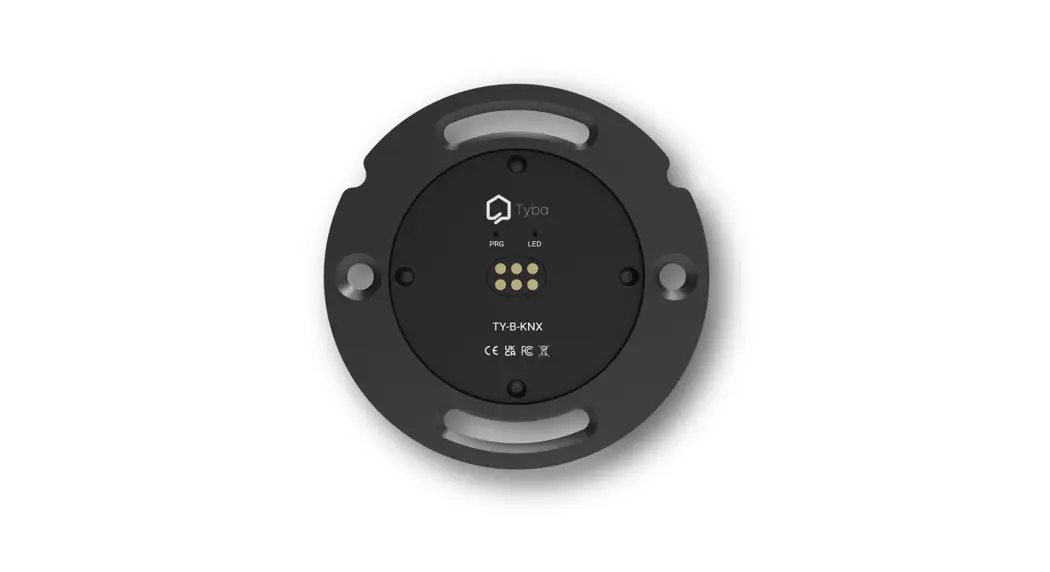
Key 1
Description Bus Connector proprietary connector
8
4.2 Connections and Physical Details Rear
Key 1
Description Cresnet power and data | 24VDC | 5W
9
4.3 Bus Connector Wiring
The Bus Connector Cresnet should be wired as per Crestron’s Cresnet specification, using Crestron’s Cresnet cable. The maximum number of devices should be calculated according to the power supply and device consumption.
Ensure the connections are correct before providing power. Always test the cable polarity.
4.4 Back Box Options
Bus Connectors can be used with a range of back boxes depending on your requirements. Bus Connectors provide screw slots top and bottom, as well as counter sunk screw holes left and right, all spaced with 60mm hole centers.
Option 1
2
Description Euro style round back box 68mm diameter. Kaiser Elektro O-range 9061-00, 9063-02, 9064-02.
UK style square back box with adjustable lug. Requires Wall Plate (TY-B-PLT)
10
4.5 Mounting a Bus Connector using a Euro back box Once the back box is installed, align the Bus Connector with the front of the back box and insert it so that the Bus Connector sits flat and square on the wall.
Use the screw slots top and bottom to fix the Bus Connector to the back box. You can rotate the Bus Connector within the bounds of the screw slots to ensure it is level.
Ensure the Euro back box is installed with the mounting holes top and bottom so that the Bus Connector screw holes align. Do not over tighten the fixing screws.
11
4.6 Mounting a Bus Connector using a UK back box Once the back box is installed, insert the Bus Connector in to the Wall Plate. Align the Bus Connector and Wall Plate with the front of the back box and insert it so that the Bus Connector and Wall Plate sits flat and square on the wall.
Use the screw slots left and right to fix the Bus Connector and Wall Plate to the back box.
Ensure the UK box is installed with the mounting lug on either the left or right to provide fine level adjustment. Do not over tighten the fixing screws.
12
5 Setup It is recommend that setup is carried out by a qualified and trained person. 5.1 Powering On Once Bus Connector Cresnet is powered it will appear in Crestron Toolbox on the default Cresnet address 25. Using Toolbox you can now address the device as normal. 5.2 Crestron Driver Setup Instructions on setting up the Crestron driver for your application can be found with the Crestron Cresnet device driver download at https://www.tybahome.com/downloads.
13
6 Maintenance The product is maintenance free. Repair should only be carried out by a qualified and trained person.
14
 Tyba Home