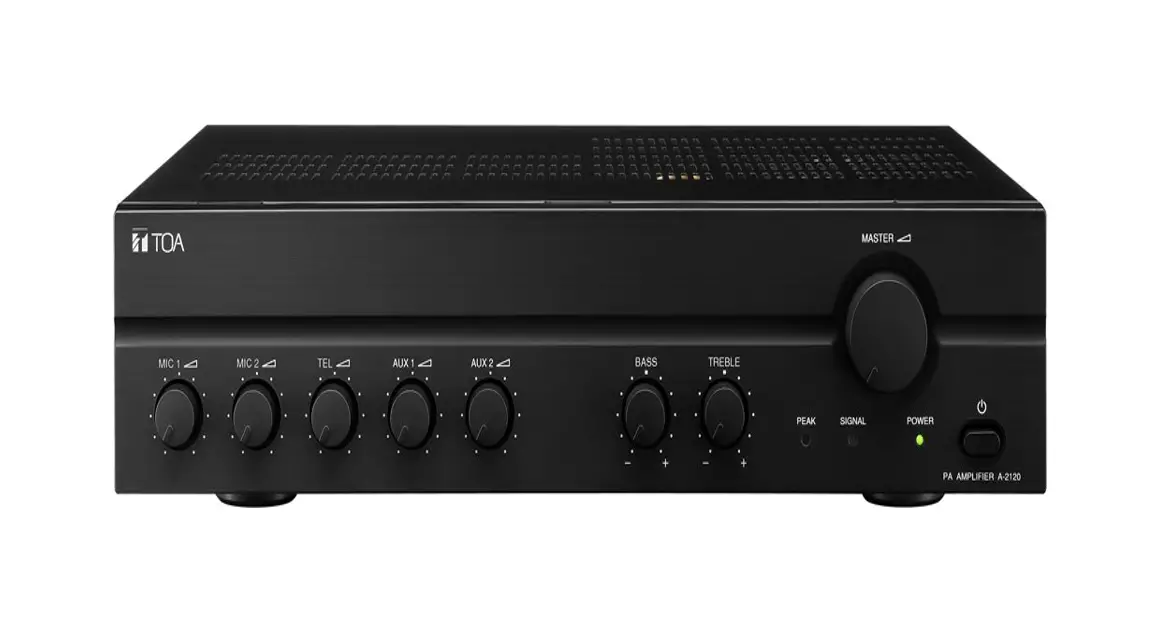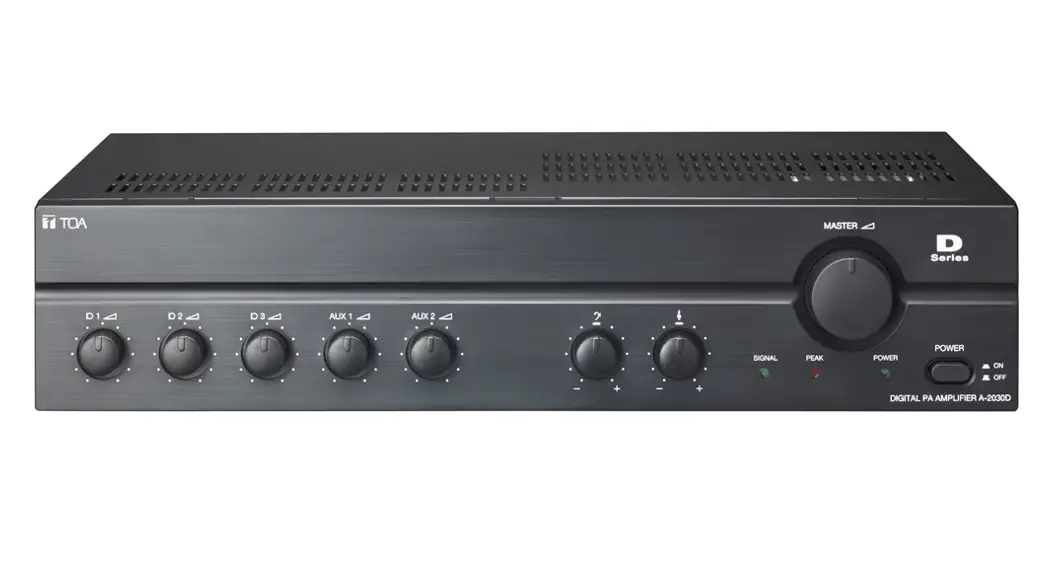

DIGITAL PA AMPLIFIERS
INSTRUCTIONS MANUAL
A-2030D SERIES
A-2060D SERIES
A-2120D SERIES
A-2240D SERIES
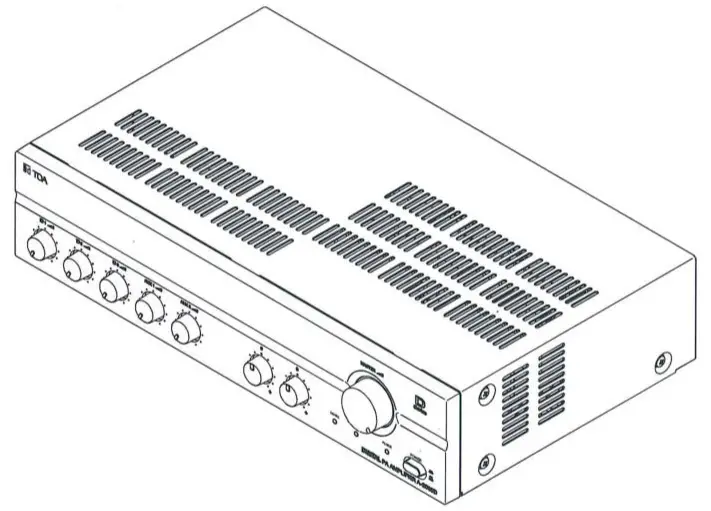
Thank you for purchasing TOA’s Digital PA Amplifiers.
Please carefully follow the instructions in this manual to ensure !long, trouble-free use of your equipment.
TOA Corporation
SAFETY PRECAUTIONS
* Before installation or use, be sure to carefully read all the instructions in this section for correct and safe operation.
* Be sure to follow all the precautionary instructions in this section, which contain important warnings and/or cautions regarding safety.
* After reading, keep this manual handy for future reference.
Safety Symbol and Message Conventions
Safety symbols and messages described below are used in this manual to prevent bodily injury and property damage that could result from mishandling. Before operating your product, read this manual first and understand the safety symbols and messages so you are thoroughly aware of the potential safety hazards.
 WARNING WARNING | Indicates a potentially hazardous situation that, if mishandled, could result in death or serious personal injury. |
| CAUTION | Indicates a potentially hazardous situation that, if mishandled, could result in moderate or minor personal injury, and/or property damage. |
WARNING
When Installing The Unit
- Do not expose the unit to rain or an environment where it may be splashed by water or other liquids, as doing so may result in fire or electric shock.
- Use the unit only with the voltage specified on the unit. Using a voltage higher than that which is specified may result in fire or electric shock.
- Do not cut, kink, or otherwise damage nor modify the power supply cord. In addition, avoid using the power cord in close proximity to heaters, and never place heavy objects including the unit itself on the power cord, as doing so may result in fire or electric shock.
- The terminals marked with the symbol
 are hazardous live. The external wiring to these terminals requires installation by an instructed
 - The socket outlet shall be installed near the equipment and the plug (disconnecting device) shall be easily accessible.
- Be sure to replace the unit’s terminal cover after connection completion. Because the voltage of up to 100V is applied to the high impedance speaker terminals, never touch these terminals to avoid electric shock.
- Be sure to ground to the safety ground (earth) terminal to avoid electric shock. Never ground to a gas pipe as a catastrophic disaster may result.
- Apparatets stikprop skal tilsluttes en stikkontakt med jord, som giver forbindelse til stikproppens
- Laite on liitettava suojakoskettimilla varustettuun
- Apparatet ma tilkoples jordet stikkontakt.
- Apparaten skall anslutas till jordat uttag.
When The Unit is in Use
- Should the following irregularity be found during use, immediately switch off the power, disconnect the power supply plug from the AC outlet and contact your nearest TOA dealer? Make no further attempt to operate the unit in this condition as this may cause fire or electric shock.
- If you detect smoke or a strange smell coming from the unit.
- If water or any metallic object gets into the unit.
- If the unit falls, or the unit case breaks.
- If the power supply cord is damaged (exposure of the core, disconnection, etc).
- If it is malfunctioning (no tone sounds).
- To prevent a fire or electric shock, never open nor remove the unit case as there are high voltage components inside the unit. Refer all servicing to your nearest TOA dealer.
- Do not place cups, bowls, or other containers of liquid or metallic objects on top of the unit. If they accidentally spill into the unit, this may cause a fire or electric shock.
- Do not insert nor drop the metallic objects or flammable materials in the ventilation slots of the unit’s cover, as this may result in fire or electric
- Class I construction shall be connected to a main socket outlet with a protective earthing connection.
- The ventilation should not be impeded by covering the ventilation openings with items, such as newspapers table-cloths, curtains,
- No naked flame source such as lighted candles should be placed on the apparatus.
- The use of apparatus in moderate climates.
CAUTION
When Installing The Unit
- Never plug in nor remove the power supply plug with wet hands, as doing so may cause electric
- When unplugging the power supply cord, be sure to grasp the power supply plug, and never pull on the cord itself. Operating the unit with a
damaged power supply cord may cause a fire or electric shock. - When moving the unit, be sure to remove its power supply cord from the wall outlet. Moving the unit with the power cord connected to the outlet may cause damage to the power cord, resulting in fire or electric shock. When removing the power cord, be sure to hold its plug to pull.
- Do not block the ventilation slots in the unit’s cover. Doing so may cause heat to build up inside the unit and result in fire. Also periodically clean the ventilation slots of dust.
- Avoid installing the unit in humid or dusty locations, in locations exposed to direct sunlight, near the heaters, or in locations generating sooty smoke or steam as doing otherwise may result in fire or electric shock.
- To avoid electric shocks, be sure to switch off the unit’s power when connecting the speaker.
- Be sure to follow the instructions below when rack mounting the unit. Failure to do so may cause a fire of personal injury.
- Install the equipment rack on a stable, hard floor. Fix it with anchor bolts or take other arrangements to prevent it from falling down.
- When connecting the unit’s power cord to an AC outlet, use the AC outlet with the current capacity allowable to the unit.
- Rack-mounting screws are not supplied with the Prepare them that are appropriate for the equipment rack.
- Keep the distance for all sides of units 10 cm away from the object that may obstruct airflow for internal units temperature rise prevention.
When The Unit is In Use
- Do not place heavy objects on the unit as this may cause it to fall or break which may result in personal injury and/or property damage. In addition, the object itself may fall off and cause injury and/or damage.
- Make sure that the volume control is set to minimum position before power is switched on, Loud noise produced at high volume when is power is switched on can impair hearing.
- Switch OFF the unit’s power before turning the phantom power switch ON or OFF. Operating the switch without switching OFF the main power could result in a large transient noise through the speakers, potentially resulting in speaker failure.
- Avoid using phantom power when connecting an unbalanced microphone to the MIC 1 input, as the microphone fails.
- Do not operate the unit for an extended period of time with the sound distorting. Doing so may cause the connected speakers to heat, resulting in a fire.
- Contact your TOA dealer as to the cleaning. If dust is allowed to accumulate in the unit over a long period of time, fire or damage to the unit may
- If dust accumulates on the power supply plug or in the wall AC outlet, a fire may result. Clean it In addition, insert the plugin into the wall outlet securely.
- Switch off the power, and unplug the power supply plug from the AC outlet for safety purposes when cleaning or leaving the unit unused for 10 days Doing otherwise may cause a fire or electric shock
GENERAL DESCRIPTION
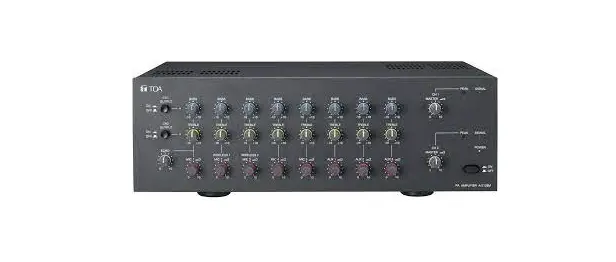
TOA’s Digital PA Amplifiers A-2030D, A-2060D, A-2120D, and A-2240D are high-performance mixer power amplifiers suited for broadcasting paging or background music in schools, offices, and shops, factories, mosques, churches, and large rooms.
FEATURES
- High durability, high reliability, and high performance.
- Three microphone inputs are electronically-balanced input, two AUX inputs,s, and one recording output.
- MIC 1 with phantom power for a condenser microphone.
- Speaker output of constant voltage distribution system (100V).
- Operates on AC power.
- Muting function.
- Independent input volume control and master volume control.
- The Independent tone control of boost and cut type for both high and low frequency.
- Current limiter circuitry protects transistors and thermal protection circuitry prevents failure due to overheating.
NOMENCLATURES AND FUNCTIONS
Front
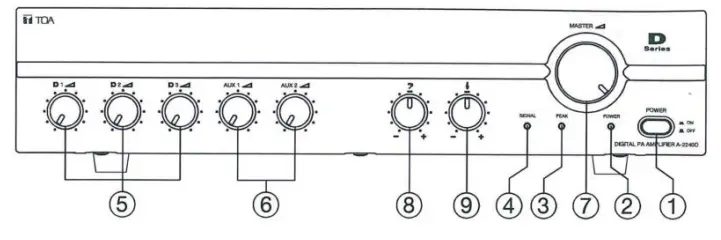
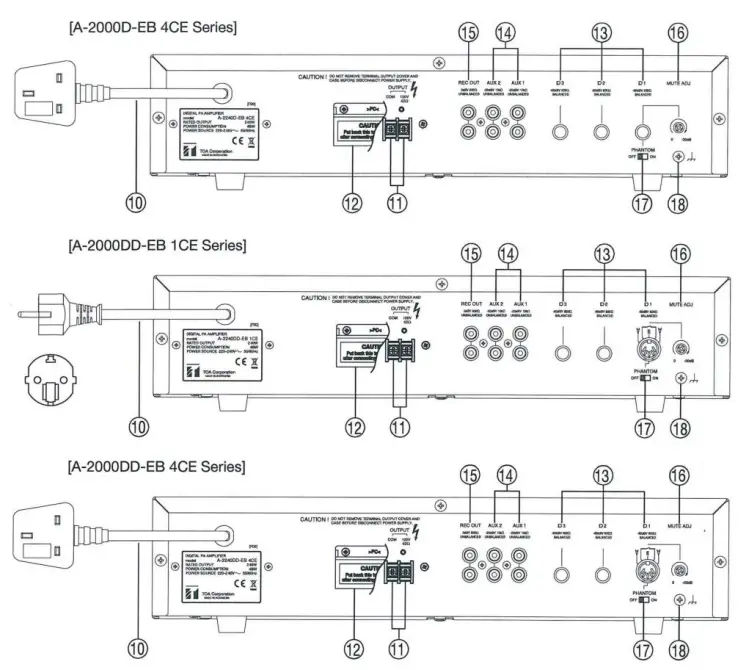
Rear
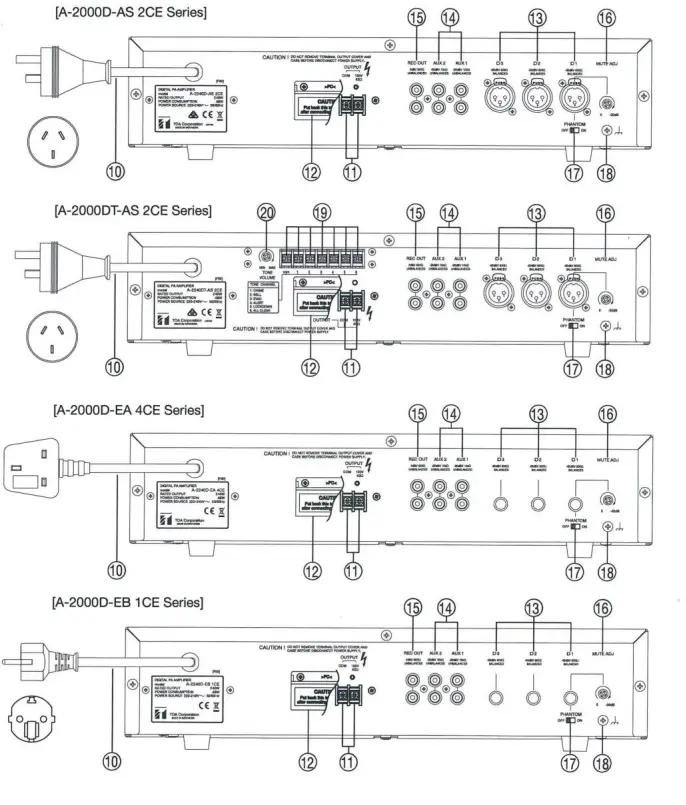
- Power Switch
Press to turn ON the power. Press again to turn off the power. - Power Indicator
Lights green when power is switched ON. - Peak Indicator
Lights red to indicate the output signal reaches the peak level, this indicates that the sound is distorted. In such a case, adjust each volume control to reduce the output level. - Signal Indicator
Lights green indicates the presence of an output signal. - Microphone Volume Control
Adjust the microphone level. - AUX Volume Control Adjust the AUX level.
- Master Volume Control Adjust the overall signal level.
- Bass Control
Adjust bass response. Rotate clockwise to increase bass output and counterclockwise to reduce it. The center position provides a flat characteristic. - Treble Control
Adjust treble response. Rotate clockwise to increase treble output and counterclockwise to reduce it. The center position provides a flat characteristic. - AC Power Cord
Connect to an AC power source. - Output Terminal
Terminal for connecting speaker. Use only with a high impedance speaker. - Terminal Cover
To avoid electric shock by high voltage from the output terminal, put back terminal cover after connecting speaker cords. - MIC 1, MIC 2, and MIC 3
-60dB (1mV), 600Q, electronically balanced. Mic 1 provides a phantom it can be applied to a condenser microphone.
note:
XLR connection: Pin-1 Ground, Pin-2 Hot, Pin-3 Cold.
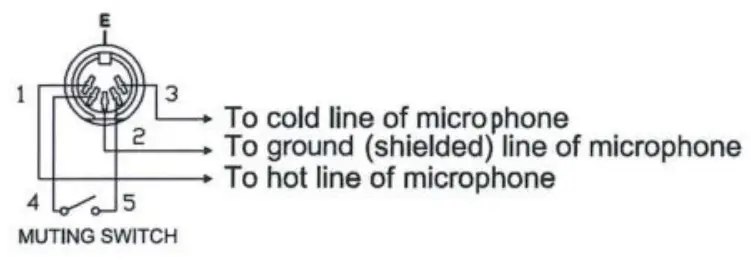
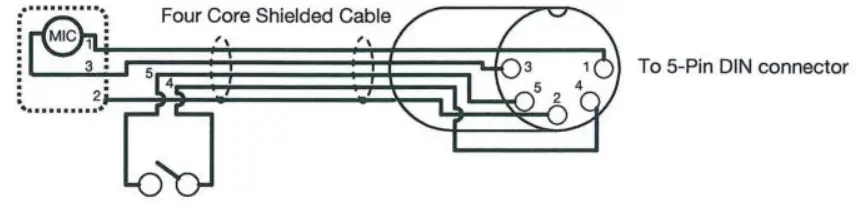
5-pin DIN connection: Pin-1 Hot, Pin-2 Ground, Pin-3 Cold, Pin-4, and Pin-5 mute switch. When pin-4 is shorted with pin-5, the muting function is Groundoperated.
Phone plug connections can use double pole types and single-pole types.
MIC 1 input can operate a dynamic microphone with phantom power position OFF. And condenser microphone with phantom power position ON.
MIC 2, and MIC 3 input can operate a dynamic microphone. - AUX 1 & AUX 2 Input Terminal
-20dB, l0k(2, unbalanced. Monaural RCA pin jack.
Accept external equipment output signal. - Recording Output
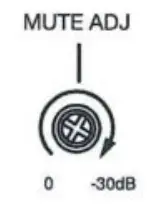
add (1 o, 600! Q, unbalanced. Output all input signals before the master volume control. Connect to a cassette deck, etc., when recording the broadcast content. - Muting Level Control
Adjust attenuating level from O to -30dB.
Factory preset : -30dB (maximum muting level). - Phantom Switch
Selecting to ON position supplies power for the condenser microphone from MIC 1. Be sure to select OFF when using the microphone that can not be operated on phantom power. The phantom power is 21 V DC. Factory preset: OFF. - Ground Terminal
Connect to the ground (earth) to avoid electric shock. - Tones Option (for A-2000DT-AS 2CE Series only)
6 tones contact trigger (Chime, Bell, Evac, Siren, Lockdown, All Clear). - Tone Volume Level Control
Adjust attenuating level from MIN to MAX.
Factory preset: middle (center level).
MUTING FUNCTION
MIC 1 has a priority function. When MIC 1 input is used it takes precedence and automatically attenuates the volume of MIC 2, MIC 3, AUX 1 & AUX 2 inputs by O up to 30dB, which is adjustable with the MUTE ADJ on the rear panel. The attenuation level is preset for -30dB at the factory.
Remark: About the mute function
- When a signal of MIC 1 appears, the mute circuit work promptly.
- When a signal of MIC 1 disappears, it returns to its previous state about 3 seconds later.
A-2000DD-EB Series only
Shorting DIN plug pin-4 and pin-5 of rear-mounted Mic 1 input allow Mic 1 input to reduce the volume of Mic 2, Mic 3, Aux 1 , and Aux 2 inputs by 0 to -30dB. The attenuation level is preset for -30dB at the factory. We recommended using TOA’s microphone PM-222D or PM-660D to bring the best results.
CONNECTIONS
Input Connections
- MIC 1, MIC 2, MIC 3 Connection (Phone Plug) Because MIC input is an electronically balanced type, it uses a double pole phone plug.

However, the microphone input circuit is in a condition of unbalance when using a single-pole type.
Since the state of unbalance is more vulnerable to noise generation, the recommended length of the microphone cable is less than 1 0m.

- MIC 1 , MIC 2, MIC 3 Connection (XLR Plug)

- AUX Input Connection (RCA Pin Jack)

- MICR Connection (5-pin DIN Plug)
Output Connection
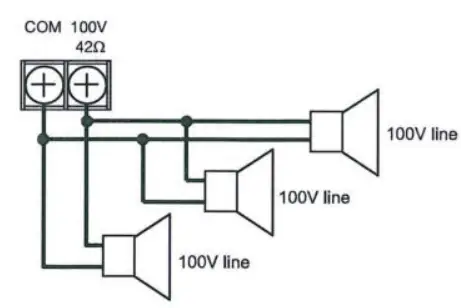
Total impedance for 1 00V line :
- 330:Q (A-2030D Series)
- 170(2 (A-2060D Series)
- 83!Q (A-2l20DSeries)
- 42Q (A-2240D Series)
CAUTION!
Impedances indicate at the terminal represent the total impedance (load) of the speaker system.
TOneS Connec?ion (only A-2120DT-AS 2CE, A-2240DT-AS 2CE) j
Tones connection just operation at one connection for one time. l
Connection 1 to C will function sound Chime.
Connection 2 to C will function sound Bell.
Connection 3 to C will function sound Evacuation.
Connection 4 to C will function sound Alert.
Connection 5 to C will function sound Lockdown.
Connection 6 to C will function sound All Clear.
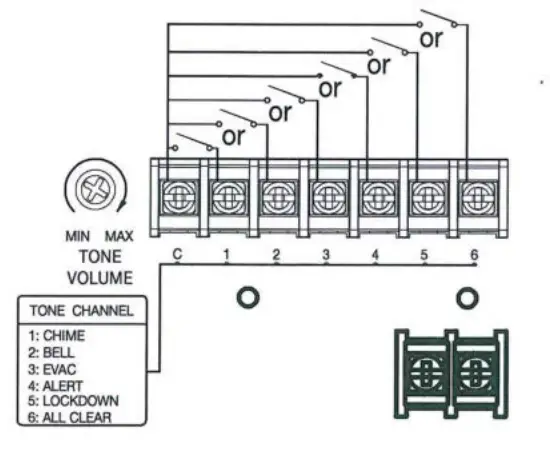
Note: Priority at tone function
- When a signal of tone appears, mute circuit work promptly.
- When a signal of tone disappears, it returns to its previous state.
Example of External Equipment Connections
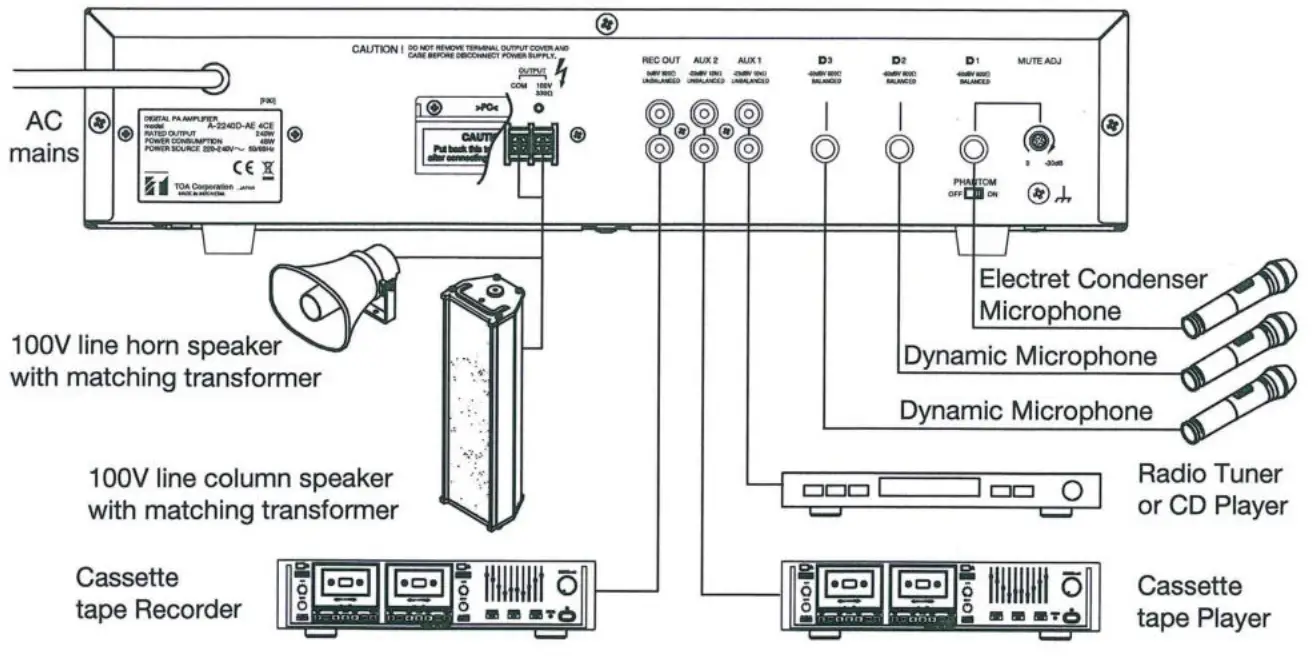
VOLUME CONTROL SETTING
Output levels are adjustable with individual volume control. Rotate clockwise to increase the volume level & counterclockwise to decrease it. For music ptay or announcement, adjust the corresponding volume control until the indicator PEAK (red) lights intermittently. Note that the sound quality is downgraded when the PEAK indicator remains lit.
Factory preset: Minimum
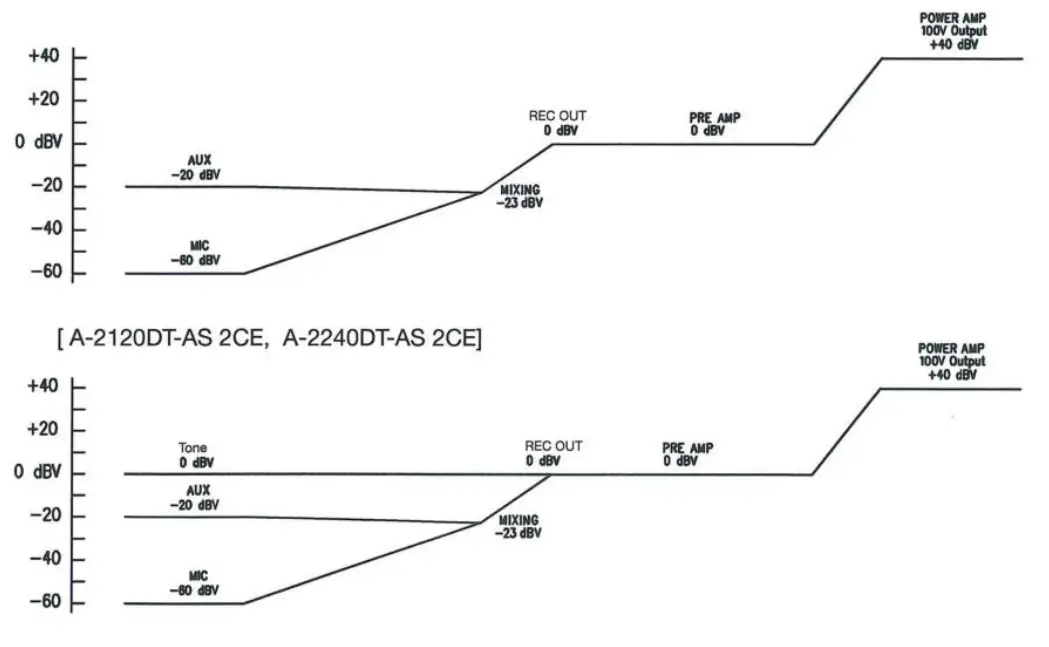
BLOCK AND LEVEL DIAGRAMS
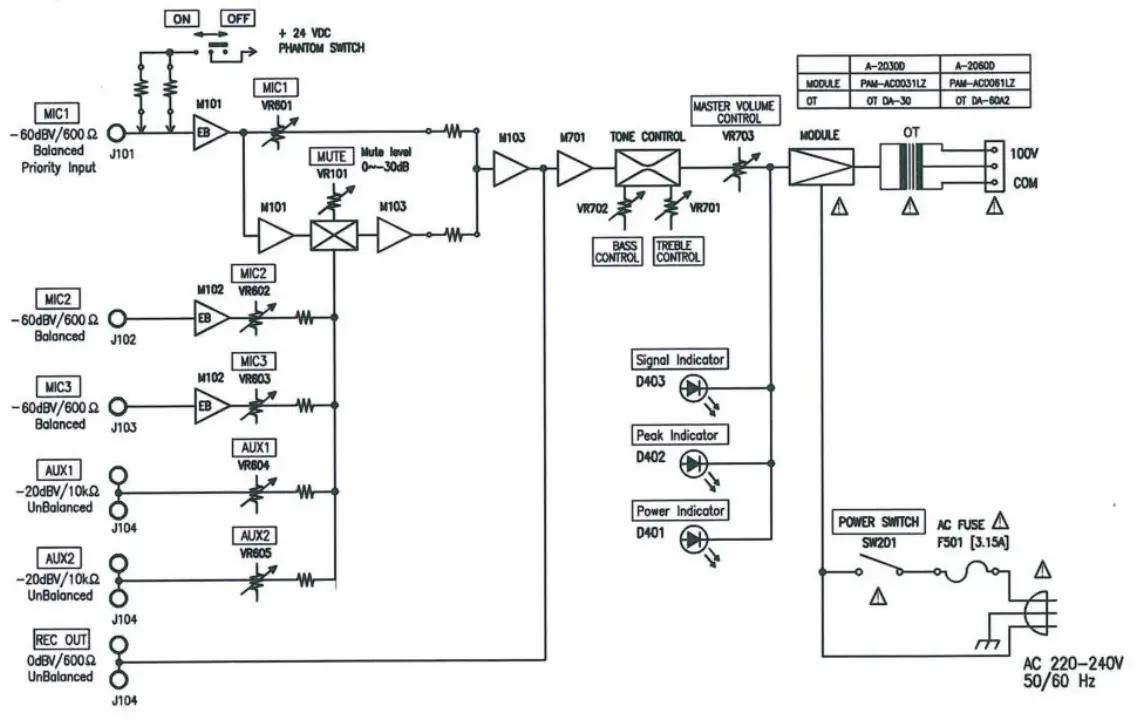
[A-2030D Series, A-2060D Series l
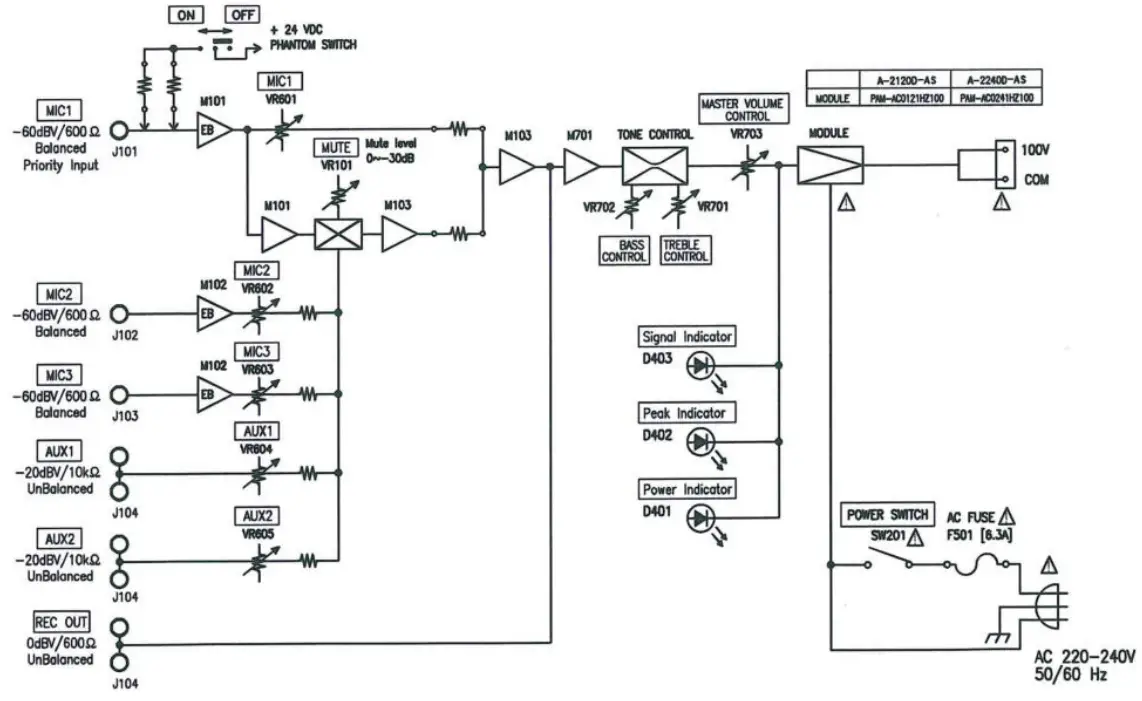
[A-2120D Series, A-2240D Series ]
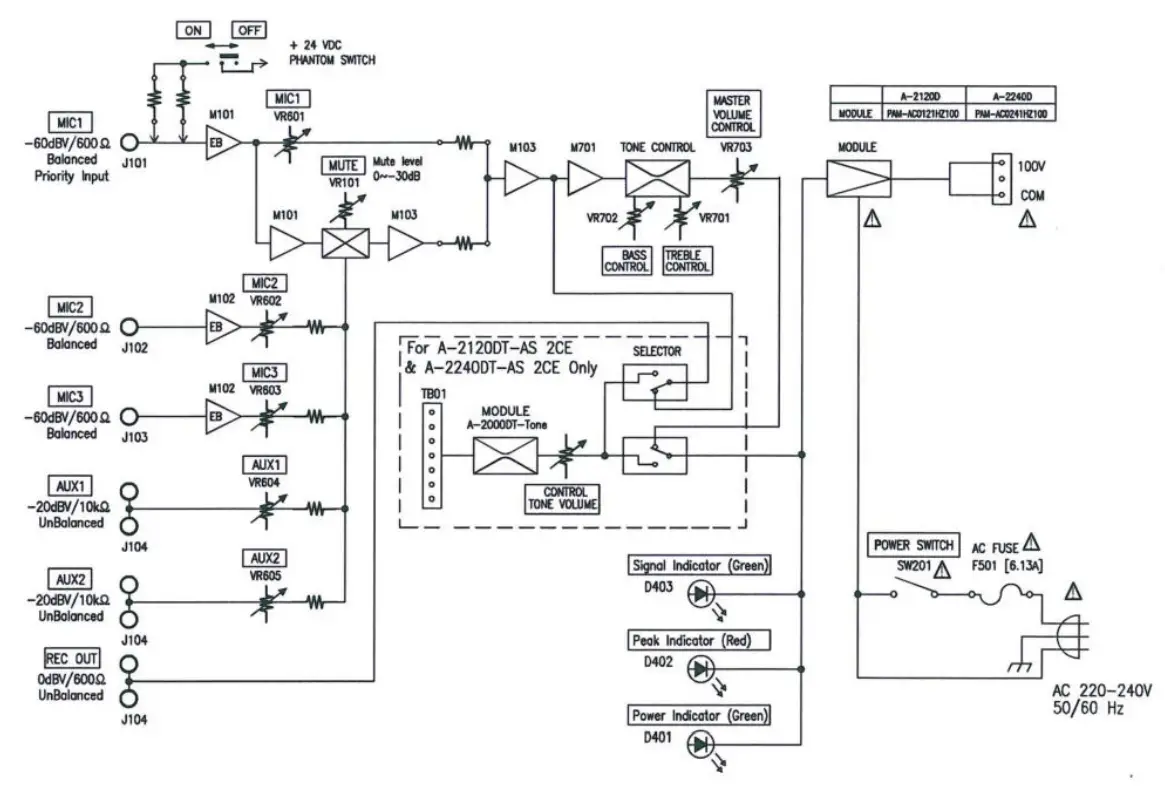
[A-2120DT-AS 2CE, A-2240DT-AS 2CE ]
[ A-2030D Series, A-2060D Series, A-21 20D Series, and A-2240D Series ]
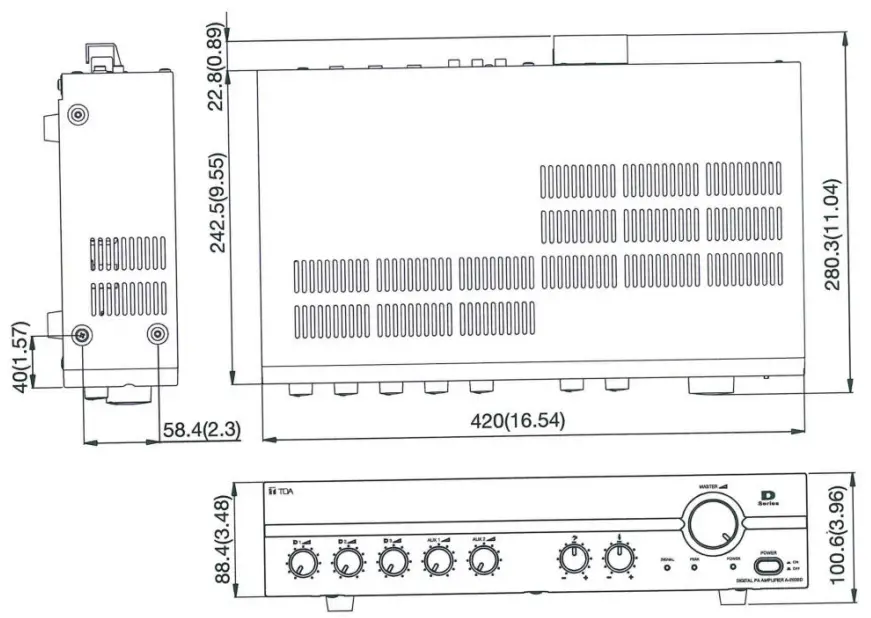
DIMENSIONAL DIAGRAM
The dimensional diagram represents by A-2030D-AS 2CE image. The outer dimension for all series is the same.
Units: mm (inches)
SPECIFICATIONS
[A-2000D-AS 2CE Series]
| Model no. | A-2030D | A-2060D | A-2120D | A-2240D | |
| Power Source | 220-240V∼50/60Hz | ||||
| Rated Output | 30W | 60W | 120W | 240W | |
| Power Consumption | 12W | 16W | 34W | 48W | |
| Frequency Response | 50-20000Hz, ±3dB | ||||
| Distortion | Less than 1% at 1 kHz, 1/3 Rated Power | ||||
| Input | MIC 1-3 | -60 dB (OdB=1V), 6000, Balanced, XLR3 -31 type | |||
| AUX 1-2 | -20 dB (OdB=1V), 101(0, Unbalanced, RCA pin jack | ||||
| Output | Speaker out | Balanced (Floating) | |||
| Line 100V | 330Ω | 170Ω | 83Ω | 42Ω | |
| Rec Out | 0dB (1V), 600Ω, Unbalanced RCA pin jack | ||||
| Phantom Power | DC +21V (MIC 1) | ||||
| S/N Ratio | Over 60dB | ||||
| Tone Control | Bass ±10dB at 100Hz | ||||
| Treble ±10dB at 10kHz | |||||
| Muting | MIC 1: mute another input signal by 0-30dB attenuation | ||||
| Indicator | POWER, PEAK, SIGNAL | ||||
| Finish | Panel: ABS Resin, Black | ||||
| Case: Steel Plate, Black | |||||
| Dimensions | 420 (W) x 100.6 (H) x 280.3 (D) mm (16.54″ x 3.96″ x 11.04″) | ||||
| Weight | 4.0 kg (8.88 Ib) | 4.6 kg (10.14 Ib) | 4.0 kg (8.88 Ib) | 4.0 kg (8.88 Ib) | |
*Design & specifications are subject to change without notice for improvement.
[A-2120DT -AS 2CE, A-2240DT -AS 2CE]
| Model no. | A-2120D | A-2240D | |
| Power Source | 220-240V∼50/60Hz | ||
| Rated Output | 120W | 240W | |
| Power Consumption (EN 60065) | 34W | 48W | |
| Frequency Response | 50-20000Hz, ±3dB | ||
| Distortion | Less than 1 % at 1 kHz, 1/3 Rated Power | ||
| Input | MIC 1-3 | -60 dB (OdB=1V), 6000, Balanced, XLR3 -31 type | |
| AUX 1-2 | -20 dB (OdB=1V), 10k52, Unbalanced, RCA pin jack | ||
| TONES | 6 Tone contact trigger (chime, Bell, Evac, Alert, Lockdown, Clear) will be mute the other function | ||
| Output | Speaker out | Balanced (Floating) | |
| Line 100V | 83Ω | 42Ω | |
| Rec Out | 0dB (1V), 600Ω, Unbalanced RCA pin jack | ||
| Phantom Power | DC +21V (MIC 1) | ||
| S/N Ratio | Over 60dB | ||
| Tone Control | Bass ±10dB at 100Hz | ||
| Treble ±10dB at 10kHz | |||
| Muting | MIC 1: mute another input signal by 0-30dB attenuation | ||
| Indicator | POWER, PEAK, SIGNAL | ||
| Finish | Panel: ABS Resin, Black | ||
| Case: Steel Plate, Black | |||
| Dimensions | 420 (W) x 100.6 (H) x 280.3 (D) mm (16.54″ x 3.96″ x 11.04″) | ||
| Weight | 4.0 kg (8.88 Ib) | 4.0 kg (8.88 Ib) | |
*Design & specifications are subject to change without notice for improvement.
[A-2000DD -EB 10CE Series, A-2000DD -EB 4CE Series]
| Model no. | A-2060D | A-2120D | A-2240D | |||||
| Power Source | 220-240V∼50/60Hz | |||||||
| Rated Output | 30W | 60W | 120W | 240W | ||||
| Power Consumption (EN 60065) | 12W | 16W | 34W | 48W | ||||
| Frequency Response | 50-20000Hz, ±3dB | |||||||
| Distortion | Less than 1% at 1 kHz, 1/3 Rated Power | |||||||
| Input | MIC 1 | -60 dB (OdB=1V), 60052, Balanced, 5-P DIN type | ||||||
| MIC 2-3 | -60 dB (OdB=1V), 6000, Balanced, Phone jack | |||||||
| AUX 1-2 | -20 dB (OdB=1V), 10k0, Unbalanced, RCA pin jack | |||||||
| Mute | Mute: contact pin 4-5 closure to input (for MIC1) | |||||||
| Output | Speaker out | Balanced (Floating) | ||||||
| Line 100V | 170Ω | 83Ω | 42Ω | |||||
| Rec Out | 0dB (1V), won, Unbalanced RCA pin jack | |||||||
| Phantom Power | DC +21V (MIC 1) | |||||||
| S/N Ratio | Over 60dB | |||||||
| Tone Control | Bass ±10dB at 100Hz | |||||||
| Treble ±10dB at 10kHz | ||||||||
| Muting | MIC 1 : mute other input signal by 0-30dB attenuation | |||||||
| Indicator | POWER, PEAK, SIGNAL | |||||||
| Finish | Panel : ABS Resin, Black | |||||||
| Case : Steel Plate, Black | ||||||||
| Dimensions | 420 (W’ x 100.6 (H) x 280.3 (D) mm (16.54″ x 3.96″ x 11.04″) | |||||||
| Weight | 4.0 kg (8.88 Ib) | 4.6 kg (10.14 Ib) | 4.0 kg (8.88 Ib) | 4.0 kg (8.88 Ib) | ||||
*Design & specification are subject to change without notice for improvement.
[A-2000D-EA 4CE Series, A-2000D-EB 1 CE Series, A-2000D-EB 4CE Series]
| Model no. | A-2030D | A-2060D | A-2120D | A-2240D | |
| Power Source | 220-240V∼50/60Hz | ||||
| Rated Output | 30W | 60W | 120W | 240W | |
| Power Consumption (EN 60065) | 12W | 16W | 34W | 48W | |
| Frequency Response | 50-20000Hz, ±3dB | ||||
| Distortion | Less than 1% at 1 kHz, 1/3 Rated Power | ||||
| Input | MIC 1-3 | -60 dB (OdB=1V), 600Ω, Balanced, Phone jack | |||
| AUX 1-2 | -20 dB (OdB=1V), 10k0, Unbalanced, RCA pin jack | ||||
| Output | Speaker out | Balanced (Floating) | |||
| Line 100V | 330Ω | 170Ω | 83Ω | 42Ω | |
| Rec Out | 0dB (IV), 600Ω, Unbalanced RCA pin jack | ||||
| Phantom Power | DC +21V (MIC 1) | ||||
| S/N Ratio | Over 60dB | ||||
| Tone Control | Bass ±10dB at 100Hz | ||||
| Treble +1 dB at 10kHz | |||||
| Muting | MIC 1: mute another input signal by 0-30dB attenuation | ||||
| Indicator | POWER, PEAK, SIGNAL | ||||
| Finish | Panel: ABS Resin, Black | ||||
| Case: Steel Plate, Black | |||||
| Dimensions | 420 (W) x 100.6 (H) x 280.3 (D) mm (16.54″ x 3.96″ x 11.04″) | ||||
| Weight | 4.0 kg (8.88 Ib) | 4.6 kg (10.14 Ib) | 4.0 kg (8.88 Ib) | 4.0 kg (8.88 Ib) | |
*Design & specifications are subject to change without notice for improvement.
| Traceability Information for Europe | |
| Manufacturer: TOA Corporation 7-2-1, Minatojima-Nakamachi, Chuo-ku, Kobe, Hyogo, Japan | Authorized representative: TOA Electronics Europe GmbH Suederstrasse 282, 20537 Hamburg, Germany |
ILJRL: http://www.toa.jp/
133020030600
 Home | TOA Corporation