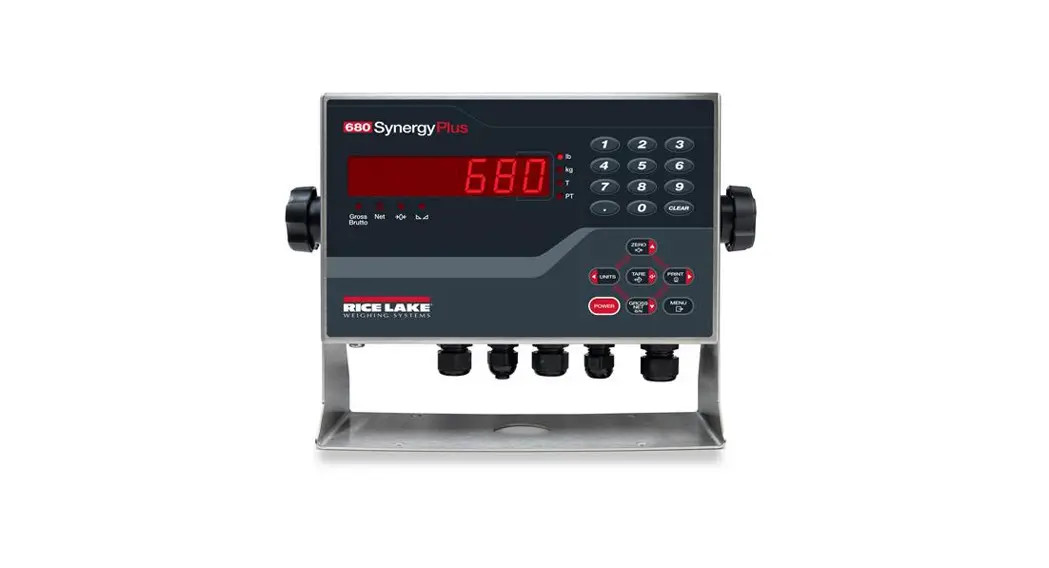

192627 SYNERGY PLUS DIGITAL WEIGHT INDICATOR TECHNICAL
User Manual
192627 SYNERGY PLUS DIGITAL WEIGHT INDICATOR TECHNICAL
 | IMPORTANT | |
Damage can occur to A/D circuitry if the SENSE parameter is not correctly configured for the load cell cable used.
The SENSE parameter is set to 4-WIRE by default but must be changed to 6-WIRE for applications that use a 6-WIRE cable.
Configure the SENSE parameter using the front panel of the 680.
- Access setup mode by pressing the setup switch,
 and config displays.
 - Press
 capacity displays.
 - Press
 sense displays.
 - Press
 to view the current wire setting for the SENSE parameter,
  displays.
 - Press
 to change the setting
  and displays.
 - Press
 to accept the SENSE parameter setting.
 - Press
 to return to weigh mode.
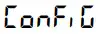 and config displays.
 capacity displays.
 sense displays.
 to view the current wire setting for the SENSE parameter,
  displays.
 to change the setting
  and displays.
 to accept the SENSE parameter setting.
 to return to weigh mode.
Route the load cell cable to the J1 connector on the 680 CPU board and refer to the figures and table below for 4- and 6-wire cable wiring. For a 6-wire installation, the SENSE parameter must be set to 6-WIRE in the CONFIG menu.
SENSE Parameter set to 4-WIRE
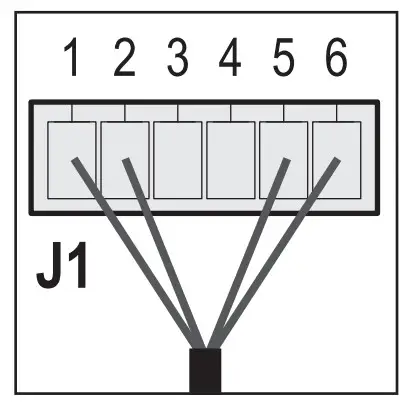
| Pin | Function |
| 1 | + SIG |
| 2 | – SIG |
| 3 | + SENSE |
| 4 | – SENSE |
| 5 | + EXC |
| 6 | – EXC |
SENSE Parameter set to 6-WIRE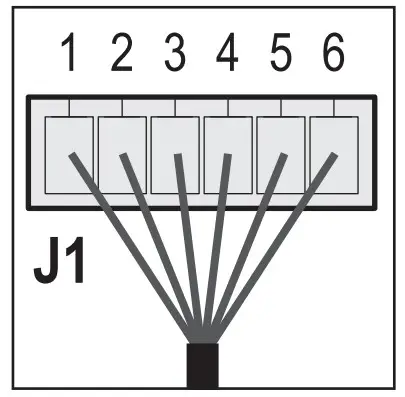
 Note For a 4-wire installation leave pins 3 and 4 empty on the J1 connector.
Please refer to the 680 Technical Manual (PN 192627) for complete installation instructions and for additional details on accessing setup mode and the CONFIG menu, if needed.
PN 209029