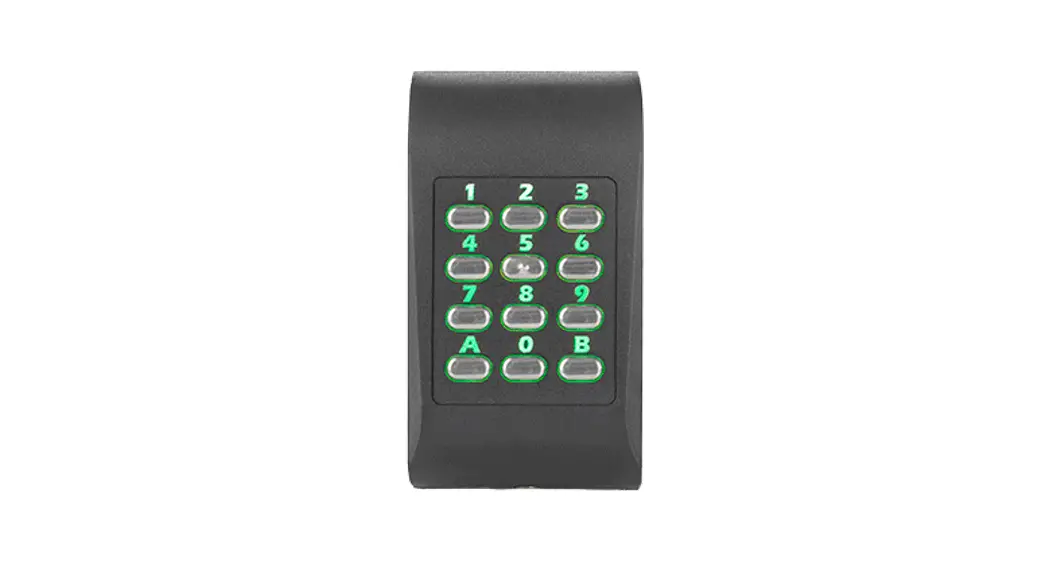
ARD-SELECT-BOK Select Reader with Keypad
Product Information
The LECTUS select is a proximity reader made by Bosch Security
Systems. It comes in various models, including ARDSELECTBP,
ARDSELECTBPK, ARDSELECTBO, ARDSELECTBOK, ARDSELECTWP, ARDSELECTWPK,
ARDSELECTWO, ARDSELECTWOK, ARASELECTWWA, and ARASELECTSWA. The
device is equipped with protection class III according to EN 60950
and is designed for use in residential, business, commercial, and
industrial areas. It is important to note that the installation and
assembly of electrical components must be carried out by a
qualified electrician.
Product Usage Instructions
Before making any changes to the installation, always switch off
the power supply to the device. Do not connect or disconnect any
plugs, data cables, or screws while the power supply is switched
on. The installation must be carried out in accordance with local
fire, health, and safety regulations. A secured door that has a
fail-safe lock must be installed as part of an escape route.
Ideally, a solenoid lock should be used. The door must be released
in the event of power loss. Additionally, an emergency switch with
a glass cover for manual breaking of the circuit should be
installed so that the fail-safe lock can be de-energized
immediately in an emergency.
To protect the device against electrostatic discharge, observe
the ESD instructions before unpacking or touching the plug and
electronics. It is also important to note that appropriate
precautionary measures such as grounding must be observed because
the circuit board is at risk from electrostatic discharge.
When disposing of the product and/or battery, it must be done
separately from household waste. Dispose of such equipment
according to local laws and regulations to allow their reuse and/or
recycling. This will help in conserving resources and protecting
human health and the environment.
LECTUS select
ARDSELECTBP | ARDSELECTBPK | ARDSELECTBO | ARDSELECTBOK | ARDSELECTWP | ARDSELECTWPK | ARDSELECTWO | ARDSELECTWOK | ARASELECTWWA | ARASELECTSWA
1 23 4 56 789 C0E
en
Installation manual
LECTUS select
Table of contents
1 1.1 2 2.1 2.2 2.3 2.4 2.4.1 2.4.2 2.4.3 2.5 2.6 2.7 3 3.1 3.1.1 3.1.2 3.2 3.3 3.4 3.5 3.5.1 3.5.2 3.5.3 3.5.4 4 5 6
Safety FCC Class B General Introduction Disposal Components Functional requirements OSDP Phg_crypt Firmware overview RFID technology Transponder data Reading distances Installation General Mechanical structure of the flush-mount version Mechanical structure of the surface-mount version Installing data and supply lines Assembly preparation Assembling the reader Assembling the reader module Configuring the reader (DIP switches) Connecting and mounting the reader module Unmounting the reader module Resetting OSDP-key Care instructions Technical specifications More information
Table of contents | en 3
4 5 6 6 7 7 9 11 11 11 12 13 14 16 16 16 16 17 18 19 21 21 22 23 23 24 25 27
Bosch Security Systems B.V.
Installation manual
2022-05 | V02 |
4 en | Safety
1
LECTUS select
Safety
Read, observe and keep the instructions – the entire safety and operating instructions must be read and correctly followed before the readers are operated.
Take all warnings into account – follow all warnings on the devices and in the operating instructions.
Power sources – the readers should only be operated with the recommended power sources. If you are unsure whether you can use a specific power supply, contact your dealer.
Warning!
Risk of damage to the equipment!
!
Always switch off the power supply to the device before making changes to the installation.
Do not connect or disconnect any plugs, data cables or screws while the power supply is
switched on.
Warning!
Health and Safety!
Installation must be carried out in accordance with local fire, health and safety regulations. A
!
secured door must be installed as part of an escape route and must have: – a fail-safe lock. the door must be released in the event of power loss. Ideally, a solenoid lock
should be used.
– an emergency switch with a glass cover for manual breaking the circuit, so that the fail-safe
lock can be de-energized immediately in an emergency.
Warning!
!
Risk of damage! Protect the device against electrostatic discharge by observing the ESD instructions before
unpacking or touching the plug and the electronics.
Notice!
– The devices are equipped according to EN 60950, with protection class III.
i
– During the installation, make sure that the facility requirements placed by the corresponding device safety standard are not influenced in an impermissible manner, compromising product
safety.
– Electromagnetic compatibility: The devices are designed for use in residential, business,
commercial and industrial areas.
Notice!
i
Installation and assembly of electrical components must be carried out by a qualified electrician.
Notice! The circuit board is at risk from electrostatic discharge. Appropriate precautionary measures (grounding, etc.) must be observed.
2022-05 | V02 |
Installation manual
Bosch Security Systems B.V.
LECTUS select
1.1
Safety | en 5
Danger! – The device must be operated in a fully assembled state only. – Before connecting the device to the power supply, make sure that the connected operating voltage does not exceed the permitted values according to the technical specifications. – Additional safety measures should be enforced whenever there is a risk that failure of malfunction of the device might pose a risk to humans, animals or damage to the equipment, this must be prevented with additional safety measures (limit switches, protective equipment, etc.).
FCC Class B
This device complies with part 15 of the FCC Rules. Operation is subject to the following two conditions: This device may not cause harmful interference. This device must accept any interference received, including interference that may cause
undesired operation. Changes or modifications not expressly approved by the party responsible for compliance could void the user’s authority to operate the equipment. Note: This equipment has been tested and found to comply with the limits for a Class B digital device, pursuant to part 15 of the FCC Rules. These limits are designed to provide reasonable protection against harmful interference in a residential installation. This equipment generates, uses and can radiate radio frequency energy and, if not installed and used in accordance with the instructions, may cause harmful interference to radio communications. However, there is no guarantee that interference will not occur in a particular installation. If this equipment does cause harmful interference to radio or television reception, which can be determined by turning the equipment off and on, the user is encouraged to try to correct the interference by one or more of the following measures: – Reorient or relocate the receiving antenna. – Increase the separation between the equipment and receiver. – Connect the equipment into an outlet on a circuit different from that to which the receiver is connected. – Consult the dealer or an experienced radio/TV technician for help.
Bosch Security Systems B.V.
Installation manual
2022-05 | V02 |
6 en | General
LECTUS select
2
2.1
General
Introduction
This installation manual is aimed at authorized service providers. The installation manual contains instructions on the installation and configuration of the Bosch Security Systems proximity reader LECTUS select.
1 23 4 56 789 C0E
Figure 2.1: LECTUS select readers
2022-05 | V02 |
Installation manual
Bosch Security Systems B.V.
LECTUS select
2.2
General | en 7
Disposal
Old electrical and electronic equipment
This product and/or battery must be disposed of separately from household waste. Dispose such equipment according to local laws and regulations, to allow their reuse and/or recycling. This will help in conserving resources, and in protecting human health and the environment.
2.3
Components
x1
x2
x2
Quantity 1 1 4
Bosch Security Systems B.V.
Component Reader module Locking bar Screws
Installation manual
2022-05 | V02 |
8 en | General
Quantity 1 2
Component Quick installation guide Safety instructions
LECTUS select
2022-05 | V02 |
Installation manual
Bosch Security Systems B.V.
LECTUS select
2.4
General | en 9
Functional requirements
The LECTUS select reader reads data from contactless RFID credentials and sends the data to a higher-level control center. This is where the evaluation takes place as to whether a credential is authorized or not. The result is sent back to the reader, which then provides a visual and an acoustic signal. Communication between the reader and the control center takes place via an encrypted RS485 bus. The reader has a compact design and is available in two variants, with and without a keyboard (each as a flush-mount version). The flush-mounted variant fits into any device box in flushmounted or hollow-wall design according to DIN, with a device screw distance of 60 mm. The readers have tamper monitoring and tear-off detection (i.e. a sabotage message is generated if the reader is completely torn from the wall). They are suitable for both indoor and outdoor use. Connection type: 8-pin screw / plug-in terminal
1 23 4 56 789 C0E
Figure 2.2: LECTUS select readers without and with keypad
Bosch Security Systems B.V.
Installation manual
2022-05 | V02 |
10 en | General
Surface-mount version
88 mm
41 mm
80.4 mm 56 mm
LECTUS select
22 mm 1 mm
3.5 mm 16.2 mm
56 mm 93.4 mm
101 mm
21.2 mm
Accessories for surface-mount version: ARA-SELECT-SWA, ARA-SELECT-WWA Flush-mount version
88 mm
19 mm 2 mm 16 mm
101 mm
Wall bracket for flush mounting (part included) The wall bracket is included in the reader delivery.
56 mm
7 mm
14.5 mm
71.6 mm 50.5 mm
26.2 mm
73 mm
60 mm 56 mm
25.7 mm
2022-05 | V02 |
3.5 mm
Installation manual
Bosch Security Systems B.V.
LECTUS select
2.4.1
2.4.2
2.4.3
General | en 11
OSDP
The following readers support OSDP V2 protocol:
Commercial Type Number (CTN)
Description
ARD-SELECT-BO
Black, OSDP
ARD-SELECT-WO
White, OSDP
ARD-SELECT-BOK
Black, OSDP, Keypad
ARD-SELECT-WOK
White, OSDP, Keypad
OSDP protocol is common within the Bosch Access Control Systems product portfolio.
Phg_crypt
The following readers support phg_crypt protocol:
Commercial Type Number (CTN)
Description
ARD-SELECT-BP
Black, phg_crypt
ARD-SELECT-WP
White, phg_crypt
ARD-SELECT-BPK
Black, phg_crypt, Keypad
ARD-SELECT-WPK
White, phg_crypt, Keypad
These readers are not compatible with AMC2 controllers. Phg_crypt is a proprietary secure protocol that can be used in third party installations such as MATRIX.
Firmware overview
LECTUS select
ARD-SELECT-BP, ARDSELECT-BPK, ARD-SELECTWP, ARD-SELECT-WPK
ARD-SELECT-BO, ARDSELECT-BOK, ARD-SELECTWO, ARD-SELECT-WOK
Type Phg_crypt
OSDP
Firmware 68350
68435
Bosch Security Systems B.V.
Installation manual
2022-05 | V02 |
12 en | General
LECTUS select
2.5
RFID technology
The LECTUS select readers support the following RFID technology: LEGIC prime / Advant MIFARE Classic /DESFire / EV 1 The RFID technology that can be used is dependent on the reader configuration and the reader firmware.
2022-05 | V02 |
Installation manual
Bosch Security Systems B.V.
LECTUS select
2.6
i
General | en 13
Transponder data
The support of the transponder media listed below depends on the respective variant or reading technology (hardware platform) and the respective reader firmware. The following non-exhaustive list includes transponder media that is supported by the reader.
RF standard
Supported LEGIC transponders
Other supported transponders **)
LEGIC RF standard
MIM22, MIM256, MIM1024, CTC4096-MP410
ISO 14443 A (also NFC Forum Type 2/4A Tag *)
ATC512-MP, ATC2048-MP, ATC4096-MP, CTC4096MP410, AFS4096-JP
according to ISO 14443 part 3/4: e.g. Infineon SLE, SmartMX Integrated support of MIFARE Ultralight, MIFARE Classic, MIFARE Plus and MIFARE DESFire NFC peer-to-peer target
ISO 14443 B ***) (also NFC Forum Type 4B Tag *)
according to ISO 14443 part 4: e.g. B. InfineonSLE
ISO 15693 (also ISO 18000-3 mode 1)
ATC128-MV, ATC256-MV, ATC1024-MV
Selected types, e.g. B. EM 4035, Infineon SRF55VxxP, Tag-It HFI
INSIDE Secure (UID only)
according to INSIDE Secure
*) Passive mode, initiator **) Access with transparent mode (assigned commands for MIFARE transponders) ***) If transponders according to ISO 14443 B (2001) are used, only one transponder is allowed in the RF field. This restriction does not apply to transponders according to ISO 14443 B (2008). ****) The SONY FeliCa protocol is supported in accordance with ISO 18092 (6 byte introduction). Older FeliCa cards with a shorter introduction are not supported.
Notice! Recommendation when using smart card chips for LEGIC “card in card” solutions: A suitability and functional test of the corresponding medium should be carried out before use or if it is planned to be used.
Bosch Security Systems B.V.
Installation manual
2022-05 | V02 |
14 en | General
LECTUS select
2.7
Reading distances
The normal reading distance depends on the respective reading system, the installation environment and the type of data carrier. Direct mounting on metal might reduce the optimal reading distance.
Reading distances (cm)
Type of transponder media
LEGIC prime / advent Basis 4200M
MIFARE Classic/DESFire
EC-format
Key-fob
EC-Format
Key-fob
LEGIC MIM 256
3,5
2
–
–
LEGIC MIM 1024
4
*)
–
–
LEGIC ATC2048-MP110 (ISO
4,5
2,5
–
–
14443A)
LEGIC ATC4096-MP310 (ISO
3
1,5
–
–
14443A)
LEGIC ATC4096-MP311 (ISO
2
1
14443A)
–
–
LEGIC AFS4096-JP10/JP11
2
*)
–
–
(ISO 14443A)
LEGIC ATC1024-MV110 (ISO
6,5
3,5
–
–
15693)
Classic 1k
–
–
3,5
3
Classic 4k
–
–
4
*)
DESFire EV1, 2k / 4k / 8k
–
–
1
1
Legic CTC4096-MP410 (prime
6,5
4
access)
–
–
Legic CTC4096-MP410 (ISO14443 access)
2,5
2
–
–
*) Key-fob not available during the test, “AFS4096” not available as key-fob
Note: Not all designs and transponder media were available at the time the distance was measured.
Notice!
The reading distances listed above are distance ranges measured on the basis of a selection
i
of transponder media. These measured reading distances are to be regarded as typical guide values.
If other transponder media are used (chip type, design, size, production process), the
distance ranges may differ and it is recommended to carry out a suitability and functional test
of the respective medium before using or planning to use the reader.
2022-05 | V02 |
Installation manual
Bosch Security Systems B.V.
LECTUS select
General | en 15
Influencing (reducing) the reading distance The reading distance can be influenced due to different reasons. On the one hand this is influenced by the medium (i.e. the data carrier) and on the other hand by the ambient conditions of the antenna and the data carrier. The following is a list of points that can reduce the reading distance: “Shade” or shield the data carrier with metal, such as EC card in your wallet, key fob on
your key ring, etc. No optimal coupling, i.e., the antenna surface of the data carrier is perpendicular (90 °) to
the antenna surface of the reader Data carrier itself
key fob (small active antenna surface) “bad” response from the data carrier (ID card / key fob) combination ID card (e.g. LEGIC® / inductive, MIFARE / inductive etc.) Metal in the “active” effective area of the HF field. The transmission energy is attenuated. This point is particularly relevant when installing the reader components in metal front panels (including metal columns, etc.).
Bosch Security Systems B.V.
Installation manual
2022-05 | V02 |
16 en | Installation
LECTUS select
3
3.1
3.1.1
Installation
General
When choosing the installation location, please note: The readers can interfere with each other or be negatively influenced by other systems and sources of interference. The readers can still disturb each other at a distance of approx. two to three times the reading distance. High-energy sources of interference in the range of the modulation and carrier frequencies can also interfere with the transmission.
Mechanical structure of the flush-mount version
3.1.2
Mechanical structure of the surface-mount version
2022-05 | V02 |
Installation manual
Bosch Security Systems B.V.
LECTUS select
3.2
Installation | en 17
Installing data and supply lines
When supplying the reader (especially over longer distances), ensure that the cable crosssection is adequate. Since the power consumption of the individual systems is partially pulsed, short-term voltage drops cannot be detected with a conventional multimeter (digital or analog). However, these voltage drops can cause a “POWER-ON-RESET” on the reader component, which can lead to communication problems. When dimensioning the power supply and the cable cross-sections of the cabling, the maximum current consumption must be taken into account. It is essential to ensure that the input voltage remains constant and corresponds to the technical specifications of the reader.
Bosch Security Systems B.V.
Installation manual
2022-05 | V02 |
18 en | Installation
LECTUS select
3.3
Assembly preparation
1. Lay the connection cables according to the local conditions and prepare them for connection.
2. Remove the 8-pin screw / plug-in terminal from the reader module and connect the wires according to this graphic:
12 34 5 6 78
Notice!
i
The wiring must be carried out in a de-energized state. In other words, the operating voltage may only be switched on after the reader has been fully installed!
Connection terminal ST1 (8 pin screw / plug terminal, voltage supply / interfaces)
PIN number
Description
1
RS485 data “A”
2
RS485 data “B”
3
Do not connect
4
Do not connect
5
Do not connect
6
Do not connect
7
DC- (0V)
8
DC+ (from 8V to 30V)
Wire diameter
Stranded wire
AWG 28 – 16
Solid wire
AWG 28 – 16
Cable stripping length 6 to 7 mm
2022-05 | V02 |
Installation manual
Bosch Security Systems B.V.
LECTUS select
3.4
Installation | en 19
Assembling the reader
Flush-mount version 1. Use the provided screws to screw the wall bracket onto a DIN device socket with a device
screw distance of 60 mm. 2. Support the reader’s tear detection by fixing the perforated tear-off tab with an additional
locking screw.
Bosch Security Systems B.V.
Installation manual
2022-05 | V02 |
20 en | Installation
LECTUS select
Surface-mount version 1. Screw the wall-mount frame to the wall using the screws. The connection cable can be
inserted from above, below or directly from the wall. 2. Tear detection is supported by fixing the upper left screw.
2022-05 | V02 |
Installation manual
Bosch Security Systems B.V.
LECTUS select
3.5
3.5.1
Installation | en 21
Assembling the reader module
Configuring the reader (DIP switches)
Depending on the firmware function, the DIP switches of the reader module must be set accordingly. The reader has 6 DIP switches. Each switch is numbered from 1 to 6.
With the DIP switches it possible to: Set the address of the reader Set the BUS termination Set baud rate for phg_crypt protocol
To change the reader configuration: 1. Power-off the reader. 2. Set the DIP switches correctly. 3. Power-on the reader.
12 34 5 6 78
ON
WE
123456
OSDP protocol
Address
1
2
3
4
5
6
7
8
S1
ON
–
ON
–
ON
–
ON
–
S2
–
ON
ON
–
–
ON
ON
–
S3
–
–
–
ON
ON
ON
ON
–
S4
–
–
–
–
–
–
–
ON
S5 Reserved (default – OFF)
S6 Bus terminator resistor (default – OFF)
Bosch Security Systems B.V.
Installation manual
2022-05 | V02 |
22 en | Installation
LECTUS select
Phg_crypt protocol
Address
1
2
3
4
5
6
7
8
S1
ON
–
ON
–
ON
–
ON
–
S2
–
ON
ON
–
–
ON
ON
–
S3
–
–
–
ON
ON
ON
ON
–
S4
–
–
–
–
–
–
–
ON
S5 Adjustment of the baud rate: ON: 19200, OFF 9600
S6 Bus terminator resistor (default – OFF)
Notice!
i
For the phg_crypt protocol, address 0 is also valid (switches S1 to S4 set to OFF).
3.5.2
Connecting and mounting the reader module
1. Insert the wired connection terminal on the reader module. 2. Place the reader module flat on the wall bracket. Push the connection cable with the
reader module back into the flush-mounted box. 3. Push the attached reader module down until the reader module clicks into place on the
wall bracket. 4. After it has successfully clicked into place, slide the locking bar into the reader module
until it also clicks into place. NOTE: A clear click can be heard each time it clicks into place.
1
2 2
2022-05 | V02 |
Installation manual
Bosch Security Systems B.V.
LECTUS select
3.5.3
Installation | en 23
Unmounting the reader module
1. Unlock the locking bar. To do this, use the screwdriver with the blade max. 4 mm wide into the unlocking openings and press until the lock releases.
2. Pull out the unlocked locking bar and remove it from the reader module. 3. Push the reader module upwards to release it and lift it off forwards.
1 2
i
3.5.4
Notice! Any changes that are done to the DIP-switches while the power is on are not considered.
Resetting OSDP-key
Upon delivery from the factory, each reader is set to the `OSDP installation mode’ to active. When operating a reader with an AMC using OSDP secure channel, a dedicated generated encryption key secures operation and prevents the use of the reader in a different site. Should it be necessary to change the connection to another access modular controller, then the OSDP-key must be reset.
It is necessary to reset the OSDP-key: if readers and/or access modular controllers need to be changed. if the reader must be disposed.
1. Disconnect the reader from the socket. 2. Set all DIP-switches to OFF. 3. Connect the reader to the cable for power-up. The reader emits a “beep” sound. A green LED starts flashing. 4. Disconnect the reader again. The reader is now back in `OSDP installation mode’. The reader can now be used as a new reader.
Bosch Security Systems B.V.
Installation manual
2022-05 | V02 |
24 en | Care instructions
LECTUS select
4
Care instructions
1. Do not operate the reader with sharp objects (rings, fingernails, keys … etc.) 2. For cleaning, do not use any corrosive or plastic-corrosive liquids such as gasoline,
turpentine, nitrous solution, etc. Harsh detergents can damage or discolor the surface. 3. Do not use cleaning agents with mechanical effects such as scouring milk, scouring
sponge, etc. 4. Only clean the reader with a soft, damp cloth and only use clear water.
2022-05 | V02 |
Installation manual
Bosch Security Systems B.V.
LECTUS select
5
Technical specifications | en 25
Technical specifications
Mechanical
Dimensions (H × W × D mm)
Dimensions (H × W × D in)
Color Material Mounting type Weight (g) Weight (lb) Environmental
88 × 101 × 35 mm (uninstalled) 88 × 101 × 21 mm (installed) 3.5 × 4.0 × 1.4 in (uninstalled) 3.5 × 4.0 × 0.83 in (installed) white/silver | black/silver plastic flush-mounted 137 g | 139 g 0.302 lb | 0.306 g
Usage Operating temperature (C) Operating temperature (F) Degree of protection (IEC 60529) Electrical
indoor | outdoor -25 °C to +60 °C -13 °F to +140 °F IP54
Operating voltage (VDC) Power consumption (VA) Operation
8 VDC to 30 VDC 3.5 VA maximum (2.5 VA typically)
Audible indication
yes
Credential type
Card | PIN | Keyfob
Keypad
yes | no
Optical indication
yes
Software compatibility
Building Integration System (BIS) Access Management System (AMS) Third-party software
Reading technology
LEGIC prime*1 LEGIC advant MIFARE Classic*1 MIFARE DESFire EV1 & EV2 ISO14443A (CSN / UID)*1 ISO15693 (CSN / UID)*1
*1 require specific configuration with OSDP protocol
Bosch Security Systems B.V.
Installation manual
2022-05 | V02 |
26 en | Technical specifications
Connectivity Reader interfaces Protocol
RS485
OSDP phg_crypt
LECTUS select
2022-05 | V02 |
Installation manual
Bosch Security Systems B.V.
LECTUS select
6
More information | en 27
More information
Visit the Bosch online product catalog for the latest technical documentation for this product.
Manufacturing dates For product manufacturing dates, go to www.boschsecurity.com/datecodes/ and refer to the serial number on the product label.
Support Access our support services at www.boschsecurity.com/xc/en/support/. Bosch Security and Safety Systems offers support in these areas: Apps & Tools Building Information Modeling Commissioning Warranty Troubleshooting Repair & Exchange Product Security
Bosch Building Technologies Academy Visit the Bosch Building Technologies Academy website and have access to training courses, video tutorials and documents: www.boschsecurity.com/xc/en/support/training/
Bosch Security Systems B.V.
Installation manual
2022-05 | V02 |
28 | More information
LECTUS select
2022-05 | V02 |
Installation manual
Bosch Security Systems B.V.
LECTUS select
More information | 29
Bosch Security Systems B.V.
Installation manual
2022-05 | V02 |
30 | More information
LECTUS select
2022-05 | V02 |
Installation manual
Bosch Security Systems B.V.
Bosch Security Systems B.V. Torenallee 49 5617 BA Eindhoven Netherlands www.boschsecurity.com © Bosch Security Systems B.V., 2022
Building solutions for a better life. 202205121239
References
 Home | Bosch Security and Safety Systems I Global
-
Datecodes | Bosch Security and Safety Systems I Global
-
Support | Bosch Security and Safety Systems I Global
-
Training | Bosch Security and Safety Systems | Bosch Security and Safety Systems I Global
-
Apps & Tools | Bosch Security and Safety Systems I Global
-
Building Information Modeling | Bosch Security and Safety Systems I Global
-
Product Security | Bosch Security and Safety Systems I Global
-
Repair & Exchange | Bosch Security and Safety Systems I Global
-
Trouble Shooting | Bosch Security and Safety Systems I Global
-
Warranty & Extension | Bosch Security and Safety Systems I Global
 Home | Bosch Security and Safety Systems I Global