BOSS LS-2 Line Selector Owner’s Manual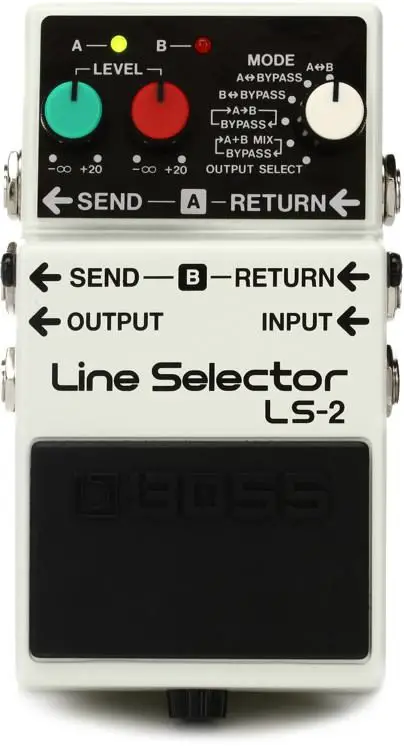
Before using this unit, carefully read the sections entitled: “USING THE UNIT SAFELY” and IMPORTANT NOTES” (supplied on a separate sheet). After reading, keep the document(s) where it will be available for immediate reference.
Main Features
- The L5-2 provides two separate line-loop outputs.
- The L5-2 features 6 different modes (including effect loop selector and line selector) that enhance its versatility.
- The L5-2 provides individual control over the output level of each ine.
- Each Line has an indicator, allowing you to easily determine the current state of the unit
- ADCOURT Jack Is provided to supply power to an exteral effect unit when an ACadaptor s being used to supply power to the L5-2.
Panel Descriptions
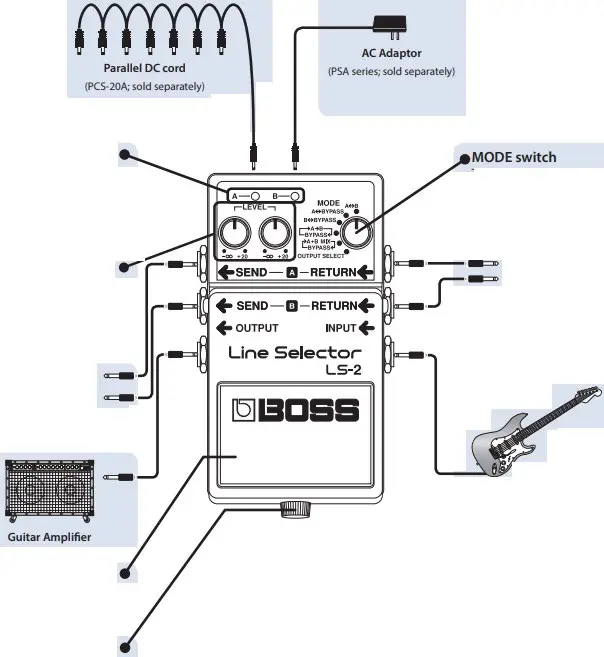
DC OUT jack
Operating the Unit
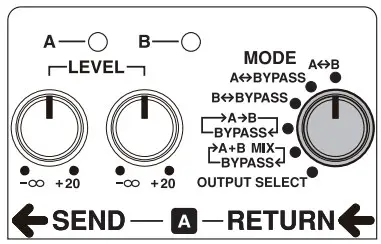
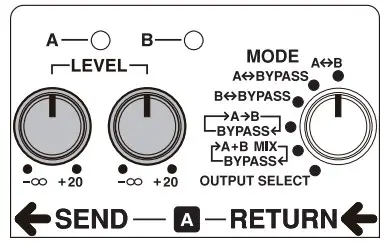
- Select the desired mode.
* Be sure to select an appropriate mode referring to “Mode Description” and “LS-2 Sample Settings (PDF).”
https://roland.cm/boss_om
- Connect the relevant units depending on the mode you have selected.
* Before connecting or disconnecting cords, be sure to turn down the volume on the amplifier. - Select the desired line by pressing the pedal. Then adjust the output level of each line with the LEVEL knobs.

* The LEVEL knobs may not work depending on how the units are set up.
Use of Battery
- A battery is supplied with the unit. The life of this battery may be limited, however, since its primary purpose was to enable testing.
- If you handle batteries improperly, you risk explosion and fluid leakage. Make sure that you carefully observe all of the items related to batteries that are listed in “USING THE UNIT SAFELY” and “IMPORTANT NOTES” (supplied on a separate sheet).
- When operating on battery power only, the unit’s indicator will become dim when battery power gets too low. Replace the battery as soon as possible.
- Batteries should always be installed or replaced before connecting any other devices. This way, you can prevent malfunction and damage.
Main Specifications
| Nominal Input Level | -20 dBu |
| Input Impedance | 1 MO |
| Nominal Output Level | -20 dBu |
| Output Impedance | 1 ke |
| Recommended Load Impedance | 10 Ica or greater |
| Power Supply | Carbon-zinc battery (9 V, 6F22) or Alkaline battery (9 V, 6LR61)AC adaptor (PSA series: sold separately) |
| Current Draw | 30 mA* Expected battery life under continuous use: Carbon: 14.5 hoursAlkaline: 29.5 hoursThese figures will vary depending on the actual conditions of use. |
| Dimensions | 73 (W) x 129 (D) x 59 (H) mm2-7/8 (W) x 5-1/8 (D) x 2-3/8 (H) inches |
| Weight | 430 g / 1 lb (including battery) |
| Accessories | Leaflet (“USING THE UNIT SAFELVIMPORTANT NOTES;’ and “Information”)Carbon-zinc battery (9 V, 6F22) |
| Options(sold separately) | AC adaptor (PSA-series) Parallel DC cord (PCS-20A) |
* 0 dBu = 0.775 Vrms
* This document explains the specifications of the product at the time that the document was issued. For the latest information, refer to the Roland website.
Mode Description
The following describes the LS-2’s six operation modes.
- When you change modes, be sure to determine the currently selected line using the Line indicators.
| MODE | Explanation |
| A4->B | Pressing the pedal alternately selects Line A or Line B.This is an ideal setting for using only the line loop function (when bypass output is not required).LINEA INPUT -• SENDA -• RETURNS -• OUTPUTLINE B INPUT -. SENDB -. RETURN B -. OUTPUT |
| BYPASS | Pressing the pedal alternately selects Line A or Bypass.LINEA INPUT -. SENDA -. RETURNA -. OUTPUTBYPASS INPUT -. OUTPUT |
| Be BYPASS | Pressing the pedal alternately selects Line B or Bypass.LINE B INPUT -‘ SENDB -• RETURN B -, OUTPUTBYPASS INPUT -• OUTPUT |
| r—>A4B-1 BYPASSEI | Pressing the pedal repeatedly selects (in sequence) Line A, Line B or Bypass.LINEA INPUT -• SENDA A -• RETURNA A -• OUTPUTLINE B INPUT -‘ SEND -, RETURN B -‘ OUTPUT BYPASS INPUT -• OUTPUT |
| r>A +6 MIX I—BYPASS+I | Pressing the pedal alternately selects Line A + Line B (mixed) or Bypass.A+B MIX INPUT -• SENDA -. RETURNA -•-• SENDB -. RETURN B -• OUTPUT BYPASS INPUT -• OUTPUT |
| OUTPUT SELECT | Pressing the pedal repeatedly selects (in sequence) Send A, Send B or Output.LINEA INPUT -• SENDALINE B INPUT -. SEND BBYPASS INPUT -• OUTPUT |
Changing the Battery
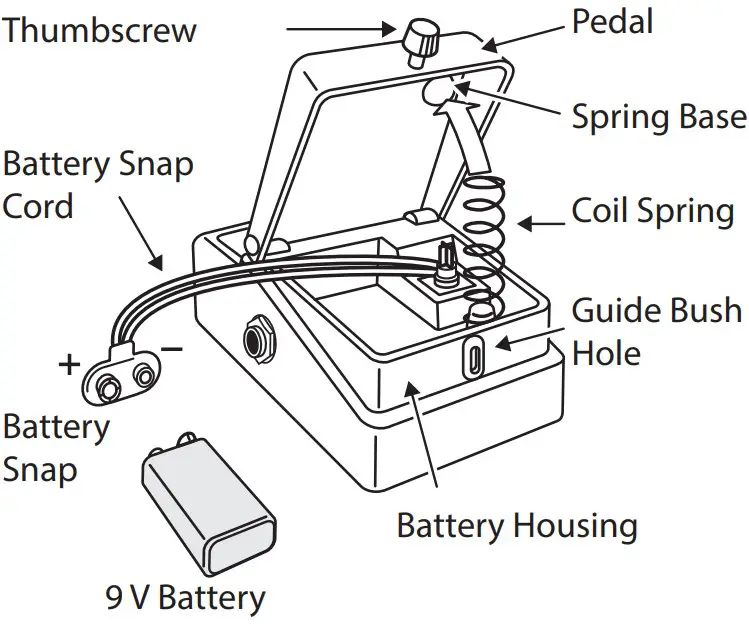
- Hold down the pedal and loosen the thumbscrew, then open the pedal upward.
* The pedal can be opened without detaching the thumbscrew completely.
- Remove the old battery from the battery housing, and remove the snap cord connected to it. 3. Connect the snap cord to the new battery, and place the battery inside the battery housing.
- Be sure to carefully observe the battery’s polarity (+ versus -).
- Slip the coil spring onto the spring base on the back of the pedal, and then close the pedal.
- Carefully avoid getting the snap cord caught in the pedal, coil spring, and battery housing.
- Finally, insert the thumbscrew into the guide bush hole and fasten it securely.