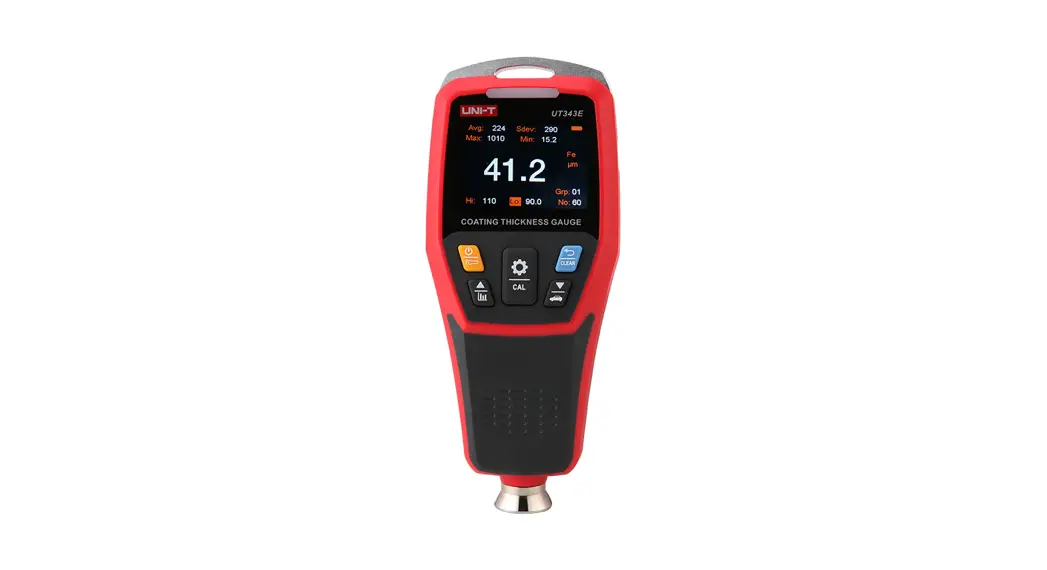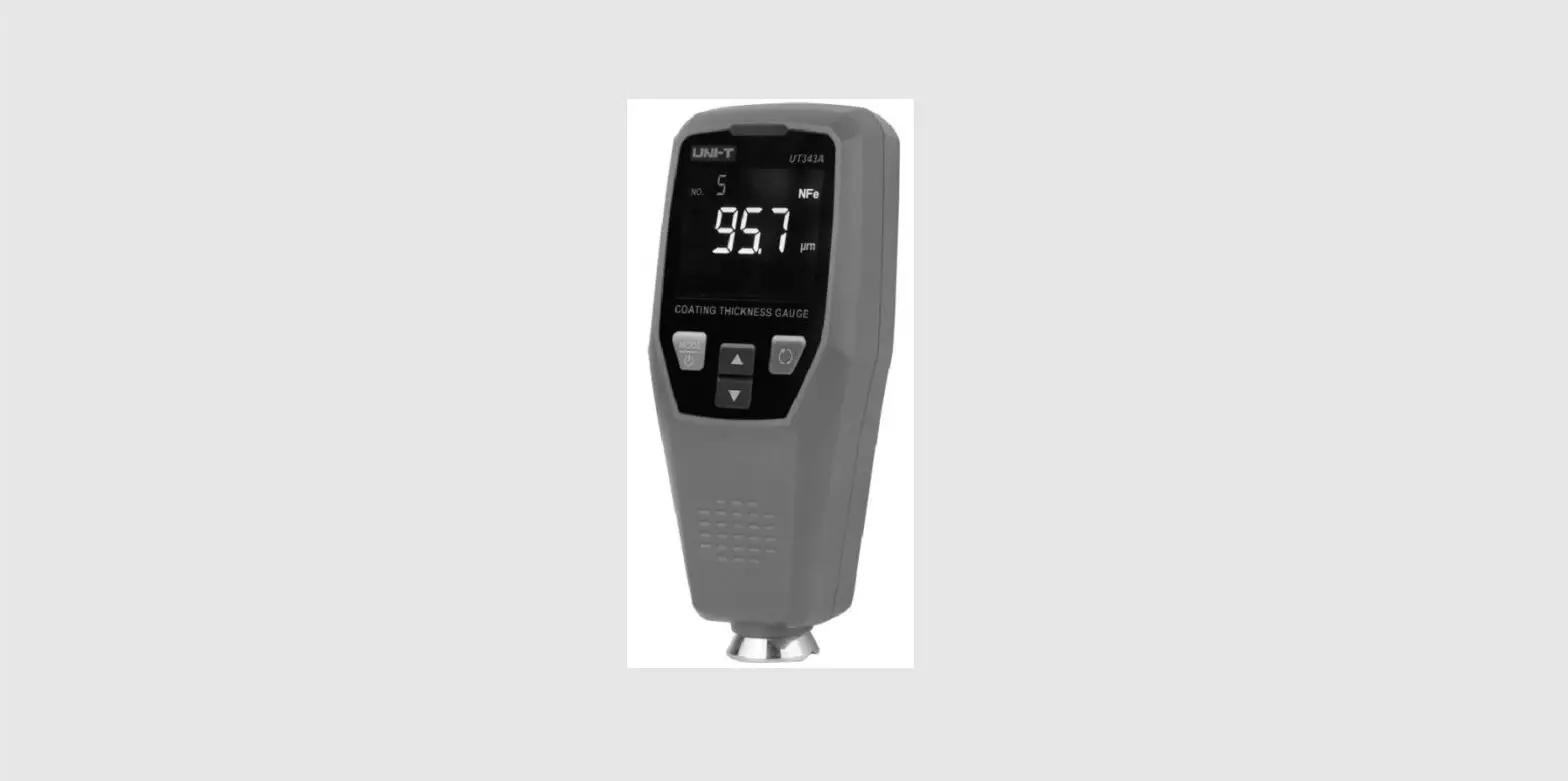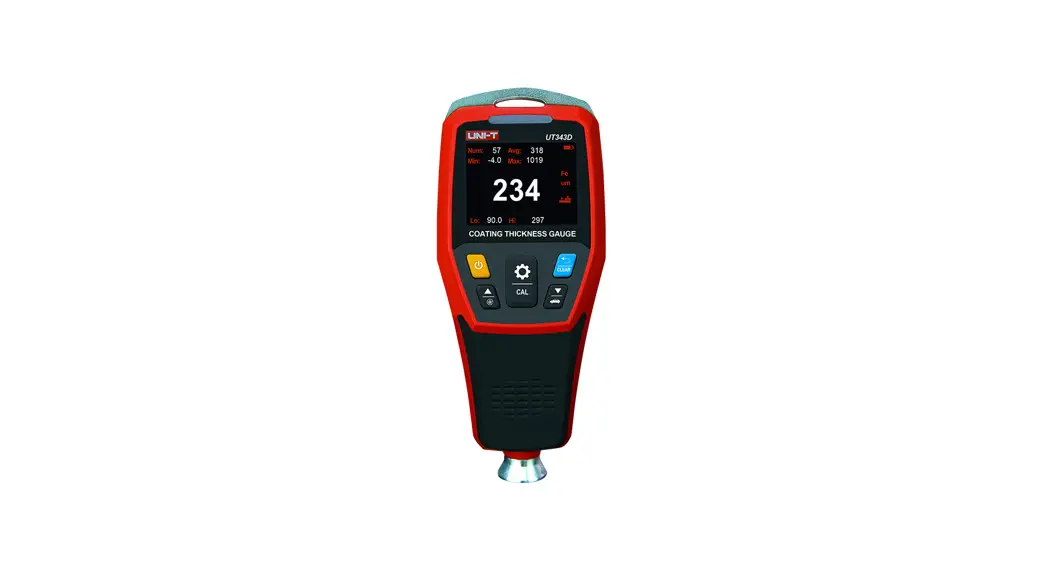


UT3S43D
Coating Thickness
Gauge User Manual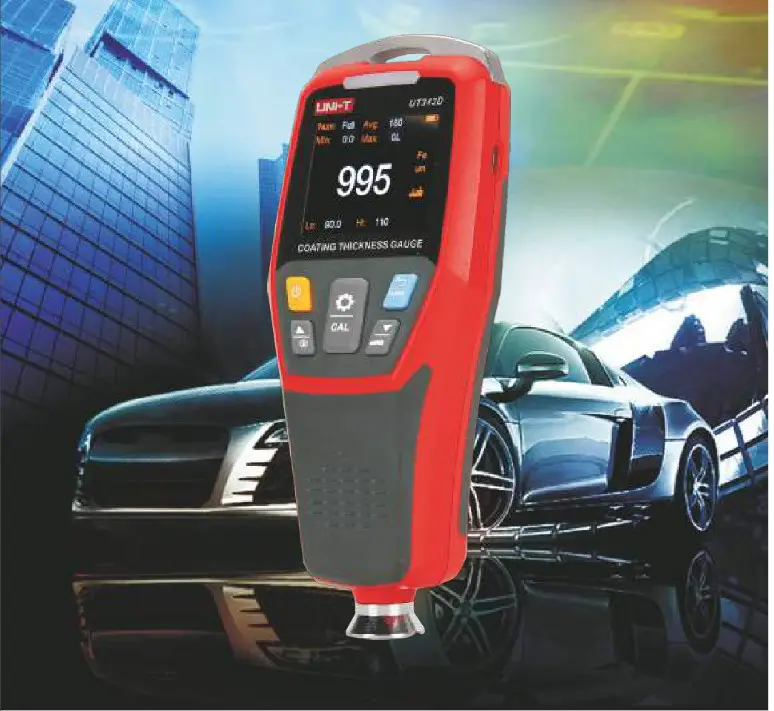
PREFACE
Thank you for purchasing the new UT343D coating thickness gauge. In order to use this product safely and correctly, please read this manual thoroughly, especially the Safety Instructions part.
After reading this manual, it is recommended to keep the manual at an easily accessible place, preferably close to the device, for future reference.
Software and user manual can be found by searching UT343D on our official website, then go to the ‘Docs & Software’ tab. Users can also scan the 2D barcode below for software download.
 https://drive.google.com/open?id=15RcDeaqiwbrfjR7NxCB6EFEBBuVv0AbI
LIMITED WARRANTY AND LIABILITY
Uni-Trend guarantees that the product is free from any defect in material and workmanship within one year from the purchase date. This warranty does not apply to damages caused by accident, negligence, misuse, modification, contamination and improper handling. The dealer shall not be entitled to give any other warranty on behalf of Uni-Trend. If you need warranty service within the warranty period, please contact your seller directly. This warranty is the only compensation you can obtain. Uni-Trend will not be responsible for any special, indirect, incidental or subsequent damage or loss caused by any reason or speculation. As some areas or countries do not allow limitations on implied warranties and incidental or subsequent damage, the above limitation of liability
and stipulation may not apply to you.
Overview
UT3430 is a high-accuracy coating thickness gauge, which can measure coating thickness on both ferrous and non-ferrous metals. This device has features of high precision and non-destructive measurement, and functions of single-point, multi-point averaging algorithm and quick judgment. It is widely used in manufacturing, metal processing, aerospace, marine mechanics, rail transport, scientific research, quality supervision, and other industries.
Features:
- The measurement method conforms to the magnetic method of measuring the thickness of non-magnetic coating on the magnetic metal substrate of GB/T 4956.
- The measurement method conforms to the eddy current method of measuring the thickness of non-conductive coating on the non-magnetic substrate of GB/T 4957.
- Automatic identification of the ferrous or non-ferrous substrate
- Gemstone embedding technology is adopted for the sensor, which is characterized by precision, wear resistance and stability.
- Zero and two-point calibration methods are adopted to correct the sensor systematic error and ensure the measurement accuracy.
- Single-point and multi-point quick judgment and prompt (display: “PASS” or “FAIL”)
- 3-color warning light indicates the current value attribute (green: qualified. red: below the limit. yellow: above the limit).
- Power on/off and measurement are accompanied by audio indication.
- The display of the screen can be automatically rotated and manually locked, so that users can read the measured values from different angles.
- The high-capacity memory chip can store 500 groups of data, which can be exported for analysis through the host computer.
- USB communication software: The product is connected to the computer software via USB for stored data exporting, tendency charts drawing, real-time online measurement, printing, etc.
Accessories
Open the packing box and take out the gauge. Please double check whether the following items are deficient or damaged.
- The QaUge -—–—–—–—-1 PS
- User manual ————————— 1 pe
- Standard coating thickness sheet ————–(5 pcs)
- Ferrous Substrate ————-~—– 1 PC
- Non-ferrous substrate ———1 PC
- Sensor COVE ~——————–—– 1 PC
- Hand rope ———————————–————- 1 pe
- USB Cable —————– 1 PC
- AA alkaline battery —————————-2 PCS
Safety Instructions
- Please perform the two-point calibration before using the gauge. For the specific operation method, please refer to the calibration section of the manual.
- Initialization self-test is needed for the gauge when it is turned on. Please do not put the gauge sensor close to any metal object when it is turned on. Otherwise, the gauge will not work and need to be restarted in an environment where there is no metal close to the sensor.
- Please keep the sensor part clean and in good condition to avoid dust, oil and other factors affecting the measurement accuracy.
- Do not use or store the gauge in high temperature, high humidity, flammable, explosive and strong magnetic field environments.
- Clean the gauge casing with a soft cloth and mild detergent. Do not use abrasives or solvents to avoid damage to the gauge.
- Do not disassemble or modify the gauge to avoid damage to it.
- When the LCD displays the low battery symbol “03”, replace the battery in time. Remove the battery if it is not used for a long time.
- The battery is normal “AA” alkaline battery, which cannot be charged.
- The standard coating thickness sheet is a high-precision accessory, which is related to the accuracy of the gauge and needs to be preserved properly to prevent scratches, corrosion, bending and deformation of the surface.
- The metal substrates are high-precision accessories, which are related to the accuracy of the gauge and need to be preserved properly to prevent scratches, rust, oxidation and deformation of the surface.
- If an error occurred in the use of the gauge, please restore the factory settings and perform the two-point calibration.
Function Description
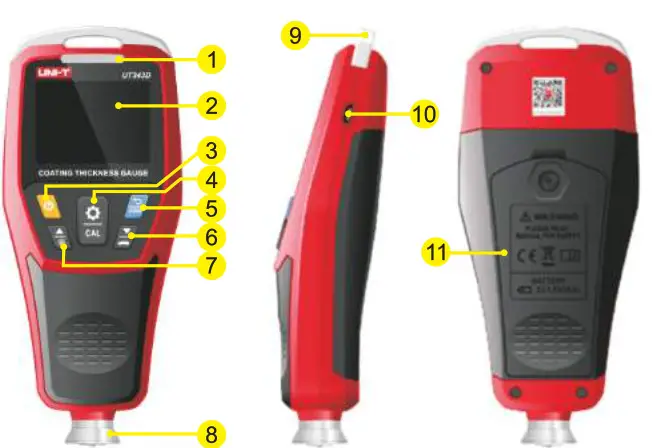
A. Structure description
- LED warning light
- LCD screen
- Power button
- Set/Confirm/Calibrate button )
- Cancel/Clear button
- Value-/Down/Quick judgment button
- Value+/Up/Lock screen button
- Sensor assembly
- Hand rope hang buckle
- USB communication interface
- Battery compartment
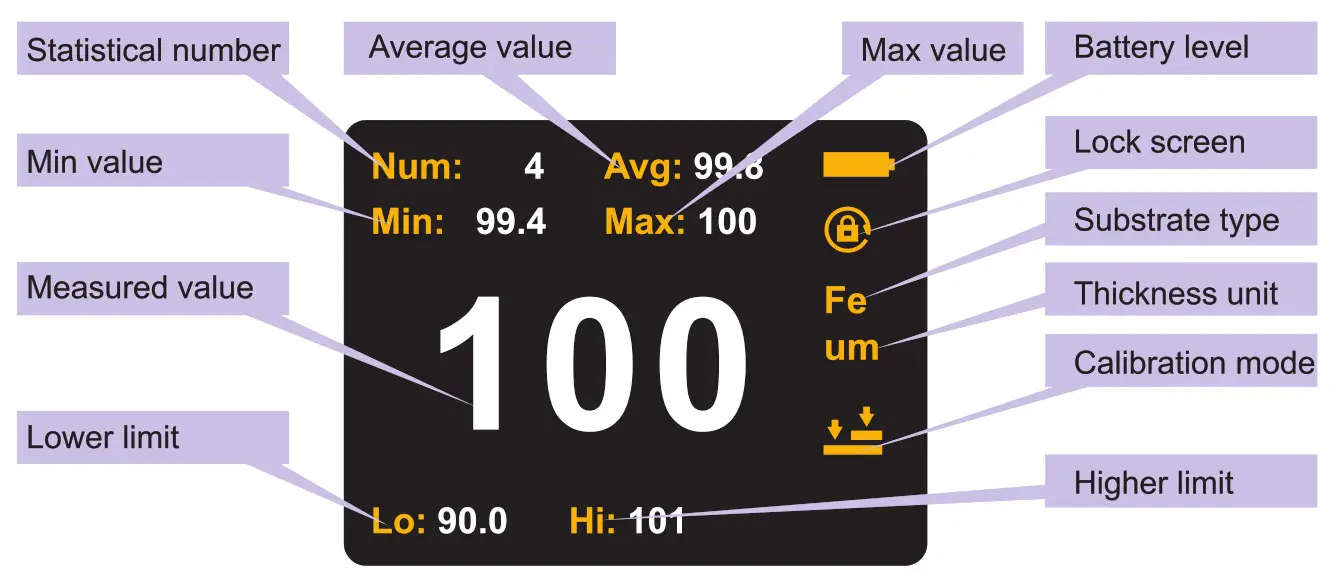
B. Display interface description
- Menu icon description

Prompt tone setting 
Backlight setting um/mil Unit setting 
Calibration mode setting 
Higher limit setting 
Lower limit setting 
LED warning light setting 
Factory reset 
Delete stored data 
Continuous measurement setting - Measurement mode interface

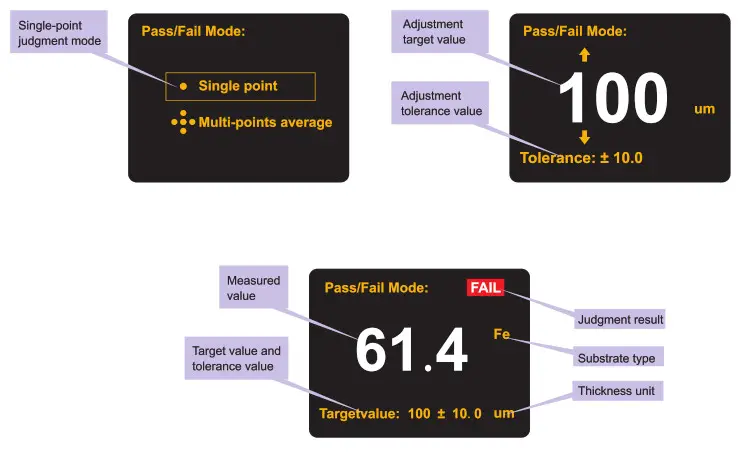
- Single-point judgment mode interface:

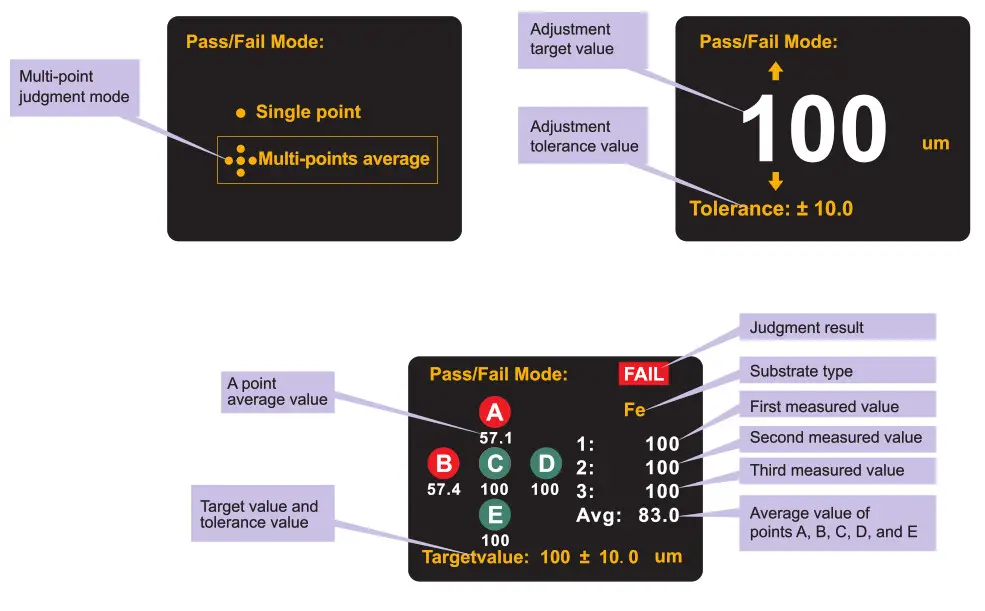
- Multi-point judgment mode interface:


Operating Instructions
A. Replace the battery:
- Turn the locking screw on the battery compartment counterclockwise, open the battery cover, and install 2 batteries in the direction indicated in the compartment.
- Install the battery cover and turn the locking screw clockwise.
- The battery level is indicated by the battery symbol “
 ” at the top right of the screen.
B. Power onloff:
- Power on: Long press the ‘
 button until the screen is on. If the buzzer is turned on, it will be accompanied by a power-on prompt tone.
 - Power off: Long press the button until the screen is off. If the buzzer is turned on, it will be accompanied by a power-off prompt tone.
 button until the screen is on. If the buzzer is turned on, it will be accompanied by a power-on prompt tone.
C. Normal measurement
- Long press the button to turn on the gauge. The gauge displays the initialization process, and enters the normal measurement mode after the initialization is completed.
- Estimate the coating thickness of the measured object, and select the corresponding or close standard coating thickness sheet to perform the two-point calibration on the measurement substrate.
- Selection of the substrate: A substrate with thickness or material close to the measured object and without coating should be selected as the measurement substrate as far as possible.
- For the two-point calibration, please refer to the calibration section of the gauge.
- After the two-point calibration, the coating thickness measurement can be performed on the measured object.
- When measuring, select 3 to 5 measuring points on the surface of the measured object evenly, measure 5 times for each measuring point, and take the average value of the 5 times as the indicating value of the point.
- After the indicating values of the 3 to 5 measuring points are measured, the average value of the values should be taken as the reference value of the coating thickness of the object.
Note:
- Hold the gauge perpendicular to the substrate to be measured, and lightly press the gauge sensor against the substrate for measurement. It is necessary to keep the sensor in close contact with the surface of the substrate and avoid the measurement error caused by excessive force.
- When the measured indicating value is greater than 1250um and less than 1500ym, the screen displays OL to indicate the over range.
- When the measured indicating value is greater than 1500um, the gauge will not respond.
D. Menu settings
Short press the  button in the normal measurement mode to enter the menu settings mode:
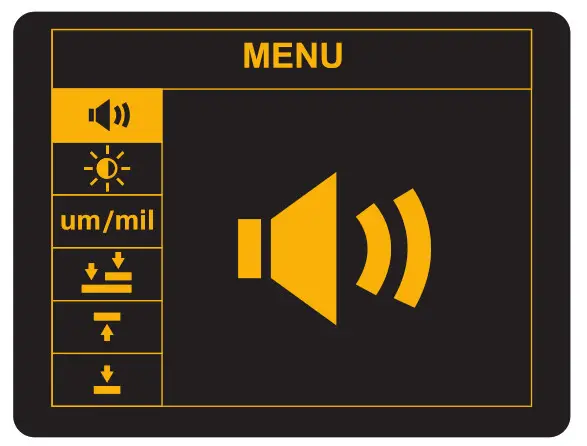
- Prompt tone setting

Select the prompt tone setting icond by using the  and
and  buttons, short press the
  button to enter the prompt tone setting menu, turn on/off the prompt tone by using the and
 buttons, and short press the button to confirm the setting or
 button to exit.
 - Backlight setting
 Select the backlight setting icon “: by using the ‘ and buttons, short press the (§] button to enter the backlight setting menu, set the backlight brightness by using the ‘ and buttons, and short press the 4 button to confirm the setting or / button to exit.
 - Unit setting um/mil
Select the unit setting iconum/mil by using the ‘ and buttons, short press thebutton to enter the unit setting menu, set the unit (um/mil) by using the ‘ and buttons, and short press the button to confirm the setting or button to exit. - Calibration mode setting

Select the calibration mode setting iconis by using the and buttons, short press the button to enter the calibration mode setting menu, select the calibration mode (zero/ two-point) by using the and buttons, and short press the button to confirm the setting or button to exit. - Higher limit setting

Select the higher limit setting icon by using the and buttons, short press the } button to enter

 buttons, short press the
  Select the backlight setting icon “
F. Quick judgment mode
Note: The quick judgment mode is mainly applicable to the quick measurement and judgment of the coating thickness of automobiles and other industrial products.
In the normal measurement mode, long press the  button to enter the quick judgment mode, select the single-point/multi-point judgment mode by using the
  and buttons, and short press the button to enter or long press the
 button to exit.
- Single-point judgment mode
1) Press theand buttons to set the target thickness value, and short press the [2] button to confirm the setting.
2) Press theand buttons to set the tolerance value, and short press the button to enter the single-point judgment mode.
3) Use the gauge to measure the coating thickness of the measured object.
4) The screen displays the measured indicating value and the judgment result (“PASS” or “FAIL”).
5) Short press the button to return or long press the button to exit. - Multi-point judgment mode
1) Press the and buttons to set the target thickness value, and short press the button to confirm the setting.
2) Press theand buttons to set the tolerance value, and short press thebutton to enter the multi-point judgment mode.
3) Use the gauge to measure the coating thickness of the measured object, measure 3 times near the same position, and the gauge will count the average value of 3 times into point A.
4) Change the measurement position, measure 3 times near the new position, and the gauge will count the average value of 3 times into point B.
5) Measure A, B, C, D and E (5 points) according to the above method.
6) After the measurement, the screen displays the average value of the 5 points and the judgment result (“PASS” or “FAIL”).
7) Short press thebutton to return or long press the button to exit.
G. Calibration of the gauge Long press the button in the normal measurement mode to enter the selected calibration mode:
Note: Zero calibration mode or two-point calibration mode depends on the calibration mode setting in the above menu settings.
| Calibration mode | Icon | Description |
| Zero calibration |  | Simply place the sensor on an uncoated metal substrate for zero calibration. |
| Two-point calibration |  | On the basis of the zero calibration, stack a standard coating thickness sheet with known thickness and an uncoated substrate together for calibration to obtain a more accurate measurement result. |
1. Zero calibration
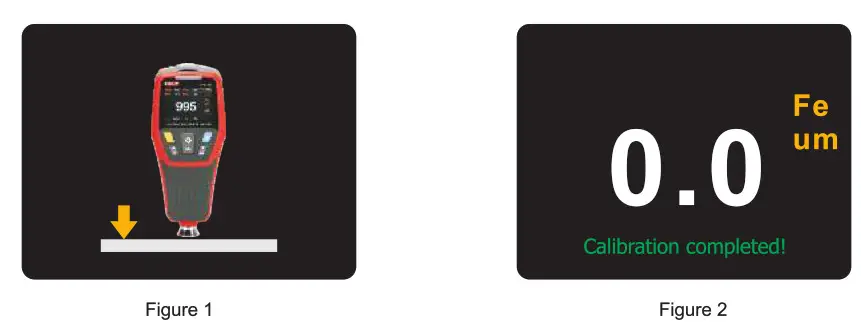
- Figure 1 appears on the screen, prompting users to place the gauge vertically on the uncoated substrate.
- Lift it up after 2s. Zero will be displayed (as shown in Figure 2), and the gauge will automatically exit to the normal measurement mode.
- At this point, the zero calibration is completed.
 2. TWo-point calibration
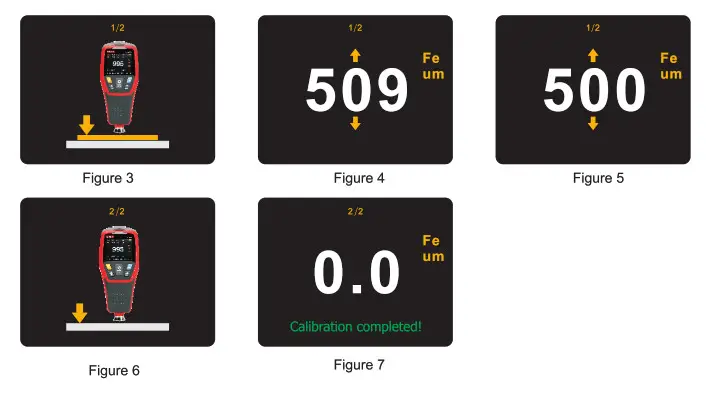
- Figure 3 appears on the screen. Stack a standard coating thickness sheet with known thickness (e.g.: 500 pm) and an uncoated substrate together for calibration.
- Lift up the gauge after 2s and the measured value will be displayed (as shown in Figure 4).
- Press the and buttons to adjust the value to the actual thickness of the standard coating thickness sheet (as shown in Figure 5).
- Press the button to confirm the adjustment (or button to cancel the calibration).
- Figure 6 appears on the screen, prompting users to place the gauge vertically on the uncoated substrate.
- Lift it up after 2s. Zero will be displayed (as shown in Figure 7), and the gauge will automatically exit to the normal measurement mode.
- At this point, the two-point calibration is completed.
3. Calibration verification
Measure the standard coating thickness sheet according to the above normal measurement mode. At this time, the indicating value of the gauge should be within the accuracy range of the nominal value for the standard coating thickness sheet. For example, if the nominal value for the standard coating thickness sheet is 100um, the indicating value of the gauge should be within +(1+3%H)um after calibration. If it is out of tolerance, recalibration is required.
Note: If the calibration result is inaccurate caused by incorrect operation, please restore factory settings and then recalibrate.
H. Auto rotatable screen
The gauge has a built-in gravity sensor, which automatically rotates the display during testing. it is convenient for users to read the value in any direction. The rotation angle is 0°, 90°, 180° and 270°. in the normal measurement mode, long press the button to tum on/off the rotary display function. When the rotary display is turned off, the lock screen symbol  appears on the screen.
1. Data upload
- Connect the USB cable to the computer and make sure the battery level of the gauge is sufficient.
- Send real-time data or save the stored data to the computer and generate the report via the USB interface.
Note:
Regarding the use of the computer software, users can retrieve the Software User Manual from the Help option of the operation interface.
The USB interface cannot power the gauge up or charge the battery.
Performance indexes
A. Technical specifications
| Function | Measuring range | Thickness | Resolution | Accuracy | Explanation |
| Ferrous and non-ferrous substrates measurement | 0–1250um | 0-99.9um | 0.1um | ±(1+3%H) | Unit conversion: 1mil = 25.4pm |
| 100-1250um | 1um | ||||
| 0-49.2mil | 0-4.99mil | 0.01mil | t(0.04+3%H) | ||
| 5.0–49.2mil | 0.1mil | ||||
| Minimum convex radius of curvature | 5ffm | ||||
| Minimum concave radius of curvature | 00m | ||||
| Minimum measured area diameter | 20ffm | ||||
| Minimum substrate thickness | O. 5rrrn | ||||
| Display screen | 2-inch TFT LCD screen | Resolution: 320*240 pixels | |||
| Auto rotatable screen | Automatically rotates the display of the screen | Rotation angle: 0°, 90°, 180° and 270° | |||
| Unit conversion | pm/mil conversion Metric/Imperial unit | conversion | |||
| Alarm indication | The LED lights up in the corresponding color when the value exceeds the set value range for alarm. | ||||
| Audio indication | Measurement and alarms are accompanied by corresponding prompt tones. | ||||
| Limit setting | Any limit value can be set between 0-1200pm. | ||||
| Measurement method | Single/Continuous | ||||
| Statistical measurement | Max/Min/Average value | ||||
| Automatic identification | Automatic identification of the substrates | ||||
| USB communication | The product is connected to the computer software via USB for data storage and analysis. | ||||
| Data storage | 500 groups | ||||
| Backlight brightness | 5 levels | ||||
| Auto power off | 5 minutes | ||||
| Low battery indication | Low battery indication at 2.2V30.2V | Low battery symbol  ” flashes. ” flashes. | |||
| Working environment | 0-40 °C -C.-80%RH | ||||
| Storage environment | -20-60 °C :-C.75%RH | ||||
B. General specifications
- Display: 4-digit color LCD display
- Refresh rate: 0.5s
- Sensor type: Magnetic induction and eddy current composite sensor
- Impact resistance: The gauge can withstand 1 meter drop
- Power requirement: AA alkaline battery (2 pcs)
- Dimensions: 152mm*65mm*35mm
- Weight: About 180g (including batteries)
UNI-TREND TECHNOLOGY (CHINA) CO., LTD.
No6, Gong Ye Bei 1st Road,
Songshan Lake National High-Tech Industrial
Development Zone, Dongguan City,
Guangdong Province, China
Tel: (86-769) 8572 3888
http://www.uni-trend.com