
 Quick Start Guide
HDMI-TPS-TX87
HDMI-TPS-RX87
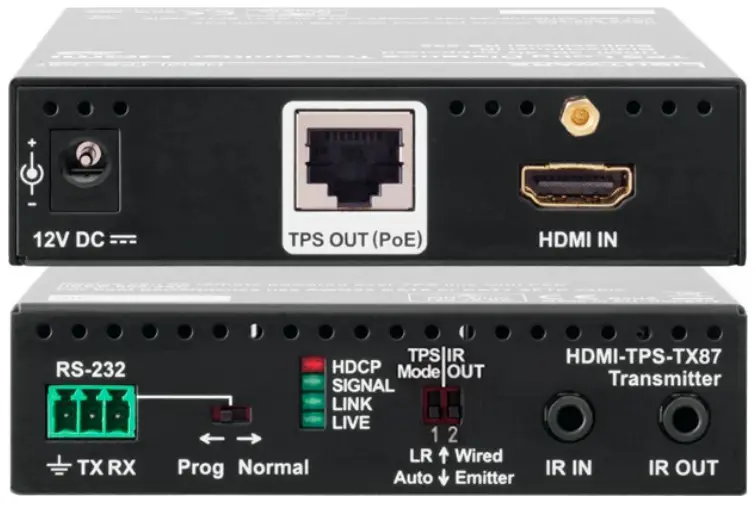
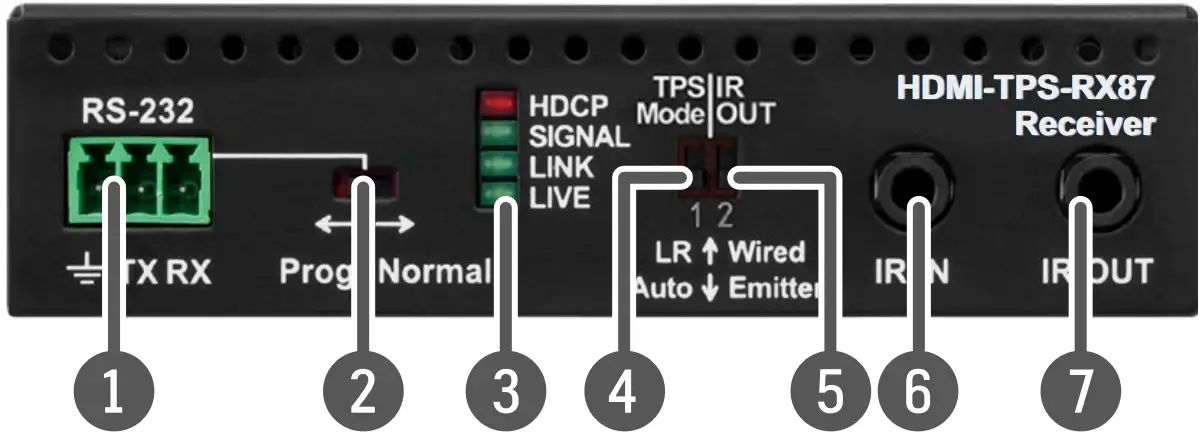
Front View
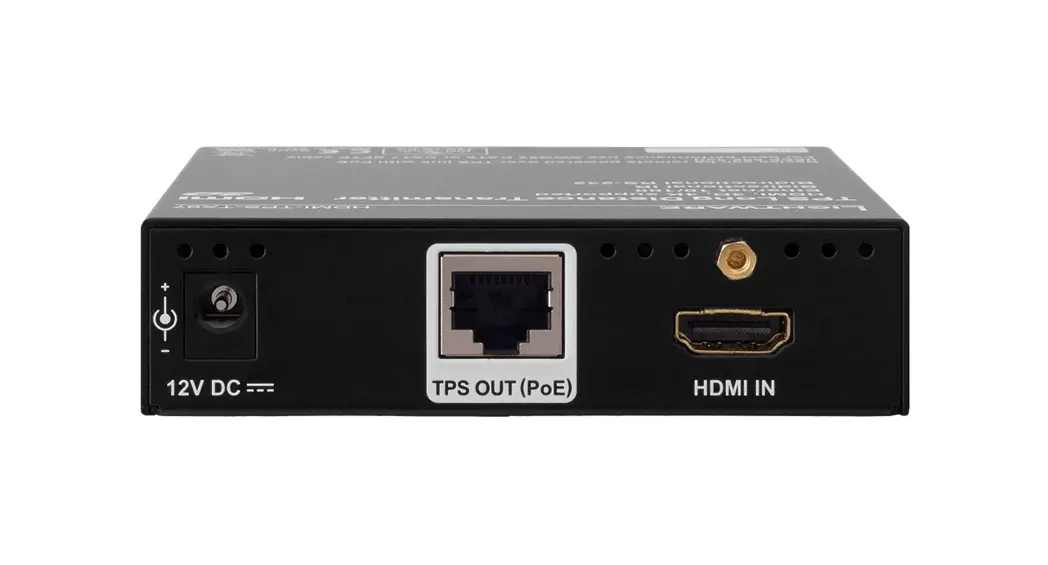
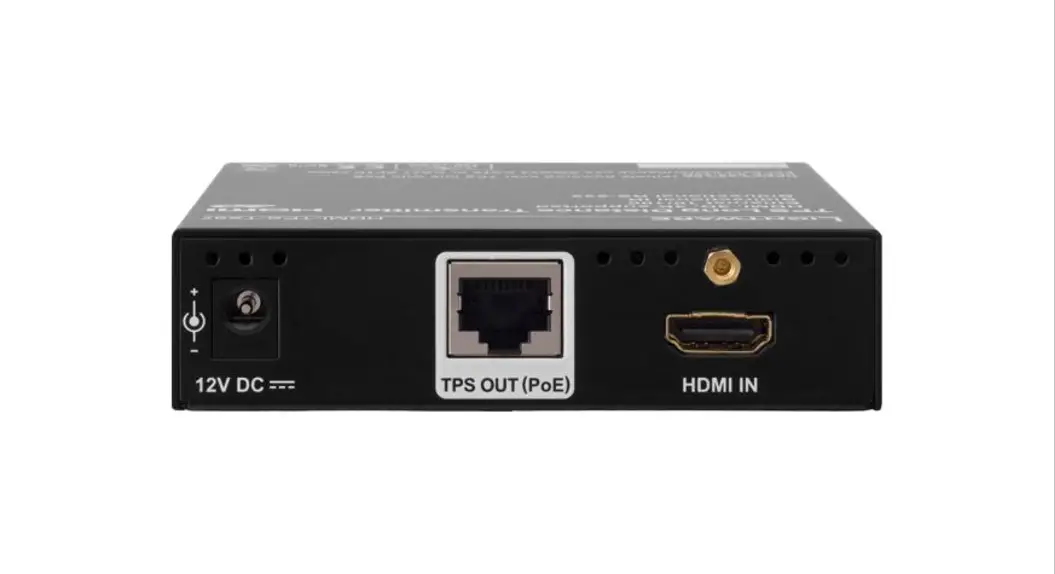
Rear View
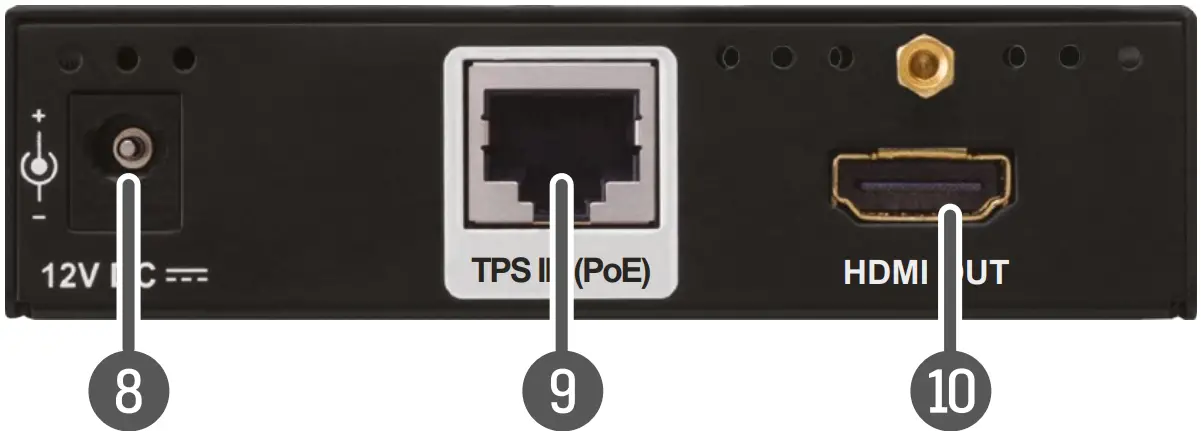
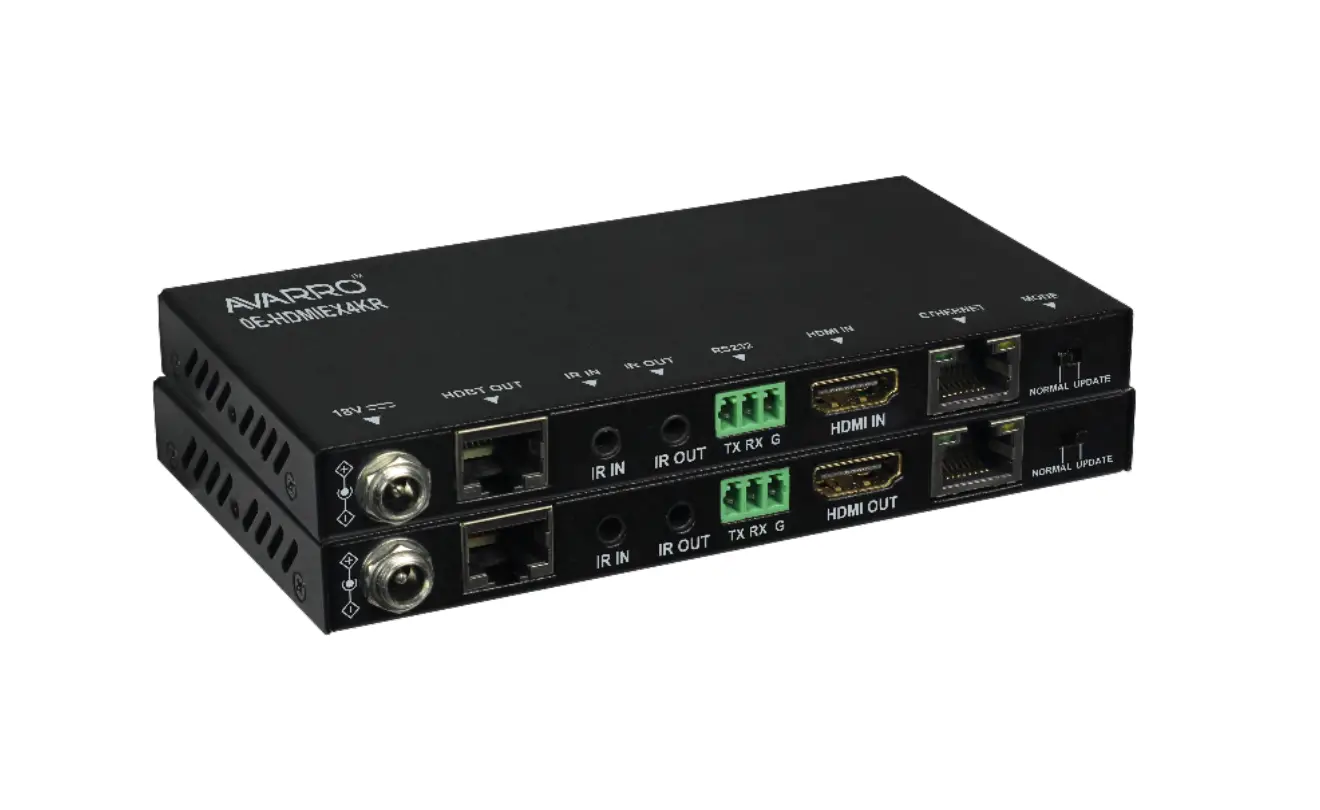
 The transmitter and the receiver have the same construction and connectors.
The product is compatible with any HDBaseT™ third-party devices. HDBaseT™ and the HDBaseT Alliance logo are trademarks of the HDBaseT Alliance.
Front And Rear View – Legend
| 1 | RS-232 port | Local RS-232 port for bidirectional serial data connection and performing firmware upgrade (programming). |
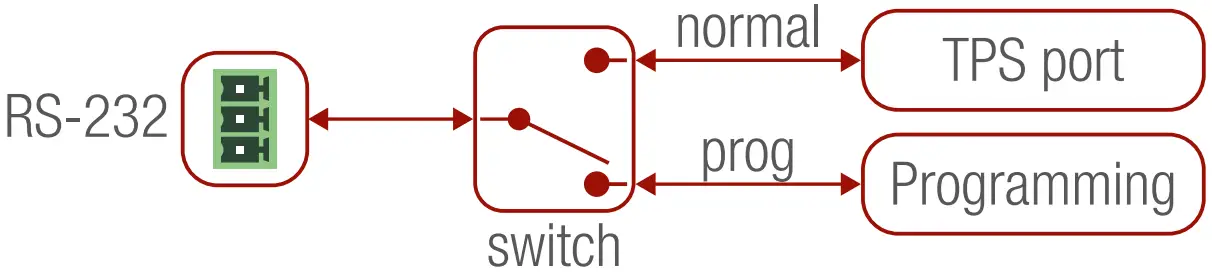
| 2 | RS-232 switch | Normal: serial data is passed through the device. Prog: RS-232 pass-through function is disabled, and the device is ready for the firmware upgrade (see the figure below). |
| 3 | Status LEDs | See the next section. |
| 4 | TPS mode switch | LR: Longreach TPS mode; lower resolution (max 1080p), longer distances; Auto: TPS mode is determined automatically |
| 5 | IR mode switch | IR output signal modulation switch; the 38 kHz modulation can be switched On (Emitter position) or Off (Wired position). |
| 6 | IR input | IR signal input connector (for 3.5 mm Jack, 3-pole, TRS plug). |
| 7 | IR output | IR signal output connector (for 3.5 mm Jack, 2-pole, TS plug). |
| 8 | DC input | 12V DC input for local power supply. |
| 9 | TPS port | TPS port to the other compatible device (extender/matrix/board). |
| 10 | HDMI port | Video port for DVI or HDMI signal. |
Status LEDs
| HDCP | ||
 | OFF | The video output signal is not encrypted with HDCP. |
 | ON | The Video output signal is encrypted with HDCP. |
| SIGNAL | ||
| OFF | No video signal transmission. |
 | ON | Video signal transmission. |
| LINK | ||
| OFF | TPS connection failed between the devices. |
 | BLINKING | TPS connection is detected and LPPF link mode is active. |
| ON | TPS connection is detected and HDBT or LR ink mode is active. |
| LIVE | ||
| OFF | No power supply or out of order. |
| ON | The device is powered and ready to use. |
Important Safety Instructions
Please read the supplied safety instruction document before using the product and keep it available for future reference.
Introduction
TPS-TX87 and RX87 twisted-pair HDBaseT™ extenders provide an extension of uncompressed 4K/UHD video with embedded audio for long distances over a single CATx cable. The extender offers uni-directional RS-232 and IR pass-through on the same CATx cable that carries the video signal. The TPS extenders support full HDCP and EDID compliance and work on all standard AV resolutions and also 120 Hz 3D signals. PoE 48V remote powering is available through the single CATx cable, but a local power supply can also be used.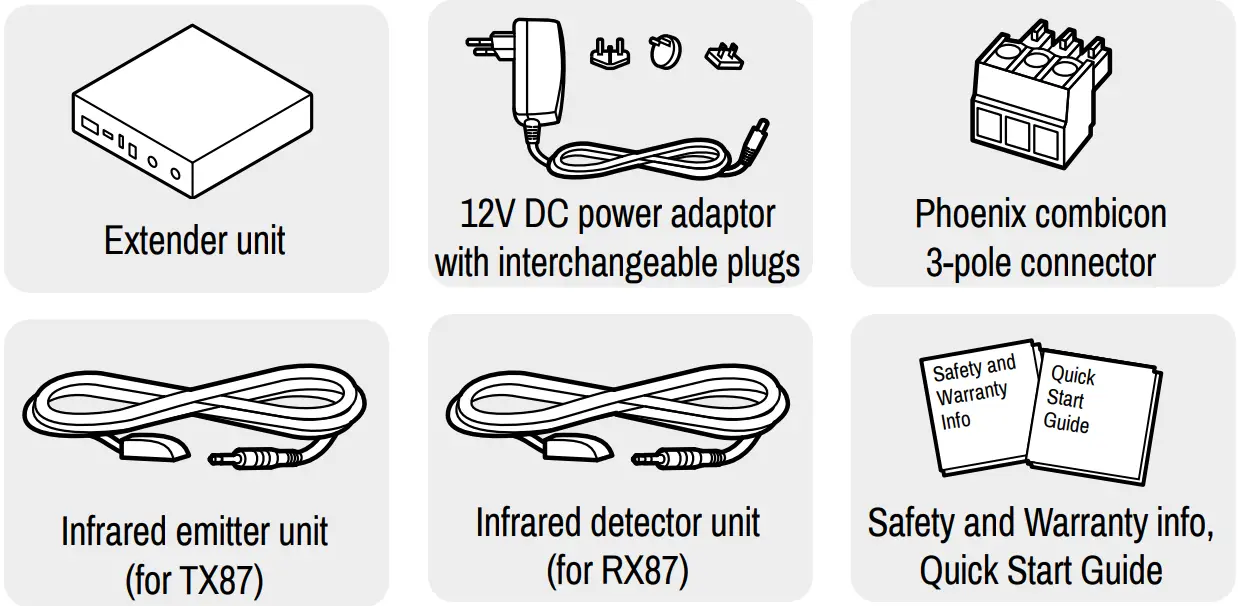
Compatible Devices
TPS-87 extenders are compatible with all Lightware devices with TPS ports except the TPS-90 series.
Power Supply Options
TPS-87 extenders are compatible with IEEE 802.3af standard – Power over Ethernet (PoE) and can receive power over the TPS line. The extenders are not compatible with TPS-95 extenders from a remote power point of view. TPS-95 extenders have a different remote power feature, which is not PoE compatible. Please always check the devices before connecting them to each other. If the remote power feature is disabled on the TPS-95 extender, it can be connected to a TPS-87 device.
The extenders can be powered:
- Locally with the supplied 12V DC adaptor or Lightware’s rack-mountable PSU,
- Remotely by a PoE-compatible Power Sourcing Equipment (PSE) device, like Lightware’s power injector (TPS-PI-1P1) or a PoE-compatible matrix or matrix board.
If both supplying modes are available (local and remote), the remote power supply will be used. Do not connect any device to the TPS connector unless you are sure they are compatible! Connecting incompatible devices with similar connectors may cause harm to the devices.AWG 26 cables are not recommended with remote powering (reduce cable distances).
Connecting Steps
The layout below means the transmitter is powered locally by the power injector and they are placed close to each other. The receiver is powered remotely via the TPS cable (PoE).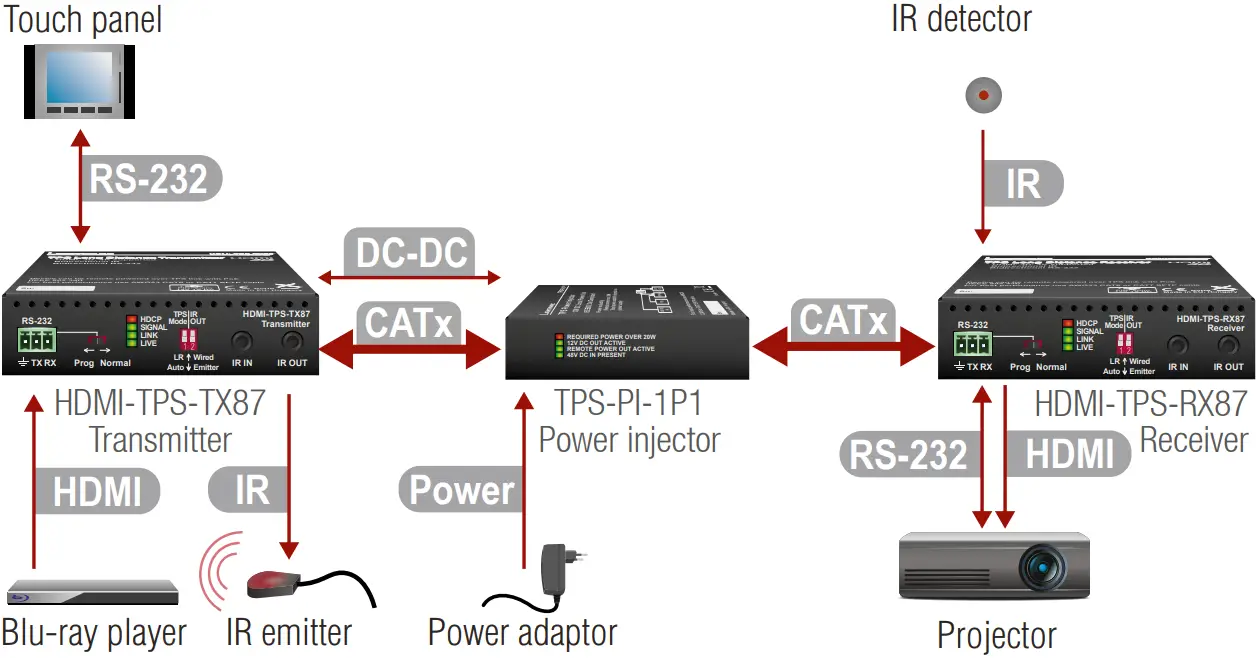
CATx | Connect the TPS output port of the TX to the TPS port of the power injector by a CATx cable. |
CATx | Connect the TPS input port of the RX to the TPS+PoE port of the power injector by a CATx cable. |
DC-DC | Connect a DC-DC cable between the transmitter and the power injector. |
HDMI | Connect a source to the HDMI (DVI-D) input port of the transmitter. |
IR | Connect an IR emitter unit to the IR output port of the transmitter. |
RS-232 | Connect a controller device to the local RS-232 port of the transmitter. Make sure the RS-232 switch is in the Normal position. |
HDMI | Connect a sink device to the HDMI (DVI-D) output port of the receiver. |
RS-232 | Connect a serial cable between the sink device and the RS-232 port of the receiver. |
IR | Connect an IR detector unit to the IR input port of the receiver. |
Power | First, connect the power adaptor to the DC input of the power injector, then secondly to the AC Dower socket. |
Locking DC Plug
The device has a locking DC connector to establish a robust and safe power connection when a local PSU is used.
Twist 90° clockwise to lock.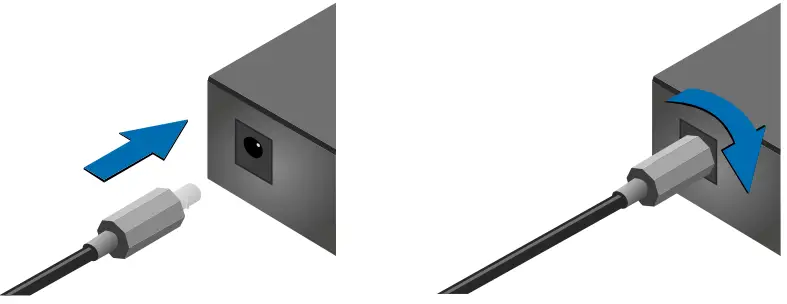
Mounting Options
Lightware offers three types of mounting accessories to fix the extenders:
Rack Shelf
1U high rack shelf provides mounting holes for the fastening of up to four extenders.
Mounting Steps: Always use the fixing screws that are supplied with the mounting accessory. If you insert screws longer than 6 mm, the device can be damaged.
- Unplug all the cables connected to the device(s).
- Turn the device(s) upside down.
- Put the shelf upside down on the device(s). Position it to get the mounting holes aligned.
- Fasten the device on the shelf with the provided screws.
- Fix the shelf to the desired place (screws are not supplied).
Under Desk Mounting Kit (UD-kit)
The UD-kit makes it easy to mount one extender under any flat surface (e.g. furniture).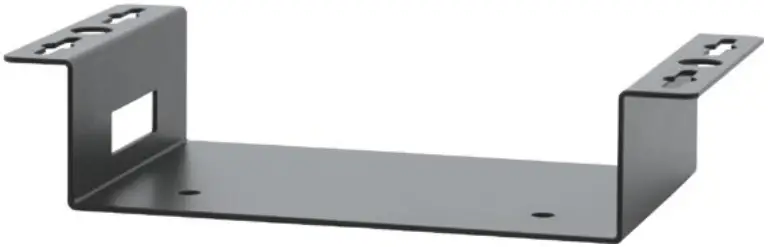 UD Mounting Kit Double (UD-kit double)
The UD-kit double makes it easy to mount two extenders under any flat surface (e.g. furniture).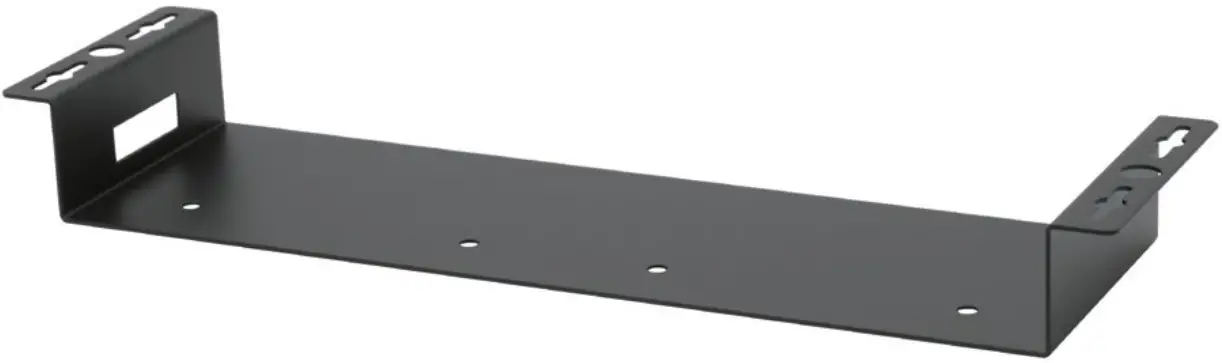
Port Diagram
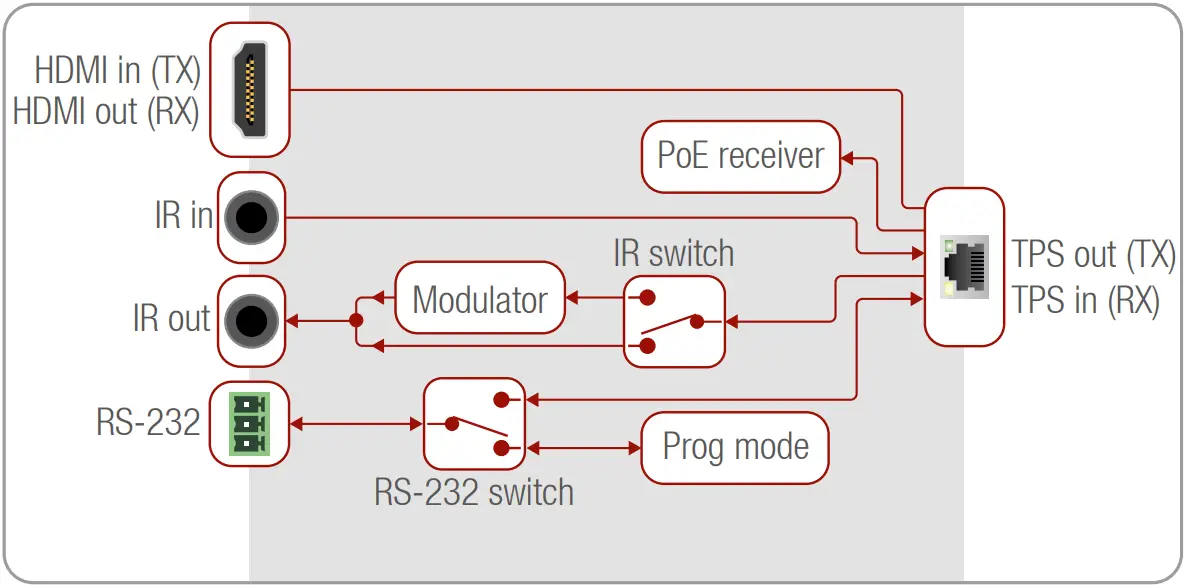
Installation of the Extender With a Matrix
- Power off all devices (installing with powered devices may harm them).
- Check the RS-232 switch(es) on the extender(s); they must be in the Normal position for RS-232 pass-through function.
- The state of the TPS link mode switch makes no difference on the extender because the connected board forces the extender to use the settings of the matrix.
- Check the PoE settings of the matrix or the matrix board (with the LDC software); each port can be set for remote powering separately.
- Pair the extender(s) and the matrix board(s) with CATx cable(s). The transmitters’ TPS OUT with the input boards’ TPS IN and the receivers’ TPS IN with the output boards’ TPS OUT.
- Connect the video source(s), sink(s), and the desired accessory device(s) to the matrix (MX-TPS boards don’t support the IR pass-through).
- Connect the video source(s), sink(s), and the desired accessory device(s) to the extenders.
- To supply the extender(s) with a remote power supply, connect the necessary power adaptor to the given matrix board.
- To supply the extenders locally, connect the supplied adaptor (12V 2A DC).
- Connect the power cord of the matrix to the outlet and switch on the matrix.
- Supply the other connected units.
Bi-directional Pass-through Data Lines
The direction of the video extension is fixed from TX towards RX, but the pass-through data lines are bi-directional*. It means the RS-232 and IR source and sink devices can be connected either to the TX or to the RX, and the signal is transmitted to the other extender.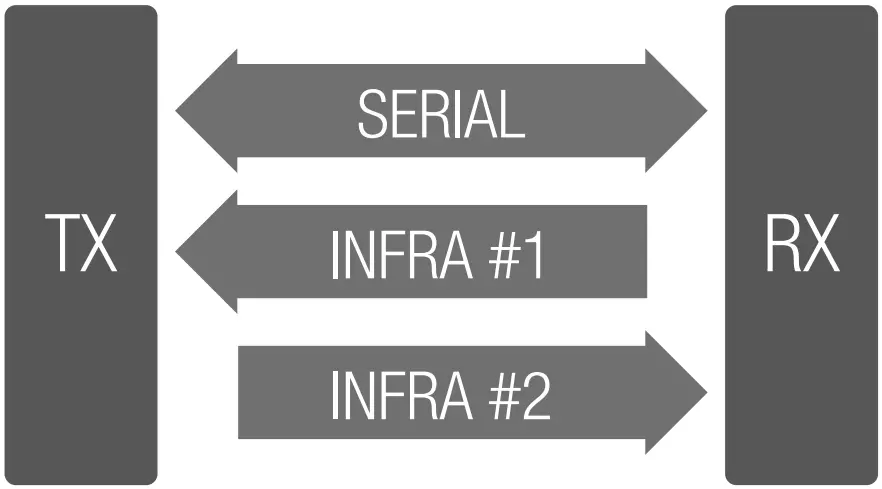
- In fact, IR transmission is uni-directional, but the extender has two IR channels in different directions.
RS-232
Third-party devices with standard RS-232 ports are supported, as the extenders work in „passthrough” mode. TX and RX provide a 3-pole Phoenix connector. The RS-232 options – the baud rate and the parity bits – are set on the third-party devices and they can be anything. The extenders support any kind of serial setting.Please find the RS-232 device type in its user guide; the extenders work as DCE devices
RS-232 Switch Modes
Infrared (IR)
One emitter and one detector are enough for remote controlling one IR sink device. If there is an IR sink device to be controlled next to the TX and the other one is next to the RX, two emitter-detector pairs are needed.
The IR emitter and the detector have standard 3.5 mm TRS (jack) connectors. The emitter’s plug has two poles (mono) and the detector’s plug has three poles (stereo). The second emitter and detector pair can be ordered from Lightware separately.
IR Output Mode Switch
The IR output signal modulation can be selected by the front panel switch as follows:
1 2 3 Detector — 3-pole-TRS Detector — 3-pole-TRS | 1 2-3 Emitter — 2-pole-TS Emitter — 2-pole-TS | ||
| 1 Tip | Signal (active low) | 1 Tip | +5V |
| 2 Ring | GND | 2 Ring | Signal (active low) |
| 3 Sleeve | +5V | 3 Sleeve | |
- Emitter: the 38 kHz modulation is switched on. In this case, an IR emitter can be connected to the IR output port.
- Wired: the 38 kHz modulation is switched off. This option allows the connection of a cable between the IR output of the extender and the IR input port of the device desired to be remotely controlled.
TPS Link Modes
The TPS working mode between the transmitter and the receiver parties is determined by the mode set in them. Both parties influence the setting that determines the final TPS transmission mode. The following TPS modes are defined:
- Long reach (LR): Longer CATx cable length, less bandwidth (limited resolution). The LPPF mode is not available in the LR TPS link mode.
- HDBaseT™ (HDBT): more bandwidth (higher resolutions), shorter CATx cable length. If no video is present, the units change to LPPF mode automatically.
- Low Power Partial Functionality (LPPF): Only RS-232 and IR are extended.
Toggling Between TPS Link Modes
The toggle switch on the extenders can be used to toggle between the LR and Auto TPS modes. If both units have an Auto state and there is a valid video signal on the transmitter, the common mode will be HDBT. If the video signal disappears, devices go into LPPF mode.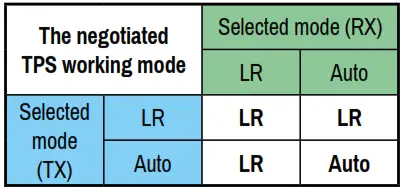 TPS mode between an extender and a port of a matrix board
If an extender and a TPS matrix board are paired, the board forces the extender to use the settings of the matrix. The extender’s TPS mode switch has no effect. Always use the Auto mode with third-party devices!
Standalone Application Application Diagram
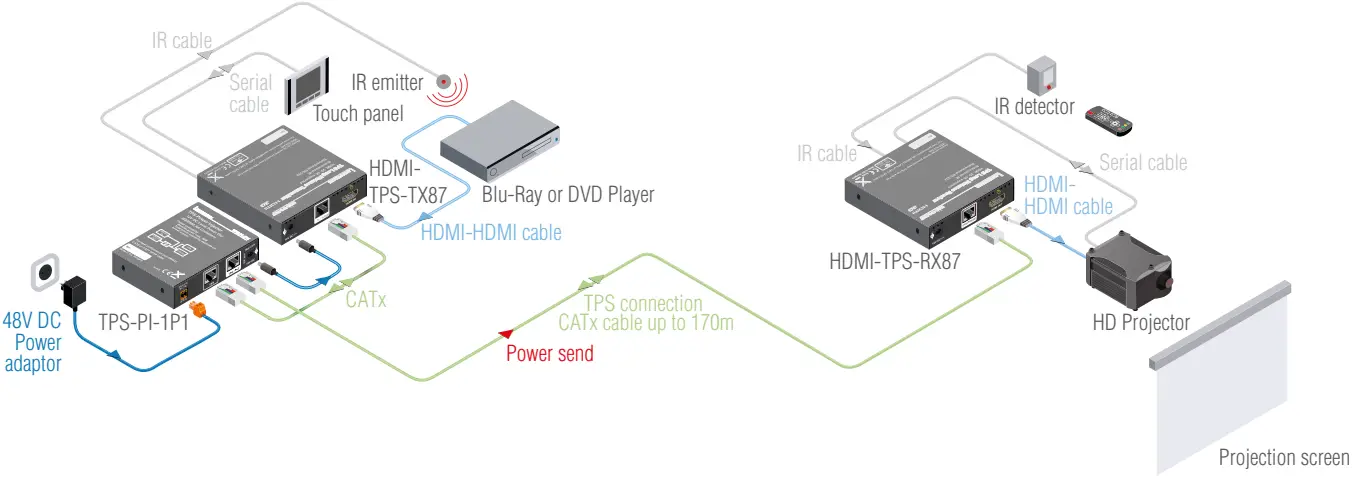 Application Diagram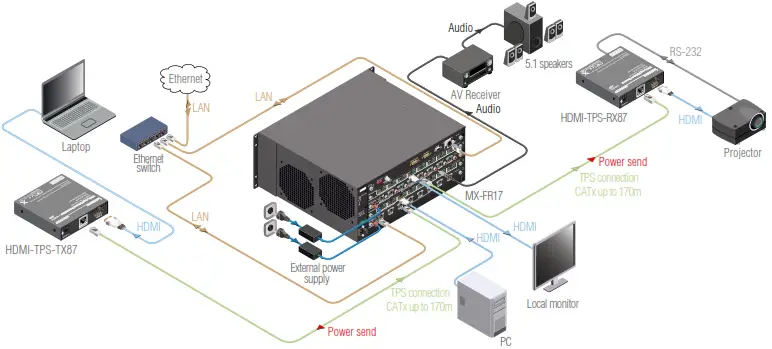
Wiring Guide for RS-232 Data Transmission
TPS-87 extenders are built with a 3-pole Phoenix connector. See the examples below of connecting to a DCE (Data Circuit-terminating Equipment) or a DTE (Data Terminal
Equipment) type device:
| Lightware device and a DCE D-SUB 9 – Phoenix | Lightware device and a DTE D-SUB 9 – Phoenix |
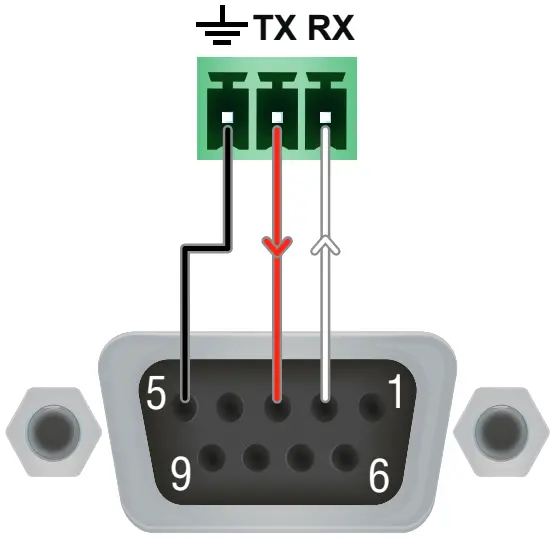 2: TX data transmit 2: TX data transmit3: RX data receive 5: Ground | 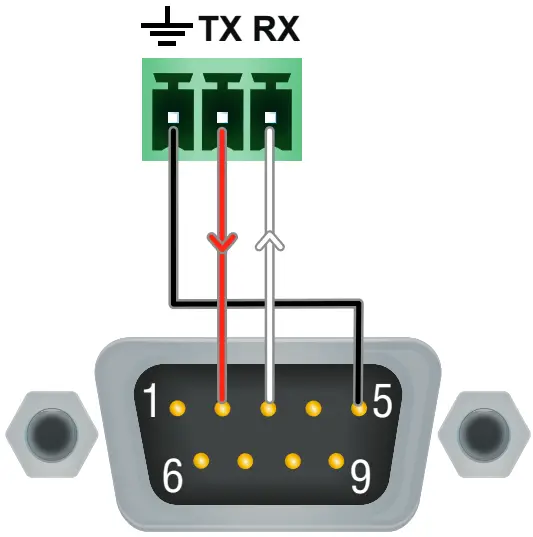 2: TX data receive 2: TX data receive3: RX data transmit 5: Ground |
For more information about cable wiring, see the Cable Wiring Guide on our website www.lightware.com/support/guides-and-white-papers.
Maximum Extension Distances
* Long reach TPS mode supports pixel clock frequencies up to 148.5 MHz.
** AWG 26 cables are not recommended with remote powering.
The above values are valid when the extender is powered by a local adaptor; distances may decrease depending on the powering mode (local or remote) and cable quality.
Resolution | Pixel clock rate | Cable lengths | ||
| CATSe AWG24 | CAT7 AWG26 “ | CAT7 AWG23 | ||
| 1024x768g60Hz | 65 MHz | 100 m 1130 m” | 90 m 1120 m* | 120 m / 170 m. |
| 1280x720pg60Hz | 73.8 MHz | 100 m / 130 m” | 90 m 1120 m* | 120 m / 170 m” |
| 1920x1080pg60Hz (24bpp) | 148.5 MHz | 100 m / 130 m” | 90 m 1120 m* | 120 m / 170 m” |
| 1920x1200g60Hz | 152.9 MHz | 100 m / NA | 90 m I NA | 120 m / NA |
| 1600x1200g60Hz | 162 MHz | 100 m / NA | 90 m I NA | 120 m / NA |
| 1920x1080g60Hz (36bpp) | 223 MHz | 70 m / NA | 70 m I NA | 100 m / NA |
| 3840×2160@30Hz UHD | 297 MHz | 70 m / NA | 70 m I NA | 100 m / NA |
| 4096×2160@30Hz 4K | 297 MHz | 70 m / NA | 70 m I NA | 100 m / NA |
CAT7 SFTP AWG23 cable is always recommended.
Specification
General
Compliance ………………………………………………………………………………………………….CE
Electrical safety ………………………………………………………………… IEC/EN 62368-1:2014
EMC (emission) ………………………………………………………………….. IEC/EN 55032:2015
EMC (immunity) ………………………………………………………………….. IEC/EN 55035:2017
RoHS ………………………………………………………………………………………..EN 63000:2018
Warranty ………………………………………………………………………………………………. 3 years
Operating temperature ……………………………………………0° to +50°C (+32° to +122°F)
Operating humidity ………………………………………………… 10% to 90%, non-condensing
Cooling ………………………………………………………………………………………………….passive
Power
Power supply ………………………………………………………………………power adaptor / PoE
Power consumption (TX) ………………………………………………… 3.6W (typ) / 4.5W (max)
Heat dissipation (TX) …………………………………………. 13 BTU/h (typ) / 16 BTU/h (max)
Power consumption (RX) ……………………………………………….. 5.5W (typ) / 6.5W (max)
Heat dissipation (RX) …………………………………………. 19 BTU/h (typ) / 23 BTU/h (max)
Power over Ethernet (PoE) ………………………………………..via TPS port (IEEE 802.3af)
Power Adaptor
Supported power source …………………………………………………100-240 V AC; 50/60 Hz
Supplied power ……………………………………………………………………………..12V DC, 2.5A
AC power plug …………………………………….. Interchangable (EU, UK, JP/US, AUS/NZ)
DC power plug ………………………………………… Locking DC connector (2.1/5.5 mm pin)
Enclosure
Enclosure material ……………………………………………………………………………. 1 mm steel
Dimensions in mm ………………………………………………………. 100.4 W x 100.4 D x 26 H
Dimensions in inch …………………………………………………………………. 4 W x 4 D x 1.1 H
Weight (TX) ………………………………………………………………………………………………285 g
Weight (RX) ……………………………………………………………………………………………..305 g
Video-Input
Connector type (HDMI transmitters) ……………………..19-pole HDMI Type A receptacle
A/V standard ……………………………………………………………………….. DVI 1.0, HDMI 1.4a
HDCP compliance ………………………………………………………………………………HDCP 1.4
Color space …………………………………………………………………………………… RGB, YCbCr
Video delay ……………………………………………………………………………………………0 frame
Supported resolutions at 8 bits/color * …………………………………………………………………
………………………………. up to 4096×2048@30Hz (4:4:4) or 4096×2048@60Hz (4:2:0)
………………………………. up to 3840×2160@30Hz (4:4:4) or 3840×2160@60Hz (4:2:0)
………………………………………………………. 1920×1080@60Hz (4:4:4) up to 12 bits/color
Reclocking ………………………………………………………………….Pixel Accurate Reclocking
3D support …………………………………………………………………………………………………. yes
Control over CEC ………………………………………………………………….. yes **, transparent
EDID support …………………………………………………………………………………. transparent
* All standard VESA, CEA, and other custom resolutions up to 300MHz (HDMI1.4a) are supported.
Video Output
Connector type (HDMI receivers) ………………………….19-pole HDMI Type A receptacle
The specifications of the output port are the same as in the case of the input port.
Connectors
TPS port ………………………………………………………………………… RJ45 (PoE-compatible)
IR input, output …………………………. 3.5 mm (1.8”) jack connector, pass-through mode
Serial port ……………………………………… 3-pole Phoenix connector, pass-through mode
Further Information
The product brief and further information on this appliance are available at www.lightware.com.
See the Downloads section on the website of the product.
Contact Us
[email protected]
+36 1 255 3800
[email protected]
+36 1 255 3810
Lightware Visual Engineering LLC.
Peterdy 15, Budapest H-1071, Hungary
Doc. ver.: 1.0
19200194
 Lightware Visual Engineering