Technologies
Dell Solutions Enabler 10.0.0 TimeFinder/ Clone
CLI User Guide 10.0.0
August 2022
Rev. 02
Solutions Enabler 10.0.0 TimeFinder Clone
Notes, cautions, and warnings NOTE: A NOTE indicates important information that helps you make better use of your product.
 CAUTION: A CAUTION indicates either potential damage to hardware or loss of data and tells you how to avoid the problem.
 WARNING: A WARNING indicates a potential for property damage, personal injury, or death.
© 2022 Dell Inc. or its subsidiaries. All rights reserved. Dell Technologies, Dell, and other trademarks are trademarks of Dell Inc. or its subsidiaries. Other trademarks may be trademarks of their respective owners.
Preface
As part of an effort to improve its product lines, Dell Technologies periodically releases revisions of its software and hardware.
Functions that are described in this document may not be supported by all versions of the software or hardware. The product release notes provide the most up-to-date information about product features.
Contact your Dell Technologies representative if a product does not function properly or does not function as described in this document. NOTE: This document was accurate at publication time. New versions of this document might be released on Dell Technologies Online Support (https://www.dell.com/support/home). Check to ensure that you are using the latest version of this document.
Purpose
This document is part of the Dell Solutions Enabler documentation set, and describes how to use TimeFinder Mirror, Clone, Snap, and VP Snap.
Audience
This document is intended for use by advanced command-line users and script programmers to manage various types of control operations on arrays and devices using the SYMCLI commands of the Dell Solutions Enabler software.
Related documentation
The following documents provide additional Solutions Enabler information:
| Dell Solutions Enabler Release Notes | Describes new features and any known limitations. |
| Dell Solutions Enabler Installation and Configuration Guide | Provides host-specific installation instructions. |
| Dell Solutions Enabler CLI Reference Guide | Documents the SYMCLI commands, daemons, error codes and option file parameters provided with the Solutions Enabler man pages. |
| Dell Solutions Enabler Array Controls and Management CLI User Guide | Describes how to configure array control, management, and migration operations using SYMCLI commands for arrays running HYPERMAX OS and PowerMaxOS. |
| Dell Solutions Enabler SRDF Family CLI User Guide | Describes how to configure and manage SRDF environments using SYMCLI commands. |
| Dell Solutions Enabler SRDF Family State Tables Guide | Describes the applicable pair states for various SRDF operations. |
| SRDF Interfamily Connectivity Information | Defines the versions of PowerMaxOS, HYPERMAX OS and Enginuity that can make up valid SRDF replication and SRDF/Metro configurations, and can participate in Non-Disruptive Migration (NDM). |
| Dell SRDF Introduction | Provides an overview of SRDF, its uses, configurations, and terminology. |
| Dell Solutions Enabler TimeFinder SnapVX CLI User Guide | Describes how to configure and manage TimeFinder SnapVX environments using SYMCLI commands. |
| Dell Solutions EnablerTimeFinder Clone CLI User Guide | Describes how to configure and manage TimeFinder Clone environments for HYPERMAX OS and PowerMaxOS using SYMCLI commands. |
| Dell SRDF/ Metro vWitness Configuration Guide | Describes how to install, configure, and manage SRDF/Metro using vWitness. |
| Dell Events and Alerts for PowerMax and HYPERMAX User Guide | Documents the SYMAPI daemon messages, asynchronous errors and message events, SYMCLI return codes, and how to configure event logging. |
Typographical conventions
EMC uses the following style conventions in this document:
Table 1. Typographical conventions used in this content
| Bold | Used for names of interface elements Examples: Names of windows, dialog boxes, buttons, fields, tab names, key names, and menu paths (what the user selects or clicks) |
| Italic | Used for full titles of publications referenced in text |
| Monospace | Used for: ● System code ● System output, such as an error message or script ● Pathnames, filenames, prompts, and syntax ● Commands and options |
| Monospace italic | Used for variables |
| Monospace bold | Used for user input |
| [ ] | Square brackets enclose optional values. |
| | | A vertical bar indicates alternate selections. The bar means “or”. |
| { } | Braces enclose content that the user must specify, such as x or y or z. |
| … | Ellipses indicate nonessential information that is omitted from the example. |
Where to get help
Dell support, product, and licensing information can be obtained as follows:
NOTE: To open a service request through Dell Online Support, you must have a valid support agreement. Contact your Dell sales representative for details about obtaining a valid support agreement or to answer any questions about your account.
| Product information | For documentation, release notes, software updates, or information about Dell Technologies products, go to Dell Technologies Online Support at https://www.dell.com/support/home. |
| Technical supporte-Licensing support | Dell Technologies offers various support options. ● Support by Product: Dell Technologies offers consolidated, product-specific information through the Dell Technologies Online Support site. The Support by Product web pages: https://www.dell.com/support/home, select Product Support. These pages offer quick links to Documentation, White Papers, Advisories (such as frequently used Knowledgebase articles) and Downloads. They also offer dynamic content such as presentations, discussion, relevant Customer Support Forum entries, and a link to Dell Technologies Live Chat. ● Dell Technologies Live Chat: Open a Chat or instant message session with a Dell Technologies Support Engineer. To activate your entitlements and obtain your license files, go to the Service Center on Dell Technologies Online Support (https://www.dell.com/support/home). Follow the directions on your License Authorization Code (LAC) letter that is emailed to you. ● Expected functionality may be unavailable because it is not licensed. For help with missing or incorrect entitlements after activation, contact your Dell Technologies Account Representative or Authorized Reseller. ● For help with any errors applying license files through Solutions Enabler, contact the Dell Technologies Customer Support Center. ● Contact the Dell Technologies worldwide Licensing team if you are missing the LAC letter or require further instructions on activating your licenses through the Online Support site. ○ [email protected] ○ North America, Latin America, APJK, Australia, New Zealand: SVC4EMC (800-782-4362) and follow the voice prompts. ○ EMEA: +353 (0) 21 4879862 and follow the voice prompts. |
Your comments
Your suggestions help improve the accuracy, organization, and overall quality of the documentation. Send your comments and feedback to: [email protected]
Revision history
The following table presents the revision history of this document:
Table 2. Revision history
| Document version | Description and/or change |
| 1 | Initial revision of the document. |
| 2 | Updated notes for TimeFinder/Clone operations on SGs. |
Introduction to TimeFinder/Clone
This chapter introduces the Dell Solutions Enabler TimeFinder/Clone and the SYMCLI command for this product.
Topics:
- Introduction to TimeFinder Family
Introduction to TimeFinder Family
Dell TimeFinder/Clone allows nondisruptive creation and management of point-in-time copies of data, enabling simultaneous action of business tasks that were previously sequential. TimeFinder creates and manages point-in-time copies of critical data that can be used for backups, decision support, and to refresh data warehouse, test, and development environments. The ability to access source data during the TimeFinder copy operation eliminates the backup window and provides benefits such as accelerated upgrades and high availability. TimeFinder can also shorten the maintenance window, minimize infrastructure costs, and improve service levels.
TimeFinder/Clone overview
TimeFinder/Clone uses the symclone CLI to create a point-in-time copy.
The TimeFinder/Clone operations are establish, or ( create , activate , recreate), restore , and terminate. NOTE: For SGs, establish is the only operation for arrays running PowerMaxOS. Create/Activate/Recreate actions are not allowed.
TimeFinder/Clone command
s y m c l o n e is used to perform the following operations:
- Creates a copy session for making multiple data copies between a source SG or device and target SGs or devices.
 NOTE: For SGs, establishis the only operation for arrays running PowerMaxOS. Create/Activate/Recreate actions are not allowed.
 - Creates and activates a copy session
- Activates a copy session to make data instantly accessible to multiple target hosts.
- Copies (incrementally) all subsequent changes made to a source SG or device to a target SG or device, after a clone session is fully copied.
- Restores data from a target SG or device back to a source SG or device or to another SG or device.
- Terminates a copy session to remove holds on target SGs or devices and delete device pair information from the array.
- Queries information about the state of multiple copy sessions.
- Verifies the state for selected devices.
- Lists all clone sessions that have been created on the array.
NOTE: The Dell Solutions Enabler CLI Command Reference provides complete details about command syntax.
TimeFinder/Clone operations on SGs
This chapter describes TimeFinder/Clone operations on SGs. NOTE: TimeFinder/Clone operations on SGs are only supported on arrays running PowerMaxOS.
Topics:
- TimeFinder/Clone of SGs overview
- Clone an SG
- Restore data from a target SG
- Terminate clone copy session for SGs
TimeFinder/Clone of SGs overview
For a high-level overview of TimeFinder/Clone functionality for SGs, refer to the Dell PowerMax 2500 and 8500: TimeFinder SnapVX and Clone whitepaper.
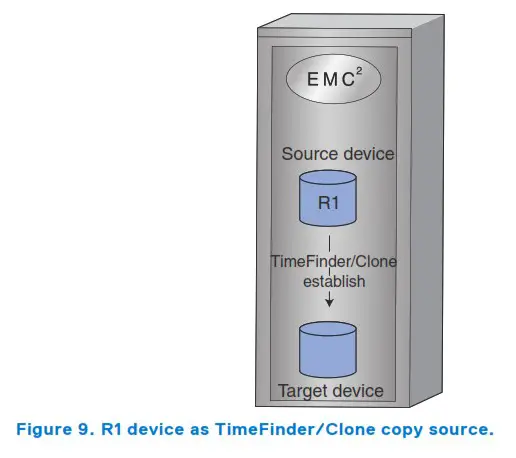
TimeFinder/Clone operations are performed using the s y m c l o n e command to create clone copies of a source SG on one or multiple target SGs.
A single source SG can have up to 256 clone copy sessions. NOTE: For SGs, establish is the only operation for arrays running PowerMaxOS. Create/Activate/Recreate actions are not allowed.
Clone an SG
Description
Use the symclone establish command to create, and then immediately activate a copy session.
Examples
To clone the SG exampleSG, enter:
symclone – sid 118 – sgexampleSG establish – tsg targetExampleSG
NOTE: The symclone establish command sets the target device to Not Ready for a short period time. If using a file system, unmount the target host before performing the establish command.
Restore data from a target SG
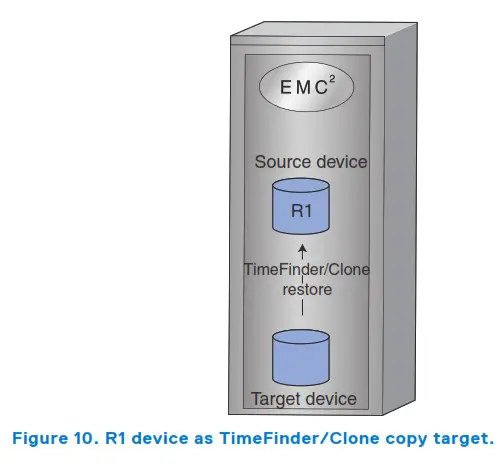
Use the symclone restore command to restore an SG to the target SG. The restore operation requires that the session is differential and the device pair is in the Copied state.
 Support | Dell US