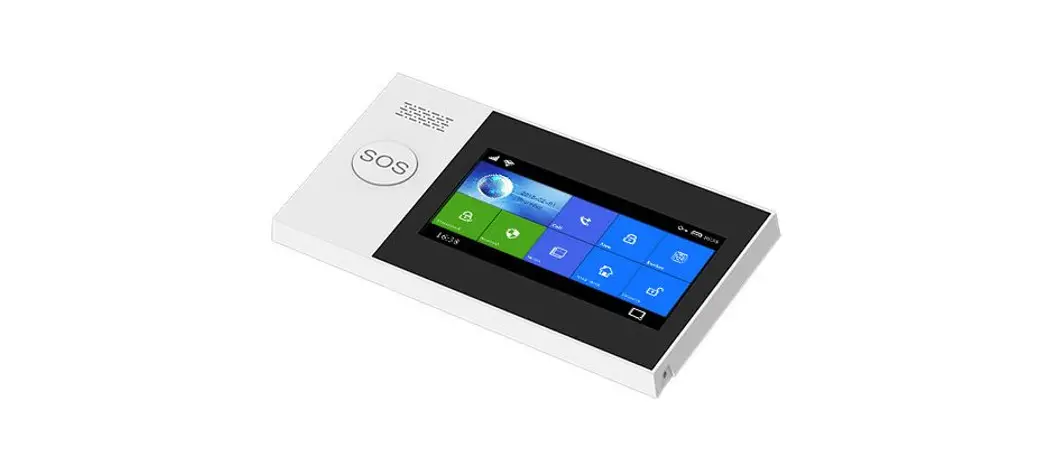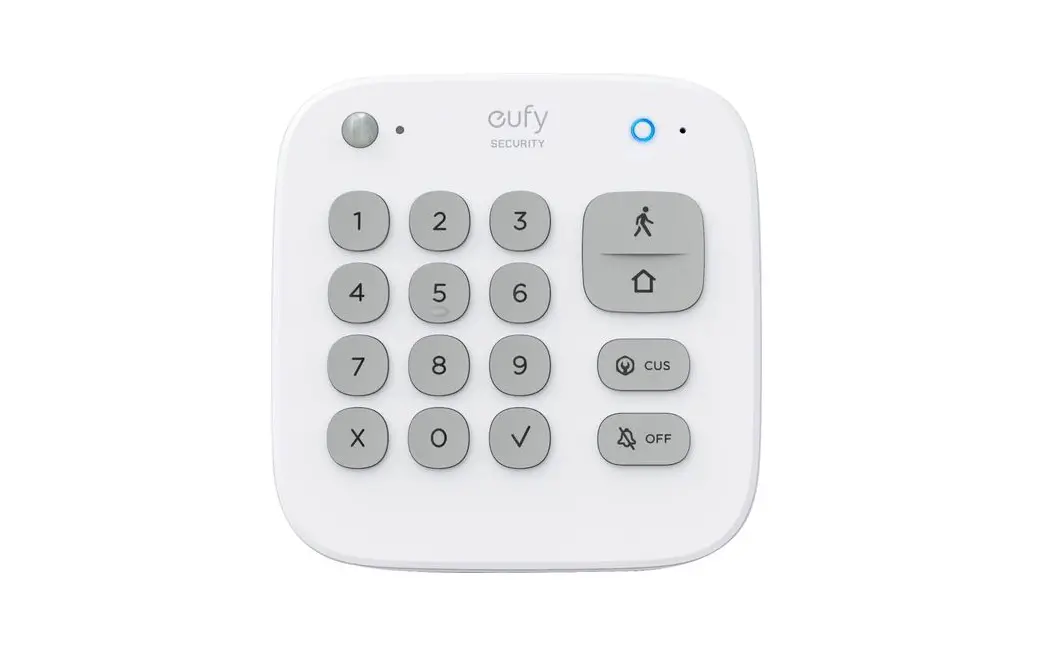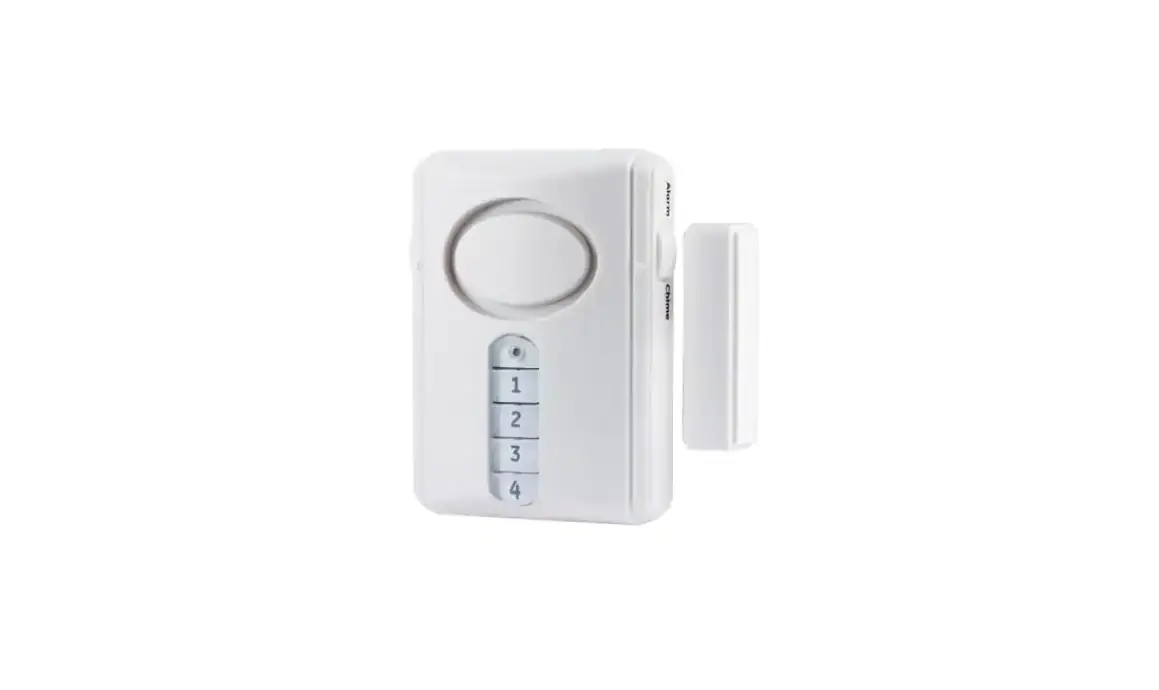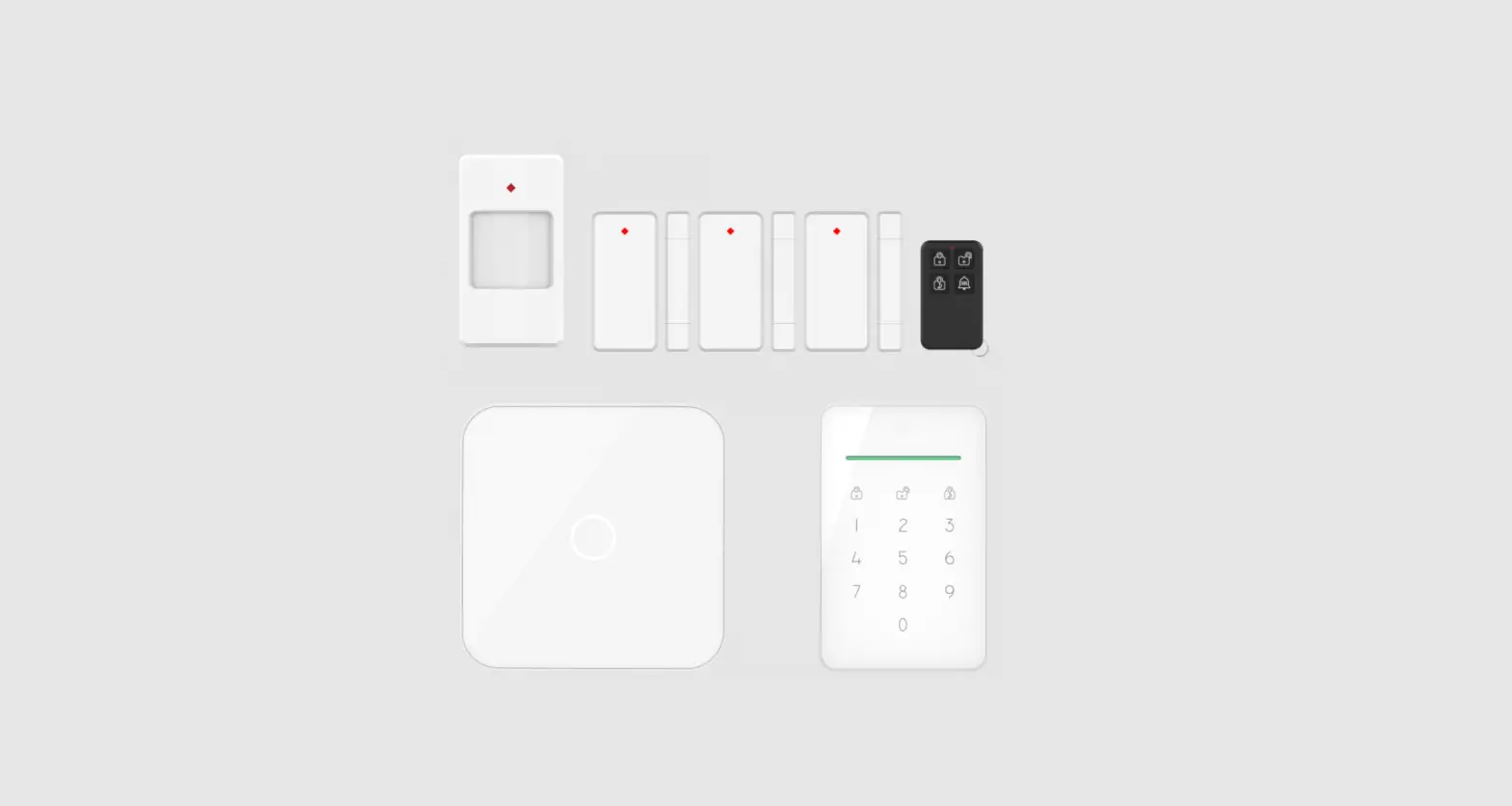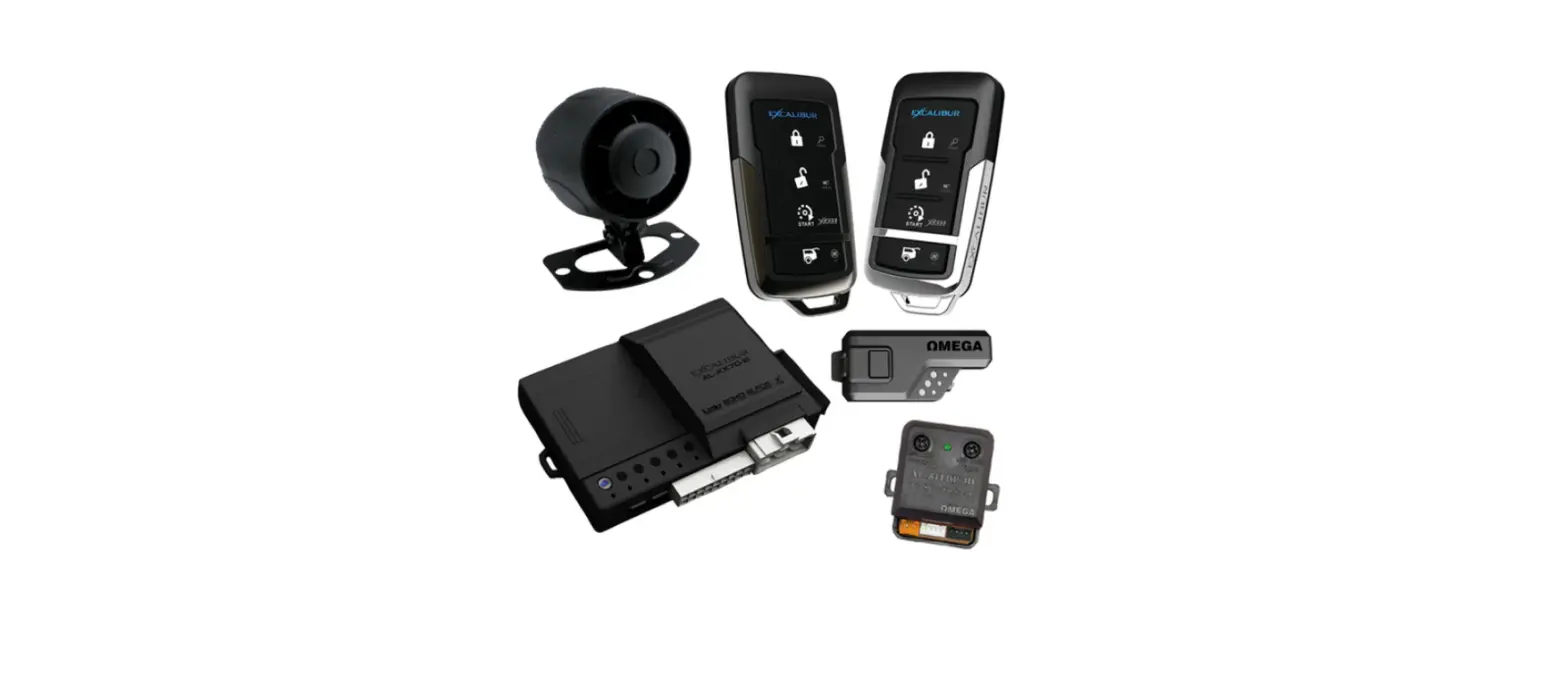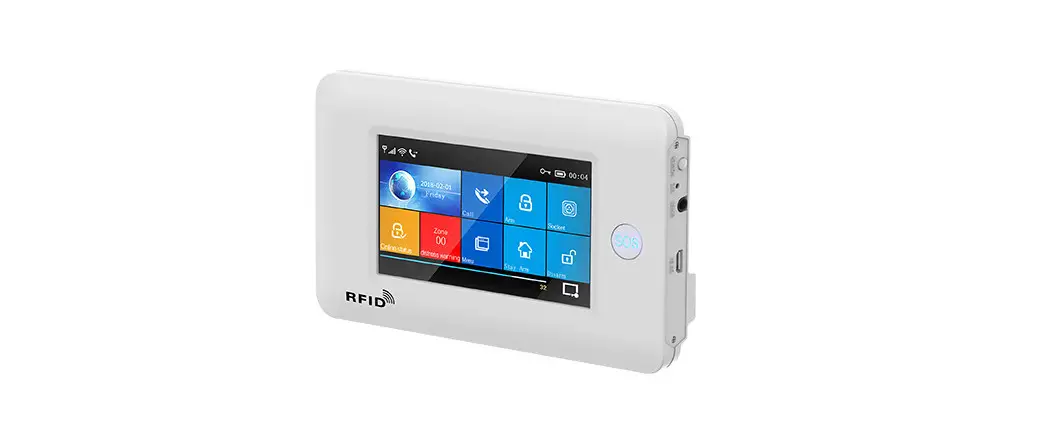
 G106 Burglar Alarm System
User Manual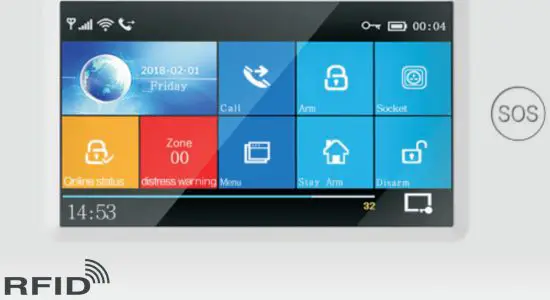

OVERVIEW
Instruction
- Items with
 , illustrated in the user manual, only be valid for the host which matched with the wifi module.
 - An item with the, only used for the customers which have the networking alarm centers and open the service with the alarm center.
Features
- 3–TFT color full touching screen used the simple style human-computer interface
- Main interface status. State magnetic paste, date and time display, the main interface
- Built-in powerful CPU master based on 32-bit Cortex-M3 core.
- Muti-tasking design. great user operation
- Wifi/GSM/3G/GPRS networking alarm system, support mobile app. SMS. invoice alarm center and other multi-channel alarm modules. make the alarm function stable.
- Support SMS arm/Disarm and parameters setting, support invoice arm/Disarm.
- Support main hall. SOS, bedroom, window, balcony, perimeter, smoke. Cooking gas, CO gas, leak water, and another zone setting.
- Support the alarm such as battery problem, low power battery anti-pry alarm, etc.
- Support low power for wireless parts, Tamper alarm
- Door/window not closed notice while armed.
- Support in/out zone, internal zone, peripheral zone, 24 hours zone, doorbell, and another zone
- Support 5 groups alarm phone number set. can set the SMS open/close, dialing open/close respectively.
- External wired alarm connectors: 1 channel external wireless siren. 1 channel alarm linked wireless intelligent socket.
- APP or host can control several so control the home electrical appliances.
- Timed arm/disarm function.
- Support multi-record storing/searching for daily operation
- GSMNViFi network time correcting automatically. ensure the time and date keep correct, support multi-language menu, invoice operation notice, and SMS alarm
- Support 20 seconds message and invoice
- Telephone number function. Support 5 groups number redialing.
- Excellent APP operation feeling and user interface, get the device working status
- Arm/disarm, host alarm to mobile
- Support APP arm/disarm remotely. parameter setting. Parts management and intelligent socket control.
 GPRS networking real-time, get the latest working status anytime, the alarm automatically while offline.
- Reserved remote GPRS TCP/UDP protocol channel, it can be compatible with several alarm center networking protocols.
- Center remote control.
Glossary
- Arm: arrange the security surveillance assignment(Burglar against), make the host get in the warning status, also called defenses setting up, warning or start operation.
- Stay Arm: when users are at home, only need to defend the main entrances and the perimeter, also called a home alarm.
- Disarm: cancel the security surveillance assignment (Burglar against), also called defenses canceling or operation power off.
- Zone triggering: at the arm status, when the detectors detected the human body or the triggers made by the door opened, then caused the warning
- Log off delay: when the host is armed, in order to avoid the alarm made by the user leaving the arm zones, need to set the delay time, also called arm
- Enter the delay: when a user comes back and triggered the detectors, the host will not alarm immediately, give some time for the user to cancel the arm, only alarm if over time, also called alarm delay.
- Alarm: when the host has the alarm assignment, it will cause the strobe alarm locally, then send the SMS alarm to the mobile defaulted, dial the mobile defaulted, push the alarm to the mobile app and send the messenger to the networking alarm center, etc.
Appearance and accessories
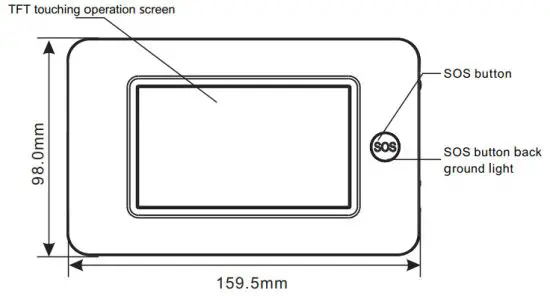
Front
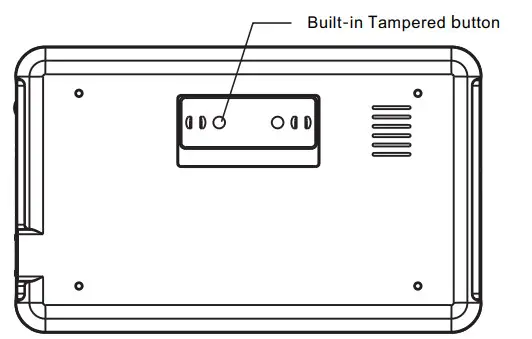
Host back parts bottom view
Side
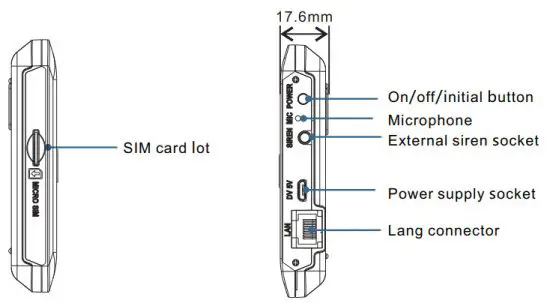
Power on/off & initialization button
| Function | Method |
| Power on | Push this button, it will show “welcome” which means power on successfully |
| Power off | Push this button for 3 seconds till the screen become black, which means power off successfully |
| Initialization | Push 5 times, the host will restart means initial successfully (don’t operate when the screen is locked) |
SOS button
Push this button when emergency, it will cause the strobe alarm locally, then send the SMS alarm to the mobile defaulted, dial the mobile defaulted, push the alarm to the mobile app and send the messenger to the networking alarm center, etc.
SOS button backlight
| Background light | Status |
| Circulate twinkle | Alarm |
| Breathing twinkle | Arm |
| Normally on | Disarm |
Navigating Menus
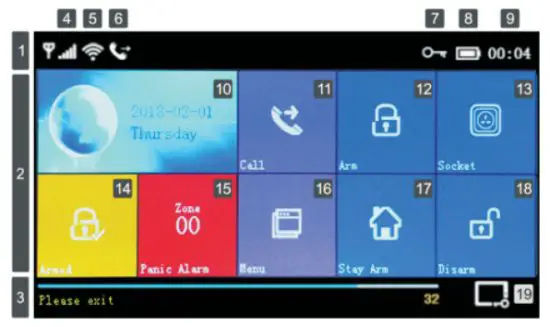
Main interface function and button description
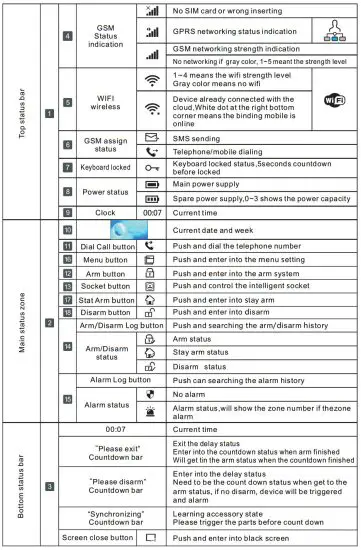
Menu function icon/button
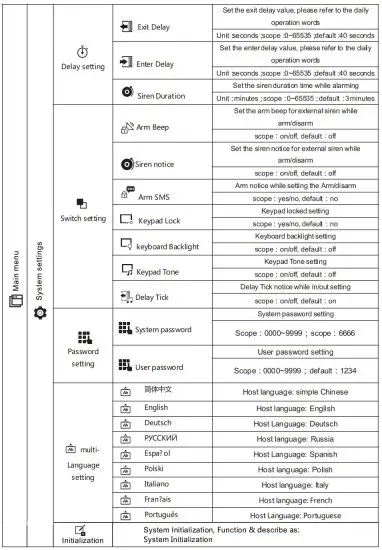
- Keyboard lock open: at the main interface, no pushing with 30 seconds or push
 directly, host locked, user, needs to enter the password for further operation.
 - keyboard backlight closed: at the main interface, no pushing for 30 seconds or pushing directly, host backlight will be closed to save the power.
- After choosing one language, the operation notice, display, and SMS message will switch to the same language, the host will restart while finished.
 directly, host locked, user, needs to enter the password for further operation.
Disassembly
Start operation Insert SIM card: as the direction of the below picture, insert the standard to MICRO SIM SIM card lot,(need to be cut if big SIM card), when hearing the “ticktack” sounds, means the card is ready。
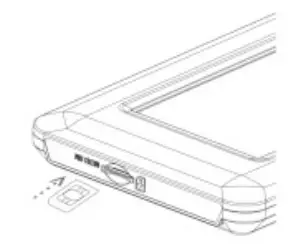 Power on: Insert the power supply with the USB 5V, Make the host power on.Start the host: Push the on/off button while the host is closed, succeed while the screen showed “welcome:Power off: Push the on/off button for about 3 seconds while the working status till the screen becomes black, which means successfully.
System initialization
Press the on/off button 5 times, the host will restart means the system initialization is successful, all the parameters set recovered to the factory setting will delete all the learned remote controllers, sensors, RFIDs, records, languages, and time zone will be recovered to factory settings too.  network IP address also be deleted, the GPRS of the host will be dropped line, need to send SMS and reset the IP if want to be online.
 Be cautious of this function, only be used while the password forgot, the host works normally, parameter set disorder or the unknown detectors, remote controller or RFID be learned. This operation is no use while the keypad is locked.
Menu operation
This item is based on the Resistance touch screen design, use the press induction to push the screen button for operation.
The function does not describe in this Part, please refer to the details for the menu function button.
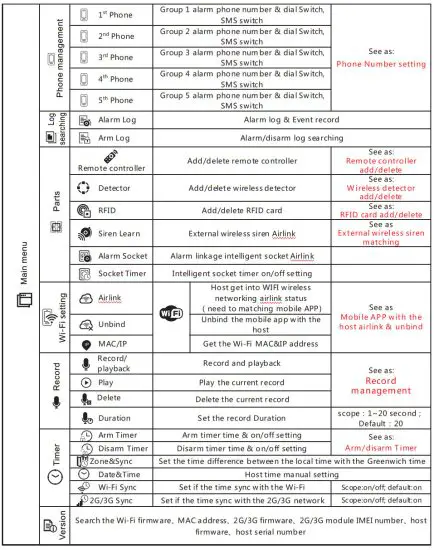
Functions described in this part: include the phone number setting, remote controller add/delete, wireless detector add/delete and the external wireless siren matching can be set by mobile app.(only with )
)
Add alarm phone numbers
5 alarm phone numbers can be set, each number can be set with the independent dial switch and SMS switch.
For example to set the Alarm No. 1:Press: Main menu phone number management alarm 1 Phone, enter alarm phone No.1 interface setting.Press enter& edit the alarming number(not more than 18 digits).Press
  and choose if open the dial function or not, if choose the ”on”, it will dial this number while the alarm happens.Press
  and choose if open the SMS function or not, if choose the “on”it will send a message to this number while the alarm happens.Press
  and confirm, the host will note” Setting OK”.
Match code with/delete remote-controllersPush: Main menuPartsRemote controller, enter the interface for the remote controller setting.Push or
or  for page down, it will show all the Synchronized remote controller
Sync the new remote controllerPress  host will show ”Synchronizing”, and get into the dialogue box for 20 seconds cut down of the remote controller launching.Press any button on the remote controller and send the signal to the host.The host shows” Learning OK”, which means the remote controller Sync correctly, it will list all the synchronized remote controller IP addresses.
If the host shows” Device code has been learned”, means the remote controller code has been learned or the other learned detector code has been repeated, please change the remote controller.
DeletePress the remote controller listed, and  delete the chosen remote controller.Press
 , and delete all the remote controllers.
Match code with/delete wireless detectors
Press: Main menu Parts Detector, enter into the detector setting interface.Pressor page down, it will list all the Synced wireless detectors.
Sync the new wireless detectorsPress, host get into the” Set Name/Mode/Number” interface.Press choose the name of the zone for the none Sync wireless detectors.Press
 choose the type of the zone for the none Sync wireless detectors.
Choose” Stay Arm Active”, after the armor stay arm setting, the detectors in this zones will alarm while being triggered. Front Door、 Window、 Balcony、 Perimeter use this
kind of detector.
Choose“Out Arm Active, after the stay arm setting, the detectors in this zones will not alarm while being triggered. Living Room、 Bedroom and other internal places use this kind of detector.
Choose 24 Hours Active,” it will alarm while be triggered anytime, SOS Panic、 “ ”, Smoke/Fire、Gas、CO、water Leakage use this kind of detectors.
Choose Close it will not alarm while triggered.
For wireless doorbell, please choose Doorbell “ ”, “ ”, It will note “dingdong” anytime while be triggered.Press , enter & edit the zoning code of the none Sync wireless detectors, please do not be repeated the code of the other zones.Press, the host will show” Synchronizing” and will get into the dialogue box for 20
seconds cut down of the wireless detectors.Trigger the wireless detectors and send signals to the host.When the host shows” Learning OK”, which means the detectors Sync successfully, it will list all the names of the detectors, type, code, and address code.
If the host shows” Device code has been learned”, means the detectors have been learned or repeated with the code of the other learned remote controller, need to be changed.
DeletePress the listed detectors, and delete the chosen detectors.Press, and delete all the detectors.
Match code with/delete RFID tag
Press: Main menu →Parts →RFID card, enter the interface of the RFID setting.Pressor page down, it will list all the Synced RFID cards.
Sync the new RFID cardPress host will show” Synchronizing”, and will get into the dialogue box for 20 seconds cunt down of the RFID card.Put the RFID card close to the induction zone.The host shows” Learning OK”, RFID Sync succeeds, it will list the card number which synced successfully.
If the host shows” Device code has been learned”, it means the RFID card code has been learned.
DeletePress the listed RFID card number, and delete the relevant RFID card.Press, and delete all the RFID cards.
Match code with wireless siren
This operation is used to Sync with the wireless strobe siren.Press: Main menu→ Parts, enter into parts setting interface.Press the” SET” button of the wireless siren, hear the sound 2 times, and loose off, siren led flashed means synced successfully.Press the siren syncing button, the host will note” Learn Signal Sent” and send the wireless signal to the siren.Siren makes the one long sound and one short sound notice, which means the syncing succeed.!Wireless siren synced with the host, the siren will alarm while the alarm happened on the host.
Wireless alarm linkage
Sync with alarm linkage intelligent socketPress: Main menu →Parts→ alarm linkage intelligent Alarm Socket, and enter into the alarm linkage intelligent socket setting interface.Operate the none sync wireless intelligent socket to get into syncing status.(see the intelligent socket user manual).Press” on” and” Off”
 in turns, host send the wireless signal to the intelligent socket.Intelligent socket led flashed means the syncing succeeds, then operate log off the syncing status(see the user manual of the intelligent socket).Press
  switch” on” or” Off”, can set the alarm linkage function open or not.!Press or, check if it can control the intelligent socket used to check if the intelligent socket sync with the host successfully or not.
If the alarm linkage function is set as “on”, while the host is alarmed, the synced socket will open automatically, when the host is disarmed or the alarm sound is finished, the socket will be closed.
Smart home appliance
Full sockets
Interface press: press Socket, and enter into the intelligent socket controlling interface.
Syncing
For the syncing method between the host with the socket, please refer to the” alarm linkage intelligent socket syncing” one host can sync with several sockets.
Press” On” or” Off” host will have the on/off signal to control the wireless socket.
the socket which synced the host successfully can use the host or the mobile app to control on/off, or can do timer control for the socket.
Socket Timer
The host can several groups of timers used to open/close the intelligent socket timed. Each group can set the socket number, time, time on/off, etc.
Press: Main menuPartsSocket Timer, enter into the intelligent socket timer interface.
Add the timer
Press, and enter into the socket timer setting interface.Press + or – in  , set the socket number.Press + or – in
 , and adjust the timer time.Press the week item in
 , and set the day of the week.Press choose timer on or off.Press, and finish the setting.
Edit
Press the serial number in front of the Timer, can edit the relevant timer, same as the above.
Delete
Press behind the timer list, and delete the relevant timer.
Press, and delete all the Timer.
Message recording and playback
Alarm record
You can record in the host for 20 seconds, when an alarm happened, the host will dial the default numbers and playback this record.Press: Main menu Record Record & playback.The host shows the dialogue box ” Busy and waiting please” when changed to” Recording” the record starting cut down.The user speaks toward the host, the record words need to be simple, such as” This XXX’s home, have been intruded, please give help”.When the record is finished, hot will show” Playing” and playback automatically.
After the playback is finished, the press will note” Please wait to save”. When the host shows” Operation OK”, the record succeeds.
Time arm/disarm
User can use their timetable, to set the time auto arm and time auto disarm, avoiding repeating daily or forgetting the operation.
Arm TimerPress: Main menu Timer Arm Timer.Press +and-, adjust the timer arm time.Press, choose” On”.Press, and finish the setting.
Disarm TimerPress: Main menu Timer Disarm Timer.Press +and-, adjust the time of the disarm timer.Press, choose“on“or” Off”.Press, and finish the setting.
Mobile app
Please refer to the attachment
Remote SMS
Set parameters by SMS
The user only needs to edit the SMS in the below format and send it to the host SIM card number to finish the setting.
| * | System password | * | Address setting | Contensetting | * | Address setting | Content setting | * |
One SMS can include one or several addresses and content but need to be separated by*, the head and the end must be* each address should be 2 digits, otherwise, it may have the unexpected result, each SMS must be less than 160 bytes, we suggest to finish all the contents in one SMS.,
| address | function | Content & scope | Factory setting |
| 35 | Redial times while dialing failure | 1-255 times | 1 time |
| 36 | bell ring times while auto receiving | 1-255 times | 1 time ( in the future ) |
| 38 | username password correct | 0000-9999must be 4 digits | 1234 |
| 39 | System password correct | 0000-9999must be 4 digits | 6666 |
| 43 | parameter initialization | see note 1 | |
| 51 | alarm phone 1:` setting | See note 2 | closed |
| 52 | alarm phone 2nd setting | See note 2 | closed |
| 53 | alarm phone 3’d setting | See note 2 | closed |
| 54 | alarm phone 4th setting | See note 2 | closed |
| 55 | alarm phone 5th setting | See note 2 | closed |
| 62 | Search the GSM field strength | empty | |
| 90 | Set the GPRS server IP address | this setting is only valid while the GPRS is online, see note 3 | empty |
| 92 | Set the GPRS APN | this setting only be valid while the GPRS is online, see note 4 | COMMENT |
| 93 | Set domain name of the network time sever | us.ntp.org.cn | |
| 94 | Set the time difference with the standard Greenwich time | +8 |
Setting comment(all the examples used the default system password:6666):
- Parameter initialization: keep the learned remote controller, wireless detectors, and RFID cards, others recovery to the factory setting. Set the SMS content as *6666*43*.
- Alarm phone number setting format: xxxxxxxxxxx,A,B
Such as: xxxxxxxxxxx is the phone number(no more than 18 digits),A: alarm voice dial switch(1-on,0-off),B: SMS alarm switch(1-on,0-off).
For Example:
Set 2 alarm phone numbers, the one 13912345678used to receive the voice dialing and SMS, the one 075581234567only used to receive the voice dialing, then the SMS content should be: *6666*5113912345678,1,1*52075581234567,1,0*. - IP address setting format should be:aaa,bbb,ccc,ddd,xxxxx
Such:as,aaa,bbb,ccc,ddd is the IP address,xxxxx is the port number,use the comma to separate for each address.
For example:
Set the GPRS network sever IP address is 116.62.42.223,port number is 2001, then the SMS content setting should be: *6666*90116,62,42,223,2001*. - Set the local GSM operator GPRS access point APN
For example:
Local GSM operator GPRS access point APN is the internet. beeline.kz, then the SMS content setting should be:*6666*92internet.beeline.kz*.
Set control panel’s name by SMS
Set one name to the host, used for the prefix for the alarm SMS, so as to distinguish the position for each alarm host.
SMS setting format: 1234@XXestate X building, 1234 is the user password,@is the commend words, “XX estate a building” is the content name(no more than 40 digits).
Set zones’ names by SMS
Set the name of each zona, used to distinguish each zona when the alarm happened.
SMS setting format: 1234@XX bedroom ,1234 is the user password,@ is the commend digit, XX is the zoning code(scope00~99), “bedroom” is the name want to set(no more than 20 digits).
Query parameters by SMS
Alarm record
SMS format:*6666*62* ,host echo:
| SYSTEM set: | |
| SN: | Host serial number |
| LANGUAGE: | Host language |
| ENGINEER PASSWORD: | Engineer password |
| USER PASSWORD: | User password |
| WIFI RSSI: | GSM field strength value(0 or 99means the signal is unusual) |
| GSM CSQ: | WIFI field strength value |
Searching system 2
SMS format:*6666*90* ,host echo:
| SYSTEM set2: | |
| APN: | Name of the GPRS access point |
| GPRS IP: | GPRS network IP sever & client number |
| NTP: | Network time sever domain name |
| TIME ZONE: | GMT standard time |
| SERVER: | Sever |
Alarm phone number searching setting
SMS format:*6666*51* ,host echo:
| PHONE se1: | |
| 1:00 | 1st alarm phone number, voice switch, SMS switch, general switch |
| 2:00 | 2nd alarm phone number, voice switch, SMS switch, general switch |
| 3:00 | 3rd alarm phone number, voice switch, SMS switch, general switch |
| 4:00 | 4th alarm phone number, voice switch, SMS switch, general switch |
| 5:00 | 5th alarm phone number, voice switch, SMS switch, general switch |
| REDIAL COUNTER: | voice alarm redial counters |
Delay searching setting
SMS format:*6666*33* ,host echo:
| DELAY set: | |
| ENTRY: | delay entering(unit: second) |
| EXIT: | delay quit(unit: second) |
| SIREN: | alarming time(unit: minutes) |
Searching switch setting
SMS format:*6666*46* ,host echo:
| SWITCH set: | |
| ARM/DISARM BEEP: | arm/disarm Beep switch(1:on,0:off) |
| ALARM BEEP: | alarm beep switch(1:on,0:off) |
| ARM/DISARM SMS: | arm/disarm SMS switch(1:on,0:off) |
Learned remote controller & detector quantities
SMS format:*6666*26* ,host echo:
| DETECTOR learned: | |
| REMOTE: | learned remote controller quantities |
| DETECTOR: | learned detectors quantities |
| RFID: | learned RFID card quantities |
Phone function
Push in the main interface, and enter into the phone number dialing interface.
Push to look over the dialed phone number.for the below status, a phone calls will be forbidden: GSM network abnormal, arm/disarm, phone alarm be in progress.
Daily operation
Users can operate the alarm host in any way as below:
Remote controller, keyboards, RFID cards.
Remote SMS
Mobile phone APP
GPRS alarm center
Out arm
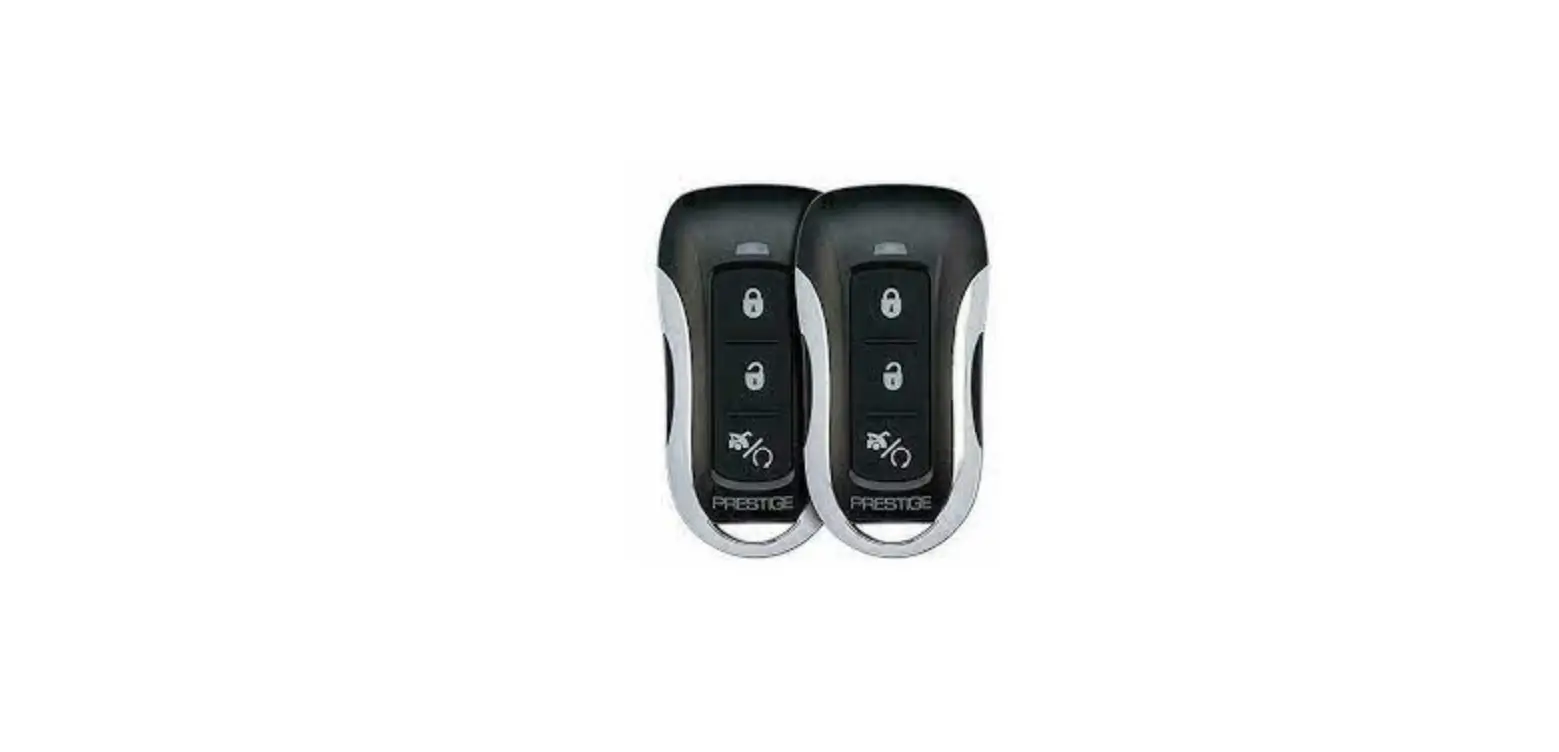
By remote control press the  key to trigger “Out Arm”.
By keyboard: In Main Interface, press: to trigger Out Arm.
By RFID tag: In disarm mode, put the RFID card close to the sensitive area in the bottom right corner of the alarm host.
By remote SMS: Send SMS message 1234#1 (1234 is the user password), the alarm host will send “System Armed!” SMS to mobile phone to confirm.
By APP: In Main Menu, select the “ ” icon, and the operation for “ Arm” is completed.
The alarm host reminder: A reminding voice “System armed” will be heard, the Main Interface displays “Armed” and “Please exit”, and an exit time progress bar appears.
The user should leave the alarm zone before exit time. If Arm/Disarm SMS switch is on, the preset phone will receive an SMS of “System Armed!”.”In Out Arm mode, all defense zones are on alert status. If there are any defense zones is been triggered, the alarm host will generate a sound alarm. Meanwhile, the alarm host sends alarm SMS and makes calls to a preset phone number, and pushes alarm information to APP/GPRS alarm center. If the alarm host learned about the alarming leakage smart plug, the plug will switch on when alarming.
Stay arm
By remote control: press  the key to trigger “Stay Arm”.
By keyboard: In Main Interface, press to trigger. “Stay Arm”
By remote SMS: Send SMS message 1234#3 (1234 is the user password), the alarm host will send“System Stay Armed!” SMS to mobile phone to confirm.
By APP: In Main Menu, select the “ Stay Arm” icon, and the operation for “Stay Arm” is completed.
The alarm host reminder: A reminding voice “System armed” will be heard, and the Main Interface displays “Stay Armed”. If Arm/Disarm SMS switch is on, the preset phone will receive the SMS “System Stay Armed! “.
In Stay Arm mode, only valid Stay Arm defense zones are on alert status. If any defense zones is been triggered, the alarm host will generate a sound alarm, Meanwhile, the alarm host sends alarm SMS and make calls to a preset phone number, and push alarm information to APP/GPRS alarm center. If the alarm host learned alarming. leakage smart plug, the plug will switch on when alarming.
Disarm
By remote control: press the  button to trigger “Disarm”.
By keyboard: press on the main interface .
.
By RFID tag: in out arm/stay arm mode, put the RFID card close to the sensitive area in the bottom right corner of the alarm host.
By SMS: Send SMS message 1234#2 (1234 is the user password), and the alarm host will send “System Disarmed!” SMS to mobile phone to confirm.
By APP: In Main Menu, select the “ Disarm” icon, and the operation for “Disarm” is completed.
The alarm host reminder: A reminding voice “System Disarmed” will be heard, and the Main Interface displays “Disarmed”. If Arm/Disarm SMS switch is on, the preset phone will receive the SMS “System Disarmed!”.
In Disarm mode, all alarm procedures will be terminated, If Arm/Disarm SMS switch is on, the preset phone will receive the SMS “System Stay Armed! “.If the alarm host learned alarming leakage smart plug, the plug will switch off.
Confirm the operation result by SMS
<The alarm host name>:
The result of remote operation
Alarm & remote monitoring
This hosting support several alarm types, when an alarm occurs, will send the SMS messages which include the detector name and the alarming number to the mobile phone users, push the alarm information to the mobile app, send the alarm SMS to the network alarm center, and dial the phone number at the same time, user can do field monitoring and remote control after connected.
below type alarms also be supported AC Power Failure alarm still be valid within 5 seconds if the AC power fails.Backup battery low power(when the main power fails, the alarm still be valid if the backup battery voltage is lower than 3.45V and lasts 10 seconds).Main power Restored.
SMS alarm
An alarm occurred, and the host will send an SMS manager to the preset phone numbers, which should be as below.
<Host Name>:
Current alert!
Prevent Zone: xx
Voice alarm & remote monitoring
Auto dial number setting
When an alarm occurred, the host will dial the preset phone numbers. (dial switch should be opened), after user answers, the host will display the current alarm type first, if there is a default recording, it will have a voice notice “Press 1 is arm, Press 2 is disarmed, Press 3 to monitor, Press 4 to talk”. I find the misinformation by the user, press 2 to disarm and end the alarming progress. Users can also press 3 to close the scene alarm.Just hang up the phone without a monitor. If the user fails to answer or dial-up fails, the host will re-press as reset times till the user answers.
Answer the alarm phone automatically
When the preset number calls the alarm host, the host will switch on automatically, and then the host can monitor the site or control the host according to the voice prompt.
Mobile app alarm receiving procedure
When there is an alert, the host will push alarm information to the cell phone first, the user opens the APP and enters the main menu, APP intermediate state icon will display a red alarm ICONS, and a display the current alert type. The user can select the “Alarm information” “Alarm Log” icon to query all user operation records and host Alarm records pushed to the phone.
Networking alarm receiving procedure
When an alarm occurs, the host swill sends the alarm message to the network monitoring center via the GPRS. The emergency response can be handled quickly after the central police have responded to the alarm.
This function will only be effective after the host has opened the user network alarm function and service.)The IP address must be set up using SMS, and this function will be effective. APN must also be set in foreign or other areas. as for these two settings methods, please see SMS message setting parameters).
Technical parameter
- Input Voltage: DC5V(micro USB standard connector supply)
- Operating current: screen off<120mA, screen on<200mA
- Standby current:<80uA
- Siren output:<500mA
- Wireless Frequency:315/433/868/915Mhz
- Wireless code:eV1527
- GSM system:850/900/1800/1900MHz
- WIFI system:IEEE802.11b/g/n wireless standard
- Spare battery:3.7V/1000mAh Libattery
- Operating temperature:-10~55℃
- Relative humidity:<80%(no condensation)
- Product size:160x98x18(Length x Height x thickness)
Packing list
- 1 host with the spare battery
- Micro USB 5V/1000mA standard power supply
- Others as the customer OEM requirement.
 92internet.beeline.kz
 areas.as