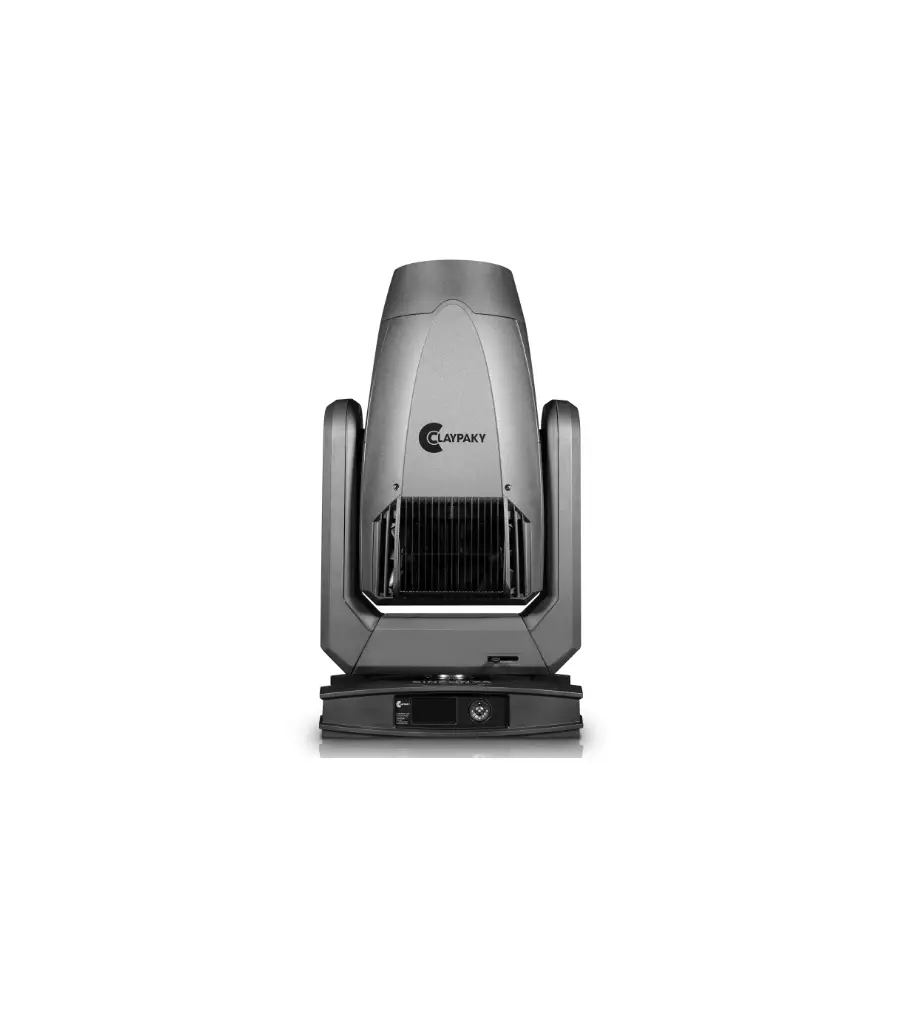
ClayPaky CL3018 Sinfonya Profile 600 LED
Congratulations on choosing a Claypaky product!
We thank you for your custom.
Please note that this product, as all the others in the rich Claypaky range, has been designed and made with total quality to ensure excellent performance and best meet your expectations and requirements.
SAFETY INFORMATION
SAFETY INFORMATION
IMPORTANT: Claypaky recommends you carefully read and keep the safety information on this product, also available in digital format at the following link:
www.claypaky.com Ref: FIS02A – Safety Information Sinfonya Profile 600
UNPACKING AND PREPARATION
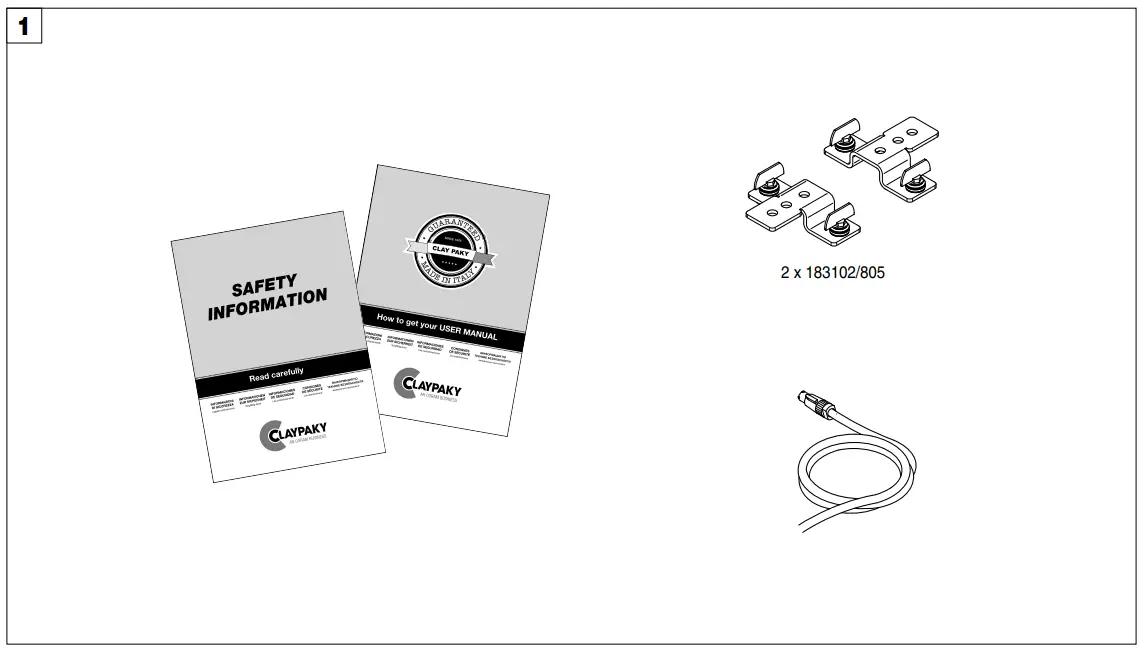
Packing contents – Fig. 1
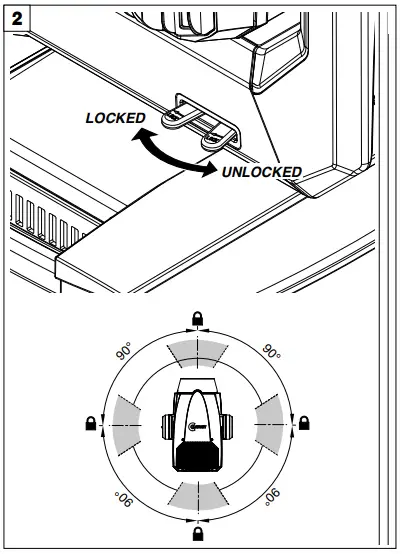
PAN Mechanism Lock and Release (every 90°) – Fig. 2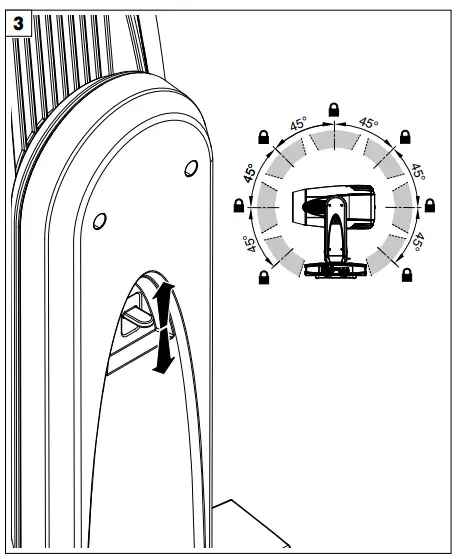
TILT Mechanism Lock and Release (every 45°) – Fig. 3
INSTALLATION AND START-UP
Installing the fixture
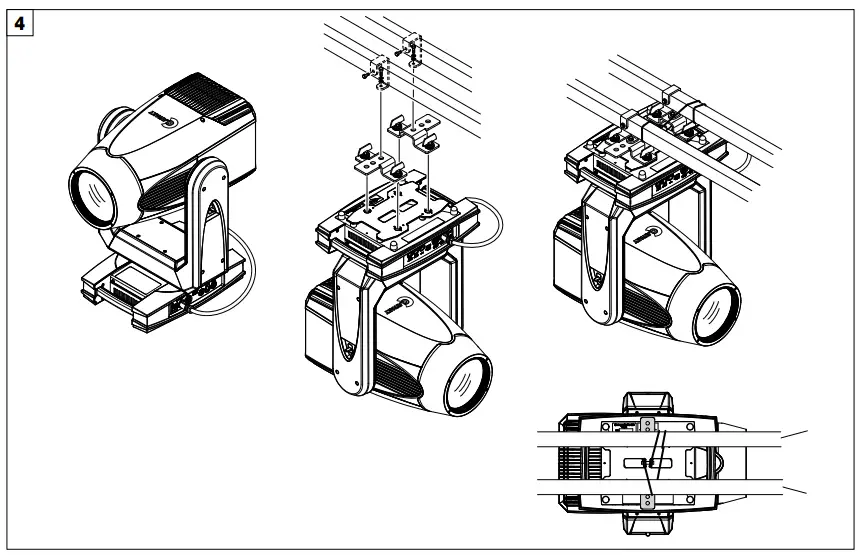
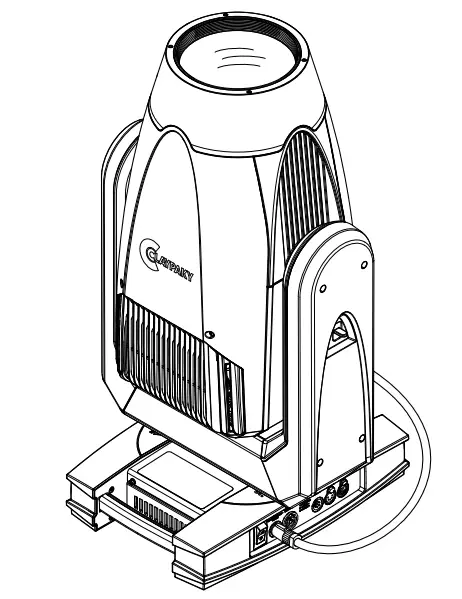
Installing the projector – Fig. 4
The projector can be installed on the floor resting on special rubber feet, on a truss or on the ceiling or wall.
WARNING: with the exception of when the projector is positioned on the floor, the safety cable must be fitted. (Cod. 105041/003 available on request).
This must be securely fixed to the support structure of the projector and then connected to the fixing point at the centre of the base
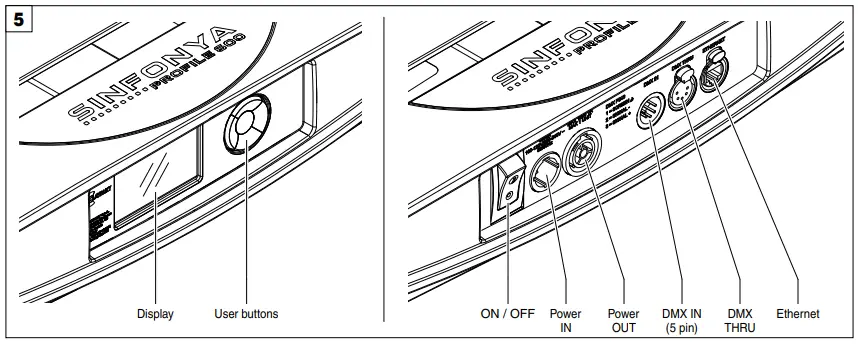
Control panel – Fig. 5
Connecting to manis supply
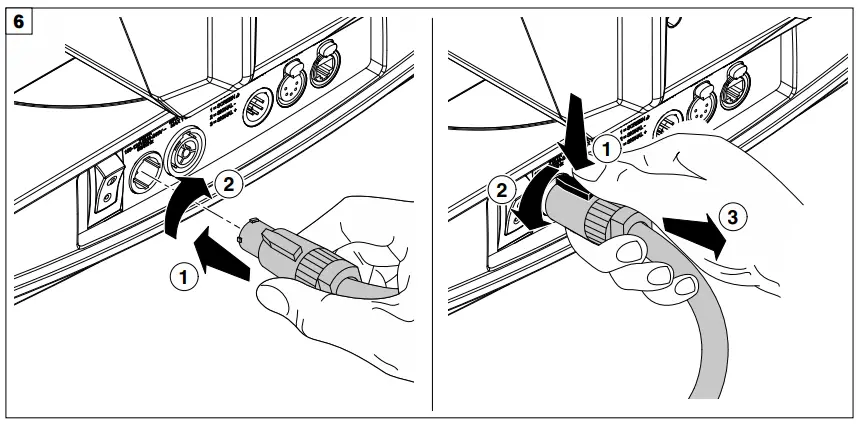
Connecting and disconnecting power cable – Fig. 6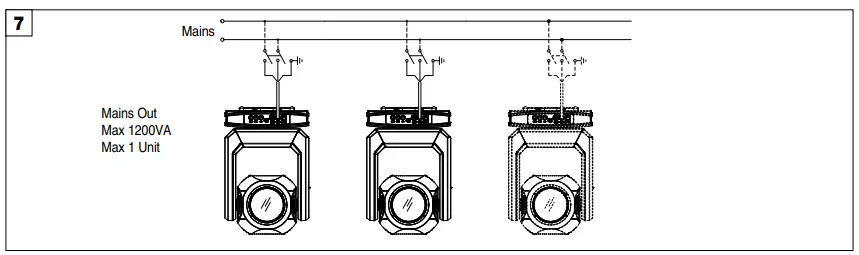
Connecting to the mains supply – Fig. 7
Connecting the control signal line: DMX / Art-Net
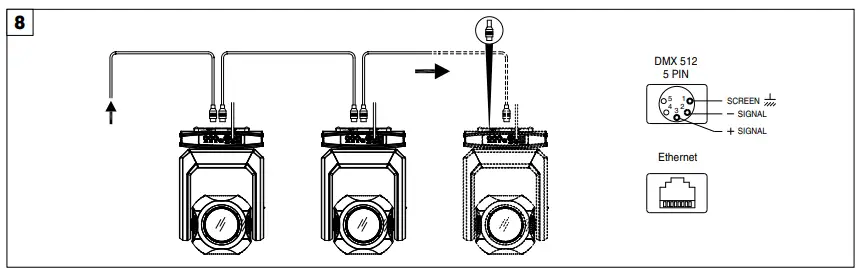
Connecting to the control signal line (DMX) – Fig. 8
Use a cable conforming to specifications EIA RS-485: 2-pole twisted, shielded, 120Ohm characteristic impedance, 22-24 AWG, low capacity. Do not use microphone cable or other cable with characteristics differing from those specified. The end connections must be made using XLR type 5 pin male/female connectors. A terminating plug must be inserted into the last projector with a resistance of 120Ohm (minimum 1/4 W) between terminals 2 and 3.
IMPORTANT: The wires must not make contact with each other or with the metal casing of the connectors. The casing itself must be connected to the shield braid and to pin 1 of the connectors.
Switching on the fixture and basic Set Up

Switching on the projector – Fig. 9
Press the switch. The projector starts resetting the effects. At the same time, the following information scrolls on the display:
On conclusion of resetting in case of absence of the dmx signal, Pan and Tilt move to the “Home” position (Pan 128 bit – Tilt 128 bit). The control panel (Fig. 8) has a display and buttons for the complete programming and management of the projector menu. The display can be in one of two conditions: rest status and setting status. When it is in the rest status, the display shows the projector’s DMX address and the Fixture ID address (if set).
During menu setting status, after a wait time (about 30 seconds) without any key having been pressed, the display automatically returns to rest status.
It should be noted than when this condition occurs, any possible value that has been modified but not yet confirmed with the  key will be cancelled.
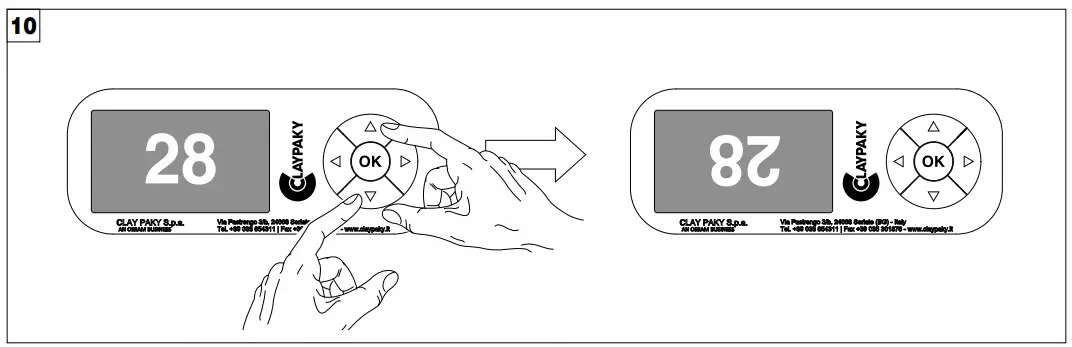
Reversal of the display – Fig. 10
To activate this function, press UP  and DOWN
  keys simultaneously while the display is in the rest mode. This status will be memorised and maintained even for the next time it will be switched on. To return to the initial state, repeat the operation all over again.
Setting the projector starting address
On each projector, the starting address must be set for the control signal (addresses from 1 to 512).
The address can also be set with the projector switched off.
Setting the projector Fixture ID
On each projector, the Fixture ID address must be set for an easy identification of the fixtures in an installation (ID from 1 to 255).
The Fixture ID address can be set with the projector switched off.
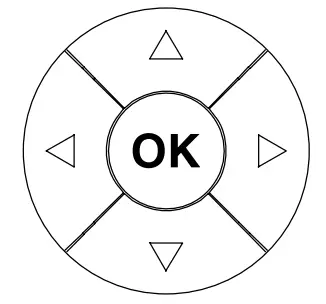 |
| Confirms the displayed value, or activates the displayed function, or enters the successive menu. |
| Decreases the value displayed (with auto-repetitions) or passes to the next item in the menu. | |
| Increases the value displayed (with auto-repetitions) or passes to the previous item in a menu. | |
 | Return to the top level | |
 | Commute from units, tens, hundreds, in the “Address”, “Fixture ID” and “Calibration” menu. |
- Press
 once – “Main Menu” appears on the display.
 - Use the UP
 and DOWN keys to select the menu to be used:
• Setup (Setup Menu): To set the setting options.
• Option (Option Menu): To set the operating options
• Information’s (Information’s Menu): To read the counters, software version and other information.
• Manual Control (Manual control Menu): To trigger the test and manual control functions.
• Test (Test Menu): To check the proper functioning of effects
• Advanced (Advanced Menu): Access to the “Advanced menu” is recommended for a trained technical personnel. - Press to display the first item in the selected menu.
- Use the UP and DOWN keys to select the MENU items
Setting addresses and options with the projector disconnected
The projector’s DMX address, as well as other possible operating options, can also be set when the appliance is disconnected from the electricity supply.
All that is needed is to press to momentarily activate the display and thus access the settings. Once the required operations have been carried out, the display will switch off again after a wait time of 30 seconds.
MAINTENANCE
Opening the covers
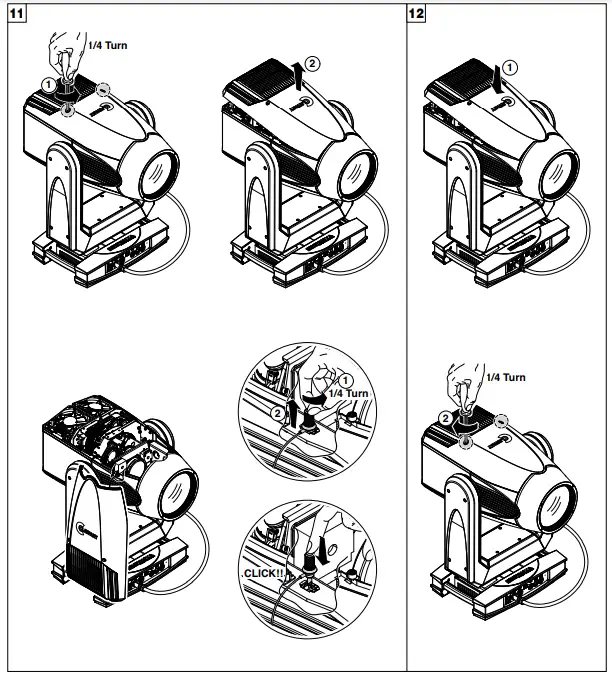
Locking and releasing Pan and Tilt movements – Refer to the instructions in the UNPACKING AND PREPARATION section.
Opening the head covers – Fig. 11.
Closing the head covers – Fig. 12.
Periodical cleaning
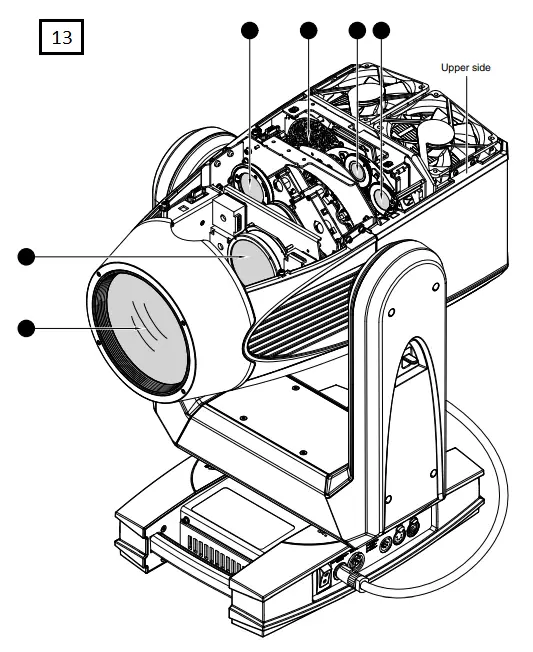
Periodical cleaning – Fig. 13
To ensure optimal operation and performance for a long time it is essential to periodically clean the parts subject to dust and grease deposits. The frequency with which the following operations are to be carried out depends on various factors, such as the amount of the effects and the quality of the working environment (air humidity, presence of dust, salinity, etc.).
Use a soft cloth dampened with any detergent liquid for cleaning glass to remove the dirt from the reflectors, from the lenses and filters. It is recommended that the projector undergoes an annual service by a qualified technician for special maintenance involving at least the following operations:
- General cleaning of internal parts.
- Restoring lubrication of all parts subject to friction, using lubricants specifically supplied by Claypaky.
- General visual check of the internal components, cabling, mechanical parts, etc.
- Electrical, photometric and functional checks; eventual repairs.
Effects module removal
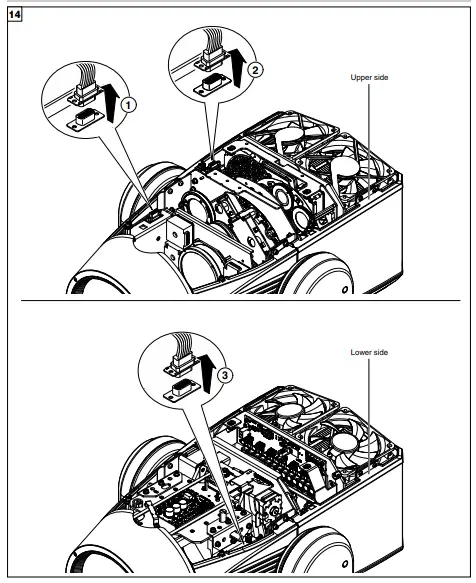
Extraction of the effect modules: Preliminary operations – Fig. 14.
NOTE:
- Do not disconnect wiring harnesses when the fixtures is switched-on, to avoid to damage electronic boards.
- Do not switch-on the fixtures with wiring harness disconnected.
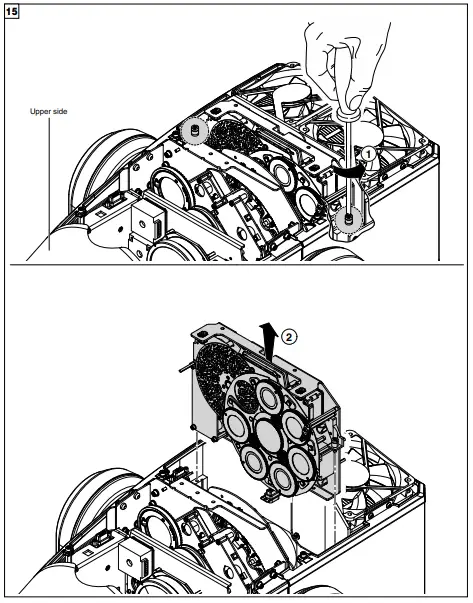
Extraction of the effect modules – Fig. 15.
IMPORTANT: Grasp the modules using the support structure and not the details which could get damaged.
Insertion of the effect modules: Repeat the operations indicated in Fig. 15, 16 and 17 in reverse order.
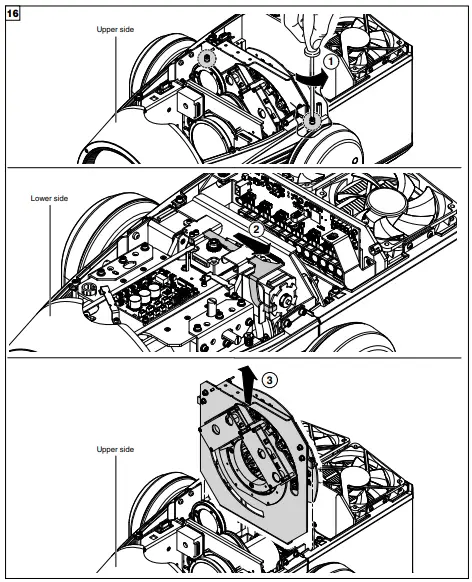
Extraction of the effect modules – Fig. 16.
IMPORTANT: Grasp the modules using the support structure and not the details which could get damaged.
Insertion of the effect modules: Repeat the operations indicated in Fig. 15, 16 and 17 in reverse order.
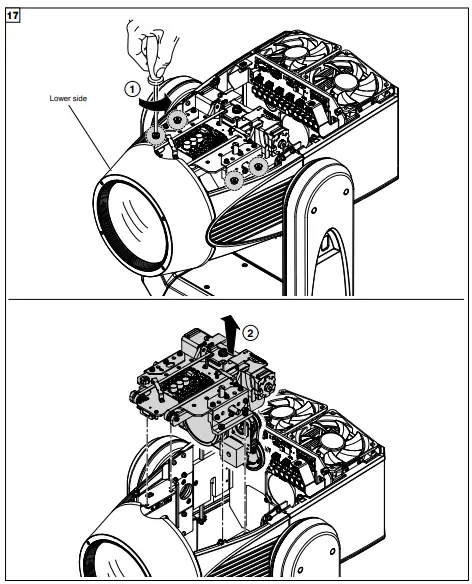
Extraction of the effect modules – Fig. 17.
IMPORTANT: Grasp the modules using the support structure and not the details which could get damaged.
Insertion of the effect modules: Repeat the operations indicated in Fig. 15, 16 and 17 in reverse order.
Cleaning of the filters
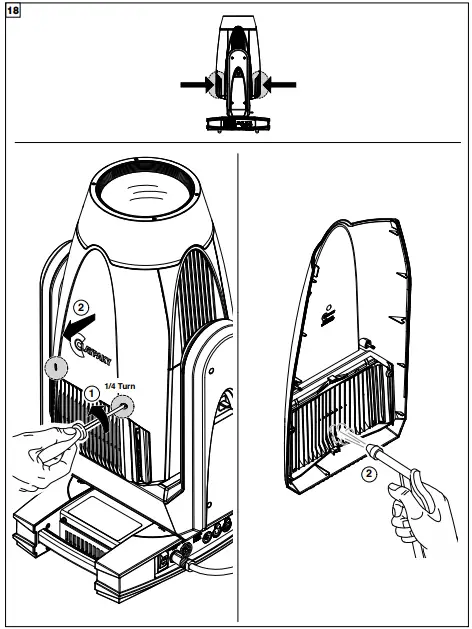
Cleaning of the grids – Fig. 18.
Rotating gobos
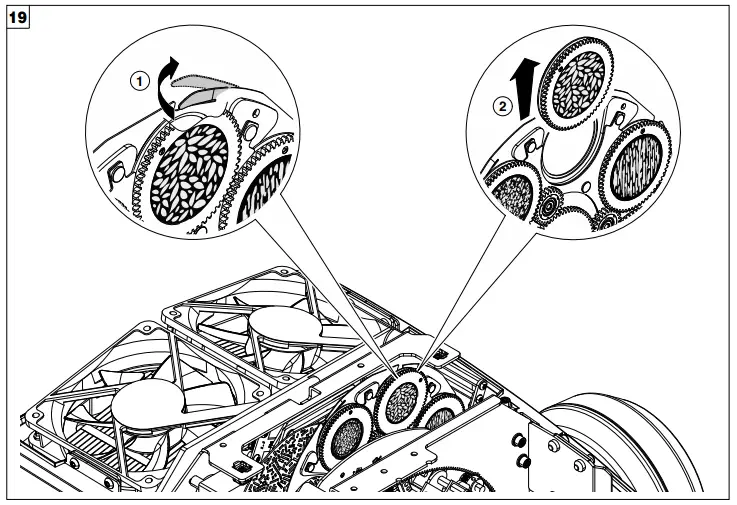
Bearing group replacement – Fig. 19
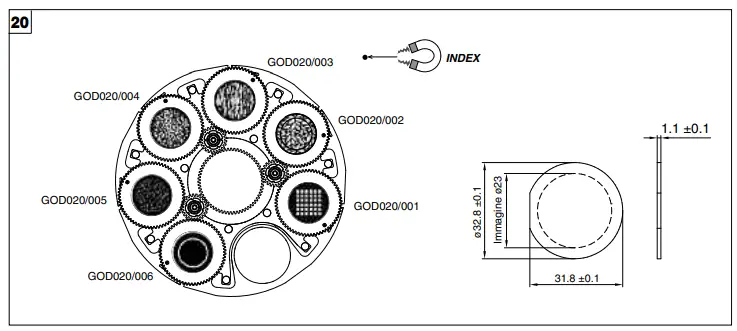
Replacing rotating gobos (max 23 mm image – thickness 1 mm) – Fig. 20
- The rotating gobo wheel only use dichroic glass gobos (it is not possible to use metal gobos);
- For more information contact Claypaky;
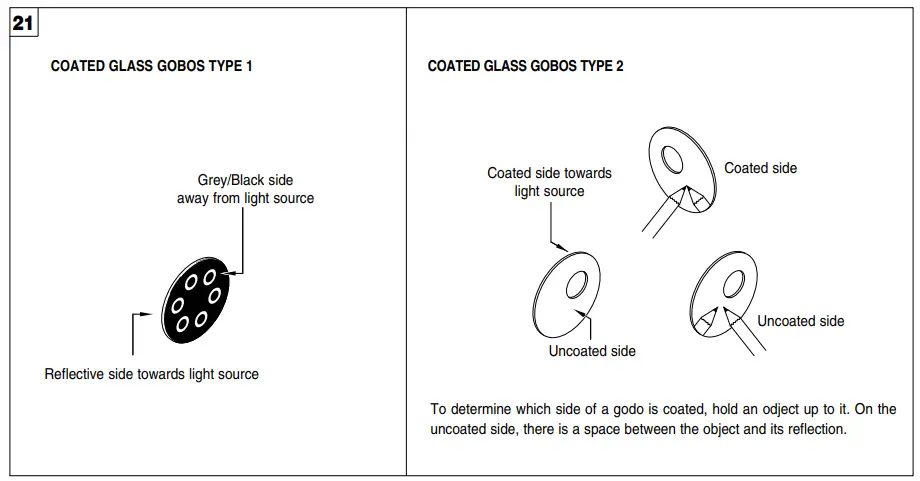
Gobo orientation – Fig. 21
The pictures shown the correct gobos orientation.
Battery removal
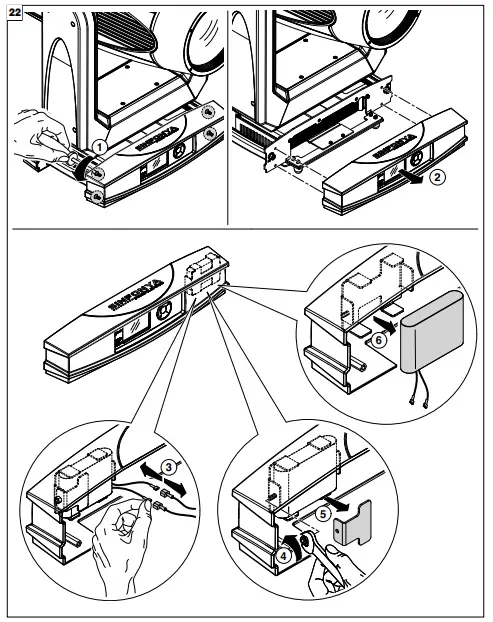
 This product contains a rechargeable battery. To preserve the environment, please dispose the battery at the end of its life according to the regulation in force.
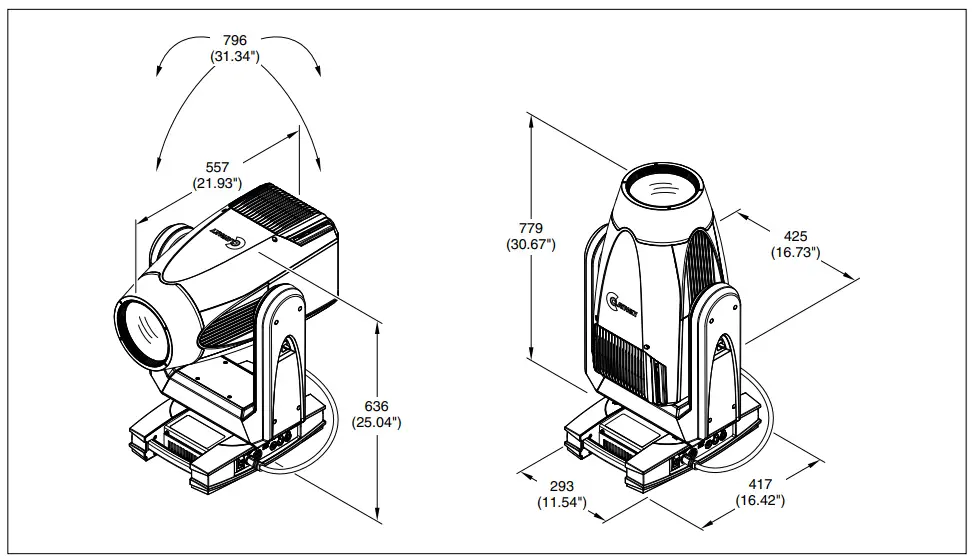
DIMENSIONS
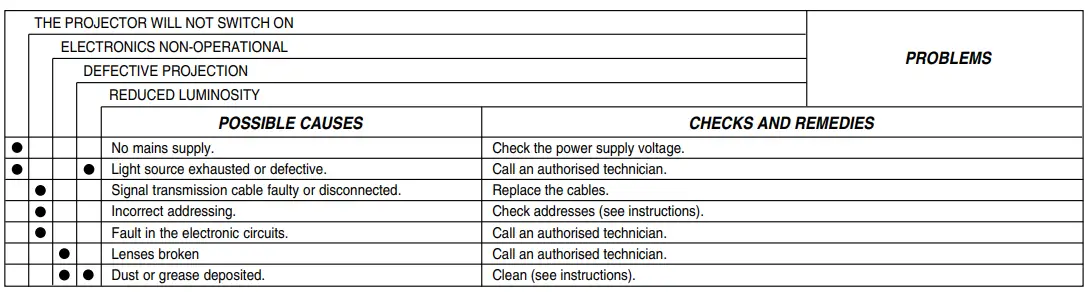
CAUSE AND SOLUTION OF PROBLEMS
CLAYPAKY S.p.A. – Via Pastrengo, 3/b – 24068 Seriate (BG) Italy – Tel. +39-035-654311- www.claypaky.com

 Clay Paky - professional lighting