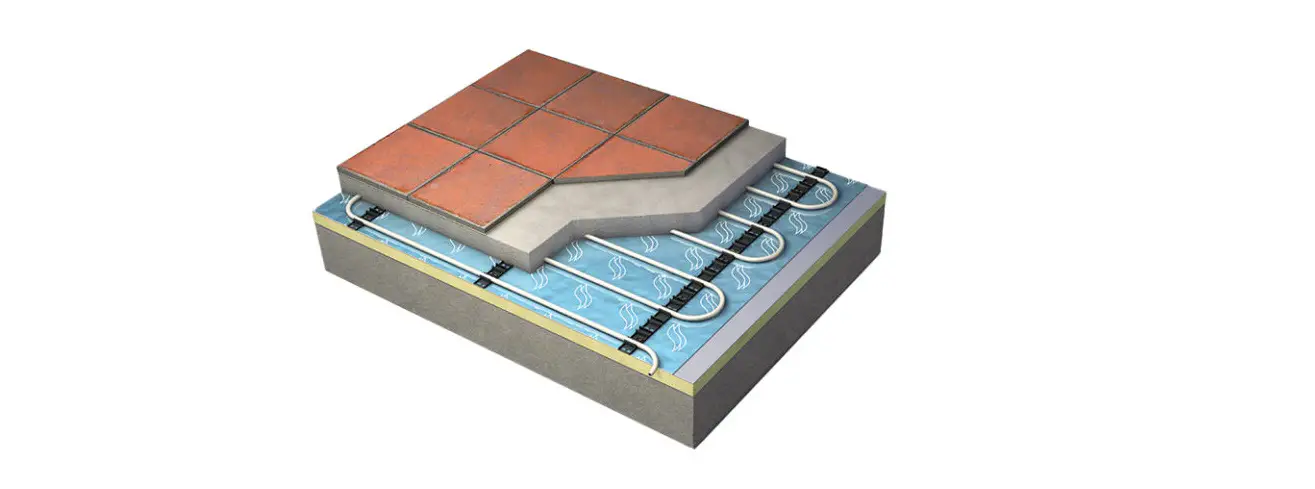

saco Nu-heat Underfloor Heating System
Control of individual heating zones – My system
- Pressing My System will display a list of all rooms connected to the central touchscreen console.
- Rooms in blue indicate that communication is working correctly. Rooms in red have a communication fault.
- The Functions tab enables alterations to multiple thermostats in terms of SETBACK, temperature HOLD, and LOCK.
- The room name can be selected in order to make adjustments to individual rooms and to copy time settings between thermostats.
Temperature hold
The HOLD function allows a set temperature to be selected for a set number of hours. To activate the hold function:
- Press: My system > Select room > Temp hold
- Select the desired temperature and the hold time
- Press done
To cancel a temperature hold: - Press: My system > Select room > Temp hold > Cancel hold
Set Temperature
The same temperature can be temporarily adjusted. The temperature will revert back to the programmed setting at the next set time period. To adjust the set temperature:
- Press: My system > Select room.
- Press arrow set temperature buttons to select the desired temperature.
- Press Apply to update the thermostat.
Time and temperature periods (programming)
Different temperatures can be selected for different period of the day. To set the time and temperature periods:
- Press: My system > Select room > Edit
- Select program mode (Weekday, Weekend or Day of the week)
- Set the time and temperature required for each of the four periods Wake, Leave, Return and Sleep (if you do not wish to use all of the time settings, enter – -:- – to disable that level).
- Press Done if complete OR copy if you wish to copy the same time and temperature settings to a different thermostat. (The thermostat must be set to operate in the same 5/2 or 7 day program mode).
Copying time and temperature settings to other thermostats:
- Press Copy
- Select thermostats to copy the time periods to, when selected they will change from blue to green. Grey zones cannot be selected.
- Press Done.
Control of individual heating zones – My system > Functions
Lock
The Lock function allows multiple room thermostats to be locked so that they cannot be adjusted locally. When the lock function is active the individual room thermostats will display the padlock icon.
To activate the Lock function:
- Press: My system>Functions>Lock
- Select which room thermostats are to be locked/unlocked (rooms in green will be locked, rooms in blue will be unlocked)
- Press Done.
Set Back Function
The set back function allows multiple room thermostats to be placed in setback mode (Default setting of 12ºC). When the set back is active the individual room thermostats will display the FROST icon. To activate/deactivate the set back function:
- Press My System>Functions>Set back.
- Select rooms to activate/deactivate set back (Rooms in green will have the setback activated, rooms in blue will not have the setback activated).
- Press Done.
Hold
The Hold function allows a set temperature to be selected for multiple room thermostats, and for a set number of hours. To activate the temperature hold:
- Press My System > Functions > Hold
- Set the desired temperature and hold time
- Press Next
- Select zones which the temperature hold should be applied to (Rooms in green will have the temperature hold activated, rooms in blue will not have the temperature hold activated).
- Press Done.
To cancel a temperature hold:- Press: My System > Functions > Hold > Cancel Hold.
- Select which rooms should have the temperature hold cancelled (Rooms in blue will have the temperature hold cancelled, rooms in green will remain active and rooms in grey cannot be selected).
Example settings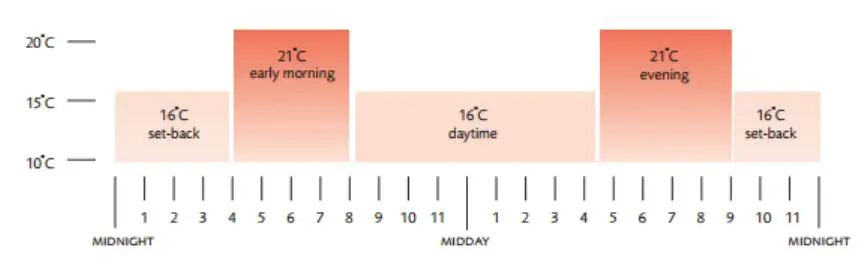
Control of hot water system – My system
Pressing My system will display a list of all rooms connected to the central touchscreen console, the room with the hot water thermostat should be selected. If the room is not known the individual thermostats can be checked, the hot water thermostat can be identified by the presence of Timer On/Timer off on the LCD screen.
Hot water time periods (Programming)
Activating/deactivating hot water system
- Press My system > Select room with hot water thermostat.
- To activate/deactivate the hot water move the toggle switch between On/Off.
To set the time periods:
- Press: My system > Select room with hot water thermostat > Edit > Hot water.
- Select program mode (Weekday, Weekend or Day of the week).
- Set the time required for each of the four periods Wake, Leave, Return and Sleep (If you do not wish to use all of the time settings, enter – -:- – to disable that level).
- Press Done.
Other system functions
Summer mode
The summer mode function allows multiple room thermostats to be placed in set back mode (Default setting of 12ºC this can be altered by going into Options > Setting > System >Setback temp.)
When the set back is active the individual room thermostats will display the Frost icon.
To activate/deactivate the summer mode function:
- Press Summer
- To activate/deactivate the summer mode function move the toggle switch between On/Off
- Press Edit
- Select rooms to activate/deactivate set back (rooms in green will follow the summer mode, rooms in blue will not).
- Press Done.
Quick View
The Quick view screen displays the following information regarding the status of each zone (this may take a few seconds to update after making a change).
• Room set temp (Set room temperature).
• Actual temp (Actual room temperature).
• Heat status (Status of room heating).
• Timer status (Status of hot water system)
To edit individual room thermostats:
1. Quick view > Select room > Detail
Temperature hold
The Temp hold function allows a set temperature to be selected for multiple room thermostats, and for a set number of hours (this is an alternative way of setting temperature hold).
To activate the temperature hold:
- Press Temp hold
- Set the desired temperature and hold time
- Press next
- Select zones which the temperature hold should be applied to (Rooms in green will have the temperature hold activated, rooms in blue will not have the temperature hold activated).
- Press Done
To cancel a temperature hold:
- Press Temp hold > Cancel hold
- Select which rooms should have the temperature hold cancelled (Rooms in blue will have the temperature hold cancelled, rooms in green will remain active and rooms in grey cannot be selected).
Away
The away function allows the hot water and heating systems to be switched off. When this mode is active the console will display HOME. To activate the away function:
- Press Away
- To activate the away function move the toggle switch to ON
- Press Edit
- Select which rooms should have the away function activated (Rooms in green will have the away function enabled, rooms in blue will not have the away function enabled).
To deactivate the away function
1. Press Home.
Hot water boost
The hot water boost function can be used to activate hot water heating during periods outside of the set time periods.
To activate the hot water boost:
1. Press HW Boost
2. Set the time period required for the hot water boost
3. Press Done
To deactivate the hot water boost
1. Press HW Boost
2. Set the time period required for the hot water boost to 00 hours
3. Press done.