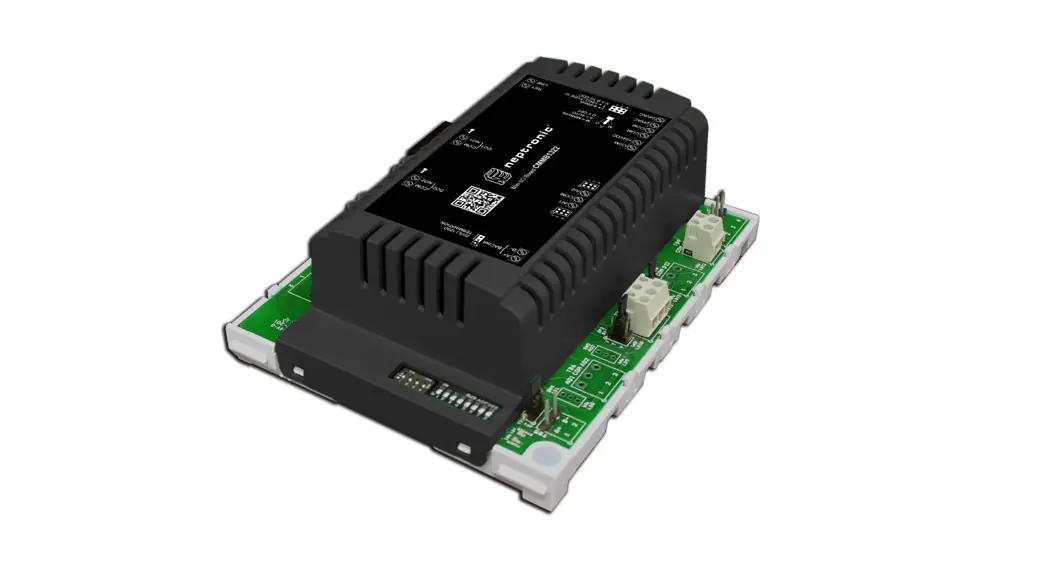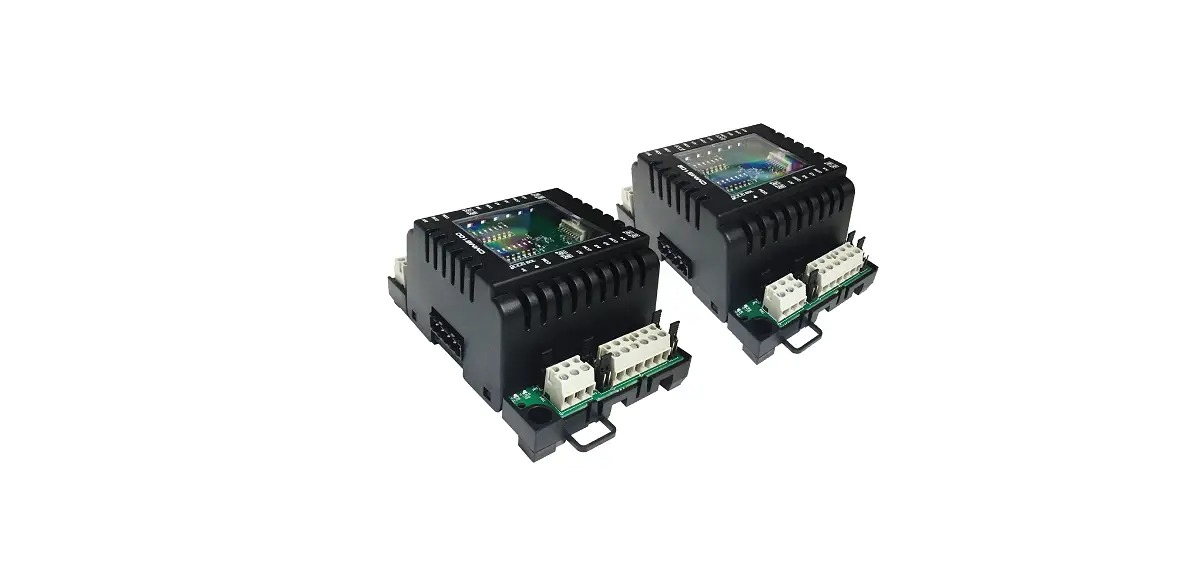

neptronic CMMB102 Dual Mini I-O Communication Module
Description
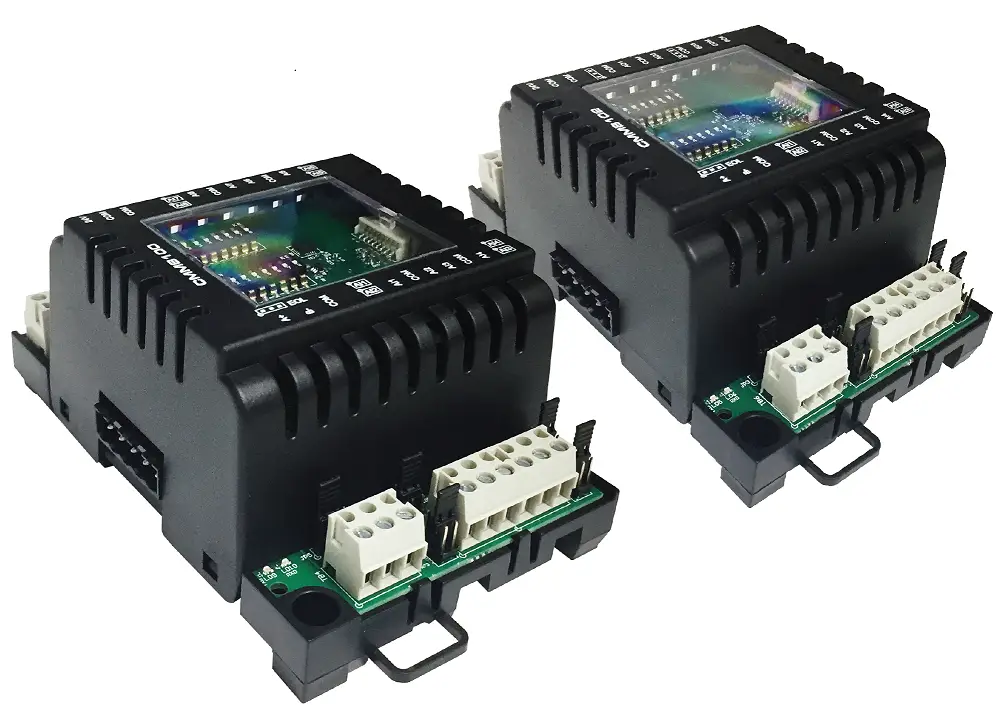
The CMMB extends your BACnet or Modbus network when your application requires additional inputs and outputs on a physical controller. Combining the 8 inputs and outputs of the CMMB with your Building Automation System provides simple expansion of a new or existing controller and reduces unnecessary costs of additional components.
Features
Power & Communication
- 24Vac or 24Vdc supply
- BACnet® MS/TP or Modbus communication port (selectable)
Inputs & Outputs
- 4 universal inputs
- 2 universal outputs (supervised)
- 2 binary outputs (supervised)
Installation
- 4 override switches to manually control each output
- LED status indication of each input and output
- DIN rail mounting
- Removable, non-strip, raising clamp terminals
- Removable see-through panel for easy access to DIP switches
Network Communication
- BACnet® MS/TP or Modbus communication port (selectable via DIP switch)
- Select MAC address via DIP switch or via network
BACnet®
- MS/TP @ 9600, 19200, 38400 or 76800 bps
- Automatic baud rate detection
- Automatic device instance configuration
- Copy & broadcast configuration to other CMMB modules
Modbus
- • Modbus @ 9600, 19200, 38400 or 57600 bps
• RTU Slave, 8 bits (configurable parity and stop bits)
• Connects to any Modbus master
Technical Specifications
| Specifications | CMMB102 |
| Input Voltage | 24 Vac or 24 Vdc |
| Consumption | 3VA (175mA @ 24 Vac) |
| Universal Inputs (12-bit) | 4 [0-10Vdc, Thermistor, on/off (dry contact), 4-20mA] / 12-bit resolution |
| Universal Outputs | 2 [0-10Vdc, pulsed signal (20mA drive), on/off] / 12-bit resolution OptoFET (250mA max) |
| Binary Relay Outputs | 2 [normally open/closed, independent common per relay, 5A resistive] |
| BACnet | BACnet® MS/TP @ 9600, 19200, 38400 or 76800 bps (BAS-C) |
| Modbus | Modbus RTU slave @ 9600, 19200, 38400 or 57600. Selectable parity and stop bit configuration: · No parity, 2 stop bit ·Even parity, 1 stop bit · Odd parity, 1 stop bit |
| Communication Connections | 24 AWG twisted-shield cable (Belden 9841 or equivalent) |
| Electrical Connections | 0.8 mm2 [18 AWG] minimum |
| Operational Temperature | 0ºC to 50ºC [32ºF to 122ºF] |
| Storage Temperature | -30ºC to 50ºC [-22ºF to 122ºF] |
| Relative Humidity | 5 a 95% non condensed |
| Weight | 0.2 kg [0.4 lb] |
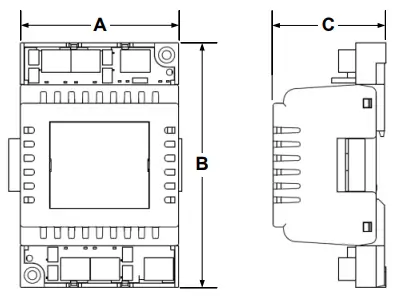
| Dimensions A = 3.18” / 81 mm B = 4.93” / 125 mm C = 2.27” / 58 mm |
|
Connections and Configurations
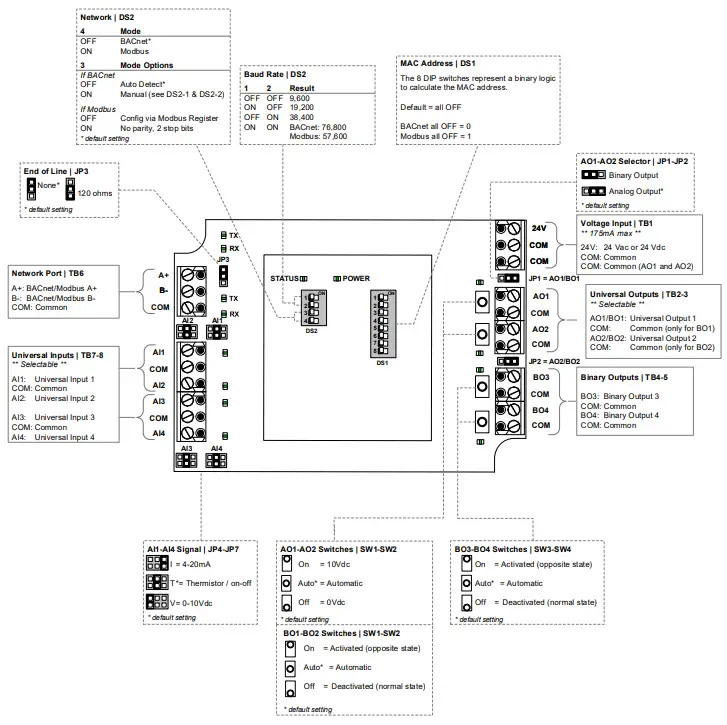
Please note that all jumper settings must also be set to the same value through BACnet. Some additional configurations are only available through BACnet (see Network Conditions on page 4).
MAC Address DIP Switch (DS1)
MAC address for BACnet and Modbus communication, are selectable by DIP switch DS1 using binary logic.
BACnet
- Highest MAC address is 254.
- Default is all switches OFF = MAC address 0
- If you do not change device instance in program mode, it will be automatically modified according to the MAC address.
| MAC Address | DS.1 = 1 | DS.2 = 2 | DS.3 = 4 | DS.4 = 8 | DS.5 = 16 | DS.6 = 32 | DS.7 = 64 | DS.8 = 128 | Default Device Instance |
| 0 | OFF | OFF | OFF | OFF | OFF | OFF | OFF | OFF | 153000 |
| 1 | ON | OFF | OFF | OFF | OFF | OFF | OFF | OFF | 153001 |
| 2 | OFF | ON | OFF | OFF | OFF | OFF | OFF | OFF | 153002 |
| 3 | ON | ON | OFF | OFF | OFF | OFF | OFF | OFF | 153003 |
| 4 | OFF | OFF | ON | OFF | OFF | OFF | OFF | OFF | 153004 |
| … | … | … | … | … | … | … | … | … | … |
| 126 | OFF | ON | ON | ON | ON | ON | ON | OFF | 153126 |
| … | … | … | … | … | … | … | … | … | … |
| 254 | OFF | ON | ON | ON | ON | ON | ON | ON | 153254 |
Modbus
- Highest MAC address is 247.
- Default is all switches OFF = MAC address 1
- MAC address is binary value +1
- There is no device instance for Modbus.
| MAC Address | DS.1 = 1 | DS.2 = 2 | DS.3 = 4 | DS.4 = 8 | DS.5 = 16 | DS.6 = 32 | DS.7 = 64 | DS.8 = 128 |
| 0+1 = 1 | OFF | OFF | OFF | OFF | OFF | OFF | OFF | OFF |
| 1+1 = 2 | ON | OFF | OFF | OFF | OFF | OFF | OFF | OFF |
| 2+1 = 3 | OFF | ON | OFF | OFF | OFF | OFF | OFF | OFF |
| 3+1 = 4 | ON | ON | OFF | OFF | OFF | OFF | OFF | OFF |
| 4+1 = 5 | OFF | OFF | ON | OFF | OFF | OFF | OFF | OFF |
| … | … | … | … | … | … | … | … | … |
| 126+1 = 127 | OFF | ON | ON | ON | ON | ON | ON | OFF |
| … | … | … | … | … | … | … | … | … |
| 246+1 = 247 | OFF | ON | ON | OFF | ON | ON | ON | ON |
LEDs
Power
- On = Input voltage normal
- Off = No power
Status
- Flashing = Normal operation (watchdog)
RX/TX (BACnet)
- Flashing = Receiving (RX) and/or transmitting (TX) data.
RX/TX (Modbus)
- Flashing = Receiving (RX) and/or transmitting (TX) data.
Input Status
- On = Input on
- Off = Input off
- Flashing = Input not connected (thermistor setting only)
- Analog = When Universal Inputs are set to analog values (Vdc, mA, or Thermistor); the LED intensity corresponds to the input value. For example: At 10Vdc, the LED will be fully on. At 5Vdc, the LED will be at 50% intensity. At 0 Vdc, the LED will be off.
Output Status
- On = Activated
- Off = Deactivated
- Flashing = Output pulsed
- Analog = When Universal and Analog outputs are set to analog values (Vdc); the LED intensity corresponds to the output value.
For example: At 10Vdc, the LED will be fully on. At 5Vdc, the LED will be at 50% intensity. At 0 Vdc, the LED will be off.
Network Conditions
Please note that all jumper settings must also be set to the same value through BACnet or Modbus. The following is a list of conditions and additional BACnet or Modbus objects.
Universal Inputs (AI1-AI4)
- For temperature thermistor reading: with the jumper set to Thermistor, set the AI input type to 10K_TypeG, 10K_Type3A1, 10K_Type4A1, 10K_NTC, 20K_Type6A1 or 30K_Type6A1.
- For on/off contact input reading: with the hardware jumper set to Thermistor, set the AI input type to Digital_Input. The polarity can also be set to direct or reverse. For example, in Reverse an “on” signal would be recognized as an “off” signal.
- For analog 0-10 Vdc input reading: with the hardware jumper set to 0-10 Vdc, set the AI input type to 0_10V
Universal/Analog Outputs (AO1-AO2)
- You can set the polarity to direct or reverse. For example, in reverse the output range would be 10-0 Vdc instead of 0-10 Vdc. The polarity applies to all settings 0-10Vdc, on/off and pulsed.
- You can also set the outputs to pulsed or digital on/off.
- A fixed output value can only be modified via BACnet when the override switch is in the “Automatic” position.
Binary Outputs (BO1-BO4)
- A fixed output (open/closed) can only be modified via BACnet when the override switch is in the “Automatic” position.
- The displayed text can be set to either Open/Closed, On/Off, or Alarm/Normal (BACnet only).
Supervised Outputs
- All outputs are fully supervised via BACnet. This provides the actual state of the output including any manual overrides done using the on-board switches.
BACnet Objects Table
| ID1 | Name | Description | Writable? | Notes (* = default) († = only when UniversalInputxFunction is set to 10K_Type3/G) | |
| AI.1 | UniversalInput1 | Universal input 1 mode selected by MSV.1 | Out of service | 0 to 10Volt or -40 to 100ºC (150ºC)†or -40 to 212ºF (302ºF)†or 4 to 20mA or 0 to 1 Resolution: 0.01Volt or 0.01ºC/0.02ºF or 0.01mA or 1 | |
| AI.2 | UniversalInput2 | Universal input 2 mode selected by MSV.12 | Out of service | 0 to 10Volt or -40 to 100ºC (150ºC)†or -40 to 212ºF (302ºF)†or 4 to 20mA or 0 to 1 Resolution: 0.01Volt or 0.01ºC/0.02ºF or 0.01mA or 1 | |
| AI.3 | UniversalInput3 | Universal input 3 mode selected by MSV.15 | Out of service | 0 to 10Volt or -40 to 100ºC (150ºC)†or -40 to 212ºF (302ºF)†or 4 to 20mA or 0 to 1 Resolution: 0.01Volt or 0.01ºC/0.02ºF or 0.01mA or 1 | |
| AI.4 | UniversalInput4 | Universal input 4 mode selected by MSV.48 | Out of service | 0 to 10Volt or -40 to 100ºC (150ºC)†or -40 to 212ºF (302ºF)†or 4 to 20mA or 0 to 1 Resolution: 0.01Volt or 0.01ºC/0.02ºF or 0.01mA or 1 | |
| AV.52 | AnalogOutput1Min | Min. voltage of analog output 1 | Present Value | 0* Volt to AV.54 | Resolution 0.1 Volt | |
| AV.53 | AnalogOutput2Min | Min. voltage of analog output 2 | Present Value | 0* Volt to AV.55 | Resolution 0.1 Volt | |
| AV.54 | AnalogOutput1Max | Max. voltage of analog output 1 | Present Value | AV.52 to 10.0* Volt | Resolution 0.1 Volt | |
| AV.55 | AnalogOutput2Max | Max. voltage of analog output 2 | Present Value | AV.53 to 10.0* Volt | Resolution 0.1 Volt | |
| AV.72 | AnalogOutput1 | Analog output 1 value | Present Value | 0-100% | Resolution 0.1% | |
| AV.73 | AnalogOutput2 | Analog output 2 value | Present Value | 0-100% | Resolution 0.1% | |
| AV.226 | UniversalInput1Offset | Universal input 1 offset | Present Value | -5.00 to 5.00 ºC/ºF/Volt/mA (default 0*) Resolution: 0.1 ºC/ºF/Volt/mA | |
| AV.227 | UniversalInput2Offset | Universal input 2 offset | Present Value | -5.00 to 5.00 ºC/ºF/Volt/mA (default 0*) Resolution: 0.1 ºC/ºF/Volt/mA | |
| AV.228 | UniversalInput3Offset | Universal input 3 offset | Present Value | -5.00 to 5.00 ºC/ºF/Volt/mA (default 0*) Resolution: 0.1 ºC/ºF/Volt/mA | |
| AV.229 | UniversalInput4Offset | Universal input 4 offset | Present Value | -5.00 to 5.00 ºC/ºF/Volt/mA (default 0*) Resolution: 0.1 ºC/ºF/Volt/mA | |
| AV.468 | CopyCfgStartAdd | Copy configuration start address | Present Value | 0-254 Address of first CMMB to copy Available only if BV.101 is set to No | |
| AV.469 | CopyCfgEndAdd | Copy configuration end address | Present Value | AV.468 – (AV.468 + 64) Address of last CMMB to copy Available only if BV.101 is set to No | |
|
AV.470 |
CopyCfgResult2 |
Copy configuration result |
Present Value | AV.468 – AV.469 Result of copy is available on Description property and is available only if BV.101 is set to Yes. Results: Succeed, Prog_Error, Type_Error, Model_Error, FW_Error, Mem_Error, Size_Error, Comm_Error, SlaveDevice, InProgress, AllSucceed | |
| AV.500 | TPMOutput1 | TPM Output 1 value | Present Value | 0-100% | Resolution 0.1% | |
| AV.501 | TPMOutput2 | TPM Output 2 value | Present Value | 0-100% | Resolution 0.1% | |
| BV.22 | ContactOutput1 | Binary output 1 status | Present Value | 0= Open / Ouvert / Off / Arret / Normal * 1= Close / Fermé / On / Marche / Alarm Text depends of selection in MSV.66 | |
| BV.23 | ContactOutput2 | Binary output 2 status | Present Value | 0= Open / Ouvert / Off / Arret / Normal * 1= Close / Fermé / On / Marche / Alarm Text depends of selection in MSV.67 | |
| BV.24 | ContactOutput3 | Binary output 3 status | Present Value | 0= Open / Ouvert / Off / Arret / Normal * 1= Close / Fermé / On / Marche / Alarm Text depends of selection in MSV.68 | |
| BV.25 | ContactOutput4 | Binary output 4 status | Present Value | 0= Open / Ouvert / Off / Arret / Normal * 1= Close / Fermé / On / Marche / Alarm Text depends of selection in MSV.69 | |
| BV.66 | AnalogOutput1Direction | Polarity of analog output 1 | Present Value | 0= Direct * | 1= Reverse |
| BV.67 | AnalogOutput2Direction | Polarity of analog output 2 | Present Value | 0= Direct * | 1= Reverse |
| BV.93 | UI1_DI_Polarity | Polarity of universal input 1 when used in digital input mode | Present Value | 0= Direct * 1= Reverse | |
| ID1 | Name | Description | Writable? | Notes (* = default) († = only when UniversalInputxFunction is set to 10K_Type3/G) | |
| BV.94 | UI2_DI_Polarity | Polarity of universal input 2 when used in digital input mode | Present Value | 0= Direct * 1= Reverse | |
| BV.95 | UI3_DI_Polarity | Polarity of universal input 3 when used in digital input mode | Present Value | 0= Direct * 1= Reverse | |
| BV.96 | UI4_DI_Polarity | Polarity of universal input 4 when used in digital input mode | Present Value | 0= Direct * 1= Reverse | |
| BV.101 | CopyCfgExecute | Start or stop copy configuration | Present Value | 0= No * 1= Yes Start copy and give results, must be reset by user. | |
| BV.102 | SystemUnit | Select the unit system to use on the device | Present Value | 0= Celsius * 1= Fahrenheit | |
| BV.103 | Inhibit Output Override | Inhibit the override of the outputs | Present Value | 0= Off * 1= On | |
|
MSV.1 |
UniversalInput1Function |
Selected analog input 1 mode |
Present Value | 1= 0_10V 2= 4_20mA 3= 10K_Type3/G * 4= 10K_Type3A1 5= 10K_Type4A1 | 6= 10K_Type2 7= 20K_Type6A1 8= 30K_Type6A1 9= Digital_Input |
|
MSV.12 |
UniversalInput2Function |
Selected analog input 2 mode |
Present Value | 1= 0_10V 2= 4_20mA 3= 10K_Type3/G * 4= 10K_Type3A1 5= 10K_Type4A1 | 6= 10K_Type2 7= 20K_Type6A1 8= 30K_Type6A1 9= Digital_Input |
|
MSV.15 |
UniversalInput3Function |
Selected analog input 3 mode |
Present Value | 1= 0_10V 2= 4_20mA 3= 10K_Type3/G * 4= 10K_Type3A1 5= 10K_Type4A1 | 6= 10K_Type2 7= 20K_Type6A1 8= 30K_Type6A1 9= Digital_Input |
|
MSV.48 |
UniversalInput4Function |
Selected analog input 4 mode |
Present Value | 1= 0_10V 2= 4_20mA 3= 10K_Type3/G * 4= 10K_Type3A1 5= 10K_Type4A1 | 6= 10K_Type2 7= 20K_Type6A1 8= 30K_Type6A1 9= Digital_Input |
| MSV.54 | AnalogOutput1Mode | Select analog output 1 mode | Present Value | 1= Analog * 2= On_Off | 3= Pulsing |
| MSV.55 | AnalogOutput2Mode | Select analog output 2 mode | Present Value | 1= Analog * 2= On_Off | 3= Pulsing |
| MSV.66 | ContactOutput1Text | Contact output 1 inactive & active text | Present Value | 1= Open_Close * 2= Ouvert_Fermé 3= On_Off | 4= Marche_Arret 5= Alarm_Normal |
| MSV.67 | ContactOutput2Text | Contact output 2 inactive & active text | Present Value | 1= Open_Close * 2= Ouvert_Fermé 3= On_Off | 4= Marche_Arret 5= Alarm_Normal |
| MSV.68 | ContactOutput3Text | Contact output 3 inactive & active text | Present Value | 1= Open_Close * 2= Ouvert_Fermé 3= On_Off | 4= Marche_Arret 5= Alarm_Normal |
| MSV.69 | ContactOutput4Text | Contact output 4 inactive & active text | Present Value | 1= Open_Close * 2= Ouvert_Fermé 3= On_Off | 4= Marche_Arret 5= Alarm_Normal |
| MSV.100 | OptofetOutput1Mode | Select Optofet output 1 mode | Present Value | 1= On_Off * | 2= TimePulseModulation |
| MSV.101 | OptofetOutput2Mode | Select Optofet output 2 mode | Present Value | 1= On_Off * | 2= TimePulseModulation |
Modbus Registers
- Register address:
- As per protocol base (base 0); for PLC add 1 to protocol base.
- As per holding register (base 40001)
- Functions:
- 03 Read Holding Register
- 06 Write Single Register
- 16 Write Multiple Registers
- Error Codes:
- 02 Illegal Data Address
- 03 Illegal Value
- 06 Slave Device Busy
- W = Writable register, [blank] = read only.
- No Real number in modbus register, use scale to calculate real number. Register = Real number * Scale => Real number = Register / Scale. Scale could be 1, 10 or 100
- Attention when writing a register that contains a bit string. If bit is writable (conditional or not), the write will always be accepted. If bit is reserved or not writable, the write will be ignored and will keep its actual state.
- Use READ-MODIFY-WRITE sequence.
| Protocol Base | Holding Register | Description | Data Type | MSB/LSB | Units/Values | Writable | Default Value | |||
| MB | LB | |||||||||
| 0 | 40001 | MSB = Neptronic Device ID LSB = MAC Address | Unsigned | 105 (69h) | [1..247] (1h- F7h) | * MAC address is writable if all DIP switches of DS2 are OFF. | W* | 69h | 1h | |
|
1 |
40002 |
Device Baud Rate | Unsigned Scale 0.01 | [96] [192] [384] [576] | 9,600 19,200 38,400 57,600 |
W |
96 | |||
|
2 |
40003 | COM Port Configuration IMPORTANT: The default value is “no parity, 2 stop bits”. To change the value, you must set DIP switch DS1-3 to OFF. If set to ON, it will always remain at the default value. Refer to Connections and Configurations on page 2. |
Unsigned |
[0..2] | 0 = no parity, 2 stop bits 1 = even parity, 1 stop bit 2 = odd parity, 1 stop bit |
W |
0 | |||
| 3 | 40004 | Product Name (characters 8 & 7) | 2 x ASCII | char 8 | char 7 | Valid ASCII character: 32 (20h) – 122 (7ah), Empty = 0 | W | 43h [C] | 40h [M] | |
| 4 | 40005 | Product Name (characters 6 & 5) | 2 x ASCII | char 6 | char 5 | Valid ASCII character: 32 (20h) – 122 (7ah), Empty = 0 | W | 40h [M] | 42h [B] | |
| 5 | 40006 | Product Name (characters 4 & 3) | 2 x ASCII | char 4 | char 3 | Valid ASCII character: 32 (20h) – 122 (7ah), Empty = 0 | W | 31h [1] | 30h [0] | |
| 6 | 40007 | Product Name (characters 2 & 1) | 2 x ASCII | char 2 | char 1 | Valid ASCII character: 32 (20h) – 122 (7ah), Empty = 0 | W | 36h [6] | 20h [ ] | |
| 7 | 40008 | Firmware Version | Unsigned Scale 100 | 102 | 1.02 | 102 | ||||
| 8 | 40009 | Application Version | Unsigned Scale 100 | 100 | 1.00 | 100 | ||||
| Protocol Base | Holding Register | Description | Data Type | MSB/LSB | Units/Values | Writable | Default Value | ||
| MB | LB | ||||||||
|
9 |
40010 |
System Status 1 |
Bit String |
[B0..B15] | 0 = Normal 1 = Fault – – – – – – – – – – – – – – – – – – – B0 = System operation |
0000, 0001, 1111, 1110b | |||
| 10 | 40011 | System Status 2 | Bit String | [B0..B15] | Always 0 | 0000, 0000, 0000, 0000b | |||
| 11 | 40012 | Analog Input 1 | 0-10V: Type: Unsigned, Scale:100, Unit: Volt, Range: 0.00-10.00V, Resolution: 0.01 4-20mA: Type: Unsigned, Scale:100, Unit: mA, Range: 4.00-20.00 mA, Resolution: 0.01 10K Type 3A1, 10K Type 4AI, 10K Type 2, 20K Type 6AI, 30K Type 6AI: Type: Signed, Scale:100, Unit: ºC, Range: -40.00 – 100.00 ºC, Resolution: 0.01 Type: Signed, Scale:100, Unit: ºF, Range: -40.00 – 212.00 ºF, Resolution: 0.02 10K Type 3/G: Type: Signed, Scale:100, Unit: ºC, Range: -40.00 – 150.00 ºC, Resolution: 0.01 Type: Signed, Scale:100, Unit: ºF, Range: -40.00 – 302.00 ºF, Resolution: 0.02 DI: Type: Unsigned, Scale:1, No Unit, Range: 0-1, Resolution: 1 | 0 | |||||
| 12 | 40013 | Analog Input 2 | 0 | ||||||
| 13 | 40014 | Analog Input 3 | 0 | ||||||
| 14 | 40015 | Analog Input 4 | 0 | ||||||
| 15 to 19 | 40016 to 40020 | Reserved | |||||||
| 20 | 40021 | Analog Output 1 | Unsigned Scale 10 | [0..1000] | Unit: %, Range: 0-100.0%, Resolution: 0.1 | W | 0 | ||
| 21 | 40022 | Analog Output 2 | 0 | ||||||
| 22 to 23 | 40023 to 40024 | Reserved | 0 | ||||||
| 24 | 40025 | Relay Output | Bit String | [B0..B5] | B0 = Relay 1 B1 = Relay 2 B2 = Relay 3 | B3 = Relay 4 B4 to B5 = Reserved | W | 0000, 0000, 0000, 0000b | |
| 25 | 40026 | Output Overwrite Status Indicates that the output is overridden by the hardware switch (SW1-SW4). | Bit String | [B0..B9] | B0 = Relay 1 B1 = Relay 2 B2 = Relay 3 B3 = Relay 4 | B4 = AO1 B5 = AO2 B6 to B9 = Reserved | 0000, 0000, 0000, 0000b | ||
| 26 | 40027 | Universal Input 1 Function |
Unsigned |
[1..9] | 1= 0_10V 2= 4_20mA 3 = 10K_Type 3/G 4= 10K_Type3A1 5= 10K_Type4A1 | 6= 10K_Type2 7= 20K_Type6A1 8= 30K_Type6A1 9= Digital_Input |
W | 3 | |
| 27 | 40028 | Universal Input 2 Function | 3 | ||||||
| 28 | 40029 | Universal Input 3 Function | 3 | ||||||
| 29 | 40030 | Universal Input 4 Function | 3 | ||||||
| 30 to 33 | 40031 to 40034 | Reserved | |||||||
| Protocol Base | Holding Register | Description | Data Type | MSB/LSB | Units/Values | Writable | Default Value | |||
| MB | LB | |||||||||
| 34 | 40035 | Universal Input 1 Offset |
Signed Scale 100 |
[0..100] |
Range: +/- 5.00, Resolution: 0.1 |
W | 0 | |||
| 35 | 40036 | Universal Input 2 Offset | 0 | |||||||
| 36 | 40037 | Universal Input 3 Offset | 0 | |||||||
| 37 | 40038 | Universal Input 4 Offset | 0 | |||||||
| 38 to 41 | 40039 to 40042 | Reserved | ||||||||
| 42 | 40043 | Analog Output 1 Mode | Unsigned | [1..3] | 1 = Analog 2 = On/Off 3 = Pulse | W | 1 | |||
| 43 | 40044 | Analog Output 1 Minimum Voltage | Signed Scale 10 | [0..100] | Unit: Volt, | Range: 0 V – Register 44, Resolution: 0.1 | W | 0 | ||
| 44 | 40045 | Analog Output 1 Maximum Voltage | Unit: Volt, Range: Register 43 – 10.0V, Resolution: 0.1 | 100 | ||||||
| 45 | 40046 | Analog Output 2 Mode | Unsigned | [1..3] | 1 = Analog 2 = On/Off 3 = Pulse | W | 1 | |||
| 46 | 40047 | Analog Output 2 Minimum Voltage | Signed Scale 10 | [0..100] | Unit: Volt, | Range: 0 V – Register 47, Resolution: 0.1 | W | 0 | ||
| 47 | 40048 | Analog Output 2 Maximum Voltage | Unit: Volt, | Range: Register 46 – 10.0V, Resolution: 0.1 | 100 | |||||
| 48 to 53 | 40049 to 40054 | Reserved | ||||||||
| 0 = Direct | 0 = Off | |||||||||
| 1 = Reverse | 1 = On | |||||||||
| – – – – – – – – – – – – – – – – – – – | – – – – – – – – – – – – – – – – – – – | |||||||||
| B0 = AO1 polarity | B14 = Inhibit Output Override | |||||||||
| System Options | B1 = AO2 polarity | – – – – – – – – – – – – – – – – – – – | ||||||||
| 54 | 40055 | Bit String | [B0..B15] | B2 to B3 = Reserved | 0 = Celsius | W | 0000, 0000, 0000, 0000b | |||
| * = digital input mode only | B4 = AI1 polarity * | 1 = Fahrenheit | ||||||||
| B5 = AI2 polarity * | – – – – – – – – – – – – – – – – – – – | |||||||||
| B6 = AI3 polarity * | B15 = System Unit | |||||||||
| B7 = AI4 polarity * | ||||||||||
| B8 to B13 = Reserved | ||||||||||
| 55 | 40056 | TPM Output 1 | Unsigned Scale 10 | [0..1000] | Unit: %, | Range: 0-100.0%, Resolution: 0.1 | W | 0 | ||
| 56 | 40057 | TPM Output 2 | 0 | |||||||
| 57 to 60 | 40058 to 40061 | Reserved | ||||||||
| 61 | 40062 | Optofet Output 1 Mode | Bit String | [1, 2] | 1 = On_Off 2 = TimePulseModulation | W | 1 | |||
| 62 | 40063 | Optofet Output 2 Mode | 1 | |||||||
400 Lebeau blvd, Montreal, Qc, H4N 1R6, Canada
www.neptronic.com
Toll free in North America: 1-800-361-2308
Tel.: (514) 333-1433
Fax: (514) 333-3163
Customer service fax: (514) 333-1091
Monday to Friday: 8:00am to 5:00pm (Eastern time)
 Neptronic | Home - Humidifier Distributor & HVAC Products