
 USER MANUAL
Tecla 55
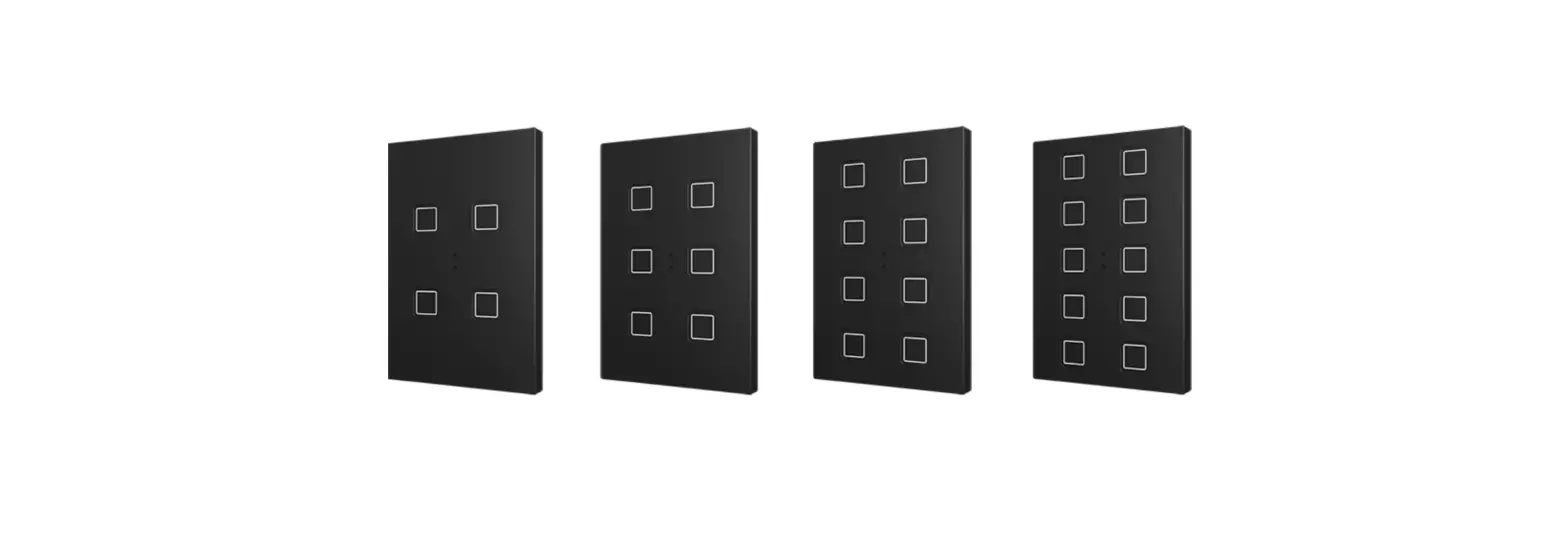
PC-ABS Capacitive push button of 55×55 with 1/2/4/6 buttons and custom icons
ZVIT55X1 / ZVIT55X2 / ZVIT55X4 / ZVIT55X6
Application Programme Version: [1.8]
User Manual Version: [1.8]_a
www.zennio.com
DOCUMENT UPDATES
| Version | Changes | Page(s) |
| [1.8]_a | Changes in the application program: • Internal Optimisation. | – |
INTRODUCTION
1.1 TECLA 55
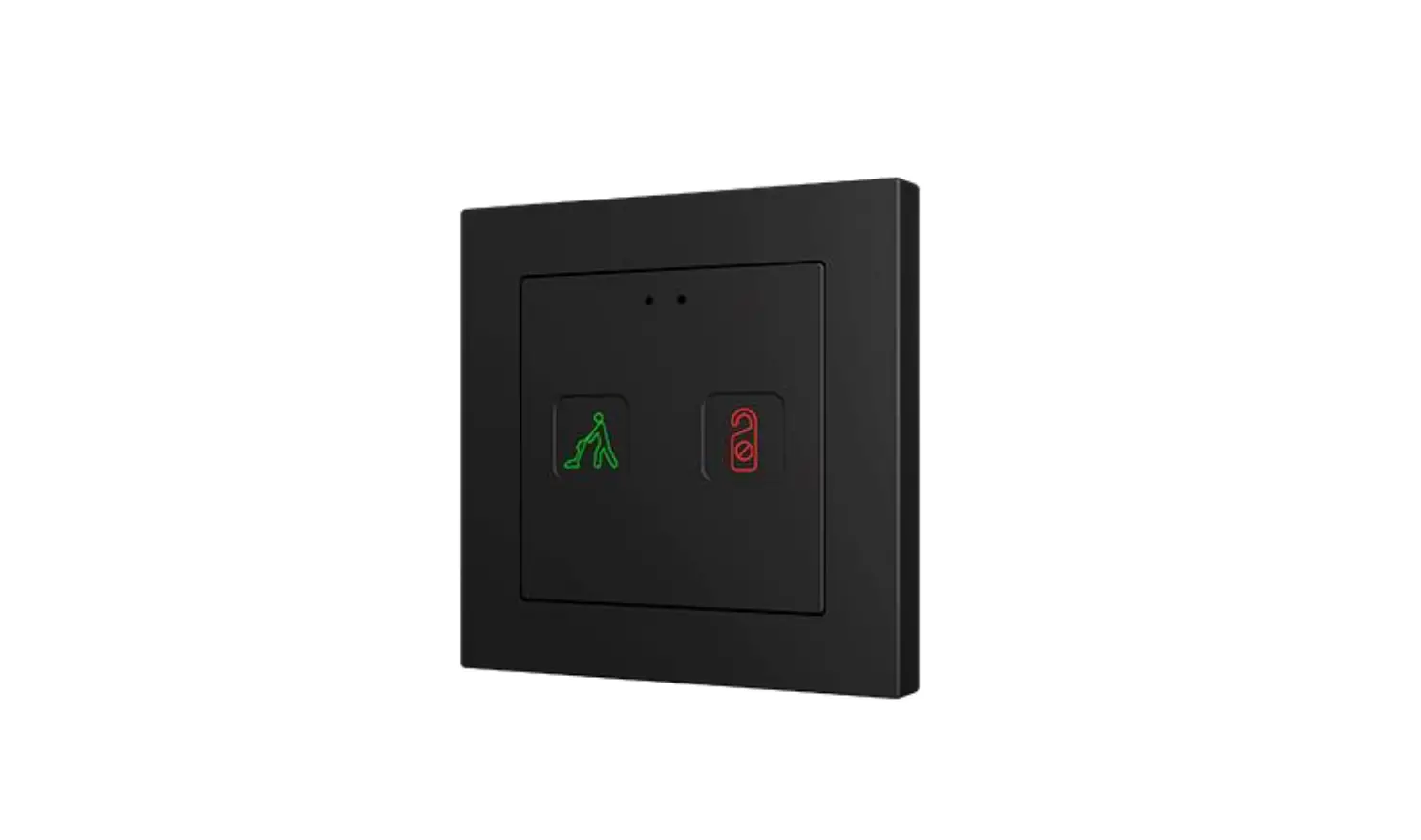
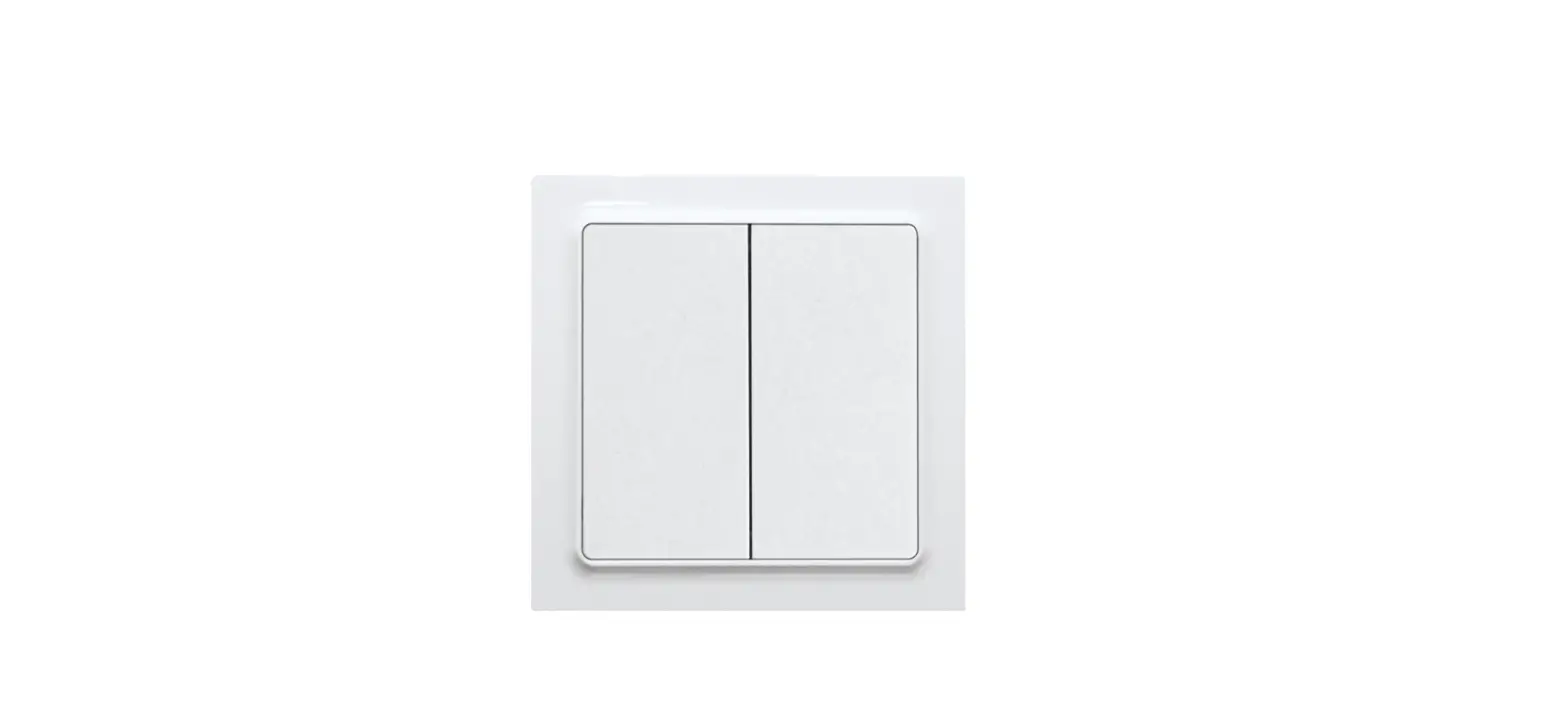
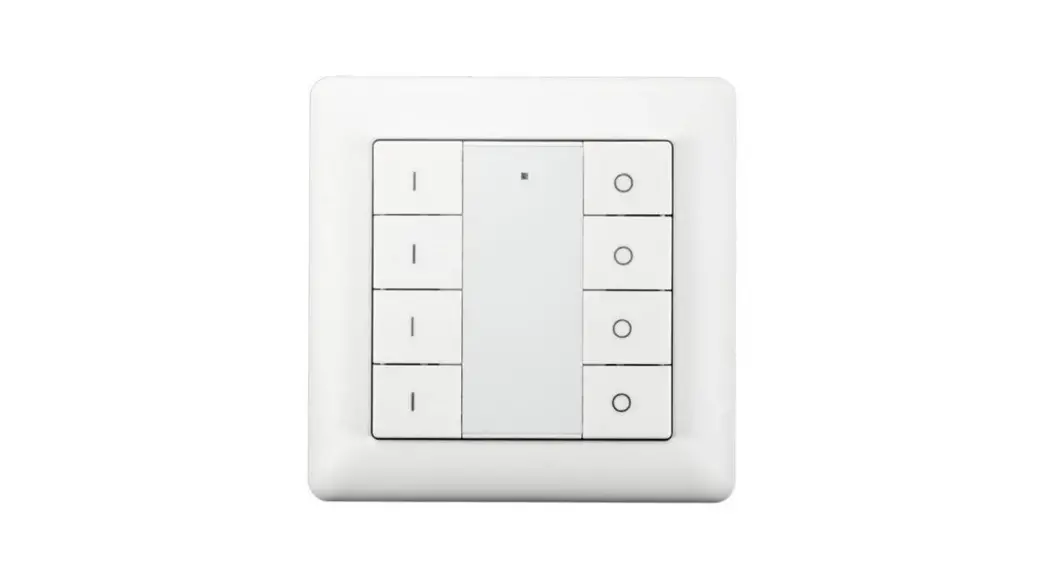
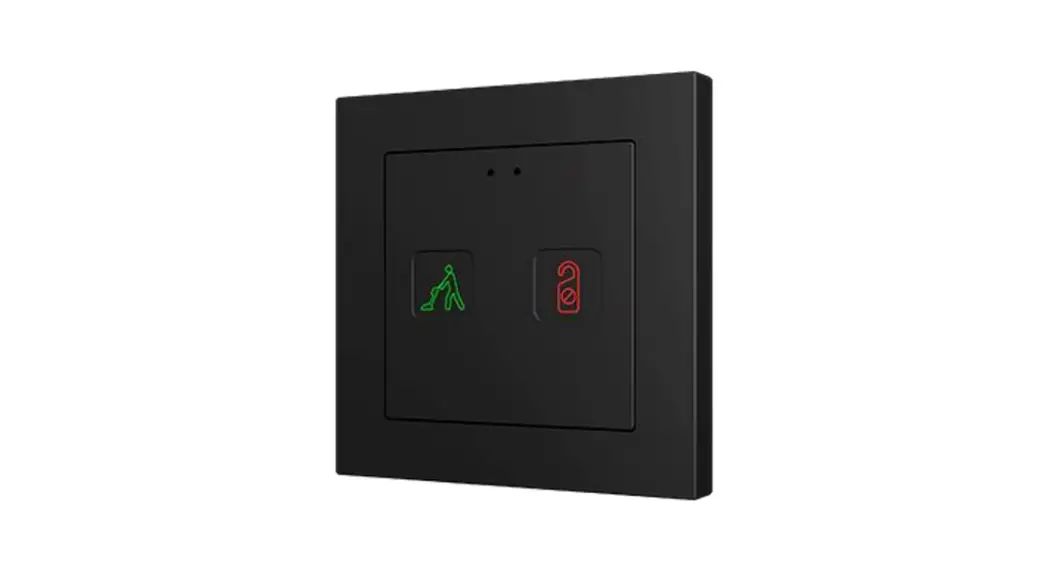
Tecla 55 is a KNX multifunction flush fitting polycarbonate capacitive touch switch with a proximity sensor, luminosity sensor and an elegant design with backlighted customizable icons.
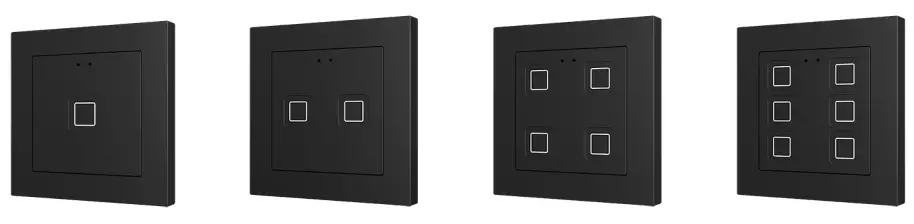
It is designed to be flush mounted in standard 55×55 frames. There are models with one, two, four or six capacitive touch buttons with LED backlight to confirm the press of
the buttons as well as showing states.
Tecla 55 is a fully customizable solution for the control of rooms where user control of air conditioning systems, lighting, blinds, scenes, etc. is required.
The versatility offered by the functionality of buttons is complemented by a built-in analog/digital input configurable as a temperature probe and the thermostat function.
The most outstanding features of Tecla 55 are:
- Fully customizable backlit icons for every button.
- 1 / 2 / 4 / 6 touch buttons, which can operate as individual or pair controls.
- Horizontally or vertically-oriented configuration (only available for the two buttons and six-button models).
- Buzzer for an audible acknowledgment of user actions (with the possibility of disabling it either by parameter or by object).
- Possibility of locking/unlocking the touch panel through binary orders or scenes.
- Welcome Back object (binary or scene) which is sent to the KNX bus when pulsation is detected after a certain period (configurable) of inactivity.
- Ambient luminosity sensor for brightness automatic adjustment.
- Proximity sensor for a quick start.
- Analog/digital input configurable as a temperature probe.
- Thermostat function.
- Heartbeat or periodical “still-alive” notification.
1.2 INSTALLATION
Figure 1 shows the connection outline of Tecla 55:
| 1. Frame (sold separately). | 6. Fixing clips. |
| 2. Metalic levelling plate. | 7. Temperature probe connector. |
| 3. KNX connector | 8. Touch area. |
| 4. Programming LED. | 9. Proximity and Luminosity Sensors |
| 5. Programming Button. |
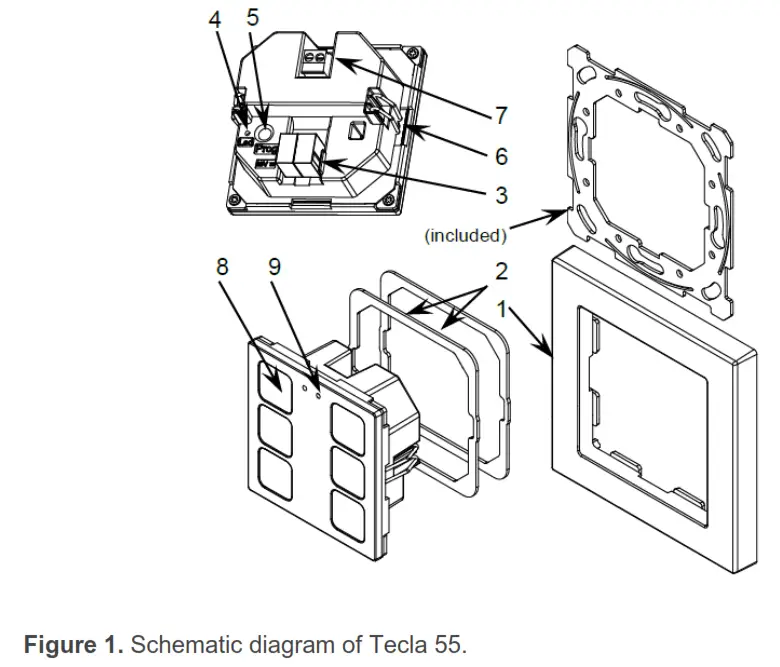
Tecla 55 is connected to the KNX bus through the built-in terminal (3). An external DC power supply is not needed.
A short press on the programming button (5) will make the device enter the programming mode. The programming LED (4) will then light in red. On the contrary, if this button is held while the device gets connected to the bus, the device will enter safe mode. In such a case, the programming LED will blink in red color. For detailed information about the technical features of Tecla 55, as well as on security and installation procedures, please refer to the device Datasheet, bundled within the
device packaging and also available at www.zennio.com.
1.3 START-UP AND POWER LOSS
After download or device reset it is necessary to wait for about 2 minutes without performing any action in order to make it possible a proper calibration of:
- Proximity sensor.
- Luminosity sensor.
- Button presses.
For a correct calibration of the proximity and brightness sensors, it is recommended not to remain too close or place anything less than 50cm approximately and do not hit with
direct light to the device during this time.
CONFIGURATION
After importing the corresponding database in ETS and adding the device into the topology of the project, the configuration process begins by entering the Parameters tab
of the device.
2.1 GENERAL
In order to allow the device to perform the desired functions, a number of options must be parameterized, either related to its general behavior or to advanced features.
2.1.1 CONFIGURATION
In the “Configuration” tab, the general settings are displayed.
ETS PARAMETERISATION 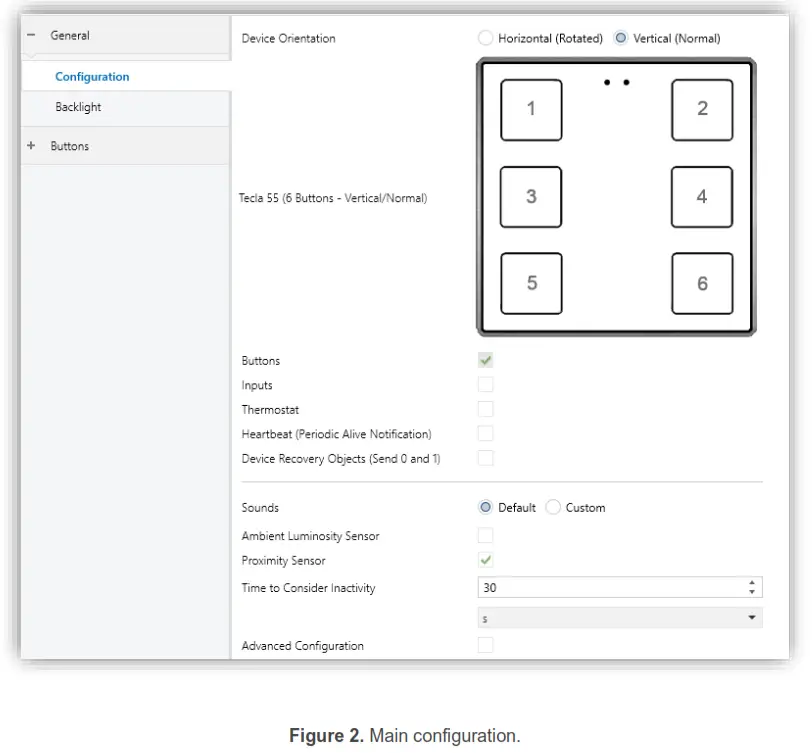
The following parameters are shown:
- Device Orientation [Horizontal (Rotated) / Vertical (Rotated)] 1 : enables
horizontal or vertical orientation to be assigned to the device, for easy identification of the push buttons during the configuration process (ETS will show a figure with the final distribution of the push buttons). To prevent inconsistency in the configuration, please note the following criterium:
Horizontal (rotated): Proximity and luminosity sensors on the left.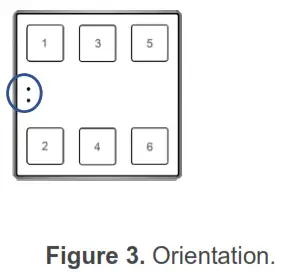 Vertical (normal): Proximity and luminosity sensors at the top.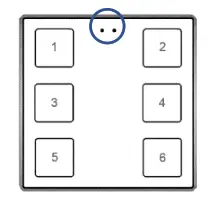
- Buttons [enabled]: read-only parameter to make it evident that the “Buttons”tab is always enabled in the tab tree on the left. See section 2.2 for details.
- Inputs [disabled/enabled]: enables or disables the “Inputs” tab in the tree on the left, depending on whether the device will or will not be connected an external temperature probe. See section 2.3 for details.
- Thermostat [disabled/enabled]: enables or disables the “Thermostat” tab in the tree on the left. See section 2.4 for details.
- Heartbeat (Periodic Alive Notification) [disabled/enabled]: incorporates a one-bit object to the project (“[Heartbeat] Object to Send ‘1’”) that will be sent periodically with value “1” to notify that the device is still working (still alive).
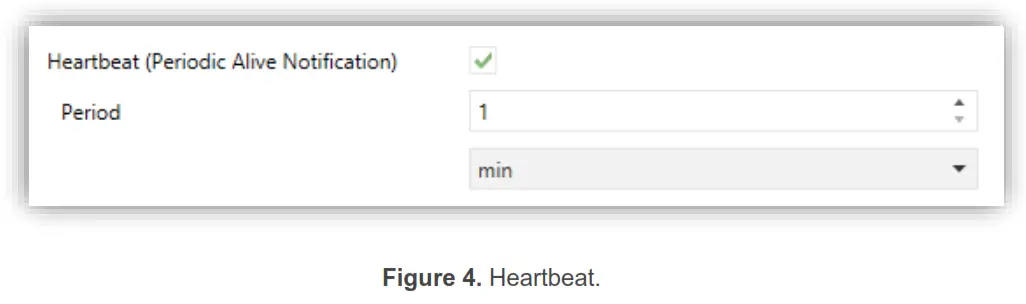 The default values of each parameter will be highlighted in blue in this document, as follows: [default/rest of options].
Note: the first sending after download or bus failure takes place with a delay of up to 255 seconds, to prevent bus overload. The following sendings march the period set.
- Device Recovery Objects (Send 0 and 1) [disabled/enabled]: this parameter lets the integrator activate two new communication objects (“[Heartbeat] Device Recovery”), which will be sent to the KNX bus with values “0” and “1” whenever the device begins operation (for example, after a bus power failure). It is possible to parameterize a certain delay [0…255][s] to this sending.
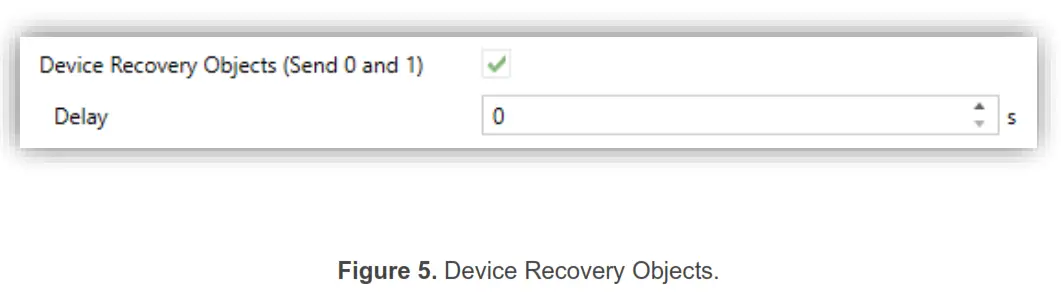 Note: After download or bus failure, the sending takes place with a delay of up to 6,35 seconds plus the parameterized delay, to prevent bus overload. Sounds [Default / Custom]: sets whether the sound functions (button beeps, alarm and doorbell) should work according to the pre-defined configuration or to a user-defined configuration. See section 2.1.3 for details.
 - Ambient luminosity sensor [disabled/enabled]: enables setting the ambient luminosity sensor. When the sensor is enabled, a new tab for its configuration is shown. See section 2.1.4 for details.
- Proximity Sensor [disabled/enabled]: enables the proximity sensor. This functionality permits “waking up” the device when detecting the presence, see section 2.1.5.
- Time to Consider Inactivity [1…30…255][s/min/h]: allows setting a time after which, if no pulsation or proximity detection has occurred, the LEDs turn off (or acquire the brightness level configured, see section 2.1.2).
- Advanced Configuration [disabled/enabled]: enables or disables the “Advanced” tab in the tree on the left. See section 2.1.6 for details.
2.1.2 BACKLIGHT
Capacitive touch switches are able to manage the brightness of the LED according to two operating modes: normal mode and night mode.
Please refer to the specific manual “Brightness” (available in the product section at the Zennio website, www.zennio.com) for detailed information about the functionality and the configuration of the related parameters.
2.1.3 SOUNDS
For detailed information about the functionality and the configuration of the related parameters, please refer to the specific manual “Capacitive Touch Switches” available
in the Tecla 55 product section at the Zennio homepage, www.zennio.com.
2.1.4 AMBIENT LUMINOSITY SENSOR
Capacitive touch switches incorporate a luminosity sensor to receive and monitor ambient brightness measurement.
Please refer to the specific manual “Luminosity and Proximity Sensor” (available in the product section at the Zennio homepage, www.zennio.com) for detailed information
about the functionality and the configuration of the related parameters.
2.1.5 PROXIMITY SENSOR
Please refer to the specific manual “Proximity and Luminosity Sensor” (available in the product section at the Zennio homepage, www.zennio.com) for detailed information
about the functionality and the configuration of the related parameters.
2.1.6 ADVANCED CONFIGURATION
For detailed information about the functionality and the configuration of the related parameters, please refer to the specific manual “Capacitive Touch Switches” available
in the Tecla 55 product section at the Zennio homepage, www.zennio.com.
2.2 BUTTONS
For detailed information about the functionality and the configuration of the related parameters, please refer to the specific manual “Capacitive Touch Switches” available
in the Tecla 55 product section at the Zennio homepage, www.zennio.com.
2.3 INPUTS
Capacitive touch switches can incorporate analog/digital inputs configurable as a Temperature Probe, to connect a temperature from Zennio.
Please refer to the specific user manual “Temperature Probe”, available in the product section, at the Zennio website (www.zennio.com).
2.4 THERMOSTAT
Capacitive touch switches implement one Zennio thermostat which can be enabled and fully customized.
Please refer to the specific manual “Zennio Thermostat” (available in the product section at the Zennio website, www.zennio.com) for detailed information about the
functionality and the configuration of the related parameters.
ANNEX I. COMMUNICATION OBJECTS
“Functional range” shows the values that, with the independence of any other values permitted by the bus according to the object size, may be of any use or have a
particular meaning because of the specifications or restrictions from both the KNX standard or the application program itself.
Note: The objects shown in this table are from model Tecla 55 X6. Please note that certain objects will not be available in models with less push buttons.
| Number | Size | I/O | Flags | Data type (DPT) | Functional Range | Name | Function |
| 1 | 1 Bit | C – – T – | DPT_Trigger | 0/1 | [Heartbeat] Object to Send ‘1’ | Sending of ‘1’ Periodically | |
| 2 | 1 Bit | C – – T – | DPT_Trigger | 0/1 | [Heartbeat] Device Recovery | Send 0 | |
| 3 | 1 Bit | C – – T – | DPT_Trigger | 0/1 | [Heartbeat] Device Recovery | Send 1 | |
| 4 | 1 Byte | I | C – W – – | DPT_SceneNumber | 0 – 63 | [General] Scene: Receive | 0 – 63 (Run Scene 1-64) |
| 5 | 1 Byte | C – – T – | DPT_SceneControl | 0-63; 128-191 | [General] Scene: Send | 0 – 63/128 – 191 (Run/Save Scene 1-64) | |
| 6 | 1 Bit | I | C – W – – | DPT_Enable | 0/1 | [General] Touch Locking | 0 = Unlock; 1 = Lock |
| 1 Bit | I | C – W – – | DPT_Enable | 0/1 | [General] Touch Locking | 0 = Lock; 1 = Unlock | |
| 7 | 1 Bit | C – – T – | DPT_Switch | 0/1 | [General] Welcome Back Object | Switch Object Sent on Wake Up | |
| 8 | 1 Bit | I | C – W – – | DPT_Enable | 0/1 | [General] Sounds – Disabling Button Sound | 0 = Disable Sound; 1 = Enable Sound |
| 1 Bit | I | C – W – – | DPT_Enable | 0/1 | [General] Sounds – Disabling Button Sound | 0 = Enable Sound; 1 = Disable Sound | |
| 9 | 1 Bit | I | C – W – – | DPT_Ack | 0/1 | [General] Sounds – Doorbell | 1 = Play a Doorbell Sound; 0 = Nothing |
| 1 Bit | I | C – W – – | DPT_Ack | 0/1 | [General] Sounds – Doorbell | 0 = Play a Doorbell Sound; 1 = Nothing | |
| 10 | 1 Bit | I | C – W – – | DPT_Alarm | 0/1 | [General] Sounds – Alarm | 1 = Play Alarm Intermittent Sounds; 0 = Stop Alarm Sounds |
| 1 Bit | I | C – W – – | DPT_Alarm | 0/1 | [General] Sounds – Alarm | 0 = Play Alarm Intermittent Sounds; 1 = Stop Alarm Sounds | |
| 11, 12, 13, 14, 15 | 1 Bit | I | C – W – – | DPT_Switch | 0/1 | [General] Welcome Back Object – Additional Condition | Additional Condition Object x |
| 16 | 1 Bit | I | C – W – – | DPT_Enable | 0/1 | [General] Proximity Sensor | 0 = Disable; 1 = Enable |
| 17 | 1 Bit | I | C – W – – | DPT_Start | 0/1 | [General] External Proximity Detection | 1 = Detection |
| 18 | 1 Bit | C – – T – | DPT_Start | 0/1 | [General] Proximity Detection | Send 1 when Proximity is Detected | |
| 19 | 1 Bit | C – – T – | DPT_Bool | 0/1 | [General] Luminosity (1-Bit) | 0 = Over Threshold; 1 = Under Threshold | |
| 1 Bit | C – – T – | DPT_Bool | 0/1 | [General] Luminosity (1-Bit) | 0 = Under Threshold; 1 = Over Threshold |
| 20 | 1 Byte | O | C R – – – | DPT_Scaling | 0% – 100% | [General] Luminosity (Percentage) | 0% … 100% |
| 22 | 1 Bit | I | C – W – – | DPT_DayNight | 0/1 | [General] Backlight Mode | 0 = Night Mode; 1 = Normal Mode |
| 1 Bit | I | C – W – – | DPT_DayNight | 0/1 | [General] Backlight Mode | 0 = Normal Mode; 1 = Night Mode | |
| 25, 31, 37, 43, 49, 55 | 1 Bit | I | C – W T – | DPT_Switch | 0/1 | [Btn][Ix] Switch | Send Selected Value on Short Press |
| 1 Bit | I | C – W T – | DPT_Switch | 0/1 | [Btn][Ix] Hold & Release | Send Selected Values on Hold and Release Presses | |
| 1 Bit | I | C – W T – | DPT_Switch | 0/1 | [Btn][Ix] Two Objects – Short Press | Send Selected Value on Short Press | |
| 1 Bit | C – – T – | DPT_Switch | 0/1 | [Btn][Ix] Light – On/Off | (Short Press) Switch Between On and Off | ||
| 1 Bit | C – – T – | DPT_Step | 0/1 | [Btn][Ix] Shutter – Stop/Step | (Short Press) 0 = Stop Shutter/Step Up; 1 = Stop Shutter/Step Down | ||
| 1 Bit | C – – T – | DPT_Trigger | 0/1 | [Btn][Ix] Shutter – Stop | (End Pressing) Stop Shutter | ||
| 25, 31, 37 | 1 Bit | C – – T – | DPT_Switch | 0/1 | [Btn][Ix] Light – On | (Short Press) Send On | |
| 1 Bit | C – – T – | DPT_Switch | 0/1 | [Btn][Ix] Light – Off | (Short Press) Send Off | ||
| 25, 31, 37, 43, 49, 55 | 1 Bit | C – – T – | DPT_Step | 0/1 | [Btn][Ix] Shutter – Stop/Step | (Short Press) Stop Shutter/Step Up | |
| 1 Bit | C – – T – | DPT_Step | 0/1 | [Btn][Ix] Shutter – Stop/Step | (Short Press) Stop Shutter/Step Down | ||
| 26, 32, 38, 44, 50, 56 | 4 Bit | I | C – W T – | DPT_Control_Dimming | 0x0 (Stop) 0x1 (Dec. by 100%) … 0x7 (Dec. by 1%) 0x8 (Stop) 0xD (Inc. by 100%) … 0xF (Inc. by 1%) | [Btn][Ix] Light – Dimming | (Long Press) Switch Between Dimming Up and Down |
| 26, 32, 38 | 4 Bit | I | C – W T – | DPT_Control_Dimming | 0x0 (Stop) 0x1 (Dec. by 100%) … 0x7 (Dec. by 1%) 0x8 (Stop) 0xD (Inc. by 100%) … 0xF (Inc. by 1%) | [Btn][Ix] Light – Dimming | (Long Press) Dimming Up |
| 4 Bit | I | C – W T – | DPT_Control_Dimming | 0x0 (Stop) 0x1 (Dec. by 100%) … 0x7 (Dec. by 1%) 0x8 (Stop) 0xD (Inc. by 100%) … 0xF (Inc. by 1%) | [Btn][Ix] Light – Dimming | (Long Press) Dimming Down | |
| 27, 33, 39, 45, 51, 57 | 1 Bit | C – – T – | DPT_UpDown | 0/1 | [Btn][Ix] Shutter – Move | (Long Press) 0 = Up ; 1 = Down |
| 1 Bit | C – – T – | DPT_UpDown | 0/1 | [Btn][Ix] Shutter – Move | (Start Pressing) Switch Between Up and Down | ||
| 1 Bit | I | C – W T – | DPT_Switch | 0/1 | [Btn][Ix] Two Objects – Long Press | Send Selected Value on Long Press | |
| 1 Bit | C – – T – | DPT_UpDown | 0/1 | [Btn][Ix] Shutter – Move | (Long Press) Up | ||
| 1 Bit | C – – T – | DPT_UpDown | 0/1 | [Btn][Ix] Shutter – Move | (Long Press) Down | ||
| 1 Bit | C – – T – | DPT_UpDown | 0/1 | [Btn][Ix] Shutter – Move | (Start Pressing) Up | ||
| 1 Bit | C – – T – | DPT_UpDown | 0/1 | [Btn][Ix] Shutter – Move | (Start Pressing) Down | ||
| 28, 34, 40, 46, 52, 58 | 1 Bit | I | C – W T – | DPT_Switch | 0/1 | [Btn][Ix] LED On/Off | 0 = Off; 1 = On |
| 1 Bit | I | C – W T – | DPT_Switch | 0/1 | [Btn][Ix] LED On/Off | 0 = On; 1 = Off | |
|
29, 35, 41, 47, 53, 59 | 1 Byte | I | C – W T – | DPT_Scaling | 0% – 100% | [Btn][Ix] Scaling | Send Selected Percentage Value on Short Press |
| 1 Byte | I | C – W T – | DPT_Value_1_Ucount | 0 – 255 | [Btn][Ix] Counter – 1-Byte Unsigned | Send Selected Value on Short Press | |
| 1 Byte | I | C – W T – | DPT_Value_1_Count | -128 – 127 | [Btn][Ix] Counter – 1-Byte Signed | Send Selected Value on Short Press | |
| 2 Bytes | I | C – W T – | DPT_Value_2_Ucount | 0 – 65535 | [Btn][Ix] Counter – 2-Byte Unsigned | Send Selected Value on Short Press | |
| 2 Bytes | I | C – W T – | DPT_Value_2_Count | -32768 – 32767 | [Btn][Ix] Counter – 2-Byte Signed | Send Selected Value on Short Press | |
| 2 Bytes | I | C – W T – | 9.xxx | -671088.64 – 670433.28 | [Btn][Ix] Float | Send Selected Value on Short Press | |
| 1 Byte | I | C – W T – | DPT_Value_1_Ucount | 0 – 255 | [Btn][Ix] Two Objects – Short Press (1-Byte) | Send Selected 1-Byte Value on Short Press | |
| 1 Byte | I | C – W T – | DPT_Scaling | 0% – 100% | [Btn][Ix] Shutter – Position | 0 – 100 % | |
| 1 Byte | I | C – W T – | DPT_Scaling | 0% – 100% | [Btn][Ix] Light – Dimming (Status) | 0 – 100 % | |
| 1 Byte | I | C – W T – | 1.xxx | 0/1 | [Btn][Ix] Room State | 0 = Normal; 1 = Make-up Room; 2 = Do not Disturb | |
| 30, 36, 42, 48, 54, 60 | 1 Byte | I | C – W T – | DPT_Value_1_Ucount | 0 – 255 | [Btn][Ix] Two Objects – Long Press (1-Byte) | Send Selected 1-Byte Value on Long Press |
|
85, 91, 97 | 1 Bit | I | C – W T – | DPT_Switch | 0/1 | [Btn][Px] Switch | Left = 0; Right = 1 |
| 1 Bit | I | C – W T – | DPT_Switch | 0/1 | [Btn][Px] Two Objects – Short Press | Left = 1; Right = 0 | |
| 1 Bit | I | C – W T – | DPT_Switch | 0/1 | [Btn][Px] Two Objects – Short Press | Left = 0; Right = 1 | |
| 1 Bit | C – – T – | DPT_Switch | 0/1 | [Btn][Px] Light – On/Off | (Short Press) Left = Off; Right = On | ||
| 1 Bit | C – – T – | DPT_Step | 0/1 | [Btn][Px] Shutter – Stop/Step | (Short Press) Left = Stop/Step Down; Right = Stop/Step Up | ||
| 1 Bit | C – – T – | DPT_Trigger | 0/1 | [Btn][Px] Shutter – Stop | (End Pressing) Left = Stop-Down; Right = Stop-Up | ||
| 1 Bit | I | C – W T – | DPT_Switch | 0/1 | [Btn][Px] Switch | Left = 1; Right = 0 | |
| 1 Bit | C – – T – | DPT_Switch | 0/1 | [Btn][Px] Light – On/Off | (Short Press) Left = On; Right = Off |
| 1 Bit | C – – T – | DPT_Step | 0/1 | [Btn][Px] Shutter – Stop/Step | (Short Press) Left = Stop/Step Up; Right = Stop/Step Down | ||
| 1 Bit | C – – T – | DPT_Trigger | 0/1 | [Btn][Px] Shutter – Stop | (End Pressing) Left = Stop-Up; Right = Stop-Down | ||
| 1 Bit | I | C – W T – | DPT_Switch | 0/1 | [Btn][Px] Switch | Lower = 0; Upper = 1 | |
| 1 Bit | I | C – W T – | DPT_Switch | 0/1 | [Btn][Px] Switch | Lower = 1; Upper = 0 | |
| 1 Bit | C – – T – | DPT_Switch | 0/1 | [Btn][Px] Light – On/Off | (Short Press) Lower = Off; Upper = On | ||
| 1 Bit | C – – T – | DPT_Switch | 0/1 | [Btn][Px] Light – On/Off | (Short Press) Lower = On; Upper = Off | ||
| 1 Bit | C – – T – | DPT_Step | 0/1 | [Btn][Px] Shutter – Stop/Step | (Short Press) Lower = Stop/Step Down; Upper = Stop/Step Up | ||
| 1 Bit | C – – T – | DPT_Step | 0/1 | [Btn][Px] Shutter – Stop/Step | (Short Press) Lower = Stop/Step Up; Upper = Stop/Step Down | ||
| 1 Bit | C – – T – | DPT_Trigger | 0/1 | [Btn][Px] Shutter – Stop | (End Pressing) Lower = Stop- Down; Upper = Stop-Up | ||
| 1 Bit | C – – T – | DPT_Trigger | 0/1 | [Btn][Px] Shutter – Stop | (End Pressing) Lower = Stop-Up; Upper = Stop-Down | ||
| 1 Bit | I | C – W T – | DPT_Switch | 0/1 | [Btn][Px] Two Objects – Short Press | Lower = 0; Upper = 1 | |
| 1 Bit | I | C – W T – | DPT_Switch | 0/1 | [Btn][Px] Two Objects – Short Press | Lower = 1; Upper = 0 | |
| 86, 92, 98 | 4 Bit | I | C – W T – | DPT_Control_Dimming | 0x0 (Stop) 0x1 (Dec. by 100%) … 0x7 (Dec. by 1%) 0x8 (Stop) 0xD (Inc. by 100%) … 0xF (Inc. by 1%) | [Btn][Px] Light – Dimming | (Long Press) Left = Darker; Right = Brighter |
| 4 Bit | I | C – W T – | DPT_Control_Dimming | 0x0 (Stop) 0x1 (Dec. by 100%) … 0x7 (Dec. by 1%) 0x8 (Stop) 0xD (Inc. by 100%) … 0xF (Inc. by 1%) | [Btn][Px] Light – Dimming | (Long Press) Left = Brighter; Right = Darker | |
| 4 Bit | I | C – W T – | DPT_Control_Dimming | 0x0 (Stop) 0x1 (Dec. by 100%) … 0x7 (Dec. by 1%) 0x8 (Stop) 0xD (Inc. by 100%) … 0xF (Inc. by 1%) | [Btn][Px] Light – Dimming | (Long Press) Lower = Darker; Upper = Brighter |
| 4 Bit | I | C – W T – | DPT_Control_Dimming | 0x0 (Stop) 0x1 (Dec. by 100%) … 0x7 (Dec. by 1%) 0x8 (Stop) 0xD (Inc. by 100%) … 0xF (Inc. by 1%) | [Btn][Px] Light – Dimming | (Long Press) Lower = Brighter; Upper = Darker | |
|
87, 93, 99 | 1 Bit | I | C – W T – | DPT_Switch | 0/1 | [Btn][Px] Two Objects – Long Press | Left = 0; Right = 1 |
| 1 Bit | I | C – W T – | DPT_Switch | 0/1 | [Btn][Px] Two Objects – Long Press | Left = 1; Right = 0 | |
| 1 Bit | C – – T – | DPT_UpDown | 0/1 | [Btn][Px] Shutter – Move | (Long Press) Left = Down; Right = Up | ||
| 1 Bit | C – – T – | DPT_UpDown | 0/1 | [Btn][Px] Shutter – Move | (Start Pressing) Left = Down; Right = Up | ||
| 1 Bit | C – – T – | DPT_UpDown | 0/1 | [Btn][Px] Shutter – Move | (Long Press) Left = Up; Right = Down | ||
| 1 Bit | C – – T – | DPT_UpDown | 0/1 | [Btn][Px] Shutter – Move | (Start Pressing) Left = Up; Right = Down | ||
| 1 Bit | C – – T – | DPT_UpDown | 0/1 | [Btn][Px] Shutter – Move | (Long Press) Lower = Down; Upper = Up | ||
| 1 Bit | C – – T – | DPT_UpDown | 0/1 | [Btn][Px] Shutter – Move | (Long Press) Lower = Up; Upper = Down | ||
| 1 Bit | C – – T – | DPT_UpDown | 0/1 | [Btn][Px] Shutter – Move | (Start Pressing) Lower = Down; Upper = Up | ||
| 1 Bit | C – – T – | DPT_UpDown | 0/1 | [Btn][Px] Shutter – Move | (Start Pressing) Lower = Up; Upper = Down | ||
| 1 Bit | I | C – W T – | DPT_Switch | 0/1 | [Btn][Px] Two Objects – Long Press | Lower = 0; Upper = 1 | |
| 1 Bit | I | C – W T – | DPT_Switch | 0/1 | [Btn][Px] Two Objects – Long Press | Lower = 1; Upper = 0 | |
| 88, 94, 100 | 1 Bit | I | C – W T – | DPT_Switch | 0/1 | [Btn][Px] LED On/Off | 0 = On; 1 = Off |
| 1 Bit | I | C – W T – | DPT_Switch | 0/1 | [Btn][Px] LED On/Off | 0 = Off; 1 = On | |
| 89, 95, 101 | 1 Byte | I | C – W T – | DPT_Scaling | 0% – 100% | [Btn][Px] Light – Dimming (Status) | 0 – 100 % |
| 115 | 1 Byte | I | C – W – – | DPT_SceneControl | 0-63; 128-191 | [Thermostat] Scene Input | Scene Value |
| 116 | 2 Bytes | I | C – W T U | DPT_Value_Temp | -273.00º – 670433.28º | [Tx] Temperature Source 1 | External Sensor Temperature |
| 117 | 2 Bytes | I | C – W T U | DPT_Value_Temp | -273.00º – 670433.28º | [Tx] Temperature Source 2 | External Sensor Temperature |
| 118 | 2 Bytes | O | C R – T – | DPT_Value_Temp | -273.00º – 670433.28º | [Tx] Effective Temperature | Effective Control Temperature |
| 119 | 1 Byte | I | C – W – – | DPT_HVACMode | 1=Comfort 2=Standby 3=Economy 4=Building Protection | [Tx] Special Mode | 1-Byte HVAC Mode |
| 120 | 1 Bit | I | C – W – – | DPT_Ack | 0/1 | [Tx] Special Mode: Comfort | 0 = Nothing; 1 = Trigger |
| 1 Bit | I | C – W – – | DPT_Switch | 0/1 | [Tx] Special Mode: Comfort | 0 = Off; 1 = On | |
| 121 | 1 Bit | I | C – W – – | DPT_Ack | 0/1 | [Tx] Special Mode: Standby | 0 = Nothing; 1 = Trigger |
| 1 Bit | I | C – W – – | DPT_Switch | 0/1 | [Tx] Special Mode: Standby | 0 = Off; 1 = On | |
| 122 | 1 Bit | I | C – W – – | DPT_Ack | 0/1 | [Tx] Special Mode: Economy | 0 = Nothing; 1 = Trigger |
| 1 Bit | I | C – W – – | DPT_Switch | 0/1 | [Tx] Special Mode: Economy | 0 = Off; 1 = On | |
| 123 | 1 Bit | I | C – W – – | DPT_Ack | 0/1 | [Tx] Special Mode: Protection | 0 = Nothing; 1 = Trigger |
| 1 Bit | I | C – W – – | DPT_Switch | 0/1 | [Tx] Special Mode: Protection | 0 = Off; 1 = On | |
| 124 | 1 Bit | I | C – W – – | DPT_Window_Door | 0/1 | [Tx] Window Status (Input) | 0 = Closed; 1 = Open |
| 125 | 1 Bit | I | C – W – – | DPT_Trigger | 0/1 | [Tx] Comfort Prolongation | 0 = Nothing; 1 = Timed Comfort |
| 126 | 1 Byte | O | C R – T – | DPT_HVACMode | 1=Comfort 2=Standby 3=Economy 4=Building Protection | Tx] Special Mode Status | 1-Byte HVAC Mode |
| 127 | 2 Bytes | I | C – W – – | DPT_Value_Temp | -273.00º – 670433.28º | [Tx] Setpoint | Thermostat Setpoint Input |
| 2 Bytes | I | C – W – – | DPT_Value_Temp | -273.00º – 670433.28º | [Tx] Basic Setpoint | Reference Setpoint | |
| 128 | 1 Bit | I | C – W – – | DPT_Step | 0/1 | [Tx] Setpoint Step | 0 = Decrease Setpoint; 1 = Increase Setpoint |
| 129 | 2 Bytes | I | C – W – – | DPT_Value_Tempd | -671088.64º – 670433.28º | [Tx] Setpoint Offset | Float Offset Value |
| 130 | 2 Bytes | O | C R – T – | DPT_Value_Temp | -273.00º – 670433.28º | [Tx] Setpoint Status | Current Setpoint |
| 131 | 2 Bytes | O | C R – T – | DPT_Value_Temp | -273.00º – 670433.28º | [Tx] Basic Setpoint Status | Current Basic Setpoint |
| 132 | 2 Bytes | O | C R – T – | DPT_Value_Tempd | -671088.64º – 670433.28º | [Tx] Setpoint Offset Status | Current Setpoint Offset |
| 133 | 1 Bit | I | C – W – – | DPT_Reset | 0/1 | [Tx] Setpoint Reset | Reset Setpoint to Default |
| 1 Bit | I | C – W – – | DPT_Reset | 0/1 | [Tx] Offset Reset | Reset Offset | |
| 134 | 1 Bit | I | C – W – – | DPT_Heat_Cool | 0/1 | [Tx] Mode | 0 = Cool; 1 = Heat |
| 135 | 1 Bit | O | C R – T – | DPT_Heat_Cool | 0/1 | [Tx] Mode Status | 0 = Cool; 1 = Heat |
| 136 | 1 Bit | I | C – W – – | DPT_Switch | 0/1 | [Tx] On/Off | 0 = Off; 1 = On |
| 137 | 1 Bit | O | C R – T – | DPT_Switch | 0/1 | [Tx] On/Off Status | 0 = Off; 1 = On |
| 138 | 1 Bit | I/O | C R W – – | DPT_Switch | 0/1 | [Tx] Main System (Cool) | 0 = System 1; 1 = System 2 |
| 139 | 1 Bit | I/O | C R W – – | DPT_Switch | 0/1 | [Tx] Main System (Heat) | 0 = System 1; 1 = System 2 |
| 140 | 1 Bit | I | C – W – – | DPT_Enable | 0/1 | [Tx] Enable/Disable Secondary System (Cool) | 0 = Disable; 1 = Enable |
| 141 | 1 Bit | I | C – W – – | DPT_Enable | 0/1 | [Tx] Enable/Disable Secondary System (Heat) | 0 = Disable; 1 = Enable |
| 142, 148 | 1 Byte | O | C R – T – | DPT_Scaling | 0% – 100% | [Tx] [Sx] Control Variable (Cool) | PI Control (Continuous) |
| 143, 149 | 1 Byte | O | C R – T – | DPT_Scaling | 0% – 100% | [Tx] [Sx] Control Variable (Heat) | PI Control (Continuous) |
| 1 Byte | O | C R – T – | DPT_Scaling | 0% – 100% | [Tx] [Sx] Control Variable | PI Control (Continuous) | |
| 144, 150 | 1 Bit | O | C R – T – | DPT_Switch | 0/1 | [Tx] [Sx] Control Variable (Cool) | 2-Point Control |
| 1 Bit | O | C R – T – | DPT_Switch | 0/1 | [Tx] [Sx] Control Variable (Cool) | PI Control (PWM) | |
| 145, 151 | 1 Bit | O | C R – T – | DPT_Switch | 0/1 | [Tx] [Sx] Control Variable (Heat) | 2-Point Control |
| 1 Bit | O | C R – T – | DPT_Switch | 0/1 | [Tx] [Sx] Control Variable (Heat) | PI Control (PWM) |
| 1 Bit | O | C R – T – | DPT_Switch | 0/1 | [Tx] [Sx] Control Variable | 2-Point Control | |
| 1 Bit | O | C R – T – | DPT_Switch | 0/1 | [Tx] [Sx] Control Variable | PI Control (PWM) | |
| 146, 152 | 1 Bit | O | C R – T – | DPT_Switch | 0/1 | [Tx] [Sx] PI State (Cool) | 0 = PI Signal 0%; 1 = PI Signal Greater than 0% |
| 147, 153 | 1 Bit | O | C R – T – | DPT_Switch | 0/1 | [Tx] [Sx] PI State (Heat) | 0 = PI Signal 0%; 1 = PI Signal Greater than 0% |
| 1 Bit | O | C R – T – | DPT_Switch | 0/1 | [Tx] [Sx] PI State | 0 = PI Signal 0%; 1 = PI Signal Greater than 0% | |
| 154 | 2 Bytes | O | C R – T – | DPT_Value_Temp | -273.00º – 670433.28º | [Ix] Current Temperature | Temperature Sensor Value |
| 155 | 1 Bit | O | C R – T – | DPT_Alarm | 0/1 | [Ix] Overcooling | 0 = No Alarm; 1 = Alarm |
| 156 | 1 Bit | O | C R – T – | DPT_Alarm | 0/1 | [Ix] Overheating | 0 = No Alarm; 1 = Alarm |
| 157 | 1 Bit | O | C R – T – | DPT_Alarm | 0/1 | [Ix] Probe Error | 0 = No Alarm; 1 = Alarm |
Join and send us your inquiries
about Zennio devices: https://support.zennio.com
Zennio Avance y Tecnología S.L.
C/ Río Jarama, 132. Nave P-8.11
45007 Toledo (Spain).
Tel. +34 925 232 002.
www.zennio.com
[email protected]
https://www.zennio.com
Technical Support: https://support.zennio.com
 Home En | Zennio
 Home En | Zennio