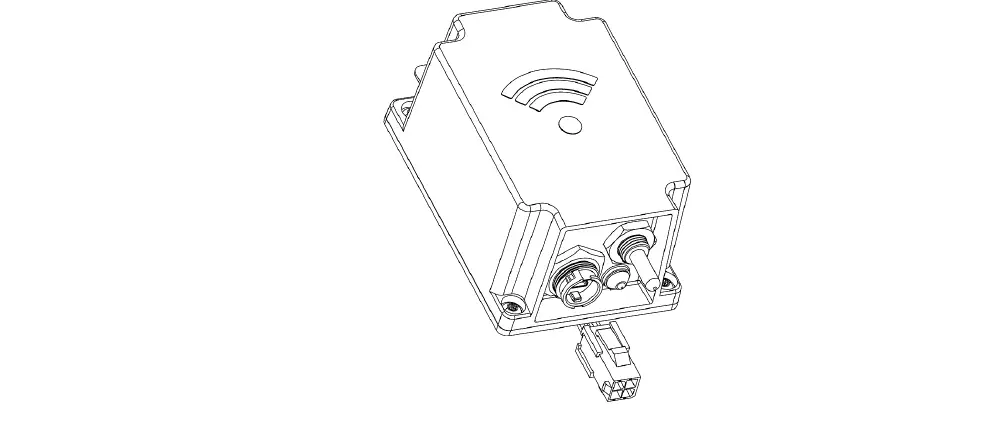
SPM01 Monitor with Wireless Communication for 1P+N System
Product Information
The SPM01 Smart Energy Sensor/Monitor is an electrical
monitoring device with wireless communication. It is designed to
work as an accessory for protective and control devices in 1P+N
systems, such as circuit breakers and modular contactors. It
provides accurate energy metering, timely alarm reporting, and
smart automation settings.
The SPM01 is suitable for energy monitoring in buildings,
infrastructures, and industries. It can be installed at the main
circuit (incoming line) for whole-home energy monitoring.
Additionally, it can measure bi-directional current flow in
real-time, which can be used for dynamic load balancing with EV
chargers and PV power generation optimization.
The device has a metering certificate for billing purposes,
which can be extended based on the regulations of the
country/region.
Product Usage Instructions
- Terminal Connection:
- Insert the terminal plate into the protective device terminal
box to receive power supply from Line (L). - Connect the cable to the power supply from Line (L).
- Connect the cable to the power supply from Neutral (N).
- Insert the terminal plate into the protective device terminal
- Through-hole Placement:
- Let the measuring cable (L) pass through the through-hole.
- Ensure that the positive current flow aligns with the arrow
direction.
- Reset Button:
- Press the reset button for 3-5 seconds to enter the pairing
mode. - This is the same function as “Remove Device” in the APP.
- Press the reset button for 3-5 seconds to enter the pairing
- LED Status Indication:
- ON: Normal usage, connected to the cloud.
- Flashing with 2Hz: Pairing mode.
- Flashing with 0.5Hz: Paired, searching for cloud.
- Flashing with 0.25Hz: Self-checking failed. Device needs to be
replaced. - Flashing with 1Hz: Wireless communication failed. Input voltage
is too low.
- Current Flow Direction:
- Ensure positive current flow direction for installation.
- Order Number:
- Refer to page 4 and 5 of the user manual for more details.
Note: Hanging-on-cable variants are recommended
if users are unsure about mount-on-MCB variant compatibility. Do
not pass both line cable and neutral cable through the same
hole.
SPM01
Smart Energy Sensor / Monitor with Wireless-communication for 1P+N System User Manual
Make energy monitoring easy for buildings, infrastructures and industries
Energy metering accurately Alarm reporting timely Automation setting smartly
BITUOTECHNIK
SPM01 smart energy monitor – also named as smart energy sensor- is an electrical monitoring device with wireless communication. It works like a smart electrical monitoring accessory for protective and control devices, such as circuit breakers and modular contactors.
SPM01 has the following main characteristics Flexibly installed above/bellow protection or control devices requiring no space at Din rail Large aperture supporting 16mm2 cable through Real-time measurement of Voltage, Current and Power Bi-directional energy measurement and forward active energy tolerance within 1% Both wireless and wire communication variants available for EMS/ BMS1) integration Useful smart features including balance calculation, chart analysis, alarm messaging, scene setting, etc.
Typical applications for SPM02 Factory energy monitoring Home energy monitoring 2) Café, restaurant and shop energy monitoring Office energy monitoring Hotel and student dorm energy monitoring / metering3) Rental properties energy monitoring / metering 3) Energy monitoring for commercial air conditioning system Energy monitoring for commercial lightning system
1) EMS: Energy Management System; BMS: Building Management System 2) In addition to whole-home energy monitoring when being installed at the main circuit (incoming line), the
real-time measurement of bi-directional current flow can provide input for dynamic load balancing with EV charger and PV power generation optimization 3) Metering certificate for billing purpose can be extended depending on the country/region regulations
April 24, 2023
Smart Energy Sensors Wifi/Zigbee
TS_SPM01_EN_V2.0
~1~
SPM01
Smart Energy Sensor / Monitor with Wireless-communication for 1P+N System
BITUOTECHNIK
5
6
4
2 3
1
8 7
#
Element
Description
(1)
Terminal plate for
Insert to protective device terminal box for power supply from Line1)
L
(2)
Cable for
Connect to power supply from Line
L
(3)
Cable for
Connect to power supply from Neutral
N
(4)
Through-hole
Let the measuring cable L going through the through-hole2)
Pay attention for positive current flow aligning with the arrow direction
(7)
(5)
Reset button
Reset button
Press the button 3~5 seconds to enter the pairing mode3)
(6)
LED
Status
ON, normal using, connect to cloud
indication
Flashing with 2Hz, pairing mode
Flashing with 0.5Hz, paired, searching for cloud
Flashing with 0.25Hz, self-checking failed4)
Flashing with 1Hz, wireless communication failed5)
(7)
Current flow direction Positive current flow direction for installation
(8)
Order number
Refer to page 4 and 5 for more details
Remark: 1) Hanging-on-cable variants are recommended, if users don’t know mount-on-MCB” variant compatibility. 2) Do not put both line cable and neutral cable going through the hole 3) Press the reset button 3~5 seconds till the LED is quickly flashing to enter the pairing mode.
Same function as Remove Device in APP. 4) Irreversible failure due to failed self-checking. Device needs to be replaced. 5) Input voltage is too low to ensure communication module inside working properly.
April 24, 2023
Smart Energy Sensors Wifi/Zigbee
TS_SPM01_EN_V2.0
~2~
BITUOTECHNIK
SPM01
Smart Energy Sensor / Monitor with Wireless-communication for 1P+N System
#
Technical specification
101 Rated operating voltage Un
110…240 VAC, 50/60 Hz
102 Basic current Ib
10 A
103 Starting current Ist 104 Max current Imax 105 Over-voltage category
50 mA 63 A III
106 Rated insolating voltage Ui
250V
107 Rated impulse withstand voltage Uimp
4kV
108 Pollution degree
3
109 Protection degree
IP20
110 Reference standard for measurement tolerance: IEC 61557-12
Voltage: Class 0.5 Current: Class 1 Active power: Class 1 Forward active energy: Class 1
111 Power consumption
Normal using: 0.5 Watt Pairing mode: 1 Watt
112 Rated operating temperature
-25…60
113 Size Height x Width x Depth
46.8mm x 17.8mm x 21.3mm
114 Reference standard
IEC 61557-12 IEC 61326-1 ETSI EN 300 328 ETSI EN 301 489-1 ETSI EN 301 489-17
April 24, 2023
Smart Energy Sensors Wifi/Zigbee
TS_SPM01_EN_V2.0
~3~
SPM01
Smart Energy Sensor / Monitor with Wireless-communication for 1P+N System Product part 1 Integration to Tuya Smart cloud1)
BITUOTECHNIK
#
Ordering number
1
SPM01-D1TW
Description Mounted on MCB2) (Downstream installation 18mm, WiFi, 1P+N, Tuya Smart cloud integration
2
SPM01-U1TW
Mounted on MCB2) (Upstream installation 18mm, WiFi, 1P+N, Tuya Smart cloud integration
3
SPM01-D1TZ
4
SPM01-U1TZ
5
SPM01-D2TW
Mounted on MCB2) (Downstream installation 18mm, Zigbee, 1P+N, Tuya Smart Zigbee gateway integration Mounted on MCB2) (Upstream installation 18mm, Zigbee, 1P+N, Tuya Smart Zigbee gateway integration Hanging on cable (Downstream installation 18mm, WiFi, 1P+N, Tuya Smart cloud integration
6
SPM01-U2TW
Hanging on cable (Upstream installation 18mm, WiFi, 1P+N, Tuya Smart cloud integration
7
SPM01-D2TZ
Hanging on cable (Downstream installation
18mm, Zigbee, 1P+N, Tuya Smart Zigbee gateway
integration
8
SPM01-U2TZ
Hanging on cable (Upstream installation
18mm, Zigbee, 1P+N, Tuya Smart Zigbee gateway
integration
Remark:
1) The Wifi and Zigbee modules from Tuya Smart use its proprietary protocol, which limits the devices’ direct
cloud integration to the Tuya Smart cloud. Tuya Integration at Home Assistant OS and API to Tuya Smart cloud
can be used to access the device indirectly. For customer-specific cloud integration or local smart home OS
integration, please use the products with Zigbee 3.0 standard meter cluster/attributes or contact us for other
solutions.
2) If users are not sure if the `mounted-on-MCB’ variants fit for the protection/control devices, `Hanging-on-cable’ variants are recommended.
April 24, 2023
Smart Energy Sensors Wifi/Zigbee
TS_SPM01_EN_V2.0
~4~
BITUOTECHNIK
SPM01
Smart Energy Sensor / Monitor with Wireless-communication for 1P+N System Product part 2 Zigbee 3.0 standard meter cluster/attributes supporting ZHA/Zigbee2Mqtt integration
#
Ordering number
1
SPM01-D1SZ
2
SPM01-U1SZ
3
SPM01-D2SZ
4
SPM01-U2SZ
Description Mounted on MCB2) (Downstream installation 18mm, Zigbee, 1P+N, Universal Zigbee coordinator integration Mounted on MCB2) (Upstream installation 18mm, Zigbee, 1P+N, Universal Zigbee coordinator integration Hanging on cable (Downstream installation 18mm, Zigbee, 1P+N, Universal Zigbee coordinator integration Hanging on cable (Upstream installation 18mm, Zigbee, 1P+N, Universal Zigbee coordinator integration
Remark: 1) The devices listed above use Zigbee 3.0 standard meter cluster/attributes. Thus, the devices can be identified by universal Zigbee coordinators for ZHA/Zigbee2Qqtt integration.
2) If users are not sure if the `mounted-on-MCB’ variants fit for the protection/control devices, `Hanging-on-cable’ variants are recommended.
April 24, 2023
Smart Energy Sensors Wifi/Zigbee
TS_SPM01_EN_V2.0
~5~
SPM01
Smart Energy Sensor / Monitor with Wireless-communication for 1P+N System
BITUOTECHNIK
Please note before starting Installation SPM01 must only be installed and maintained by qualified professionals. Qualified professionals refer to
those who have the skills, license and knowledge related to the manufacture, operation and installation of electrical equipment. They are trained to detect and avoid risks. SPM01 should not be installed if, while unpacking, any damage is observed. SPM01 must be installed inside electrical panels or switchboards, behind a door or plate, so that they are inaccessible for unauthorized persons. The electric panels must meet the requirements of the applicable standards (IEC 61439-1) and installed in compliance with current installation and safety rules (IEC 61140). All relevant local, regional, and national regulations must be respected while installing and using SPM01. SPM01 manufacturer declines any responsibility in the event that SPM01 equipment is associated with equipment that is not listed in the latest document of selection guide for product compatibility. SPM01 manufacturer is not liable in case the instructions mentioned in this document and other referred documents are not respected.
HAZARD OF ELECTRIC SHOCK, EXPLOSION OR ARC FLASH Turn off all power supply sources before installing and during maintenance of this equipment. Do not use a SPM01 product for voltage testing purposes. A Voltage Tester must be used instead. Failure to follow these instructions can result in death, serious injury, or equipment damage.
FIRE HAZARD SPM01 must be associated with an easily accessible upstream protection and circuit-breaker system. The end of cable for L and N at SPM01 must be adjusted to the according equipment and device. Such an
adjustment can only be handled by qualified professionals. Failure to follow these instructions can result in death, serious injury, or equipment damage.
RISK OF DAMAGING SPM01 Sensor Comply with the phase and the neutral position. (Red=Phase, Blue=Neutral) Disconnect SPM01 before performing the dielectric withstand test. SPM01 can only be installed upstream if associated with contactors, frequency converter or motor starters. Limit the insulation measurements up to 500 V DC. Failure to follow these instructions can result in equipment damage.
April 24, 2023
Smart Energy Sensors Wifi/Zigbee
TS_SPM01_EN_V2.0
~6~
SPM01
Smart Energy Sensor / Monitor with Wireless-communication for 1P+N System
BITUOTECHNIK
Downstream Installation Scheme (SPM01-D1TW / SPM01-D1TZ / SPM01-D2TW / SPM01-D2TZ / SPM01-D1SZ / SPM01-D2SZ)
Source
Load
Load
Source
Note: SPM01 can be damaged, if it is installed downstream of switching devices such as a contactor, frequency converter or motor starters.
April 24, 2023
Smart Energy Sensors Wifi/Zigbee
TS_SPM01_EN_V2.0
~7~
SPM01
Smart Energy Sensor / Monitor with Wireless-communication for 1P+N System
BITUOTECHNIK
Upstream Installation Scheme (SPM01-U1TW / SPM01-U1TZ / SPM01-U2TW / SPM01-U2TZ / SPM01-U1SZ / SPM01-U2SZ)
Source
Load
Load
Source
April 24, 2023
Smart Energy Sensors Wifi/Zigbee
TS_SPM01_EN_V2.0
~8~
SPM01
Smart Energy Sensor / Monitor with Wireless-communication for 1P+N System
Dimension: Unit: mm
BITUOTECHNIK
April 24, 2023
Smart Energy Sensors Wifi/Zigbee
TS_SPM01_EN_V2.0
~9~
BITUOTECHNIK
SPM01
Smart Energy Sensor / Monitor with Wireless-communication for 1P+N System
User interface example home page (Smart Life APP)
1 Device information1)
1
Click edit mark for modification
2 Total forward active energy
2
Pay attention to current flow direction
3 Current daily energy consumption chart Click to view more details
3
4
4 Energy consumption at current hour
Click to view the electricity statistics
5
6
7
8
9
5 Current with RMS value Update regularly
6 Active power with RMS value2 Update regularly
7 Voltage with RMS value Update regularly
8 Balance value Update regularly per 0.05 kW.h
9 Total reverse active energy It is excluded for balance calculation
10 Charge menu for charge setting
10
11
11 Setting menu for alarm setting
1 Following functionality could be checked at device information menu: Tap-to-Run and Automation checking for scene setting. Share Device to other users. Remove device.
2 It will show the absolute value of active power if negative power is generated. Enable the Negative-Active-Power alarm to check the wiring for right installation if necessary.
April 24, 2023
Smart Energy Sensors Wifi/Zigbee
TS_SPM01_EN_V2.0 ~ 10 ~
SPM01
Smart Energy Sensor / Monitor with Wireless-communication for 1P+N System
User interface example setting page (Smart Life APP)
BITUOTECHNIK
12 13 14 15 16 17 18 19 20
21 22 23
12 Alarm records Click to view the alarm records.
13 High power alarm Click to set the threshold value
14 Abnormal temperature alarm Slide left/right to disable/enable the alarm
15 Over current alarm Click to set the threshold value
16 Over voltage alarm Click to set the threshold value
17 Under voltage alarm Click to set the threshold value
18 Negative active power alarm Slide left/right to disable/enable the alarm
19 Insufficient balance alarm Click to set the threshold value
20 Arrearage alarm Slide left/right to disable/enable the alarm
21 Threshold value range
22 Current set value for threshold
23 Slide switch Slide to left to disable the alarm Slide to right to enable the alarm
April 24, 2023
Smart Energy Sensors Wifi/Zigbee
TS_SPM01_EN_V2.0 ~ 11 ~
SPM01
Smart Energy Sensor / Monitor with Wireless-communication for 1P+N System
BITUOTECHNIK
Alarm threshold values:
High power alarm Abnormal temperature alarm Over current alarm Over voltage alarm Under voltage alarm Negative active power alarm Insufficient balance alarm Arrearage alarm
Usable alarm threshold value: 1 ~ 25 kW To be triggered by temperature sensor inside Usable alarm threshold value: 10 ~ 100 A Usable alarm threshold value: 100 ~ 270 V Usable alarm threshold value: 90 ~ 250 V To be triggered when negative active power is more than 3 watts. Usable alarm threshold value: 10 ~ 500 kW.h To be triggered when balance is zero
April 24, 2023
Smart Energy Sensors Wifi/Zigbee
TS_SPM01_EN_V2.0 ~ 12 ~
BITUOTECHNIK
SPM01
Smart Energy Sensor / Monitor with Wireless-communication for 1P+N System
User interface example Statistics page (Smart Life APP)
24 25
26
24 Electricity Statistics Click Day / Month / Year to view: Daily energy consumption chart Monthly energy consumption chart Yearly energy consumption chart
25 Total consumed electricity value It could be checked with: Total consumed energy in selected day Total consumed energy in selected month Total consumed energy in selected year
26 Chart Value is displayed for the selected one. Data within one year could be checked.
Daily energy consumption at each hour. Monthly energy consumption at each day Yearly energy consumption at each month
27 Timeline Selected timeline for chart generation
27
April 24, 2023
Smart Energy Sensors Wifi/Zigbee
TS_SPM01_EN_V2.0 ~ 13 ~
BITUOTECHNIK
SPM01
Smart Energy Sensor / Monitor with Wireless-communication for 1P+N System
User interface example Charge page (Smart Life APP)
28 Switch prepayment Not open for current version To be open later
29 Balance Current balance value Update regularly
28
30 Charge
Click to charge the energy
29
Unit: kW.h
Balance value will be updated when charge
30
action is done successfully.
31 Charge records
31
Click to view the charge records
32
32 Reset Energy and Balance
Zero or clear the following data:
Balance
Total forward active energy
Total reverse active energy
Daily consumed energy data
Monthly consumed energy data
Yearly consumed energy data
Remark:
Access could be set in Smart Life APP for different user when the device is shared to others for data safety
consideration. Common users could not do the following action: Charge energy Check the threshold value for alarm Change the threshold value for alarm Enable or disable the alarm Reset energy and balance
It is only opened to the Administrator user.
April 24, 2023
Smart Energy Sensors Wifi/Zigbee
TS_SPM01_EN_V2.0 ~ 14 ~
SPM01
Smart Energy Sensor / Monitor with Wireless-communication for 1P+N System
BITUOTECHNIK
Disclaimer:
The information in this document is subject to change without notice and should not be construed as a commitment by BITUOTECHNIK. BITUOTECHNIK assumes no responsibility for any errors that may appear in this document.
In no event shall BITUOTECHNIK be liable for direct, indirect, special, incidental or consequential damages of any nature or kind arising from the use of this document, nor shall BITUOTECHNIK be liable for incidental or consequential damages arising from use of any software or hardware described in this document.
Trademarks
BITUOTECHNIK is a registered trademark of Shanghai Bituo Electric Co.,Ltd.
.
Shanghai Bituo Electric Co.,Ltd.
Address8F, Building 6, Qianfan Rd. 288, Songjiang District, Shanghai 201600, China Tel: +86 (21) 5780 8599
Email [email protected] Website www.bituo-technik.com
April 24, 2023
Smart Energy Sensors Wifi/Zigbee
TS_SPM01_EN_V2.0 ~ 15 ~
 BRANDED | Brand Creation & Implementation Agency
 Top Technology Provider for RCD & PMD |Bituo Technik