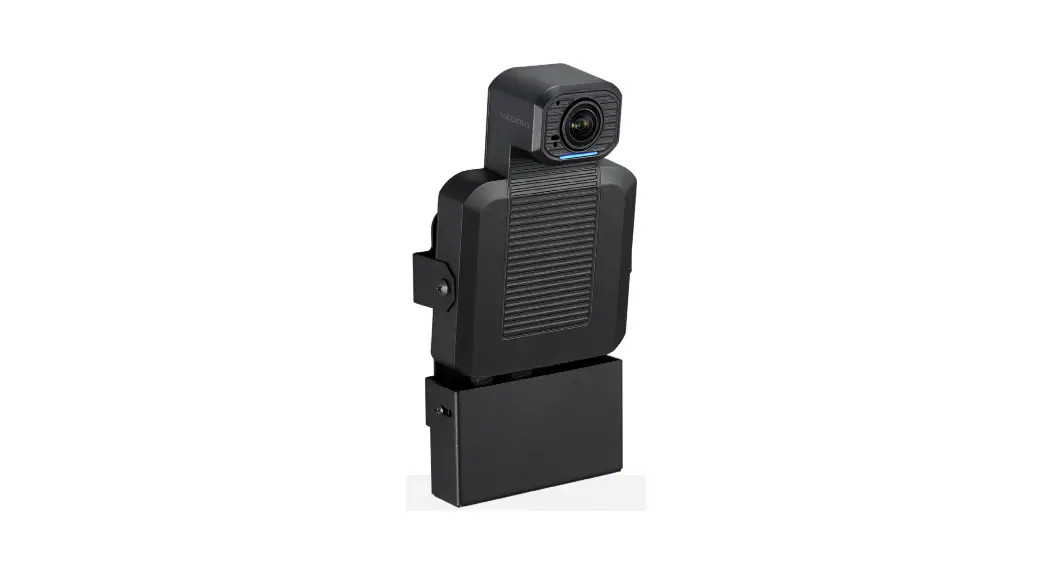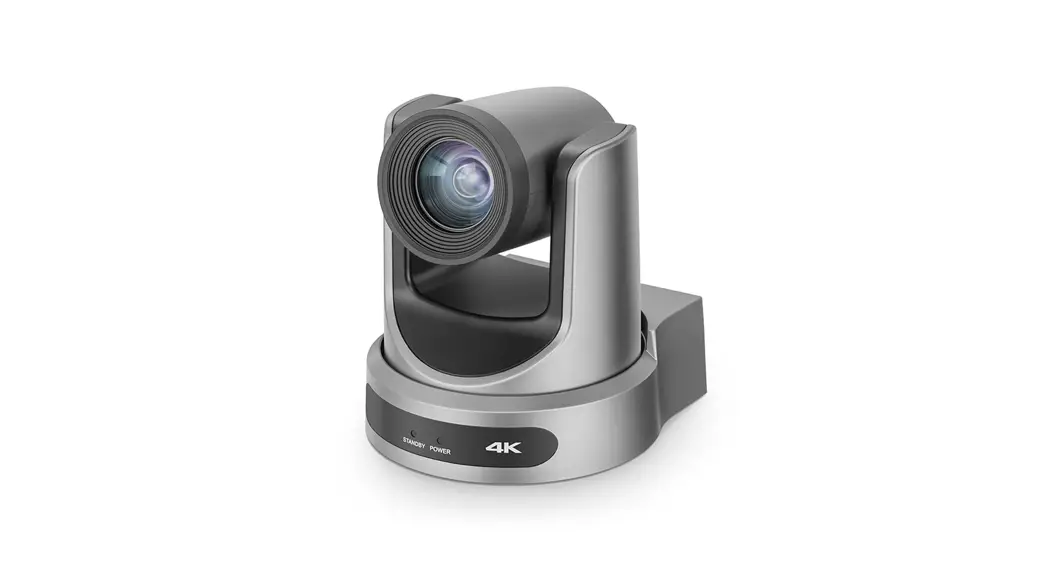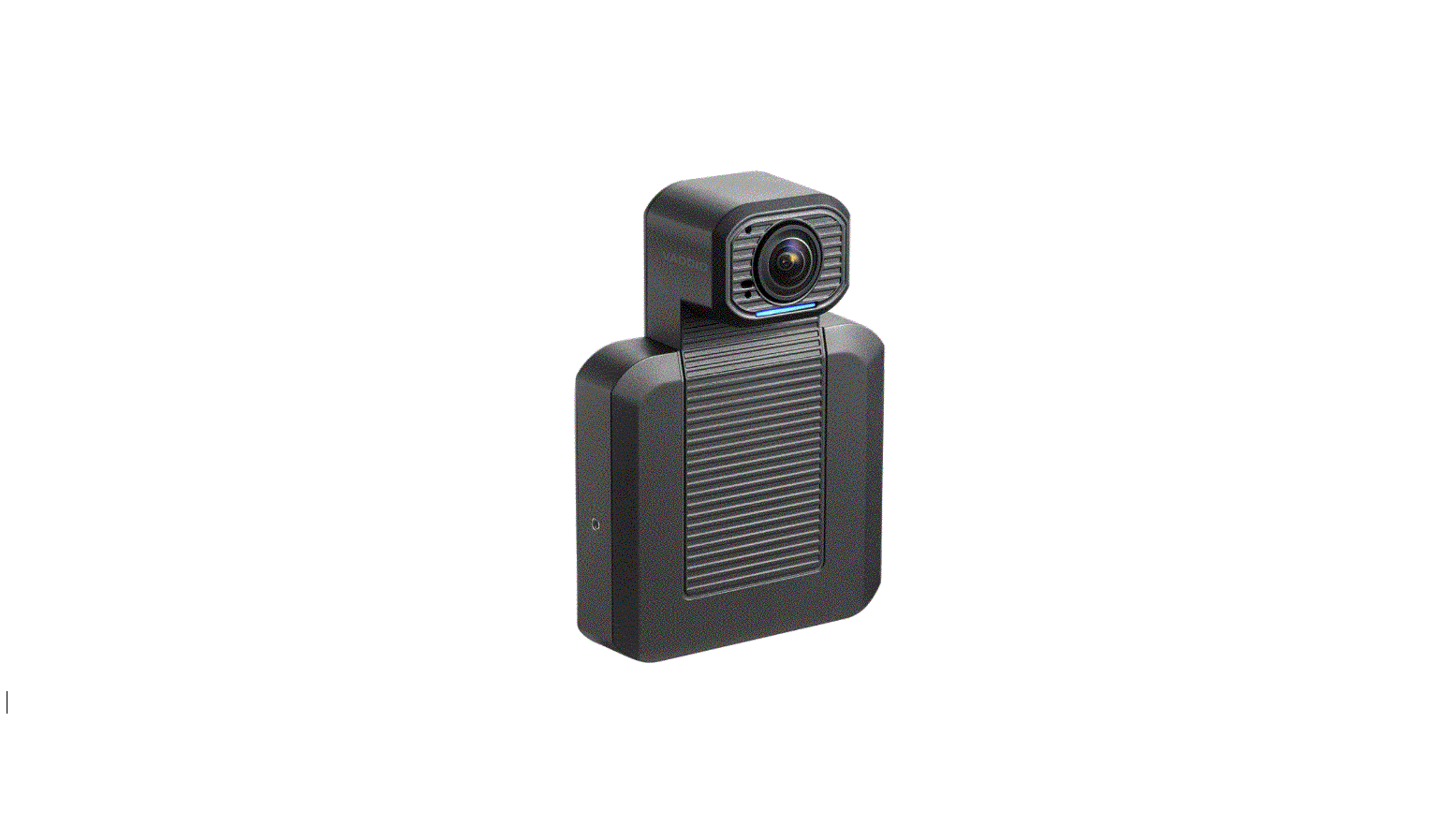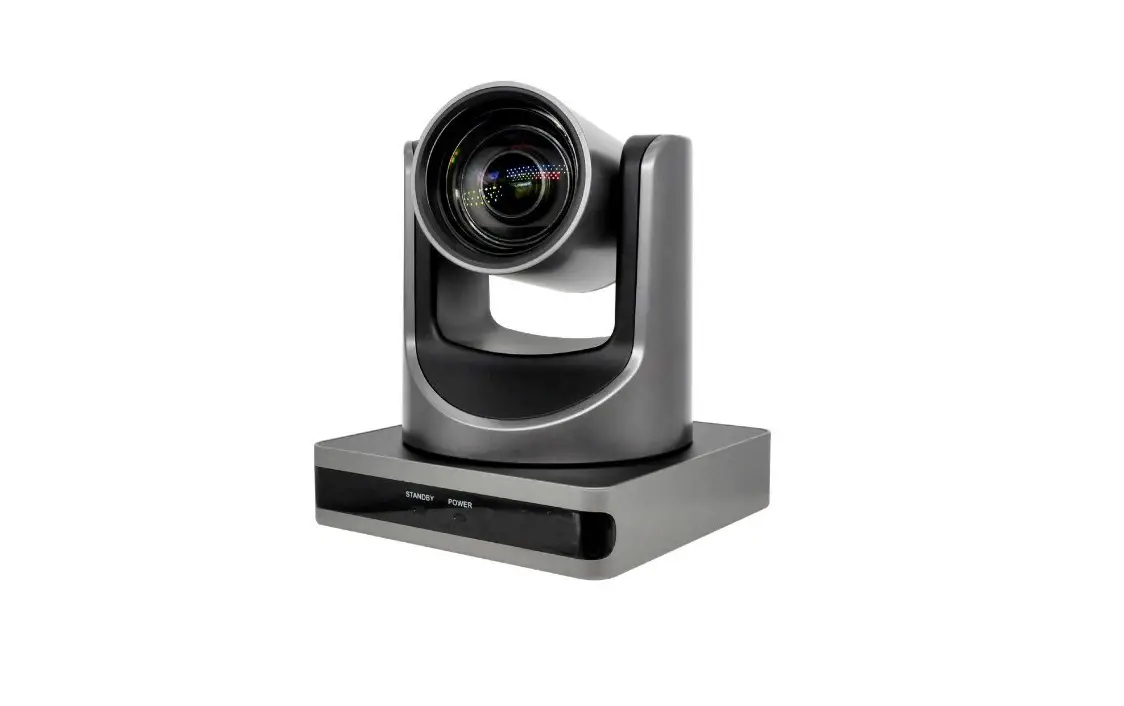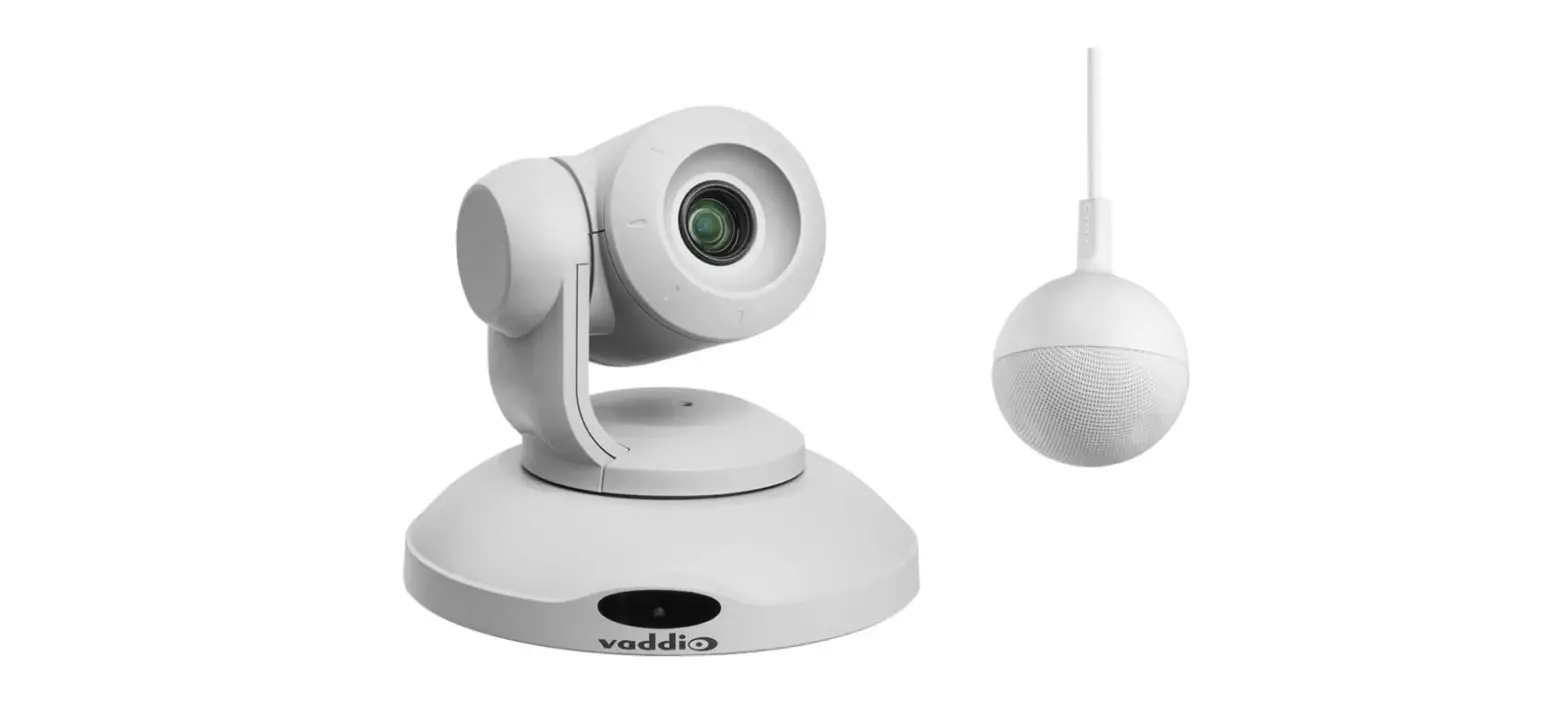

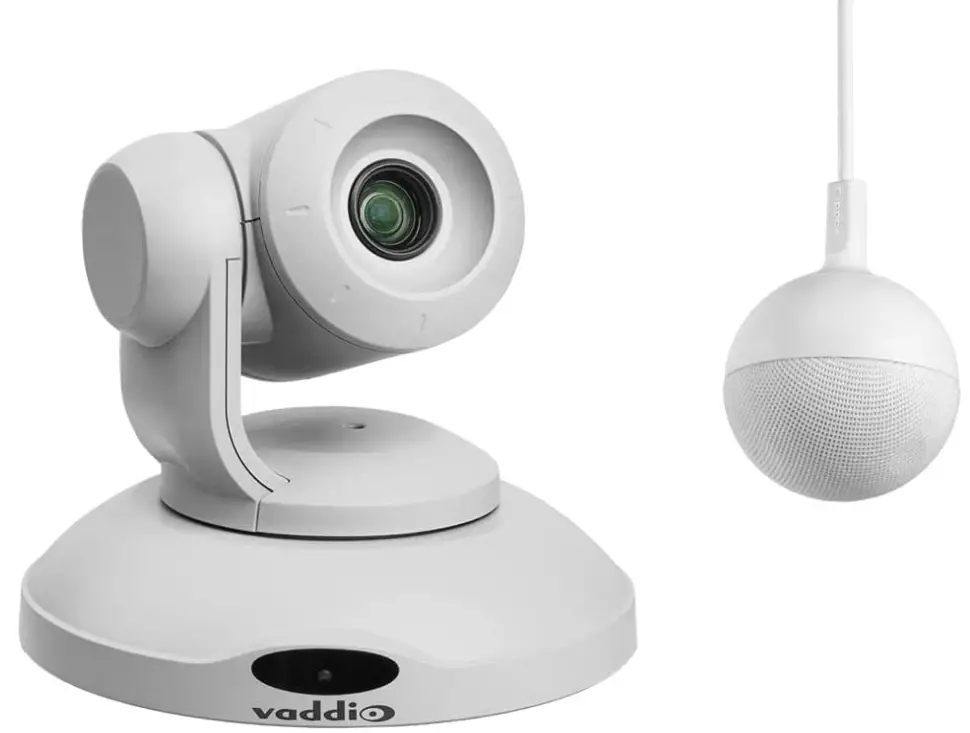
Vaddio 999-99950-800W Conference SHOT AV HD Conference Room System
Overview
This guide covers the Conference SHOT™ AV system – a camera and detachable speaker available in silver/black or white, available individually or in conference room bundles: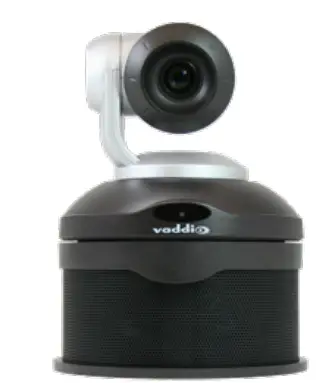
Conference SHOT AV Camera
- North America – 999-9995-000 (silver/black), 999-9995-000W (white)
- europe and UK – 999-9995-001 (silver/black), 999-9995-001W (white)
- Australia and New Zealand – 999-9995-009 (silver/black), 999-9995-009W (white)
ConferenceSHOT AV Speaker
- Worldwide – 999-9995-003 (black)
- Worldwide – 999-9995-003W (white)
ConferenceSHOT AV Bundle, CeilingMIC 1 (camera, speaker, microphone)
This bundle replaces the Integrator 1 bundle, 999-9995-100/100W/101/101W/109/109W.
- North America – 999-99950-100 (silver/black), 999-99950-100W (white)
- Europe and UK – 999-99950-101 (silver/black), 999-99950-101W (white)
- Australia and New Zealand – 999-99950-109 (silver/black), 999-99950-109W (white)
ConferenceSHOT AV Bundle, CeilingMIC 2 (camera, speaker, two microphones)
This bundle replaces the Integrator 2 bundle, 999-9995-200/200W/201/201W/209/209W.
- North America – 999-99950-200 (silver/black), 999-99950-200W (white)
- Europe and UK – 999-99950-201 (silver/black), 999-99950-201W (white)
- Australia and New Zealand – 999-99950-209 (silver/black), 999-99950-209W (white)
ConferenceSHOT AV Bundle, TableMIC 1 (camera, speaker, microphone)
this bundle replaces the Huddle bundle, 999-9995-300/300W/301/301W/309/309W.
- North America – 999-99950-300 (silver/black), 999-99950-300W (white)
- Europe and UK – 999-99950-301 (silver/black), 999-99950-301W (white)
- Australia and New Zealand – 999-99950-309 (silver/black), 999-99950-309W (white)
ConferenceSHOT AV Bundle, TableMIC 2 (camera, speaker, two microphones)
This bundle replaces the Group bundle, 999-9995-400/400W/401/401W/409/409W.
- North America – 999-99950-400 (silver/black), 999-99950-400W (white)
- Europe and UK – 999-99950-401 (silver/black), 999-99950-4601W (white)
- Australia and New Zealand – 999-99950-409 (silver/black), 999-99950-409W (white)
ConferenceSHOT AV Bundle, TableMIC 1 without Speaker (camera, microphone, HDMI audio embedder)
This bundle replaces the Basic 1 bundle, 999-9995-500/500W/501/501W/509/509W.
- North America – 999-99950-500 (silver/black), 999-99950-500W (white)
- Europe and UK – 999-99950-501 (silver/black), 999-99950-501W (white)
- Australia and New Zealand – 999-99950-509 (silver/black), 999-99950-509W (white)
ConferenceSHOT AV Bundle, TableMIC 2 without Speaker (camera, two microphones, HDMI audio embedder)
This bundle replaces the Basic 2 bundle, 999-9995-600/600W/601/601W/609/609W.
- North America – 999-99950-600 (silver/black), 999-99950-600W (white)
- Europe and UK – 999-99950-601 (silver/black), 999-99950-601W (white)
- Australia and New Zealand – 999-99950-609 (silver/black), 999-99950-609W (white)
ConferenceSHOT AV Bundle, CeilingMIC 2 without Speaker (camera, two microphones)
This bundle replaces the Integrator 2 without speaker bundle, 999-9995-700/700W/701/701W/709/709W.
- North America – 999-99950-700 (silver/black), 999-99950-700W (white)
- Europe and UK – 999-99950-701 (silver/black), 999-99950-701W (white)
- Australia and New Zealand – 999-99950-709 (silver/black), 999-99950-709W (white)
ConferenceSHOT AV Bundle, CeilingMIC 1 without Speaker (camera, microphone)
This bundle replaces the Integrator 1 without speaker bundle, 999-9995-800/800W/801/801W/809/809W.
- North America – 999-99950-800 (silver/black), 999-99950-800W (white)
- Europe and UK – 999-99950-801 (silver/black), 999-99950-801W (white)
- Australia and New Zealand – 999-99950-809 (silver/black), 999-99950-809W (white)
This manual also applies to the following discontinued bundles:
- Conference SHOT AV Bundle, Integrator 1 (camera, speaker, microphone) 999-9995-100/100W/101/101W/109/109W
Replacement: 999-99950-100/100W/101/101W/109/109W, CeilingMIC 1: - ConferenceSHOT AV Bundle, Integrator 2 (camera, speaker, two microphones) 999-9995-200/200W/201/201W/209/209W
Replacement: 999-99950-200/200W/201/201W/209/209W, CeilingMIC 2 - ConferenceSHOT AV Bundle, Huddle (camera, speaker, microphone) 999-9995-300/300W/301/301W/309/309W
Replacement: 999-99950-300/300W/301/301W/309/309W, TableMIC 1 - ConferenceSHOT AV Bundle, Group (camera, speaker, two microphones) 999-9995-400/400W/401/401W/409/409W
Replacement: 999-99950-400/400W/401/401W/409/409W, TableMIC 2 - ConferenceSHOT AV Bundle, Basic 1 (camera, microphone, HDMI audio embedder) 999-9995-500/500W/501/501W/509/509W
Replacement: 999-99950-500/500W/501/501W/509/509W, TableMIC 1 without Speaker - ConferenceSHOT AV Bundle, Basic 2 (camera, two microphones, HDMI audio embedder) 999-9995-600/600W/601/601W/609/609W
Replacement: 999-99950-600/600W/601/601W/609/609W, TableMIC 2 without Speaker - ConferenceSHOT AV Bundle, Integrator 2 without Speaker (camera, two microphones) 999-9995-700/700W/701/701W/709/709W
Replacement: 999-99950-700/700W/701/701W/709/709W, CeilingMIC 2 without speaker - ConferenceSHOT AV Bundle, Integrator 1 without Speaker (camera, microphone) 999-9995-800/800W/801/801W/809/809W
Replacement: 999-99950-800/800W/801/801W/809/809W, CeilingMIC 1 without speaker.
What’s in this Guide
This guide covers:
- Unpacking the system
- Tips for a successful installation
- Instructions for installing the camera mount
- Information on connecting the system components
- Instructions for mounting the camera and speaker
- Camera power-on Complete product information is available in the Complete Manual for the Conference SHOT AV Enterprise-Class Conferencing System.
Note
If you are responsible for configuring the equipment after installing it, please use the Complete
Manual instead of this guide. The product’s Complete Manual includes all the information in this guide, plus information on system administration, operation, and troubleshooting.
Features
- Integrated HD camera and audio system ideal for huddle rooms and small to medium conference rooms
- 2.14 Megapixel effective, native 1080p/60 full HD image sensor
- 10x optical zoom, horizontal field of view of 74° in super-wide mode
- Simultaneous uncompressed USB 3.0 and IP (H.264) video with full-duplex audio streaming
- Audio inputs for two Vaddio microphones
- Audio output for optional matching speaker – or integrate into existing audio infrastructure
- Selectable IP stream resolution; USB stream resolution auto-negotiated with conferencing client
- Precise pan and tilt movements at up to 90° per second
- Universal Video Class (UVC) and Universal Audio Class (UAC) drivers supported in Windows®, macOS®, and Linux operating systems, compatible with most UC conferencing applications
- Integration-ready Telnet control
- Enterprise-class IT administrative capabilities with full web controls for remote management
- Presenter-friendly IR remote control.
Unpacking the Conferencing System
Make sure you received all the items you expected. Here are the packing lists for the Conference SHOT AV system.
Caution
Always support the camera’s body when lifting or moving it. Lifting the camera by its head or mounting arm will damage it.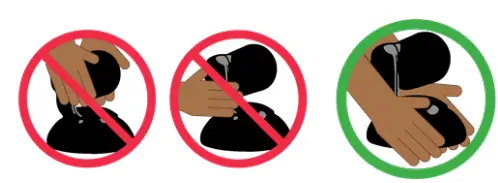
ConferenceSHOT AV camera
North America: 999-9995-000 (black/silver) or 999-9995-000W (white)
Europe and UK: 999-9995-001 (black/silver) or 999-9995-001W (white)
Australia and New Zealand: 999-9995-009 (black/silver) or 999-9995-009W (white)
- ConferenceSHOT AV camera (silver/black or white)
- Vaddio IR Remote Commander
- PoE+ mid-span power injector with AC cord set(s)
- Cat-5e cable, 10 ft (3 m)
- USB 3.0 cable, 6 ft (1.8 m)
- 4-contact Phoenix-style connector
- Thin Profile Wall Mount with mounting hardware
Conferencing Accessories
ConferenceSHOT AV speaker
All locales: 998-9995-003 (black) or 998-9995-003W (white)
- ConferenceSHOT AV speaker
- Rail mount kit (mounts to the camera or the camera mount)
- Power/audio cable, 6 in. (15 cm)
HDMI audio embedder kit
All locales: 999-9995-004
- HDMI audio embedder
- Audio interface module
- ConferenceSHOT AV speaker cable
- HDMI cable
- Audio interface to HDMI audio embedder patch cable, 4 ft (1.2 m)
- Power cable, 4 ft.(1.2 m)
ConferenceSHOT AV Bundles
ConferenceSHOT AV Bundle – TableMIC 1
Replaces ConferenceSHOT AV Huddle Bundle
North America: 999-99950-300 (black/silver) or 999-99950-300W (white)
Europe and UK: 999-99950-301 (black/silver) or 999-99950-301W (white)
Australia and New Zealand: 999-99950-309 (black/silver) or 999-99950-309W (white)
- ConferenceSHOT AV camera
- VaddioIR Remote Commander
- PoE+ mid-span power injector with AC cord set(s)
- USB 3.0 A to B cable, 6 ft (1.8 m)
- Cat-5e cable, 10 ft (3 m)
- 4-contact Phoenix-style connector
- Thin Profile Wall Mount with mounting hardware
- ConferenceSHOT AV speaker
- Power/audio cable, 6 in. (15 cm)
- Rail mount kit (mounts to the camera or its mount)
- One TableMIC microphone
- Cat-5e cable, 25 ft (7.6 m)
ConferenceSHOT AV Bundle – TableMIC 1 without Speaker
Replaces ConferenceSHOT AV Basic 1 Bundle
North America: 999-99950-500 (black/silver) or 999-99950-500W (white)
Europe and UK: 999-99950-501 (black/silver) or 999-99950-501W (white)
Australia and New Zealand: 999-99950-509 (black/silver) or 999-99950-509W (white)
- ConferenceSHOT AV camera
- VaddioIR Remote Commander
- PoE+ mid-span power injector with AC cord set(s)
- USB 3.0 A to B cable, 6 ft (1.8 m)
- Cat-5e cable, 10 ft (3 m)
- 4-contact Phoenix-style connector
- Thin Profile Wall Mount with mounting hardware
- HDMI audio embedder
- Audio interface module
- DC cable, 1 ft (0.3 m)
- Audio interface to HDMI audio embedder patch cable, 4 ft (1.2 m)
- HDMI cable, 6 ft (1.8 m)
- Dual RCA audio cable, 1.5 ft (0.5 m)
- TableMIC microphone
- Cat-5 cable, 25 ft (7.6 m)
ConferenceSHOT AV Bundle – TableMIC 2
Replaces Conference SHOT AV Group Bundle
North America: 999-99950-400 (black/silver) or 999-99950-400W (white)
Europe and UK: 999-99950-401 (black/silver) or 999-99950-401W (white)
Australia and New Zealand: 999-99950-409 (black/silver) or 999-99950-409W (white)
- ConferenceSHOT AV camera
- VaddioIR Remote Commander
- PoE+ mid-span power injector with AC cord set(s)
- USB 3.0 A to B cable, 6 ft (1.8 m)
- Cat-5e cable, 10 ft (3 m)
- 4-contact Phoenix-style connector
- Thin Profile Wall Mount with mounting hardware
- ConferenceSHOT AV speaker
- Power/audio cable, 6 in. (15 cm)
- Rail mount kit (mounts to the camera or its mount)
- Two TableMIC microphones
- Cat-5e cable, 25 ft (7.6 m)
ConferenceSHOT AV Bundle – TableMIC 2 without Speaker
Replaces Conference SHOT AV Basic 2 Bundle
North America: 999-99950-600 (black/silver) or 999-99950-600W (white)
Europe and UK: 999-99950-601 (black/silver) or 999-99950-601W (white)
Australia and New Zealand: 999-99950-609 (black/silver) or 999-99950-609W (white)
- Conference SHOT AV camera
- Vaddio IR Remote Commander
- PoE+ mid-span power injector with AC cord set(s)
- USB 3.0 A to B cable, 6 ft (1.8 m)
- Cat-5e cable, 10 ft (3 m)
- 4-contact Phoenix-style connector
- Thin Profile Wall Mount with mounting hardware
- HDMI audio embedder
- Audio interface module
- DC cable, 1 ft. (0.3 m)
- Audio interface to HDMI audio embedder patch cable, 4 ft (1.2 m)
- HDMI cable, 6 ft. (1.8 m)
- Dual RCA audio cable, 1.5 ft (0.5 m)
- TableMIC microphone, qty. 2
- Cat-5 cable, 25 ft (7.6 m), qty. 2
ConferenceSHOT AV Bundle – CeilingMIC 1
Replaces ConferenceSHOT AV Integrator 1 Bundle
North America: 999-99950-100 (black/silver) or 999-99950-100W (white)
Europe and UK: 999-99950-101 (black/silver) or 999-99950-101W (white)
Australia and New Zealand: 999-99950-109 (black/silver) or 999-99950-109W (white)
- ConferenceSHOT AV camera
- Vaddio IR Remote Commander
- PoE+ mid-span power injector with AC cord set(s)
- USB 3.0 A to B cable, 6 ft (1.8 m)
- Cat-5e cable, 10 ft (3 m)
- 4-contact Phoenix-style connector
- Thin Profile Wall Mount with mounting hardware
- ConferenceSHOT AV speaker
- Power/audio cable, 6 in. (15 cm)
- Rail mount kit (mounts to the camera or the camera mount)
- CeilingMIC microphone, white, with strain-relief boot
- In-ceiling interface box
- Tile brace
- Trim plates, qty. 2, with mounting hardware (white)
- Drop-down cable (white)
- Small zip-tie
- Strain relief clamp
- Split grommet
ConferenceSHOT AV Bundle – CeilingMIC 1 (without speaker)
Replaces Conference SHOT AV Integrator 1 without Speaker Bundle
North America: 999-99950-800 (black/silver) or 999-99950-800W (white)
Europe and UK: 999-99950-801 (black/silver) or 999-99950-801W (white)
Australia and New Zealand: 999-99950-809 (black/silver) or 999-99950-809W (white)
- ConferenceSHOT AV camera
- Vaddio IR Remote Commander
- PoE+ mid-span power injector with AC cord set(s)
- USB 3.0 A to B cable, 6 ft (1.8 m)
- Cat-5e cable, 10 ft (3 m)
- 4-contact Phoenix-style connector
- Thin Profile Wall Mount with mounting hardware
- One CeilingMIC microphone, white, with strain-relief boot
- In-ceiling interface box
- Tile brace
- Trim plates, qty. 2, with mounting hardware (white)
- Drop-down cable (white)
- Small zip-tie
- Strain relief clamp
- Split grommet
A Quick Look at the System
This section covers the physical features of the camera.
Front of the Camera
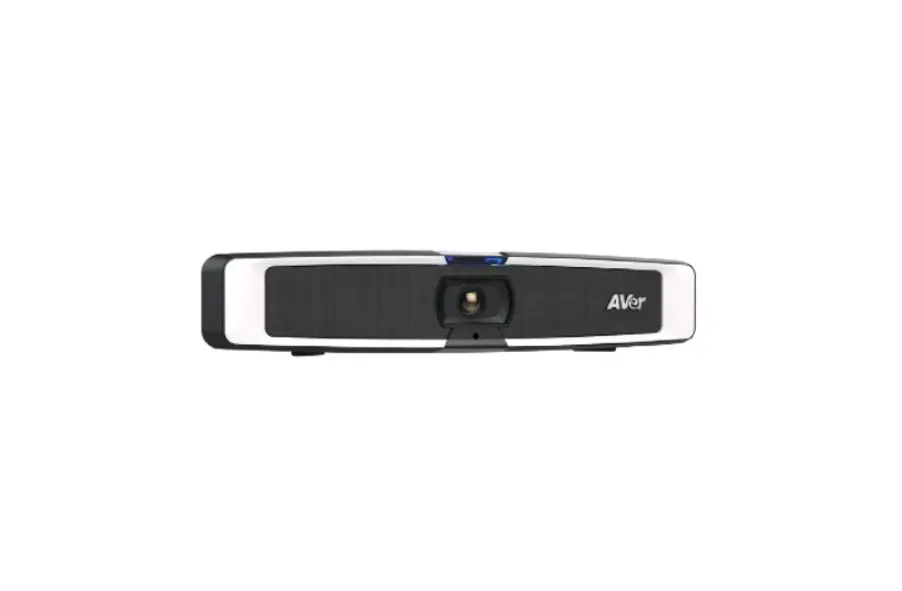
This photograph shows the camera and speaker mounted together.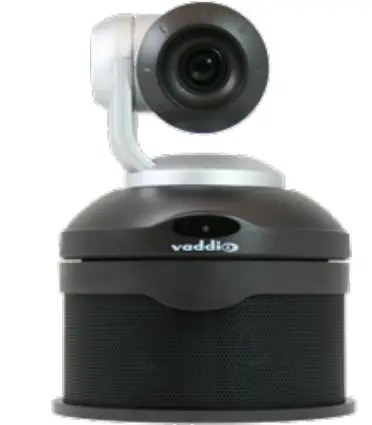
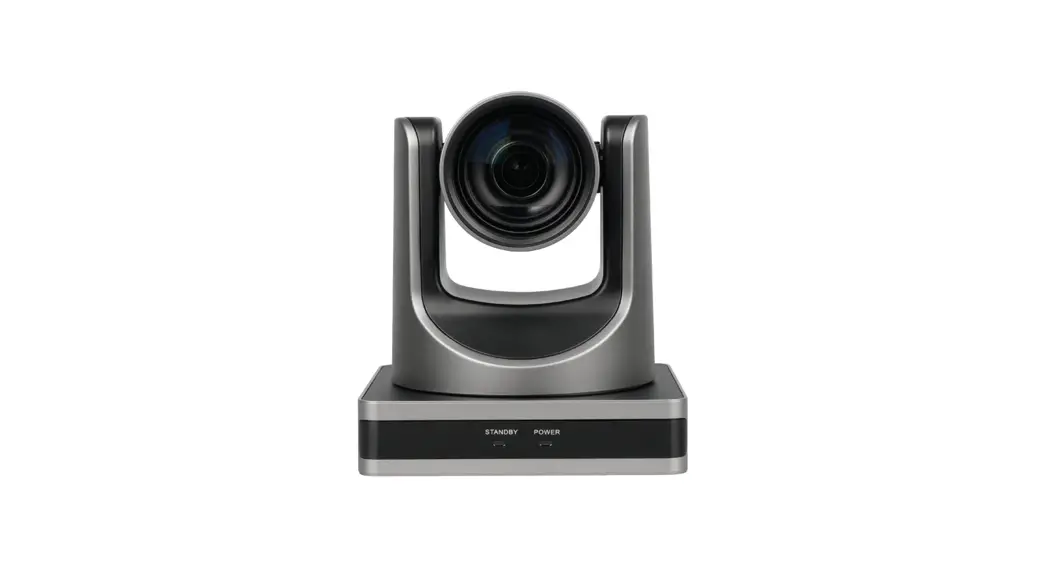
Camera and zoom lens – The ConferenceSHOT AV camera features a 10X optical zoom lens (11X in Super-Wide mode).
IR sensor – Receives signals from the IR remote. Make sure there’s nothing directly in front of the camera base, and point the remote at the camera.
Status light – The multi-colored LED indicates the camera’s current state. This light can be turned off in the administrative web interface.
Note
By default, the camera’s status indicator light is active during normal operation; however, it can be configured to remain off when the camera is powered up. The camera may be sending video even if the light is off.
Speaker – Far-end conference audio for small rooms. Available in some ConferenceSHOT AV bundles or Q Separately.
Back of the Camera
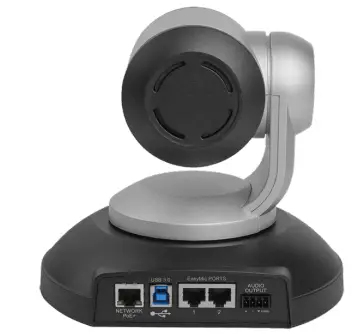
- Network PoE+ – RJ-45 connector. Connect to the network and to power via the Power and Data Out port of the mid-span PoE+ power injector. Provides power and network access for IP streaming and camera control via web interface or Telnet.
- USB 3.0 – USB type B connector. Connect to a computer for use with soft conferencing applications.
Provides uncompressed USB 3.0 stream. - EasyMic ports – RJ-45 connectors. Connect up to two Vaddio CeilingMIC, TableMIC, or other
EasyMic-compatible microphones. - Audio output – Line level differential audio and 12 VDC power output to the optional amplified speaker or other audio infrastructure.
Back of the Speaker
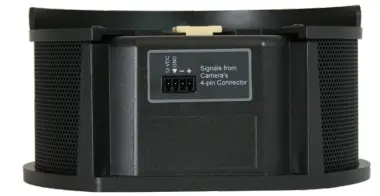
Use the provided speaker cable to connect the speaker to the camera.
Installation
This section covers:
- Selecting the location for the camera
- Installing the mount
- Connecting the camera (and speaker, if purchased)
- Mounting the camera (and speaker, if purchased) And a required safety note here:
Note
PoE type networks connected to this equipment are for intra-building use only and should not be connected to lines that run outside of the building in which this product is located.
Don’t Void Your Warranty!
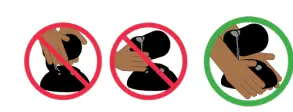
Caution
Always support the camera’s body when lifting or moving it. Lifting the camera by its head or mounting arm will damage it.
Caution
This product is for indoor use. Do not install it outdoors or in a humid environment without the appropriate
protective enclosure. Do not allow it to come into contact with any liquid.
Caution
Do not install or operate this product if it has been dropped, damaged, or exposed to liquids. If any of these things happen, return it to Vaddio for safety and functional testing.
Before You Install the Camera
Things to keep in mind when deciding where to install the camera:
- Consider camera viewing angles, lighting conditions, line-of-sight obstructions, and in-wall obstructions where the camera is to be mounted.
- Ensure that the camera body can move freely and will normally point away from the ceiling and lights.
- The camera will not perform well if it is pointed toward a light source such as a light fixture or window.
- If the remote will be used, ensure that nothing blocks the IR lens in the camera’s base.
Prepare for a successful installation:
- Be sure you can identify all cables correctly.
- Check Cat-5 cables for continuity.
- Talk to the network administrator. If installing the camera in a non-DHCP network (one that does not
automatically assign IP addresses), you will need to configure the camera with a static IP address as directed by the network administrator.
Installing the Wall Mount
The camera is shipped with a wall mount. Other mounting options are available as well. Contact us if you don’t have the camera mount you need.
You can install the camera wall mount to a 2-gang wall box or directly to the drywall.
- If you mount it to drywall, use the wall anchors provided with the wall mount.
- If you mount it to a wall box, use the cover plate screws supplied with the wall box.
If you install the camera wall mount to drywall, use the wall anchors provided with the mount.
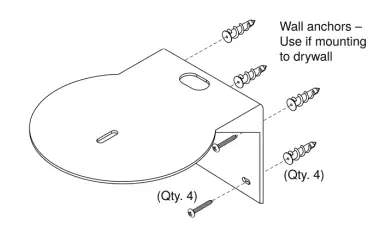
This mount may be installed as shown, or flipped 180° so that the wall attachment is directly behind the camera.
About Ceiling-Mounted Cameras
If you use an inverted mount, set the camera’s Image Flip mode ON for inverted operation. This orients the video image correctly and sets the tilt motors to respond appropriately to tilt up and down commands from the remote, web interface, and connected control devices. This control is available to the administrator on the web interface’s System page.
Cabling Notes
Caution
When building cables for Vaddio products, do not use pass-through RJ-45 connectors. If they are crimped incorrectly, they can cause intermittent connections and degrade signal quality. Incorrectly crimped pass-through connectors can also damage the connectors on the product, which will void your warranty.
Use Cat-5e or better cable. We recommend using high-quality connectors and a high-quality crimping tool. We recommend shielded cabling if the cables will be coiled, run tightly with other cables, or routed near sources of electromagnetic interference such as power lines or fluorescent light fixtures.
Caution
Check your cables. Connecting a cable to the wrong port or using the wrong pin-out can result in equipment damage and will void the warranty.
Pro Tip
Label all cables at both ends.
About Echo Cancellation
When a microphone picks up the audio from a speaker (far-end audio) during a conference, it sends the farend audio back to the participants at the far end, creating an echo. Acoustic echo cancellation prevents this.
Here’s how it works:
- The speaker feeds the far-end audio into the room. This signal also goes to the audio processor as the reference that needs to be canceled.
- The audio processor inverts the signal and sends it to the microphone.
- The sum of the audio that the microphone picks up from the speaker and the inverted signal is 0: The echo is canceled.


With the audio from the speaker canceled out, the audio from the microphone includes only the sounds originating at your end of the conference.
For the ConferenceSHOT AV system’s acoustic echo cancellation to work,
- The line outputs or the powered speaker must be connected to provide the audio to be canceled, and
- The microphone(s) must be connected, to route the audio from the speakers to the audio processor.
- In the soft conferencing client, you must select the speakers and microphone connected to the camera as the conference audio devices.
Basic Connections
Here is an example of how the camera might be set up in a medium-size conference room. (Shown: ConferenceSHOT AV bundle – TableMIC 2.) In this setup, a PC uses a unified communications conferencing application to manage the camera and connected microphones and speaker. When connected in this way, the system provides echo cancellation.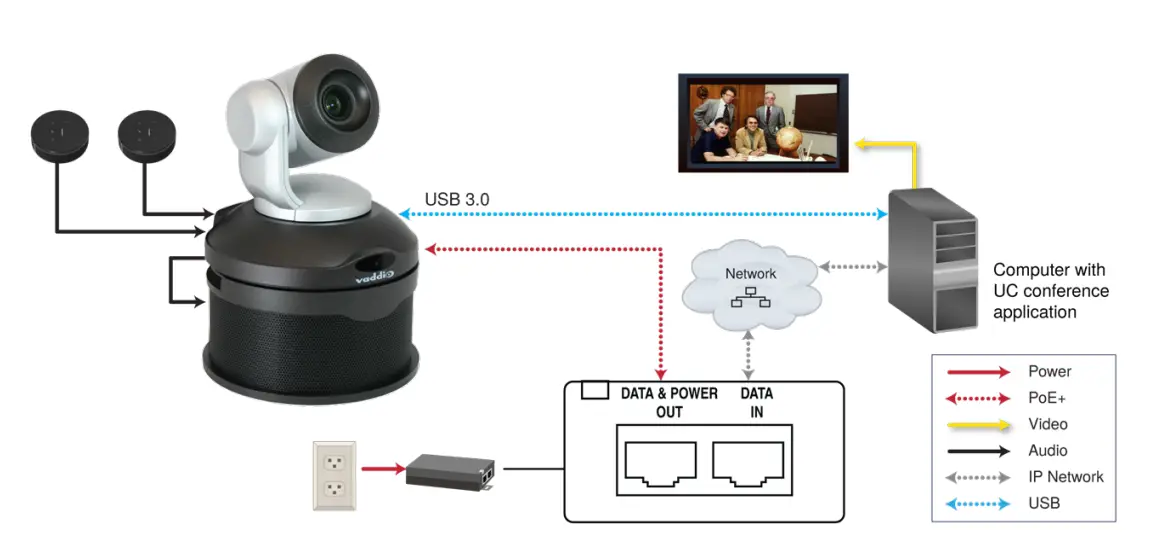
The camera can also be connected without the speaker, using an HDMI audio embedder to include the farend audio in the HDMI output. (Shown: ConferenceSHOT AV bundle – TableMIC 1 without speaker.) This allows you to use a display with integrated speakers. When connected this way, the system provides echo cancellation.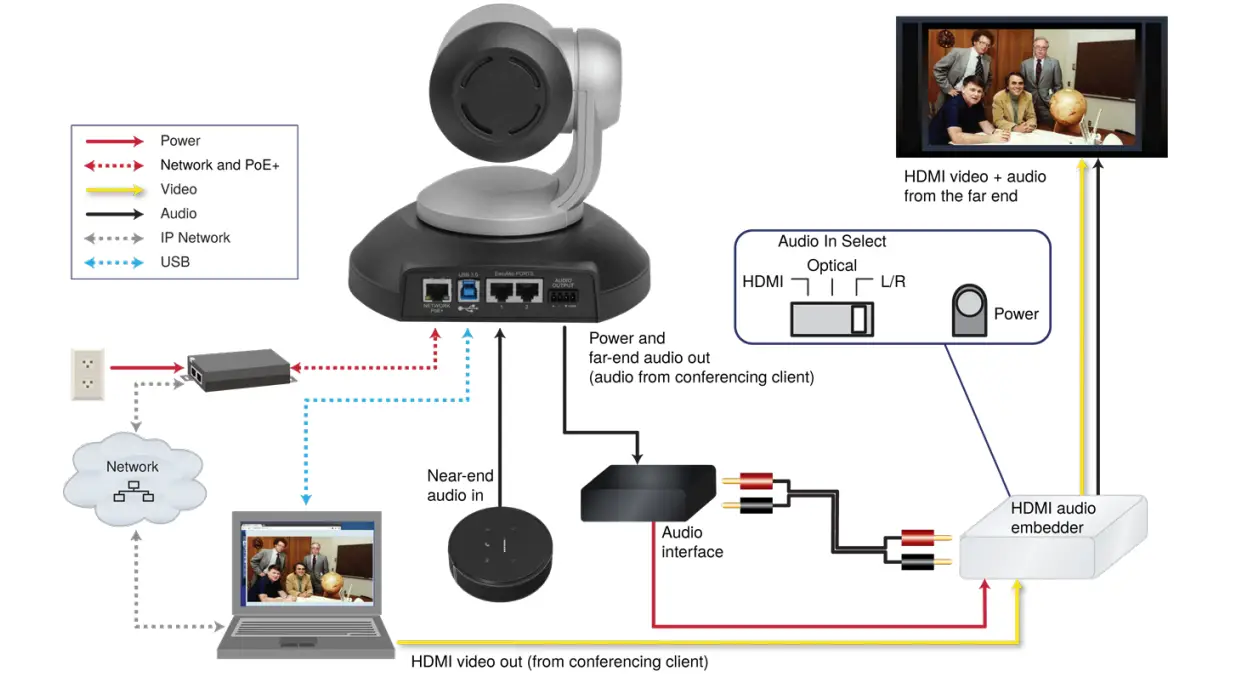
This product is intended for installation and use only in environments where all PoE/PoE+ connections originate within the building. It is not to be connected to lines that run outside the building where it is installed.
Installing the Camera without the Speaker
Caution
Before you start, be sure you can identify all cables correctly. Connecting a cable to the wrong port can result in equipment damage.
Caution
Check your cables. Connecting a cable to the wrong port or using the wrong pin-out can result in equipment damage and will void the warranty.
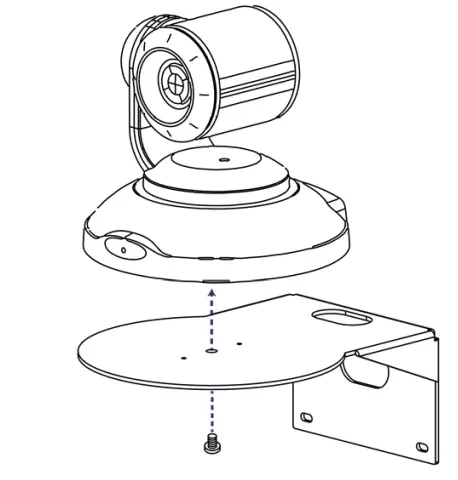
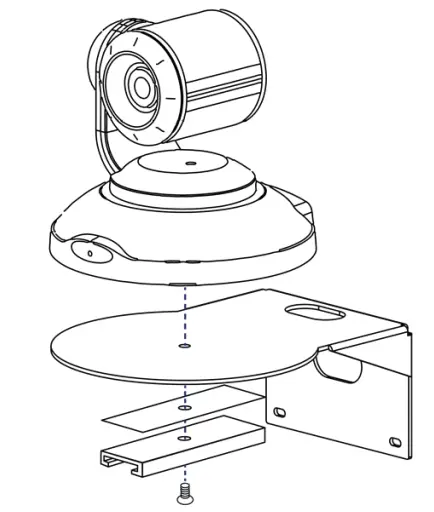
- Route the cables through the opening in the mounting shelf.
- Connect all required cables to the camera.
- Secure the camera to the mounting shelf using the mounting screw (¼-20 x .375 in.) supplied with the camera.

NOTE
If the camera is jostled or bumped, it may require a pan-tilt reset.
Installing the Camera and Speaker
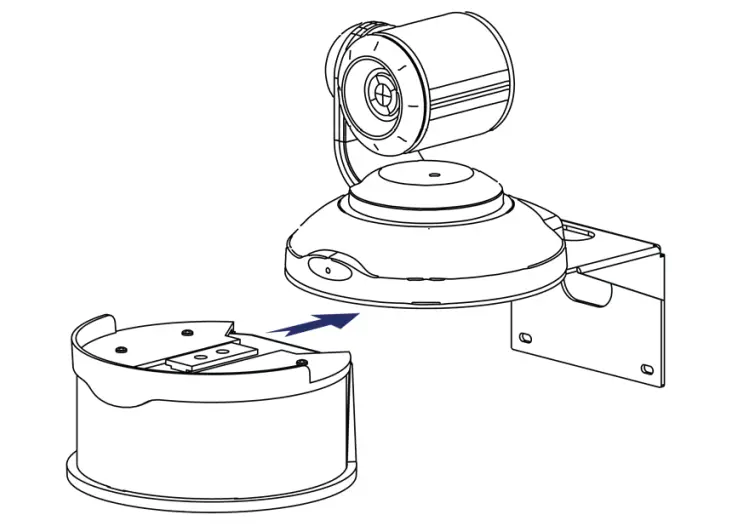
- If you are adding a speaker to a previously-installed ConferenceSHOT AV camera, remove its mounting screw.
- Place the camera on the mounting shelf if you have not already done so.
- Secure the speaker rail, gasket, and camera to the mounting shelf with the 0.5 in. 1/4-20 flathead screw.

- Connect the speaker cable (power and line level signal) to the speaker.
- Slide the speaker into place.

Note
If the camera is jostled or bumped, it may require a pan-tilt reset.
Powering Up the System
Connect camera power. The camera will initialize and move. This will take a few seconds. When an image is available, the camera is ready to accept control information.
Status Indicator Light
The light in the camera’s base indicates its current state.
- Blue – Camera is active
- Purple – Standby mode or booting
- Yellow – Firmware update is in progress
- Blinking blue – USB cable is disconnected (UC color scheme)
- Blinking red – Video mute is on (UC color scheme)
- Blinking yellow – Motor out of calibration
Caution
Do not remove power or reset the camera while the indicator is yellow, showing a firmware update in progress. Interrupting a firmware update can make the camera unusable.
Note
By default, the camera’s status indicator light is active during normal operation; however, it can be configured to remain off when the camera is powered up. The camera may be sending video even if the light is off.
Operation, Storage, and Care
For smears or smudges on the product, wipe with a clean, soft cloth. Use a lens cleaner on the lens. Do not use any abrasive chemicals.
Keep this device away from food and liquids.
Do not operate or store the device under any of the following conditions:
- Temperatures above 40° C (104° F) or below 0° C (32° F)
- High humidity, condensing or wet environments
- Inclement weather
- Severe vibration
- In a wind tunnel
- Dry environments with an excess of static discharge
Do not attempt to take this product apart. There are no user-serviceable components inside.
Next Steps
The camera is now ready to configure and use. This information is available in the Complete Manual for the ConferenceSHOT AV Enterprise-Class Conferencing System.
Glossary
- AEC
Acoustic echo cancellation. Audio processing that subtracts the far-end (speaker) audio from the sound that your microphone picks up. - auto white balance
A setting that allows the camera to manage color adjustments automatically. - backlight compensation
A setting that reduces contrast to adjust for bright light behind the main subject of the shot. - bandwidth
Data transfer rate (bits per second) for the stream. In some cases, using a high bandwidth can slow down other network traffic. On networks with very low bandwidth, video issues may result. Streaming at a lower resolution or frame rate can reduce bandwidth usage. - chromaA
setting that adjusts color intensity. - detail
A setting that adjusts image sharpness. If detail is set too low, the image may appear unrealistically smooth – like an episode of Moonlighting. - DHCP
Dynamic Host Configuration Protocol. A network management protocol that assigns an IP address to a device automatically when it is connected to the network. - DIY
Do It Yourself. As in, “You can copy information from this document to create a DIY room guide customized for your conference room.” Yes! You can do that! In fact, the “Info for DIY Room Guides” document is specifically designed for you to adapt and customize. - EasyMic
Vaddio’s proprietary connectivity standard for conferencing microphones. - echo cancellation
Audio processing that subtracts the far-end (speaker) audio from the sound that your microphone picks up. far end(conferencing) A location in the conference other than the one where you are. Far-end video is what you typically see in a conference – the people at the other end of the call. - Field of View (FOV)
How wide the video image is. Vaddio measures horizontal field of view. Some manufacturers use diagonal field of view, which yields a bigger number for the same actual image area. Tilt your head to one side and diagonal FOV will make sense. - flombodulator
A technically complex item the name of which you can’t recall at the moment. - frame rate
The number of output video frames per second. Different outputs (such as the IP stream and the USB stream) may use different frame rates. For streaming, higher frame rates use more bandwidth. - full-duplex
Simultaneous two-way (or multi-way) audio; conference participants at the near end can talk and still hear the participants at the far end(s), as in a face-to-face meeting. - gamma
A setting that adjusts the range (gray density) between bright areas and shadows. - gateway
Network information automatically assigned in a DHCP network. If installing equipment on a non- DHCP network, get this information from the network administrator. - HDMI
A video output format; may also carry audio information. - HID audio controls
(Human Interface Device) Controls to enable conference participants to use the conferencing client to control the audio. - home (camera)
The settings to which the camera returns after a reboot or on exiting standby mode. Depending on the camera’s capabilities, home may include zoom, color and lighting settings, and (for PTZ cameras) pan/tilt position. - home button (microphone)
A One Touch trigger control on a tabletop microphone. The button can be associated with one macro in momentary mode, or two macros in latching mode. - HTTP
HyperText Transfer Protocol. The magic that makes websites work. - HTTPS
HyperText Transfer Protocol Secure. The magic that uses encryption to make websites work securely See SSL certificate for more information. - IP address
Where a given device is on the IP network, logically. The IP address enables the network to route data to the right device – and that’s the reason IP address conflicts are bad. - IP address conflict
Two or more devices attempting to use the same IP address on a network. Results are unpredictable but never good. - LED
Light-Emitting Diode. An indicator light. - macro
A defined sequence of commands that a device performs in response to a trigger event. - MTU
Maximum Transmission Unit. The largest number of bytes allowed in a packet. If you don’t know what that means, don’t change MTU size. - near end
(conferencing) Your location in a conference. When you mute the video, your camera stops sending near-end video. - NTP
Network Time Protocol. Ensures that NTP-enabled devices on the network all show the same system time, so timestamps are accurate. - PoE, PoE+, PoE++
Power over Ethernet; a means of powering a device using its network connection. Requires a midspan power injector. PoE+ and PoE++ deliver more power than PoE. - preset
A stored camera position. Contains pan, tilt, and zoom position; may also include color settings. - RCLB
Really Cool Logo Badge. A visual cue that the device is a genuine Vaddio product. Accept no substitutes! - resolution
- The image size. For Vaddio cameras, resolution is expressed in terms of digital TV standards, with 1080p being the default in most cases. Resolution and frame rate are set together on Vaddio cameras.
- The thing that usually flies out the window by January 10th.
- RTMP
Real-Time Messaging Protocol. Used for livestreaming video (and audio, if available) to a service such as YouTube Live. - RTSP
Real-Time Streaming Protocol. Used for streaming video and audio over your network. - soft conferencing client
A conferencing application (such as Zoom, Google Hangouts, or Skype for Business) that uses a computer rather than requiring a conferencing codec. - SSL certificate
A file used with HTTPS proving that a web page really originates from its purported source. If you enable or require HTTPS on a camera or other device without installing an SSL certificate, your browser will pop up security warnings when you try to browse to the device’s web interface. - streaming protocol
A set of rules that define how video and audio data are sent over the network. See RTMP and RTSP. - subnet mask
Network information automatically assigned in a DHCP network. If installing equipment on a non-DHCP network, get this information from the network administrator. - trigger
An event, such as pressing the Home button on a connected TableMIC, that can be associated with a macro (defined command sequence). Devices that originate trigger events are sometimes called triggers or trigger devices. - UAC drivers
(Universal Audio Class) Standard USB audio drivers used by Vaddio conferencing products with audio capabilities. - UCC, UC conferencing
Unified Communications Conferencing; refers to soft-client conferencing (such as Zoom or Skype for Business) using a computer with USB-connected peripherals. - USB 2
An older, lower-speed USB protocol; good for audio but offers lower maximum resolutions for video conferencing. USB 2 products can be connected to USB 2 or USB 3 ports on your computer. - USB 3
A high-speed USB protocol, capable of handling high-quality video and audio as in conferencing applications. USB 3 products should be connected to USB 3 ports; performance may be degraded otherwise. - USB playback
Audio from other sites (far-end audio) in a conference call. - USB record
Audio from your site (near-end audio) in a conference call. - UVC drivers
(Universal Video Class) Standard USB video drivers used by Vaddio cameras. They’re the reason your computer doesn’t have to stop and download a driver when you connect your new Vaddio USB camera to it. - UVC extensions
Controls in UVC drivers to allow participants at the far end of a conference to control your camera, if it processes UVC commands. The administrator may choose to disable these.
Compliance and Conformity Statements
Compliance testing was performed to the following regulations:
| FCC Part 15 (15.107, 15.109), Subpart B | Class A |
| ICES-003, Issue 54: 2012 | Class A |
| EMC Directive 2014/30/EU | Class A |
| EN 55032: 2015 | Class A |
| EN 55024: November 2010 | Class A |
| IEC 60950-1:2005 (2nd Edition); Am 1: 2009 + Am 2: 2013 | Safety |
| EN 60950-1: 2006 + A11: 2009 + A1: 2010 + A12: 2011 + A2: 2013 | Safety |
FCC Part 15 Compliance
This equipment has been tested and found to comply with the limits for a Class A digital device, pursuant to Part 15, Subpart B, of the FCC Rules. These limits are designed to provide reasonable protection against harmful interference when the equipment is operated in a commercial environment. This equipment generates, uses, and can radiate radio frequency energy and, if not installed and used in accordance with the instruction manual, may cause harmful interference to radio communications. Operation of this equipment in a residential area is likely to cause harmful interference in which case the user will be required to correct the interference at his/her own expense.
Operation is subject to the following two conditions:
- This device may not cause interference, and
- This device must accept any interference including interference that may cause undesired operation of the device.
Changes or modifications not expressly approved by Vaddio can affect emission compliance and could void the user’s authority to operate this equipment.
ICES-003 Compliance
This digital apparatus does not exceed the Class A limits for radio noise emissions from digital apparatus set out in the Radio Interference Regulations of the Canadian Department of Communications.
European Compliance
This product has been evaluated for Electromagnetic Compatibility under the EMC Directive for Emissions and Immunity and meets the requirements for a Class A digital device. In a domestic environment this product may cause radio interference in which case the user may be required to take adequate measures.
Standard(s) To Which Conformity Is Declared:
- EMC Directive 2014/30/EU
- EN 55032: 2015 – Conducted and Radiated Emissions
- EN 55024: November 2010 – Immunity
- IEC 60950-1: 2005 (2nd Edition); Am 1: 2009 + Am 2: 2013 – Safety
- EN 60950-1: 2006 + A11: 2009 + A1: 2010 + A12: 2011 + A2: 2013 – Safety
- IEC 62368-1: 2014 (2nd Edition) – Safety
Warranty and Return Policy
Hardware warranty: Two (2) year limited warranty on all parts and labor for Vaddio manufactured products. Vaddio warrants its manufactured products against defects in materials and workmanship for a period of two years from the day of purchase, to the original purchaser, if Vaddio receives notice of such defects during the warranty. Vaddio, at its option, will repair or replace products that prove to be defective. Vaddio manufactures its hardware products from parts and components that are new or equivalent to new in accordance with industry standard practices.
Exclusions: The above warranty shall not apply to defects resulting from improper or inadequate maintenance by the customer, customers applied software or interfacing, unauthorized modifications or misuse, mishandling, operation outside the normal environmental specifications for the product, use of the incorrect power supply, modified power supply or improper site operation and maintenance. OEM and special order products manufactured by other companies are excluded and are covered by the manufacturer’s warranty.
Vaddio Customer Service: Vaddio will test, repair, or replace the product or products without charge if the unit is under warranty. If the product is out of warranty, Vaddio will test then repair the product or products. The cost of parts and labor charge will be estimated by a technician and confirmed by the customer prior to repair. All components must be returned for testing as a complete unit. Vaddio will not accept responsibility for shipment after it has left the premises.
Vaddio Technical Support: Vaddio technicians will determine and discuss with the customer the criteria for repair costs and/or replacement. Vaddio Technical Support can be contacted by email at [email protected] or by phone at one of the phone numbers listed on support.vaddio.com. Return Material Authorization (RMA) number: Before returning a product for repair or replacement request an RMA from Vaddio’s technical support. Provide the technician with a return phone number, email address, shipping address, product serial numbers and original purchase order number. Describe the reason for repairs or returns as well as the date of purchase. See the General RMA Terms and Procedures section for more information. RMAs are valid for 30 days and will be issued to Vaddio dealers only. End users must return products through Vaddio dealers. Include the assigned RMA number in all correspondence with Vaddio. Write the assigned RMA number clearly on the shipping label of the box when returning the product. All products returned for credit are subject to a restocking charge without exception. Special order products are not returnable.
Voided warranty: The warranty does not apply if the original serial number has been removed or if the product has been disassembled or damaged through misuse, accident, modifications, use of incorrect power supply, use of a modified power supply or unauthorized repair.
Shipping and handling: Vaddio will not pay for inbound shipping transportation or insurance charges or accept any responsibility for laws and ordinances from inbound transit. Vaddio will pay for outbound shipping, transportation, and insurance charges for all items under warranty but will not assume responsibility for loss and/or damage by the outbound freight carrier. If the return shipment appears damaged, retain the original boxes and packing material for inspection by the carrier. Contact your carrier immediately.
Products not under warranty: Payment arrangements are required before outbound shipment for all out of warranty products.
General RMA Terms and Procedures: RMA’s are valid for 30 days and will be issued to Vaddio dealers only.
- End users must return products through Vaddio dealers.
- before a defective product can be authorized to send in for repair, it must first go through the troubleshooting process with a member of the Vaddio Technical Support team.
- Products authorized for repair must have a valid RMA (Return Material Authorization) number.
- Vaddio RMA Team will issue the RMA number.
- An RMA number is to be included in all correspondence with Vaddio.
- The RMA number must appear clearly on the shipping label (not the box) when the product is returned.
- A packing slip must be included on the inside of the box with the RMA number listed and reason for RMA return.
- Products received at Vaddio that do not have a valid RMA number clearly marked on the outside of the shipping container may be refused and returned to sender.
- Boxes showing external damage will be refused and sent back to the sender regardless of the clearly marked RMA number and will remain the responsibility of the sender. RMA Charges (Restocking): All qualified returns must be made in unopened, original packaging with all original materials.
- initial shipments of equipment that are refused upon attempted delivery, for any reason, are subject to restocking charges.
- The Dealer has up to 60 days from the date of purchase to return Vaddio product for credit for future purchases of Vaddio product only.
- The Dealer has 61 to 90 days from the date of purchase to return Vaddio product with a 15% restocking fee or $50.00 fee, whichever amount is greater
- The Dealer has up to 30 days from the date of purchase to return OEM and other manufacturer’s products with a 15% restocking fee or $50.00 fee, whichever amount is greater.
- NOTE: Special Order products from other manufacturers (identified in the Vaddio Price Guide as noncancelable, nonreturnable and not refundable) are not eligible for advance replacement from Vaddio. Advance Replacement Policies: For Vaddio manufactured products, advance replacement will be provided for up to one (1) year after the initial shipment of products.
- NOTE: OEM and other manufacturer’s products are excluded from the Vaddio advance replacement policy. Advance replacement will be provided for up to 30 days after initial shipment of OEM products.
Thereafter, a return to Vaddio and factory repair is offered during the other manufacturer’s warranty period. Vaddio will determine if the returned product is qualified for the OEM warranty. - NOTE: Special Order products from other manufacturers (identified in the Vaddio Price Guide as noncancelable, nonreturnable and not refundable) are not eligible for advance replacement from Vaddio.
Advance Replacement Procedures: The Vaddio Dealer must submit a non-revocable purchase order for advance replacement equipment at normal dealer pricing. Credit shall be issued upon complete product return (including all accessories) for dealers with Net 30 terms. For credit card accounts, charges will be assessed to the credit card for the replacement and credited back upon complete product return.
- Returns must be made in the original Vaddio packaging with all original materials if at all possible. Vaddio products with missing original materials will be billed to the dealer at dealer price.
- OTE: OEM products must be returned in the original packaging with all materials and the RMA number written on the shipping label only and not on the OEM box. If the return is incomplete and/or the OEM box is defaced, the product shall be returned to the dealer and the RMA will not be credited.
- Equipment returned with “No Trouble Found” after advanced replacement will be assessed a full 15% or $50.00 restocking fee (whichever is greater) for each item and may also be assessed for additional charges to compensate for wear, damages and reconditioning.
- All returns must be accompanied by RMA # as stated above.
- All Advanced Replacement products are sent via 2-day service in the continental USA. If the product is requested to be sent via priority or overnight shipping, the Dealer shall pay shipping costs. The dealer can elect to supply their preferred shipping account number.
- International customers are responsible for all freight charges for equipment returned to Vaddio, including international shipping, taxes, and duties, insurance and all other associated logistic charges. Warranty Repair Terms and Procedures: Vaddio will repair any product free of charge, including parts and labor, within the terms outlined in the warranty agreement for that product.
- Customers must provide proof of the product’s purchase date.
- Product that is within the warranty period will be repaired under the non-warranty terms if:
- The equipment has been damaged by negligence, accident, act of God, mishandling, used with the incorrect, modified or extended power supply or has not been operated in accordance with the procedures described in the operating and technical instructions.
- The equipment has been altered or repaired by other than the Manufacturer or an authorized service representative.
- Adaptations or accessories other than those manufactured or provided by the Manufacturer have been made or attached to the equipment, which in the determination of the Manufacturer, shall have affected the performance, safety of reliability of the equipment; or the equipment’s original serial number has been modified or removed.
- Customer is responsible for shipping charges to send defective product under warranty to Vaddio. Vaddio will pay ground service return shipping charges during the 2nd year of the warranty period.
- Standard return shipping method for products under warranty, but out of the advance replacement warranty period, is ground shipment. Extra charges associated with priority shipping, when requested, will be the responsibility of the customer.
Non-Warranty Repair Terms: Vaddio will repair any non-obsolete product that does not meet the terms of the warranty. Non-warranty repair terms are as follows: - The customer is responsible for, and agrees to pay, all parts and labor costs associated with the repair. Standard non-warranty repair charges are outlined below.
- Customers must provide payment method and one of the following, prior to receiving an RMA:
- Hard copy of a PO, for dealers with Net 30 terms and in good standing with Vaddio.
- Valid credit card number – Credit card will be charged upon shipping repaired product back to customer.
- Request for COD: Customers will be notified of COD charges prior to shipping repaired unit.
- Customer is responsible for all shipping charges both to and from Vaddio, and may use their own carrier.
- Customers will receive a courtesy call notifying them of total repair charges prior to return shipping.
Non-Warranty Repair Charges: Total repair charges (per unit) for a non-warranty repair consist of the following:
- Cost of any replacement parts needed to repair the defect.
- Labor costs billed per hour after minimum charges/time.
- Labor charges include troubleshooting and repair time only.
- Burn-in time and final test time is not included in the labor charges.
- Labor time is rounded to the nearest quarter hour.
- Labor charges are billed at the prevailing rate for the category of equipment repaired, after minimum charges/time. For prevailing labor rates, please contact the Vaddio technical support.
- All shipping and handling costs are the responsibility of the customer for non-warranty repairs. Minimum Labor Charges: All non-warranty repairs are subject to a minimum evaluation/repair labor charge even if there is no problem found. Please contact Vaddio technical support for the current applicable rate.
Repair Charge Estimates: Estimates on repair charges for a specific problem will not be given before an RMA is issued and the actual product has been evaluated by a Vaddio technician. Repair estimates will be given after the repair department receives and evaluates the unit.
- Customers requesting an estimate on repair charges must do so up front when they call in for an RMA.
The RMA team will call or email with the estimate after evaluating the unit and before proceeding with the repair. - Any product evaluated for a repair estimate is still subject to the minimum labor charges even if the customer decides not to proceed with the repair.
- Vaddio does not guarantee estimates given on repair charges. Actual repair costs may exceed the estimate.
- Customer is responsible for actual repair charges, regardless of estimate.
Repair Policy Notes:
- Duration of Repair: Products are repaired on a first come first serve basis. The turn-a-round time of a particular repair is dependent upon circumstances such as product type, the nature of the problem and current repair volumes. Requests for expedited repair service will be considered on a case-by-case
basis. - Repair Warranty: Vaddio guarantees all of its repair work, performed on non-warranty items, for 90 days from the day the repaired product is shipped back to the customer. If the original problem described was not resolved or reoccurs within the 90-day period, Vaddio will repair the unit free of labor charges. However additional material charges may apply unless the parts used to affect the repair are again deemed defective.
Photo Credits
This guide may include some or all of these photos.
European Space Agency (ESA) astronaut Samantha Cristoforetti, a Flight Engineer with Expedition 42, photographs the Earth through a window in the Cupola on the International Space Station By NASA – https://blogs.nasa.gov/ISS_Science_Blog/2015/03/06/women-in-space-part-two-whatsgender- got-to-do-with-it/, Public Domain, https://commons.wikimedia.org/w/index.php?curid=38834990 Carl Sagan, Bruce Murray, Louis Friedman (founders) and Harry Ashmore (advisor), on the occasion of signing the papers formally incorporating The Planetary Society
By credit NASA JPL – JPL, Public Domain, https://commons.wikimedia.org/w/index.php?curid=1180927 Main Control Room / Mission Control Room of ESA at the European Space Operations Centre (ESOC) in Darmstadt, Germany
By European Space Agency – ESOC flickr, Credit: ESA – Jürgen Mai, CC BY-SA 3.0-igo,
https://commons.wikimedia.org/w/index.php?curid=36743173
Expedition 42 on orbit crew portrait, International Space Station, Mar. 7, 2015 – Barry Wilmore (Commander) Top, Upside down, to the right cosmonaut Elena Serova, & ESA European Space Agency Samantha Cristoforetti. Bottom center US astronaut Terry Virts, top left cosmonauts Alexander Samokutyaev and Anton Shkaplerov.
By NASA – https://www.flickr.com/photos/nasa2explore/16166230844/, Public Domain,
https://commons.wikimedia.org/w/index.php?curid=38931301
European Space Agency astronaut Luca Parmitano, Expedition 36 flight engineer, outside the International Space Station
By NASA – http://spaceflight.nasa.gov/gallery/images/station/crew-36/html/iss036e016704.html, Public Domain, https://commons.wikimedia.org/w/index.php?curid=27263573 Chris Cassidy, Luca Parmitano, and Karen Nyberg, ISS, 2013. Photo Credit: NASA Nicolas Altobelli, Rosetta Scientist at ESA’s European Space Astronomy Centre, Villanueva de la Cañada, Madrid, Spain
By European Space Agency – Nicolas Altobelli talks to the media, CC BY-SA 3.0-igo,https://commons.wikimedia.org/w/index.php?curid=36743144
Andrea Accomazzo, ESA Rosetta Spacecraft Operations Manager, providing a live update from the Main Control Room at ESA’s European Space Operations Centre, Darmstadt, Germany during the Rosetta wake-up day.
By European Space Agency – Live update from the Main Control Room, CC BY-SA 3.0-igo, https://commons.wikimedia.org/w/index.php?curid=36743150 Sleeping goose
By ladypine – Own work, CC BY-SA 3.0, https://commons.wikimedia.org/w/index.php?curid=1695227 By Rick Dikeman – Image:Wayne Gretzky 1997.jpg, CC BY-SA 3.0, https://commons.wikimedia.org/w/index.php?curid=945698
Photo AS11-40-5948, Aldrin assembles seismic experiment, by National Aeronautics and Space Administration, courtesy of the NASA History Office and the NASA JSC Media Services Center
Vaddio is a brand of Legrand AV Inc.· www.legrandav.com · Phone 800.572.2011 / +1.763.971.4400 · Fax +1.763.971.4464 · Email [email protected]·
Visit us at support.vaddio.com for firmware updates, specifications, drawings, manuals, technical support information, and more. ©2019 Legrand AV Inc.
Vaddio is a registered trademark of Legrand AV Inc. All other brand names or marks are used for identification purposes and are trademarks of their respective owners. All patents are protected under existing designations. Other patents pending.
Commercial AV Brands Chief | Da-Lite | Middle Atlantic | Projecta | Vaddio
FAQS
What type of power cord is required?
The camera comes with a power cord that can plug into ant home 110v outlet. The cord is about 6ft long and also plugs into the the camera. It also has an adapter to mount the camera on a wall or a ledge. I set mine on a window ledge so I can see outside. It gives me alerts if someone is approaching the house and takes a picture of that movement.
Can this mount against a window to look outside?
There is a setting on the camera for outside viewing. The camera is great once you get it set up.
Does this camera have continous viewing?
Yes.
Can you view more then one camera at a time on my smartphone? Like watching 2 kids rooms at once
The app. allows to access and control multiple cameras but only one can be viewed live. No simultaneous split screen view.
Do you subscription to record and save events caught on camera?
yes subscription is very affordable and the recordings a recorded on a cloud that can be viewed anywhere on the app
Does this camera have continous viewing?
Yes
Can you view more then one camera at a time on my smartphone? Like watching 2 kids rooms at
once
The app. allows to access and control multiple cameras but only one can be viewed live. No simultaneous split screen view.
Does the camera have the ability to turn while in a stationary position?
The camera is not motorized and only works in a stationary position. However, it has a wide field of view which they use to create a virtual pan effect, making it seem the camera is following you (even though it is stationary the whole time).
Can l place it indoors and point it out doors?
Yes, you can. It has a setting called “Window Mode” to help support this (from the app: “Window Mode allows your camera to see clearly through glass at night by disabling its infrared lights to remove glare”).
Can this work with an Echo monitor?
yes it can
Is it possible to stream the video to my computer directly?
No, you cannot (yet). The camera is not (yet) accessible when you access your ecobee account on their website, either. The video feed is only available on ecobee’s official apps (for Android and iPhone) and they have not yet exposed it in their API (so non-ecobee apps can access it).