
BMETERS Hydroclima 2 Thermal Energy Meter
Preface
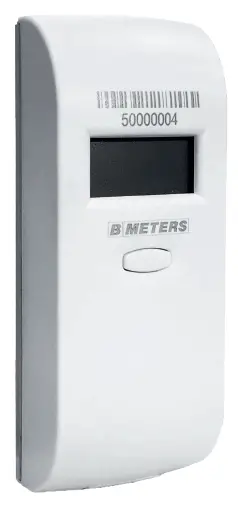
This User’s manual comprises rules, information and advices regarding proper use of the heat cost allocator HC2 manufactured by B METERS Company. Please, read this manual before using the product. It shall enable a proper and safe operation of the product.
Failure to meet recommendations and guidelines set out in the document may result in improper measurements and it constitutes basis to refuse potential complaints.
Safety and warranty
Important information
The product must be installed professionally, in accordance with defined guidelines regarding the installation process; the installation may be carried out by qualified and trained personnel only!
Intended use of the product
The heat cost allocator is intended to directly measure quantity of consumed thermal energy emitted by a radiator. Each use other than the described above and any modifications to the device shall be considered an improper use. The device is designed to measure central heating systems, with vertical distribution of a heating agent. On the grounds of units measured by the heat cost allocator and/or the ambient temperature, clearing of building heating costs is taking place.
Lithium batteries safety guidelines
Set of the heat cost allocator comprises a lithium battery as well. This type of the battery is considered to be dangerous.
Always observe the binding transport and storage regulations!
Precautions for lithium batteries
- keep batteries in a dry room
- do not heat up a battery up to temperatures exceeding 110°C and do not throw it into a fire
- do not cause a short circuit
- do not open and do not damage a battery
- do not charge the battery
- store in places out of the reach of children
General information
Hydroclima 2 is a two sensor, electric, second generation heat cost allocator. It is intended to measure directly consumed thermal energy emitted by a radiator.
The heat cost allocator provides non-dimensional units of the thermal energy consumption depending on a temperature of a radiator and a temperature of a room. It also provides an opportunity to record historical data of heat consumption,temperatures and other statistics. Based on the configuration all the data can be sent via Wireless M-Bus.
Packaging content
- a heat cost allocator Hydroclima 2
- an aluminum heat sink
- a protective seal for the heat cost allocator
Additional elements:
- user’s manual
- installation manual
- a leaflet for a final user
- fixing elements
available on website or on request
if ordered with the heat cost allocator
Installation and connection
Installation
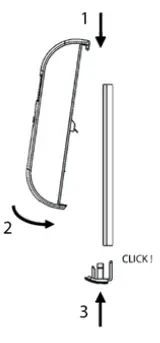
An Heat cost allocator can be install at radiator in two steps.
Firstly, an aluminum heat sink is fixed to a radiator. Depending on type of a radiator and dedicated installation technology, the following methods are applied: fixing elements, welding or gluing. Then, place the heat cost allocator on a fixed heat sink and close it, using the seal from the bottom.
Detailed guidelines regarding installation methods on particular radiators are indicated in the document
“Installation Manualâ€.
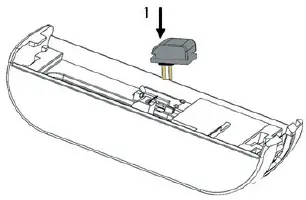
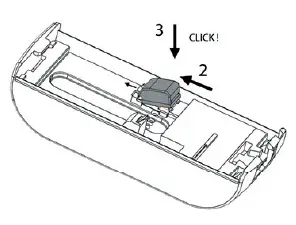
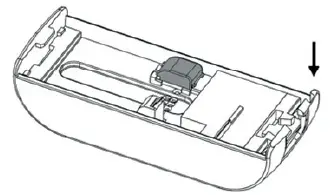
Exterior temperature sensor installation (EXT version)
The external temperature sensor (separate component) has to be connected before heat cost allocator is installed. This operation consists of three steps:
- First of all, upper edge of the temperature sensor has to be placed in the socket to tilt plastic hook.

- Next, gently push the lower edge (from the wire side) of the sensor.

- Last step is to place and fit the wire in the dedicated slot.

Display
To present the data, a digital display with icons is available. A full lines test of the display is presented below:
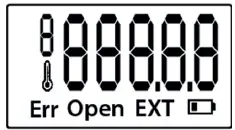
The heat cost allocator shows data in two modes, a basic mode and an extended one:
- Basic mode takes place by short-time pushing of the button (not exceeding 2 sec.);
- Extended mode takes place by pushing of the button exceeding 3 sec.
Basic mode – data is displayed as a loop repeated three times.
The following table represents a cycle of displaying information on recorded data and errors.
| Item | Conditionally | Message | Time in s | Description |
| 1 | “C” | 3 | Present data | |
| 2 | “U” | 3 | Data (results) for a terminated clearing period | |
| 3 | “ ” ” | 3 | Average ambient temp. for a terminated period | |
| Total | 9 | |||
Extended mode – can be entered exclusively during an active basic mode. Three cycles of the expanded loop are displayed and subsequently the device goes back in stand-by mode.
| Item | Conditionally | Message | Time in s | Error |
| 1 | “C” | 2 | Present data | |
| 2 | “U” | 2 | Data (results) for a terminated clearing period | |
| 3 | “” | 2 | Average ambient temp. for a present period | |
| 4 | “ ” ” | 2 | Average ambient temp. for a terminated period | |
| 5 | “IP” | 2 | The first adjustment coefficient (KC) | |
| 6 | “2P” | 2 | The second adjustment coefficient (KQ) | |
| 7 | “1” | 2 | Beginning date of a clearing period | |
| 8 | “2” | 2 | Closing date of a clearing period | |
| 9 | “H” | 2 | Control code | |
| 10 | 2 | Serial number (last 6 digits) | ||
| Total | 20 | |||
In case of recording of the following events, additional results are displayed, whether or not the display has been initiated to present the data:
- A heat cost allocator with data presentation switched off (data presentation in a loop, with messages displayed one by one)
Item Conditionally Message Time in s Error 1 YES “Err” 6
Collective information on a group of errors/events 2 YES “Open” Enclosure opening (event) 3 YES “  ”
”Operation time exceeded – battery is empty 4 14 Switched off display Total 20 - The heat cost allocator initiated to display in a basic mode or in an extended mode (continuous presentation all the time of the basic mode):
| Item | Conditionally | Message | Errorv |
| 1 | YES | “Err” | Collective information on a group of errors/incidents |
| 2 | YES | “Open” | Enclosure opening (incident) |
| 3 | YES | “EXT” | Information on connected external sensor |
| 4 | YES | “  ” ” | Operation time exceeded – battery is empty |
Additionally, the following special data presentation cycles are possible:
- Factory’s settings (no configuration)
Item Conditionally Message Time in s Error 1 “- – – – -” 2 Factory’s settings (no configuration) 2 6 Switched off display Total 8 - Stand-by mode – information displayed between the configuration to the start of the accounting.
Item Conditionally Message Time in s Error 1 “SLEEP” 2 Stand-by mode 2 6 Switched off display Total 8 - Seal application
Item Conditionally Message Time in s Error 1 “CLOSE” 10 Seal application Total 10
Examples of indications
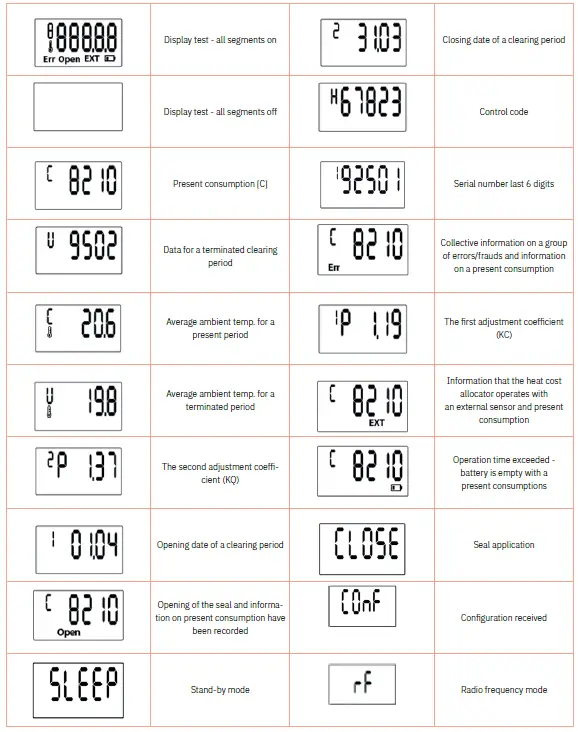
The timing of button pressure corresponds to the following events:
- Non-configured heat cost allocator (factory settings); Pressing the button for the first time prepares the device to receive the configuration data. After a successful configuration the “CONF” information appears in the display.
- Previously configured heat cost allocator (normal operation mode):
- ¬ Pushing of the button not longer than 2 seconds – initiation of the display basic data described in the previous chapter
- ¬ Pushing of the button longer than 3 seconds – initiation of the display extended data described in the previous chapter
- ¬ Pushing of the button longer than 5 seconds – the allocator activate rf transmitting mode that allow the communication with software in two modes:
- ~ Change of the operation configuration. Successful configuration is confirmed by “CONF” information displayed in the display for 10 s. In case the configuration is not successful, it is necessary to release the button and push it again
- ~ Sending of the following extended data:
- · a pack including history of units memorized at the end of 24 previously months
- · a pack including a history of average temperatures for recent 24 months
- · a pack comprising all data stored in the memory of the heat cost allocator
Alarms
In the status field we have an error/event report. Possible errors/events are listed in the table.
| Event/Error | Description |
| C 15 | Power failure has been recorded. Power supply has been temporarily lost, all data has been restored from non-volatile memory. |
| C 13 | A quartz oscillator malfunction event has been recorded. Flag deleted automatically after date and time update. |
| C 11 | The overflow of the heat consumption indication parameter [C] was recorded. Closing the billing period does not clear this flag, therefore the overflow event may also relate to the past period. |
| C 10 | Reduced temperature was recorded for a longer period (radiator temperature parameter TK). The value of the TK radiator temperature parameter below 16 ° C was registered for a period longer than 24h. |
| C 9 | Exceeding the range of permissible temperature values (radiator temperature parameter TK). Permitted temperature range is: <5 ° C … 95 ° C> |
| B 8 | An open case event was recorded, the date of first occurrence is recorded. Clearing this flag also resets the date of occurrence. The flag can be cleared automatically in the event of the first seal application after the configuration process. |
| A 1 | State of verification of the opening sensor and button. The flag is cleared automatically after closing the cover and pressing the button. |
| A 0 | Default configuration parameter values. Device not configured or data from non-volatile memory lost; flag cleared automatically after the configuration process. |
Configuration
Programming and configuration of the device is carried out by radio, using an RFM-RX2 and BMetering software. To trigger the configuration procedure, the BMetering software must be properly configured:
- For the factory state of the allocator, press the button for < 1s,
- For the allocator already configured, press the button for > 5s, until the display shows the message “rF”. The method of configuration has been described in the documentation concerning the B Metering software user manual
Technical data
| Type | Hydroclima 2, electronic, two-sensor one |
| Available versions | Compact, with an external temperature probe |
| LCD | 7 segment display with icons |
| Dimensions | 102 mm x 40 mm x 27 mm (h x w x d) |
| Power supply | Lithium battery 3.6V |
| Maximum battery life | 10 Years* |
| Application temperatures | From 35°C to 105°C From 35°C to 130°C (version with a remote sensor, length of the sensor 3m) |
| Accuracy of the measurement | Temperature Sensors – thermistors 1% |
| Way of reading | Physical (display) Radio (remote) |
| Communication with the device | Radio, two-ways directions |
| Configuration | Radio configuration, via Bmetering software and RFM-RX2 |
| Power of the transmitter | 10 dBm (10 Mw) |
| Frequency of the transmitter | 868,950 Mhz |
| Frequency of the receiver | 868,300 Mhz |
| Start accounting ( thermal energy consumption units) | Radiator’s temperature > 22.5°C Δt ≥3k (difference between a temp. Of a radiator and the ambient temp.) |
| Measurement method | Two-sensor or single sensor (depending of the conditions) |
The battery life strongly depends on the working time window, set during the configuration process, and on the environmental conditions. Estimation of the battery life is given by the configuration software.
Dimensions and drawings
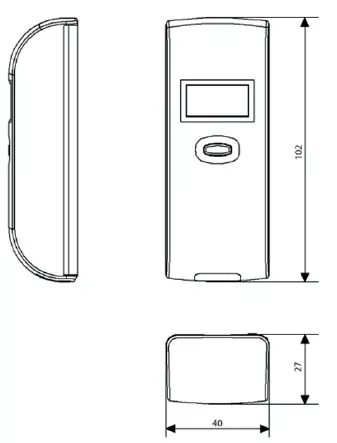
Contacts
B METERS srl
Via Friuli, 3 • Gonars 33050 (UD) • ITALY
Tel: +39 0432 931415
Tel: +39 0432 1690412
Fax: +39 0432 992661
E-mail (sales/info): [email protected]
E-mail (support): [email protected]
Web: www.bmeters.com
 Home EN - www.bmeters.com