 SECUTRONIC
Operating instructions
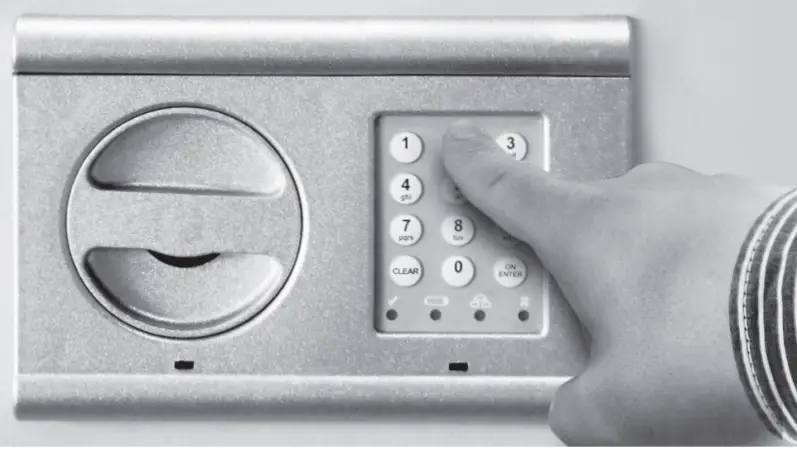
Structure
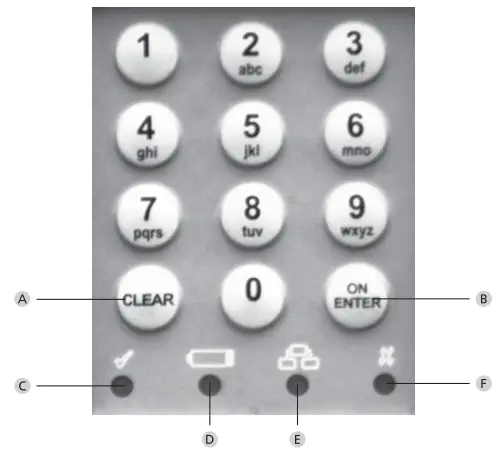
A Clear key Exiting programming mode
B On/Enter key C Ready to open The LED lights up if a valid opening code is entered and if the programming was successful
D Battery change symbol If this LED lights up, please replace all 3 batteries (LR6 / AA / 1.5V / alkaline).
E Input/programming ready state When entering programming mode, the LED lights up. He goes out when you exit programming mode again.
F Input instruction/lock time The LED lights up when an invalid code is entered or in case of wrong programming. If a code is entered three times in succession wrong, the lock blocks operation for 5 minutes. This time, The LED flashes. Opening in this state is not not possible even with a valid unlock code.
Combi Line Finger Scan Safe Operation Instructions
Generally
Opening Safe
- Push on/Enter button
- Wait for yellow light
- Swipe 1 finger or the six digit pin code
- Turn knob pull door open Programming mode procedure for both PIN and FINGERS you must always do these 5 steps first before you can add a finger or change a pin code or remove all fingers!
1. Open door with current operating code and leave open until completed with all steps
2. Push “ON/ENTER” button (yellow light now comes on)
3. Push 76 to get into programming mode (yellow light now goes off )
4. Press ON/ENTER button (yellow light is still off )
5. Push in current pin code BUT DO NOT PRESS ON/ENTER button (yellow light now comes on and is blinking to signify you are in programming mode)
Changing the Pincode (Only 1 pin code allowed)
- Push 22 (to enter into pin code programming mode, yellow light will continue to blink)
- Press ON/ENTER button (yellow light still blinking)
- Within 5 seconds enter in new six digit combo (Yellow light still blinking)
- Press ON/ENTER button (Yellow light still blinking)
- Within 5 seconds enter in same new six digit code a second time to confirm it (Yellow light still blinking)
- Press ON/ENTER button (green light will come on and then go off, and yellow light will still be blinking)
- Press CLEAR button twice to exit programming mode 8. Try new code 3 times with door open (Use OPENING SAFE 1-5 instructions above
Programing in a finger (Up to 10 different fingers)
- Push 23 ON/ENTER (yellow light will stop blinking and become solid)
- Slide your finger in a steady downward motion (yellow light will go off and then back on) it may take several times of sliding the same figure over the sensor to program
- Once finger is programmed the green light will go on and off and the yellow light will start blinking again
- To program your next finger repeat steps 1 & 2
- Press CLEAR button twice to exit programming mode To delete 1 finger you will need to delete all fingers in the safe following the instructions below and re-enter in the ones you want to use again!
1. Push 33 ON/ENTER button (green light will go on and off )
2. Push CLEAR twice to exit or 23 to program in new fingers and follow PROGRAMMING IN A FINGER section steps 2-6
Installing new Batteries
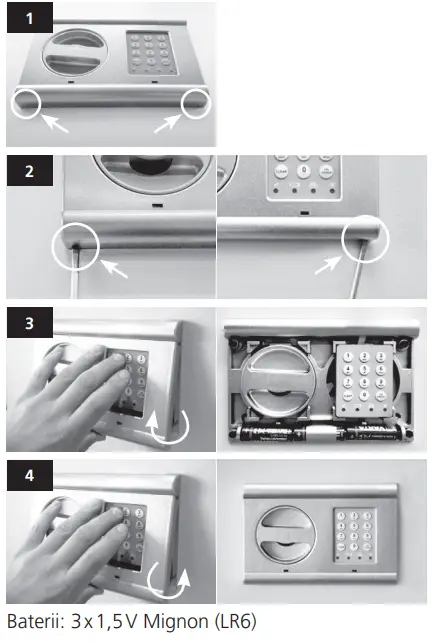
- Use a small flat blade screwdriver insert it into the front left slot and gently pull the lower part of the keypad out, repeat on right side slot.
- Insert 3 new Alkaline AA batteries with positive side on all 3 going to the left
Trouble shooting the Lock
- Make sure handle is turned completely left and is horizontal
- If at any time an incorrect number is entered push the “CLEAR” buttonto clear it out and start over
- If wrong code is entered three times red light will flash and you will belocked out for 5 minutes, every time after three wrong code entries youwill be locked out for 20 minutes until correct code is entered
- If while in the programming mode you enter in an incorrect number ineither of the two code entries the code will revert back to original codethat you have been using*Always change the code or fingers with the door open and try the new codeor fingers at least 3 times before locking the door, if you change the code orfingers incorrectly and the door is locked shut the safe will have to be drilledopen to gain acces
Disposal of batteries
 Please be aware that electrical and electronic devices, as well as batteries, should not be disposed of as household waste, but rather collected separately. Please obtain information on the collecting points for electrical waste from the responsible authority of you municipality
 If you have any questions concerning the CE declaration of conformity, please use [email protected]
 BURG-WÄCHTER