OrganDonor Roland RS-09
Product Information: Tubbutec OrganDonor for Roland RS-09
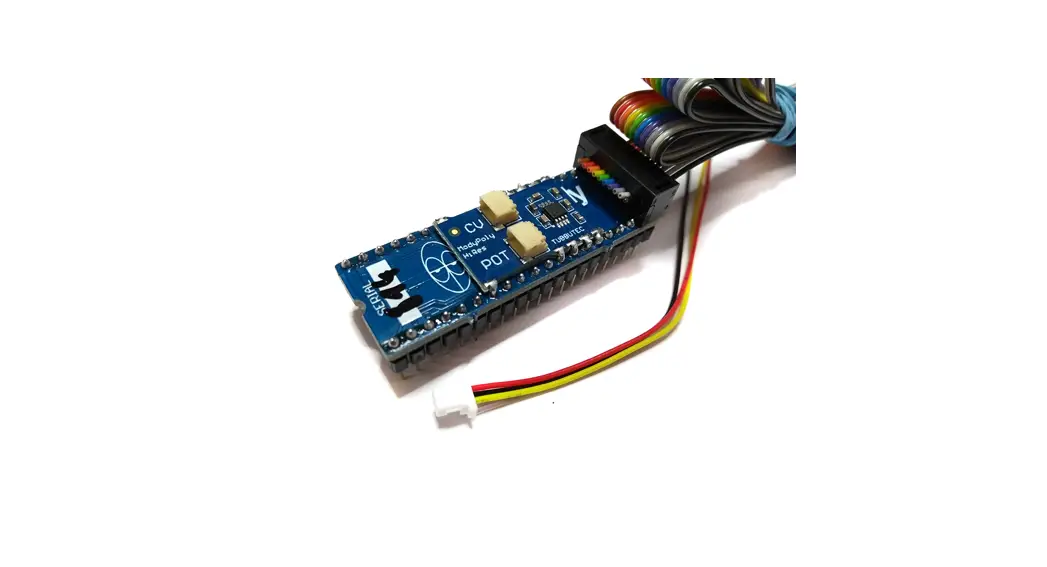
The Tubbutec OrganDonor is a device that uses analog switches to
simulate keyboard presses directly without the need to solder two
wires for each key. With solder jumpers to connect common signals
on the back of each analog switch board, this device makes
installation easier for the Roland RS-09 model, which has one
common signal. The kit includes shrouded headers, wires, and a
learn button (optional) to set midi channel.
Product Usage Instructions
- Preparation: Consolidated synthesizer models may have more
screws than needed, wires too long, or wire assemblies not needed
for your installation. Solder the shrouded headers to the switch
boards and solder the little jumpers on the backside of the
switchboards. - Installation:
- Stick insulation tape on the bottom side of the boards to
prevent short circuits with the case. - Stick double-sided tape on top of the insulation tape and place
the boards on the bottom of the case under the keyboard. - Plug in the interconnection cables and the switch board
cables. - Solder the switch board wires to the key contacts. Take care
not to desolder the internal wires.
- Stick insulation tape on the bottom side of the boards to
- Power Connection:
- Extend the wires of the power connector by about 20cm using
stranded wire with different colors. Strip and solder to the power
connector wires. Use shrinking tube to cover the joints. - Guide the wires under the keyboard to the power supply
board. - Solder the wires to the power supply board. The yellow wire
gets soldered to the -14V terminal, the black wire to the ground
(GND) terminal, and the red wire to the +14V terminal.
- Extend the wires of the power connector by about 20cm using
- Installing the MIDI Socket:
- The MIDI socket can be installed on the back of the machine,
next to the external input. Alternatively, a 3.5mm stereo jack can
be used instead of the standard MIDI socket. - Use the provided drill guide to center punch the locations of
the 3 holes. The two small holes need to be about 3.5mm in
diameter, and the large hole 15mm. Use a stepping drill for this
purpose.
- The MIDI socket can be installed on the back of the machine,
- Installing the Learn Button:
- The optional learn button needs to be connected to the IO 2 and
G pin on the main board. (The back of the main board has labels on
it). - Press the learn button and while it is pressed send a MIDI note
on any MIDI channel. OrganDonor will use this MIDI channel from now
on. These settings are saved. - Note: Wires are not included in the kit for this optional
feature.
- The optional learn button needs to be connected to the IO 2 and
- Configuration: No additional configuration is needed after
installation and power connection.
Tubbutec OrganDonor
Installation manual for Roland RS-09
Tools you will need: · Soldering iron · Wire stripper · Metal drill 3.5mm (or similar) · Metal drill for a 15mm hole (stepping drill for example) · Center punch · Screw driver · Stranded wire to extend the power and MIDI connectors
Included in the kit: · OrganDonor Main Board · 3x organ Donor Switch Board, 2x 16pin connector, 1x 20pin connector · Analog switch connection: 2×16 38cm + 40cm 1×20 – 32cm · Interconnect cables: 1x 6cm, 1x 19cm, 1x 20cm · Midi connector assembly · Power connector · Learn button · Midi socket drill guide · 2x M3 bolt, 2xM3 nut for midi socket
Principle of operation
OrganDonor uses analog switches to simulate keyboard presses directly. Normally this would require to solder two wires for each key. Luckily this can often be avoided by grouping common signals. OrganDonor features solder jumpers to connect common signals on the back of each analog switch board. In the case of the Roland RS-09 there is 1 common signal.
Preparation
After the first batch of OrganDonor we decided to consolidate different synthesizer models in one kit where reasonable. That means that there might be more screws than needed for your model, or the wires are too long, or there might even be a wire assembly you don’t need for your installation. So don’t get confused. But most importantly this also means you have to solder the shrouded headers to the switch boards, and solder the little jumpers on the backside of the switchboards.
Here’s how to do it:
Switchboard 1 16pin Header make sure to install the header centered on the top side of the board. Solder the jumpers on the backside of the board as shown.
Switchboard 2 16pin Header make sure to install the header centered on the top side of the board. Solder the jumpers on the backside of the board as shown.
Switchboard 3 20pin Header make sure to install the header on the top side of the board. Solder the jumpers on the backside of the board as shown.
Installation
Before you place the boards please stick insulation tape on the bottom side of the boards to prevent short circuits with the case. Then stick double-sided tape on top of the insulation tape and place the boards on the bottom of the case under the keyboard like shown in the picture.
Plug in the interconnection cables and the switch board cables. Now solder the switch board wires to the key contacts:
Take care that you don’t accidentally desolder the internal wires.
Switch board 1: Wires 1 16 get soldered to key contacts 1 16. Switch board 2: Wires 1 16 get soldered to key contacts 17 32. Switch board 3: Wire 1 gets cut. Wire 2 gets soldered to the common connection (bus bar).
Wires 3 14 get soldered to key contacts 33 44. Wires 15 18 are not used. Wires 19 and 20 get cut.
Power connection
You need to extend the wires of the power connector by about 20cm. To do so take some stranded wire with different colors, strip and solder to the power connector wires. Use shrinking tube to cover the joints. Then guide the wires under the keyboard to the power supply board.
Then solder the wires to the power supply board. The yellow wire gets soldered to the -14V terminal, the black wire to the ground (GND) terminal and the red wire to the +14V terminal.
Installing the midi socket
The midi socket can be installed on the back of the machine, we recommend the space right next to the external input. As the space is very tight you could also use a 3,5mm stereo jack instead of the standard MIDI socket. Use the provided drill guide to center punch the locations of the 3 holes. The two small holes need to be about 3.5mm in diameter, the large hole 15mm. Here we typically use a stepping drill.
Installing the learn button
The optional learn button can be used to set midi channel. It needs to be connected to the IO “2” and “G” pin on the main board. (The back of the main board has labels on it). Wires are not included in the kit. Press the learn button and while it is pressed send a midi note on any midi channel. OrganDonor will use this midi channel from now on. These settings are saved.
Configuration
You need to flash the corresponding configuration file to OrganDonor using our configuration tool. The configuration tool can also be used to experiment with settings and key assignments. You`ll find the configurator here: https://tubbutec.de/files/organDonor/ tubbutecOrganDonorConfigurator.html This is a browser application, it works with Chrome and Safari right away, Firefox needs to be configured for web MIDI. The configurator allows you to upload your settings directly from your browser to OrganDonor, safe and load settings and export settings as SysEx files for uploading to Organ Donor via another SysEx tool.
 Tubbutec OrganDonor configurator