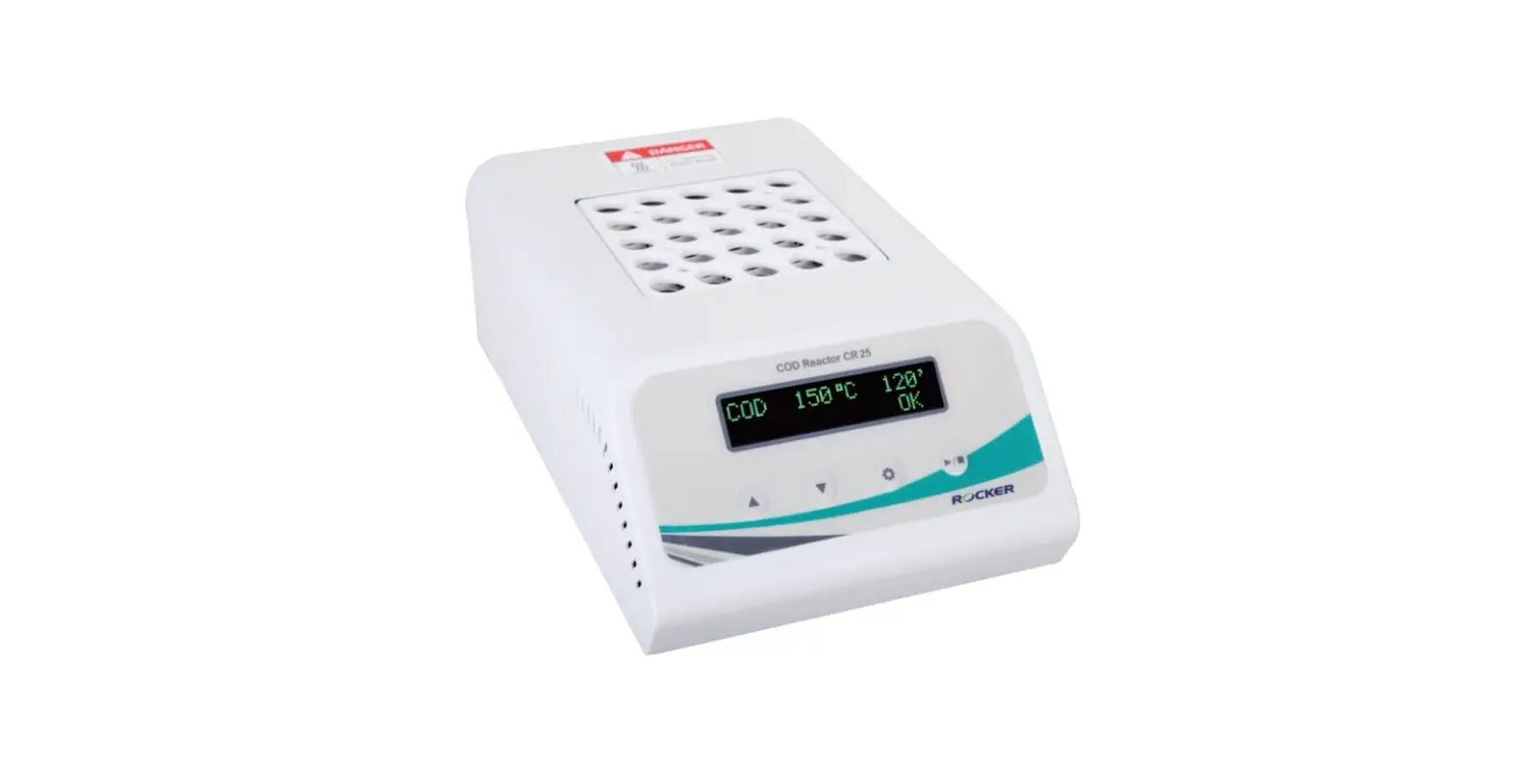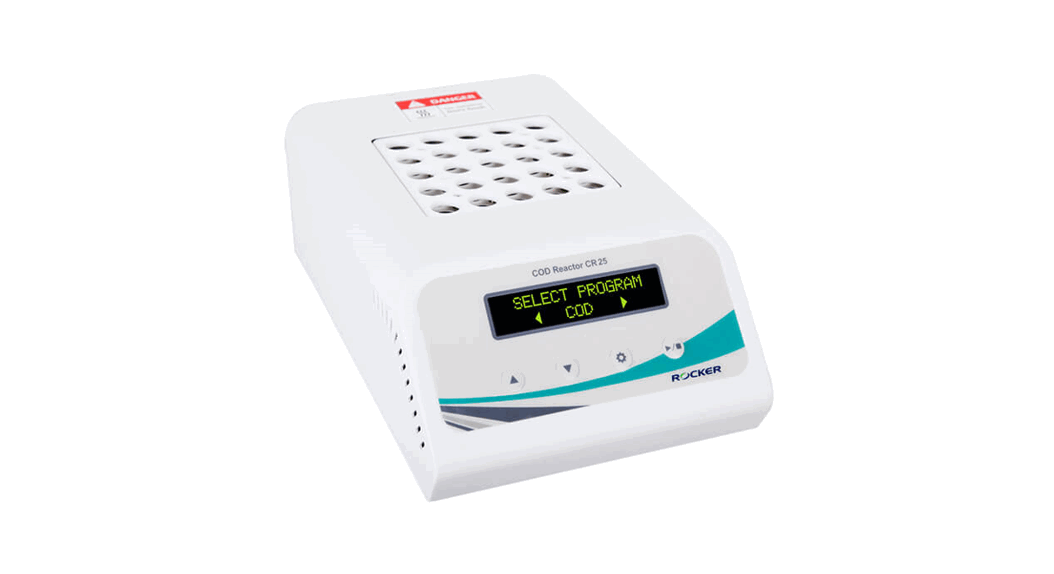
 Chemical Oxygen Demand Reactor
INSTRUCTION MANUAL
Model No. CR 25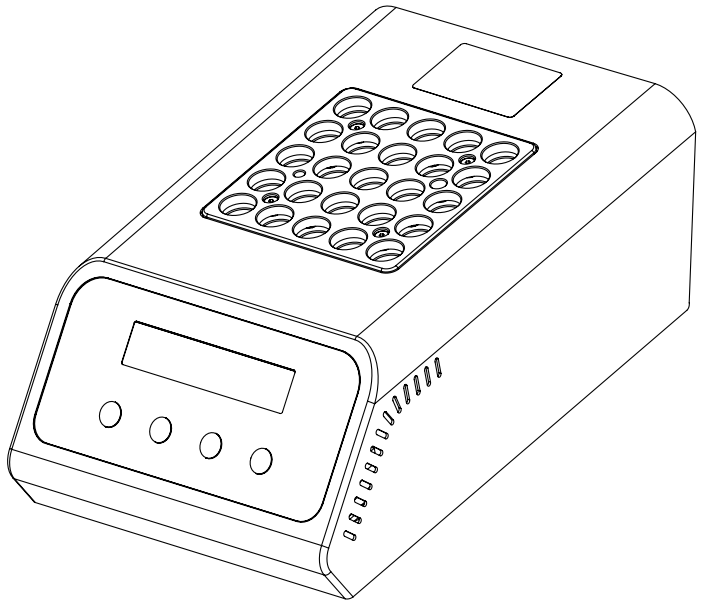 Please read this instruction manual before using this product.
Important Notice
This instrument is designed for laboratory usage only. Please read this manual carefully before installing and operating. The instrument shall not be modified in any way. Any modification will void the warranty and may result in potential hazard. We are not responsible for any injury or damage caused by any non-intended purposes and modifying the instrument without authorization.
- Check the voltage specified on the name plate and ensure it matches the line voltage in your location.
- Install the instrument in a clean, dust-less and well-ventilated area under 40°C.
- Please keep the instrument away from inflammables.
- The surface temperature of the instrument is very high after work or during work, please do NOT touch it to avoid serious burns.
- Operating condition
(a) Ambient temperature: 5~ 40 °C
(b) Relative humidity: 80% RH Max.
(c) Power supply: 100~120V, 50/60Hz or 200~240V, 50/60Hz
(d) Fuse: T4A, 250V for 100~120V or T2A, 250V for 200~240V
(e) Altitude: up to 2000 m
(f) IP20
(g) Pollution degree: II
(h) Overvoltages category: I
(i) Indoor use Caution: Hot surface
 The equipment must be disconnected from the mains supply before replacing the fuse link.
Unpacking
Please check if the package is complete without any damage before unpacking. When unpacking, please make sure you have all accessories that indicated on the list. If there is any problem, please keep the serial number along with packing case and contact your local distributor immediately for assistance.
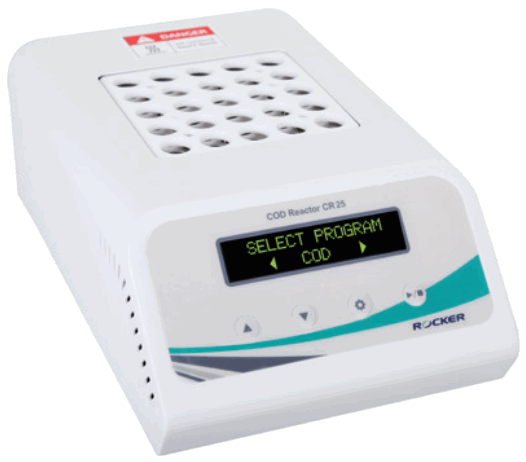
| Item | Content |
| 1 | CR 25 Main Unit |
| 2 | Power Cord |
| 3 | Instruction Manual |
Main Part Diagram
(1). Main Part
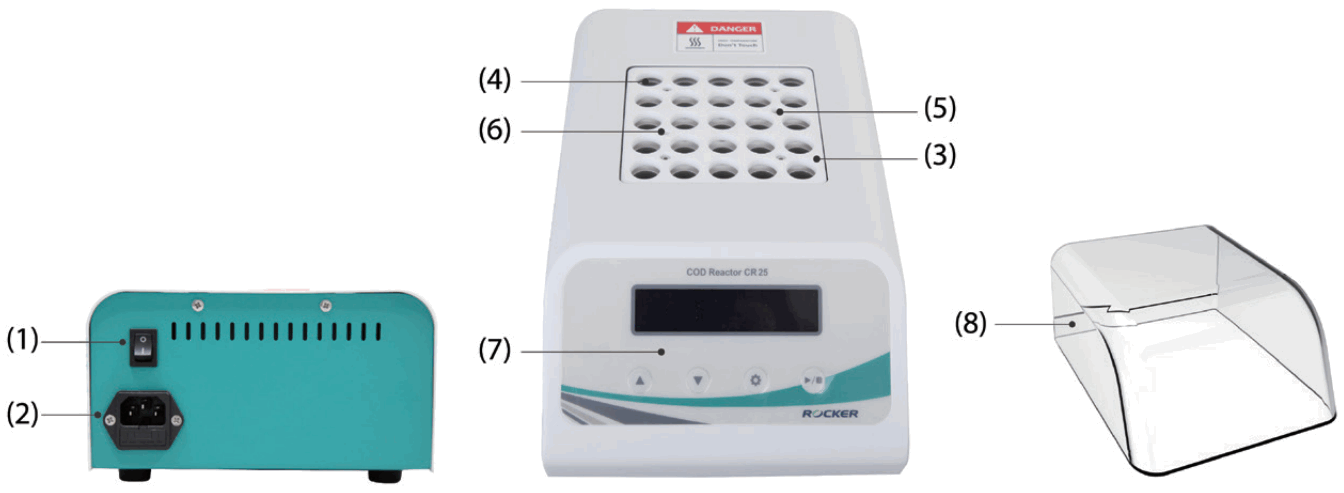
| Item | Designation | Item | Designation |
| 1 | Power Switch | 5 | Hole for Mercury Thermometer |
| 2 | AC Socket and Fuse Holder | 6 | Hole for Digital Thermometer Probe |
| 3 | Anti-heat PTFE Plate | 7 | Operation Panel |
| 4 | Hole for 16 mm Digestion Vials | 8 | Protective Lid (Optional) |
(2). Operation Panel
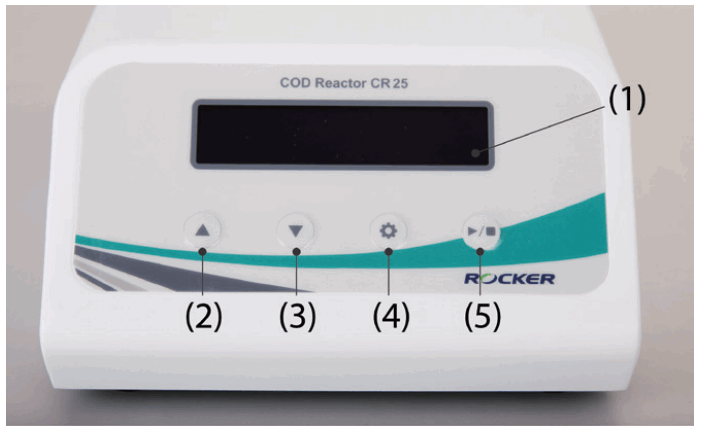
| Position | Designation | Position | Designation |
| 1 | Display | 4 | Setting / Calibration Button |
| 2 | Up Button | 5 | Start / Stop Button |
| 3 | Down Button |
(1). Buttons
| Button | Designation | Description |
| ▲ | Up Button | Select program or change setting value. (Hold the button to change value continuously) |
| ▼ | Down Button | Select program or change setting value. (Hold the button to change value continuously) |
 | Setting / Calibration Button | 1. Program calibration (Temperature). 2. User program setting (temperature and timer) |
 | Start / Stop Button | 1. Start or stop heating. 2. Stop setting or calibration. |
(2). Symbols
| Symbol | Description |
| T1 / T2 | Hold down both ▲ and ▼ to switch Standard Timing Mode (T1) or Preheated Timing Mode (T2) during heating state. |
 | Reach the set temperature, ready to start the program. |
| T⭡ | Heats the block to set temperature. |
| \ | / – | Timing state indication |
| T1 T1. T1: T1⭡ | Heating state indication, symbols alternate every 0.5 sec |
(3). Display
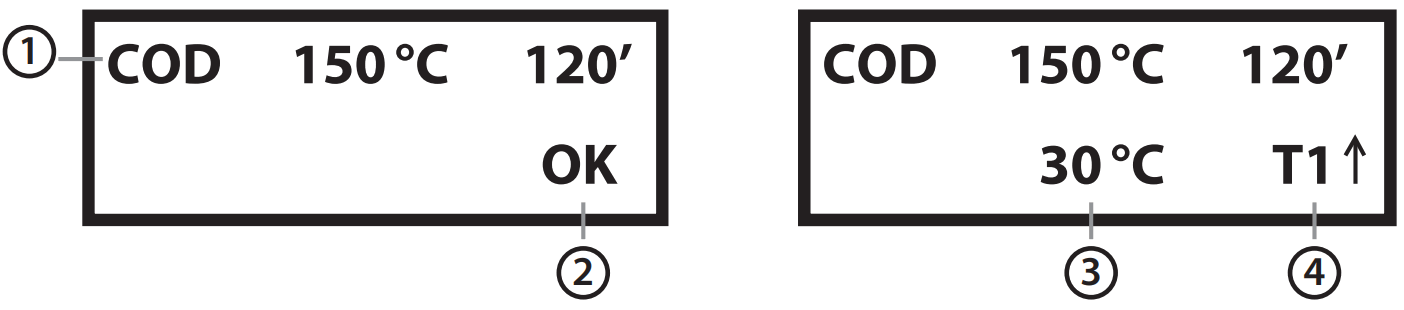
| Position | Designation | Position | Designation |
| 1 | Program Name, Temp, Time | 3 | Actual Temperature |
| 2 | Program Standby Indication | 4 | Heating State |
Operation
(1). Program Menu
| Item | Description | Remark |
| 1: COD | Heats for 2 hours at 150 °C. | Standard Timing Mode (T1) |
| 2: COD2 | Heats for 20 mins at 165 °C. | Preheated Timing Mode (T2). |
| 3: TP | Heats for 30 mins at 150 °C. | Standard Timing Mode (T1) |
| 4: TN | Heats for 30 mins at 105 °C. | Standard Timing Mode (T1) |
| 5: TPN2 | Heats for 30 mins at 120 °C. | Preheated Timing Mode (T2). |
| 6: TOC | Heats for 2 hours at 105 °C. | Standard Timing Mode (T1) |
| 7: PRG1 | Program temperature and heating time are editable. | User Program |
| 8: USR2 | User Program |
(2). Program Operation
(a). COD, TP, TN, TOC Predened Programs (Standard Timing Mode, T1)
| Step | Operation | Screen Display |
| 1 | Switch on the instrument and LOGO shows on the screen. | COD Reactor |
| 2 | Program menu shows on the screen in 2 seconds (1). | COD 150°C 120′ OK |
| 3 | Select desired heating program by using 「▲ 」 or 「▼」. (8 programs are selectable.) | COD2 165°C 20′ O K |
| 4 | Press 「」 to start heating after confirming temperature and time of program(2) (3). | COD 150°C 120′ 26°C T1↑ |
| 5 | T1 Standard Timing Mode (4): one beep indicates set temperature has been reached and time will automatically count down to zero. | COD 150°C 120/26°C |
| 6 | The instrument will beep for 15 seconds to indicate the program is complete and stop automatically. Press any key to stop the audio alarm. Press 「」 to return to the program menu for another new program. | COD 150°C 000′ 150°C |
Note 2. (a).
- The machine will memorize the selected program and maintain when machine is switch on next time.
- How to stop or select other program:
Press 「 」 then comes with a “STOP HEATING?” message. Press 「」 to stop heating and return to program list.
 - How to calibrate temperature during the heating state:
Hold down 「 」during heating state to enter temperature calibration mode for current program. Please refer to Procedure for Temperature Calibration to calibrate the temperature.
 - How to switch Timing Mode:
T1 Standard Timing Mode: Automatically counts down to zero when the instrument reaches to set temperature. Hold down 「▲」 and 「▼」 simultaneously to switch to T2 Preheated Timing Mode during heating state.
(b). COD2, TPN Predefined Programs (Preheated Timing Mode, T2)
| Step | Operation | Screen Display |
| 1 | Switch on the instrument and LOGO shows on the screen. | COD Reactor |
| 2 | Program menu shows on the screen in 2 seconds (1). | COD 150°C 120′ O K |
| 3 | Select desired heating program by using「▲ 」or「▼. (8 programs are selectable.) | COD 2165°C 20′ OK |
| 4 | Press 「」 to start heating after confirming temperature and time of program(2) (3). | COD2 165°C 20′ 26°C T2↑ |
| 5 | T2 Preheated Timing Mode (4): beep two times and will show up to indicate the set temperature is reached. | COD2 165°C 20′ 165° |
| 6 | Place the test vials into the heating block, then press 「」to start(5). | COD2 165°C 20′ 162°C T↑ |
| 7 | After reaching the set temperature or press 「」, the instrument will beep and automatically count down to zero. | COD2 165°C 20/165°C |
| 8 | The instrument will beep for 15 seconds to indicate the program is complete and stop automatically. Press any key to stop the audio alarm. Press「」to return to the program menu for another new program. | COD2 165°C 000′ 165°C |
Note 2. (b).
- The machine will memorize the selected program and maintain when machine is switch on next time.
- How to stop or select other program:
Press 「」 then comes with a “STOP HEATING?” message. Press 「」 to stop heating and return to program list. - How to calibrate temperature during the heating state:
Hold down 「」 during heating state to enter temperature calibration mode for current program. Please refer to Procedure for Temperature Calibration to calibrate the temperature. - How to switch Timing Mode:
T2 Standard Timing Mode: Reach and Hold the temperature and wait for further instruction. Hold down 「▲ 」 and 「▼」 simultaneously to switch to T1 Standard Timing Mode during heating state. - The temperature of heating block will slightly decline after inserting vials. The timer will start after the heating block reach to set temperature. Press 「」 to cancel the waiting process and start to count down immediately.
(c). PRG1, PRG2 User Programs
| Step | Operation | Screen Display |
| 1 | Switch on the instrument and LOGO shows on the screen. | COD Reactor |
| 2 | Program menu shows on the screen in 2 seconds (1). | COD 150°C 120′ OK |
| 3 | Select PRG1 or PRG2 program by using 「▲ 」or 「▼」. | PRG1 150°C 120′ OK |
| Press 「」to start parameter setting by using 「▲ 」 and 「▼」. Press「」 to complete the setting process. Temp: 30~200 °C Timer: 1~999 min or Continuous Mode (On) | PRG1 100°C 120′ OK | |
| 5 | Press 「」 to start heating after confirming temperature and time of program(2) (3). | PRG1 100°C 120′ 26°C T1↑ |
| 6 | T1 Standard Timing Mode (4): one beep indicates set temperature has been reached and time will automatically count down to zero. | PRG1 100°C 120/100°C |
| 7 | The instrument will beep for 15 seconds to indicate the program is complete and stop automatically. Press any key to stop the audio alarm. Press「」to return to the program menu for another new program. | PRG1 100°C 000′ 100°C |
Note 2. (c).
- The machine will memorize the selected program and maintain when machine is switch on next time.
- How to stop or select other program:
Press 「」 then comes with a “STOP HEATING?” message. Press 「」 to stop heating and return to program list. - How to calibrate temperature during the heating state:
Hold down 「」 during heating state to enter temperature calibration mode for current program. Please refer to Procedure for Temperature Calibration to calibrate the temperature. - T1 Standard Timing Mode: Automatically counts down to zero when the instrument reaches to set temperature. Hold down 「▲」 and 「▼」 simultaneously to switch to T2 Preheated Timing Mode during heating state.
- T2 Standard Timing Mode: Reach and Hold the temperature and wait for further instruction. Hold down 「▲」 and 「▼」 simultaneously to switch to T1 Standard Timing Mode during heating state.
(3). Procedure for Temperature Calibration
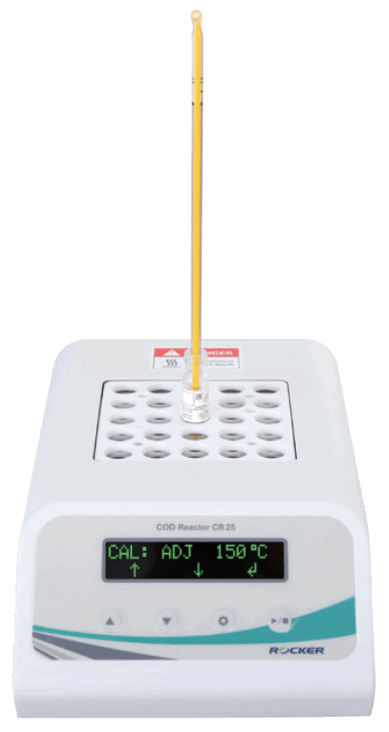
Insert thermometer into 16 mm vial which filled with nearly 5 mL glycerol and touches the bottom of vial. Insert the vail on center of heating block as shown on the right. Calibrate temperature as following procedure.
- Digital or mercury thermometer can be used for calibration, please make sure thermometer is calibrated regularly or certified by standard organization to ensure the accuracy.
- General lab thermometers are often not accurate enough for calibration.
| Step | Operation | Display |
| 1 | Hold down 「」 to enter temperature calibration mode of current program during heating state. | COD 150°C 120′ OK |
| 2 | The calibration (1)(2) will be proceeded based on set temperature of current program and screen shows heating state at same time. | CAL 150°C 30°C Heating T |
| 3 | A 30-min timer for stabilization shows up after set temperature has been reached. | CAL 150°C 150°C Waiting 30\ |
| 4 | Adjust the actual temperature on thermometer by pressing「▲ 」and「▼」. Then press 「 」 to finish the calibration procedure. | CAL: ADJ 150°C |
Note 3.
- The calibration parameters of each program are independent and have no impact on other programs when executing calibration procedure for specific program.
- If heating block is hotter than set temperature, you should wait for temperature declining.
- How to stop calibration procedure:
Press 「」 then comes with a “STOP HEATING?” message. Press 「」 to stop heating and return to program list, or 「」 to continue calibration.
Maintenance
- Please operate the instrument in well ventilated area.
- The instrument is not autoclavable. Please clean the surface by pure water or 75% ethanol.
- If a vial overflows, or liquid is spilled, please switch off the instrument, unplug the power cord immediately. Clean the instrument as soon as possible while it cools down to prevent corrosion.
- Incorrect power source may cause fuse blew. A spare fuse is available in fuse holder and can be taken out with flathead screwdriver.
Troubleshooting
| Problem | Reason and Solution |
| Fail to start or Abnormal Display |  Loose plug ⇒ Reconnect plug to power supply. Blown fuse ⇒ Replace a new fuse. Instrument is over temperature ⇒ Cool the instrument down and operate in well-ventilated circumstance. Display or components failure ⇒ Contact distributor for assistance. Loose plug ⇒ Reconnect plug to power supply. Blown fuse ⇒ Replace a new fuse. Instrument is over temperature ⇒ Cool the instrument down and operate in well-ventilated circumstance. Display or components failure ⇒ Contact distributor for assistance. |
| Liquid spilled during heating process | Incorrect temperature setting ⇒ Reset heating temperature. Incorrect temperature of block ⇒ Calibrate the temperature. Loose vial cap ⇒ Change vial and tighten the cap Incorrect sample volume ⇒ Change new vial and fill right volume Improper reagent ⇒ Change new reagent, world renowned brand is suggested. |
| Other problems | Please contact distributor for assistance |
Ordering Information
| 179250-11(22) | CR 25, COD Reactor, AC110V,60Hz (AC220V,50Hz) |
| 198200-01(02) | CD 200, COD Detector, AC100~240V adaptor, US plug (EU plug) |
| 191100-01(02) | WD 100, Multiparameter Colorimeter, AC100~240V adaptor, US plug (EU plug) |
| 179250-43 | Protective Lid |
| AWE770110 | 1000~5000 ul Pipette (Adjustable) |
| SSI 5000-50 | 5 ml Pipette Tip (50/PK) |
Instruction Video https://youtube.com/playlist?list=PLbsN2_Rc-KRgz8Y3bLMzXqP3k52EhpLSU
Rocker Scientific Co., Ltd.
Tel: +886-2-26033311
Fax: +886-2-26036622
E-mail:[email protected]
https://www.rocker.com.tw
RO-OPE179250-EN202102-C01
 Rocker 實驗室真空過濾設備領導品牌 - Rocker 洛科儀器