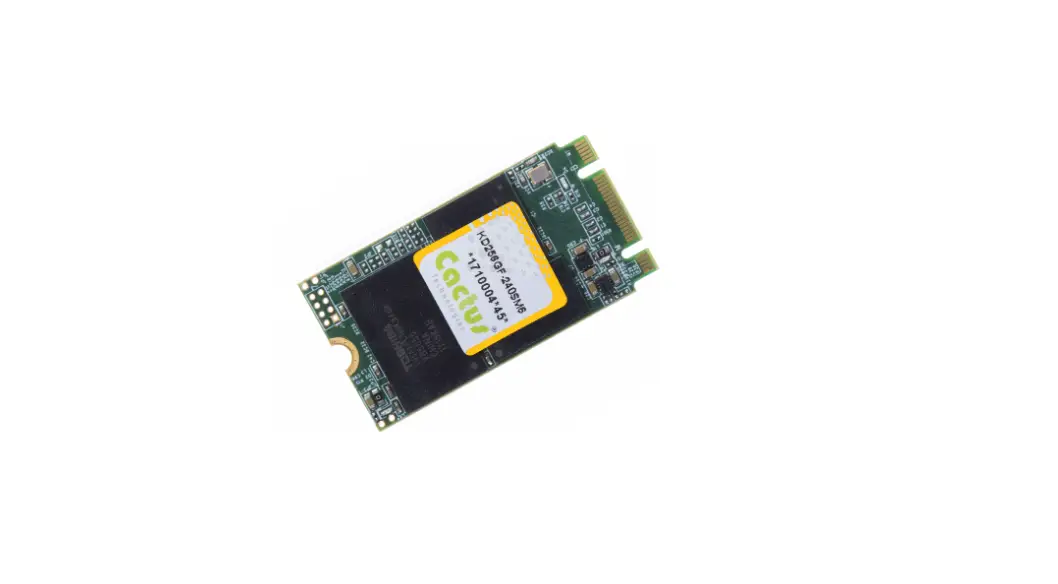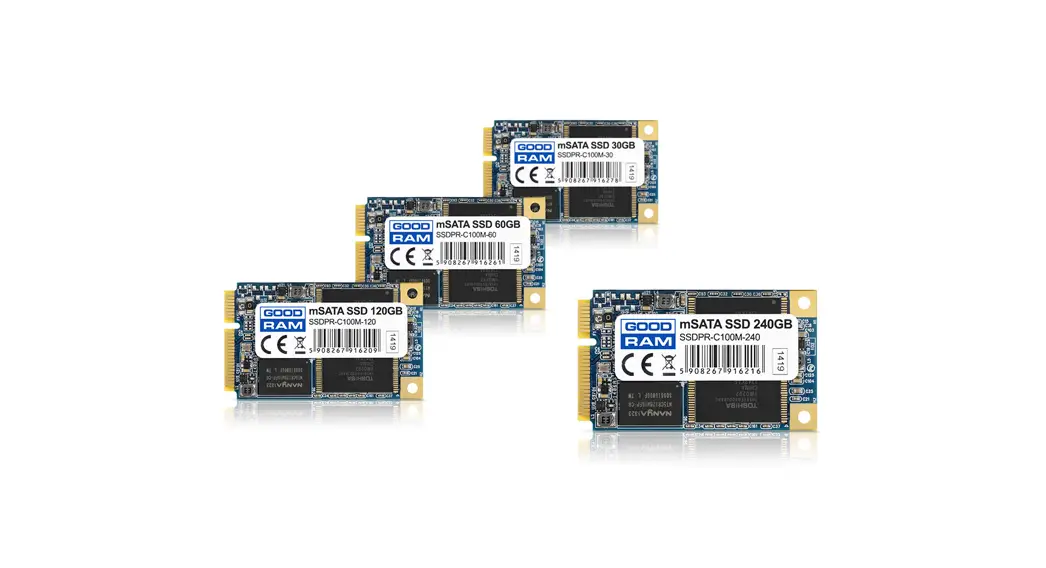

Cactus 940S Series Industrial Grade mSATA SSD
The information in this manual is preliminary and is subject to change without notice. Cactus Technologies ®, Limited shall not be liable for technical or editorial errors or omissions contained herein; nor for incidental or consequential damages resulting from the furnishing, performance, or use of this material. Cactus Technologies® makes no warranty, representation or guarantee regarding the suitability of its products for any particular purpose, nor does Cactus Technologies® assume any liability arising out of the application or use of its products, and specifically disclaims any and all liability, including without limitation consequential or incidental damages. Cactus Technologies® products are not designed, intended or authorized for use as components in systems intended for surgical implant into the body or in other applications intended to support or sustain life or for any application where the failure of a Cactus Technologies® product can result in personal injury or death.
Users of Cactus Technologies® products for such unintended and unauthorized applications shall assume all risk of such use and shall indemnify and hold Cactus Technologies® and its officers, employees, subsidiaries, affiliates and distributors harmless against all claims, costs, damages, expenses and attorney fees arising out of, directly or indirectly, any claim of personal injury or death associated with such unintended and unauthorized use, even if such claim alleges that Cactus Technologies® was negligent regarding the design or manufacture of the part.
All parts of the Cactus Technologies® documentation are protected by copyright law and all rights are reserved. This documentation may not, in whole or in part, be copied, photocopied, reproduced, translated, or reduced to any electronic medium or machine-readable form without prior consent, in writing, from Cactus Technologies®, Limited. © 2005-2022 Cactus Technologies® Limited. All rights reserved.
The Industrial Grade -940S Series mSATA SSD is a product manufactured by Cactus Technologies Limited. This product is designed for industrial-grade use and offers high-speed data transfer and reliable data storage.
Product Features
- Host and technology independence
- Defect and error management
- Low power consumption
- Highly durable and reliable
Supported Standards
The Industrial Grade -940S Series mSATA SSD supports the following standards:
- ATA Command Set
- S.M.A.R.T Feature Set
Product Usage Instructions
- Before using the Industrial Grade -940S Series mSATA SSD, ensure that your system meets the system environmental specifications and power requirements listed in this maual.
- To connect the Industrial Grade -940S Series mSATA SSD to your system, insert the SSD into an mSATA slot and secure it in place. The SSD is host and technology independent, meaning it can be used with various types of systems.
- The Industrial Grade -940S Series mSATA SSD supports the ATA command set and S.M.A.R.T feature set. Refer to sections 6 and 7 of this manual for more information on these features.
- If you experience any issues with the Industrial Grade -940S Series mSATA SSD, refer to Appendix B of this manual for technical support services. The product also comes with a limited warranty, as outlined in Appendix D of this manual.
Introduction to Cactus Technologies®
Industrial Grade -940S Series mSATA SSD Products
Features:
- Solid state design with no moving parts
- Capacities from 8GB to 128GB
- Compliant with Serial ATA 3.1 specifications
- ATA-8 ACS2 compatible
- Supports Serial ATA Generation I/II/III transfer rate of 1.5/3.0/6.0 Gbps
- Supports ATA SMART Feature Set
- Supports ATA Security Feature Set
- Supports Data Set Management (TRIM)
- Supports NCQ w/ max. queue depth of 32
- Supports DevSLP
- ECC capable of correcting up to 66 bit errors per 1KB
- Enhanced error correction, < 1 error in 1014 bits read
- Voltage support: 3.3V±5%
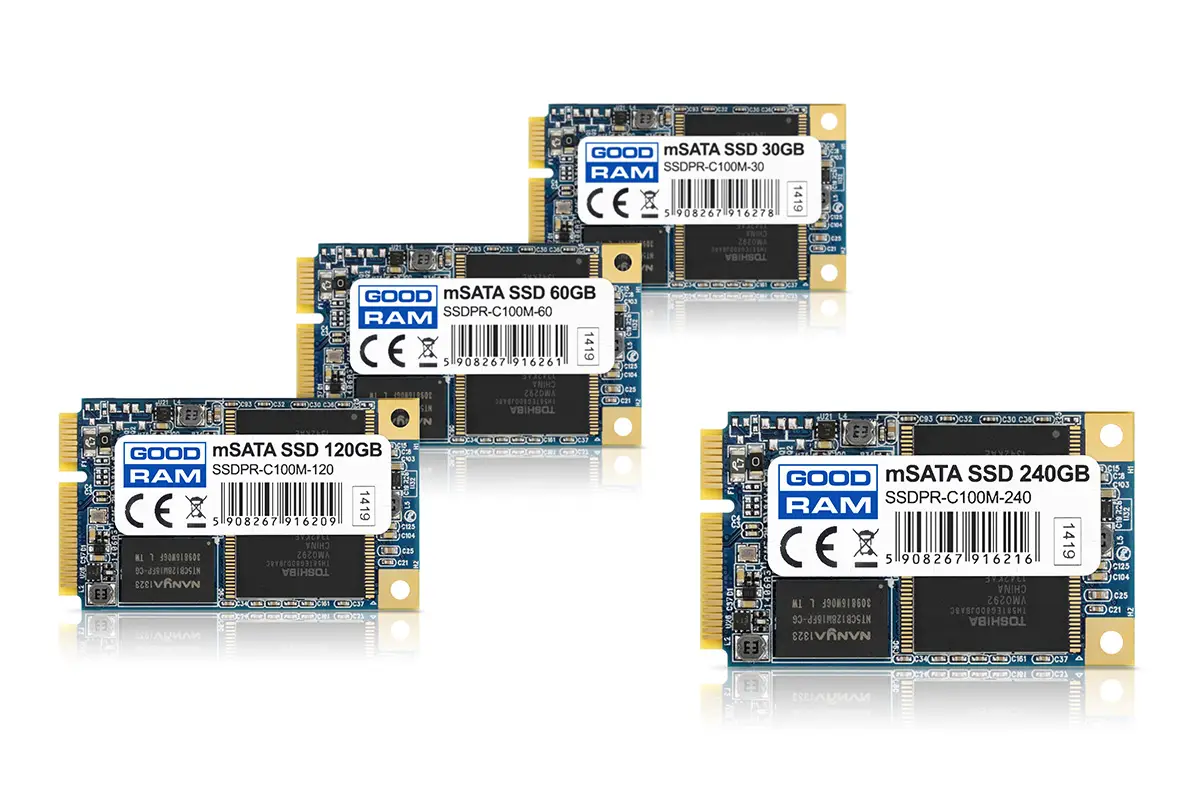
Cactus Technologies® Industrial mSATA SSD is a high capacity solid-state flash memory product that complies with the Serial ATA 3.1 standard and is functionally compatible with a SATA hard disk drive. Cactus Technologies® -940S series Industrial mSATA SSD provide up to 128GB of formatted storage capacity.
Cactus Technologies® Industrial mSATA SSD product uses high quality MLC NAND flash memory from Kioxia Corporation. In addition, it includes an on-drive intelligent controller that manages interface protocols, data storage and retrieval as well as ECC, defect handling and diagnostics, power management, and clock control. The controller’s firmware isupgradeable, thus allowing feature enhancements and firmware updates while keeping the BOM stable.
Supported Standards
Cactus Technologies® mSATA SSD is fully compatible with the following specification:
- ATA 8/ACS2 Specification published by ANSI
- Serial ATA 3.1 Specification published by the Serial ATA International Organization
Product Features
Cactus Technologies® Industrial mSATA SSD contains a high level, intelligent controller. This intelligent controller provides many capabilities including the following:
- Standard ATA register and command set (same as found on most magnetic disk drives).
- Manages details of erasing and programming flash memory independent of the host system
- Sophisticated defect managing capabilities (similar to magnetic disk drives).
- Sophisticated system for error recovery using powerful error correction code (ECC).
- Intelligent power management for low power operation.
Host and Technology Independence
Cactus Technologies® Industrial mSATA SSD appears as a standard SATA disk drive to the host system. The drive utilizes a 512-byte sector which is the same as that in an IDE magnetic disk drive. To write or read a sector (or multiple sectors), the host computer software simply issues an ATA Read or Write command to the drive as per the SATA protocol. The host software then waits for the command to complete. The host system does not get involved in the details of how the flash memory is erased, programmed or read as this is all managed by the built-in controller in the drive. Also, with the intelligent on-board controller, the host system software will not require changing as new flash memory evolves. Thus, systems that support the Cactus Technologies® Industrial mSATA SSD products today will continue to work with future Cactus Technologies® Industrial mSATA SSDs built with new flash technology without having to update or change host software.
Defect and Error Management
Cactus Technologies® Industrial mSATA SSD contains a sophisticated defect and error management system similar to those found in magnetic disk drives. The defect management is completely transparent to the host and does not consume any user data space. The soft error rate for Cactus Technologies® Industrial mSATA SSD is much lower than that of magnetic disk drives. In the extremely rare case where a read error does occur, the drive has sophisticated ECC to recover the data. These defect and error management systems, coupled with the solid-state construction, give Cactus Technologies® Industrial mSATA SSDs unparalleled reliability.
Power Supply Requirements
Cactus Technologies® Industrial mSATA SSD operates at a voltage range of 3.3 volts ± 5%.
Product Specifications
For all the following specifications, values are defined at ambient temperature and nominal supply voltage unless otherwise stated.
System Environmental Specifications
Table 2-1. Environmental Specifications
| Temperature | Operating: -40°C to +85°C Non-Operating: -55°C to +95°C |
|---|---|
| Humidity | Operating & Non-Operating: 8% to 95%, non-condensing |
| Vibration | Operating & Non-Operating: 20G, MIL-STD-883G Method 2005.2, Condition A |
| Shock | Operating & Non-Operating: 3,000 G, MIL-STD-883G Method 2002.4, Condition C |
| Altitude (relative to sea level) | Operating: 100,000 feet maximum |
System Power Requirements
Table 2-2. Power Requirements
| Cactus Technologies® Industrial mSATA SSD | ||||||
| 8GB | 16GB | 32GB | 64GB | 128GB | ||
| DC Input Voltage (VCC) 100 mV max. ripple (p-p) | 3.3V ±5% | |||||
| (Maximum Average | Idle: | 85 | 85 | 90 | 95 | 105 |
| Value) mA See Notes. | Reading: Writing: | 240 255 | 260 300 | 325 420 | 345 465 | 685 870 |
NOTES: All values quoted are typical at ambient temperature and nominal supply voltage unless otherwise stated. Sleep mode is specified under the condition that all drive inputs are static CMOS levels and in a “Not Busy“ operating state. The Industrial Grade -940S Series mSATA SSD requires a DC input voltage (VCC) with a maximum ripple of 100 mV (p-p).
System Performance
All performance timings assume the drive controller is in the default (i.e., fastest) mode.
Table 2-3. Performance
| 8GB | 16GB | 32GB | 64GB | 128GB | |
| Read Transfer Rate (MB/s) | 80 | 85 | 165 | 170 | 540 |
| Write Transfer Rate (MB/s) | 40 | 75 | 150 | 160 | 415 |
System Reliability
Table 2-4. Reliability
| Data Reliability | < 1 non-recoverable error in 1014 bits READ |
| Endurance (estimated TBW): | |
| 8GB | 480TB |
| 16GB | 960TB |
| 32GB | 1920TB |
| 64GB | 3840TB |
| 128GB | 7680TB |
Physical Specifications
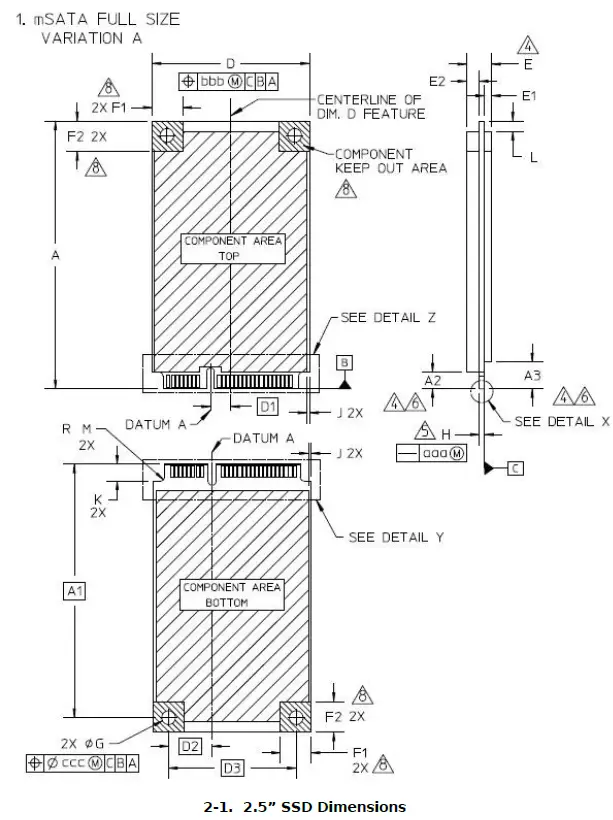
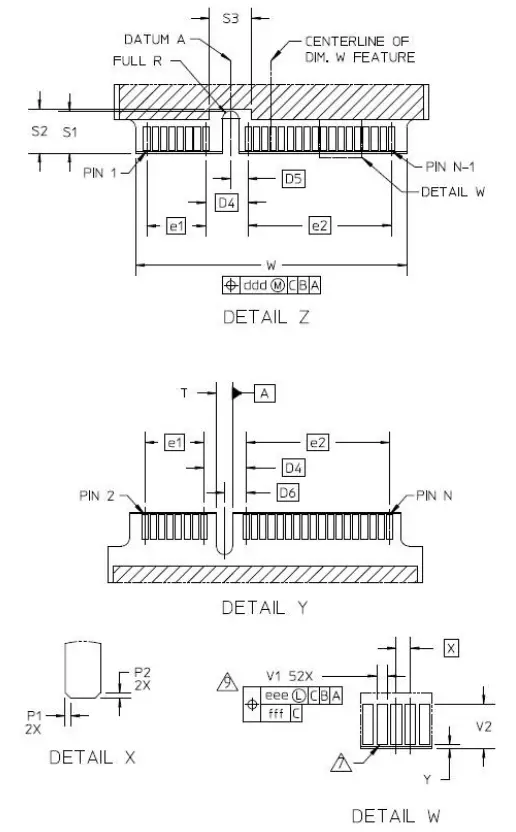
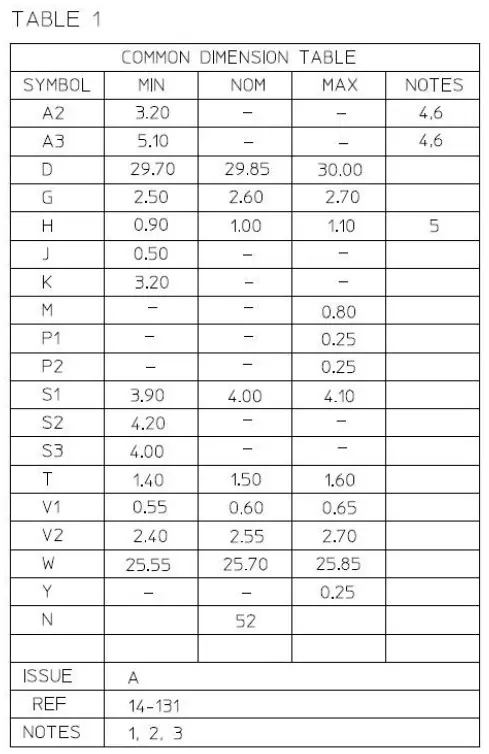
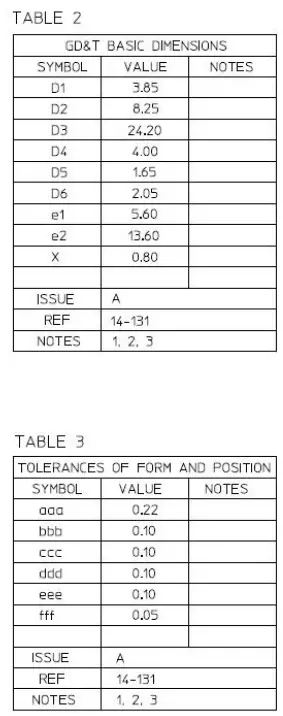
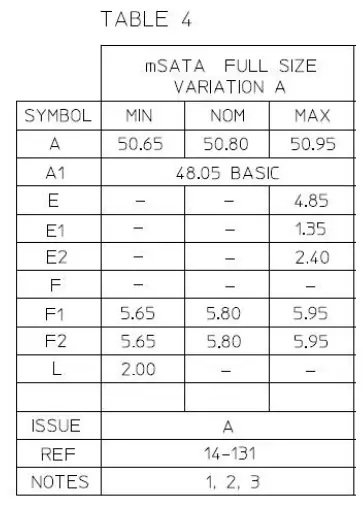
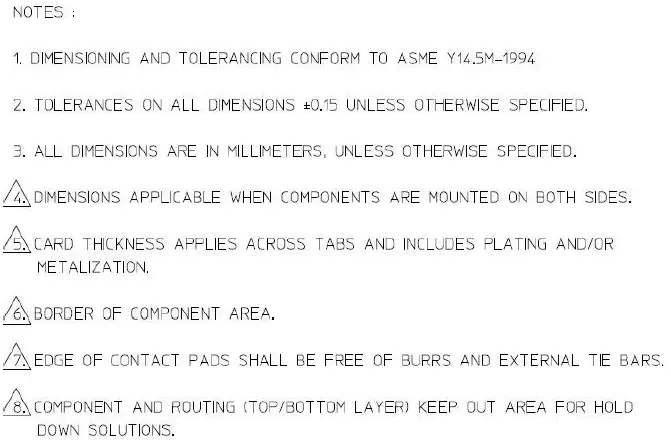
The following sections provide the physical specifications for Cactus Technologies® Industrial mSATA SSD products.
mSATA SSD Physical Specifications
Interface Description
The following sections provide detailed information on the Cactus Technologies® Industrial mSATA SSD interface.
mSATA SSD Pin Assignments and Pin Type
The signal/pin assignments and descriptions are listed in Table 3-5.
Table 3-5. mSATA SSD Pin Assignments and Pin Type
| Pin # | Pin Name | Description | Pin # | Pin Name | Description |
| 1 | Reserved | 2 | 3.3V | 3.3V supply | |
| 3 | Reserved | 4 | GND | ||
| 5 | Reserved | 6 | NC | Reserved for 1.5V supply | |
| 7 | Reserved | 8 | Reserved |
| Pin # | Pin Name | Description | Pin # | Pin Name | Description |
| 9 | GND | 10 | Reserved | ||
| 11 | Reserved | 12 | Reserved | ||
| 13 | Reserved | 14 | Reserved | ||
| 15 | GND | 16 | Reserved | ||
| 17 | Reserved | 18 | GND | ||
| 19 | Reserved | 20 | Reserved | ||
| 21 | GND | 22 | Reserved | ||
| 23 | RX+ | Host Receiver Differential Plus | 24 | 3.3V | 3.3V supply |
| 25 | RX- | Host Receiver Differential Minus | 26 | GND | |
| 27 | GND | 28 | NC | Reserved for 1.5V supply | |
| 29 | GND | 30 | I2C_CLK | Two wire interface clock | |
| 31 | TX- | Host Transmitter Differential Minus | 32 | I2C_DAT | Two wire interface data |
| 33 | TX+ | Host Transmitter Differential Plus | 34 | GND | |
| 35 | GND | 36 | Reserved | ||
| 37 | GND | 38 | Reserved | ||
| 39 | 3.3V | 3.3V supply | 40 | GND | |
| 41 | 3.3V | 3.3V supply | 42 | Reserved | |
| 43 | Device Type | No connect for mSATA | 44 | DEVSLP | DevSleep control |
| 45 | Vendor | Vendor specific pin | 46 | Reserved | |
| 47 | Vendor | Vendor specific pin | 48 | NC | Reserved for 1.5V supply |
| 49 | DAS/DSS | Device Activity signal | 50 | GND | |
| 51 | Presence Detect | Tied to GND in device | 52 | 3.3V | 3.3V supply |
Electrical Specifications
The following table defines all D.C. Characteristics for the mSATA SSD products. Unless otherwise stated, conditions are:
- Vcc = 3.3V ± 5%
- Ta = -40°C to 85°C
Absolute Maximum Ratings
| Parameter | Symbol | MIN | MAX | Units |
| Storage Temperature | Ts | -55 | +100 | oC |
| Operating Temperature | TA | -40 | +85 | oC |
| Vcc with respect to GND | Vcc | -0.3 | 3.6 | V |
DC Characteristics
| Parameter | Symbol | MIN | MAX | Units |
| Input Voltage | Vin | -0.5 | Vcc + 0.5 | V |
| Output Voltage | Vout | -0.3 | Vcc + 0.3 | V |
| Input Leakage Current | ILI | -10 | 10 | uA |
| Output Leakage Current | ILO | -10 | 10 | uA |
| Input/Output Capacitance | CI/Co | 10 | pF | |
| Operating Current Idle Active | ICC | 110 875 | mA |
AC Characteristics
Cactus Technologies® mSATA SSD products conforms to all AC timing requirements as specified in the SATA-IO specifications. Please refer to that document for details of AC timing for all operation modes of the device.
ATA Drive Register Set Definition and Protocol
The communication to or from the SSD is done using FIS. Legacy ATA protocol is supported by using the legacy mode defined in the SATA specifications. In this mode, the FIS has defined fields which provide all the necessary ATA task file registers for control and status information. The Serial ATA interface does not support Primary/Secondary or Master/Slave configurations. Each SATA channel supports only one SATA device, with the register selection as defined by the ATA standard.
ATA Task File Definitions
The following sections describes the usage of the ATA task file registers. Note that the Alternate Status Register of legacy ATA is not defined for SATA drives.
Data Register
The Data Register is a 16-bit register, and it is used to transfer data blocks between the SSD data buffer and the Host.
Error Register
This register contains additional information about the source of an error when an error is indicated in bit 0 of the Status register. The bits are defined as follows:
| D7 | D6 | D5 | D4 | D3 | D2 | D1 | D0 |
| BBK | UNC | 0 | IDNF | 0 | ABRT | 0 | AMNF |
- Bit 7 (BBK) This bit is set when a Bad Block is detected.
- Bit 6 (UNC) This bit is set when an Uncorrectable Error is encountered.
- Bit 5 This bit is 0.
- Bit 4 (IDNF) The requested sector ID is in error or cannot be found.
- Bit 3 This bit is 0.
- Bit 2 (Abort) This bit is set if the command has been aborted because of a status condition: (Not Ready, Write Fault, etc.) or when an invalid command has been issued.
- Bit 1 This bit is 0.
- Bit 0 (AMNF) This bit is set in case of a general error.
Feature Register
This register provides information regarding features of the SSD that the host can utilize.
Sector Count Register
This register contains the number of sectors of data requested to be transferred on a read or write operation between the host and the SSD. If the value in this register is zero, a count of 256 sectors is specified. If the command was successful, this register is zero at command completion. If not successfully completed, the register contains the number of sectors that need to be transferred in order to complete the request.
Sector Number (LBA 7-0) Register
This register contains the starting sector number or bits 7-0 of the Logical Block Address (LBA) for any SSD data access for the subsequent command.
Cylinder Low (LBA 15-8) Register
This register contains the low order 8 bits of the starting cylinder address or bits 15-8 of the Logical Block Address.
Cylinder High (LBA 23-16) Register
This register contains the high order bits of the starting cylinder address or bits 23-16 of the Logical Block Address.
Drive/Head (LBA 27-24) Register
The Drive/Head register is used to select the drive and head. It is also used to select LBA addressing instead of cylinder/head/sector addressing. The bits are defined as follows:
| D7 | D6 | D5 | D4 | D3 | D2 | D1 | D0 |
| 1 | LBA | 1 | DRV | HS3 | HS2 | HS1 | HS0 |
- Bit 7 This bit is set to 1.
- Bit 6
- LBA is a flag to select either Cylinder/Head/Sector (CHS) or Logical Block Address Mode (LBA). When LBA=0, Cylinder/Head/Sector mode is selected. When
- LBA=1, Logical Block Address is selected. In Logical Block Mode, the Logical Block Address is interpreted as follows:
- LBA07-LBA00: Sector Number Register D7-D0.
- LBA15-LBA08: Cylinder Low Register D7-D0.
- LBA23-LBA16: Cylinder High Register D7-D0.
- LBA27-LBA24: Drive/Head Register bits HS3-HS0.
- Bit 5 This bit is set to 1.
- Bit 4 (DRV) DRV is the drive number. This should always be set to 0.
- Bit 3 (HS3) When operating in the Cylinder, Head, Sector mode, this is bit 3 of the head number. It is Bit 27 in the Logical Block Address mode.
- Bit 2 (HS2) When operating in the Cylinder, Head, Sector mode, this is bit 2 of the head number. It is Bit 26 in the Logical Block Address mode.
- Bit 1 (HS1) When operating in the Cylinder, Head, Sector mode, this is bit 1 of the head number. It is Bit 25 in the Logical Block Address mode.
- Bit 0 (HS0) When operating in the Cylinder, Head, Sector mode, this is bit 0 of the head number. It is Bit 24 in the Logical Block Address mode.
Status Registers
These registers return the status when read by the host. Reading the Status register does clear a pending interrupt while reading the Auxiliary Status register does not. The meaning of the status bits are described as follows:
| D7 | D6 | D5 | D4 | D3 | D2 | D1 | D0 |
| BUSY | RDY | DWF | DSC | DRQ | CORR | 0 | ERR |
- Bit 7 (BUSY) The busy bit is set when the device has access to the command buffer and registers and the host is locked out from accessing the command register and buffer. No other bits in this register are valid when this bit is set to a 1.
- Bit 6 (RDY) RDY indicates whether the device is capable of performing operations requested by the host. This bit is cleared at power up and remains cleared until the device is ready to accept a command.
- Bit 5 (DWF) This bit, if set, indicates a write fault has occurred.
- Bit 4 (DSC) This bit is set when the device is ready.
- Bit 3 (DRQ) The Data Request is set when the device requires that information be transferred either to or from the host through the Data register.
- Bit 2 (CORR) This bit is set when a Correctable data error has been encountered and the data has been corrected. This condition does not terminate a multi-sector read operation.
- Bit 1 (IDX) This bit is always set to 0.
- Bit 0 (ERR) This bit is set when the previous command has ended in some type of error. The bits in the Error register contain additional information describing the error.
Device Control Register
This register is used to control the drive interrupt request and to issue an ATA soft reset to the drive. The bits are defined as follows:
| D7 | D6 | D5 | D4 | D3 | D2 | D1 | D0 |
| HOB | X | X | X | 1 | SW Rst | -IEn | 0 |
- Bit 7 This bit is used in 48-bit addressing mode. When cleared, the host can read the most recently written values of the Sector Count,Drive/Head and LBA registers. When set, the host will read the previous written values of these registers. A write to any Command block register will clear this bit.
- Bit 6 This bit is an X (Do not care).
- Bit 5 This bit is an X (Do not care).
- Bit 4 This bit is an X (Do not care).
- Bit 3 This bit is ignored by the drive.
- Bit 2 (SW Rst)This bit is set to 1 in order to force the drive to perform an AT Disk controller Soft Reset operation. The drive remains in Reset until this bit is reset to ‘0’.
- Bit 1 (-IEn) The Interrupt Enable bit enables interrupts when the bit is 0. When the bit is 1, interrupts from the drive are disabled. This bit is set to 0 at power on and Reset.
- Bit 0 This bit is ignored by the drive.
Drive Address Register
This register is provided for compatibility with the AT disk drive interface. It is recommended that this register not be mapped into the host’s I/O space because of potential conflicts on Bit 7. The bits are defined as follows:
| D7 | D6 | D5 | D4 | D3 | D2 | D1 | D0 |
| X | -WTG | -HS3 | -HS2 | -HS1 | -HS0 | -nDS1 | -nDS0 |
Conflicts may occur on the host data bus when this bit is provided by a Floppy Disk Controller operating at the same addresses as the SSD. Following are some possible solutions to this problem:
- Locate the SSD at a non-conflicting address (i.e., Secondary address (377) when a Floppy Disk Controller is located at the Primary addresses).
- Do not install a Floppy and a SSD in the system at the same time.
- Implement a socket adapter that can be programmed to (conditionally) tri-state D7 of I/0 address 3F7/377 when a SSD product is installed and conversely to tri-state D6-D0 of I/O address 3F7/377 when a floppy controller is installed.
- Do not use the SSD’s Drive Address register. This may be accomplished by either a) If possible, program the host adapter to enable only I/O addresses 1F0-1F7, 3F6 (or 170- 177, 176) to the SSD or b) if provided use an additional Primary/Secondary configuration in the SSD that does not respond to accesses to I/O locations 3F7 and 377. With either of these implementations, the host software must not attempt to use information in the Drive Address Register
- Bit 6 (-WTG) This bit is 0 when a write operation is in progress, otherwise, it is 1.
- Bit 5 (-HS3) This bit is the negation of bit 3 in the Drive/Head register.
- Bit 4 (-HS2) This bit is the negation of bit 2 in the Drive/Head register.
- Bit 3 (-HS1) This bit is the negation of bit 1 in the Drive/Head register.
- Bit 2 (-HS0) This bit is the negation of bit 0 in the Drive/Head register.
- Bit 1 (-nDS1) This bit is 0 when drive 1 is active and selected.
- Bit 0 (-nDS0) This bit is 0 when the drive 0 is active and selected.
ATA Command Description
This section defines the ATA command set supported by Cactus Technologies® mSATA SSDs.
ATA Command Set
Table 5-6 summarizes the supported ATA command set.
| COMMAND | Code |
| Check Power Mode | E5h, 98h |
| Data Set Management | 06h |
| Execute Drive Diagnostic | 90h |
| Flush Cache | E7h |
| Flush Cache Ext | EAh |
| Identify Drive | ECh |
| Idle | E3h, 97h |
| Idle Immediate | E1h, 95h |
| Initialize Drive Parameters | 91h |
| NOP | 00h |
| Read Buffer | E4h |
| Read DMA | C8h |
| Read DMA Ext | 25h |
| Read FPDMA Queued | 60h |
| Read Multiple | C4h |
| Read Multiple Ext | 29h |
| Read Sector(s) | 20h, 21h |
| Read Sector(s) Ext | 24h |
| Read Verify Sector(s) | 40h, 41h |
| Read Verify Sector(s) Ext | 42h |
| Security Disable Password | F6h |
| Security Erase Prepare | F3h |
| Security Erase Unit | F4h |
| Security Freeze Lock | F5h |
| Security Set Password | F1h |
| Security Unlock | F2h |
| Seek | 70h |
| Set Features | EFh |
| Set Multiple Mode | C6h |
| Set Sleep Mode | E6h, 99h |
| SMART | B0h |
| Stand By | E2h, 96h |
| Stand By Immediate | E0h, 94h |
| Write Buffer | E8h |
| Write DMA | CAh |
| Write DMA Ext | 35h |
| Write FPDMA Queued | 61h |
| Write Multiple | C5h |
| Write Multiple Ext | 39h |
| Write Sector(s) | 30h, 31h |
| Write Sector(s) Ext | 34h |
S.M.A.R.T. Feature Set
Cactus Technologies® -940 Series mSATA SSD supports S.M.A.R.T. attribute reporting. This following subcommands are supported when programmed into the Feature Register:
| Value | Command | Value | Command |
| D0h | Read Data | D5h | Reserved |
| D1h | Read Attribute Threshold | D6h | Reserved |
| D2h | Enable/Disable Autosave | D8h | Enable SMART operationes |
| D3h | Save Attribute Values | D9h | Disable SMART operations |
| D4h | Execute OFF-LINE Immediate | DAh | Return Status |
S.M.A.R.T Data Structure
The Read Data commands returns 512 bytes of data in the following structure:
| Byte | Description |
| 0-1 | Revision code |
| 2-361 | Vendor specific |
| 362 | Off-line data collection status |
| 363 | Self-test execution status byte |
| 364-365 | Total time in seconds to complete off-line data collection activitiies |
| 366 | Vendor specific |
| 367 | Off-line data collection capabilities |
| 368-369 | SMART capabilities |
| 370 | Error logging capabilities: bit[7:1] – reserved; bit[0]: 1=device error logging supported |
| 371 | Vendor specific |
| 372 | Short self-test routine recommended polling time (in minutes) |
| 373 | Extended self-test routine recommended polling time (in minutes) |
| 374 | Conveyance self-test routine recommended polling time (in minutes) |
| 375-385 | Reserved |
| 386-395 | Firmware Version/Date Code |
| 396-397 | Reserved |
| 398-399 | Reserved |
| 400-405 | ‘SM2244’ |
| 406-510 | Vendor specific |
| 511 | Data structure checksum |
S.M.A.R.T Attributes
The following table lists the attributes returned in bytes 2-361 of the 512-byte SMART data. Byte 0 is Attribute ID, bytes 1-2 are status flags, bytes 3-4 are reserved bytes; the table below shows the definition for bytes 5-11:
| Attribute ID | Attribute values | Attribute Name | ||||||
| Byte 5 | Byte 6 | Byte 7 | Byte 8 | Byte 9 | Byte 10 | Byte 11 | ||
| 01h | MSB | 00 | 00 | 00 | 00 | 00 | 00 | Read error rate |
| 05h | LSB | MSB | 00 | 00 | 00 | 00 | 00 | Reallocated sectors count |
| 09h | LSB | MSB | 00 | 00 | 00 | Power on hours | ||
| 0Ch | LSB | MSB | 00 | 00 | 00 | Power cycle count | ||
| A0h | LSB | MSB | 00 | 00 | Uncorrectable sector count when read/write | |||
| Attribute ID | Attribute values | Attribute Name | ||||||
| A1h | LSB | MSB | 00 | 00 | 00 | 00 | 00 | Number of valid spare block |
| A3h | LSB | MSB | 00 | 00 | 00 | 00 | 00 | Number of initial invalid block |
| A4h | LSB | MSB | 00 | 00 | 00 | Total erase count | ||
| A5h | LSB | MSB | 00 | 00 | 00 | Max. Erase count | ||
| A6h | LSB | MSB | 00 | 00 | 00 | Min. Erase count | ||
| A7h | LSB | MSB | 00 | 00 | 00 | Average erase count | ||
| A8h | LSB | MSB | 00 | 00 | 00 | Max. erase count spec. | ||
| A9h | LSB | MSB | 00 | 00 | 00 | This attribute is not applicable for this product. | ||
| AFh | LSB | MSB | 00 | 00 | 00 | Program fail count in worse die | ||
| B0h | LSB | MSB | 00 | 00 | 00 | 00 | 00 | Erase fail count in worst die |
| B1h | LSB | MSB | 00 | 00 | 00 | Total wear level count | ||
| B2h | LSB | MSB | 00 | 00 | 00 | 00 | 00 | Runtime invalid block count |
| B5h | LSB | MSB | 00 | 00 | 00 | Total program fail count | ||
| B6h | LSB | MSB | 00 | 00 | 00 | 00 | 00 | Total erase fail count |
| BBh | LSB | MSB | 00 | 00 | 00 | Uncorrectable error count | ||
| C0h | LSB | MSB | 00 | 00 | 00 | Power-off retract count | ||
| C2h | MSB | 00 | 00 | 00 | 00 | 00 | 00 | Drive temperature (°C) |
| C3h | LSB | MSB | 00 | 00 | 00 | Hardware ECC recovered | ||
| C4h | LSB | MSB | 00 | 00 | 00 | Reallocation event count | ||
| C6h | LSB | MSB | 00 | 00 | 00 | Reserved | ||
| C7h | LSB | MSB | 00 | 00 | 00 | 00 | 00 | UltraDMA CRC error count |
| F1h | LSB | MSB | Total LBAs written (in units of 32MB) | |||||
| F2h | LSB | MSB | Total LBAs read (in units of 32MB) | |||||
Appendix
A. Ordering Information
Model KDXFI-940SM1
- Where: X is drive capacities:
- 8G —————- 8GB
- 16G ————– 16GB
- 32G ————– 32GB
- 64G ————– 64GB
- 128G ———— 128GB
- Where: I is temperature grade:
- blank ———— standard
- I ——————- extended
Example:
- 8GB mSATA SSD ———————————————————– KD8GF-940SM1
- 8GB mSATA SSD extended temp. ———————————— KD8GFI-940SM1
B.Technical Support Services
B.1.Direct Cactus Technologies® Technical Support
Email: [email protected]
C.Cactus Technologies® Worldwide Sales Offices
Email: [email protected]
Email: [email protected]
Limited Warranty
WARRANTY STATEMENT
Cactus Technologies® warrants its Industrial Grade products only to be free of any defects in materials or workmanship that would prevent them from functioning properly for five years from the date of purchase or when rated TBW is exceeded, whichever occurs first. This express warranty is extended by Cactus Technologies® Limited to customers of our products.
GENERAL PROVISIONS
This warranty sets forth the full extent of Cactus Technologies® responsibilities regarding the Cactus Technologies® Industrial Grade Flash Storage Products. Cactus Technologies®, at its sole option, will repair, replace or refund the purchase price of the defective product. Cactus Technologies® guarantees our products meet all specifications detailed in our product manuals. Although Cactus Technologies® products are designed to withstand harsh environments and have the highest specifications in the industry, they are not warranted to never have failure and Cactus Technologies® does not warranty against incidental or consequential damages. Accordingly, in any use of products in life support systems or other applications where failure could cause injury or loss of life, the products should only be incorporated in systems designed with appropriate redundancy, fault tolerant or backup features.
WHAT THIS WARRANTY COVERS
For products found to be defective, Cactus Technologies® will have the option of repairing, replacing or refunding the purchase price the defective product, if the following conditions are met:
- A. The defective product is returned to Cactus Technologies® for failure analysis as soon as possible after the failure occurs.
- B. An incident card filled out by the user, explaining the conditions of usage and the nature of the failure, accompanies each returned defective product.
- C. No evidence is found of abuse or operation of products not in accordance with the published specifications, or of exceeding maximum ratings or operating conditions.
All failing products returned to Cactus Technologies® under the provisions of this limited warranty shall be tested to the product’s functional and performance specifications. Upon confirmation of failure, each product will be analyzed, by whatever means necessary, to determine the root cause of failure. If the root cause of failure is found to be not covered by the above provisions, then the product will be returned to the customer with a report indicating why the failure was not covered under the warranty. This warranty does not cover defects, malfunctions, performance failures or damages to the unit resulting from use in other than its normal and customary manner, misuse, accident or neglect; or improper alterations or repairs. Cactus Technologies® Limited may repair or replace, at its discretion, any product returned by its customers, even if such product is not covered under warranty, but is under no obligation to do so.
RECEIVING WARRANTY SERVICE
According to Cactus Technologies® warranty procedure, defective product should be returned only with prior authorization from Cactus Technologies® Limited. Please contact Cactus Technologies® Customer Service department ([email protected]) with the following information: product model number and description, nature of defect, conditions of use, proof of purchase and purchase date. If approved, Cactus Technologies® will issue a Return Material Authorization or Product Repair Authorization number with shipping instructions.
 Industrial Solid State Storage, Flash Memory Storage Devices - Cactus