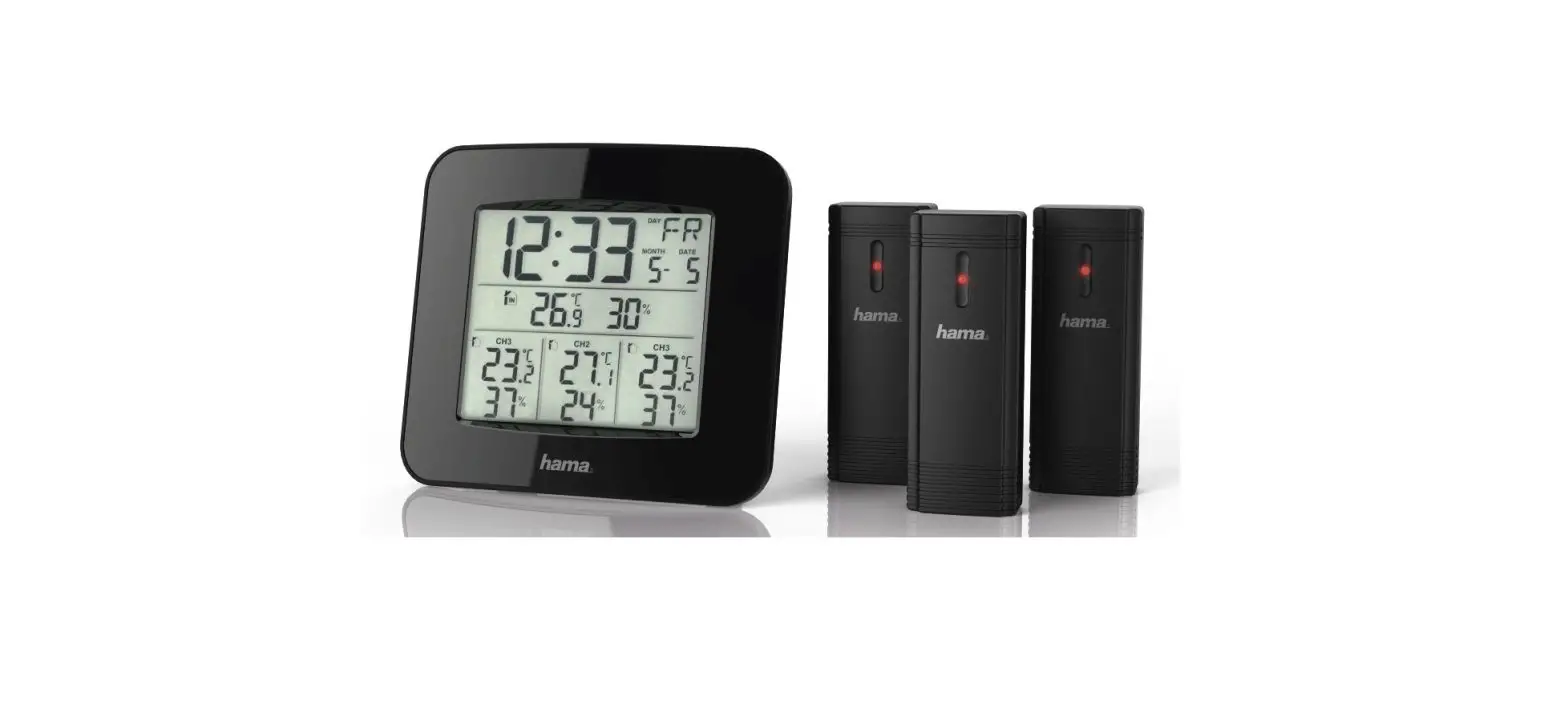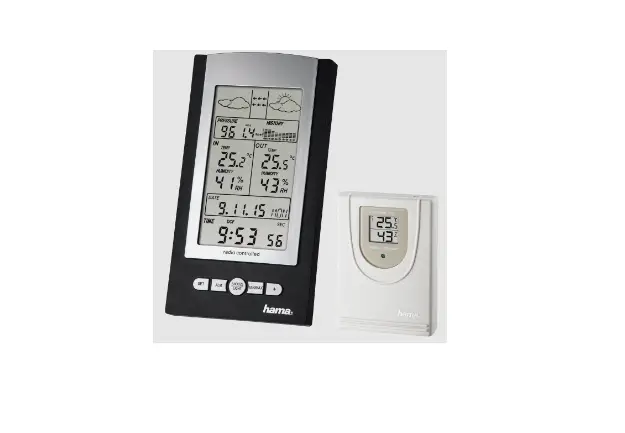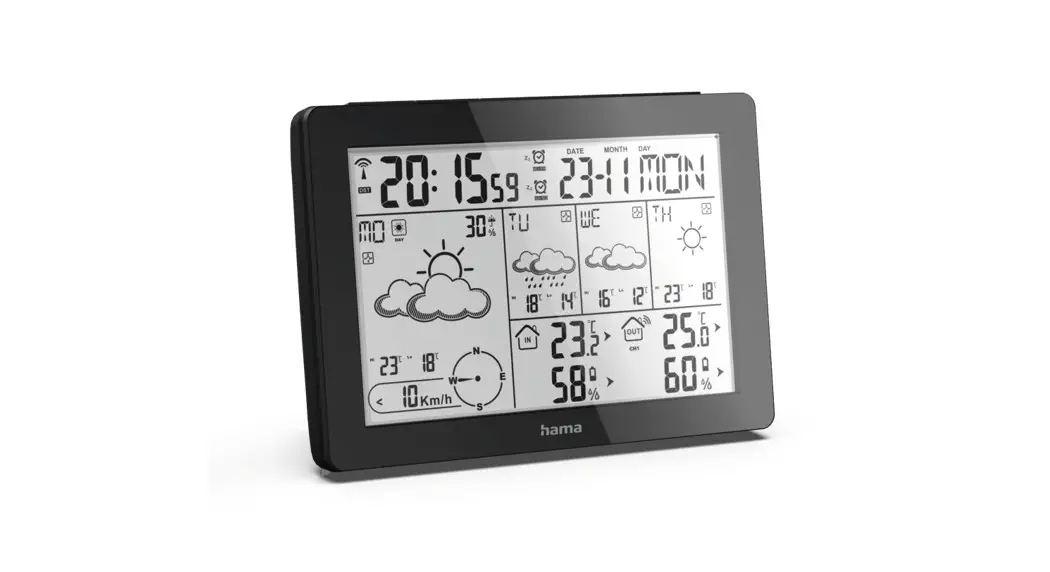
 00186369 Meteotime Weather Station
Instruction Manual
Meteotime Weather Station
PLEASE READ BEFORE YOU BEGIN
Your new weather station is different from conventional weather stations that only measure the prevailing weather conditions.
Instead, the information provided by this weather station is based on METEOTIME data, which is compiled daily by highly qualified meteorologists using state-of-the-art instruments.
The weather station was designed so that it can receive the coded METEOTIME signal which transfers the weather information.
The data is sent via the radio time signal transmitter DCF77 (in Germany). The weather station is therefore also a radio-controlled clock with all the familiar advantages, such as the exact time and automatic changeover from winter to summer time.
You can receive weather forecasts for 60 meteorological regions in Europe up to 4 days in advance and a 2-day forecast for a further 30 regions.
HOW DO I ACHIEVE GOOD RECEPTION?
Similar to mobile phone networks or TV and radio reception, weather stations may not always have reception everywhere. It is therefore essential that you observe the following instructions to ensure that your device works properly.
A suitable location is extremely important for the weather station.
For this reason, the weather station is equipped with an innovative test function (TEST button) that allows you to check the quality of the reception in your environment in order to place the device in the most suitable location.
To determine the quality of the reception, test the weather station according to the instructions in the manual. To do this, switch on all possible sources of interference in the room where you want to set up the device (e.g. the television). Then place the weather station in the desired location and align it as desired. Keep a minimum distance of one metre from potential sources of interference.
Observe the GOOD RECEPTION or POOR RECEPTION symbol on the screen. When you have found the suitable location for good reception, leave the Meteotime weather station there so that the required data can be received via the radio signal. Within a few minutes, the time and date are displayed. However, receiving very large amounts of data (forecast for all regions and days) takes significantly longer. Up to 24 hours are required from the first start-up to receive all data.
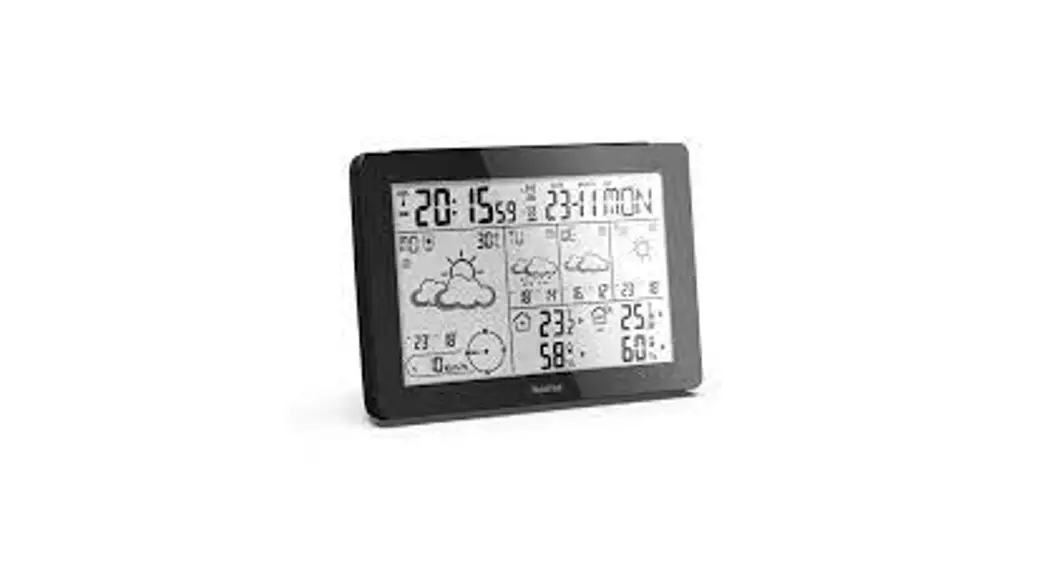
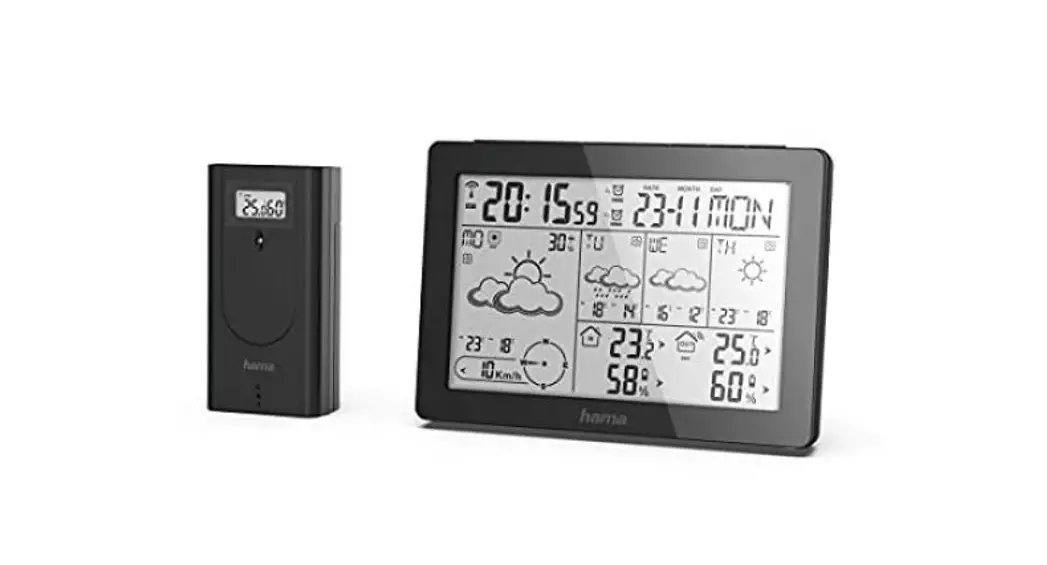
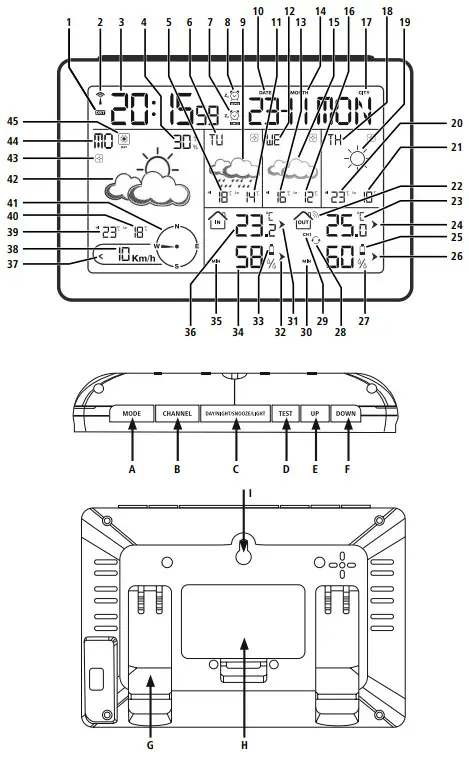
Controls and displays Figure A: Base station
- DST (Daylight Saving Time) – summertime symbol
- DCF77 signal radio symbol (German long-wave transmitter Frankfurt 77kHz)
- Time
- Rain probability in %
- Maximum temperature tomorrow
- Weekday tomorrow
- Weekend alarm
- Weekday alarm
- Weather forecast symbol tomorrow
- Calendar day
- Minimum temperature tomorrow
- Day of the week the day after tomorrow (in 2 days)
- Maximum temperature the day after tomorrow (in 2 days)
- Month
- Weather forecast symbol the day after tomorrow (in 2 days)
- Lowest temperature the day after tomorrow
- Region/city of the weather forecast
- Day of the week (in 3 days)
- Weather forecast symbol (in 3 days)
- Maximum temperature (in 3 days)
- Minimum temperature (in 3 days)
- Outdoor sensor radio symbol
- Outdoor temperature
- Outdoor temperature trend
- Display for low battery level in outdoor sensor
- Outdoor humidity tendency
- Outdoor humidity
- Channel change
- Channel
- Max/Min display of outdoor temperature/humidity
- Indoor temperature tendency
- Indoor humidity tendency
- Display for low battery level in base station
- Ambient humidity
- Max/Min display of indoor temperature/humidity
- Room temperature
- Wind speed range
- Wind speed
- Maximum temperature today
- Minimum temperature today
- Wind direction
- Weather forecast symbol today
- Meteotime symbol
- Weekday today
- Day/night symbol
A MODE button = Settings / confirmation of the setting value
B CHANNEL button = Manual search for the outdoor sensor signal / channel selection
C DAY/NIGHT/SNOOZE/LIGHT button = Interruption of alarm signal/activation of backlight/switching between day and night display value
D TEST button = Check the quality of the DCF signal
E UP button = Increase of the current setting value/Recall of the stored maximum/ minimum values (MAX/MIN)/Weather data for the next days for a short time in the wider area (37 – 45)
F DOWN button = Decrease of the current setting value / Activate / Deactivate manual DCF radio signal reception / Select one of the locations from the favourites list
G Base
H Battery compartment
I Cut-out for wall mounting
Explanation of warning symbols and notes
 Warning
This symbol is used to indicate safety instructions or to draw your attention to specific hazards and risks. Note
Note
This symbol is used to indicate additional information or important notes.
Package contents
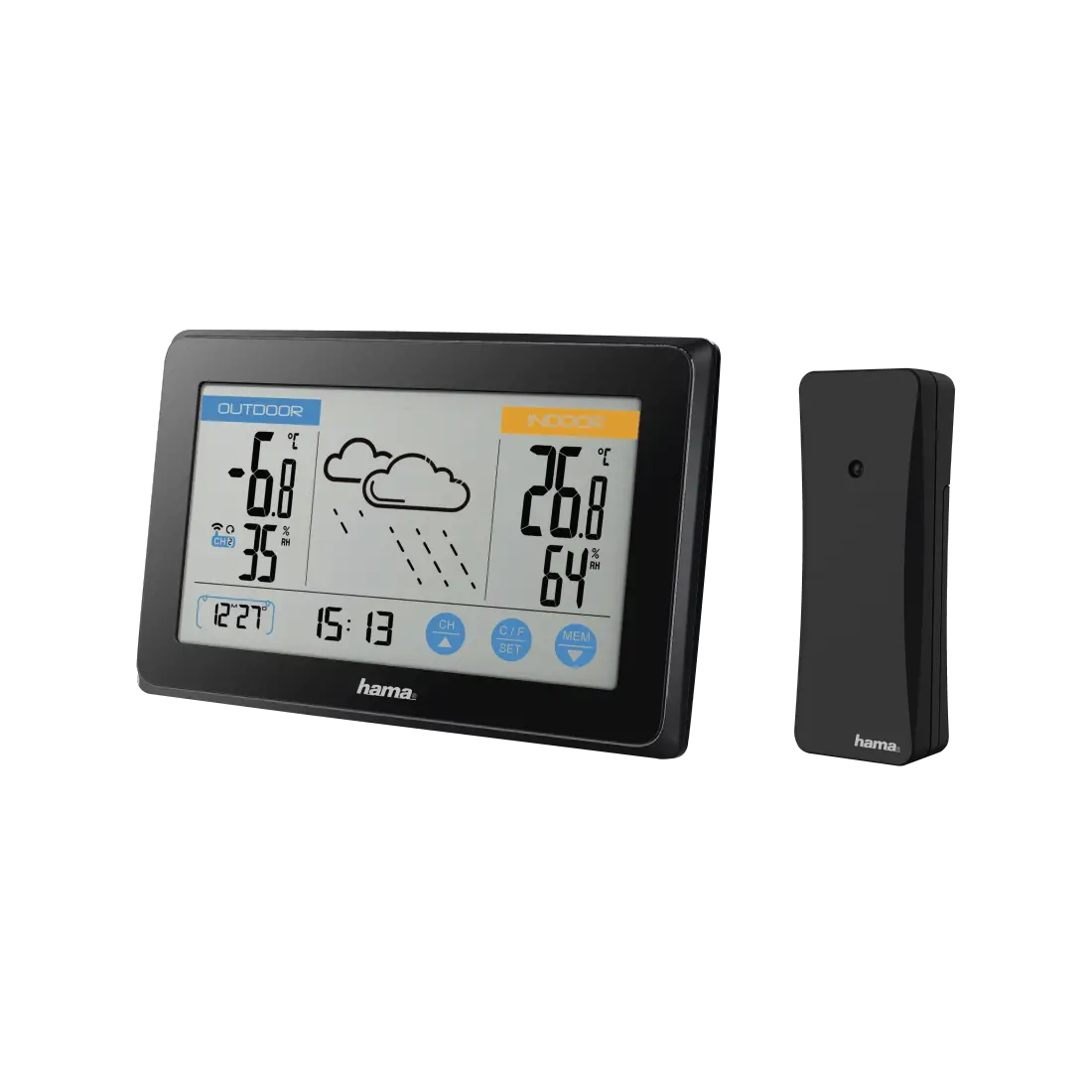
- “Meteotime” weather station (base station for indoor use)
- Outdoor sensor for outdoor use
- 4 AA Mignon batteries
- These operating instructions
Safety instructions
- The product is intended for private, non-commercial use only.
- Use the product only for the intended purpose.
- Protect the product from dirt, moisture and overheating and use it in dry rooms only.
- Do not use the product in the immediate vicinity of heaters, other heat sources or in direct sunlight.
- As with all electrical products, this device should be kept out of the reach of children.
- Only use the article under moderate climatic conditions.
- Do not operate the product outside the power limits specified in the technical data.
- Do not use the product in areas in which electronic products are not permitted.
- Do not use the product in a damp environment and avoid splashing water.
- Do not place the product near interference fields, metal frames, computers, TVs, etc. Electronic devices and window frames can negatively affect the product’s functionality.
- Do not drop the product and do not expose it to any major shocks.
- Do not modify the product in any way. Doing so voids the warranty.
- Keep the packaging material out of the reach of children due to the risk of suffocation.
- Dispose of packaging material immediately in accordance with the locally applicable regulations.
- Route all cables so that there is no risk of tripping.
- Do not bend or crush the cable.
Warning – Batteries
- When inserting batteries, note the correct polarity (+ and markings) and insert the batteries accordingly. Failure to do so could result in the batteries leaking or exploding.
- Only use batteries (or rechargeable batteries) that match the specified type.
- Before you insert the batteries, clean the battery contacts and the polar contacts.
- Do not allow children to change batteries without supervision.
- Do not mix old and new batteries, or batteries of different types or from different manufacturers.
- Remove the batteries from products that are not being used for an extended period (unless these are being kept ready for an emergency).
- Do not short-circuit batteries.
- Do not charge batteries.
- Do not burn batteries.
- Keep batteries out of the reach of children.
- Never open, damage or swallow batteries or allow them to enter the environment. They can contain toxic, environmentally harmful heavy metals.
- Remove spent batteries from the product and dispose of them without delay.
- Avoid storing, charging and using in extreme temperatures and at extremely low atmospheric pressures (such as at high altitudes).
Getting started
Note
Please remember, during commissioning, to always insert the batteries into the outdoor sensor first and then into the base station.
4.1 Inserting the batteries
- Open the battery compartment on the outdoor sensor and remove the contact breaker. Close the battery compartment.
- Remove the protective film from the base station display.
- Open the battery compartment (H) and remove the contact breaker.
- Then close the battery compartment cover.
- A signal tone will now sound and the base station will start searching for the DCF signal, for the outdoor sensors and for the Meteotime signal. This search takes several minutes.
- If no time signal is received after a longer period of time, change the location and check the reception conditions using the test function described in 6.1.
4.2 Changing batteries / Low battery capacity
Note – Changing the batteries
- Be aware that, after every battery change on the outdoorsensor or base station, the stations will need to be resynchronised.
- To do this, remove the batteries from the other station and re-insert them or change them completely if required.
Outdoor sensor
- If the
 symbol (25) appears, replace the 2 AA batteries in the outdoor sensor with 2 new batteries.
 - Open the battery compartment, remove and dispose of the spent batteries and insert two new AA batteries observing the correct polarity. Then close the battery compartment cover.
 symbol (25) appears, replace the 2 AA batteries in the outdoor sensor with 2 new batteries.
Base station
- If the symbol (33) appears, replace the 2 AA batteries inthe base station with 2 new batteries.
- Open the battery compartment, dispose of the spent batteries and insert 2 new AA batteries observing the correct polarity.
Then close the battery compartment cover.
Installation
Note – Installation
- We recommend initially positioning the base station and outdoor sensor at the preferred setup locations without installing them and carrying out all the settings – as described in 6. Operation.
- Do not install the station(s) until the settings are correct and the radio connection is stable.
Note
- The range of the radio transmission between the outdoor sensor and the base station is up to 50 m in unobstructed areas.
- Before installing, make sure that the radio transmission is not influenced by interfering signals or obstacles such as buildings, trees, vehicles, high-voltage power lines, etc.
- Before final installation, make sure that there is sufficient reception between the desired installation locations.
- When installing the outdoor sensor, take care to ensure it is positioned so that it is protected from direct sunlight and rain.
- The international standard height for measuring air temperature is 1.25 m (4 ft) above ground.
Warning
- Buy special or suitable installation material from a specialist dealer for wall-mounting.
- Ensure that you do not install any faulty or damaged parts.
- Never apply force during installation. These can damage the product.
- Before mounting, check that the wall you have chosen is suitable for the weight to be mounted. Also make sure that there are no electric, water, gas or other lines running through the wall at the mounting site.
- Do not mount the product above locations where persons might sit or stand.
5.1 Base station
- Alternatively, place the base station on a flat surface using the stand (G).
- Alternatively, you can mount the base station on a wall using the recess (I) on the back.
5.2 Outdoor sensor
- You can also set the outdoor sensor up on an even surface outdoors.
- We recommend mounting the outdoor sensor securely and firmly onto an outdoor wall.
- Secure the dowel, screw, nail, etc. in the wall provided.
- Hang the outdoor sensor onto it using the cut-out provided.
Operation
Information – Input
Press and hold the UP or DOWN button to select the values more quickly.
6.1 Basic setting and manual setting
After inserting the batteries, the base station automatically searches for the DCF signal and for the Meteotime weather signal. The radio symbol (2) flashes during the search process.
| Display | Search for DCF signal |
 Flashing display Flashing display | Active |
| Permanent display | Successful – the signal is being received |
 | Inactive |
- The time and date are displayed within a few minutes. However, receiving the very large amounts of data with the forecast for all regions and days requires up to 24 hours from the initial start-up until all data is received.
- After successful reception of the time and date signal, the display shows FRM (Frankfurt am Main) as the location for the info window. For information on changing the country and location, see below.
- If the device has successfully received the Meteotime signal, the Meteotime symbol
 is displayed next to the respective day of the week.
| Display | Meteotime status |
 | Valid and updated data |
 | Valid, but not updated data |
 | Inactive |
Note – faulty transmission of the measured values
- In some cases, interference caused by a WiFi network, computer, TV, etc., for example, may cause the transmission of measured values between the base station and the outdoor sensor to fail.
- If this happens, resynchronise the stations by briefly removing the batteries from both stations and reinserting them.
- If the measured values are not transmitted again, replace the batteries with new ones.
- If necessary, choose a new location for the base station to avoid the possible interference signals in the future.
 Note
Note
You can use the TEST function to search for a better location.
Take the device in your hand to find a suitable location. Press the TEST button (D) to check the quality of the Meteotime signal/DCF signal. The signal strength is displayed as a value from T-1 (very poor) to T-9 (very good). The TEST takes about one minute. You can restart or stop the test at any time by pressing the TEST button.
If no signal is received on a repeated basis, press and hold the DOWN button (F) for around 3 seconds to start the manual search for the DCF signal. The radio signal (2) starts to flash.
Note – Setting the time
- The search process takes about 5 minutes. If this fails, the search is terminated and repeated at the top of the next hour. The radio symbol (2) disappears.
- Meanwhile, you can make a manual setting of the time and date.
- The clock automatically continues to search for the DCF signal daily. Once the signal is received successfully, the manually set time and date are overwritten.
Press and hold the DOWN button (F) again for around 3 seconds to end the manual search process.
Note – Summertime
The time adjusts automatically to summertime. While summertime is active, DST (1) appears on the display.
6.2 Connection to the outdoor sensor
- After the batteries are inserted, the base station automatically searches for a connection to the outdoor sensor and carries out the initial setup routine.
Note
- Initial setup takes around 3 minutes.
- During the connection attempt, the radio signal (2) on the base station (22) flashes.
- Avoid any operation of the buttons during this time!
Otherwise, errors and inaccuracies may occur in the values and their transmission. - The process is finished as soon as the indoor and outdoor measurement data (23/27/34/36) are displayed.
- If no signal is received from the outdoor sensor on a repeated basis, press and hold the CHANNEL button (B) for around 3 seconds to start the manual search for the signal.
6.3 Channel selection / Additional outdoor sensorsNote
- You can install two further outdoor sensors in addition to the outdoor sensor supplied. When doing so, ensure the same channel setting on the base station and each outdoor sensor.
- Suitable outdoor sensors can be found at www.hama.com
- Press the CHANNEL button (B) repeatedly to set the same channel as on the outdoor sensor in question. Channel CH1, CH2 or CH3 is displayed.
- If the
 symbol appears, the weather station automatically changes the channel display every 5 seconds.
 symbol appears, the weather station automatically changes the channel display every 5 seconds.
6.4 Manual settings
Press and hold the MODE button (A) for around 3 seconds to carry out the following settings in sequence:
- Time zone
- Language (day of the week: German, French, Spanish, Italian,
Danish, Dutch, English) - 12/24-hour format
- Year
- Month
- Day
- Hours Minutes
- °C and °F display
To select the individual values, press the UP button (E) or the DOWN button (F) and confirm your selection by pressing the MODE button (A).
Press the MODE button (A) directly to adopt and skip the displayed value.
If no entries are made for 30 seconds, the clock automatically exits settings mode.
Note – time zone
- The DCF signal can be received in many places, however it does not always correspond to the CET applicable in GermanyYou should therefore remember to take into account the time difference in countries with a different time zone.
- Moscow, for example, is 3 hours ahead of Germany. Set the time to the time zone +3. The clock will then automatically set itself 3 hours ahead of the time received from the DCF signal or the time set manually.
Note – day of the week
For the display of the days of the week, you can choose German (GER), English (ENG), French (FRE), Italian (ITA), Spanish (SPA), Dutch (DUT) or Danish (DAN).
6.5 Selecting the country and cities
Hold the TEST button (D) down for around 3 seconds. COUNTRY appears in the display (17) and starts to flash. Then press the UP button (E) or DOWN button (F) to select the country. Example: If GER appears in the information window, this means that you have selected “Germany”.
Press the MODE button (A) to confirm the country. After selecting “Germany”, CITY appears in the information window. Then press the UP button (E) or DOWN button (F) to select the city. The city name is displayed in the information window.
Example: FRM means “Frankfurt am Main”.
Press the TEST button (D) to confirm the setting. The selected city is immediately displayed in the information window.
Activating favourites
Once you have defined the city as described above, you can select other cities for easy access. Instead of ending the setting process with the MODE button (A), proceed as follows:
- If “Frankfurt am Main” is one of your preferred cities, press the TEST button (D) to confirm this. A√ is displayed above the selected city and it is stored in your personal list of selected cities. You can now use the UP button (E) or DOWN button (F) to select further cities in the same country and confirm your selections with the TEST button (D)√.
- If you wish to select cities from various countries, you must exit the setting process using the MODE button (A) and call it up again as described above to change the country.
- You can select up to FIVE cities as favourites.
- Once you have made all settings, press the MODE button (A) to confirm the settings and exit settings mode.
Note
If you skip the city selection option when you first insert the batteries, the city selection defaults to “Frankfurt am Main – FRM”.
Displaying favourites
If you have selected more than one city as a favourite, press the DOWN button (F) to toggle between the various city names in the favourites list.
Removing a city from the list of favourites
- Hold the TEST button (D) down for around 3 seconds.
COUNTRY starts to flash. Then press the UP button (E) or DOWN button (F) to select the country. Press the MODE button (A) to confirm the country. Use the UP button (E) or DOWN button (F) to switch to your selected city with the√. - Press the TEST button (D) to remove the . The √city has been removed from the favourites. Repeat the process if you wish to remove further cities from the list. You can now also use the UP button (E) or DOWN button (F) to select a further preferred city.
If you select more than five cities, the first selected city is deleted from the favourites list. - Once you have made all changes, press the MODE button (A) to exit the menu.
6.6 Alarm clock
Alarm signal on week days:
- This is a recurring alarm signal that is triggered daily from Monday to Friday at a defined time.
Alarm signal at the weekend:
- This is an alarm signal that is only triggered on a Saturday and Sunday at a defined time.
Setting the alarm time - Press the MODE button (A) to switch to the alarm time setting mode. Press the UP button (E) to display the alarm time. Press the MODE button (A) for around 3 seconds to set the alarm time for the displayed alarm. The hour display starts to flash.
- Press the UP button (E) or DOWN button (F) to select the hour of the alarm time and confirm the selection by pressing the MODE button (A). The minute display starts to flash. Repeat the procedure for the minutes of the alarm time.
- Repeat the procedure for the weekend alarm.
- If no entries are made for 30 seconds, the clock automatically exits settings mode.
- When the alarm is triggered, the alarm symbol starts flashing and an alarm signal sounds. Press any button (except the
DAY/NIGHT/SNOOZE/LIGHT button (C)) to stop the alarm.
Otherwise, it ends after 2 minutes. - The alarm does not need to be activated again. It sounds after24 hours again at the set alarm time.
Activating/deactivating the alarm clock
- To select and activate or deactivate the desired alarm, press the MODE button (A) repeatedly to select
 or
or  . The active alarm is indicated by the alarm symbol (8) or (7) SA-SO . When deactivating an active alarm, the corresponding alarm symbol or goes out.
 - When the alarm is triggered, the active alarm symbol (7/8) starts flashing and an alarm signal sounds. Tap any button (except the DAY/NIGHT/SNOOZE/LIGHT button (C)) to end the alarm.
Otherwise, it ends after 2 minutes.
 or
or  . The active alarm is indicated by the alarm symbol (8)
 Note – Snooze function
- During the alarm signal, press the DAY/NIGHT/SNOOZE/ LIGHT button (C) to activate the snooze function. The alarm signal is interrupted for 5 minutes and then triggered again.
- Press any button (except the DAY/NIGHT/SNOOZE/LIGHT button (C) to end the snooze function and thus the alarm.
6.7 Weather forecast
Switching between weather information for day and night The device can automatically switch between DAY and NIGHT weather information. Press the AY/NIGHT/SNOOZE/LIGHT button (C) for around 3 seconds and you can switch to the weather for DAY for 10 seconds if the weather for NIGHT is currently displayed, and vice versa.
A total of 15 different weather conditions for daytime and 15 different weather conditions for night-time can be displayed.
| 1. Sunny (day); Clear (night) 2. Slightly cloudy 3. Mostly cloudy 4. Overcast 5. Heat storm 6. Heavy rain 7. Snowfall 8. Fog | 9. Sleet 10. Rain shower 11. Light rain 12. Snow shower 13. Storm front 14. Low stratus 15. Hail showers |
The meaning of the various weather forecasts
| Meaning | Day | Night |
| Sunny (day)Clear (night) | 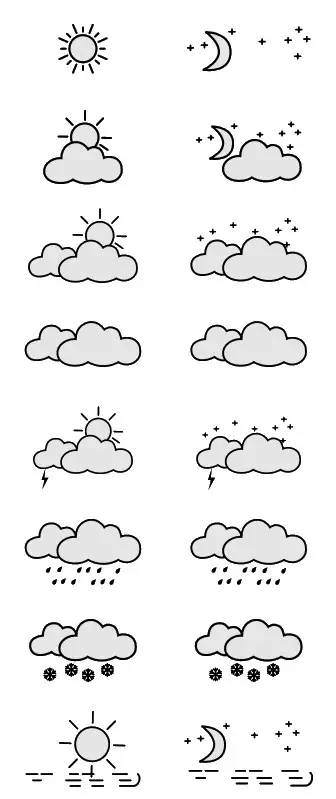 | |
| Slightly cloudy | ||
| Mostly cloudy | ||
| Overcast | ||
| Heat storm | ||
| Heavy rain | ||
| Snowfall | ||
| Fog | ||
| Sleet | 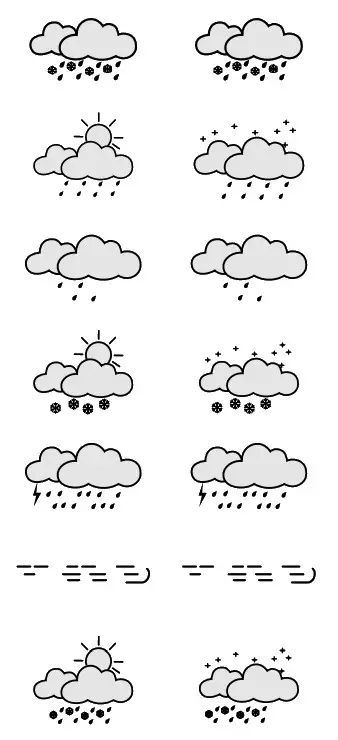 | |
| Rain shower | ||
| Light rain | ||
| Snow shower | ||
| Storm front | ||
| Low stratus | ||
| Hail showers | ||
6.8 Wind speed
The wind speed is displayed in 8 ranges:
< 2 km/h, < 13 km/h, < 30 km/h, < 52 km/h, < 63 km/h,
< 76 km/h, < 89 km/h, > 99 km/h
The wind direction and special airflow, special airflow with warning symbol
< 2 km/h: Calm to light breeze
< 13 km/h: light to mild breeze
< 30 km/h: moderate to fresh wind
< 52 km/h: strong to stiff wind
< 63 km/h: gale force wind
< 76 km/h: storm
< 89 km/h: severe storm
> 99 km/h: hurricane-like storm
6.9 Rain probability
The rain probability is displayed in 8 percentages: 0%, 15%, 30%, 45%, 60%, 75%, 90%, 100%.
0% no rain to 100% very high probability of rain.
6.10 Temperature and ambient humidity trendNote
In the first hours of operation, the trend display is not possible due to missing data that is only stored during operation.Note
All measured values are subject to a certain measurement tolerance.
The weather station gives a trend for the outdoor temperature/ humidity (23/27) and indoor temperature/humidity (36/34) of how the values will probably develop for the next hours.
| Display | Trend |
 | Rising |
 | Constant |
 | Falling |
6.11 Maximum and minimum temperature and humidity values
- The base station automatically stores the maximum and minimum values of the temperature and humidity in the outdoor and indoor areas.
- Press the UP button (E) for around 3 seconds to switch between the display of current temperature and humidity, lowest temperature and humidity (MIN) and highest temperature and humidity (MAX). After around 5 seconds, the display automatically changes to the current temperature and humidity display.
- If the temperature is lower than -21°C, LL.L is shown on the display. If the temperature is higher than 40 °C, HH.H is shown on the display.
6.12 Frost alarm
The snowflake symbol flashes if the outdoor temperature is between +1 and -1°C. The snowflake symbol remains if the outside temperature is below -1.1°C.
6.13 Backlight
Press the DAY/NIGHT/SNOOZE/LIGHT button (C) to activate the backlight for 5 seconds.
Care and maintenance
- Only clean this product with a slightly damp, lint-free cloth and do not use aggressive cleaning agents.
- Ensure that no water is able to enter the product.
Warranty Disclaimer
Hama GmbH & Co KG assumes no liability and provides no warranty for damage resulting from improper installation/mounting, improper use of the product or from failure to observe the operating instructions and/or safety notes.
Technical data
| Base station | Outdoor sensor | |
| Powersupply | 3 .0 V 2 x AA batteries | 3.0 V 2 x AA batteries |
| Measuring range Temperature (°C) Ambient humidity | 0°C – +50°C / 32°F – +122°F 20% – 95% | -20°C – +60°C 20% – 95% |
| Measuring increments Temperature Ambient humidity | 0.1°C/ 0.2°F 1% | 0.1°C 1% |
| DCF radio clock | Yes | No |
| Hygrometer | Yes | Yes |
| Thermometers | Yes | Yes |
| Alarm function | Yes | No |
| Max. number of outdoor sensors | 3 | |
| Range | ≤80 m | |
Declaration of Conformity
 Hereby, Hama GmbH & Co KG declares that the radio equipment type [00186369] is in compliance with Directive 2014/53/EU. The full text of the EU declaration of conformity is available at the following internet address: www.hama.com -> 00186369 -> Downloads.
| Frequency band(s) | 433 MHz |
| Maximum radio-frequency power transmitted | 0.22 mW |
A total of 611 locations are stored in the memory. For cities with an * after the city name, only a 2-day forecast is available.
| Country Name | Country name short form | City Name | City Name at Information Window |
| FRANCE | FRA | BORDEAUX | BOR |
| FRANCE | FRA | AGEN | AGE |
| FRANCE | FRA | AUCH | AUC |
| FRANCE | FRA | BRIVE LA GAILLARDE | BRG |
| FRANCE | FRA | CAHORS | CAH |
| FRANCE | FRA | MONT_MARSAN | MDS |
| FRANCE | FRA | MONTAUBAN | BAN |
| FRANCE | FRA | PAU | PAU |
| FRANCE | FRA | PERIGUEUX | PEG |
| FRANCE | FRA | TARBES | TAR |
| FRANCE | FRA | TOULOUSE | TOU |
| FRANCE | FRA | LA ROCHELL | LA |
| FRANCE | FRA | ANGOULEME | ANM |
| FRANCE | FRA | LA_ROCHE_S | ROC |
| FRANCE | FRA | LIMOGES | LIM |
| FRANCE | FRA | NIORT | NIO |
| FRANCE | FRA | POITIERS | POI |
| FRANCE | FRA | PARIS | PAR |
| FRANCE | FRA | ALENCON | ALE |
| FRANCE | FRA | AUXERRE | AUX |
| FRANCE | FRA | BAR_LE_DUC | BLD |
| FRANCE | FRA | BLOIS | BLO |
| FRANCE | FRA | BOBIGNY | BOB |
| FRANCE | FRA | BOURGES | BOU |
| FRANCE | FRA | CERGY_PONT | CER |
| FRANCE | FRA | CHARTRES | CHA |
| FRANCE | FRA | CRETEIL | CRE |
| FRANCE | FRA | EVRY | EVR |
| FRANCE | FRA | LE MANS | LEM |
| FRANCE | FRA | MELUN | MEL |
| FRANCE | FRA | NANTERRE | NAN |
| FRANCE | FRA | NEVERS | NEV |
| FRANCE | FRA | ORLEANS | ORL |
| FRANCE | FRA | REIMS | REI |
| FRANCE | FRA | TOURS | TOS |
| FRANCE | FRA | TROYES | TRS |
| FRANCE | FRA | VERSAILLES | VER |
| FRANCE | FRA | BREST | BRE |
| FRANCE | FRA | ANGERS | ANG |
| FRANCE | FRA | CHERBOURG | CHE |
| FRANCE | FRA | LAVAL | LAV |
| FRANCE | FRA | LORIENT | LOR |
| FRANCE | FRA | NANTES | NAT |
| FRANCE | FRA | RENNES | REN |
| FRANCE | FRA | ST_BRIEUC | SBR |
| UK | GB | JERSEY | JER |
| FRANCE | FRA | CLERMON FERRAND | CLE |
| FRANCE | FRA | AURILLAC | AUR |
| FRANCE | FRA | FLORAC | FLO |
| FRANCE | FRA | GUERET | GUE |
| FRANCE | FRA | MENDE | MAD |
| FRANCE | FRA | MILLAU | MIU |
| FRANCE | FRA | MONTLUCON | MON |
| FRANCE | FRA | PUY_VELAY | PUY |
| FRANCE | FRA | RODEZ | ROD |
| FRANCE | FRA | ST_FLOUR | SFL |
| FRANCE | FRA | ST-ETIENNE | STE |
| FRANCE | FRA | BEZIERS | BEZ |
| FRANCE | FRA | ALBI | ALI |
| FRANCE | FRA | CARCASSONN | CAR |
| FRANCE | FRA | FOIX | FOI |
| FRANCE | FRA | MONTPELLIER | MOP |
| FRANCE | FRA | PERPIGNAN | PER |
| B/BELGIUM | BEL | BRUSSEL | BRU |
| B/BELGIUM | BEL | Aalst | ALT |
| B/BELGIUM | BEL | ANTWERPEN | ANT |
| B/BELGIUM | BEL | BRUGGE | BRG |
| B/BELGIUM | BEL | CHARLEROI | CHL |
| B/BELGIUM | BEL | Genk | GEK |
| B/BELGIUM | BEL | GENT | GET |
| B/BELGIUM | BEL | Halle | HAE |
| B/BELGIUM | BEL | Hasselt | HAT |
| B/BELGIUM | BEL | Ixelles | IXE |
| B/BELGIUM | BEL | Knokke-Heist | KNO |
| B/BELGIUM | BEL | Kortrijk | KOR |
| B/BELGIUM | BEL | Leuven | LEU |
| B/BELGIUM | BEL | LIEGE | LIG |
| B/BELGIUM | BEL | Lokeren | LOK |
| B/BELGIUM | BEL | Mechelen | MEC |
| B/BELGIUM | BEL | Mons | MOS |
| B/BELGIUM | BEL | Mouscron | MOC |
| B/BELGIUM | BEL | NAMUR | NAM |
| B/BELGIUM | BEL | Oostende | OOS |
| B/BELGIUM | BEL | Roeselare | ROE |
| B/BELGIUM | BEL | Schaerbeek | SCB |
| B/BELGIUM | BEL | Tournai | TON |
| FRANCE | FRA | BOULOGNE | BOG |
| FRANCE | FRA | LILLE | LIL |
| NL/NETHERL | NL | MAASTRICHT | MAA |
| NL/NETHERL | NL | MIDDELBURG | MIB |
| NL/NETHERL | NL | TERNEUZEN | TER |
| FRANCE | FRA | DIJON | DIJ |
| FRANCE | FRA | CHAUMONT | CHM |
| FRANCE | FRA | EPINAL | EPI |
| FRANCE | FRA | LONS_LE_S | LOL |
| FRANCE | FRA | METZ | MET |
| FRANCE | FRA | NANCY | NAC |
| FRANCE | FRA | VESOUL | VEL |
| FRANCE | FRA | MARSEILLE | MAR |
| FRANCE | FRA | ALES | ALS |
| FRANCE | FRA | AVIGNON | AVI |
| FRANCE | FRA | MONTELIMAR | MOE |
| FRANCE | FRA | NIMES | NIM |
| FRANCE | FRA | PRIVAS | PRI |
| FRANCE | FRA | ST_TROPEZ | STT |
| FRANCE | FRA | TOULON | TOL |
| FRANCE | FRA | LYON | LYO |
| FRANCE | FRA | BOURG_EN_B | BOE |
| FRANCE | FRA | MACON | MAC |
| FRANCE | FRA | VALENCE | VAL |
| FRANCE | FRA | GRENOBLE | GRE |
| FRANCE | FRA | BRIANCON | BRI |
| FRANCE | FRA | CHAMBERY | CHB |
| FRANCE | FRA | DIGNE | DIG |
| FRANCE | FRA | GAP | GAP |
| CH/SUISSE | CH | LA CHAUX-DE-FONDS | LA |
| CH/SUISSE | CH | DELEMONT | DEL |
| FRANCE | FRA | ANNECY | ANN |
| FRANCE | FRA | BESANCON | BES |
| D / GER | GER | FRANKFURT AM MAIN | FRM |
| D / GER | GER | Aschaffenburg | ASC |
| D / GER | GER | Bad Homburg | BHB |
| D / GER | GER | Bad Kreuznach | BKH |
| D / GER | GER | Darmstadt | DAR |
| D / GER | GER | Heidelberg | HBG |
| D / GER | GER | KAISERSLAUTERN | KAI |
| D / GER | GER | KARLSRUHE | KAR |
| D / GER | GER | Landau in der Pfalz | LDP |
| D / GER | GER | Ludwigshafen | LUD |
| D / GER | GER | MAINZ | MAI |
| D / GER | GER | MANNHEIM | MAH |
| D / GER | GER | Pirmasens | PIM |
| D / GER | GER | Worms | WOR |
| B/BELGIUM | BEL | VERVIERS | VEV |
| D / GER | GER | TRIER | TRI |
| D / GER | GER | BITBURG | BIT |
| D / GER | GER | HAGEN | HAG |
| D / GER | GER | Iserlohn | ISE |
| D / GER | GER | KOBLENZ | KOB |
| D / GER | GER | Lüdenscheid | LUS |
| D / GER | GER | Neuwied | NWD |
| D / GER | GER | SAARBRÜCKEN | SAA |
| D / GER | GER | SIEGEN | SIE |
| D / GER | GER | Wiesbaden | WIB |
| FRANCE | FRA | SEDAN | SED |
| LUX | LUX | LUXEMBOURG | LUX |
| D / GER | GER | DUISBURG | DUI |
| D / GER | GER | AACHEN | ACC |
| D / GER | GER | BIELEFELD | BIE |
| D / GER | GER | Bochum | BOC |
| D / GER | GER | Bonn | BON |
| D / GER | GER | DORTMUND | DOR |
| D / GER | GER | Düren | DUR |
| D / GER | GER | DÜSSELDORF | DUS |
| D / GER | GER | ESSEN | ESS |
| D / GER | GER | Gelsenkirchen | GEL |
| D / GER | GER | Gütersloh | GUT |
| D / GER | GER | KÖLN | KOL |
| D / GER | GER | LINGEN | LGN |
| D / GER | GER | Lippstadt | LIP |
| D / GER | GER | Mönchengladbach | MOB |
| D / GER | GER | Mülheim an der Ruhr | MDR |
| D / GER | GER | MÜNSTER | MUS |
| D / GER | GER | Nordhorn | NDH |
| D / GER | GER | Oberhausen | OBE |
| D / GER | GER | OSNABRÜCK | OSN |
| D / GER | GER | Recklinghausen | REC |
| D / GER | GER | Rheine | RHE |
| D / GER | GER | Solingen | SLG |
| D / GER | GER | Wesel | WES |
| D / GER | GER | WUPPERTAL | WUP |
| UK | GB | SWANSEA | SWA |
| UK | GB | BRISTOL | BRI |
| UK | GB | CARDIFF | CDF |
| UK | GB | EXETER | EXE |
| UK | GB | HOLYHEAD | HOL |
| UK | GB | PLYMOUTH | PLY |
| UK | GB | ST_DAVIDS | SDV |
| UK | GB | MANCHESTER | MAN |
| UK | GB | BIRMINGHAM | BIR |
| UK | GB | BLACKPOOL | BLA |
| UK | GB | LEEDS | LEE |
| UK | GB | LEICESTER | LEI |
| UK | GB | LIVERPOOL | LIV |
| UK | GB | MIDDLESBROUGH | MID |
| UK | GB | NEWCASTLE | NEW |
| UK | GB | NOTTINGHAM | NOT |
| UK | GB | SHEFFIELD | SHE |
| FRANCE | FRA | LE HAVRE | LEH |
| FRANCE | FRA | AMIENS | AMI |
| FRANCE | FRA | BEAUVAIS | BEA |
| FRANCE | FRA | CAEN | CAE |
| FRANCE | FRA | EVREUX | EVX |
| FRANCE | FRA | LAON | LAO |
| FRANCE | FRA | ROUEN | ROU |
| UK | GB | LONDON | LON |
| UK | GB | BOURNEMOUT | BOM |
| UK | GB | BRIGHTON | BRG |
| UK | GB | CAMBRIDGE | CAM |
| UK | GB | DOVER | DOV |
| UK | GB | IPSWICH | IPS |
| UK | GB | KINGSTON | KIN |
| UK | GB | NORTHAMPTON | NOM |
| UK | GB | NORWICH | NOR |
| UK | GB | OXFORD | OXF |
| UK | GB | PORTSMOUTH | POR |
| UK | GB | READING | REA |
| UK | GB | SOUTHAMPTON | SOU |
| D / GER | GER | BREMERHAVEN | BRH |
| D / GER | GER | BORKUM | BOK |
| D / GER | GER | CUXHAVEN | CUX |
| D / GER | GER | Elmshorn | ELM |
| D / GER | GER | EMDEN | EMD |
| D / GER | GER | HAMBURG | HAM |
| D / GER | GER | Nordertstedt | NOD |
| D / GER | GER | SPIEKEROOG | SPI |
| D / GER | GER | ST_PETER_ORDING | SPO |
| D / GER | GER | SYLT | SYL |
| D / GER | GER | WILHELMSHAVEN | WIL |
| NL/NETHERL | NL | DEN HELDER | DHR |
| NL/NETHERL | NL | GRONINGEN | GRO |
| NL/NETHERL | NL | LEEUWARDEN | LEW |
| NL/NETHERL | NL | TEXEL | TEX |
| DK/DENMARK | DK | HERNING | HER |
| DK/DENMARK | DK | ALBORG | ALB |
| DK/DENMARK | DK | ESBJERG | ESB |
| DK/DENMARK | DK | Frederikshavn | FRD |
| DK/DENMARK | DK | Holsterbro | HOB |
| DK/DENMARK | DK | SKAGEN | SKA |
| DK/DENMARK | DK | Thisted | THI |
| DK/DENMARK | DK | THYBORØN | THY |
| DK/DENMARK | DK | Viborg | VIB |
| DK/DENMARK | DK | ARHUS | ARH |
| DK/DENMARK | DK | Fredericia | FRC |
| DK/DENMARK | DK | Horsens | HOR |
| DK/DENMARK | DK | Kolding | KOL |
| DK/DENMARK | DK | ODENSE | ODE |
| DK/DENMARK | DK | Randers | RAN |
| DK/DENMARK | DK | Silkeborg | SIL |
| DK/DENMARK | DK | Vejle | VEJ |
| D / GER | GER | HANNOVER | HAN |
| D / GER | GER | Braunschweig | BRA |
| D / GER | GER | BREMEN | BRE |
| D / GER | GER | Celle | CEL |
| D / GER | GER | GOSLAR | GOS |
| D / GER | GER | Hameln | HAL |
| D / GER | GER | Herford | HEF |
| D / GER | GER | HILDESHEIM | HIL |
| D / GER | GER | LÜNEBURG | LUN |
| D / GER | GER | MAGDEBURG | MAG |
| D / GER | GER | Minden | MIN |
| D / GER | GER | OLDENBURG | OLD |
| D / GER | GER | Wolfsburg | WOL |
| DK/DENMARK | DK | KØBENHAVN | KØB |
| DK/DENMARK | DK | HelsingØr | HEL |
| DK/DENMARK | DK | Kalundborg | KAØ |
| DK/DENMARK | DK | Næstved | NST |
| DK/DENMARK | DK | Roskilde | ROK |
| DK/DENMARK | DK | Slagelse | SLA |
| S/SWEDEN | SW | MALMÖ | MAL |
| D / GER | GER | ROSTOCK | ROS |
| D / GER | GER | FEHMARN | FEH |
| D / GER | GER | FLENSBURG | FLE |
| D / GER | GER | GREIFSWALD | GRE |
| D / GER | GER | KIEL | KIE |
| PL/POLAND | PL | KOSZALIN | KOS |
| D / GER | GER | LÜBECK | LUB |
| D / GER | GER | RÜGEN | RUG |
| D / GER | GER | Schwerin | SCH |
| D / GER | GER | Stralsund | STD |
| D / GER | GER | Wismar | WIS |
| PL/POLAND | PL | Szczecin | SZC |
| D / GER | GER | INGOLSTADT | ING |
| D / GER | GER | AUGSBURG | AUG |
| D / GER | GER | Deggendorf | DEG |
| D / GER | GER | LANDSHUT | LAN |
| D / GER | GER | PASSAU | PAS |
| D / GER | GER | REGENSBURG | REG |
| D / GER | GER | ULM | ULM |
| AU/AUSTRIA | AUS | LINZ | LIN |
| AU/AUSTRIA | AUS | WELS | WEL |
| D / GER | GER | MÜNCHEN | MUN |
| D / GER | GER | BURGHAUSEN | BUR |
| D / GER | GER | FRIEDRICHSHAFEN | FRI |
| D / GER | GER | KEMPTEN | KEM |
| D / GER | GER | ROSENHEIM | ROH |
| D / GER | GER | SIGMARINGEN | SIG |
| I / ITALY | ITA | BOLZANO | BOZ |
| I / ITALY | ITA | MERANO | MER |
| I / ITALY | ITA | TRENTO | TRE |
| D / GER | GER | NÜRNBERG | NUR |
| D / GER | GER | ANSBACH | ANS |
| D / GER | GER | Bamberg | BAM |
| D / GER | GER | BAYREUTH | BAY |
| D / GER | GER | Erlangen | ERL |
| D / GER | GER | Fürth | FUR |
| D / GER | GER | Schweinfurt | SCW |
| D / GER | GER | WEIDEN | WEI |
| D / GER | GER | WERTHEIM | WER |
| D / GER | GER | WÜRZBURG | WUR |
| D / GER | GER | LEIPZIG | LEI |
| D / GER | GER | Altenburg | ALN |
| D / GER | GER | Bautzen | BAU |
| D / GER | GER | Chemnitz | CHT |
| D / GER | GER | COTTBUS | COT |
| D / GER | GER | Dessau | DES |
| D / GER | GER | DRESDEN | DRE |
| D / GER | GER | Eisenhüttenstadt | ESH |
| D / GER | GER | GÖRLITZ | GOR |
| D / GER | GER | HALLE | HLL |
| D / GER | GER | Hoyerswerda | HOY |
| D / GER | GER | Wittenberg | WIT |
| PL/POLAND | PL | WROCLAW | WRO |
| PL/POLAND | PL | ZIELONA GORA | ZIE |
| D / GER | GER | ERFURT | ERF |
| D / GER | GER | EISENACH | EIE |
| D / GER | GER | Gotha | GOA |
| D / GER | GER | HOF | HOF |
| D / GER | GER | JENA | JEN |
| D / GER | GER | Nordhausen | NOR |
| D / GER | GER | PLAUEN | PLA |
| D / GER | GER | Suhl | SUH |
| D / GER | GER | Weimar | WEM |
| D / GER | GER | ZWICKAU | ZWI |
| CH/SUISSE | CH | LAUSANNE | LAU |
| CH/SUISSE | CH | FRIBOURG | FRI |
| CH/SUISSE | CH | GENEVE | GEN |
| CH/SUISSE | CH | MONTREUX | MOT |
| CH/SUISSE | CH | NEUCHATEL | NEU |
| FRANCE | FRA | EVIAN | EVI |
| CH/SUISSE | CH | ZÜRICH | ZUR |
| CH/SUISSE | CH | AARAU | AAR |
| CH/SUISSE | CH | BERN | BER |
| CH/SUISSE | CH | BIENNE | BNN |
| CH/SUISSE | CH | FRAUENFELD | FRD |
| CH/SUISSE | CH | LUZERN | LUZ |
| CH/SUISSE | CH | SCHAFFHAUSEN | SCH |
| CH/SUISSE | CH | SOLOTHURN | SON |
| CH/SUISSE | CH | ZUG | ZUG |
| D / GER | GER | KONSTANZ | KON |
| CH/SUISSE | CH | ADELBODEN | ADE |
| CH/SUISSE | CH | GRINDELWALD | GRI |
| CH/SUISSE | CH | INTERLAKEN | INT |
| CH/SUISSE | CH | SION | SIO |
| CH/SUISSE | CH | BRIG | BRI |
| CH/SUISSE | CH | MARTIGNY | MAR |
| CH/SUISSE | CH | GLARUS | GLA |
| CH/SUISSE | CH | ALTDORF | ALF |
| CH/SUISSE | CH | SARNEN | SAR |
| CH/SUISSE | CH | SCHWYZ | SCZ |
| CH/SUISSE | CH | ST.GALLEN | STG |
| CH/SUISSE | CH | STANS | STA |
| CH/SUISSE | CH | DAVOS | DAV |
| CH/SUISSE | CH | CHUR | CHU |
| D / GER | GER | KASSEL | KAS |
| D / GER | GER | FULDA | FUL |
| D / GER | GER | GIESSEN | GIE |
| D / GER | GER | GÖTTINGEN | GOT |
| D / GER | GER | Marburg | MAR |
| CH/SUISSE | CH | LOCARNO | LOC |
| CH/SUISSE | CH | BELLINZONA | BEN |
| CH/SUISSE | CH | LUGANO | LUG |
| I / ITALY | ITA | EDOLO | EDO |
| I / ITALY | ITA | SESTRIERE | SES |
| I / ITALY | ITA | AOSTA | AOS |
| I / ITALY | ITA | MILANO | MIL |
| I / ITALY | ITA | ALESSANDRIA | ALE |
| I / ITALY | ITA | BERGAMO | BEO |
| I / ITALY | ITA | BRESCIA | BRC |
| I / ITALY | ITA | PARMA | PAR |
| I / ITALY | ITA | PIACENZA | PIA |
| I / ITALY | ITA | TORINO | TOR |
| I / ITALY | ITA | VERONA | VEA |
| I / ITALY | ITA | ROMA | ROM |
| I / ITALY | ITA | FIRENZE | FIR |
| I / ITALY | ITA | PERUGIA | PER |
| I / ITALY | ITA | PISA | PIS |
| I / ITALY | ITA | SIENA | SIN |
| V/VATICANO | VAT | VATICANO | VAT |
| NL/NETHERL | NL | AMSTERDAM | AMS |
| NL/NETHERL | NL | ARNHEM | ARN |
| NL/NETHERL | NL | ASSEN | ASS |
| NL/NETHERL | NL | DEN HAAG | DEN |
| NL/NETHERL | NL | EINDHOVEN | EIN |
| NL/NETHERL | NL | HAARLEM | HAA |
| NL/NETHERL | NL | LELYSTAD | LEL |
| NL/NETHERL | NL | ROTTERDAM | ROT |
| NL/NETHERL | NL | S.HERTOGENBOSCH | SHH |
| NL/NETHERL | NL | UTRECHT | UTR |
| NL/NETHERL | NL | ZWOLLE | ZWO |
| FRANCE | FRA | CANNES | CAN |
| FRANCE | FRA | NICE | NIC |
| I / ITALY | ITA | GENOVA | GEN |
| I / ITALY | ITA | LA SPEZIA | LAS |
| I / ITALY | ITA | SAN_REMO | SAO |
| MONACO | MCO | MONACO | MOO |
| HR/CROATIA | HR | RIJEKA | RIJ |
| I / ITALY | ITA | VENEZIA | VEN |
| I / ITALY | ITA | BOLOGNA | BOL |
| I / ITALY | ITA | RIMINI | RIM |
| I / ITALY | ITA | TRIESTE | TRT |
| I / ITALY | ITA | UDINE | UDI |
| SLOVENIA | SLO | NOVA GORIC | NOV |
| CH/SUISSE | CH | BASEL | BAS |
| CH/SUISSE | CH | LIESTAL | LIL |
| D / GER | GER | FREIBURG | FRG |
| D / GER | GER | LÖRRACH | LOH |
| D / GER | GER | OFFENBURG | OFF |
| FRANCE | FRA | STRASBOURG | STR |
| FRANCE | FRA | BELFORT | FRB |
| FRANCE | FRA | COLMAR | COL |
| FRANCE | FRA | MULHOUSE | MUL |
| AU/AUSTRIA | AUS | KLAGENFURT | KLA |
| AU/AUSTRIA | AUS | GRAZ | GRA |
| AU/AUSTRIA | AUS | LIENZ | LIE |
| AU/AUSTRIA | AUS | Semmering | SEM |
| AU/AUSTRIA | AUS | VILLACH | VIL |
| AU/AUSTRIA | AUS | ZELTWEG | ZEL |
| SLOVENIA | SLO | LJUBLJANA | LJU |
| SLOVENIA | SLO | MARIBOR | MAR |
| AU/AUSTRIA | AUS | INNSBRUCK | INN |
| AU/AUSTRIA | AUS | Bad Gastein | BGT |
| AU/AUSTRIA | AUS | Ischgl | ISC |
| AU/AUSTRIA | AUS | LANDECK | LAK |
| AU/AUSTRIA | AUS | Sölden | SOL |
| AU/AUSTRIA | AUS | Tuxertal | TUX |
| AU/AUSTRIA | AUS | SALZBURG | SAL |
| AU/AUSTRIA | AUS | BISCHOFSHOFEN | BIS |
| AU/AUSTRIA | AUS | BREGENZ | BRE |
| AU/AUSTRIA | AUS | KITZBÜHEL | KIT |
| AU/AUSTRIA | AUS | SCHLADMING | SCL |
| AU/AUSTRIA | AUS | Steyr | STE |
| D / GER | GER | BAD_TÖLZ | BAZ |
| D / GER | GER | BERCHTESGADEN | BGD |
| D / GER | GER | GARMISCH_PATENKIRCHEN | GAR |
| D / GER | GER | LINDAU | LIN |
| FL/LICHTEN | FL | VADUZ | VAD |
| AU/AUSTRIA | AUS | EISENSTADT | EIS |
| AU/AUSTRIA | AUS | Klosterneuburg | KLO |
| AU/AUSTRIA | AUS | WIEN | WIE |
| AU/AUSTRIA | AUS | Wiener Neustadt | WIN |
| H/HUNGARY | HUN | GYÖR | GYO |
| H/HUNGARY | HUN | SOPRON | SOP |
| H/HUNGARY | HUN | SZOMBATHELY | SMT |
| H/HUNGARY | HUN | ZALAEGERSZEG | ZAL |
| SK/SLOVAKI | SK | BRATISLAVA | BRA |
| SK/SLOVAKI | SK | TRENCIN | TRN |
| AU/AUSTRIA | AUS | ST PÖLTEN | STP |
| AU/AUSTRIA | AUS | ZWETTL | ZWE |
| CZ/CZ REP | CZ | PRAHA | PRA |
| CZ/CZ REP | CZ | BRNO | BRN |
| CZ/CZ REP | CZ | BUDEJOVICE | BUD |
| CZ/CZ REP | CZ | CHEB | CEB |
| CZ/CZ REP | CZ | HAVLICKAV BROD | HAV |
| CZ/CZ REP | CZ | HRADEC/KRA | HRA |
| CZ/CZ REP | CZ | Jihlava | JIH |
| CZ/CZ REP | CZ | Karlovy Vary | KAV |
| CZ/CZ REP | CZ | Kladno | KLD |
| CZ/CZ REP | CZ | Most | MST |
| CZ/CZ REP | CZ | OLOMOUC | OLO |
| CZ/CZ REP | CZ | OSTRAVA | OSA |
| CZ/CZ REP | CZ | Pardubice | PAD |
| CZ/CZ REP | CZ | PLZEN | PLZ |
| CZ/CZ REP | CZ | Prerov | PRE |
| CZ/CZ REP | CZ | Prostejov | PRO |
| CZ/CZ REP | CZ | DECIN | DEC |
| CZ/CZ REP | CZ | Chomutov | CHO |
| CZ/CZ REP | CZ | Liberec | LIB |
| CZ/CZ REP | CZ | Opava | OPA |
| CZ/CZ REP | CZ | Sniezka | SNI |
| CZ/CZ REP | CZ | TEPLICE | TEP |
| CZ/CZ REP | CZ | Usti nad Labem | UST |
| D / GER | GER | Pirna | PIR |
| PL/POLAND | PL | WALBRZYCH | WAL |
| D / GER | GER | BERLIN | BER |
| D / GER | GER | Brandenburg | BRD |
| D / GER | GER | Finow | FIN |
| D / GER | GER | FRANKFURT AN DER ODER | FRO |
| D / GER | GER | NEUBRANDENBURG | NEU |
| PL/POLAND | PL | PILA | PIL |
| D / GER | GER | POTSDAM | POT |
| D / GER | GER | Stendal | STL |
| PL/POLAND | PL | Gorzow | GOZ |
| PL/POLAND | PL | LESZNO | LES |
| PL/POLAND | PL | Poznan | POZ |
| S/SWEDEN | SW | GÖTEBORG | GOT |
| S/SWEDEN | SW | HALMSTAD | HAL |
| DK/DENMARK | DK | NYKOPING | NYK |
| S/SWEDEN | SW | STOCKHOLM | STO |
| S/SWEDEN | SW | GÄVLE | GAV |
| S/SWEDEN | SW | UPPSALA | UPP |
| S/SWEDEN | SW | VÄSTERAS | VAS |
| DK/DENMARK | DK | BORNHOLM | BNM |
| DK/DENMARK | DK | RONNE | RON |
| S/SWEDEN | SW | KALMAR | KAL |
| S/SWEDEN | SW | BORGHOLM | BGM |
| S/SWEDEN | SW | LINKÖPING | LIK |
| S/SWEDEN | SW | VISBY | VIS |
| S/SWEDEN | SW | JÖNKÖPING | JON |
| S/SWEDEN | SW | BORAS | BOS |
| S/SWEDEN | SW | KARLSTAD | KAR |
| S/SWEDEN | SW | ÖREBRO | ORE |
| D / GER | GER | DONAUESCHINGEN | DON |
| D / GER | GER | Baden-Baden | BAD |
| D / GER | GER | FREUDENSTADT | FRE |
| D / GER | GER | VILLINGEN-SCHWENNINGEN | VIL |
| N / NORWAY | NOR | OSLO | OSL |
| N / NORWAY | NOR | DRAMMEN | DRN |
| N / NORWAY | NOR | FREDRIKSTADEN | FRN |
| N / NORWAY | NOR | TØNSBERG | TØN |
| D / GER | GER | STUTTGART | STU |
| D / GER | GER | AALEN | AAL |
| D / GER | GER | Göppingen | GOP |
| D / GER | GER | HEILBRONN | HEI |
| D / GER | GER | PFORZHEIM | PFO |
| D / GER | GER | Reutlingen | REU |
| D / GER | GER | Schwäbisch Gmünd | SCG |
| D / GER | GER | TÜBINGEN | TUB |
| I / ITALY | ITA | NAPOLI* | NAP |
| I / ITALY | ITA | ANCONA* | ANC |
| I / ITALY | ITA | PESCARA* | PES |
| I / ITALY | ITA | SAN_MARINO* | SAN |
| I / ITALY | ITA | BARI* | BAR |
| I / ITALY | ITA | FOGGIA* | FOG |
| I / ITALY | ITA | LECCE* | LEC |
| H/HUNGARY | HUN | BUDAPEST* | BUD |
| H/HUNGARY | HUN | BÊKÉSCSABA* | BEK |
| H/HUNGARY | HUN | DEBRECEN* | DEB |
| H/HUNGARY | HUN | DUNAÚJVÁROS* | DUN |
| H/HUNGARY | HUN | EGER* | EGE |
| H/HUNGARY | HUN | ÊRD* | ERD |
| H/HUNGARY | HUN | HÓDMEZÔVÁSÁRHELY* | HOD |
| H/HUNGARY | HUN | KAPOSVÁR* | KAP |
| H/HUNGARY | HUN | KECSKEMÉT* | KEC |
| H/HUNGARY | HUN | MISKOLC* | MIS |
| H/HUNGARY | HUN | NAGYKANIZSA* | NAG |
| H/HUNGARY | HUN | NYIREGYHÁZA* | NYI |
| H/HUNGARY | HUN | ÓZD* | OZD |
| H/HUNGARY | HUN | PECS* | PEC |
| H/HUNGARY | HUN | SALGÒTARJÁN* | SAL |
| H/HUNGARY | HUN | SIOFOK* | SIO |
| H/HUNGARY | HUN | SZEGED* | SZE |
| H/HUNGARY | HUN | SZÉKESFEHÉRVÁR* | SZK |
| H/HUNGARY | HUN | SZOLNOK* | SZO |
| H/HUNGARY | HUN | TATABANYA* | TAT |
| H/HUNGARY | HUN | VESZPRÉM* | VES |
| SK/SLOVAKI | SK | BRANSKA* | BRN |
| SK/SLOVAKI | SK | KOSICE* | KOS |
| ES / SPAIN | ES | MADRID* | MAD |
| ES / SPAIN | ES | BILBAO* | BIL |
| I / ITALY | ITA | PALERMO* | PAL |
| I / ITALY | ITA | CATANIA* | CAT |
| I / ITALY | ITA | COSENZA* | COS |
| I / ITALY | ITA | MESSINA* | MES |
| I / ITALY | ITA | REGGIO CALABRIA* | REG |
| ES / SPAIN | ES | PALMA DE MALLORCA* | PAL |
| ES / SPAIN | ES | IBIZA* | IBI |
| ES / SPAIN | ES | MAHON* | MAH |
| ES / SPAIN | ES | VALENCIA* | VAL |
| ES / SPAIN | ES | BARCELONA* | BAR |
| ES / SPAIN | ES | FIGUERES* | FIG |
| ES / SPAIN | ES | GIRONA* | GIR |
| ES / SPAIN | ES | LLORET DE MAR* | LLO |
| ANDORRA | AND | ANDORRA LA VELLA* | AND |
| ES / SPAIN | ES | SEVILLA* | SEV |
| P/PORTUGAL | PRT | LISBOA* | LIS |
| FRANCE | FRA | AJACCIO* | AJA |
| FRANCE | FRA | BASTIA* | BAS |
| I / ITALY | ITA | SASSARI* | SAS |
| I / ITALY | ITA | CAGLIARI* | CAG |
| ES / SPAIN | ES | GIJON* | GIJ |
| IRELAND | IRL | GALWAY* | GAL |
| IRELAND | IRL | CORK* | COR |
| IRELAND | IRL | LIMERICK* | LIM |
| IRELAND | IRL | DUBLIN* | DUB |
| UK | GB | BELFAST* | BEL |
| UK | GB | GLASGOW* | GLA |
| UK | GB | ABERDEEN* | ABE |
| UK | GB | EDINBURGH* | EDI |
| UK | GB | ISLE_OF_MAN* | ISL |
| N / NORWAY | NOR | STAVANGER* | STA |
| N / NORWAY | NOR | BERGEN* | BER |
| N / NORWAY | NOR | TRONDHEIM* | TRO |
| S/SWEDEN | SW | SUNDSVALL* | SUN |
| PL/POLAND | PL | GDANSK* | GDA |
| PL/POLAND | PL | OLSZTYN* | OLS |
| PL/POLAND | PL | Slupsk* | SLU |
| PL/POLAND | PL | WARSZAWA* | WAR |
| PL/POLAND | PL | BIALA PODLASKA* | BPL |
| PL/POLAND | PL | BIALYSTOK* | BIA |
| PL/POLAND | PL | Bydgoszcz* | BYD |
| PL/POLAND | PL | KALISZ* | KAL |
| PL/POLAND | PL | KONIN* | KON |
| PL/POLAND | PL | LODZ* | LOD |
| PL/POLAND | PL | LUBLIN* | LUB |
| PL/POLAND | PL | TORUN* | TOR |
| PL/POLAND | PL | KRAKOW* | KRA |
| PL/POLAND | PL | BIELSKO* | BIE |
| PL/POLAND | PL | KATOWICE* | KAT |
| PL/POLAND | PL | KIELCE* | KIE |
| PL/POLAND | PL | OPOLE* | OPO |
| PL/POLAND | PL | RZESZOW* | RZE |
| PL/POLAND | PL | ZAKOPANE* | ZAK |
| S/SWEDEN | SW | UMEA* | UME |
| S/SWEDEN | SW | ÖSTERSUND* | OST |
| S/SWEDEN | SW | FALUN* | FAL |
| CH/SUISSE | CH | SAMEDAN* | SAM |
| HR/CROATIA | HR | ZAGREB* | ZAG |
| HR/CROATIA | HR | OSIJEK* | OSI |
| CH/SUISSE | CH | ZERMATT* | ZER |
| HR/CROATIA | HR | SPLIT* | SPL |
Hama GmbH & Co KG
86652 Monheim / Germany
Service & Support www.hama.com
 +49 9091 502-0
00186369/10.22
All listed brands are trademarks of the corresponding companies. Errors and omissions excepted,
and subject to technical changes. Our general terms of delivery and payment are applied.
 hama.com
 hama.com