
avi-on Cloud Platform Public API

Information
- Product information is subject to change without notice. Check the Avi-on support website for the latest information.
- The Bluetooth® word mark and logos are registered trademarks owned by the Bluetooth SIG, Inc. and any use of such marks by Avi-on Labs, Inc. is under license.
- All trademarks are recognized as the property of their respective owners.
- To ensure optimal reliability and to meet warranty requirements, Avi-on products must be installed according to the instructions in this manual.
Audience
This manual is intended for use by skilled professional installation and maintenance personnel. Safety and shock hazards may be present during installation.
Overview
- This API is designed for application developers to access the platform via our cloud API to create mobile or web applications that connect through the Avi-on cloud service to operate devices within Avi-on Networks. The API also allows discovery of the devices, groups, and scenes to control, as well as the current status of devices.
- For the API to work, the user must have a Remote Access Bridge configured and online to connect their local Mesh network to the Avi-on cloud service.
- The key elements of the API include authentication and session token management, get account status information, get device configuration and available features, and post new states to devices, groups or scenes for dimming and color changing.
- The present release does not support the creation or modification of groups, schedules or scenes via the API. In many cases complex logic is required to assure changes are properly synchronized across all impacted devices. These should be set up using the Avi-on app, and then they can be operated via the API.
- To access the API, the remote system must independently have the current avi-on user email and password for each user account to be accessed. Other integrations, such as OATH2 are possible as a services engagement with Avi-on.
- Please contact Avi-on for licensing terms and services support cost and scope for a production integration.
- Public API includes every endpoint accessible to Users with role End User. The following instructions describe how to to authenticate a user created through the Avi-on app (or third party apps using our APIs) and consume the set of APIs defined as Public for third party developers.
Support
Support is available to Avi-on device licensees on a professional services basis. Contact [email protected] for a customized support quote bas on your needs.
Authentication
- Avi-on use based on HTTP Basic Authentication strategy to enforce access control to our API. The creation of a Session Token is done with a POST (only supported by HTTPS) with 0the email and password in the body as JSON. We don’t support sending this information in other formats.
- If the information provided (email and password) is correct, the API respond with a Token and a Refresh Token to be use in following requests in the header: Authorization: Token <Token>. The expiration time of the token for the API is one week and the refresh token one month.
Create Session Token
- If the information provided (email and password) is correct, the API respond with a Token and a Refresh Token to be use in following requests in the header: Authorization: Token <Token>. The expiration time of the token for the API is one week and the refresh token one month.
- First step to use the Public API is to create an authorization token with the username and password.
- POST http://api.avi-on.com/sessions
Payload (JSON
| Name | Type | Description |
| User’s email | string | |
| string | password | User’s password |
Headers:
| Name | Value |
| Content-Type | application/json |
Response:
| Name | Type | Description |
| auth_token | String | Token for authentication |
| capabilities* | Array | List of capabilities |
| email_verified | Boolean | Email verification |
| phone_verified | Boolean | Phone verification |
| refresh_token** | String | Token to get new token when auth_token expires |
| expiration_date | Date/Time | Time after the auth_token requires refresh |
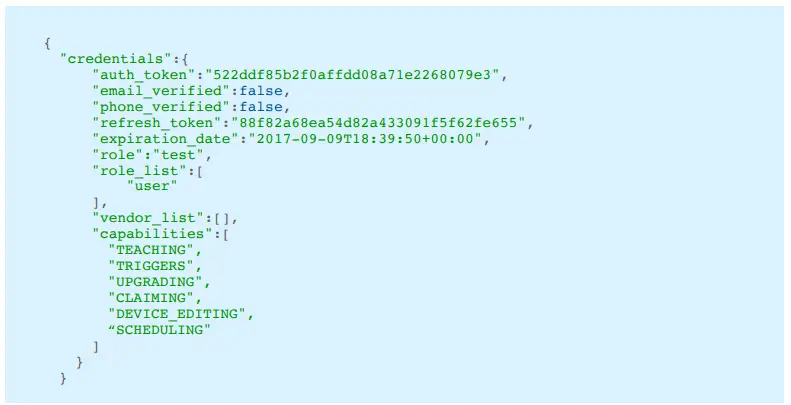
Response (Code 201):
Inside credential attribute. Ignore the rest of the response. It’s for internal use.
| Name | Type | Description |
| auth_token | String | Token for authentication |
| capabilities* | Array | List of capabilities |
| email_verified | Boolean | Email verification |
| phone_verified | Boolean | Phone verification |
| refresh_token** | String | Token to get new token when auth_token expires |
| expiration_date | Date | Date/Time when the Token requires refresh |
Errors:
| Code | Response | Reason |
| 401 | {“error”:{“auth”:[“Incorrect Email or Password.”]}} | Self descriptive. Credentials are wrong. |
| 401 | {“error”:{“credentials”:[“Missing credentials”]}} | The data was sent (check the Content-Type). |
Example:
curl -X POST http://api.avi-on.com/user/devices -H “Content-Type: application/json” -d “{\”email\”:\”[email protected]\”,\”password\”:\”password\”}”
Code 201
Refresh Session Token
To refresh the token once expired. It’s the same endpoint but must include an Authorization header with the refresh token as value. See Headers below: PUT http://api.avi-on.com/sessions
Headers:
| Name | Value |
| Content-Type | application/json |
| Authorization | RefreshToken <token> |
Response:
The same as Create Session Token.
Errors:
| Code | Response | Reason |
| 401 | {“error”:{“auth”:[“Inco{“error”:{“refresh_token”:[“Invalid Refresh Token”]}} rrect Email or Password.”]}} | The refresh token is wrong |
| 401 | {“error”:{“credentials”:[“Missing credentials”]}}{“error”:{“credentials”:[“Missing credentials”]}} | Refresh Token is missing |

User’s Devices API
The purpose of this is to identify the current state of the device (not groups or scenes at this time). This includes:
- Current Dim level
- Current Color temperature (Kelvin)
- Active scenes
- Device Name and capabilities
Get Device State
GET http://api.avi-on.com/user/devices
Headers:
| Name | Value |
| Content-Type | application/json |
| Authorization | Token <token> |
Errors:
| Code | Response | Reason |
| 401 | {“error”:{“auth_token”:[“Invalid Token”]}} | The token is not longer valid |
| 401 | {“error”:{“credentials”:[“Missing credentials”]}} | Refresh Token is missing |
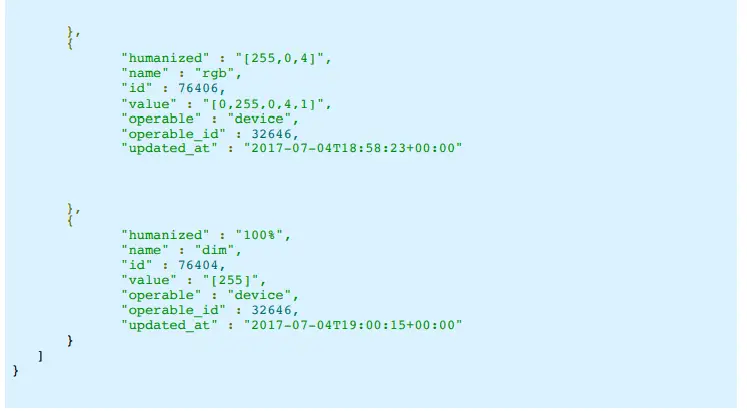
Response (Code 200):
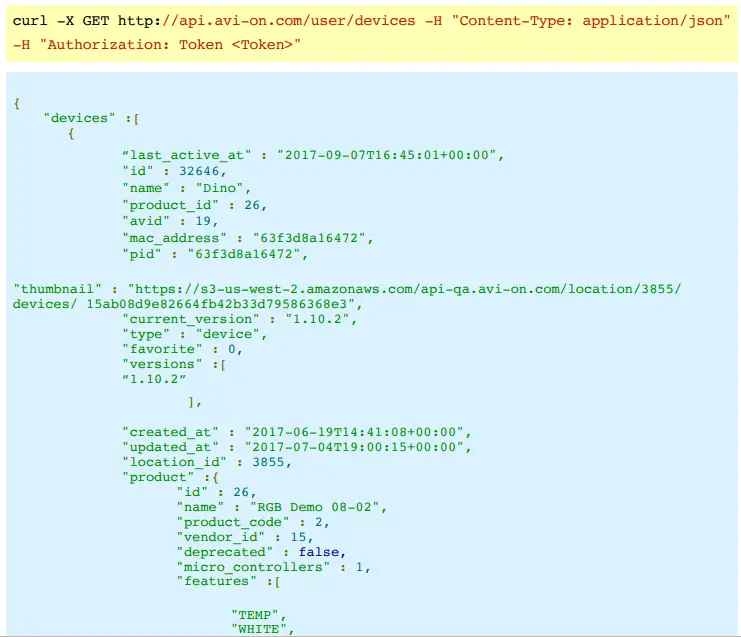
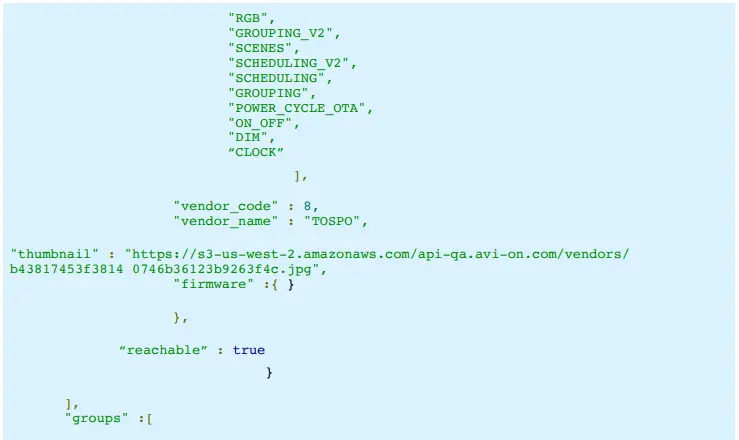
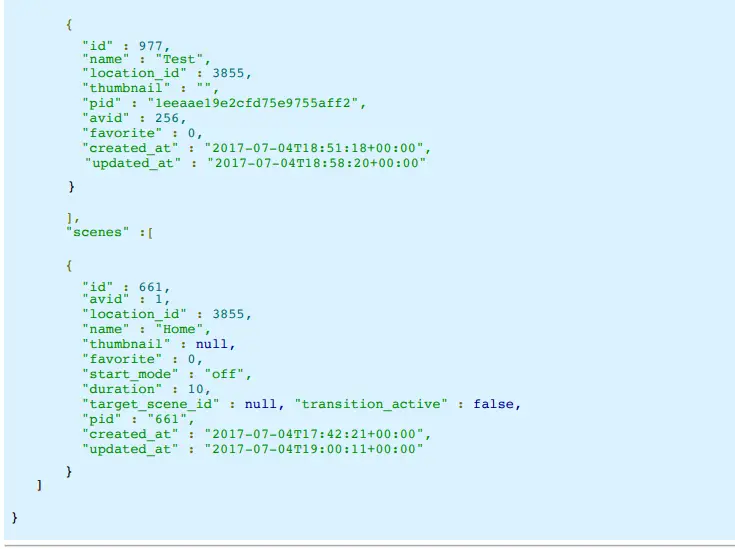
State API
Get States
GET http://api.avi-on.com/<operable>/<pid>/state
Parameters:
| Name | Value |
| operable | Oneoperablefrom:device, grouporscene |
| pid | Public ID |
Headers:
| Name | Value |
| Content-Type | application/json |
| Authorization | Token <token> |
Response (Code 200):
| Field | Description |
| name | Standard name of the stateful feature |
| value | Current value in internal protocol format |
| humanized | The value in human readable format |
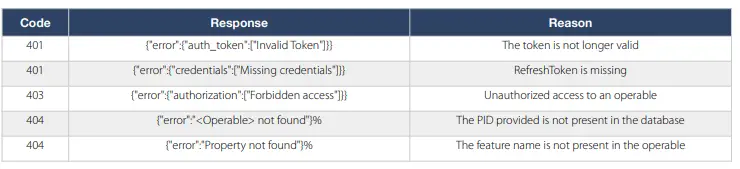
Errors:
| Code | Response | Reason |
| 401 | {“error”:{“auth_token”:[“Invalid Token”]}} | The token is not longer valid |
| 401 | {“error”:{“credentials”:[“Missing credentials”]}} | RefreshToken is missing |
| 403 | {“error”:{“authorization”:[“Forbidden access”]}} | Unauthorized access to an operable |
| 404 | {“error”:”<Operable> not found”}% | The PID provided is not present in the database |
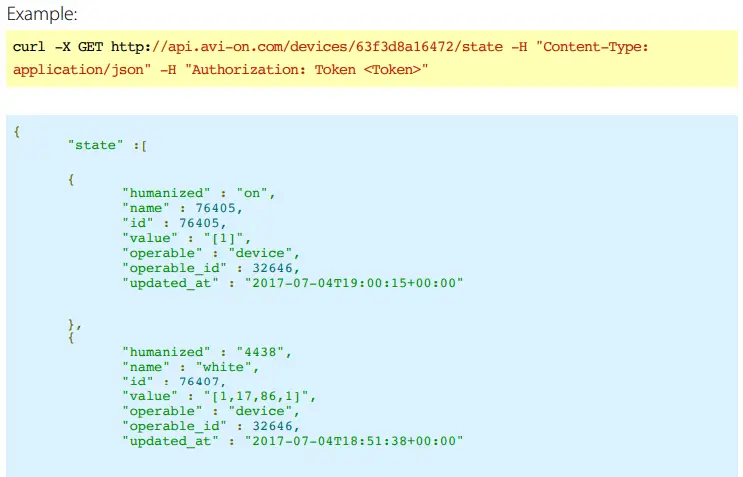
Update States
POST http://api.avi-on.com/<operable>/<pid>/state
Perameters:
| Name | Value |
| operable | Oneoperablefrom:device, grouporscene |
| pid | Public ID |
Payload (JSON): State
| Name | Type | Description |
| String | Standard name of the stateful feature | |
| value* | String | New Value in JSON |
* See more information about valid values for properties below.
Headers:
| Name | Value |
| Content-Type | application/json |
| Authorization | Token <token> |
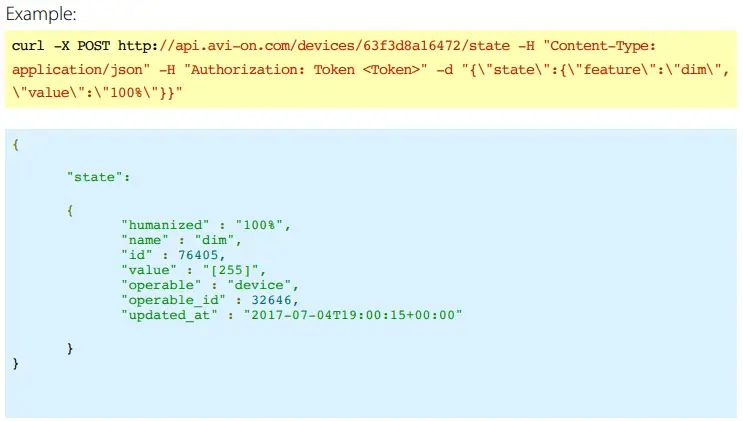
Response (Code 200):

Errors:
Response (Code 200):
| Field | Description |
| name | Standard name of the stateful feature |
| value | Current value in internal protocol format |
| humanized | The value in human readable format |
Featured Value Format:
| Code | Response | Reason |
| on_off | String in lowercase (on,off) or in integer (1,0) | “on”, “off”, “1”, “0” |
| dim | Percentage between 0-100% or between 0-255. Also supports delta incrementals. | “100%” (full dimming) or “0” (off ). “+10%”, “-25%” |
| white | Kelvins between 1500-7000. Also supports delta incrementals. | “2200” (warm), “5500” (daylight). “-25%” (warmer), “+25%” (cooler) |
| rgb | [Red,Green,Blue] | “[255,0,0]” (for Red) |
| action | Only feature for scenes. Idem as on_off. | “on”, “off”, “1”, “0” |
Analytics
This set of endpoints is available to provide historical information for devices under each location. We gather energy consumption and dimming events which can then be reported via the following.
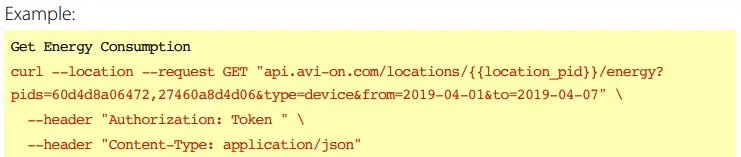
Get Energy Consumption
GET http://api.avi-on.com/locations/{{location_pid}}/energy?
pids=60d4d8a06472,27460a8d4d06&type=device&from=2019-04-01&to=2019-04-07
Can be queried for both groups or sets of devices. Group query supports a single group on each request, whereas queries for devices support a set of devices. You will need to specify the type of request (device or group), start and end dates for the report (inclusive) and the set of pids for the required entities.
Will return a list of devices or groups with a set of pairs timestamp
Headers:
| Name | Value |
| Content-Type | application/json |
| Authorization | Token <token> |
Parameters:
| Name | Value | Description |
| pid | 60d4d8a06472,27460a8d4d06 | Required – comma separated list of device pids, or a single group pid. |
| type | device | Required – one of, “device” or “group” to collect data for a set of devices or a group. |
| from | 2019-04-01 | Required – YYYY-MM-DD start date for the report. |
| to | 2019-04-07 | Required – YYYY-MM-DD end date for the report. |
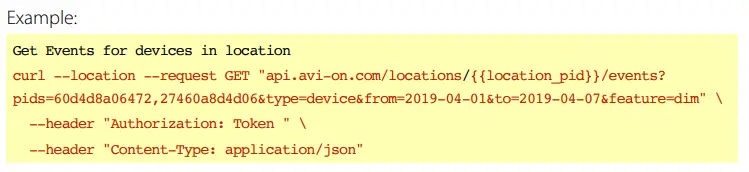
Get Events for devices in location
GET http://api.avi-on.com/locations/{{location_pid}}/events?
pids=60d4d8a06472,27460a8d4d06&type=device&from=2019-04-01&to=2019-04-07&feature=dim
Can be queried for both groups or sets of devices. Group query supports a single group on each request, whereas queries for devices support a set of devices. You will need to specify the type of request (device or group), start and end dates for the report (inclusive) and the set of pids for the required entities.
Will return a list of devices or groups with a set of pairs timestamp
Headers:
| Name | Value |
| Content-Type | application/json |
| Authorization | Token <token> |
Parameters:
| Name | Value | Description |
| pid | 60d4d8a06472,27460a8d4d06 | Required – comma separated list of device pids, or a single group pid. |
| type | device | Required – one of, “device” or “group” to collect data for a set of devices or a group. |
| from | 2019-04-01 | Required – YYYY-MM-DD start date for the report. |
| to | 2019-04-07 | Required – YYYY-MM-DD end date for the report. |
| feature | dim |

ALL PRODUCT, PRODUCT SPECIFICATIONS AND DATA ARE SUBJECT TO CHANGE WITHOUT NOTICE TO IMPROVE RELIABILITY, FUNCTION OR DESIGN OR OTHERWISE.
The information contained herein is believed to be reliable. Avi-on makes no warranty, representation or guarantee regarding the information contained herein, the suitability of the products for any particular purpose, or the continuing production of any product. Avi-on assumes no responsibility or liability whatsoever for the use of the information contained herein. The information contained herein, or any use of such information does not grant, explicitly or implicitly, to any party any patent rights, licenses, or any other intellectual property rights, whether with regard to such information itself or anything described by such information.
 api.avi-on.com/
 Domain im Kundenauftrag registriert