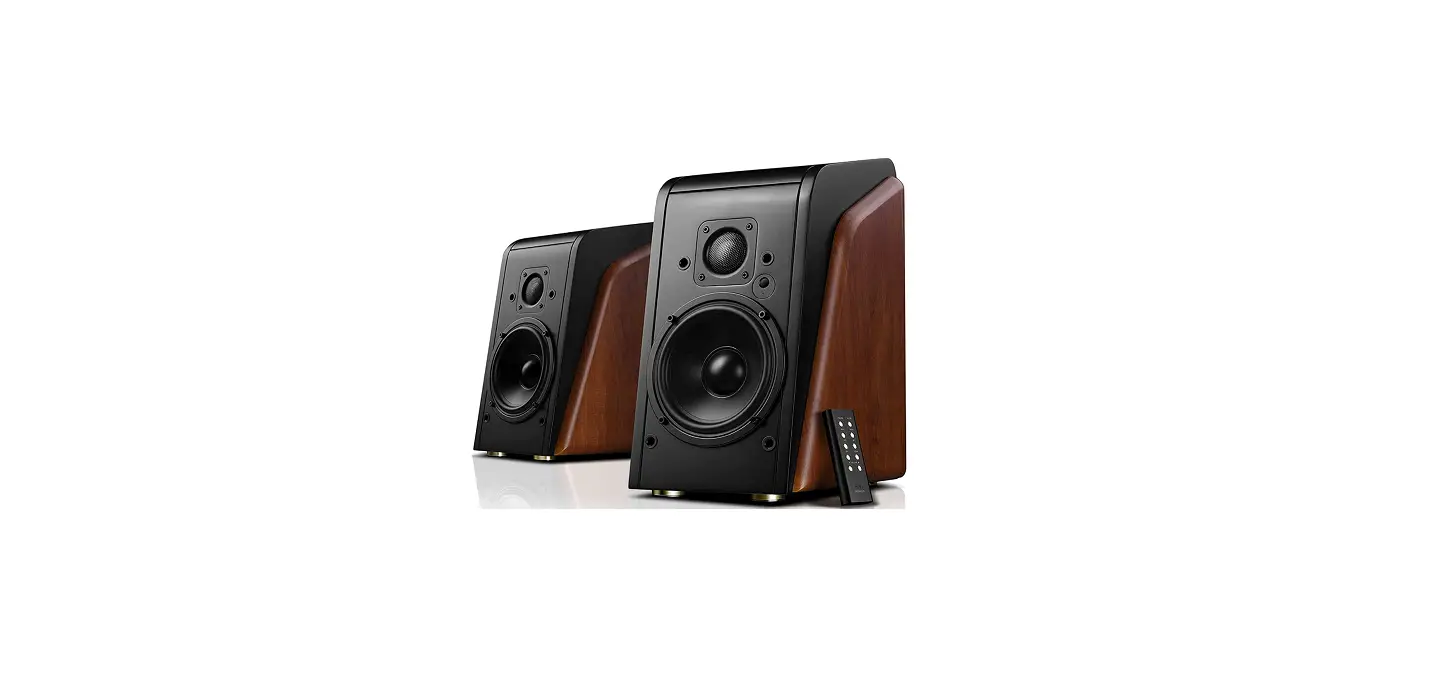
 HiVi-Swans M200MKII WiFi Powered Bluetooth Speakers
 HiVi-Swans M200MKII WiFi Powered Bluetooth Speakers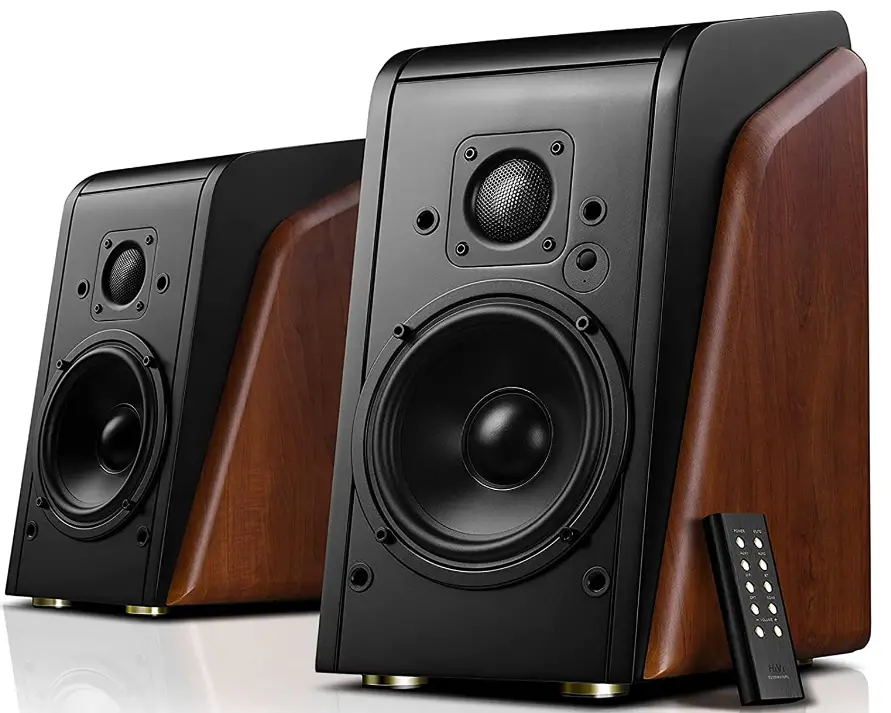
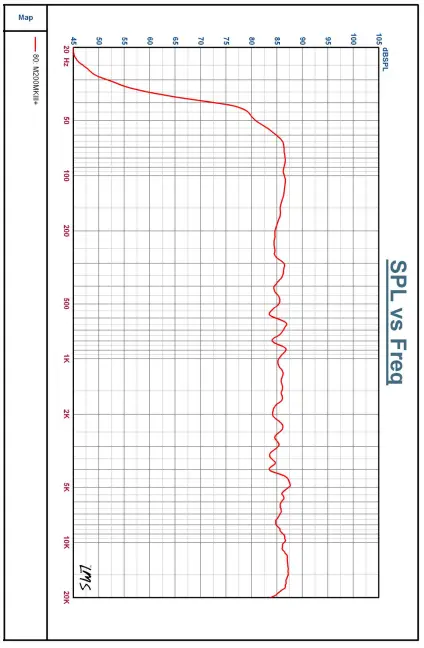
Graph
Unpacking
This speaker adopts fine packing material to protect it from damage during shipping. Please check if all accessories are in the box.
- Active speaker 1 piece
- Passive speaker 1 piece
- Speaker connection cable 1 piece
- Remote control 1 piece
- Power cable 1 piece
- 5mm to RCA audio cable 1 piece
- Manual 1 piece
- Optical cable 1 piece
Figures of speaker functions and electrical parts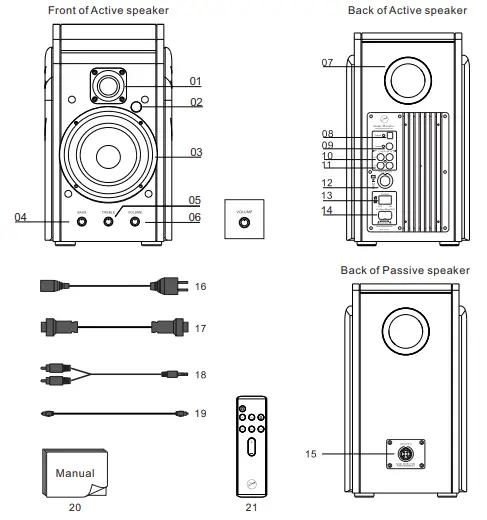
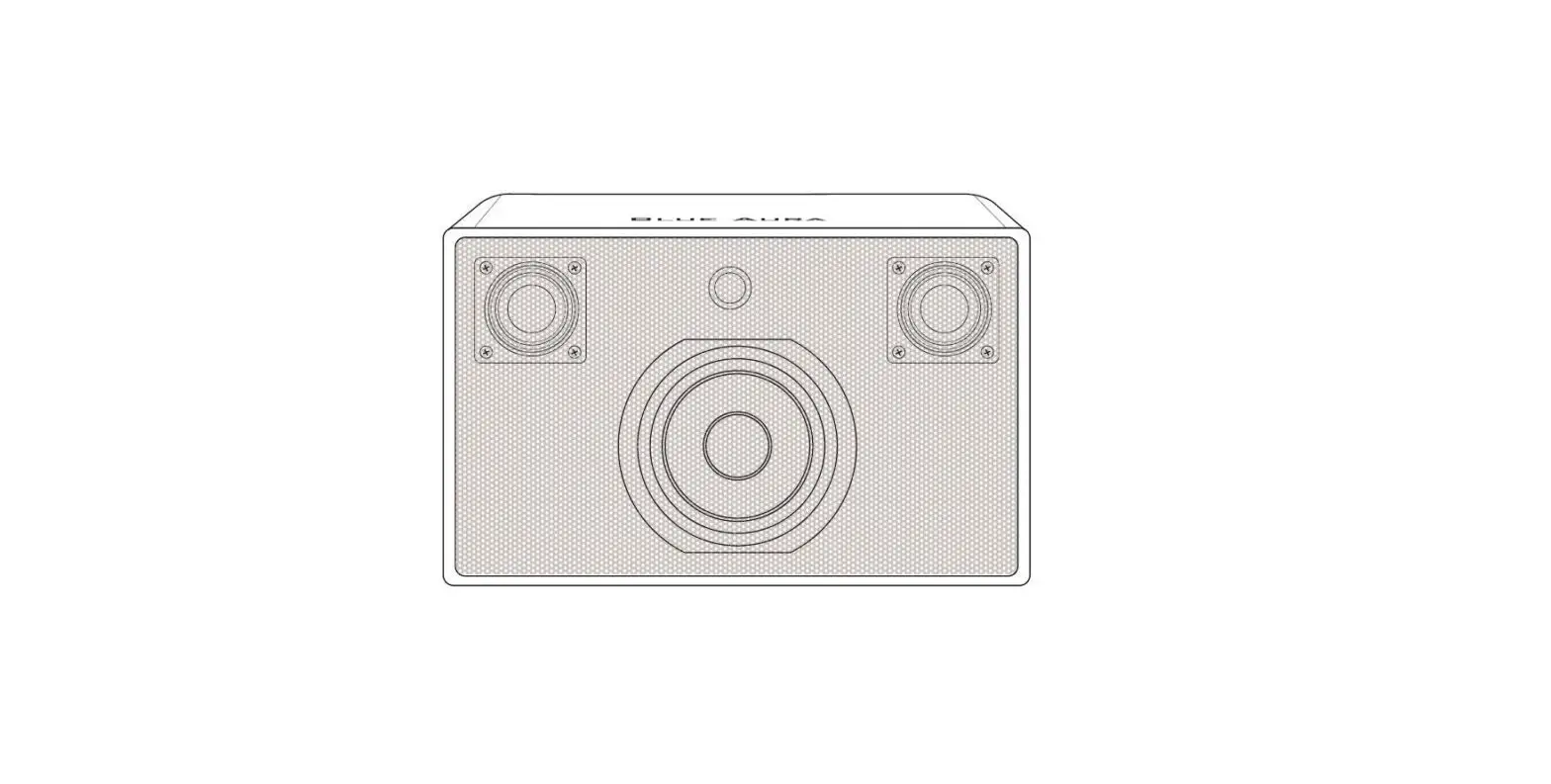
- Tweeter
- Signal Indicator
- Woofer
- Bass volume control
- Treble volume control
- Volume control
- Rear port
- Optical input
- Coaxial input
- RCA input Line1
- RCA input Line2
- Speaker output
- Power switch
- Power plug
- Speaker input to active speaker
- Power cable
- Speaker connection cable
- 5mm to RCA audio cable
- Optical cable
- Manual
- Remote Control
Volume control function
- You can switch input mode by pressing the volume control. The indicator will change accordingly.
- If the speaker is in “mute” mode, press volume control then the speaker is unmute.
- Indicator color:
- RCA input LIN1 (green)
- RCA input LIN2 (purple)
- Bluetooth input (blue)
- Optical input (grass green)
- Mute (Red flashing light)
- Coaxial(white)
- Standby(red breathing light)
Remote Control
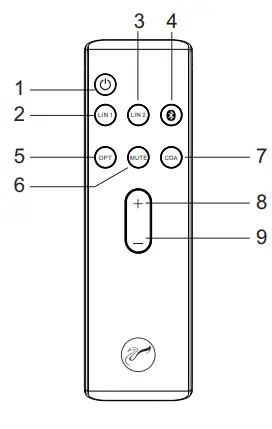
- Standby
- RCA audio input LIN1
- RCA audio input LIN2
- Bluetooth input
- Optical
- MUTE
- Coaxial
- Volume up
- Volume down
Notice:
- Please do not put the remote under any objects heavy in case it is destroyed.
- Take the battery off if you are not going to use the remote in a long period of time.
- Keep the remote under a cool and dry place and do not get it wet.
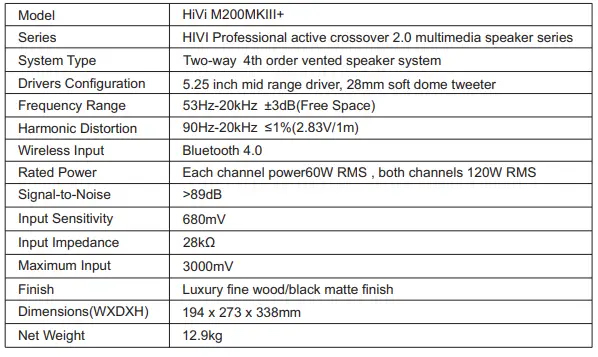
Specification


Trouble shooting
- Problems with sound quality
- Please check and make sure all drivers have sound or not? Is there any problem with the speaker?
- Please check if the connection cables are firmly connected with the OUTPUT of the computer sound card or OUTPUT of the line output.
- Please check if the connection cable is inserted to the right position.
- No sound at all
- Please check if the power cable is connected well, if the power switch is on.
- Please check if the signal cable between the speaker and the sound source is short-circuited?
- Please check if the sound source is set up properly.
- Only one speaker has sound
- Please check the balance controls on the sound source and make sure it is set to the middle position.
- Please check the cable between active speaker and passive speaker is inserted properly.
Warranty
If the problems still exist after you checking as No. IX shows, please contact the local dealer.
Remote control introductions
- After the speakers are connected properly, turn on the power when the indicator light is red, the speaker is in Standby mode. Press the Standby button, the indicator is green when the speaker is in working mode and default input is LIN1.
- Press other button and it can be switched to LIN2, bluetooth, optical or coaxial input and the indicator will change accordingly.
- Press MUTE the speaker is in Mute when the indicator is red light flashing then press again, the speaker is unmute.
- Long-press the volume up, the volume can go up quickly.
- Long-press the volume down, the volume can go down quickly.
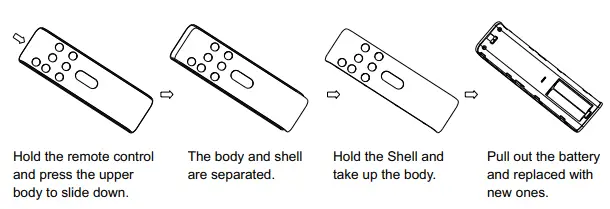
How to replace the remote’s battery
Speaker placement and listening environment
- Speaker Placement
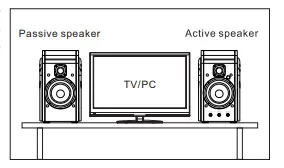
Put the main speaker on the right and passive speaker on the left When listening to music, the distance between the two speakers should be over 70cm so that a natural sound field can be achieved. Adjust the angle and distance of the speakers until optimal sound accuracy and imaging are achieved. In order to get best sound, not only do we recommend using high quality components to match the speakers, but also a good listening environment. The placement and the size of the listening area will influence the sound quality.
- A few simple suggestions to optimize your listening environment:
- Carpet the floor to avoid the sound reflection.
- Decorate the wall with cloth or other sound absorbing materials to improve sound quality.
- Use thick curtain to avoid the sound reflection by glass windows.
Speaker Connections
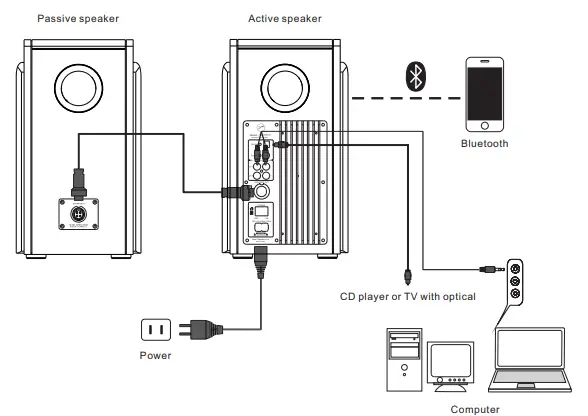
The M200MKIII+ is built in with amplifier. On the back there are power outlet, audio in and volume control. The connection diagram is as below:
- Diagram of active speaker connected to passive speaker

- Active speaker connection to passive speaker
Insert the end of the speaker connection cable into the SPEEAKER OUT of the active speaker and the SPEAKER IN of the passive speaker. Make sure the pins are fully inserted to avoid loose connection. - Connecting with computer or other sound source
Insert the RCA connectors of the RCA to 3.5mm cable into the audio input terminals of the active speaker, red to red and white to white. Then insert the 3.5mm stereo jack to the stereo output of your computer. - Connecting the power
Make sure the power switch is off, plug the power cable into the power outlet.
Notice:
- Please make sure the power is switched off when connecting the power cable.
- The speaker is built-in with amplifier. Please do not stuff the rear port with anything. It can destroy the amplifier.
- Make sure connections are firm to avoid influencing sound quality.
- The quality of cables will directly influence the sound quality. We suggest using the original cable.
Listening
- Turn on the computer or other sound source, turn on the volume control to minimum(0).
- Play the MP3, CD, and turn up the volume gradually.
- You can use the three function knobs on the back panel to adjust the volume to meet your listening habit.
Notice:
- Turn off the power when you are not going to listen.
- We suggest using a high quality sound card so that it can produce the best possible high-fidelity sound. Using a poor quality sound card will degrate the sound quality.
Break-in
Break-in refers to the aging period for the speakers to where they perform best acoustically. Upon purchase the speakers are not broken-in. A period ranging from 48-400 hours of usage is recommended before both the amplifier and speaker drivers behave optimally.
Maintenance
The M200MKIII+ can be operated under normal conditions without requiring any maintenance. Avoid using any corrosive liquids or gasses on the surface of the cabinet or on the speaker drivers. Do not place in high temperatures, moist conditions, or sunshine for long periods of time. For cleaning be sure to use a detergent without any strong chemicals.
FAQs
Are Swans Speakers good?
While not quite as good as a good soundbar in terms of quality, the Swans M10 greatly increased loudness and provided sound that was superior to that of the TV’s built-in speakers. If you don’t have a dedicated soundbar or home theatre system, the M10 is suitable for all household usage.
Do HiVi-Swans M200MKII bookshelf speakers sound good?
They do not produce as much bass and do not occupy as much visual or physical space as larger tower speakers. However, a good set of bookshelf speakers will offer a satisfyingly full sound for the majority of listeners and musical genres. (And you can frequently add a subwoofer if you truly want extra bass.)
Where are swans speakers made?
Hi-Vi Research, a business that specializes in the design and manufacturing of drivers, produces all Swans speakers in China.
What happens if speakers are too close to wall?
One thing to keep in mind is that, even though getting close to a back wall typically just amplifies the bass, if you get too close to a side wall, where the wall is now affecting and being seen by the speaker’s entire front driver assembly, you may actually start amplifying frequencies other than the bass frequencies.
Can you put HiVi-Swans M200MKII bookshelf speakers on their side?
It shouldn’t ever be an issue with straightforward bookshelf speakers with a single woofer. Vertical mounting is perfectly acceptable. Any “vertical” speaker will sound the same even if you tilt your head to the side.
Can I put HiVi-Swans M200MKII bookshelf speakers on the floor?
Bookshelf speakers should not be placed on the ground; instead, they should be placed on a shelf, table, or other elevated surface. They are made with the intention of enhancing sound in tiny to medium-sized settings.
How long do HiVi-Swans M200MKII bookshelf speakers last?
The response to these queries depends on the features, the calibre of the construction, and the components of the speakers. If you take care of them, speakers typically last 10 to 20 years before needing to be replaced.
Are HiVi-Swans M200MKII bookshelf speakers better for pictures?
Additionally, bookshelf speakers are thought to provide better imagery.
Do HiVi-Swans M200MKII bookshelf speakers sound better on stands?
The fact that bookshelf speakers sound best when placed on a stand is no coincidence. This is so that a correctly constructed loudspeaker stand can lift the diminutive box speaker off of surfaces like bookshelves, floors, and walls.
How high should HiVi-Swans M200MKII bookshelf speakers be?
Furthermore, utilising an average ear height of 91cm to 96.5cm (36-38″) is frequently just as acceptable as measuring the distance from your ears to the floor if more than one person will be listening to the speakers or if you frequently have friends around.
How far should HiVi-Swans M200MKII bookshelf speakers be apart?
For bookshelf speakers, aim for a distance of 4 feet, while for floor-standing speakers, aim for 8 feet. Too close speakers will cause sounds to muddle and merge together. The stereo image will have a gap between the two halves if they are too far away (more on this later).
Do you need an amplifier for HiVi-Swans M200MKII bookshelf speakers?
An amp is not necessary for the operation of active bookshelf speakers. But an amplifier is necessary for passive bookshelf speakers to function effectively. Bookshelf speakers that are active already have an amplifier installed; passive speakers do not. It will be incredibly silent if a passive bookshelf speaker is utilised without an amp.
What size are HiVi-Swans M200MKII bookshelf speakers?
While bookshelf speakers are only about one foot tall, floor standers are normally about three feet tall. Floor standing speakers might have more drivers due to their larger size (the part of a speaker that creates sound).
What are powered HiVi-Swans M200MKII bookshelf speakers?
Since powered speakers already have an amplifier inside of them, all you need to do is connect them into an electrical outlet to use them. You can directly plug all of your home theatre components into them because they are made with a broad variety of inputs (ports).
Can you put HiVi-Swans M200MKII bookshelf speakers in the wall?
To maximise their overall performance, bookshelf speakers should specifically be positioned two to three feet away from the wall. Bookshelf speakers should be mounted in order for the air supplied through the ports to reach open space as quickly as feasible.