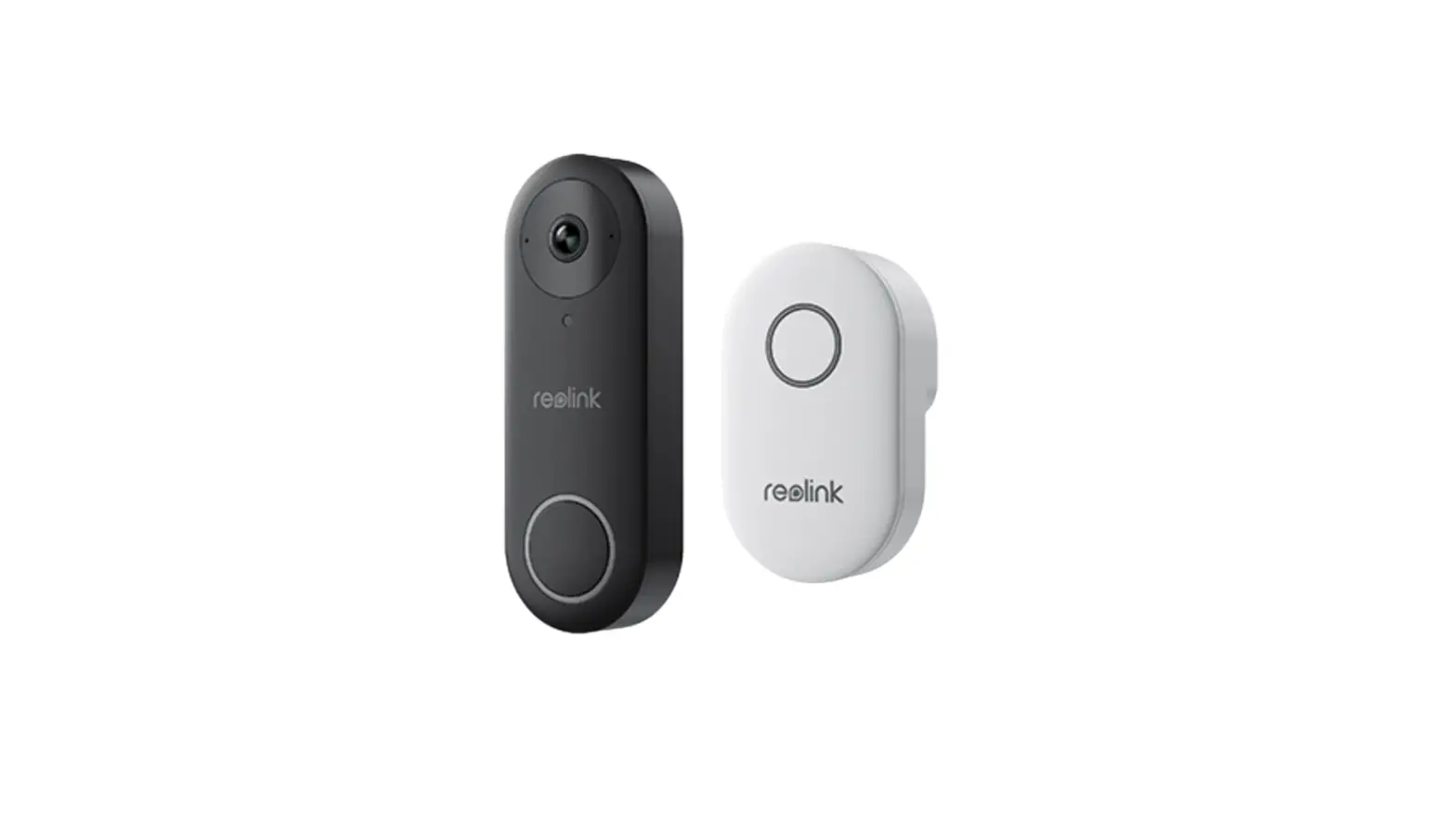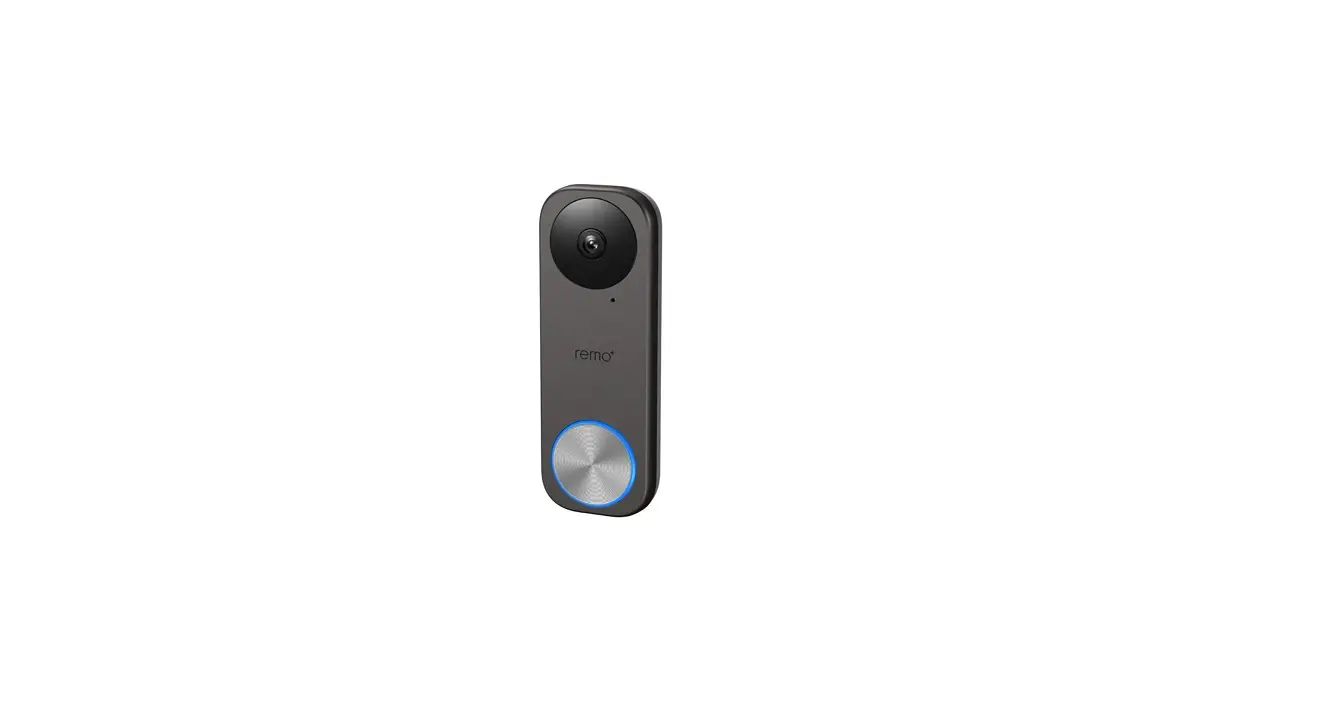

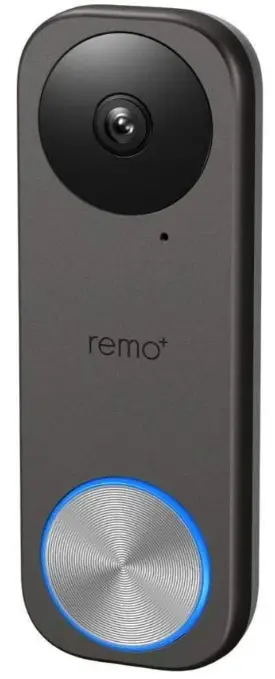
Remo+ RMBL-1809H WiFi Video Doorbell Camera User Manual
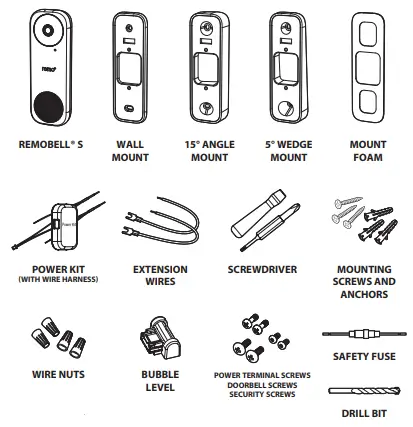
WHAT’S IN THE BOX
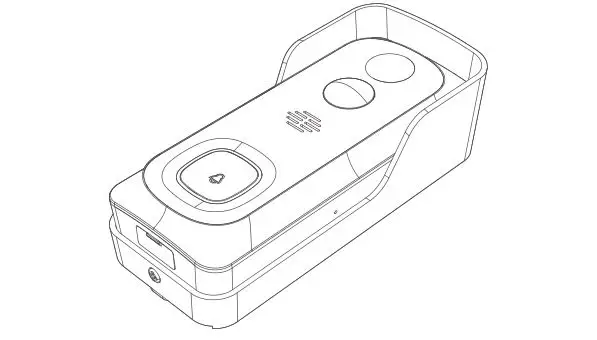
MEET REMOBELLS
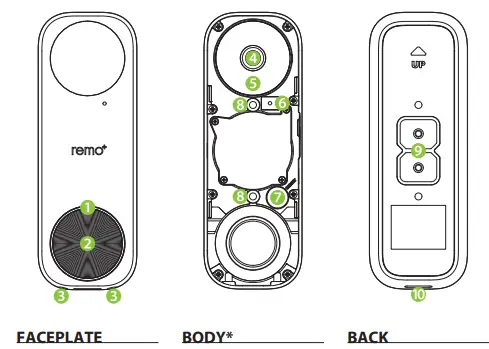
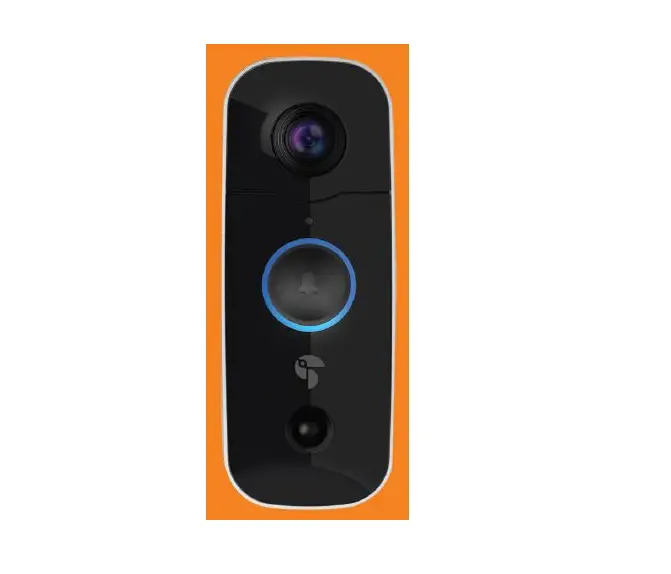
- LED Indicator
- Bell button
- Security screw holes
- Camera lens
- IR LED
- Mic
- Reset button
- Mounting holes
- Power terminal
- Speaker
BEFORE YOU BEGIN
Check your doorbell voltage and chime.
RemoBell S only works with a voltage of 16-24VAC.
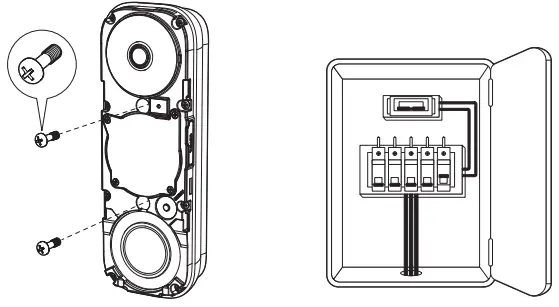
Go to your breaker box and turn off the power to your doorbell.
WARNING: If you are not sure how to turn off the power to your doorbell from your breaker box, please consult a licensed electrician.
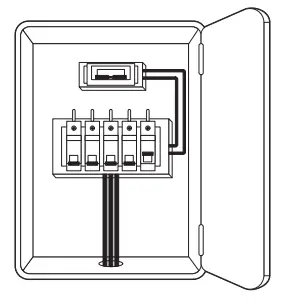
- If you have a mechanical chime, start POWER KIT INSTALLATION.
- If you have an electronic chime, please refer to its manual for instructions.
- If you do not have chime, skip POWER KIT INSTALLATION and follow OPTION B on page 8.
POWER KIT INSTALLATION
- Insert one end of the Wire Harness into the Power Kit.
- Remove the cover of your mechanical chime.

- Take a picture of the wiring for reference during installation.
- Loosen the screws and remove the wires. Then straighten the exposed end of the wires.
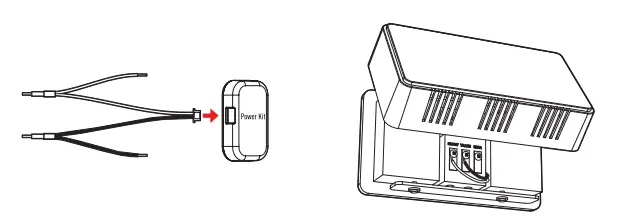
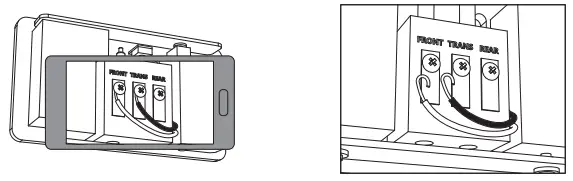
- Place your Power Kit so that it doesn’t interfere with moving parts or muffle the chime. You can use the adhesive backing to hold it in place. Put the chime cover back on.
DOORBELL MOUNTING
- Remove your existing doorbell and disconnect the wires.
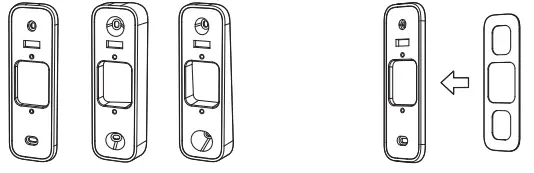
- Based on your doorbell location, select the appropriate Mount type to optimize the camera’s viewing angle.
(Optional) For hard surfaces like brick or stucco, paste the Mount Foam to the back of your Mount.
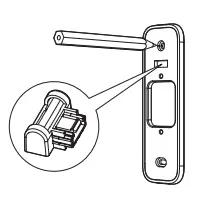
- Insert the Bubble Level into the Mount to straighten the Mount. When the bubble is in the middle, mark the drill points on the wall. You can remove the Bubble Level after the drill points are marked.

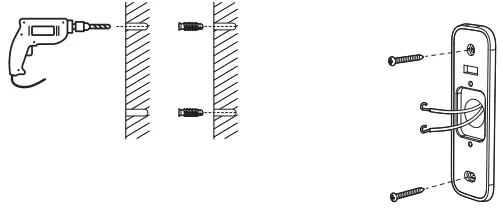
- Drill holes according to your drill points and insert Anchors.
- Secure the Mount onto the wall using Screwdriver and Mounting Screws.

- If a Power Kit is installed, follow Option A. If you do not have chime, follow Option B.
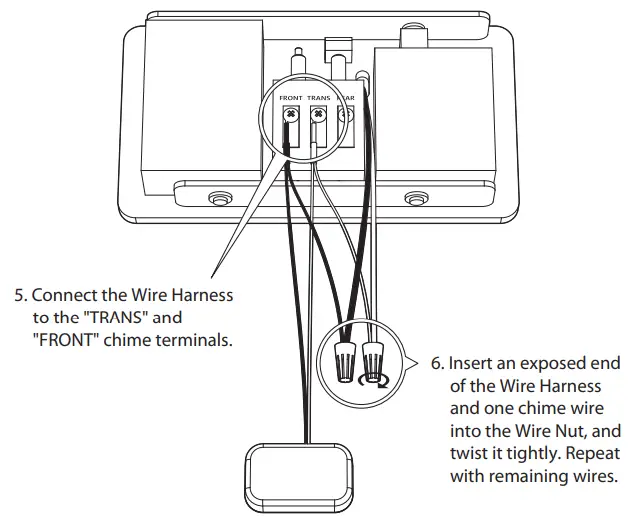
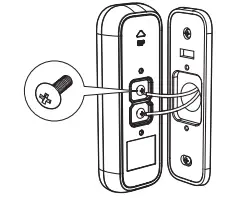
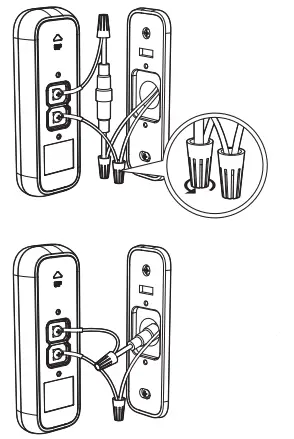
Option A: Connect the RemoBell S with your existing doorbell wires.
Option B: Connect the Safety Fuse Wire with your existing doorbell wires.
Insert an exposed end of the Safety Fuse Wire and one chime wire into the Wire Nut, and twist it tightly. Repeat with remaining wires.
Push the Safety Fuse Wire and the Extension Wire into the wall to secure the Doorbell to the mount.
WARNING: If no safety fuse is connected when there is no chime, the doorbell may malfunction or cause a fire. If you do not know your chime system, please consult a licensed electrician. - Remove the Faceplate. Fixate the RemoBell® S to the Mount by inserting the Doorbell Screws.
- Restore power on the breaker box. If the LED Indicator flashes blue, then proceed to DoorBell Setup (Page 10). If not, turn off your power and check the doorbell wiring.
REGISTER REMOBELL S
- Have your Wi-Fi network password available.
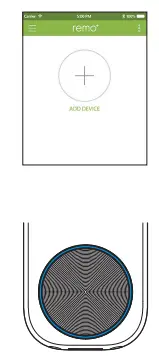
- After logging into the remo+ app, press “+” on the home screen to add your device, and select your time zone.
- Enter the password for the displayed Wi-Fi network and proceed to the QR code scan page.
* If you want to use a different network, go to your phone’s Wi-Fi settings and connect to that network first. - Scan the QR code on the RemoBell S or the cover of this QSG when the LED Indicator _ashes blue.
- Switch to your phone’s Wi-Fi settings, leaving remo+ app open. Please DO NOT CLOSE THE APP.
- Connect to the network RemoBellS_xxxxxx. If you see “internet is unavailable,” tap “okay.”
- Once you’re connected to the RemoBellS_xxxxxx network, switch back to the remo+ app and press continue. Your app will then complete the registration. This may take up to 3 minutes.

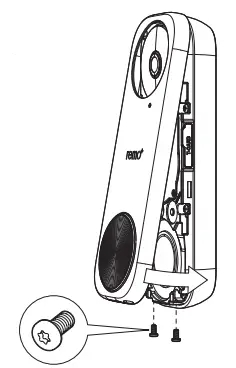
- Put the Faceplate back on and insert two Security Screws into the Security Screw Holes to secure the Faceplate.
DOORBELL SETUP
CREATE AN ACCOUNT
- Make sure your mobile device is connected to your home 2.4GHz Wi-Fi. (5GHz not supported)
- Download and launch the remo+ app.

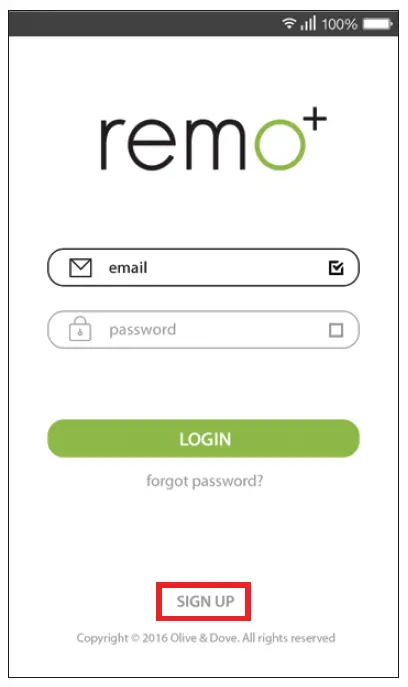
- Press SIGN UP at the bottom of the login page.

- Enter your email and create a password. Then press sign up. For Help, press the
 at the top right corner.

 at the top right corner.
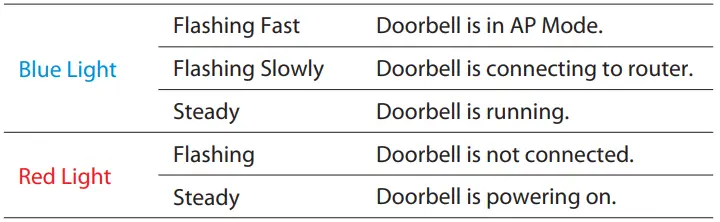
LED INDICATOR
Frequently Asked Questions
Forgot your password?
- Press “forgot password” on the login page.
- Enter your account email and click SEND.
- Check your email (including spam folder) for the temporary password.
- Open the app remo+ and log in using your account email and the temporary password.
- Create a new password.
How many users can access the RemoBell® S?
You can view RemoBell® S from up to 5 iOS/Android devices:
- Open the app from your choice of device.
- Log in using the same account email and password.
- Enter a different profile name (this will show in the Viewers list).
Is a Cloud plan required?
The Cloud plan is not required. You will still be able to receive alerts, see and
communicate with your visitors, and access your activity log.
We do, however, highly recommend the Cloud plan. Without the plan, all activity MUST be viewed in real time. Videos will not be saved and cannot be accessed by the user or the Remo+ team. With the Cloud plan, you can save video recordings and refer to them in the future. Video recordings are protected with bank-level security.
TROUBLESHOOTING
Can’t see the videos on your Recent Activity?
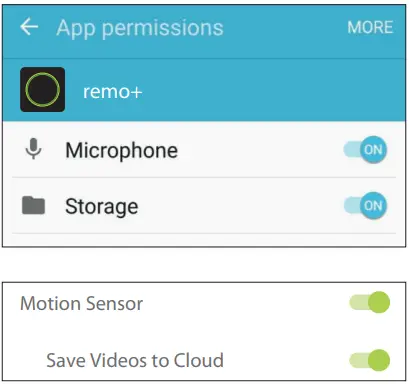
For Android users, allow all permissions to the remo+ app:
Settings > Applications Manager >Permissions > Storage
Check your Settings:
app > Menu > Devices > Your Devices >Turn on Motion Sensor >Turn on Save Videos to Cloud
Can’t find your home Wi-Fi during the setup process?
If you cannot get past step 3 on “REGISTER REMOBELL® S”, make sure you connect to your home Wi-Fi and restart from Step 1.
How to reset your RemoBell® S
- Remove the Faceplate and hold the reset button on the Body of the device for 5 seconds.
- Wait until the LED Indicator _ashes blue, then go back to the app to delete your registered device.
- Follow the instructions on “REGISTER REMOBELL® S” (Page 11) to re-register your RemoBell® S.
Experiencing false motion alarms?
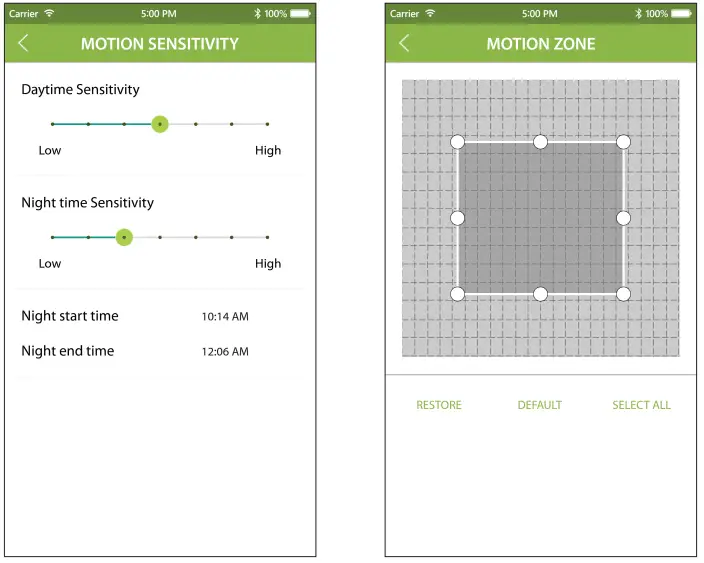
Adjust the motion sensitivity of your RemoBell S:
app > Menu > Devices > Your Devices > Motion Sensitivity > Adjust settings
Define Motion Zones to cut out unwanted motion: (ex. Trees blowing in the wind, busy roadways)
app > Menu > Devices > Your Devices > Motion Zone >Adjust Motion Zone
ELECTRICAL SHOCK WARNING
DO TURN OFF POWER on the breaker box before RemoBell® S installation. Serious electrical shock, injury, or death may occur if left on.
DO NOT TURN ON POWER until RemoBell® S installation is complete. Contact a licensed electrician if you need any assistance with power or wiring.
SUPPORT
We’re happy to help!
(888)-985-1849 Mon-Fri 8am to 5pm PT (except holidays)
LIMITED WARRANTY
- LISCENSOR DOES NOT WARRANT THAT THE FUNCTIONS CONTAINED IN THE LICENSED PRODUCT AND HARDWARE WILL MEET LICENSEE’S REQUIREMENTS OR THAT THE OPERATION OF THE SOFTWARE AND HARDWARE WILL BE UNINTERRUPTED OR ERROR-FREE. LICENSOR DOES WARRANT THAT THE MEDIA ON WHICH THE SOFTWARE IS FURNISHED AND THE HARDWARE WILL BE FREE FROM DEFECTS IN MATERIAL AND WORKMANSHIP UNDER NORMAL USE FOR A PERIOD OF ONE YEAR FROM THE DATE OF DELIVERY (”WARRANTY PERIOD”). THIS LIMITED WARRANTY IS VOID IF FAILURE OF THE MEDIA ON WHICH THE PRODUCT OR SOFTWARE IS FURNISHED HAS RESULTED FROM ACCIDENT, ABUSE, OR MISAPPLICATIONS.
- EXCEPT AS PROVIDED ABOVE, THE LICENSED PRODUCT IS PROVIDED “AS IS” WITHOUT WARRANTY OF ANY KIND, EITHER EXPRESS OR IMPLIED INCLUDING, BUT NOT LIMITED TO, IMPLIED WARRANTIES OF MERCHANTABILITY AND FITNESS FOR A PARTICULAR PURPOSE. THE ENTIRE RISK AS TO THE QUALITY AND PERFORMANCE OF THE LICENSED PRODUCT AND HARDWARE IS WITH LICENSE.
RF EXPOSURE WARNING STATEMENT
The antenna used for this transmitter must be installed at least 8 inches (20cm) from all persons and must not be co-located or operating in conjunction with any other antenna or transmitter.
FCC COMPLIANCE STATEMENT
You are cautioned that changes or modifications not expressly approved by the part responsible for compliance could void the user’s authority to operate the equipment.
This device complies with Part 15 of the FCC Rules. Operation is subject to the following two conditions:
- this device may not cause harmful interference, and
- this device must accept any interference received, including interference that may cause undesired operation of the device.
Note: This equipment has been tested and found to comply with the limits for a Class B digital device, pursuant to part 15 of the FCC rules. These limits are designed to provide reasonable protection against harmful interference in a residential installation. This equipment generates, uses, and can radiate radio frequency energy and, if not installed and used in accordance with the instructions, may cause harmful interference to radio communications. However, there is no guarantee that interference will not occur in a particular installation. If this equipment does cause harmful interference to radio or television reception, which can be determined by turning the equipment off and on, the user is encouraged to try to correct the interference by one or more of the following measures:
- Reorient or relocate the receiving antenna.
- Increase the separation between the equipment and receiver.
- Connect the equipment into an outlet on a circuit different from that to which the receiver is connected.
- Consult the dealer or an experienced radio/TV technician for help.
FCC Grant of Equipment Authorizations of this device and transmitters installed in this device can be found at FCC website by entering the FCC ID number on the device.
Please take attention that changes or modification not expressly approved by the party responsible for compliance could void the user’s authority to operate the equipment.
This equipment complies with FCC radiation exposure limits set forth for an uncontrolled environment. This equipment should be installed and operated with minimum distance 20cm between the radiator & your body.
FAQs
What happens to Remo+ RMBL-1809H doorbell when WiFi goes out?
A cellular backup mechanism kicks in if your Base Station loses its internet connection, regardless of the reason, and enables the system to keep watching your house.
Do Remo+ RMBL-1809H doorbell cameras record all the time?
Most doorbell cameras do not continuously record. They only record when the camera is activated. To ensure you don’t miss the footage, they then send a notification to your phone. A few cameras actually record continuously.
How long do Remo+ RMBL-1809H wireless doorbell cameras last?
The official rating for Ring Doorbell batteries from a full charge is somewhere between six and twelve months (ratings vary based on models) before needing to be recharged. Better scores are typically found in newer models, like 10 to 12 month models.
What are the disadvantages of a Remo+ RMBL-1809H smart doorbell?
Video doorbells could potentially slow down your internet connection, which is a drawback. This is because the doorbell will send live video, which consumes a significant amount of bandwidth.
How far can Remo+ RMBL-1809H doorbell cameras hear?
Consumer Reports started a study to find out what can be heard and at what distances. Models and brands’ recording capabilities differ. The Ring Video Doorbell 3 Plus reportedly records crystal-clear audio at distances of up to 18 feet.
Do Remo+ RMBL-1809H doorbell cameras get stolen?
Recently, robbers have been seen taking the video doorbells themselves while being recorded on camera. The truth is that these gadgets might not be as discouraging as we assumed, whether they’re laying the groundwork for a future attack or truly desired the doorbell.
Can a Remo+ RMBL-1809H wireless doorbell be hacked?
Ring doorbell security vulnerabilities are still prevalent, particularly given that they are not encrypted, even if some have been addressed and subsequently fixed. Can Ring devices therefore be hacked? They can, yes.
How far can a Remo+ RMBL-1809H wireless doorbell work?
When someone rings the doorbell, wireless doorbells with receivers transmit a signal to the receiver. The maximum distance between the doorbell and receiver is specified by the manufacturer in metres. This usually ranges from 50 to 100 metres. The maximum distance is actually lesser.
Do Remo+ RMBL-1809H wireless doorbell works through walls?
The basic rule of thumb is that a signal will be 20% weaker after passing through each wall.
Do Remo+ RMBL-1809H doorbell cameras record voices?
Since doorbells and other such devices are so common, you could anticipate seeing yourself on other people’s video feeds whenever you drive or walk down the street. You might not know that video doorbells can also record audio.
Do Remo+ RMBL-1809H wireless doorbells need internet?
Internet access is not always necessary to use a doorbell camera. There are a few options to using a smart doorbell if you don’t have access to a remote live broadcast or other services that depend on a WiFi network.
Can I use Remo+ RMBL-1809H doorbell camera without service?
Numerous video doorbells with excellent reviews are available without a subscription. These doorbells store video locally instead of in the cloud, typically on a microSD card or their internal memory. This provides you more control over your recordings and saves you money on a monthly charge.
How do Remo+ RMBL-1809H wireless doorbells work without batteries?
By using magnetic induction, the wireless doorbell’s transmitter automatically creates current. There is no need for batteries or other power sources; simply press the button to convert kinetic energy to electrical energy.
How is a Remo+ RMBL-1809H wireless doorbell powered?
Wireless doorbells can be powered by energy from the mains or by batteries. The absence of complex electrical systems is something that many homeowners like. The radio signal is the underlying technology in this. As previously indicated, a receiver detects the signal when the button is pressed.