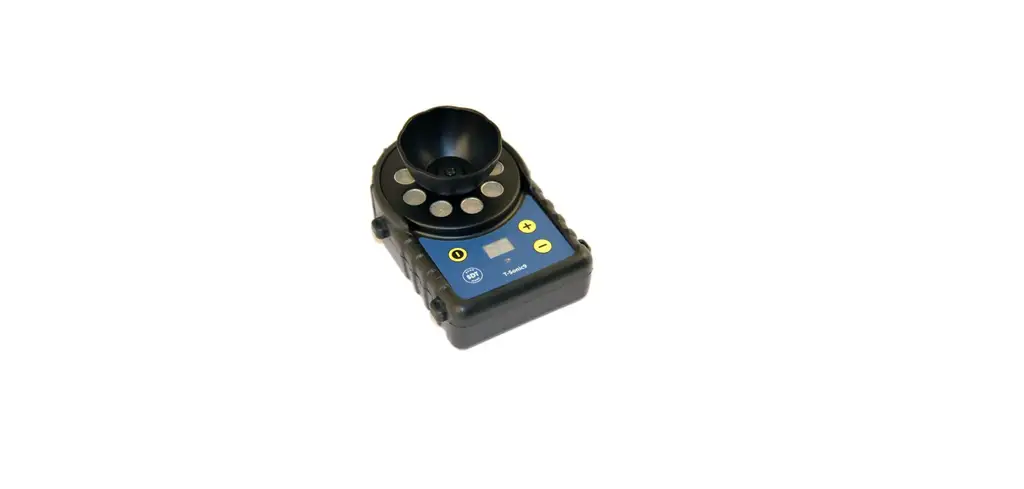
T-Sonic9 Ultrasonic Emitter
Product Information:
Specifications:
- Frequency: 39.9 and 40.1 kHz
- Delay: 80 ms
- Bluetooth range
- Power supply: 6 AA batteries (Alkaline or rechargeable)
- Sound Pressure Level (SPL):
- Level 1: 86 dB SPL
- Level 2: 95 dB SPL
- Level 3: 101 dB SPL
- Level 4: 105 dB SPL
- Level 5: 111 dB SPL
- Level 6: 117 dB SPL
- Battery Life:
- Level 1: 24 hours
- Level 2: 21 hours
- Level 3: 19 hours
- Level 4: 18 hours, 30 minutes
- Level 5: 11 hours
- Level 6: 5 hours, 30 minutes
- Beam Angle: 0° to 340°
Environmental:
- Housing material: ABS-PC (400g / 14oz)
Mechanical:
- User manual version: 03 – Mar 2022
Product Usage Instructions:
- Battery: Insert six AA batteries (Alkaline or
rechargeable) in the compartment (1). Check the polarity. - Power On/Off: Press the button (8) once to
power on. Press and hold for 4 seconds to power off. The T-Sonic9
will automatically power down after 30 minutes of inactivity. To
deactivate/reactivate this feature, press the power button 5 times
rapidly. The deactivation is confirmed by a red flashing indicator
light (6) and the display (7) shows A0. The reactivation is
confirmed by a green flashing indicator light (6) and the display
(7) shows A1. - Power Indicator:
- GREEN = On and battery charged
- GREEN/RED every second = low battery
- Flashing RED every second = critical low level
- Increase Power Output: Press button + (4) on
the illustration to increase the level of ultrasound emission from
1 to 6. - Decrease Power Output: Press button – (5) to
decrease the level of ultrasound emission from 6 to 1. - Buzzer: To activate/deactivate the Buzzer,
press and hold the minus button (5). The activation is confirmed by
a green flashing indicator light (6), the display (7) shows B1, and
the device beeps every 5 seconds during the emission. The
deactivation is confirmed by a red flashing indicator light (6) and
the display (7) shows B0. Simultaneously press and hold the
plus/minus buttons (4/5) for 4 seconds to display the remaining
battery life. - Display: The display (7) shows the emission
level, autonomy, and the symbol for the activation/deactivation of
features. - Built-in Transmitter: When the device is
powered, the transducer (2) doesn’t emit until level 1 or higher
has been set. - Holster: The holster is equipped with hidden
magnets to attach the transmitter to metal surfaces. - USB Port: Use the USB connector (9) for
powering with an external 5V universal power supply and firmware
update. - Reflector: Use a Flat-Head screwdriver to
screw the reflector onto the main unit. Position the small
centering opening of the reflector on the small rib (11) before
screwing. - Safety Instructions: Anyone located less than
2 meters (6.5 feet) from the T-Sonic9 when emitting must wear
hearing protection with an NRR of 20 dB or higher. - Pairing Remote Control / T-Sonic9: Set the
T-Sonic9 to Pairing mode by simultaneously pressing the plus/minus
buttons (4/5) and holding them down for 10 seconds until the
display (7) shows PM and the indicator light (6) flashes blue. Set
the remote control to Pairing mode by pressing and holding button
(13) on the remote control for 10 seconds until the indicator light
(16) flashes blue.
Manual del usuario
Batería: Inserte seis baterías AA, alcalinas o recargables en el compartimiento (1). Chequee la polaridad. Encendido On/Off: Presione una vez el botón (8) para encender. Presione durante 4 segundos para apagar. El T-Sonic9 se apaga automáticamente después de 30 minutos de inactividad. Para desactivar/reactivar esta función, presione rápidamente el botón de encendido 5 veces. La desactivación se confirma por una luz roja (6) indicadora y en la pantalla (7) muestra A0. La reactivación se confirma por una luz verde indicadora que parpadea (6) y en pantalla (7) muestra A1.
Indicador de Carga: VERDE = On y batería cargada; VERDE/ROJO cada segundo = batería baja; Parpadeo ROJO cada Segundo = nivel crítico bajo.
Incremento Potencia de Salida: Incrementa el nivel de la emisión ultrasónica de 1 a 6. Presione el botón “+” (4) en la ilustración.
Reducir la potencia de Salida: Reduce el nivel de emisión ultrasónica de 6 a 1. Para disminuir el nivel de emisión presione el botón “-” (5). Vibrador: Para activar/desactivar el vibrador presione largo el botón menos (5). La activación es confirmada por la luz verde del indicador (6), en la pantalla (7) muestra B1 y el aparato hace beep cada 5 segundos durante la emisión. La desactivación es confirmada en la luz roja del indicador (6) en la pantalla (7) muestra B0. Para ver la vida remanente de la batería presione/sostenga simultáneamente los botones más/menos (4/5) por 4 segundos. Pantalla: La apantalla (7) muestra el nivel de la emisión, la autonomía y los símbolos de activación/desactivación de las funciones. Transmisor Interno: Cuando el aparato es encendido, el transductor (2) no emite hasta que no se ha ajustado el nivel 1 o mayor.
Cubierta: La cubierta está equipada con unos magnetos ocultos para pegar el transmisor a superficies metálicas. Puerto USB: El Puerto USB (9) para energizar con una fuente externa 5V universal y para actualizar el firmware.
Reflector: El reflector es usado para harmonizar el campo emitido, no importando la orientación del aparato Utilice un destornillador de Cabeza Plana para atornillar el reflector a la unidad principal.
Orientación del Reflector: Posicione la pequeña apertura central del reflector en la pequeña pestaña (11) antes de atornillarla.
Instrucciones de seguridad: El uso de protección auditiva con un NRR de 20 dB o mayor es mandatorio para cualquiera localizado a menos de 2 metros (6.5 ft) del T-Sonic 9 cuando está emitiendo.
Emparejando el control remoto / T-Sonic9: configure el T-Sonic9 en Modo de emparejamiento presionando simultáneamente los botones más / menos (4/5) y manténgalos presionados durante 10 segundos hasta que la pantalla (7) muestre PM y la luz indicadora, ( 6) parpadea en azul. Ponga el control remoto en modo de Emparejamiento presionando y manteniendo presionado el botón (13) en el control remoto durante 10 segundos hasta que la luz indicadora (16) parpadee en azul.
Luz indicadora del control remoto: Parpadea en azul / rojo, no se detecta T-Sonic9, azul sólido T-Sonic9 en el modo de emparejamiento detectado, Parpadea en verde, emparejamiento exitoso entre el control remoto y T-Sonic9, parpadea en rojo, falla la conexión de emparejamiento entre control remoto y T – Sonic9.
Atenuador: Ajustar el nivel de emisión al mínimo. Desenroscar el reflector. Conectar el atenuador al flex (17). Bloquear cada salida para realizar la prueba de funcionamiento (18).
Specifications
General
39.9 and 40.1 kHz
80 ms
Bluetooth range
Power supply
Level 1 86 dB SPL
Level 1
24h
Sound Pressure Level at 1m, Ref. 0 dB=0.0002 µbar
Level 2 95 dB SPL Level 3 101 dB SPL Level 4 105 dB SPL Level 5 111 dB SPL
With Alkaline
Level 2 Level 3 Level 4 Level 5
21h 19h 18:30h 11h
Level 6 117 dB SPL
Level 6
5:30h
Beam Angle
Angle
0 340 350 0
330 -2
320
-4 310
10 20
-6 300
-8 290
-10
280 -12
30 40 50 60 70
80
270
-14
90
Environmental
Mechanical
Housing material
-10 to +50 °C (14 to 122 °F) Non-condensing 30
ABS-PC 400g (14oz)
Version 03- Mar 2022
User manual
Battery: Insert six AA batteries, Alkaline or rechargeable in the compartment (1) Check the polarity.
Power On/Off: Press once the button (8) to power on. Press and hold for 4 seconds to power off. The T-Sonic9 will automatically power down after 30 minutes of inactivity. To deactivate/reactivate this feature, press the power button 5 times rapidly. The deactivation is confirmed by a red flashing indicator light (6) and the display (7) shows A0. The reactivation is confirmed by a green flashing indicator light (6) and the display (7) shows A1.
Power indicator: GREEN=On and battery charged, GREEN/RED every second=low battery, Flashing RED every second=critical low level
Increase Power Output: Increases the level of the ultrasound emission from 1 to 6. Press button “+” (4) on the illustration.
Decrease Power Output: Decreases the level of the ultrasound emission from 6 to 1. To decrease de level of emission press button “-” (5).
Buzzer: To activate/ deactivate the Buzzer press long the minus button (5). The activation is confirmed by a green flashing indicator light (6), the display (7) shows B1 and the device beep every 5 seconds during the emission. The deactivation is confirmed by a red flashing indicator light (6) and the display (7) shows B0. Simultaneously press and hold the plus/ minus (4/5) buttons for 4 seconds to display remaining battery life.
Display: The display (7) shows the emission level, the autonomy and the symbol for the activation/deactivation of features.
Built-in transmitter: When the device is powered, the transducer (2) doesn’t emit until the level 1, or higher, has been set.
Holster: The holster is equipped with hidden magnets to attach the transmitter to metal surfaces.
USB Port: USB connector (9) for powering with external 5V universal power supply and firmware update.
Reflector: The reflector is used to harmonize the emitted field, regardless of the orientation of the device. Use a Flat-Head screwdriver to screw the reflector on the main unit.
Reflector orientation: Position the small centering opening of the reflector on the small rib (11) before screwing.
Safety instructions: The port of a hearing protection having an NRR of 20 dB or higher, is mandatory for everyone located less than 2 meters (6.5 feet) from the T-Sonic9 when emitting.
Pairing remote control / T-Sonic9: Set the T-Sonic9 to Pairing mode by simultaneously pressing the plus / minus buttons (4/5) and hold them down for 10 seconds until the display (7) shows PM and the indicator light, (6) flashes blue. Set the remote control to Pairing mode by pressing and holding the (13) button on the remote control for 10s until the indicator light (16) flashes blue.
Remote control indicator light: Blinks Blue / Red, T-Sonic9 not detected, Solid blue T-Sonic9 in Pairing mode detected, Green blinks, Pairing succeeded between Remote Control and T-Sonic9, Red blinks, Pairing connection failed between Remote Control and T- Sonic9.
Attenuator: Set the emission level at the minimum. Unscrew the reflector. Connect the attenuator to the flex (17). Obstruct each output to run the functional test (18).
SDT International sa-nv Bd de l’Humanité 415 · B-1190 Brussels (Belgium)
Tel: +32(0)2 332 32 25 email: [email protected]
SDT North America 7677 County Road 2 · Cobourg ON K9A 0X4, Canada
Phone: 1-800-667-5325 | 1-905-377-1313 email: [email protected]
www.sdtultrasound.com
T-Sonic9
USER MANUAL
English Français Nederlands Deutsch Español Italiano
Ultrasound Soluons
11
1144 1155
1166 1133
11 11
10 10
99
2 3 4
5
6 77 88
17
+ –
18
Manuel d’utilisation
Piles: Insérez six piles AA, alcalines ou rechargeables dans le compartiment (1). Vérifiez la polarité.
Mise sous/hors tension: Appuyez une fois sur le bouton (8) pour allumer. Appuyez et maintenez 4 secondes pour éteindre. Le T-Sonic9 s’éteint automatiquement après 30 minutes d’inactivité. Pour désactiver/réactiver cette fonction, appuyez 5 fois rapidement sur le bouton (2). La désactivation est confirmée par le voyant (6) clignotant rouge et l’écran (7) affiche A0. La réactivation est confirmée par le voyant (6) clignotant vert et l’écran (7) affiche A1.
Voyant lumineux: VERT=allumée et batterie chargée, VERT/ROUGE toutes les secondes=Piles faibles, ROUGE clignotant toutes les secondes=Niveau bas critique.
Augmenter la puissance d’émission (4) et (14): Augmente le niveau d’émission ultrasonore de 1 à 6. Appuyez sur le bouton «+» (4) sur l’illustration.
Diminuer la puissance d’émission (5) et (15): Diminue le niveau d’émission ultrasonore de 6 à 1. Pour diminuer le niveau d’émission, appuyez sur le bouton “-” (5).
Bipeur: Pour activer/désactiver le bipeur, appuyez long sur le bouton (5). L’activation est confirmée par le voyant (6), et l’afficheur (7) indique B1 et l’appareil émet un bip sonore toutes les 5 secondes pendant l’émission. La désactivation est confirmée par le voyant (6) et l’afficheur (7) indique B0. Appuyez simultanément sur les boutons plus/moins (4/5) et maintenez-les enfoncés pendant 4 secondes pour afficher la durée l’autonomie restante des piles.
Ecran: L’écran (7) affiche le niveau d’émission, l’autonomie et le symbole d’activation/ désactivation des fonctions.
Transducteur: Lorsque l’appareil est allumé, le transducteur (2) n’émet pas tant que, le niveau ou supérieur n’a pas été sélectionné.
Etui de protection: L’étui est équipé d’aimants afin d`aimanter l’appareil aux surfaces métalliques.
Connecteur USB: Connecteur USB (9) pour alimenter avec une alimentation universelle 5V et pour la mise à jour du Firmware.
Réflecteur: Le réflecteur est utilisez pour harmoniser le champ émis, indépendamment de l’orientation de l’appareil. Utilisez un tournevis à tête plate pour visser le réflecteur à l’unité principale.
Languette de centrale: Positionner la petite ouverture de centrage du réflecteur sur la nervure (11) avant de visser.
Instructions de sécurité: Le port d’une protection auditive ayant un NRR de 20 dB ou plus est obligatoire pour toute personne située à moins de 2 mètres du T-Sonic9 lors de l’émission.
Pairing télécommande/T-Sonic9: Mettre le T-Sonic9 en mode Pairing en appuyant simultanément sur les boutons plus/moins (4/5) et maintenez-les enfoncés pendant 10 secondes jusqu’à ce que l’afficheur (7) affiche PM et le voyant lumineux, (6) clignote bleu. Mettre la télécommande en mode Pairing en appuyant et en maintenant la touche (13) de la télécommande pendant 10s jusqu’à ce que le voyant lumineux, (16) clignote bleu.
Voyant lumineux télécommande: Clignote Bleu/rouge, T-Sonic9 pas détecté, Bleu continu T-Sonic9 en mode Pairing détecté, Clignote vert, Pairing réussi entre la Télécommande et T-Sonic9, Clignote rouge, connexion Pairing échoué entre la Télécommande et T-Sonic9.
Atténuateur: réglez le niveau d’émission au minimum. Dévissez le réflecteur. Connectez l’atténuateur au flex (17). Obstruez chaque sortie pour effectuer le test fonctionnel (18).
Bedienungsanleitung
Batterie: Legen Sie sechs AA-Batterien Alkali oder wiederaufladbar in das Batteriefach ein. (1) Überprüfen Sie die Polarität. Ein- / Ausschalten: Drücken Sie einmal die Taste (8), um das Gerät einzuschalten. Drücken und 4 Sekunden lang gedrückt halten, um das Gerät auszuschalten. Der T-Sonic9 schaltet sich nach 30 Minuten Inaktivität automatisch aus. Um diese Funktion zu deaktivieren / reaktivieren, drücken Sie den Netzschalter fünfmal schnell. Die Deaktivierung wird durch eine rot blinkende Kontrollleuchte (6) bestätigt und das Display (7) zeigt A0. Die Reaktivierung wird durch eine grün blinkende Kontrollleuchte (6) bestätigt und das Display (7) zeigt A1. Betriebsanzeige: GRÜN = Ein und Batterie geladen, GRÜN / ROT jede Sekunde = schwache Batterie, Blinkend ROT jede Sekunde = kritischer Batteriezustand Leistung erhöhen: Erhöht den Level der Ultraschallemission von 1 bis 6. Drücken Sie in der Abbildung die Taste ,,+” (4). Leistung verringern: Verringert den Level der Ultraschallemission von 6 auf 1. Emissionspegel zu verringern, drücken Sie die Taste “-” (5). Buzzer: Um den Buzzer zu aktivieren / deaktivieren, drücken Sie länger die Minustaste (5). Die Aktivierung wird durch eine grün blinkende Kontrollleuchte (6) bestätigt, das Display (7) zeigt B1 und das Gerät piept während der Emission alle 5 Sekunden. Die Deaktivierung wird durch eine rot blinkende Kontrollleuchte (6) bestätigt und auf dem Display (7) erscheint B0. Drücken und halten Sie gleichzeitig die Plus / Minus-Tasten (4/5) für 4 Sekunden, um die verbleibende Batterielebensdauer anzuzeigen. Display: Das Display (7) zeigt den Emissionsgrad, die Autonomie und das Symbol für die Aktivierung / Deaktivierung von Funktionen an. Eingebauter Sender: Wenn das Gerät mit Strom versorgt wird, sendet der Wandler (2) erst dann, wenn der Level 1 oder höher eingestellt ist. Schutzhülle: Die Schutzhülle ist mit versteckten Magneten ausgestattet, um den Sender an Magnetischen Oberflächen zu befestigen. USB-Port: USB-Anschluss (9) für die Stromversorgung mit externer 5-V-Universal-Stromversorgung und Firmware-Updates. Reflektor: Der Reflektor dient zur Harmonisierung des Sendefeldes, unabhängig von der Ausrichtung des Gerätes. Verwenden Sie einen Flachkopfschraubendreher, um den Reflektor am Hauptgerät zu befestigen. Reflektor ausrichten: Positionieren Sie vor dem Verschrauben die kleine Zentrieröffnung des Reflektors (11) auf der kleinen Rippe. Sicherheitshinweise: Der Anschluss eines Gehörschützers mit einem NRR von 20 dB oder höher ist für alle Personen vorgeschrieben, die sich beim Senden weniger als 2 Meter vom T-Sonic9 entfernt befinden. Kopplung Fernbedienung / T-Sonic9: Stellen Sie den T-Sonic9 in den Kopplungsmodus, indem Sie gleichzeitig die Plus-/Minus-Tasten (4/5) drücken und diese für 10 Sekunden gedrückt halten, bis auf der Anzeige (7) PM und die Kontrollleuchte (6) blau blinken. Stellen Sie die Fernbedienung in den Kopplungsmodus, indem Sie die Taste (13) auf der Fernbedienung 10 Sekunden lang gedrückt halten, bis die Kontrollleuchte (16) blau blinkt. Anzeigeleuchte der Fernbedienung: Blinkt blau / rot, T-Sonic9 nicht erkannt, dauerhaft blau, T-Sonic9 im Kopplungsmodus erkannt, blinkt grün, Koppeln zwischen Fernbedienung und T-Sonic9 erfolgreich, Rot blinkt, Kopplungsverbindung zwischen Fernbedienung und T- Sonic9 fehlgeschlagen. Dämpfungsglied: stellen Sie den Emissionspegel auf das Minimum. Schrauben Sie den Reflektor ab. Schließen Sie das Dämpfungsglied an das Flex an (17). Blockieren Sie jeden Ausgang, um den Funktionstest durchzuführen (18).
Manuale d’uso
Batteria: Inserisci sei batterie AA, Alkaline o ricaricabili nel vano portabatterie (1). Verifica la polarità. Accensione/Spegnimento: Premi una volta il pulsante (8) per l’accensione.Tieni premuto per 4 secondi per spegnere. L’Emettitore T-Sonic9 si spegnerà automaticamente dopo 30 minuti di inattività. Per disattivare/riattivare questa funzione, premi 5 volte velocemente il pulsante di accensione. La disattivazione viene confermata dal led (6) che lampeggerà rosso e il display (7) mostra A0. La riattivazione viene confermata dal led verde lampeggiante (6) e il display (7) mostra A1. Indicatore carica: VERDE=Acceso e batteria carica, VERDE/ROSSO lampeggia ogni secondo=batteria scarica, ROSSO lampeggia ogni secondo=livello critico.
Aumentare la potenza: Aumenta il livello dell’emissione ultrasonora da 1 a 6. Premere il pulsante “+” (4) sull’illustrazione.
Diminuire la potenza: Diminuisci il livello dell’emissione ultrasonora da 6 a 1. Per diminuire il livello di emissione premere il pulsante “-” (5). Buzzer: Per attivare/disattivare il Buzzer premi a lungo il pulsante meno (5). L’attivazione viene confermato dal led verde lampeggiante (6), il display (7) mostra B1 e lo strumento emette un beep ogni 5 secondi. La disattivazione viene confermata dal led rosso lampeggiante (6) e il display (7) mostra B0. Premi simultaneamente i pulsanti più/meno (4/5) per 4 secondi per vedere la durata residua della batteria. Display: Il display (7) mostra il livello di emissione, l’autonomia e il simbolo per l’attivazione/disattivazione delle funzioni L’Emettitore: Quando il dispositivo è alimentato, il trasduttore (2) non emette fino a quando non è stato impostato il livello 1 o superiore.
Guaina: La Guaina all’interno ha calamite che ti permettono di attaccare l’emettitore alle superfici in metallo Porta USB: Connettore USB (9) per alimentare con potenza 5V universale e per aggiornare il firmware.
Reflettore :Il reflettore indirizza il segnale nella direzione giusta a prescindere dalla posizione dell’emettitore. Usa un cacciavite a testa piatta per avvitare il reflettore all’emettitore. Orientamento riflettore: Posiziona la piccolo apertura del riflettore sulla scanalatura (11) prima di svitarlo.
Istruzioni di sicurezza: È obbligatorio usare protezioni con NRR di 20 dB o maggiore per tutti coloro a meno di 2 mtr dall’emettitore quando è in funzione.
Abbinamento del telecomando / T-Sonic9: Impostare il T-Sonic9 in modalità di abbinamento premendo contemporaneamente i pulsanti più / meno (4/5) e tenerli premuti per 10 secondi finché il display (7) mostra PM e la spia luminosa (6) lampeggia in blu. Impostare il telecomando in modalità di abbinamento tenendo premuto il tasto (13) sul telecomando per 10 secondi finché la spia (16) non lampeggia in blu.
Indicatore luminoso del telecomando: Lampeggia blu / rosso, T-Sonic9 non rilevato, Blu fisso T-Sonic9 in modalità di associazione rilevata, Verde lampeggiante, Accoppiamento riuscito tra Controllo remoto e T-Sonic9, Lampeggiamento rosso, Connessione non riuscita tra Telecomando e T- Sonic9.
Attenuatore: Impostare il livello di emissione al minimo. Svitare il riflettore. Collegare l’attenuatore al flex (17). Bloccare ogni uscita per eseguire il test funzionale (18).
Gebruikershandleiding
Batterij: Steek 6 AA batterijen, alkaline of oplaadbaar, in het toestel. Respecteer de polariteit. Aan- / uitzetten: Druk eenmaal op de knop (8) om in te schakelen. Houd 4 seconden ingedrukt om uit te schakelen. De T-Sonic9 wordt automatisch uitgeschakeld na 30 minuten inactiviteit. Om deze functie te deactiveren / opnieuw te activeren, drukt u vijf keer snel op de aan / uit-knop. De deactivering wordt bevestigd door een rood knipperend indicatielampje (6) en het display (7) toont A0. De reactivering wordt bevestigd door een groen knipperend indicatielampje (6) en het display (7) toont A1.
Voedingsindicator: GROEN = Aan en batterij opgeladen, GROEN / ROOD per seconde = bijna lege batterij, ROOD knippert elke seconde = kritiek laag niveau
Verhoog het uitgangsvermogen: Verhoogt het niveau van de ultrasone emissie van 1 tot 6. Druk op knop “+” (4) op de afbeelding.
Verlaag voedingsuitgang: verlaagt het niveau van de ultrasone emissie van 6 naar 1. Druk op de knop “-” (5) om het emissieniveau te verlagen.
Zoemer: om de zoemer in of uit te schakelen, drukt u lang op de min-knop (5). De activering wordt bevestigd door een groen, knipperend indicatielampje (6), het display (7) toont B1 en het apparaat piept elke 5 seconden tijdens de emissie. De deactivering wordt bevestigd door een rood knipperend indicatielampje (6) en op het display (7) verschijnt B0. Houd tegelijkertijd de toetsen plus / min (4/5) gedurende 4 seconden ingedrukt om de resterende levensduur van de batterij weer te geven. Display: het display (7) toont het emissieniveau, de autonomie en het symbool voor het activeren / deactiveren van functies. Ingebouwde zender: wanneer het apparaat wordt gevoed, genereert de transducer (2) pas wanneer het niveau 1 of hoger is ingesteld.
Holster: de holster is uitgerust met verborgen magneten om de zender op metalen oppervlakken te bevestigen. USB-poort: USB-connector (9) voor voeding met externe 5V universele voeding en firmware-update.
Reflector: De reflector wordt gebruikt om het emissieveld te harmoniseren, ongeacht de richting van het apparaat. Gebruik een platte schroevendraaier om de reflector op het hoofdtoestel te schroeven. Reflectororiëntatie: Plaats de kleine centreeropening van de reflector op de kleine rib (11) voordat u deze vastschroeft.
Veiligheidsinstructies: De poort van een gehoorbescherming met een NRR van 20 dB of meer is verplicht voor iedereen die zich op minder dan 2 meter afstand van de T-Sonic9 bevindt tijdens het uitzenden.
Afstandsbediening / T-Sonic9 paren: Stel de T-Sonic9 in op de koppelingsmodus door tegelijkertijd op de plus / min-knoppen (4/5) te drukken en ze gedurende 10 seconden ingedrukt te houden totdat op het display (7) PM en het indicatielampje (6) knippert blauw. Stel de afstandsbediening in op de koppelingsmodus door de knop (13) op de afstandsbediening gedurende 10 seconden ingedrukt te houden totdat het indicatielampje (16) blauw knippert.
Indicatorlampje afstandsbediening: Knippert blauw / rood, T-Sonic9 niet gedetecteerd, effen blauw T-Sonic9 in gekoppelde koppelingsmodus, groen knippert, koppeling is geslaagd tussen afstandsbediening en T-Sonic9, rood knippert, koppelingsverbinding mislukt tussen afstandsbediening en T – Sonic9.
Verzwakker: Stel het emissieniveau in op het minimum. Schroef de reflector los. Sluit de demper aan op de flex (17). Belemmer elke uitgang om de functionele test uit te voeren (18).
 Predictive Maintenance Equipment - SDT Ultrasound Solutions