
RoHS V1-F Fade-In Fade-Out PushplusRF LED Dimmer
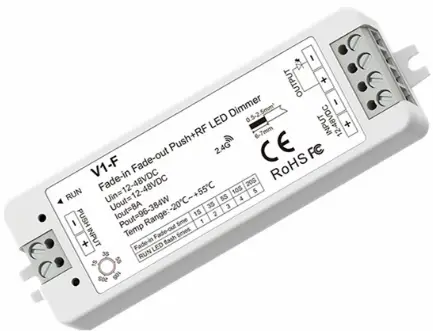
5 fading speed/Step-less dimming/Push Dim/Wireless remote control/Multiple protection
Features
- Fade-in Fade-out LED dimmer with smooth fading effect for soft start and stop.
- The fading speed can be set via knob potentiometer, 1S, 3S, 5S, 10S, 20S selectable.
- Connect with self-resetting metal button or push switch to achieve on/off and 0-100%dimming function.
- Push input can accept either positive or negative trigger.
- Match with RF 2.4G single zone or multiple zone dimming remote control optional.
- Over-heat / Over-load / Short circuit protection, recover automatically.
Technical Parameters
| Input and Output | |
| Input voltage | 12-48VDC |
| Input current | 8A |
| Output voltage | 12-48VDC |
| Output current | 1CH,8A |
| Output power | 96-384W |
| Output type | Constant voltage |
| Environment | |
| Operation temperature | Ta: -20 OC ~ +55 OC |
| Case temperature (Max.) | Ta: +85 OC |
Dimming data
| Input signal | Push Dim + RF 2.4GHz |
| Control distance | 30m(Barrier-free space) |
| Dimming gray scale | 4096 (2^12) levels |
| Dimming range | 0 -100% |
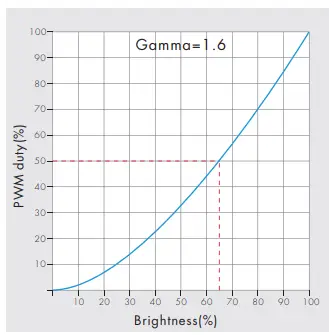
| Dimming curve | Logarithmic |
| PWM Frequency | 2000Hz (default) |
| Warranty | |
| Warranty | 5 years |
| Safety and EMC | |
| EMC standard (EMC) | ETSI EN 301 489-1 V2.2.3 ETSI EN 301 489-17 V3.2.4 |
| Safety standard(LVD) | EN 62368-1:2020+A11:2020 |
| Radio Equipment(RED) | ETSI EN 300 328 V2.2.2 |
| Certi cation | CE,EMC,LVD,RED |
| Package | |
| Size | L120 x W43 x H27mm |
| Gross weight | 0.053kg |
Mechanical Structures and Installations

Light on/off fading speed
Rotate knob to switch fading speed,
When the fading speed set to 1/3/5/10/20s, the RUN LED indicator will flash 1/2/3/4/5 times.

Wiring Diagram
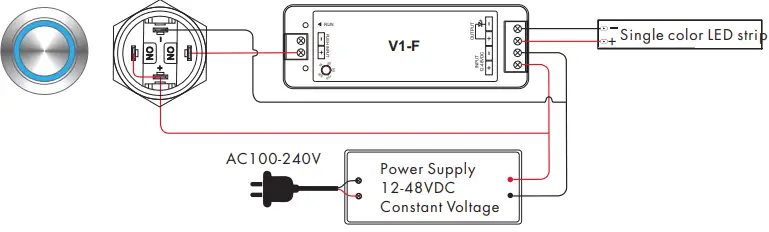
- Connect with self-resetting metal button, positive trigger input.
Press the button to switch or adjust brightness, the button indicator always lights up.
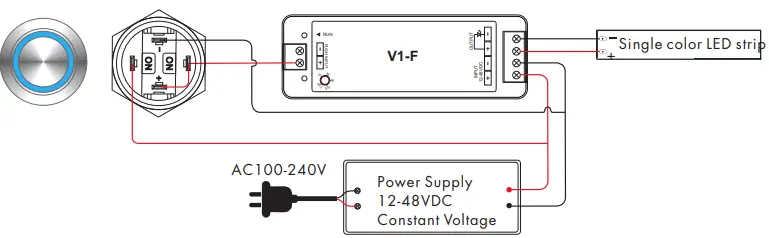
- Connect with self-resetting metal button, positive trigger input.
Press the button to switch or adjust brightness, the button indicator lights up when pressed.
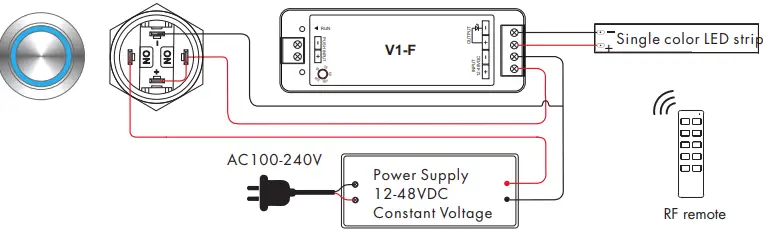
- Connect with self-latching metal button.
Press the button to power on or off the controller, the button indicator lights up when pressed. Use RF remote to adjust brightness optional.
- Connect with push switch panel, negative trigger input. Press the panel to switch or adjust brightness.

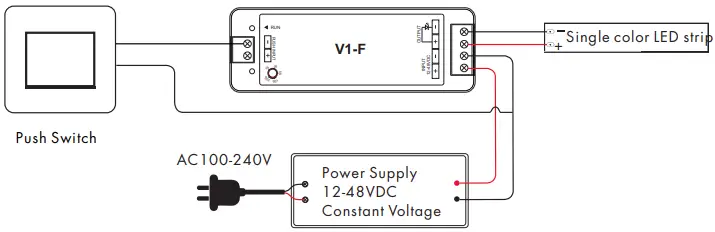
Match Remote Control
Match:
Switch off the power, then switch on power.
Immediately short press on/off key (single zone remote)or zone key (multiple zone remote) 3 times on the remote.
The light blinks 3 times means match is successful.
Delete:
Switch off the power, then switch on power.
Immediately short press on/off key (single zone remote) or zone key (multiple zone remote) 5 times on the remote.
The light blinks 5 times means all matched remotes were deleted.
Push Dim Function
The provided Push-Dim interface allows for a simple dimming method using commercially available non-latching (momentary) wall switch or metal button.
- Short press:
Turn on or off light. - Long press (1-6s):
Press and hold to step-less dimming,
With every other long press, the light level goes to the opposite direction. - Dimming memory:
Light returns to the previous dimming level when switched off and on again, even at power failure. - Synchronization:
If more than one controller are connected to the same push switch, do a long press for more than 10s, then the system is synchronized and all lights in the group dim up to 100%.
This means there is no need for any additional synchrony wire in larger installations.
We recommend the number of controllers connected to a push switch does not exceed 25 pieces, The maximum length of the wires from push to controller should be no more than 20 meters.
Dimming Curve