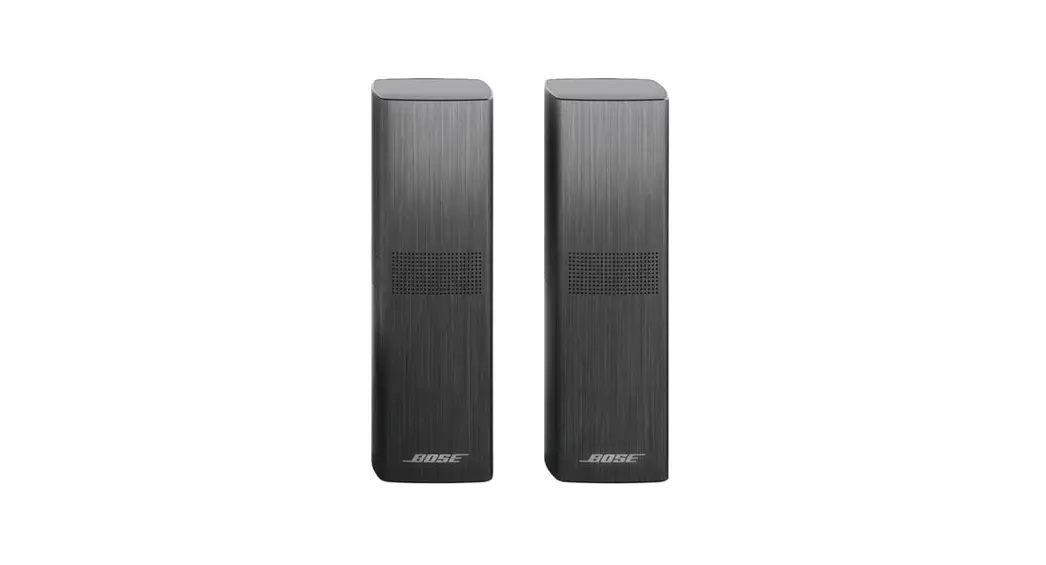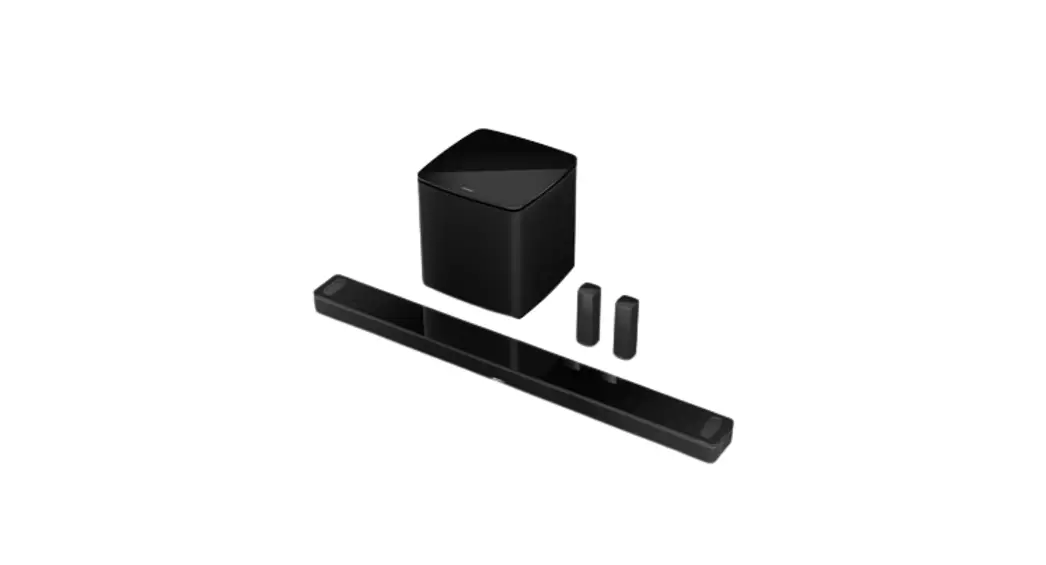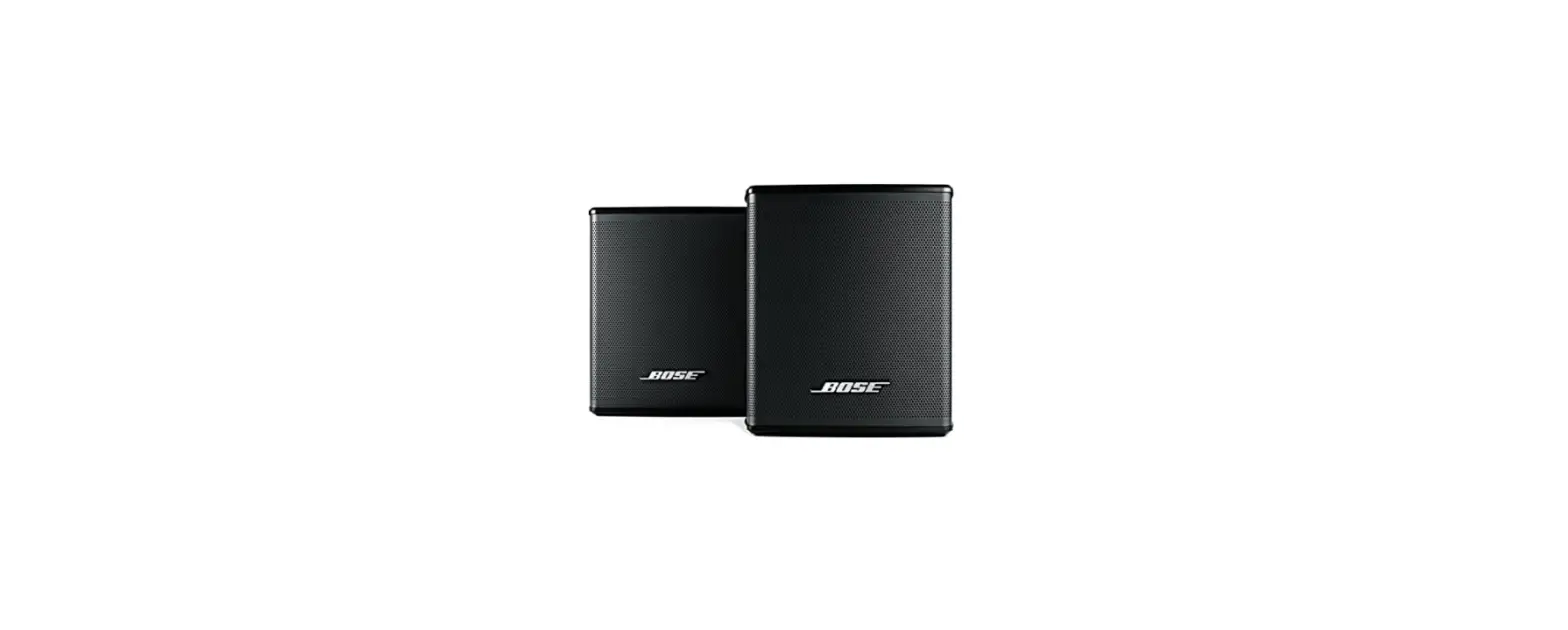

Bose 809281-1100 Surround Speakers
IMPORTANT SAFETY INSTRUCTIONS
Please read and keep all safety, security, and use instructions.
Bose Corporation hereby declares that this product is in compliance with the essential requirements and other relevant provisions of Directive 2014/53/EU and all other applicable EU directive requirements.
The complete declaration of conformity can be found at: www.Bose.com/compliance
This product conforms to all applicable Electromagnetic Compatibility Regulations 2016 and all other applicable UK regulations. The complete declaration of conformity can be found at: www.Bose.com/compliance
Bose Corporation hereby declares that this product is in compliance with the essential requirements per Radio Equipment Regulations 2017 and all other applicable UK regulations. The complete declaration of conformity can be found at: www.Bose.com/compliance
Important Safety Instructions
- Read these instructions.
- Keep these instructions.
- Heed all warnings.
- Follow all instructions.
- Do not use this apparatus near water.
- Clean only with a dry cloth.
- Do not block any ventilation openings. Install in accordance with the manufacturer’s instructions.
- Do not install near any heat sources such as radiators, heat registers, stoves, or other apparatus (including amplifiers) that produce heat.
- Protect the power cord from being walked on or pinched particularly at plugs, convenience receptacles, and the point where they exit from the apparatus.
- Only use attachments/accessories specified by the manufacturer.
- Use only with the cart, stand, tripod, bracket, or table specified by the manufacturer, or sold with the apparatus. When a cart is used, use caution when moving the cart/apparatus combination to avoid injury from tip-over.
- Unplug this apparatus during lightning storms or when unused for long periods of time.
- Refer all servicing to qualified personnel. Servicing is required when the apparatus has been damaged in any way, such as power-supply cord or plug is damaged, liquid has been spilled or objects have fallen into the apparatus, the apparatus has been exposed to rain or moisture, does not operate normally, or has been dropped.
Contains small parts which may be a choking hazard. Not suitable for children under age 3.
This product contains magnetic material. Consult your physician on whether this might affect your implantable medical device.
- To reduce the risk of fire or electrical shock, do NOT expose this product to rain, liquids or moisture.
- Do NOT expose this product to dripping or splashing, and do not place objects filled with liquids, such as vases, on or near the product.
- Keep the product away from fire and heat sources. Do NOT place naked flame sources, such as lighted candles, on or near the product.
- Do NOT make unauthorized alterations to this product.
- Do NOT use a power inverter with this product.
- Do NOT use in vehicles or boats.
- The speaker wire and interconnect cables included with this system are not approved for in-wall installation.
Please check your local building codes for the correct type of wire and cable required for in-wall installation. - Where the mains plug or an appliance coupler is used as the disconnect device, the disconnect device shall remain readily operable.
- Due to ventilation requirements, Bose does not recommend placing the product in a confined space such as in a wall cavity or in an enclosed cabinet.
WHAT’S IN THE CARTON
CONTENTS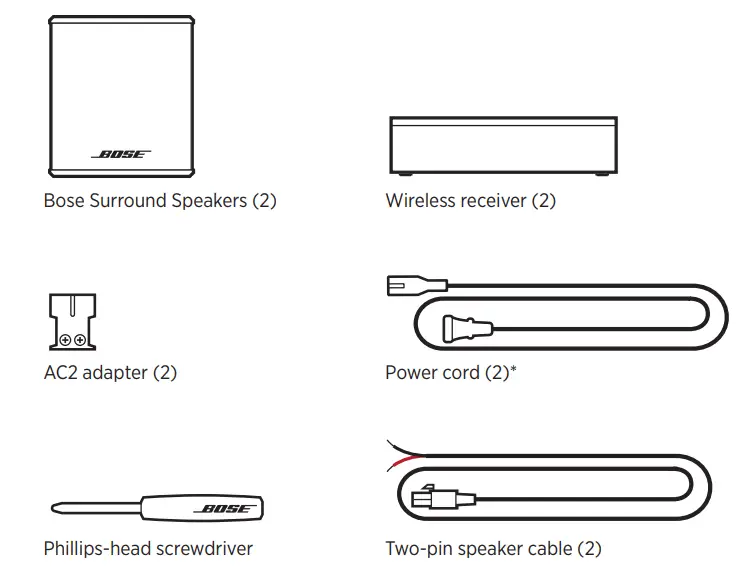
Confirm that the following parts are included:
*May ship with multiple power cords. Use the power cord for your region.
NOTE: If any part of the product is damaged, do NOT use it. Contact your authorized Bose dealer or Bose customer service.
Visit: worldwide.Bose.com/Support
SYSTEM PLACEMENT
RECOMMENDATIONS
To avoid wireless interference, keep other wireless equipment 1 – 3 ft. (0.3 – 0.9 m) away from the wireless receivers. Place the speakers and wireless receivers outside and away from metal cabinets, other audio/video components, and direct heat sources.
| COMPONENT | PLACEMENT RECOMMENDATIONS |
|
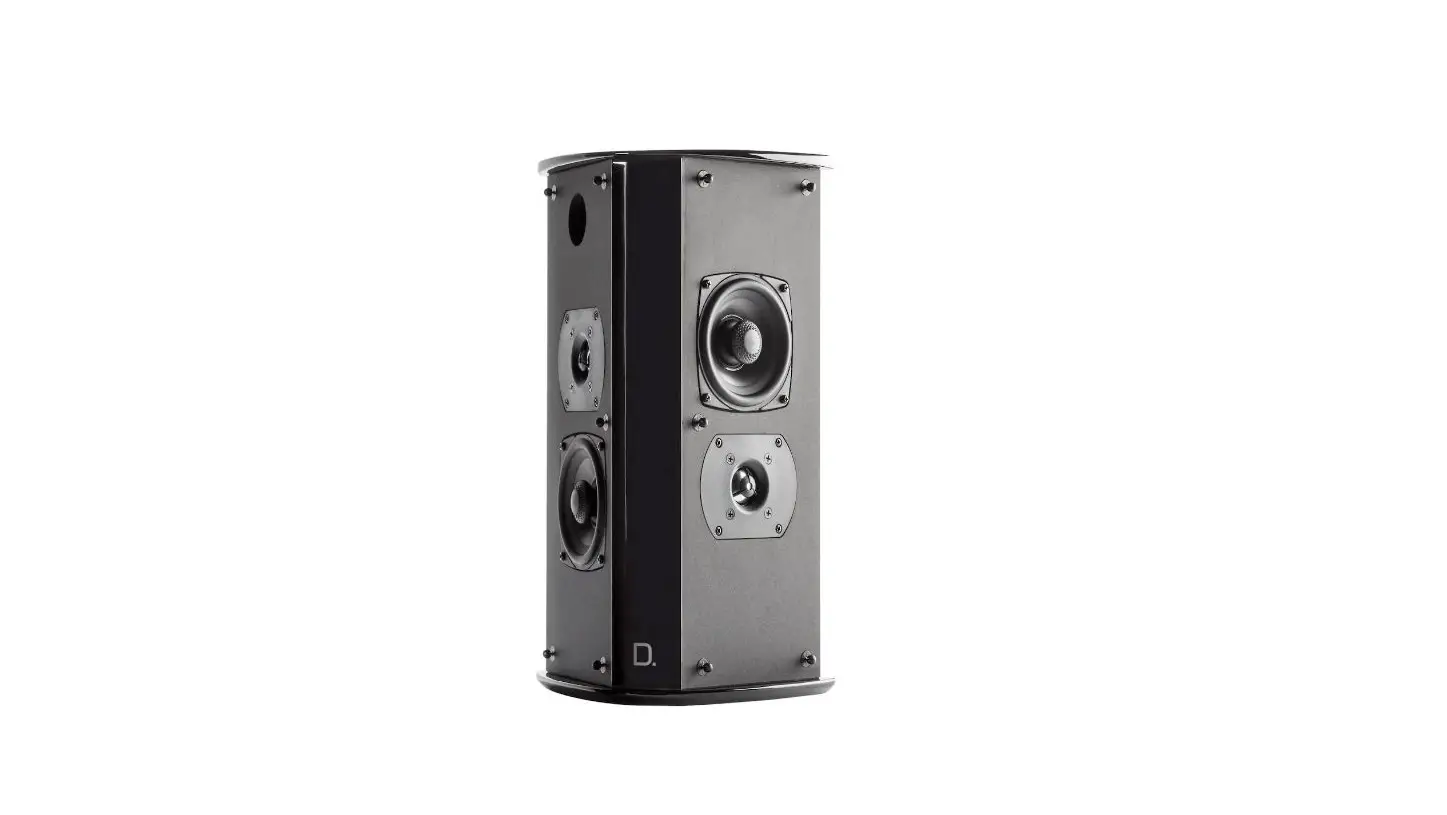
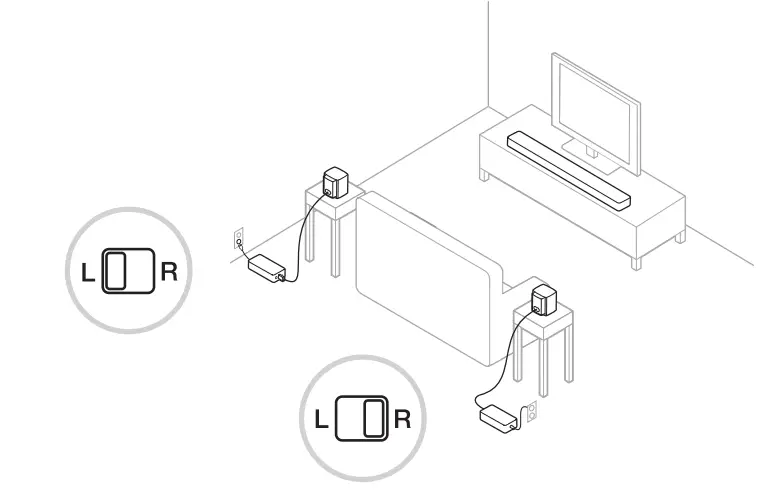
Rear speakers | Place the speakers on their rubber feet on a stable and level surface. Place the speakers at ear height or higher in the back of the room.
If placing the speakers in an enclosed bookcase shelf, position them at the front edge of the shelf. For a sound that is directed straight at the listener, aim the speakers in towards the listener. For a sound that reflects off the walls to fill the room, aim the speakers out towards a rear or side wall. |
|
Wireless receivers | Confirm that the switch on one wireless receiver is set to R (right). Confirm that the switch on the other wireless receiver is set to L (left). Facing the TV, place the speaker and R wireless receiver on the right
side of the room. Facing the TV, place the speaker and L wireless receiver on the left side of the room. Make sure there is an AC (mains) outlet near each wireless receiver. |
Mount the speakers
You can mount the speakers on wall brackets, ceiling mounts, floor stands or table stands. To purchase these accessories, visit Bose.com or contact your local Bose dealer.
CAUTION: Only use Bose hardware to mount the speakers. Using unauthorized mounts may damage your Bose system and its components.
WIRELESS RECEIVER SETUP
CONNECT THE ADAPTERS
- Using the screwdriver, turn the screws to the left (counter-clockwise) to loosen the wire terminals.

- Insert the red, stripped end of the two-pin cable marked H into the red H terminal.
- Insert the black, stripped end of the two-pin cable into the silver z terminal.

NOTE: Be sure to only insert the stripped and tinned portions of each exposed wire to avoid clamping the wire’s insulation. - Using the screwdriver, turn the screws to the right (clockwise) to secure the wires into the terminals.
- Repeat steps 1 – 4 to connect the other adapter.
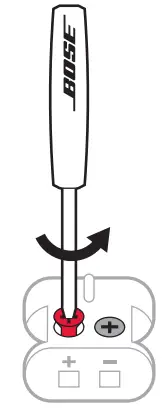
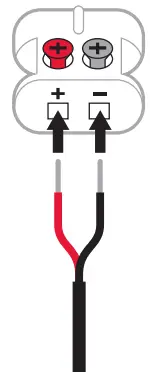
IDENTIFY SWITCH SETTINGS ON THE WIRELESS RECEIVERS
The speakers connect to wireless receivers to communicate with your soundbar.
The receivers come preset to a left and right channel out of the box. You can use the switch on the front of the receiver to adjust the channel settings.
- Confirm that the switch on one wireless receiver is set to L (left).
- Confirm that the switch on the other wireless receiver is set to R (right).

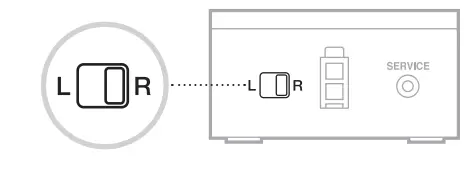
NOTE: Make sure that one wireless receiver is always set to L (left) and the other is set to R (right).
CONNECT THE SPEAKERS
- Insert the adapter into the back of the speaker.
- Insert the other end of the two-pin cable into the wireless receiver.

You hear or feel a click. - Repeat steps 1 – 2 to connect the other speaker.
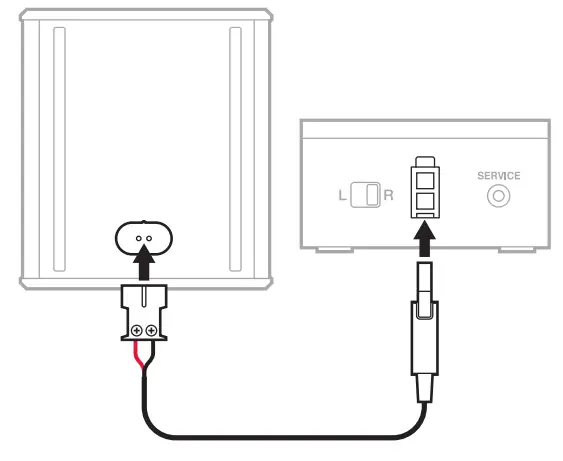
POWER
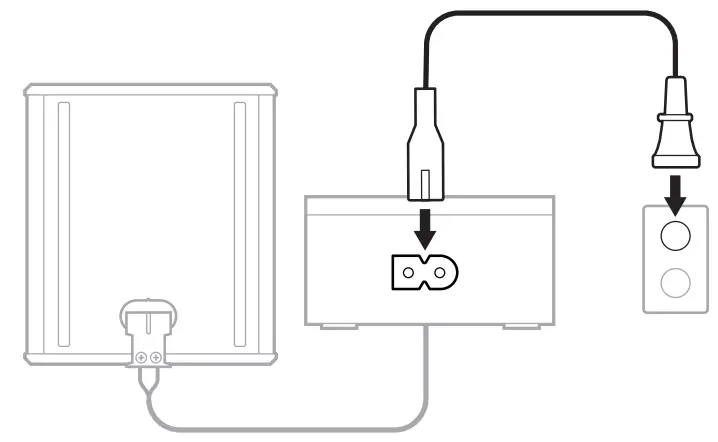
CONNECT THE BOSE SURROUND SPEAKERS TO POWER
- Connect the power cord to the wireless receiver.

- Plug the other end of the power cord into an AC (mains) power outlet.
- Repeat steps 1 – 2 to connect the other speaker to power.
CONNECT TO A SOUNDBAR
CHOOSE YOUR CONNECTION METHOD
The way you connect the surround speakers depends on your soundbar. Choose your connection method from the table below.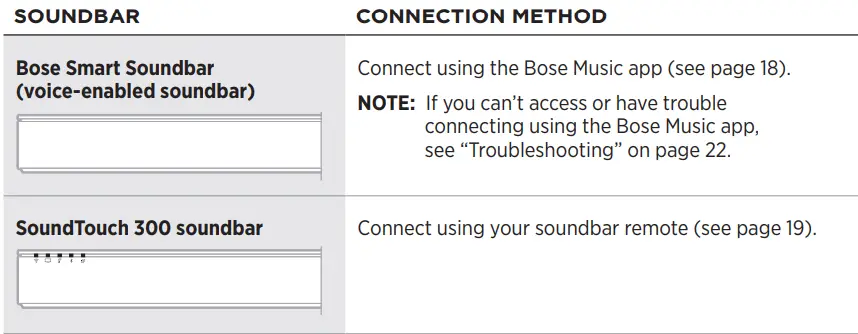
CONNECT USING THE BOSE MUSIC APP
- In the Bose Music app, select your soundbar.
- Go to the Settings menu to add your surround speakers.
New to the Bose Music app?
- On your mobile device, download the Bose Music app.

- Follow the app instructions.
CONNECT USING THE SOUNDTOUCH 300 REMOTE
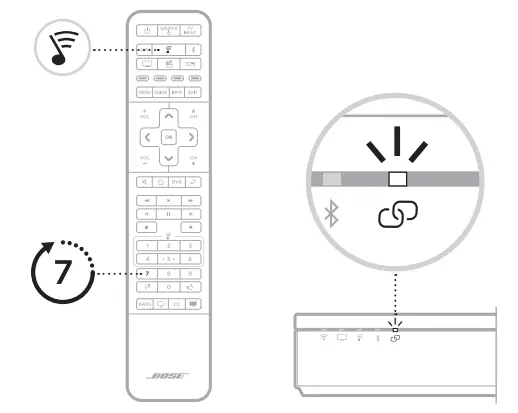
- On your soundbar’s remote, press the SoundTouch button
 .
. - Press and hold k until the connectivity
 light on the soundbar blinks white.
 Once connected, you hear a tone. The light on the back of the wireless receivers and on the soundbar glow white.
NOTES: Connecting may take several minutes.
If the surround speakers don’t connect to the soundbar, see “Troubleshooting” on page 22.
 .
. light on the soundbar blinks white.
 Once connected, you hear a tone. The light on the back of the wireless receivers and
 CHECK FOR SOUND
NOTE: To avoid hearing distorted audio, turn off your TV speakers. Refer to your TV owner’s guide for more information.
- Power on your TV.
- If you are using a cable/satellite box or another secondary source:
- Power on this source.
- If this source is connected to your TV, select the appropriate TV input.
- Power on the soundbar.
You hear sound coming from the surround speakers.
NOTE: If you don’t hear sound from the surround speakers, see “Troubleshooting” on page 23.
SURROUND SPEAKER STATUS
STATUS LIGHT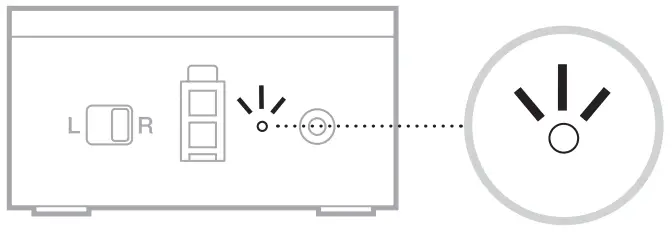
The light on the front of the wireless receiver shows the system status.
| LIGHT ACTIVITY | SYSTEM STATE |
| Solid white | Connected to the soundbar |
| Blinking white | Downloading a software update |
| Solid amber (dim) | Disconnected from the soundbar |
| Blinking amber | Ready to connect to the soundbar |
| Blinking red | Error – contact Bose customer service |
CARE AND MAINTENANCE
CLEAN THE SURROUND SPEAKERS
Clean the exterior of the surround speakers with a soft, dry cloth.
CAUTIONS:
- Do NOT allow liquids to spill onto the surround speakers or into any openings.
- Do NOT use any sprays near the surround speakers.
- Do NOT use any solvents, chemicals or cleaning solutions containing alcohol, ammonia or abrasives.
- Do NOT allow objects to drop into any openings.
REPLACEMENT PARTS AND ACCESSORIES
Replacement parts and accessories can be ordered through Bose customer service.
Visit: worldwide.Bose.com/Support
LIMITED WARRANTY
Your surround speakers are covered by a limited warranty. Visit our website at global.Bose.com/warranty for details of the limited warranty.
To register your product, visit global.Bose.com/register for instructions. Failure to register will not affect your limited warranty rights.
TROUBLESHOOTING
TRY THESE SOLUTIONS FIRST
If you experience problems with the surround speakers: Unplug the power cords for the wireless receivers and soundbar, wait 30 seconds and plug them firmly into a live AC (mains) outlet. Secure all cables. Check the wireless receiver status light (see page 20). Move the surround speakers and soundbar away from possible interference (wireless routers, cordless phones, televisions, microwaves, etc.). Place the surround speakers according to the placement guidelines (see page 12).
OTHER SOLUTIONS
If you could not resolve your issue, see the table below to identify symptoms and solutions to common problems. If you are unable to resolve your issue, contact Bose customer service. Visit: worldwide.Bose.com/contact
| SYMPTOM | SOLUTION |
| Bose Music app doesn’t work on mobile device | Make sure your mobile device is compatible with the Bose Music app and meets minimum system requirements. For more information, refer to the app store on your mobile device. |
|
Surround speakers don’t connect to the soundbar | Confirm that the status light is blinking amber, indicating that the wireless receivers are ready to connect (see page 20).
Repeat the connection process (see page 17). Unplug the power cords for the wireless receivers and soundbar, wait 30 seconds and plug them firmly into a live AC (mains) outlet. |
| SYMPTOM | SOLUTION |
| Intermittent or no audio from the surround speakers | Unmute the system. Increase the volume.
Confirm that the soundbar is playing audio. If not, refer to your soundbar owner’s guide for troubleshooting information (see page 24). Confirm that the status light is solid white, indicating that the surround speakers are connected to the soundbar (see page 20). Test different sources (if available). Make sure that the audio you’re playing supports surround sound. NOTE: Most music and some TV shows are recorded in stereo, meaning that they have no audio assigned to play from surround speakers. Make sure that your TV can output surround sound audio (refer to your TV owner’s guide). Repeat the connection process (see page 17). Make sure that one wireless receiver is set to the L (left) channel and the other is set to the R (right) channel (see page 15). Make sure that the positive and negative speaker cable wires are securely inserted into the adapters. Firmly insert the adapters into the speakers. Place the surround speakers according to the placement guidelines (see page 12). |
| Poor or distorted sound from
the surround speakers | Test different sources (if available).
Place the surround speakers according to the placement guidelines (see page 12). Make sure that the positive and negative speaker cable wires are securely inserted into the adapters. Firmly insert the adapters into the speakers. If placing the speakers in a cabinet or on a shelf, position them as close as possible to the front edge of the shelf for optimum acoustic performance. |
ACCESS YOUR SOUNDBAR OWNER’S GUIDE
For instructions and troubleshooting specific to your soundbar, refer to your soundbar owner’s guide. Visit: Bose Smart Soundbar: worldwide.Bose.com/Support
SoundTouch 300 soundbar: global.Bose.com/Support/ST300
REGULATORY AND LEGAL INFORMATION
NOTE: This equipment has been tested and found to comply with the limits for a Class B digital device, pursuant to Part 15 of the FCC Rules. These limits are designed to provide reasonable protection against harmful interference in a residential installation. This equipment generates, uses, and can radiate radio frequency energy and, if not installed and used in accordance with the instructions, may cause harmful interference to radio communications. However, there is no guarantee that interference will not occur in a particular installation. If this equipment does cause harmful interference to radio or television reception, which can be determined by turning the equipment off and on, the user is encouraged to try to correct the interference by one or more of the following measures:
- Reorient or relocate the receiving antenna.
- Increase the separation between the equipment and the receiver.
- Connect the equipment into an outlet on a circuit different from that to which the receiver is connected.
- Consult the dealer or an experienced radio/TV technician for help.
Changes or modifications not expressly approved by Bose Corporation could void the user’s authority to operate this equipment.
This device complies with part 15 of the FCC Rules and with ISED Canada license-exempt RSS standard(s). Operations subject to the following two conditions:
- This device may not cause harmful interference, and
- this device must accept any interference received, including interference that may cause undesired operation.
This device complies with FCC and ISED Canada radiation exposure limits set forth for the general population. This equipment should be installed and operated with a minimum distance of 20 cm between the radiator and your body.
This device for operation in the band 5150 – 5250 MHz is only for indoor use to reduce the potential for harmful interference to other co-channel systems.
CAN ICES-3(B)/NMB-3(B)
Product Power State Table
The product, in accordance with the Ecodesign Requirements for Energy Related Products Directive 2009/125/EC and the Ecodesign for Energy-Related Products and Energy Information (Amendment) (EU Exit) Regulations 2020, is in compliance with the following norm(s) or document(s): Regulation (EC) No. 1275/2008, as amended by Regulation (EU) No. 801/2013.
|
Required Power State Information | Power Modes | |
| Standby | Networked Standby | |
| Power consumption in specified power mode, at 230V/50Hz input | £ 0.5 W | Bose wireless £ 2.0 W |
| Time after which equipment is automatically switched into mode | £ 2.5 hours | £ 20 minutes |
| Power consumption in networked standby if all wired network ports are connected and all wireless network ports are activated, at 230V/50Hz input | N/A | £ 2.0 W |
|
Network port deactivation/activation procedures. Deactivating all networks will enable standby mode. | Per Annex II 3(a) of Regulation 801/2013 (“Lot 26” amendment of 1275/2008), the requirement to deactivate a wireless port “does not apply to products which rely on a single wireless network connection for intended use and have no wired network connection.” | |
REGULATORY AND LEGAL INFORMATION\
For Europe:
Frequency bands of operation 2400 to 2483.5 MHz, 5150 to 5350 MHz, and 5470 to 5725 MHz.
Maximum transmit power less than 20 dBm EIRP.
Frequency band of operation 5725 to 5850 MHz.
Maximum transmit power less than 14 dBm (25mW) EIRP.
Maximum transmit power is below regulatory limits such that SAR testing is not necessary and exempt per applicable regulations.
This device is restricted to indoor use when operating in the 5150 to 5350 MHz frequency range in all EU Member States listed in the table.
| BE | DK | IE | UK (NI) | FR | CY | SK | HU | AT | SE |
| BG | DE | PT | EL | HR | LV | LT | MT | PL | |
| CZ | EE | FI | ES | IT | RO | LU | NL | SI | |
This symbol means the product must not be discarded as household waste, and should be delivered to an appropriate collection facility for recycling. Proper disposal and recycling helps protect natural resources, human health and the environment. For more information on the disposal and recycling of this product, contact your local municipality, disposal service, or the shop where you bought this product.
Management Regulation for Low-power Radio-frequency Devices
Article XII
According to “Management Regulation for Low-power Radio-frequency Devices” without permission granted by the NCC, any company, enterprise, or user is not allowed to change frequency, enhance transmitting power or alter original characteristic as well as performance to an approved low power radio-frequency devices.
Article XIV
The low power radio-frequency devices shall not influence aircraft security and interfere legal communications; If found, the user shall cease operating immediately until no interference is achieved. The said legal communications means radio communications operated in compliance with the Telecommunications Act. The low power radio-frequency devices must be susceptible with the interference from legal communications or ISM radio wave radiated devices.
China Restriction of Hazardous Substances Table
| Names and Contents of Toxic or Hazardous Substances or Elements | ||||||
| Toxic or Hazardous Substances and Elements | ||||||
|
Part Name | Lead (Pb) | Mercury (Hg) | Cadmium (Cd) | Hexavalent (CR(VI)) | Polybrominated Biphenyl
(PBB) | Polybrominated diphenylether (PBDE) |
| PCBs | X | O | O | O | O | O |
| Metal Parts | X | O | O | O | O | O |
| Plastic Parts | O | O | O | O | O | O |
| Speakers | X | O | O | O | O | O |
| Cables | X | O | O | O | O | O |
| This table is prepared in accordance with the provisions of SJ/T 11364.
O: Indicates that this toxic or hazardous substance contained in all of the homogeneous materials for this part is below the limit requirement of GB/T 26572. | ||||||
| X: Indicates that this toxic or hazardous substance contained in at least one of the homogeneous materials used for this part is above the limit requirement of GB/T 26572. | ||||||
Taiwan Restriction of Hazardous Substances Table
| Equipment name: Powered Speaker, Type designation: 429148 | ||||||
| Restricted substances and its chemical symbols | ||||||
|
Unit | Lead (Pb) |
Mercury (Hg) |
Cadmium (Cd) | Hexavalent chromium (Cr+6) | Polybrominated biphenyls (PBB) | Polybrominated diphenyl ethers (PBDE) |
| PCBs | – | ○ | ○ | ○ | ○ | ○ |
| Metal Parts | – | ○ | ○ | ○ | ○ | ○ |
| Plastic Parts | ○ | ○ | ○ | ○ | ○ | ○ |
| Speakers | – | ○ | ○ | ○ | ○ | ○ |
| Cables | – | ○ | ○ | ○ | ○ | ○ |
| Note 1: “○” indicates that the percentage content of the restricted substance does not exceed the percentage of reference value of presence.
Note 2: The “−” indicates that the restricted substance corresponds to the exemption. | ||||||
Date of Manufacture: The eighth digit in the serial number indicates the year of manufacture; “1” is 2011 or 2021.
China Importer: Bose Electronics (Shanghai) Company Limited, Part C, Plant 9, No. 353 North Riying Road, China (Shanghai) Pilot Free Trade Zone
EU Importer: Bose Products B.V., Gorslaan 60, 1441 RG Purmerend, The Netherlands
Taiwan Importer: Bose Taiwan Branch, 9F-A1, No. 10, Section 3, Minsheng East Road, Taipei City 104, Taiwan
Phone Number: +886-2-2514 7676
Mexico Importer: Bose de México, S. de R.L. de C.V., Paseo de las Palmas 405-204, Lomas de Chapultepec, 11000 México, D.F. Phone Number: +5255 (5202) 3545
UK Importer: Bose Limited, Bose House, Quayside Chatham Maritime, Chatham, Kent, ME4 4QZ, United Kingdom
Input Rating: 100 – 240V 50/60Hz 30W
The CMIIT ID is located on the bottom of the product.
Please complete and retain for your records
The serial and model numbers are located on the bottom of the surround speakers.
Serial number: _____________________________________________________________________
Model number: ____________________________________________________________________
Please keep your receipt with your owner’s guide. Now is a good time to register your Bose product.
You can easily do this by going to global.Bose.com/register
Security Information
This product is capable of receiving automatic security updates from Bose. To receive automatic security updates, you must complete the product setup process in the Bose Music app and connect the product to the Internet. If you do not complete the setup process, you will be responsible for installing security updates that Bose makes available.
Apple and the Apple logo are trademarks of Apple Inc., registered in the U.S. and other countries. App Store is a service mark of Apple Inc. The Bluetooth® word mark and logos are registered trademarks owned by Bluetooth SIG, Inc. and any use of such marks by Bose Corporation is under license.
Google and Google Play are trademarks of Google LLC.
Wi-Fi is a registered trademark of Wi-Fi Alliance®.
Bose, Bose Music, the Bose Music logo, Bose Smart Soundbar, Bose Surround Speakers, SoundTouch, and the wireless note design are registered trademarks of Bose Corporation.
Bose Corporation Headquarters: 1-877-230-5639
©2021 Bose Corporation. No part of this work may be reproduced, modified, distributed, or otherwise used without prior written permission.
LICENSE DISCLOSURES
The following license disclosure applies to the FreeRTOS software package that is included as a component of your Bose Surround Speaker product:
Permission is hereby granted, free of charge, to any person obtaining a copy of this software and associated documentation files (the “Software”), to deal in the Software without restriction, including without limitation the rights to use, copy, modify, merge, publish, distribute, sublicense, and/or sell copies of the Software, and to permit
persons to whom the Software is furnished to do so, subject to the following conditions:
The above copyright notice and this permission notice shall be included in all copies or substantial portions of the Software.
THE SOFTWARE IS PROVIDED “AS IS”, WITHOUT WARRANTY OF ANY KIND, EXPRESS OR IMPLIED, INCLUDING BUT NOT LIMITED TO THE WARRANTIES OF MERCHANTABILITY, FITNESS FOR A PARTICULAR PURPOSE AND NON-INFRINGEMENT. IN NO EVENT SHALL THE AUTHORS OR COPYRIGHT HOLDERS BE LIABLE FOR ANY CLAIM, DAMAGES, OR OTHER LIABILITY, WHETHER IN AN ACTION OF CONTRACT, TORT OR OTHERWISE, ARISING FROM, OUT OF OR IN CONNECTION WITH THE SOFTWARE OR THE USE OR OTHER DEALINGS IN THE SOFTWARE.
FAQS
What kind of wall mount I can use for these speakers?
They are compatible with the UB-20II wall mounts.
Yes
No, they are not compatible.
The Surround Speakers listed are designed to be used wirelessly with the SoundTouch 300, Soundbar 500 or
Soundbar 700 only.
Stands are sold separately either floor or table stand version are the base of the choice provides ample length for the cords
No. Will not pair with other soundbars.
Unfortunately no. It can be wall-mounted or have a floor stand.
These speakers are compatible with Bose sound bar 500 Bose sound bar 700 and Sound Touch 300 sound bar
These speakers are specific for 500 and 700 surround system
The Soundbar 500 can be paired to one set of Surround Speakers at a time. It is not possible to connect multiple pairs of Surround Speakers.
Simply plug the adapters into a power source and wirelessly connect the receivers to the sound bar to enjoy your entertainment in minutes
Compatible with Bose sound bar 500 Bose sound bar 700 and Sound Touch 300 sound bar
Works better in the back of the room for surround sound.
This is for two speakers.
No. Not 220.