Bose
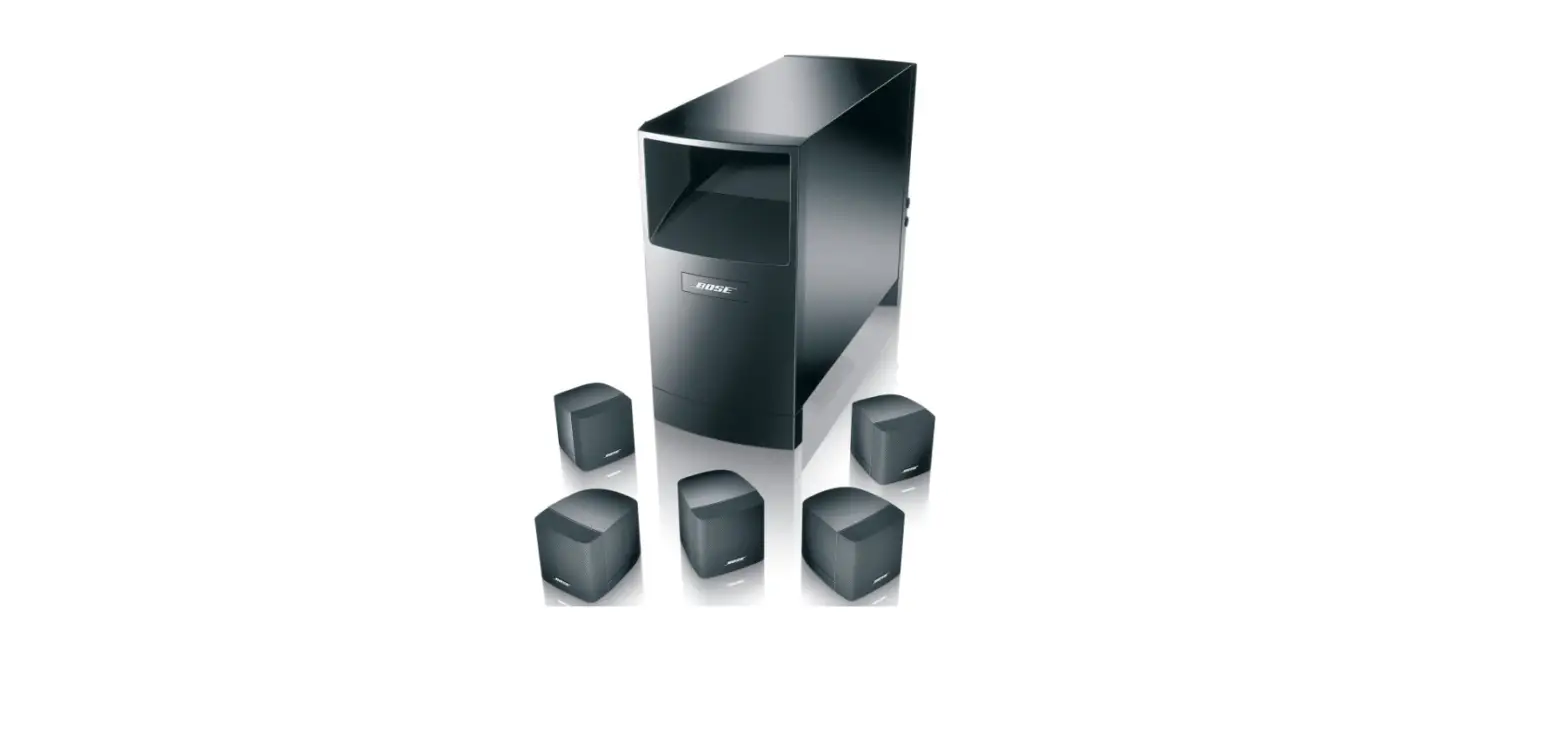
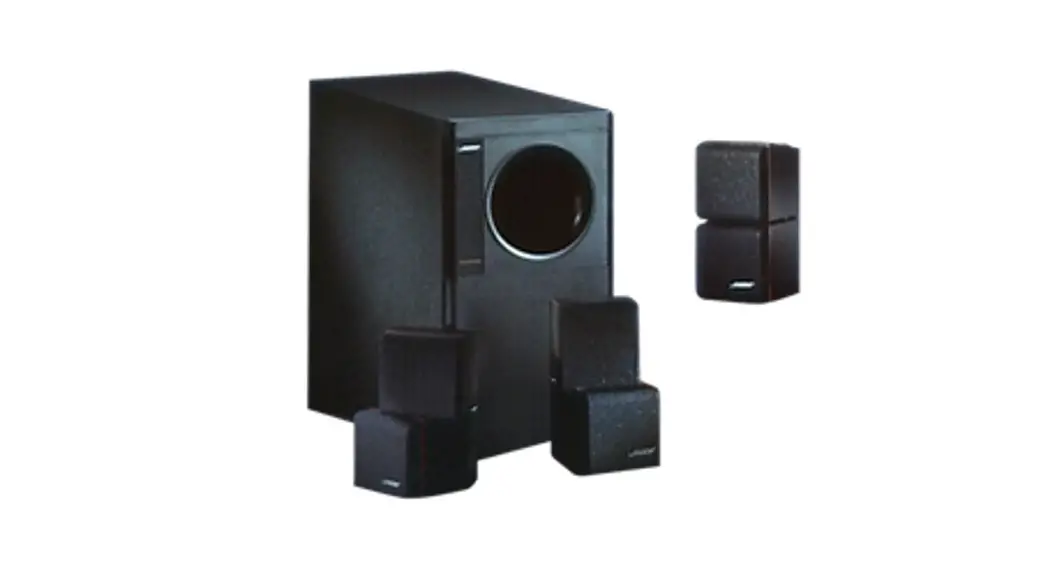
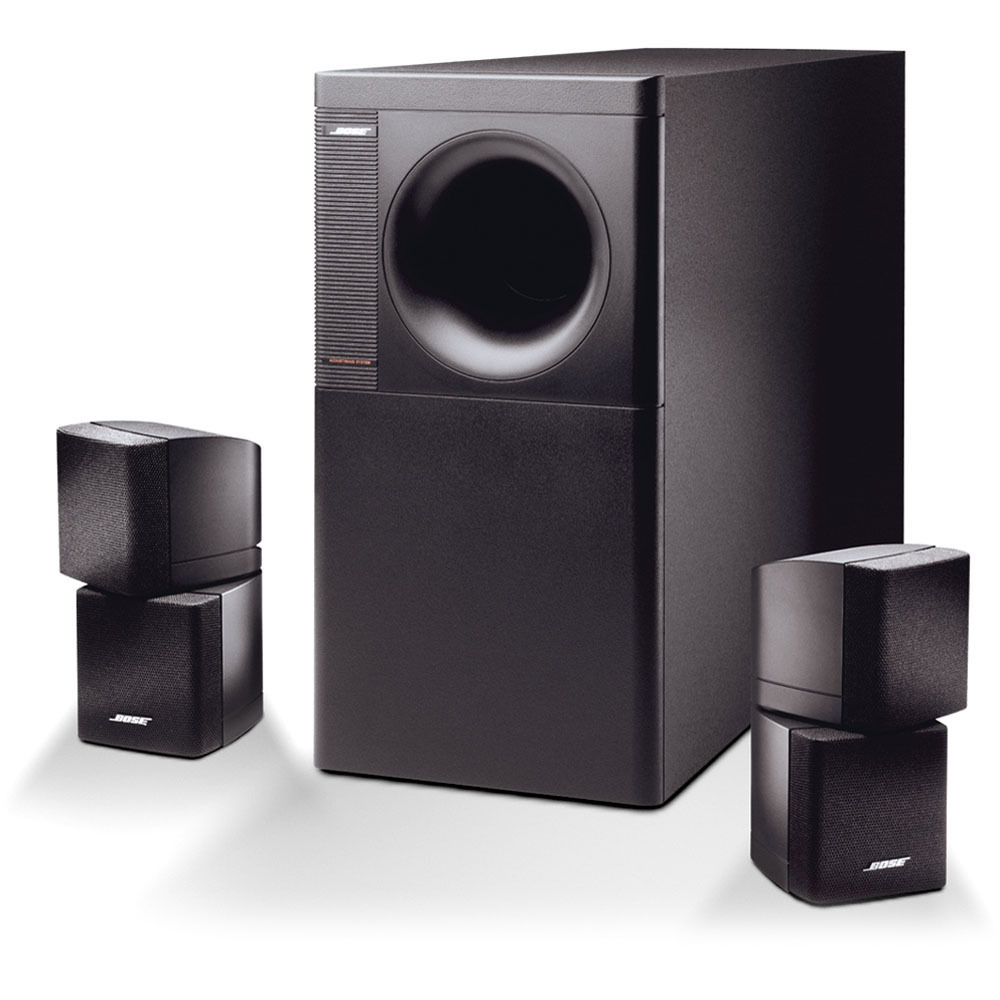
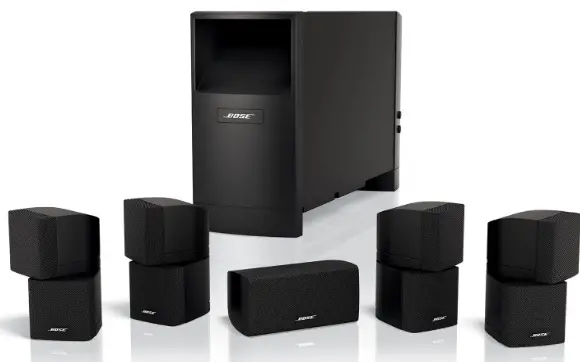
Bose 350664-1110 Home Entertainment Speaker System
Specifications
- CUBE SPEAKER ARRAY AND CENTER FRONT SPEAKER WEIGHT:4 lb. (1.1 kg) each
- CUBE SPEAKER ARRAY AND CENTER FRONT SPEAKER DIMENSIONS:2″H x 3.1″W x 4.0″D (15.7 cm x 7.9 cm x 10.2 cm)
- MODULE WEIGHT: 35 lb. (15.8 kg)
- MODULE DIMENSIONS:3″H x 8.1″W x 25.3″D (41.4 cm x 20.6 cm x 64.3 cm)
- SPEAKER DRIVER COMPLEMENT: Cube speaker arrays and center front speaker: Two 2.5″ (6.35 cm) Twiddler speakers, Powered Acoustimass module: Two 5.25″ (13 cm) woofers
- POWER RATING: Canada: 100-127V~ 50/60 Hz 270W/ Europe/Australia: 220-240V~ 50/60 Hz 270W
- CONNECTIVITY: Compatible with A/V receivers and amplifiers rated from 10 to 200 watts per channel, rated from 4 to 8 ohms
Introduction
With the Bose Acoustimass 10 Series IV home entertainment speaker system, your music and movies will have 5.1-channel sound. Enjoy Bose sound by connecting it to your home theatre receiver. His setup consists of a centre channel speaker, four Direct/Reflecting Cube speakers, and an Acoustimass bass module. Instead of big speakers, the Acoustimass 10 Series IV speaker system is designed to fill the room with lovely sound. The Acoustimass module can be hidden almost anywhere in the room, and you still hear dramatic sound that appears to be coming from the tiny speaker arrays. The Acoustimass module’s two downward-firing drivers provide robust performance for the lowest audible notes and effects. Technology in the module helps to reduce auditory distortion.
Please read this owner’s guide
Please take the time to follow this owner’s guide carefully. It will help you set up and operate your system properly and enjoy all of its advanced features. Please save your owner’s guide for future reference.
For your safety
WARNING: To reduce the risk of fire or electric shock, do not expose the powered Acoustimass® module to rain or moisture.
WARNING: No naked flame sources, such as lighted candles, should be placed on the apparatus.
These CAUTION marks are located on the rear of the Acoustimass module:
The lightning flash with arrowhead symbol within an equilateral triangle is intended to alert the user to the presence of uninsulated, dangerous voltage within the system enclosure that may be of sufficient magnitude to constitute a risk of electric shock.
The exclamation point within an equilateral triangle, as marked on the system, is intended to alert the user to the presence of important operating and maintenance instructions in this owner’s guide.
CAUTION: To prevent electric shock, match the wide blade of the line cord plug to the wide slot of the AC (mains) receptacle. Insert fully.
This product conforms to the EMC Directive 89/336/EEC and to the Low Voltage Directive 73/23/EEC. The complete Declaration of Conformity can be found on www.bose.com/static/compliance/index.html.
Additional safety information
See the additional safety information on the Important Safety Instructions page enclosed with your speaker system.
SETTING UP
Before you begin
We appreciate your choice of the Bose® Acoustimass® 6 Series III or Acoustimass 10 Series IV home entertainment speaker system.
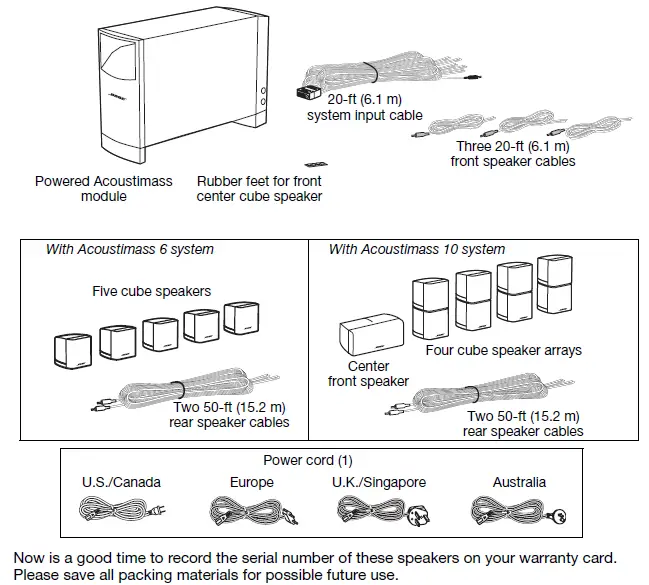
The Acoustimass 6 features five small cube speakers, while the Acoustimass 10 system features four cube speaker arrays and a center front speaker. These speakers, together with the Acoustimass module, reproduce the full spectrum of multi-channel digital programming for a powerful and realistic home theater experience.
Unpacking the carton
Carefully unpack the carton contents
- Remove the brown inner carton containing the small speakers.
- Gently roll the carton onto its side and pull out the Acoustimass module. WARNING: To avoid injury, use care in lifting the module, this weighs roughly 30 lb. (14 kg).
WARNING: To avoid danger of suffocation, keep the plastic bags that wrap these speakers out of the reach of children.
Placing your speakers to achieve realistic home theater sound
Keep these guidelines in mind when choosing a location for each speaker:
- The Acoustimass® module should be at least 2 feet (.6 m) from your TV set to prevent interference.
- All of the small speakers are magnetically shielded to prevent interference with a TV picture.
- Select a stable and level surface for each of the small speakers. Vibration can cause them to move, particularly on smooth surfaces like marble, glass, or highly polished wood. To prevent this problem, rubber feet are provided for attachment to the bottom of the center front speaker.
Note: You may order additional rubber feet, free of charge, by contacting Bose. Refer to the address list included in the carton.
- In an Acoustimass 10 system, the center front speaker is for use at the front of the room and near the center of your TV. The other cube array speakers are identical and can be placed interchangeably around the room (Figure 2a and 2b).
- The top and bottom cube on each cube array speaker can be rotated to create room-filling sound patterns.
- In the Acoustimass 6 system, all five single cube speakers are identical and can be placed interchangeably around the room (Figure 2c and 2d).
The shape and size of your room and location of the furniture in it will affect your choice of speaker locations. Use the examples below as the basis, but not the rule, for your home theater setup.
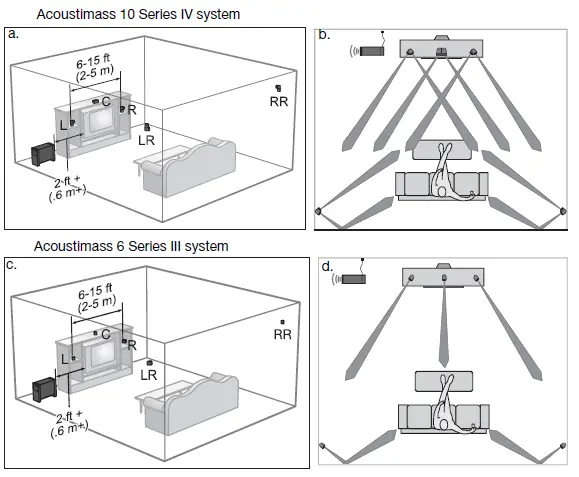
Front left and right speakers
The goal for these is to create a sound image wider than the screen that seems natural to viewers sitting anywhere in the room.
- Place these two front speakers on either side of your TV.
- Keep them from 6 feet (2 m) to 15 feet (5 m) apart (as shown in Figure 2 on page 5).
Center speaker
Sound from the center speaker should seem to come from within the picture to give the most realistic performance of on-screen action and dialogue.
- Place the center speaker above, on top of, or below your TV. Do NOT rest the weight of the TV on the speaker.
- Keep the speaker in line with the vertical center of the screen, if possible, for the most accurate reproduction of dialogue (as shown in Figure 2 on page 5).
CAUTION: Before placing the center speaker on top of your television, attach the four supplied rubber feet to the bottom of the speaker. Position two of the feet near the front edge and close together on the bottom surface. Place the other two feet at the rear outer edges on the bottom.
Rear speakers
While the rear (surround) speakers may deliver some dialogue, they serve primarily to deliver discrete sounds and special effects that expand the visual image. They help bring the viewer into the center of the action.
Choose locations that are practical and convenient, while considering these recommended guidelines:
- Position the left and right rear speakers so they can deliver sound on both sides of the viewer, rather than from directly behind (as shown in Figure 2 on page 5).
- Place these speakers at the same height as the ears of a seated viewer or higher.
- For the Acoustimass® 10 system, rotate the top and bottom sections of the rear cube speaker arrays to direct the sound to the front and back of the listener (see Figure 3 on page 7).
- For the Acoustimass 6 system, aim the rear cube speakers slightly behind the listener or reflect the sound off the rear wall (see Figure 2 on page 5).
Powered Acoustimass® module
Acoustimass® speaker technology makes it difficult to locate the source of low-frequency sound from this module. So feel free to hide it from view, and:
- Locate the module at the same end of the room as the TV screen.
- Keep the module at least 2 feet (.6 m) from your TV set to prevent interference.
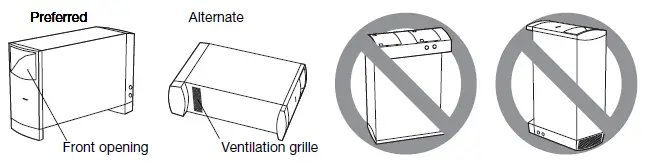
- To increase bass effects, turn the front opening toward a wall; turn it away from the wall to decrease bass effects.
- Keep both the front opening and the ventilation grille on the bottom of the module at least 2 inches (5 cm) from any other surface.
- Do not block the ventilation grilles located on the bottom of the module. Impeding ventilation can cause a reduction in the bass-frequency output from the module.
Making the connections
Only the Acoustimass module connects to your receiver. The small speakers all connect directly to the Acoustimass module.
WARNING: Connecting the small speakers to a receiver can result in damage to your system and possible electric shock.
Connecting speakers to the Acoustimass module
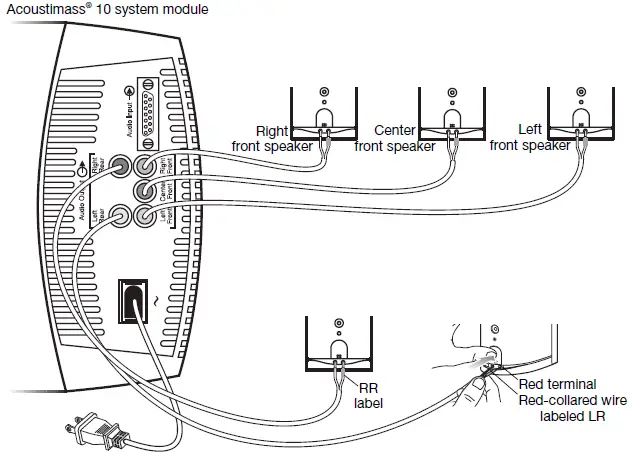
Insert the connector on each speaker cable into the jack on the module. Refer to the label on each connector to match it to the proper jack.

- Use the supplied 20-ft (6.1 m) speaker cables for the three front speakers. Insert the connectors, as labeled, into jacks on the module as follows. (Figure 5 on page 8).
- R goes into the jack labeled Right Front.
- C goes into the jack labeled Center Front.
- L goes into the jack labeled Left Front.
- Use the supplied 50-ft (15.2 m) speaker cables for the speakers at the rear of your room (Figure 5).
Insert them into the jacks on the module as follows:- RR goes into the jack labeled Right Rear.
- LR goes into the jack labeled Left Rear.
- At the other end of each cable, insert the red-collared (+) wire into the red (+) terminal on one speaker. Insert the other wire into the other terminal (Figure 5).
Notice a label on each red-collared wire that matches it to the proper speaker:

Connecting the Acoustimass® module to the receiver
The system input cable is 20 feet (6.1 m) long and connects to your surround receiver. Unlike the speaker cables, this input cable has a multi-pin connector that inserts into the Audio Input jack on the module (Figure 6).
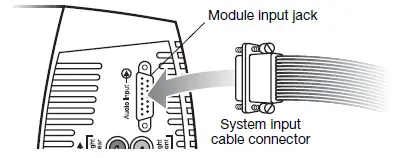
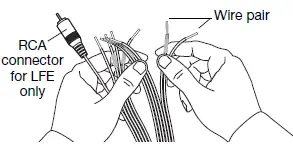
At the other end of the system input cable, multiple wire pairs “unzip” for easy reach and insertion into terminals on your receiver. A red collar marks a wire as positive (+) wire.
CAUTION: Do NOT connect your module to the TV, which lacks the required amplification.
The single RCA connector at that end is for use ONLY with a receiver that handles low-frequency effects and provides an LFE/SUBWOOFER jack (Figure 7).
CAUTION: Before making these connections, turn off your receiver to prevent unwanted noises when you plug the Acoustimass® module into it.
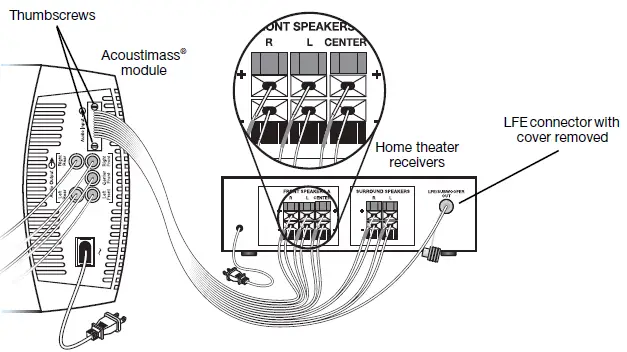
To make the connections (Figure 8 on page 10):
- Insert the multi-pin connector on the system input cable into the input jack on the Acoustimass module. Tighten the two thumbscrews to secure the connection.
- Connect each wire pair on the other end of the system input cable to your surround receiver, which should have audio output terminals labeled:
- Right, Left, and Center for the front audio channels.
- Right Surround and Left Surround for the rear channels.
The specific labels on your receiver may differ slightly.
CAUTION: Do not allow exposed wires to brush against each other; this could damage your receiver.
- Carefully match the polarity of the connections (+ to + and – to –).
- Attach each red-collared wire (+) to the appropriate + terminal.
- Attach each plain wire (–) to the appropriate – terminal.
- If applicable to your receiver, insert the RCA plug marked LFE on the system input cable into the LFE/SUBWOOFER OUT jack on your surround receiver. Remove the cover first.
Checking the connections
Before plugging in the Acoustimass module, check all connections from the receiver to the module and the module to the small speakers (Figure 8).
- Make sure all cube speaker arrays are connected to the proper terminals according to their position in your room.
- Check to be sure all wires are connected to your surround receiver with the proper polarity (+ to + and – to – wires). Incorrect wiring can result in a total loss of module output.
- Correct any wiring problems before you plug in your receiver and turn it on.
When all the connections check out, plug the power cord from the Acoustimass module into an AC (mains) outlet. Plug in the receiver also.
Note: Bose recommends using a quality surge suppressor on all electronics equipment. Voltage variations and spikes can damage electronic components in any system. Using a high- quality suppressor (available at electronics stores) can eliminate the vast majority of failures caused by a power surge.
Getting the most from your home theater speakers
With system connections completed and the module plugged in, your Acoustimass® system is now ready for use.
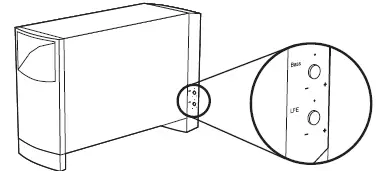
You may want to familiarize yourself with the controls and built-in protections that adjust the audio of this system (Figure 9). They offer options to suit your particular style of use and preferences.
CAUTION: This system provides an automatic protection circuit to help guard against damage from electrical stresses and overload of the system. At high volume levels, the circuit activates to reduce output, which slightly decreases the volume. If you notice this decrease, be aware that your system is functioning as designed. This volume reduction also indicates that power input to the system may exceed safe levels. Sustained listening at these levels is not recommended.
Adjusting the bass/room compensation
After placing the Acoustimass module where you want it, you can fine-tune it for that location. Make this adjustment only as necessary.
For example:
- If the system performance is “thin” or lacks bass, turn the BASS control (shown above) clockwise to increase the low-frequency output of the module.
- If the audio is “boomy” or overemphasizes bass, turn the knob counter-clockwise to reduce the low-frequency output of the module.
The setting made at the factory is meant for use in the most common room arrangements.
Adjusting the LFE level
The LFE level control (shown above) is for use only with receivers that provide an LFE/SUB-WOOFER channel.
By turning the knob, you can adjust the relative level of the low-frequency effects from movie soundtracks. Use it to match the volume level of the LFE channel with volume levels of your other speaker channels.
You can check all levels by using the “test tones” feature on your digital surround sound receiver. For details on using this feature, refer to the owner’s guide provided with your surround receiver.
Setting your digital surround sound receiver
Speakers in your Acoustimass® 6 Series III or Acoustimass 10 Series IV system are fully compatible with the audio output of digital surround receivers. The system’s integrated signal processing supports full low-frequency reproduction from all channels.
To gain complete advantage of these system capabilities, you may want to adjust some settings on your receiver. To make changes, use the digital display menu on the receiver and refer to the list of recommended settings, below.
Note: If your receiver provides it, the LFE or Subwoofer option setting should be ON and the crossover value at the lowest number possible, which is typically 80 Hz.
Receiving a digital audio signal
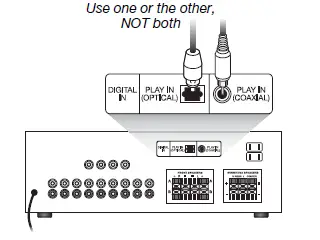
For the digital audio signal from your DVD player to reach your surround receiver, you need a digital audio connection between the DVD player and receiver (Figure 10).
- Use either the Optical or Coaxial input (not both) on the receiver to connect to the digital output from the DVD.
- Be sure to select the digital output in the setup menu of your DVD player.
For additional setup and operating information, please refer to the owner’s guide that came with your surround receiver.
Setting your analog surround sound receiver
For analog (non-digital) surround sound applications, we recommend that you set the surround sound center mode of your receiver to Wide. For instructions on how to change this setting, refer to the owner’s guide provided with your surround receiver.
Troubleshooting
If you have a problem with your Acoustimass® speaker system, turn off your sound source and try the following solutions. If you still have a problem, contact your Bose® dealer to arrange for service. To contact Bose directly, refer to the address list included in the carton.
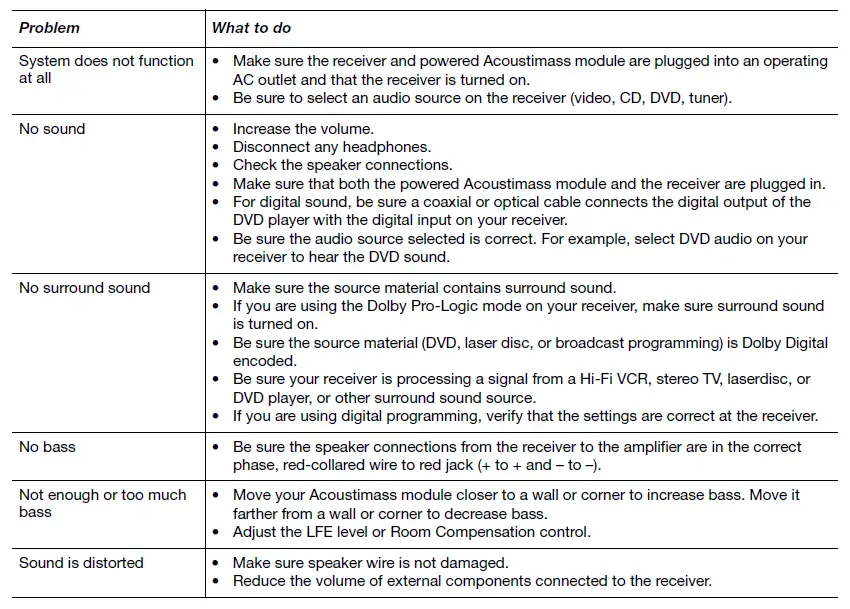
Customer service
For additional help in solving problems, contact the Bose® Customer Service office appropriate to your area. See the address list included in the carton.
Cleaning the speakers
The cabinets of your Acoustimass® speaker system may be cleaned only with a soft dry cloth. Do not use any sprays near the system or allow liquids to spill into any openings. Also, do not use any solvents, chemicals, or cleaning solutions containing alcohol, ammonia, or abrasives.
The grille assemblies on the small speakers may be carefully vacuumed, if necessary. Please note that the drivers are located directly behind the grille cloth and are easily damaged if reasonable care is not taken.
Limited warranty
Your Acoustimass® speaker system is covered by a limited transferable warranty. Details of the warranty are provided on the warranty card that came with your system.
Please fill out the information section on the card and mail it to Bose. Failure to do so, however, does not affect your rights.
Accessories
Bose offers the following accessories in colors to match and add to your enjoyment of the Acoustimass speaker system.
- UTS-20 table stands
- UFS-20 floor stands
- UB-20 wall brackets
- Speaker wire adapter kit for use with in-wall wiring from the Acoustimass module to the small speakers. Available in black, white, or silver.
For the accessories described above:
Contact your authorized Bose dealer or visit the Bose website: www.bose.com.
For the accessories described below:
Contact your authorized Bose dealer. Or to contact Bose directly, refer to the address list included in the carton.
- Input cable adapter for use with in-wall wiring from the Acoustimass module to the receiver.
- 20-ft (6.1 m) extension cable for use between the Acoustimass module and the receiver.
FREQUENTLY ASKED QUESTIONS
The Bose Acoustimass 10 series is solely a speaker system for surround sound. As a result, they require an independent amplifier/receiver to provide power. If you already own an AV receiver, this is excellent; otherwise, it will cost you more.
Speaker cables should be connected to the Acoustimass® bass module’s terminals marked RIGHT, INPUT FROM AMP OR RECEIVER (Figure 5). 2. Attach the other end to the receiver’s RIGHT FRONT SPEAKER terminals.
Left front speaker is connected with the black connector with the letter L. Center speaker is connected with grey connector with the letter C. Right front speaker is connected with the black connector with the letter R. Left surround speaker is connected with the grey connector with the letter LS.
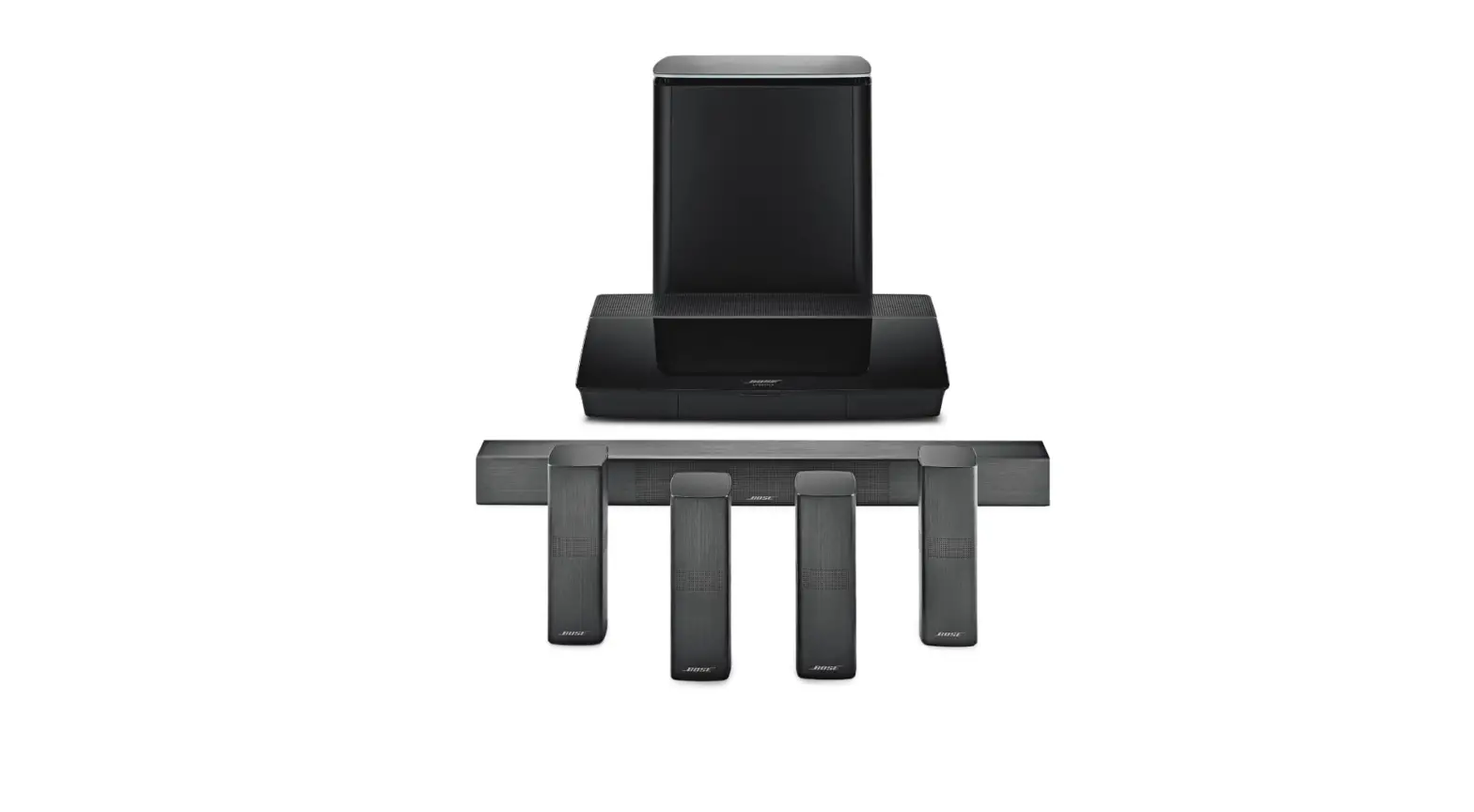
Connect the power cord to the bass module’s connector. Insert the power cord’s opposite end into a mains AC socket. Use the remote control to activate pairing mode on the SoundTouch® 300 soundbar in order to wirelessly couple the bass module with the soundbar.
Because the Acoustimass Module serves as the mainframe connecting the modular speakers, Bose speakers cannot be operated without it. The Acoustimass, which is renowned for its strong bass, performs admirably on its own, but additional speakers may be added for a more complete audio experience.
The Media Center jack on the bass module should be connected to the Acoustimass Module jack on the system console. Each speaker’s speaker cables should be connected to the bass module’s Speakers jacks. From the HDMI OUT Video to TV jack on the game console to your TV, attach an HDMI cable.
Use an LFE cable to connect a subwoofer to a receiver’s subwoofer output (SUB OUT or SUBWOOFER). If there isn’t an LFE subwoofer output or LFE input, connect using an RCA cable. Use the receiver’s speaker output to connect everything if the subwoofer has spring clips for connecting speakers.
Looking at the Bose Acoustimass 10’s characteristics, it is mentioned that the system is compatible with A/V receivers and amplifiers rated at 10-200 watts per channel and 4 to 8 ohms.
Verify speaker cables and connections. Check all the wires and connection points leading to amplifiers, receivers, or speakers beginning with the subwoofer. Verify that the cables are securely attached and plugged into the appropriate locations.
Put the jack on the Bose speaker adapter that is compatible with the plug of the Bose Lifestyle speaker cable. One end of a speaker wire has two strands that are covered in insulation for half an inch. Connect the red speaker cable to the opening under the red station on the Bose speaker adapter.
Yes, trying to connect the cubes straight to the receiver is not something I would advise. I’ve heard of individuals doing it and damaging their cubes. Bose typically fetches nice rates on eBay, so if you want to get rid of the bass module, I’d probably sell the whole system and replace it with something more to your taste.
Verify that the subwoofer is not muted. The subwoofer’s volume should be turned up. Make sure the subwoofer can be used by checking the speaker settings on the TV or stereo system. Important: The subwoofer may be disabled by specific speaker settings.
To make the light on the rear of the bass module blink white and then glow amber, push and hold the button there for around 10 seconds.