ABN AMRO SAP Ariba Supplier Registration Questionnaire Work

Introduction
This work instruction will help to explain how to fill in the Supplier Registration Questionnaire from ABN AMRO. In order to become a registered supplier for ABN AMRO, your organization needs to provide certain information in the Supplier Registration Questionnaire.
This work instruction will explain in detail how to fill in your Supplier Registration Questionnaire:
- Where you can find the Registration Questionnaire.
- Which fields are mandatory to fill.
- How to provide your company name.
- How to provide your DUNS number.
- How to comply with ABN AMRO Supplier Code of Conduct.
- Which ID numbers you need to provide.
- Accounts Receivable contact.
- Adding Bank Accounts, including rules related to field entry and country specific requirements.
- Mandatory fields for Domestic and Foreign based vendors.
- How to submit your Supplier Registration Questionnaire.
Supplier Registration Questionnaire 1st screen
If you go to your SAP Ariba account, you will see that there are two steps that you need to complete to register yourself as a supplier for ABN AMRO: Supplier Registration Questionnaire
Supplier Registration Questionnaire 1st screen
If you go to your SAP Ariba account, you will see that there are two steps that you need to complete to register yourself as a supplier for ABN AMRO: Supplier Registration Questionnaire.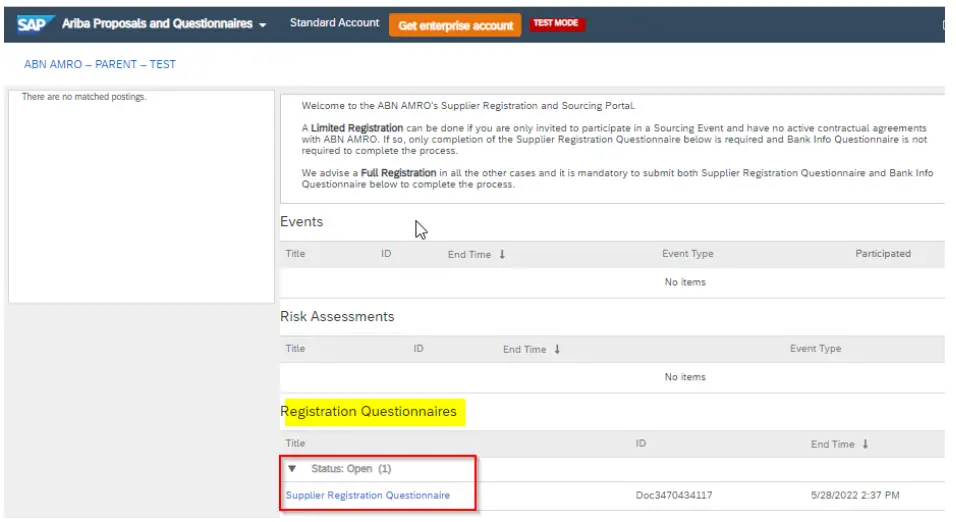
Once you click on Supplier Registration Questionnaire, you will see the screen below.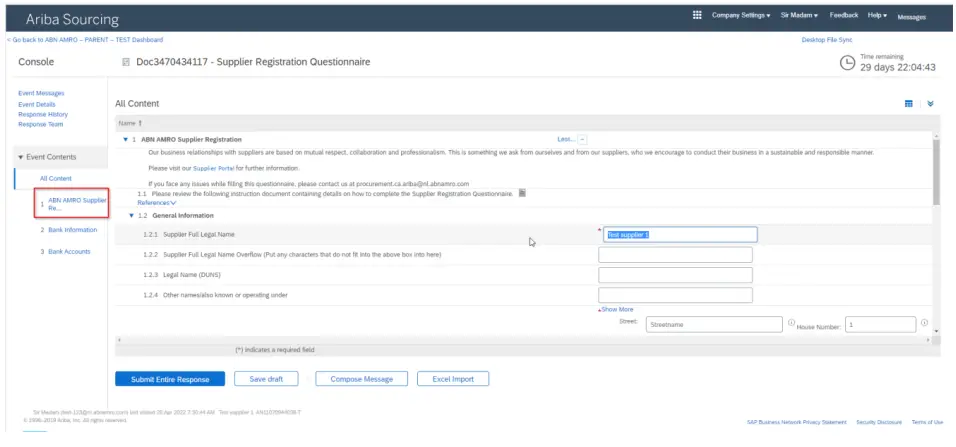
In the section All Content you will see all the questions of the Supplier Registration Questionnaire. These questions are about your company details.
On the right side you will see the fields were you can provide your answers. The fields which are marked with an asterisk (*) are mandatory. In the Supplier Full Legal Name (1.2.1) field you can provide the official legal name of your organisation. In case the legal name is longer than 40 characters, you can use the extra characters in the field of 1.2.2. You can use the field of 1.2.3 for your trading name.
VAT numbers
In the section VAT you can provide your VAT number and your Company Registration Number. The VAT number is your organizations taxpayer reference. The Company Registration Number is the unique number of your organization which is registered in Chamber of Commerce and it is mandatory for organization which is based in The Netherlands.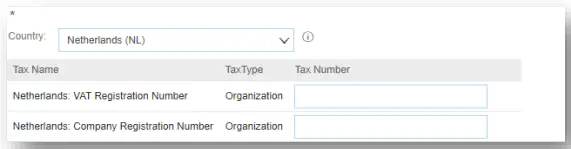
For US based companies, you can provide multiple ID numbers. Please fill in what is applicable. You can provide the following ID numbers:
Social Security Number: This is a nine-digit number that the U.S. government issues to all U.S. citizens
Employee ID number: This is an unique nine-digit number assigned by the Internal Revenue Service (IRS) to business entities operating in the United States for the purposes of
identification.
Company Registration number: The Company Registration Number is the unique number of your organization which is registered in Chamber of Commerce. Unique Form Identifier: This is a ten-digit number provided by the IRS for organizations to report the number and amount of payments to foreign persons.
GIIN Number: This a worldwide reference number provided by the IRS for some organizations (for example Banks).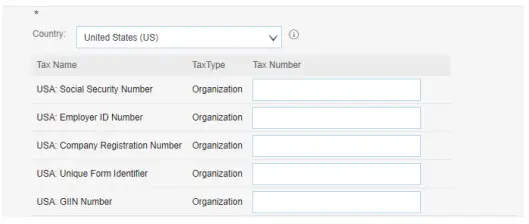
DUNS number
In the screen below you will see a field where you need to provide your DUNS number (this your Duns & Bradstreet number).
If you are already a supplier with ABN AMRO, this field will be pre-populated with characters ( for example 12-123-1231). In order to submit your questionnaire, you will have to remove the hyphens (for example 121231231).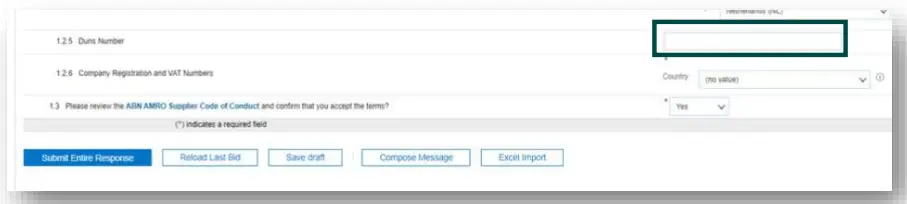
ABN AMRO Supplier Code of Conduct
In the field Confirmation of ABN AMRO Supplier Code of Conduct you can answer Yes or No. If you click on ABN AMRO Supplier Code of Conduct you can view our Supplier Code of Conduct in PDF.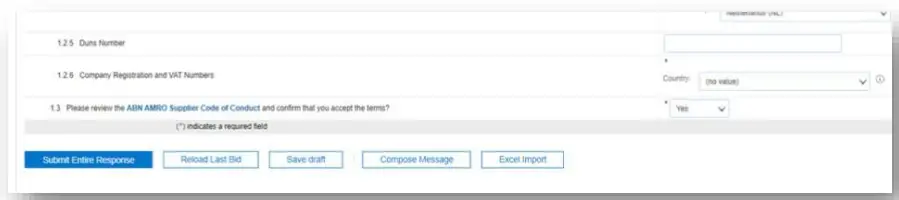
If you do not agree with the ABN AMRO Supplier Code of Conduct, you will see a text box below, where you have to explain the reasons why you do not agree with our Supplier Code of Conduct. You can also attach files in this text (for example adding your own Code of Conduct).
How to provide your bank information
Once you click on Bank Info, you will see the following screen. In the section All Content you will see all the steps you need to do in order to complete your Bank info.
There is a field where you can provide the e-mail address of your Account Receivable department. This field is mandatory, the e-mail address is needed for the correspondence between our Purchase-2-Pay department and your Account Receivable department to be able to receive Purchase orders.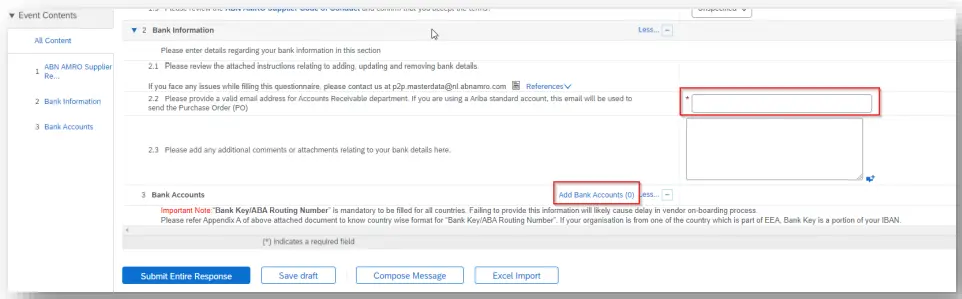
On the middle right of the screen you will see the link Add Bank Accounts. Click on the this link and it will bring you to the Add Bank Accounts screen (see section 2). We will explain the Add Bank Account screen in the next section.
Add Bank Account
Important Note: “Bank Key/ABA Routing Number” is mandatory to be filled for all countries. Failing to provide this information will likely cause delay in vendor onboarding process.
Please refer Appendix A to know country wise format for “Bank Key/ABA Routing Number
Domestic vendors (Vendors based in Netherlands)
If you click on Add Bank Account, you will see the screen below. In this screen you have to provide the Bank Account Details of your organization. This section will explain what information needs to be filled in each field. Based on the country where your bank is located, some of the fields are mandatory.
In Bank Type you can choose Domestic. Choose the country as ‘Netherlands’.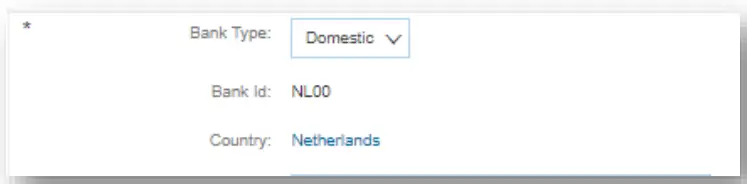
The following fields are mandatory for Netherlands’ bank accounts:
Table 2.1 Mandatory fields for Domestic Vendors
| # | Field Name | Sample Value | Field Explanation |
| 1 | Bank Name | ABN AMRO | Name of bank |
| 2 | Account Holder Name | Test Vendor Registration | Name of beneficiary |
| 3 | Bank Key/ABA Routing Number | ABNANL2A | BIC code of the bank |
| 4 | Bank Account Number | 0543719029 | Bank account number |
| 5 | IBAN | NL81ABNA0543719029 | IBAN |
| 6 | SWIFT Code/BIC | ABNANL2A | BIC code of the bank |
PS: BIC code of the bank goes twice in the two fields (Bank Key/ABA Routing Number, SWIFT Code/BIC).
A sample bank account data is shown in the below picture: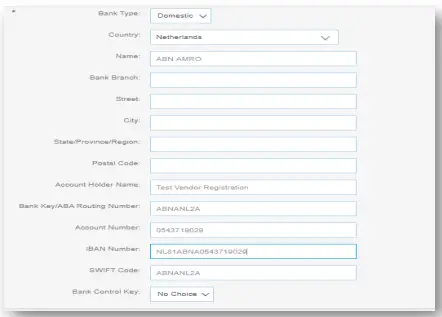
Be aware that there is a check between Account Number field, BIC and IBAN (International Bank Account Number) field.
If there are more Bank Accounts you want to add, you can click on the button Add Bank Account Info which is on the left bottom of your screen. A second screen will show up where you can provide Bank Details.
Once you have completed you can click on the “OK” button which is on the right top of
your screen.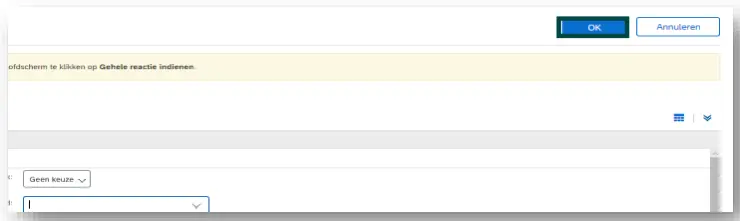
In Bank Type choose Foreign.
If you choose Foreign, you can choose the country where your bank is located.
The country where your bank is located, will decide which fields are mandatory to fill in. In table 1.1 you will find an overview of the fields that are mandatory based upon the country where your bank is located.
In appendix A you will find the mandatory fields for foreign vendors per country.
In the section below you can also provide optional fields like Name, Branch, Street, City, State/Province/Region, Postal Code of your bank.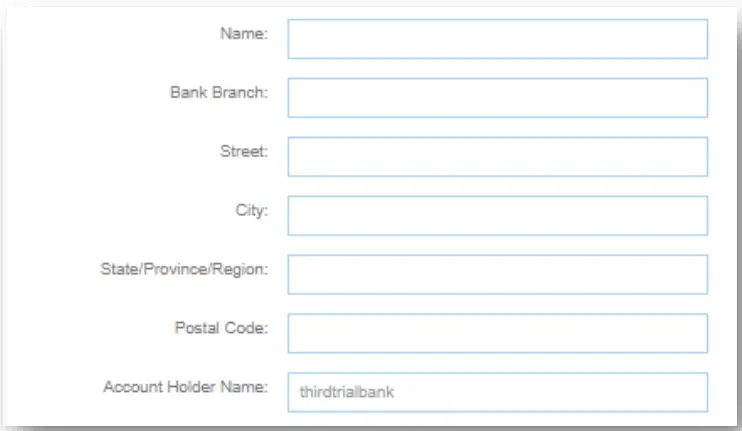
If there are more Bank Accounts you want to add, you can click on the button Add Bank Account Info which is on the left bottom of your screen. A second screen will show up where you can provide Bank Details.
Once you have completed you can click on the “OK” button which is on the right top of your screen.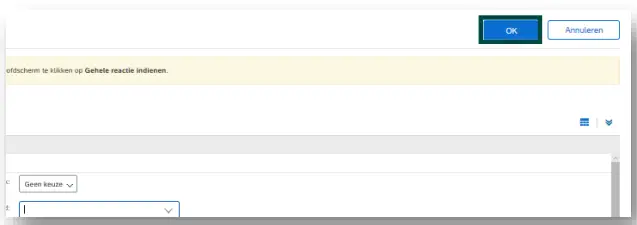
Completing Supplier Registration Questionnaire
If you have completed the Supplier Registration Questionnaire, you can click on Submit Entire Response. Once you have submitted, your form will be send to our Operation Procurement Department of ABN AMRO. This department will review your form and contact your organization if there is some missing information.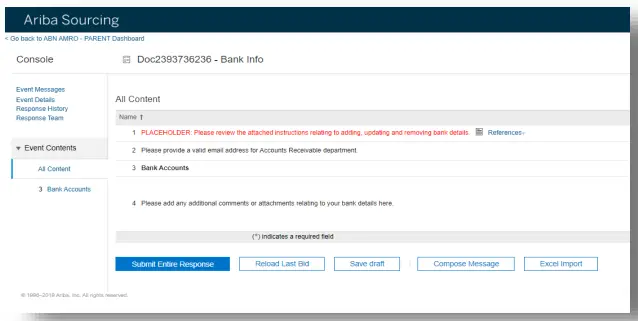
With the Save draft button you can save your information which you have provided without sending it.
If you want to send a message, to ask for more information, you can use the Compose Message button. This message will be send to our Operational Procurement Department which can provide you with a response.
You can use the Excel Import button if you want to upload multiple accounts from an excel file. Once you have uploaded your excel file, you have to check whether Bank Account Details fields are correctly filled in (see Section 2 were we explain Bank Account Details).
Errors while submitting
If, at the moment of submitting, the data entry is incorrect, an error might appear at the top of the page. This error message does not only indicate how many errors have been found, but also details where the error occurs.
Please resolve the error and re-submit. If you do not resolve the error the form can’t be submitted.
Appendix A
Mandatory bank fields for Foreign Vendors per country
Mandatory fields for vendors in Germany
| # | Field Name | Sample Value | Field Explanation |
| 1 | Bank Name | Deutsche Bank | Name of bank |
| 2 | Account Holder Name | Test Vendor Registration | Name of beneficiary |
| 3 | Bank Key/ABA Routing Number | 37040044 | Bank Key / Bank Identifier |
| 4 | Bank Account Number | 0532013000 | Bank account number |
| 5 | IBAN | DE89370400440532013000 | IBAN |
| 6 | SWIFT Code/BIC | DEUTDEFF500 | SWIFT/ BIC code of the bank |
Mandatory fields for vendors in Belgium
| # | Field Name | Sample Value | Field Explanation |
| 1 | Bank Name | ING Belgium | Name of bank |
| 2 | Account Holder Name | Test Vendor Registration | Name of beneficiary |
| 3 | Bank Key/ABA Routing Number | 363 | Bank Key / Bank Identifier |
| 4 | Bank Account Number | 363-1234567-13 | Bank account number |
| 5 | IBAN | BE08363123456713 | IBAN |
| 6 | SWIFT Code/BIC | BBRUBEBB | SWIFT/ BIC code of the bank |
Mandatory fields for vendors in France
| # | Field Name | Sample Value | Field Explanation |
| 1 | Bank Name | BNP Paribas SA | Name of bank |
| 2 | Account Holder Name | Test Vendor Registration | Name of beneficiary |
| 3 | Bank Key/ABA Routing Number | 3000402605 | Bank Key / Bank Identifier |
| 4 | Bank Account Number | 00012003050 | Bank account number |
| 5 | IBAN | FR7630004026050001200305070 | IBAN |
| 6 | SWIFT Code/BIC | BNPAFRPP | SWIFT/ BIC code of the bank |
| 7 | Bank Control Key | 70 | Check digit |
Mandatory fields for vendors in UK
| # | Field Name | Sample Value | Field Explanation |
| 1 | Bank Name | HSBC Bank PLC | Name of bank |
| 2 | Account Holder Name | Test Vendor Registration | Name of beneficiary |
| 3 | Bank Key/ABA Routing Number | 400515 | Bank Key / Sort Code |
| 4 | Bank Account Number | 35091948 | Bank account number |
| 5 | IBAN | GB19MIDL40051535091948 | IBAN |
| 6 | SWIFT Code/BIC | MIDLGB22 | SWIFT/ BIC code of the bank |
Mandatory fields for vendors in Greece
| # | Field Name | Sample Value | Field Explanation |
| 1 | Bank Name | Alpha Bank | Name of bank |
| 2 | Account Holder Name | Test Vendor Registration | Name of beneficiary |
| 3 | Bank Key/ABA Routing Number | 01403590 | Bank Key / Bank Identifier |
| 4 | Bank Account Number | 359002220001500 | Bank account number |
| 5 | IBAN | GR8701403590359002220001500 | IBAN |
| 6 | SWIFT Code/BIC | CRBAGRAAXXX | SWIFT/ BIC code of the bank |
Mandatory fields for vendors in USA
| # | Field Name | Sample Value | Field Explanation |
| 1 | Bank Name | JP Morgan Chase | Name of bank |
| 2 | Account Holder Name | Test Vendor Registration | Name of beneficiary |
| 3 | Bank Key/ABA Routing Number | 071000013 | Routing Number |
| 4 | Bank Account Number | 5310314 | Bank account number |
| 6 | SWIFT Code/BIC | CHASUS33 | SWIFT/ BIC code of the bank |
Mandatory fields for vendors in Switzerland
| # | Field Name | Sample Value | Field Explanation |
| 1 | Bank Name | UBS SA | Name of bank |
| 2 | Account Holder Name | Test Vendor Registration | Name of beneficiary |
| 3 | Bank Key/ABA Routing Number | 00240 | Bank Key / Bank Identifier |
| 4 | Bank Account Number | 24045959900H | Bank account number |
| 5 | IBAN | CH590024024045959900H | IBAN |
| 6 | SWIFT Code/BIC | UBSWCHZH80A | SWIFT/ BIC code of the bank |
Mandatory fields for vendors in Spain
| # | Field Name | Sample Value | Field Explanation |
| 1 | Bank Name | BANCO SANTANDER | Name of bank |
| 2 | Account Holder Name | Test Vendor Registration | Name of beneficiary |
| 3 | Bank Key/ABA Routing Number | 00496702 | Bank Key / Bank Identifier |
| 4 | Bank Account Number | 2416075865 | Bank account number |
| 5 | IBAN | ES3700496702612416075865 | IBAN |
| 6 | SWIFT Code/BIC | BSCHESMM | SWIFT/ BIC code of the bank |
| 7 | Bank Control Key | 61 | Check digit |
Mandatory fields for vendors in Italy
| # | Field Name | Sample Value | Field Explanation |
| 1 | Bank Name | JP Morgan Chase | Name of bank |
| 2 | Account Holder Name | Test Vendor Registration | Name of beneficiary |
| 3 | Bank Key/ABA Routing Number | 0349401600 | Bank Key / Bank Identifier |
| 4 | Bank Account Number | 000000000512 | Bank account number |
| 5 | IBAN | IT90A0349401600000000000512 | IBAN |
| 6 | SWIFT Code/BIC | CHASITMX | SWIFT/ BIC code of the bank |
| 7 | Bank Control Key | A | Check digit |
Mandatory fields for vendors in India
| # | Field Name | Sample Value | Field Explanation |
| 1 | Bank Name | HDFC Bank | Name of bank |
| 2 | Account Holder Name | Test Vendor Registration | Name of beneficiary |
| 3 | Bank Key/ABA Routing Number | HDFCINBBXXX | SWIFT Code |
| 4 | Bank Account Number | 15772320000162 | Bank account number |
| 5 | SWIFT Code/BIC | HDFCINBBXXX | SWIFT/ BIC code of the bank |
Mandatory fields for vendors in Singapore
| # | Field Name | Sample Value | Field Explanation |
| 1 | Bank Name | ANZ Bank | Name of bank |
| 2 | Account Holder Name | Test Vendor Registration | Name of beneficiary |
| 3 | Bank Key/ABA Routing Number | 7931051 | Bank code + Branch code |
| 4 | Bank Account Number | 1013233391 | Bank account number |
| 5 | SWIFT Code/BIC | ANZBSGSX | SWIFT/ BIC code of the bank |
Mandatory fields for vendors in Austria
| # | Field Name | Sample Value | Field Explanation |
| 1 | Bank Name | ERSTE BANK | Name of bank |
| 2 | Account Holder Name | Test Vendor Registration | Name of beneficiary |
| 3 | Bank Key/ABA Routing Number | 20111 | Bank Key / Bank Identifier |
| 4 | Bank Account Number | 30001042696 | Bank account number |
| 5 | IBAN | AT112011130001042696 | IBAN |
| 6 | SWIFT Code/BIC | GIBAATWW | SWIFT/ BIC code of the bank |
Mandatory fields for vendors in Denmark
| # | Field Name | Sample Value | Field Explanation |
| 1 | Bank Name | DEN DANSKE BANK | Name of bank |
| 2 | Account Holder Name | Test Vendor Registration | Name of beneficiary |
| 3 | Bank Key/ABA Routing Number | 3000 | Bank Key / Bank Identifier |
| 4 | Bank Account Number | 3001036496 | Bank account number |
| 5 | IBAN | DK3330003001036496 | IBAN |
| 6 | SWIFT Code/BIC | DABADKKK | SWIFT/ BIC code of the bank |
Mandatory fields for vendors in Iceland
| # | Field Name | Sample Value | Field Explanation |
| 1 | Bank Name | BANK OF AMERICA | Name of bank |
| 2 | Account Holder Name | Test Vendor Registration | Name of beneficiary |
| 3 | Bank Key/ABA Routing Number | 990061 | Bank Key / Bank Identifier |
| 4 | Bank Account Number | 54878097 | Bank account number |
| 5 | IBAN | IE93BOFA99006154878097 | IBAN |
| 6 | SWIFT Code/BIC | BOFAIE3X | SWIFT/ BIC code of the bank |
Mandatory fields for vendors in Norway
| # | Field Name | Sample Value | Field Explanation |
| 1 | Bank Name | DNB | Name of bank |
| 2 | Account Holder Name | Test Vendor Registration | Name of beneficiary |
| 3 | Bank Key/ABA Routing Number | 1503 | Bank Key / Bank Identifier |
| 4 | Bank Account Number | 15030825191 | Bank account number |
| 5 | IBAN | NO2815030825191 | IBAN |
| 6 | SWIFT Code/BIC | DNBANOKK | SWIFT/ BIC code of the bank |
Mandatory fields for vendors in Poland
| # | Field Name | Sample Value | Field Explanation |
| 1 | Bank Name | BANK POLSKA | Name of bank |
| 2 | Account Holder Name | Test Vendor Registration | Name of beneficiary |
| 3 | Bank Key/ABA Routing Number | 12402063 | Bank Key / Bank Identifier |
| 4 | Bank Account Number | 1111001036860394 | Bank account number |
| 5 | IBAN | PL79124020631111001036860394 | IBAN |
| 6 | SWIFT Code/BIC | PKOPPLPW | SWIFT/ BIC code of the bank |
| 7 | Bank Control Key | 79 | Check digit |
Mandatory field for vendors in Portugal
| # | Field Name | Sample Value | Field Explanation |
| 1 | Bank Name | PT bank | Name of bank |
| 2 | Account Holder Name | Test Vendor Registration | Name of beneficiary |
| 3 | Bank Key/ABA Routing Number | 00350623 | Bank Key / Bank Identifier |
| 4 | Bank Account Number | 00001288090 | Bank account number |
| 5 | IBAN | PT50003506230000128809095 | IBAN |
| 6 | SWIFT Code/BIC | CGDIPTPL | SWIFT/ BIC code of the bank |
| 7 | Bank Control Key | 95 | Check digit |
Mandatory fields for vendors in Sweden.
| # | Field Name | Sample Value | Field Explanation |
| 1 | Bank Name | SKANDINAVISKA ENSKILDA | Name of bank |
| 2 | Account Holder Name | Test Vendor Registration | Name of beneficiary |
| 3 | Bank Key/ABA Routing Number | 5231 | Bank Key / Bank Identifier |
| 4 | Bank Account Number | 52311075888 | Bank account number |
| 5 | IBAN | SE4150000000052311075888 | IBAN |
| 6 | SWIFT Code/BIC | ESSESESS | SWIFT/ BIC code of the bank |