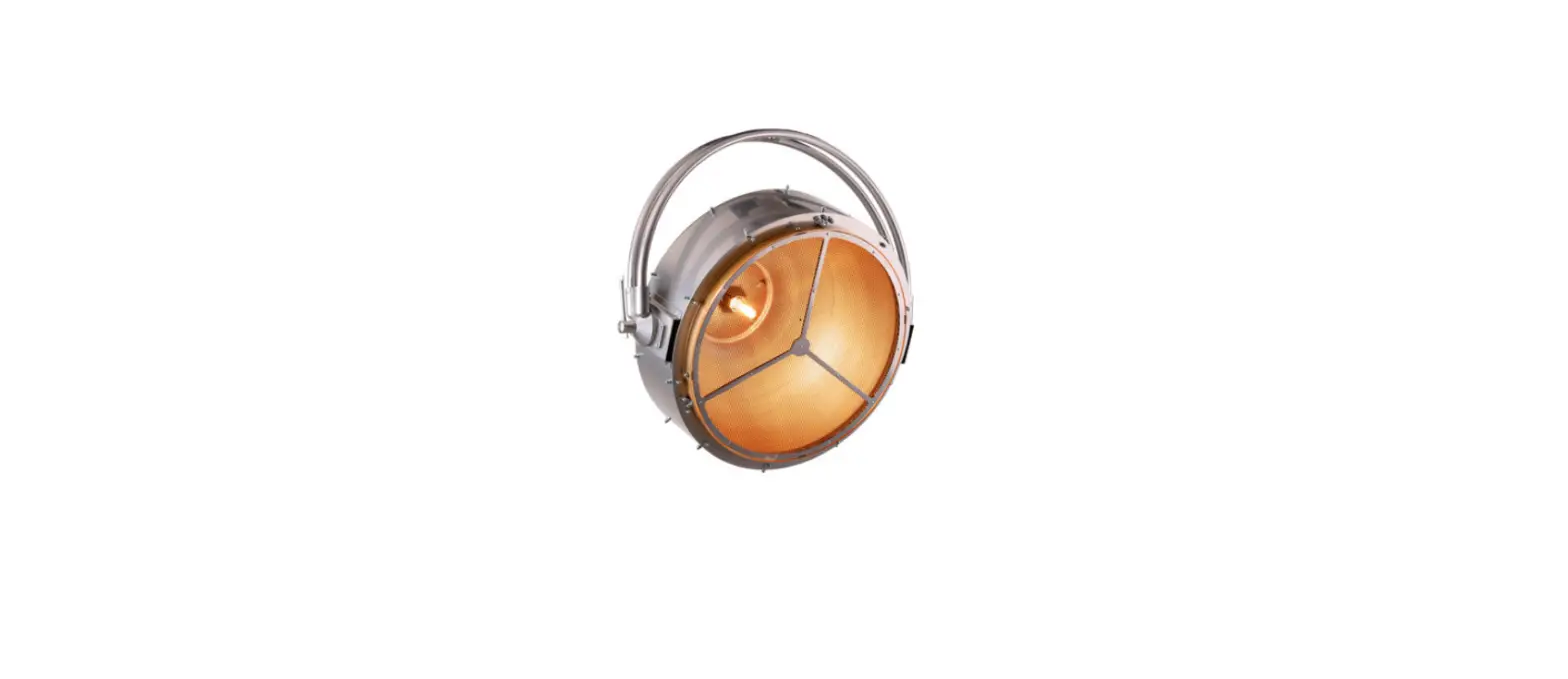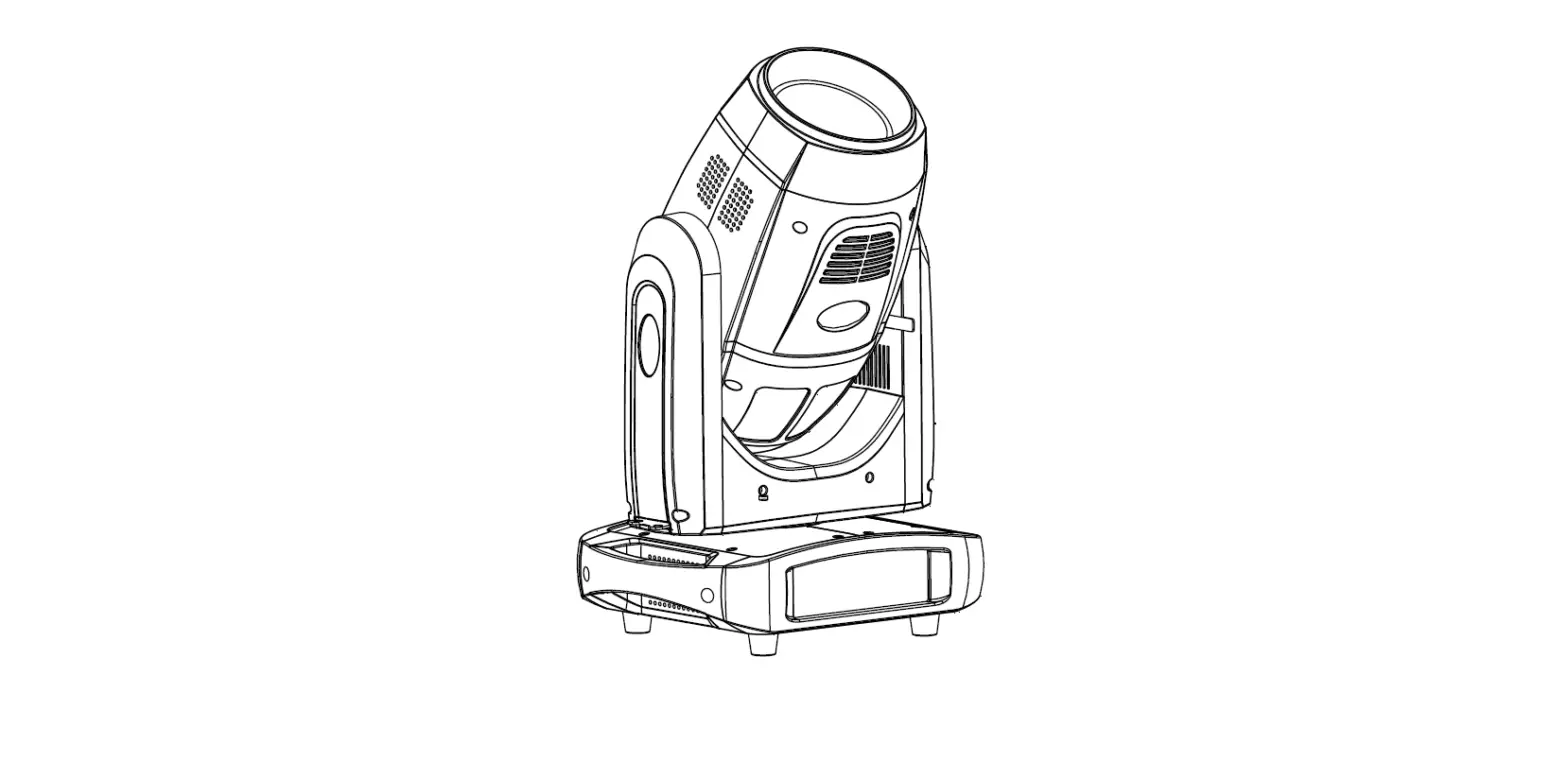

PR-2345A XR 380 Beam
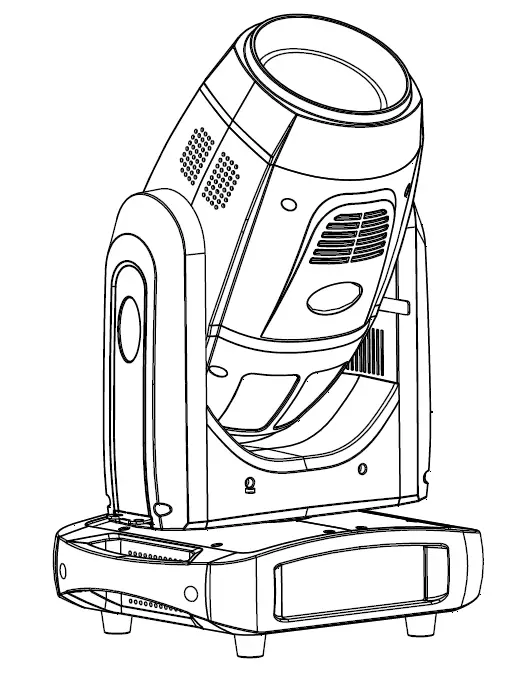
XR 380 Beam
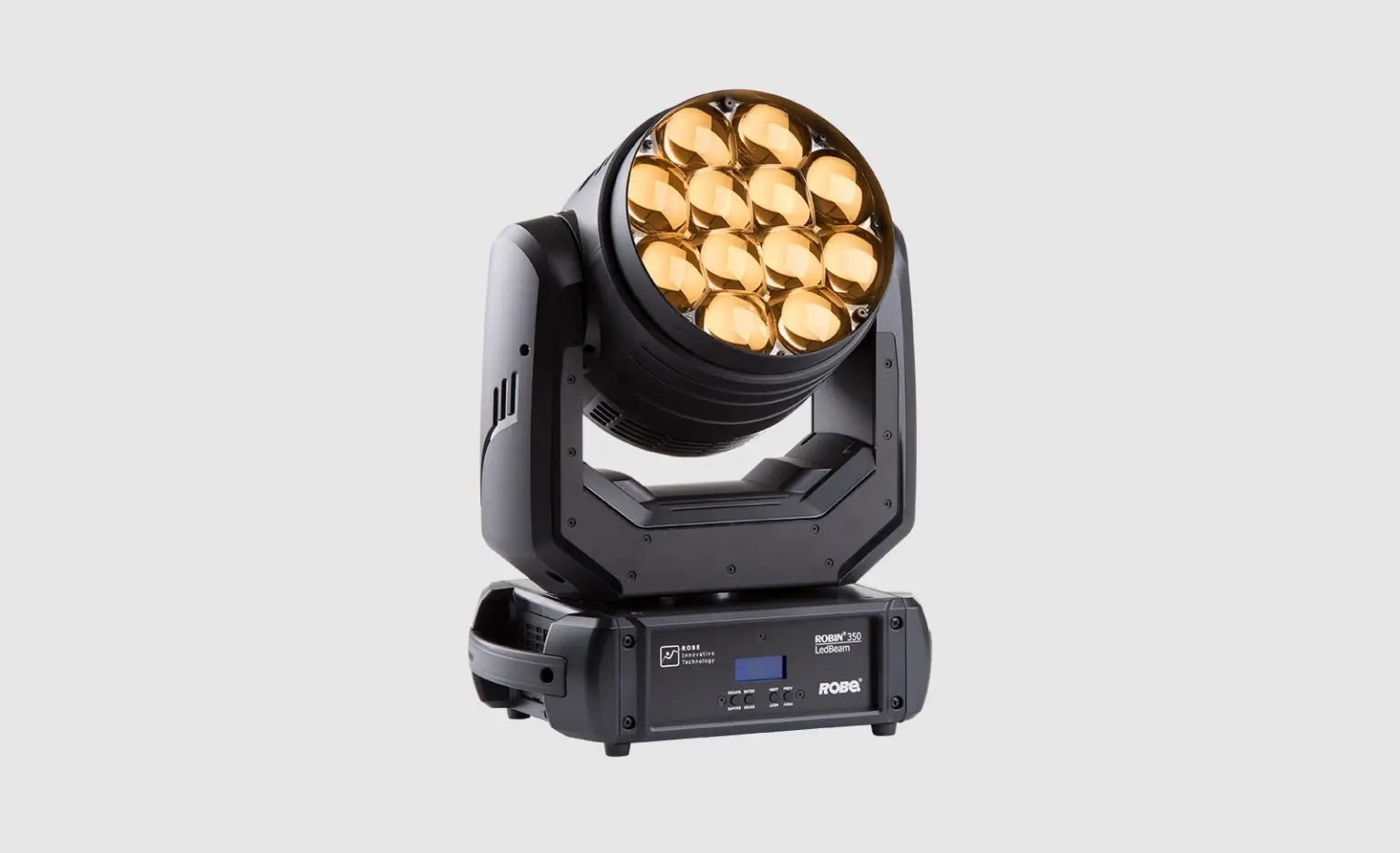
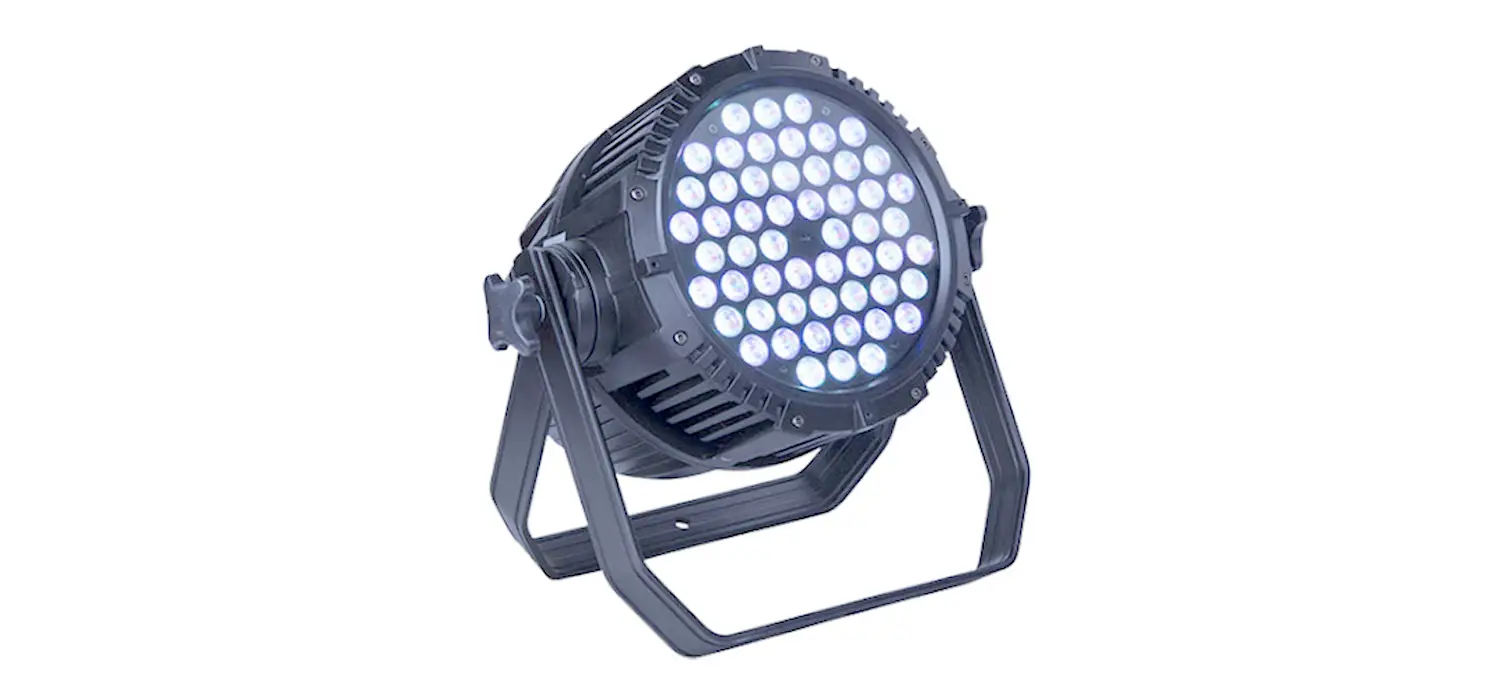
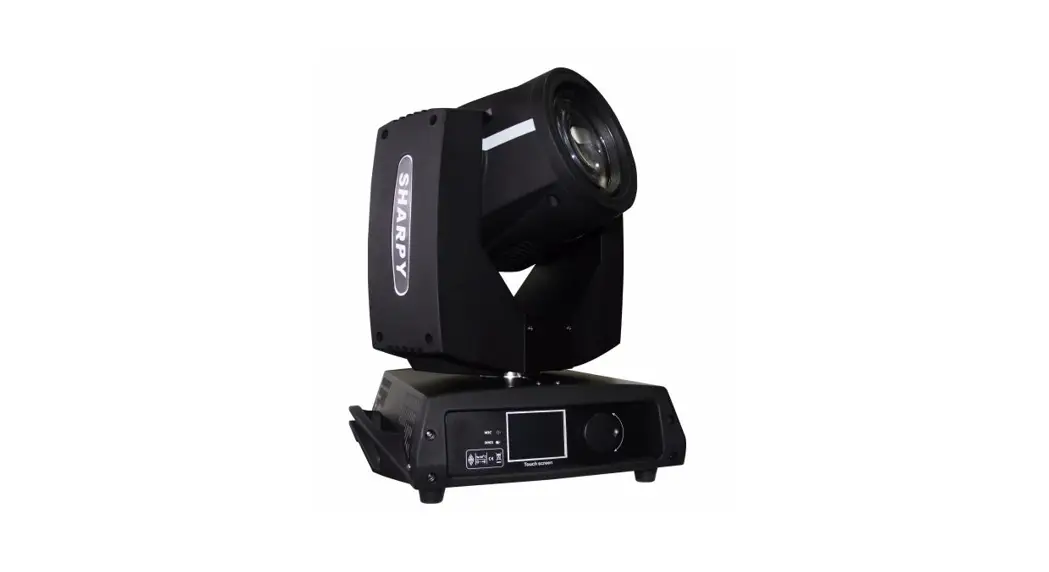
The XR 380 Beam is a projector designed for professional use. It is manufactured by PR Lighting Ltd. and comes with various accessories including a safety cord, clamps, and a user manual. It is important to read and follow the instructions carefully before using the product.
Accessories
The following accessories are included with the projector:
| Name | Quantity | Unit | Remark |
|---|---|---|---|
| Safety cord | 1 | Pc | |
| Clamp | 2 | Pc | |
| Foldable clamp | 2 | Pc | |
| User manual | 1 | Pc | |
| Optional QR code | – | – |
| Name | Quantity | Unit | Remark |
| Safety cord | 1 | Pc | |
| Clamp | 2 | Pc | |
| Foldable clamp | 2 | Pc | Optional |
| User manual | 0 | Pc | QR code |
Safety and Warnings
Before installing, powering on, operating, and maintaining the projector, it is important to read and follow the safety information provided in the user manual. Some of the important safety instructions are:
- Do not look straight into the light sources, especially for epileptics, as it may cause eye damage.
- Do not connect the projector to any type of dimmer pack.
- If the lamp, lens, and screen protective cover of the projector are damaged, please stop using it and replace them with original parts.
- Do not use the projector without covers or housing.
- Wear protective items while operating the projector.
- Run the safety cord through the safety cord holes for safety support.
- Ensure the projector is disconnected from power mains before any installation, maintenance, and cleaning work.
Cleaning and Maintenance
Regular cleaning and maintenance of the projector is necessary to ensure its maximum light output and reliable running during its lifespan. The following are some important instructions for cleaning and maintaining the projector:
- Use a soft cloth with good quality detergent for cleaning. Do not use alcohol or other solvents.
- Clean the front lens once a week to remove any accumulation of oil and smoke that may cause a decrease in light output.
- Clean the cooling fans once a month.
- Clean internal items inside the projector once a year using vacuum or blower.
- Clean color filters, rotators, and internal mirrors once a month.
Appendix
The user manual contains additional information and instructions about the projector. Please refer to the manual for more details.
Please note that as part of our ongoing commitment to continuous product development, specifications are subject to change without notice. Whilst every care is taken in the preparation of the manual we reserve the right to change specifications in the course of product improvement. The publishers cannot be held responsible for the accuracy of the information herein, or any consequence arising from them. Every unit is tested completely and packed properly by the manufacturer. Please make sure the packing and / or the unit are in good condition before installation and use. Should there be any damage caused by transportation, consult your dealer and do not use the unit. Any damage caused by improper use will not be assumed by the manufacturer and / or dealer. Any future technical change in the user manual won’t be with any notice.
Note: For the products made by Guangzhou PR lighting Ltd, the warranty for the whole product is one year starting from the delivery date but the light source is not within the warranty
SAFETY AND WARNINGS
NOTE: Before a projector’s installation, power-on, operation and maintenance, please carefully read the safety information hereinafter!
The following safety signs are used in the user manual.
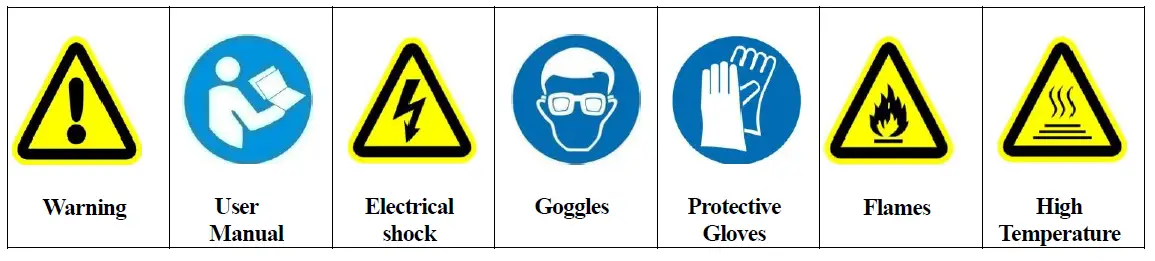
- When unpacking , check if there is transportation damage before using the projector. Should there be any damage caused by transportation, consult your dealer and do not use it.
- The manufacture is not responsible for loss caused by the user not following the manual or changing the projector as he/she likes
- Please be noted that the damage caused by changing the projector at will is not warranted.
- Do not hesitate to contact the dealer or the manufacturer if any questions or advice.
- If a lamp is damaged or deforms because of heat, it should be replaced.
- The projector is for indoor use only, IP20.
- Use only in dry locations. Keep this unit away from rain and moisture, excessive heat, humidity and dust. Do not allow contact with water or any other liquids.
- The projector should be kept away from high temperature, fire, electrical surge, vibration and strong light while being operated
- The projector is only intended for installation, operation and maintenance by qualified personnel. And the operation must strictly follow the procedures in the manual
- No repairable parts in the projector and do not open covers for maintenance by yourself.
- Don’t look straightly into the light sources especially for epileptics, otherwise eyes will be burned.
- Do not connect a projector to any type of dimmer pack.
- If the lamp, lens and screen protective cover of the a projector have obvious damage, i.e., to the extent that it hurts the performance like cracking or deformation. Please stop using it and replace them with the original parts, otherwise its performance will be compromised.
- For the installation location of a projector, it shouldn’t be seen in the distance of less than 4 meters for a long time.
- Before operation, please confirm that all covers(housing) are on and screws tightened. It’s forbidden to use a projector while covers(housing)are off
- Keep the lamp clean and do not touch it with bare hands.
- While operating it, wear protective items.
- Any electrical connection must be carried out by a qualified person .
- Before installation, please confirm the voltage supplied matches what is required for the projector
- Each projector must be properly earthed and installed as per related electrical standards.
- Do not use power cord with its insulator damaged and connect the power cord with other cables.
- If the projector is not used or under cleaning,, please hold the plug and unplug it. Do not unplug it forcefully or by pulling the power cable.
- All power cords must conform to related safety and regulations
- While being operated, the projector should not be under rains or in humidity.
- Do not switch on and off the projector constantly in very short intervals, otherwise the light source’s and other electrical parts’ life will be shortened .
- There are safety cord holes at the bottom of the base of a projector. In view of safety, please run the safety cord supplied through the safety cord holes for safety support.
- Before any installation, maintenance and cleaning work, please ensure the projector is disconnected from power mains.
- After stable operation under normal situation , its temperature is 80℃.
- While the lamp is stricken for the first time, there will be smoke and strange smell. It’s normal and does not mean the projector has some defects.
- While it running, don’t touch the metal housing to avoid being burned!
- Do not mount the projector directly on inflammable surface.
- Do not project the beam straightly on combustible items and the minimum distance between the projector and illuminated items is 8m.
- A projector should be installed with good ventilation and the minimum distance between the projector and walls is 50cm. At the same time, please ensure the fans and air inlets and outlets are workable.
- Do not let the front lens under sunlight or other strong light sources at any angle, otherwise the danger of fire can be caused by the focused beam by the lens inside a projector.
- The product meets The General Technical Requirements and Standards for Recycle and Use Of Expired Appliance and Electronic Products.
- When the product meets disposal standards and needs to be disposed, a client needs to dispose and recycle it.
INSTRUCTIONS
CLEANING AND MAINTENANCE
Keeping a projector is necessary and the dust, oil and smoke should not accumulate on or in it, otherwise its light output will be greatly
- compromised. Regular cleaning will ensure light output at maximum and reliable running during its whole life span. It’s advised to use soft cloth with good quality detergent. Under whatever circumstances, it should not use alcohol or other solvent.
- For the accumulation of oil and smoke on the front lens, thus sharp decrease in light output, the front lens should be cleaned once every week. Cooling fans cleaned once every month. Internal items inside the projector should be cleaned once every year using vacuum or blower. Color filters, rotators and internal mirrors should be cleaned once every month.
- Regular inspection of air filters and clean them before they fully blocked. Clean air filters at the bottom of the base. Please vacuum or compressed air to clean and put them back after cleaning.
- Before any maintenance and cleaning, please ensure the project is off the power
- Only qualified person is allowed to do maintenance
- During maintenance and before maintenance, the projector must be off power.
- To avoid internal damage, sun light or other light mustn’t penetrate into the projector via front lens whether it runs or not
- Do not use alcohol or other organic solvent to clean the housing to avoid damag
- Do not use any solvent with chemical elements to clean color filters or hot mirror.
- Hot mirror should be cleaned every 3 days and coated with
LUBRICATION
To ensure smooth movement of gobos and zoom and focus lens, it’s advised rotators’ bearings and 2 sliding bars for zoom and focus lens be lubricated every 2 months. High quality and high temperature lubricant/grease is advised..
TROUBLESHOOTING
| PROBLEM | ACTION |
| The projector doesn’t switch on | Ø Check the fuse on the power socket. Ø Check the lamp. |
| The lamp is on but the projector doesn’t respond to the controller | Ø Make sure that the fixture’s start address is right Ø Replace or repair the XLR signal cable. |
| The projector functions intermittently | Ø Make sure the fan is working well or fans and their shields are not blocked |
| Beam appears dim, Low in brightness | Ø Make sure the lamp is within its lifespan Ø Remove dust or grease from the lenses. |
| The project image appears to have a halo | Ø Carefully clean the lamp, optical lenses and other components. |
| Heavily Defective Beam | Ø Check if lens are in good condition(not cracked) Ø Clean dust or grease on the lens. |
APPEARANCE
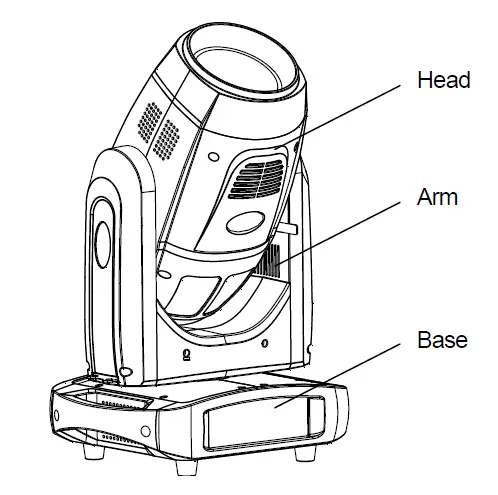
INSTALLATION
A projector can be placed on the stage floor directly or mounted on a truss at any direction without impacting its performance. Please use a safety cord, which can support 10 times the weight of the projector, while mounting it on the truss. The safety cord should be used with magazine with a lock. Just as the figures below, please run the safety cord through the holes at the bottom of the base and around the truss.
RIGGING
- Use M12 bolt to fix the clamp(1) into the omega holder (3), run the bolt through the holder’s holes
- Push 2 quick-lock fasteners(4) into holes at the bottom of the base, fix them and tighten them clockwise
- Run safety cord(2) through holes at the bottom of the base and around the truss(6)
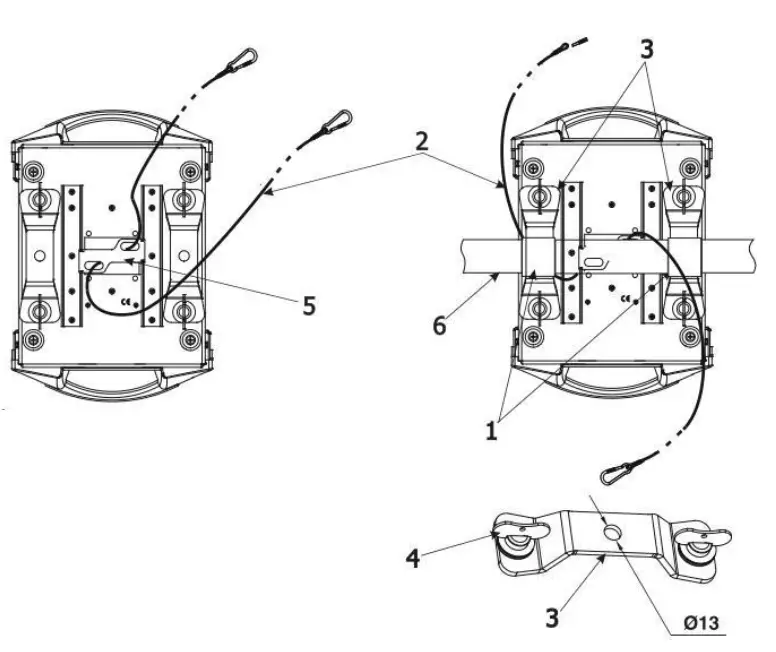
- Clamps
- Safety wire
- Omega holder
- Quick-lock fastener
- Attachment point
- Truss
Use the spanner supplied with a projector to help installation.
WARNING:
- The projector MUST be lifted or carried by the HANDLES instead of clamps.
- For safety the safety cord should afford 10 times the Projector’s weight.
It must use secondary safety accessory like appropriate net. The structures of the secondary accessory must ensure that while malfunction happens, the installed parts won’t fall to the ground. While rigging, mounting or maintaining, the projector mustn’t be placed in the areas listed hereinafter: the bridge, high work areas or other dangerous areas.
The operator of the projector or its related safety items must be accepted by safety experts before first launching or re-running after any replacements or repairing.
The operator must ensure a test before acceptance every 4 years and the related safety measures and installation accepted by experts. The operator must ensure the related safety measures and its installation must be approved by the technicians every year. The projector may be installed in places under which people may walk by or sit. Important! Installations in high places requires wide experience, including but not limited to load limit calculation, the installing materials needed and regular inspection of installing materials and the projectors. If lacking the qualifications, please don’t try installation by yourself, but seek help from professionals using designated lifting gears. Abnormal installation may cause body harm or property damages. The projectors must be installed in places where people can’t reach. If they are removed from ceiling or high places, professional truss must be used. It is forbidden to let any projector move freely in a room after installation.
Note: Device falling down can cause heavy body harm! If you have any questions about its safety, don’t install any projector! Before installation, please ensure mounting areas can endure 10 times the weight of a project at least.
POWER CONNECTION
- Connect the power cord as follows: L (live) =brown
- E (earth) =yellow/green
- N (neutral) =blue
Before power connection, please ensure the power supplied must match what the nameplate says. It is recommended that each projector be connected with power separately so that they may be individually switched on and off.
- The earth wire(yellow/green) must be connected to the ground. And electrical connection must be in accordance with the standards concerned.
- If any questions about the electrical installation, do not continue but consult a qualified electrician.
DMX CONTROL CONNECTION
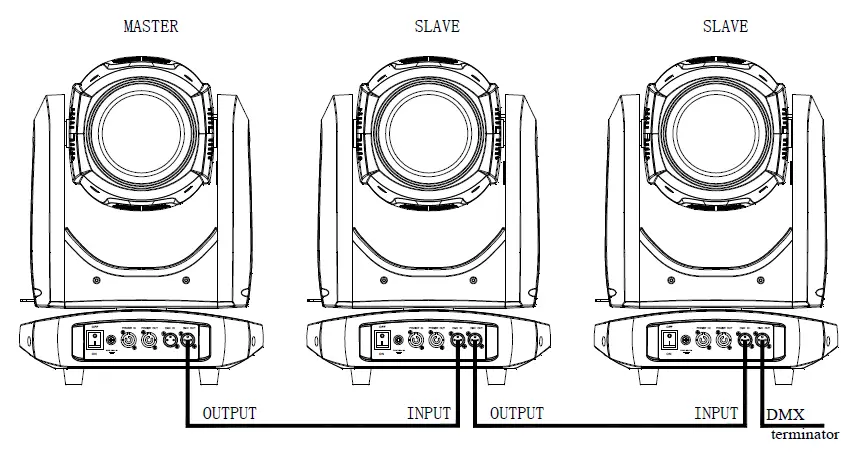
Connection between controller and projector and between one projector and another must be made with a twin-screened cable, with each wire having at least a 0.5mm in diameter. Connection to and from the projector is via cannon 5 pin (which are included with the projector) or 5 pin XLR plugs and sockets. The XLR’s are connected as shown in the figure above.
Note: care should be taken to ensure that none of the pins touch the metallic body of the plug or each other. XLR plugs and sockets mustn’t be connected in any way other than mentioned in the above figure. The XR330BWS accepts digital control signals in protocol DMX512 (1990). Connect the controller’s DMX output to the first fixture’s DMX input, and connect the first fixture’s DMX output to the second fixture’s DMX input and connect the rest fixtures in the same way. Eventually connect the last fixture’s DMX output to a DMX terminator as shown in the figure below.
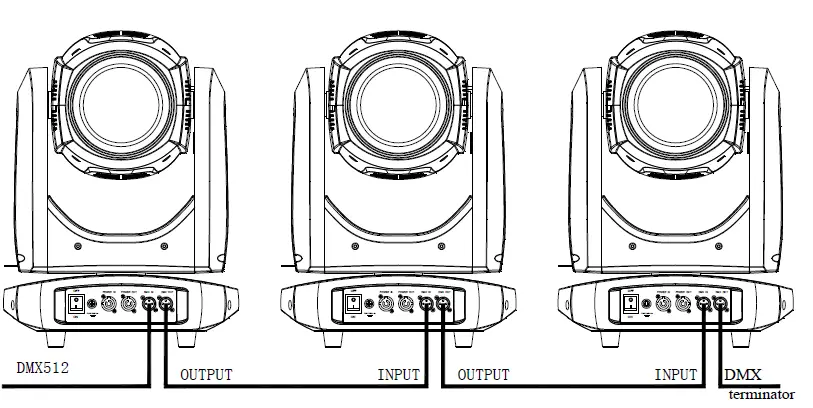
DMX TERMINATOR
In the Controller mode, at the last fixture in the chain, the DMX output has to be connected with a DMX terminator. This prevents electrical noise from disturbing and corrupting the DMX control signals. The DMX terminator is simply an XLR connector with a 120 (ohm) resistor connected across pins 2 and 3, which is then plugged into the output socket on the last projector in the chain. The connections are illustrated below.
ALIGNMENT/INSTALLATION/REPLACEMENT OF A LAMP
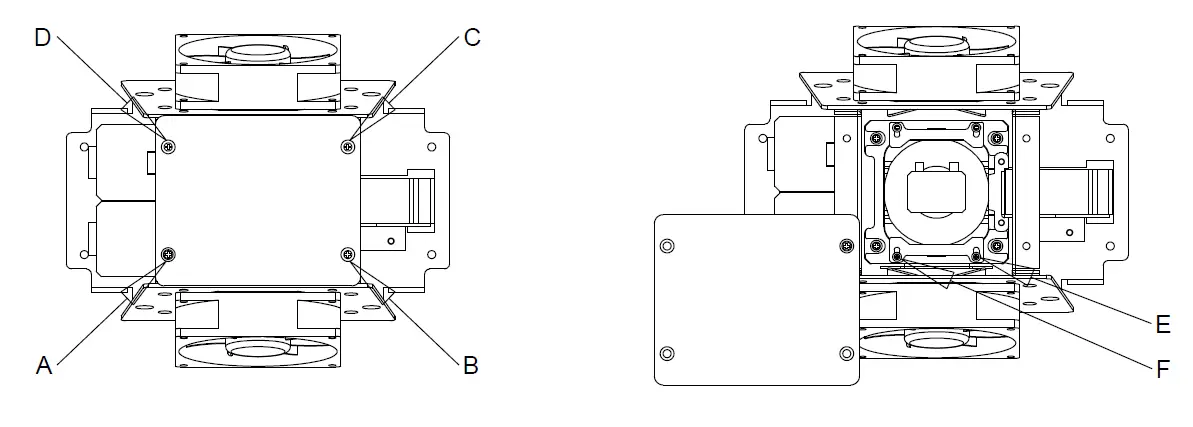
- Loosen and remove screws B,C and D .Loosen screw A which can only be loosened but can’t be removed, for details please see the figure on the right. Then the lamp and its supporting frames can be seen.
- Loosen screws E and F and push the lamp supporting frames downward to expose the lamp’s side, and remove the lamp after pushing it downward. After unplugging the lamp, remove it. Plug a new lamp with lamp wires after it is in place, push the supporting frames upward and tighten the screws to fix the new lamp. Tighten the screws after the lamp chamber cover is on. At last restore the projector’s original appearance based on the opposite sequences of dismantling.
SETUP AND CONFIGURATION
FRONT PANEL OPERATION
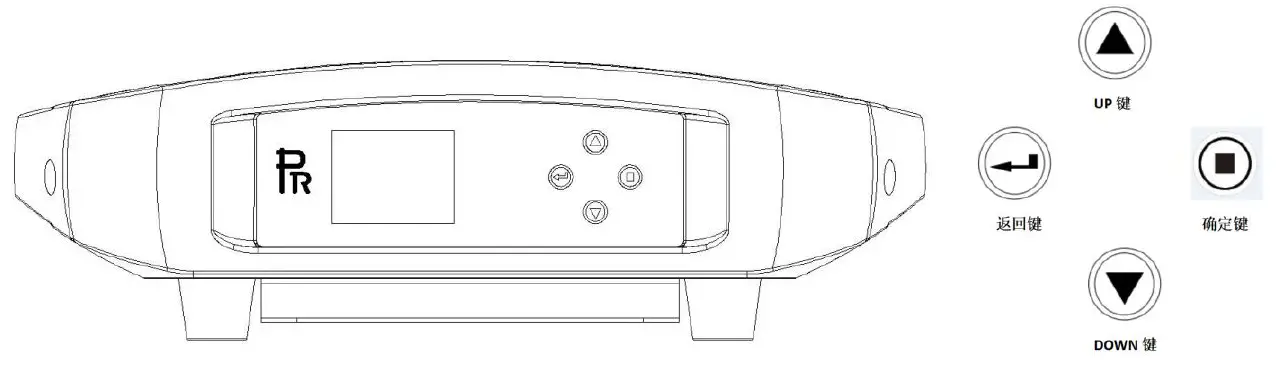
To browse through or view a projector’s function settings, push any key to activate the screen after power-on.. After screen unlocked, push both key and to enter into menus. Each main menu has its sub-menus with different special functions, for details please see the 5th point hereinafter OPERATION MENU.
- Under menu page for function settings,push or to select function desired.
- During menu operation key is to escape key means ENTER push key to save settings or enter into submenus,push or key to change values(plus or minus).
DMX START ADDRESS
Push any key to enter into options interface.
If multiple projectors are controlled by DMX controller, each projector must have its own DMX address to receive DMX signals from the controller and respond to them. The projector has 2 DMX modes. There are short mode and standard mode. For example standard mode has 16 channels, so set the No. 1 projector’s address 001, No. 2 projector’s address 017, No. 3 projector’s address 033, No. 4 projector’s address 49 and so on. Turn on a projector and push any key to enter into options interface Select CHANNEL MODE icon and push ENTER key . Select DMX ADRESS in 2nd level menu to set start address
- Push key UP or DOWN to set value desired.
- Push ENTER key to confirm it.
- Push ESCAPE key to enter into upper level menus.
STAND-ALONE MODE
Without connecting a projector with a controller via XLR cable, after preset memories under the master mode enabled, it will run in Stand-Alone mode.
MASTER/SLAVE MODE
- Edit the scene desired Two ways to edit scene
- Edit manually Disconnect a projector from XLR cable and enter into scene editing via control panel. A scene has 20 steps and select any step via its sequence No.. Enter into channel control to edit its data. After disconnected from a DMX controller, a projector will respond to data edited simultaneously.
- Edit with help of a DMX controller Use a DMX controller to control a projector. After the projector is controlled properly in positions, select the sequence No. of step to be saved and click to store DMX values. Current DMX data will be automatically saved to its scene’s data and the sequence NO. added 1. And so on, it can save 20-step scene.
- Select use mode from scene menu. There are 2 modes for selection: single and recycle. If not used, it can be closed.
Menu interface:
- DMX address
- Config
- Manual control
- Scene
- System settings
- Information
- Explanations for menu functions. Push any key to enter into option interface while at initial display
| Main menu | 1st level menu | 2nd level menu | Description |
|
DMX address |
DMX Setting |
001-512 | Select “DMX address”option 1) After ENTER key pushed,the current DMX address will be shown 2) Push UP or DOWN key to set address 3) Push ENTER key to save and exit. Push ESCAPE key to exit directly |
|
Config |
Channel mode | 14CH Short Mode | Select ”Channel mode” option 1)After ENTER key pushed, current channel mode will be shown(16CH for standard mode,14CH for short mode) 2) Push UP or DOWN key to select either of the options; 3)Push ENTER key to save the mode selected. PUSH ESCAPE key to go back to the upper level menu and cancel the mode selected |
| 16CH Standard mode | |||
|
Lamp Striking |
Auto lamp-on | Select “Lamp Striking”Option 1) Push ENTER key to show current mode(Auto lamp-on, lamp-on by DMX control). 2) Push UP or DOWN key to select either of the options. 3)Push ENTER key to save the mode selected. PUSH ESCAPE key to go back to the upper level menu and cancel the mode selected | |
|
Lamp-on by DMX control | |||
|
Pan & Tilt | Pan Invert | Select“Pan and Tilt Invert”option 1) Push ENTER key and the options will be shown on the display(Open or Close) 2) Push UP or DOWN key to select either of the options. 3) Push ENTER key to save the selected. PUSH ESCAPE key to cancel the setting. | |
|
Tilt Invert | |||
| Pan and Tilt swap | Select“Pan and Tilt Swap”option 1)Push ENTER key and the options will be shown on the |
| display(Open or Close) 2)Push UP or DOWN key to select either of the options.3) Push ENTER key to save the selected. PUSH ESCAPE key to cancel the setting. | |||
| Channel calibration | (Hidden ) | Push both UP and DOWN keys to enter into the menu, push DOWN or UP key to select, push ENTER key to save. | |
|
Lamp control | Open | Select“Lamp Control”option 1) Push ENTER key and the options will be shown on the display(Open or Close) 2) Push UP or DOWN key to select either of the options. 3) Push ENTER key to save the selected. PUSH ESCAPE key to cancel the setting. | |
| Close | |||
|
Manual control |
Lamp power | Full power | Select“Lamp power”option 1) Push ENTER key and the options will be shown on the display(Full or half power) 2) Push UP or DOWN key to select either of the options. 3)Push ENTER key to save the selected. PUSH ESCAPE key to cancel the setting. |
| Half power | |||
|
System reset | Head reset | Select“System reset”option 1) Push ENTER key and the reset options will be shown on the display(Head reset, pan and tilt reset and total reset) 2) Push UP or DOWN key to select any of the options. 3)Push ENTER key to save the selected. PUSH ESCAPE key to cancel the setting. | |
| Pan and Tilt reset | |||
| Total reset | |||
|
Scene |
Mode | Close | Select“Mode”option 1) Push ENTER key and the options will be shown on the display(Close, single and cycle) 2) Push UP or DOWN key to select any of the options. 3)Push ENTER key to save the selected. PUSH ESCAPE key to cancel the setting. |
| Single | |||
| Cycle |
Select“Scene”options 1) Push ENTER key and the options will be shown on the display(No., Effective and time) 2) Push UP or DOWN key to select any of the options. 3)Push ENTER key to save the selected. PUSH ESCAPE key to cancel the setting. | ||
| Sequence No | 1-20 | ||
| Effective | Yes | ||
| No | |||
| Time | 3.0 | ||
|
Save DMX value | Yes | ||
| Cancel | |||
|
Channel control |
DMX Channel | Select“Channel control”options 1) Push ENTER key and the option will be shown on the display(all DMX channels) 2) Push UP or DOWN key to enter into any of the options(adjustable between 0 and 255). 3) Push ENTER key to save the selected. PUSH ESCAPE |
DMX PROTOCOL
| PR-9604 Beam light DMX chart | |||
| DMX channel | Value | Function | |
| Short Mode | Standard Mode | ||
| 1 | 1 | Pan | |
| 0-255 | 0-100% | ||
| 2 | Pan Fine | ||
| 0-255 | 0-100% | ||
| 2 | 3 | Tilt | |
| 0-255 | 0-100% | ||
| 4 | Tilt Fine | ||
| 0-255 | 0-100% | ||
| 3 | 5 | Pan and Tilt speed | |
| 0-255 | Fast ->Slow | ||
|
4 |
6 | Strobe | |
| 0-3 | Close | ||
| 4-103 | Strobe: Slow->Fast | ||
| 104-107 | Open | ||
| 108-207 | Pulse strobe: Slow->Fast | ||
| 208-212 | Open | ||
| 213-225 | Strobe at random: slow speed | ||
| 226-238 | Strobe at random: medium speed | ||
| 239-251 | Strobe at random: fast speed | ||
| 252-255 | Open | ||
| 5 | 7 | Dimmer | |
| 0-255 | 0-100% | ||
|
6 |
8 | Colors | |
| 0-4 | Open | ||
| 5-8 | Open+ Color1 | ||
| 9-12 | Color1 | ||
| 13-17 | Color1+Color2 | ||
| 18-21 | Color2 | ||
| 22-25 | Color2+Color3 | ||
| 26-29 | Color3 | ||
| 30-34 | Color3+ Color4 | ||
| 35-38 | Color4 | ||
| 39-42 | Color4+ Color5 | ||
| 43-46 | Color5 | ||
| 47-51 | Color5+ Color6 | ||
| 52-55 | Color6 | ||
| 56-59 | Color6+Color7 | ||
| 60-63 | Color7 | ||
| 64-68 | Color7+ Color8 | ||
| 69-72 | Color8 | ||
| 73-76 | Color8+ Color9 | ||
| 77-81 | Color9 | ||
| 82-85 | Color9+ Color10 | ||
| 86-89 | Color10 | ||
| 90-93 | Color10+Color11 | ||
| 94-98 | Color11 | ||
| 99-102 | Color11+Color12 | ||
| 103-106 | Color12 | ||
| 107-110 | Color12+Color13 | ||
| 111-115 | Color13 | ||
| 116-119 | Color13+Color14 | ||
| 120-123 | Color14 | ||
| 124-127 | Color14+Open | ||
| 128-255 | Rotation: slow->fast |
|
7 |
9 | Fixed gobo wheel | |
| 0-3 | Open | ||
| 4-7 | GOBO1 | ||
| 8-11 | GOBO2 | ||
| 12-15 | GOBO3 | ||
| 16-19 | GOBO4 | ||
| 20-23 | GOBO5 | ||
| 24-27 | GOBO6 | ||
| 28-31 | GOBO7 | ||
| 32-35 | GOBO8 | ||
| 36-39 | GOBO9 | ||
| 40-43 | GOBO10 | ||
| 44-47 | GOBO11 | ||
| 48-51 | GOBO12 | ||
| 52-55 | GOBO13 | ||
| 56-59 | GOBO14 | ||
| 60-63 | GOBO15 | ||
| 64-67 | GOBO16 | ||
| 68-71 | GOBO17 | ||
| 72-78 | GOBO1 SHAKE: Slow->Fast | ||
| 79-85 | GOBO2 SHAKE: Slow->Fast | ||
| 86-92 | GOBO3 SHAKE: Slow->Fast | ||
| 93-99 | GOBO4 SHAKE: Slow->Fast | ||
| 100-106 | GOBO5 SHAKE: Slow->Fast | ||
| 107-113 | GOBO6 SHAKE: Slow->Fast | ||
| 114-120 | GOBO7 SHAKE: Slow->Fast | ||
| 121-127 | GOBO8 SHAKE: Slow->Fast | ||
| 128-134 | GOBO9 SHAKE: Slow->Fast | ||
| 135-141 | GOBO10 SHAKE: Slow->Fast | ||
| 142-148 | GOBO11 SHAKE: Slow->Fast | ||
| 149-155 | GOBO12 SHAKE: Slow->Fast | ||
| 156-162 | GOBO13 SHAKE: Slow->Fast | ||
| 163-169 | GOBO14 SHAKE: Slow->Fast | ||
| 170-176 | GOBO15 SHAKE: Slow->Fast | ||
| 177-183 | GOBO16 SHAKE: Slow->Fast | ||
| 184-190 | GOBO17 SHAKE: Slow->Fast | ||
| 191-222 | Clockwise rotation: Fast->Slow | ||
| 223-255 | Anti-clockwise rotation: slow->fast | ||
| 8 | 10 | Prism1 | |
| 0-63 | Open | ||
| 64-255 | Prism 1 in | ||
| 9 | 11 | 16 facet prism rotation | |
| Prism2 | |||
| 0-63 | Open |
| 64-255 | Prism 2 in | ||
|
10 |
12 | Prism rotation | |
| 0-127 | 0-360° | ||
| 128-190 | Clockwise rotation: Fast->Slow | ||
| 191-192 | Stop | ||
| 192-255 | Anti-clockwise rotation: slow->fast | ||
| 11 | 13 | Frost | |
| 0-255 | 0-100% | ||
| 12 | 14 | Focus | |
| 0-255 | 0-100% | ||
|
13 |
15 | Reset | |
| 0-25 | NO | ||
| 26-76 | Head reset | ||
| 77-127 | Pan & Tilt reset | ||
| 128-255 | Total reset | ||
|
14 |
16 | Lamp control | |
| 0-25 | No | ||
| 26-100 | Lamp off | ||
| 101-255 | Lamp on |
ERROR MESSAGE
| Name | Type | Correction |
| Pan | Optical sensor error: Pan | Check if wiring, optical sensor and motors are normal |
| Tilt | Optical sensor error: Tilt | Check if wiring, optical sensor and motors are normal |
| Pan & Tilt driver board | Communication error: module1 | Check if wiring, hall sensor and motors are normal |
| Motor driver board | Communication error: module2 | Check if wiring, hall sensor and motors are normal |
| Focus | Hall error: Focus | Check if wiring, hall sensor and motors are normal |
| Color wheel | Hall error: Color wheel | Check if wiring, hall sensor and motors are normal |
| Fixed gobo wheel | Hall error: Fixed gobo wheel | Check if wiring, hall sensor and motors are normal |
| Lamp striking | Lamp striking error | Check if wiring and igniter are normal and if the voltage of the igniter is normal |
TECHNICAL DATA
ELECTRIC PARAMETERS
- Input voltage 200V~240V AC,50/60Hz
- Input power 600W@230V
- Power factor PF>0.90
THE SPECIFICATIONS OF THE LIGHT SOURCE
- Lamp: MSD Platinum 300S Flex
- Color temperature: 7800K
- rated life: 6000hrs
COLORS
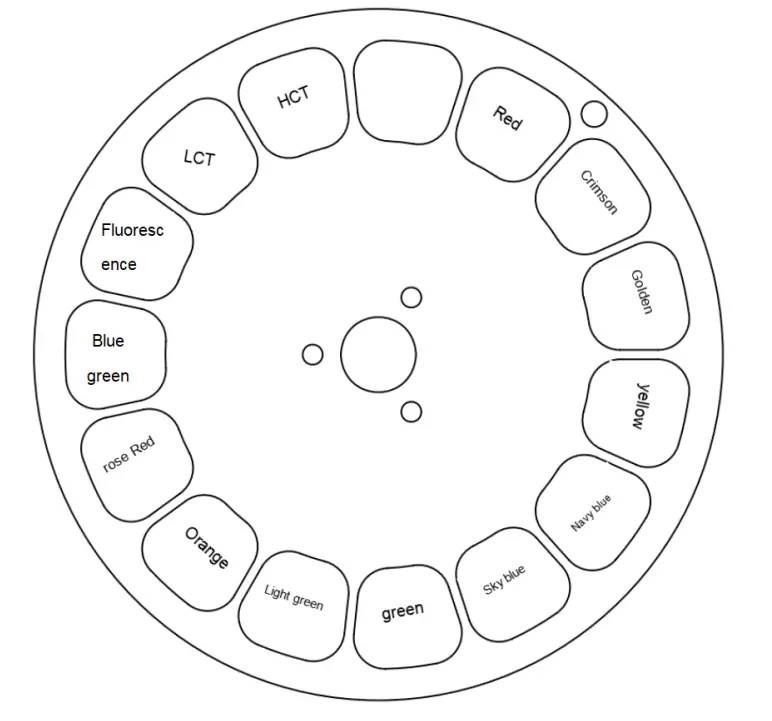
- 1color wheel: 14colors+ Open
FIXED GOBO WHEEL
1 fixed gobo wheel: 17gobos+open, gobo diameter=6mm, its thickness=0.8mm

SPECIFICATION
- PRISM/FROST: 1 8-facet prism and 1 16-facet prism, bi-directional rotation from slow to fast , both can be overlapped
- FOCUS: DMX linear focus
- DIMMER /STROBE: Strobe at variable speeds(15 F.P.S at maximum) 0-100% linear dimmer
- HEAD MOVEMENT: Pan 540º, Tilt 270º with 16 bit control
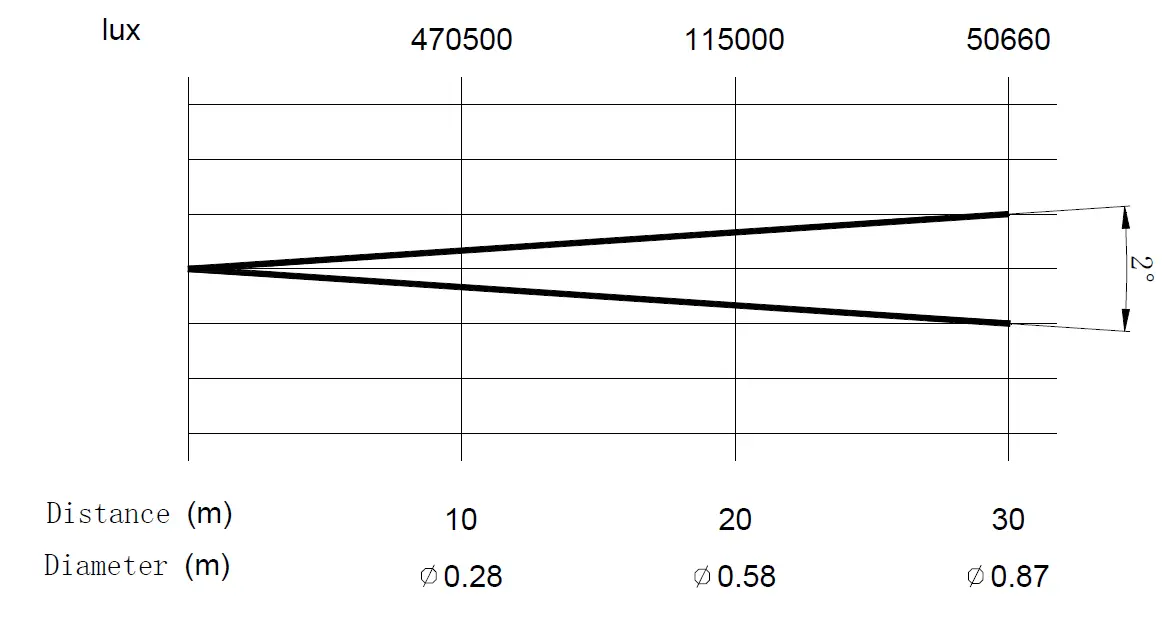
- BEAM ANGLE: 0°~ 2°
- CONTROL: International standard DMX 512 protocol, 5-pin interface 14channels in short mode and 16channels in standard mode
- HOUSING: High temperature and anti-UV ABS and aluminum , IP20
- NET WEIGHT: 17Kg
- OPERATION TEMPERATURE: Ambient temperature at maximum:45°C
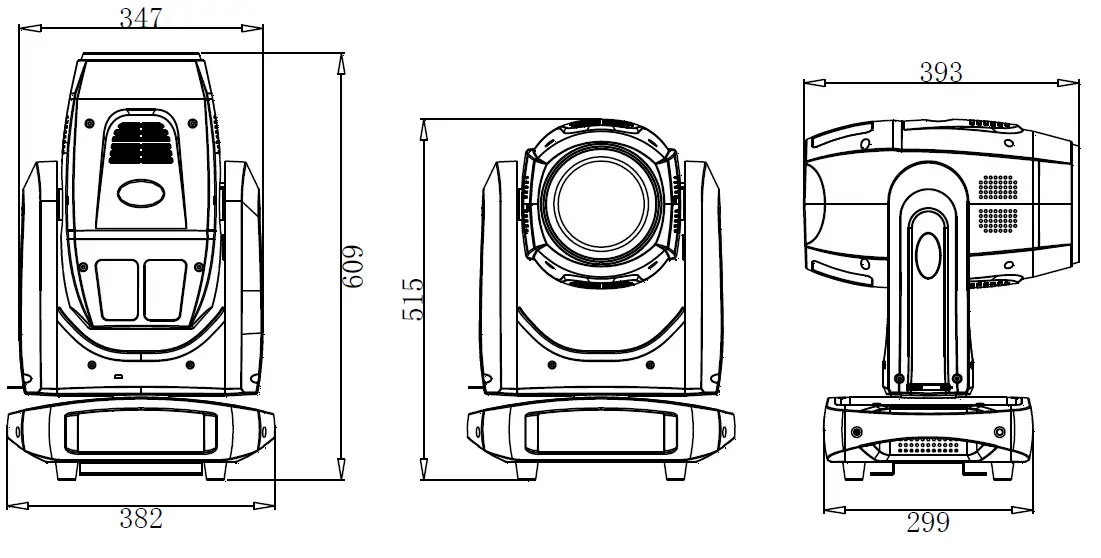
SIZES: 
LIGHT OUTPUT
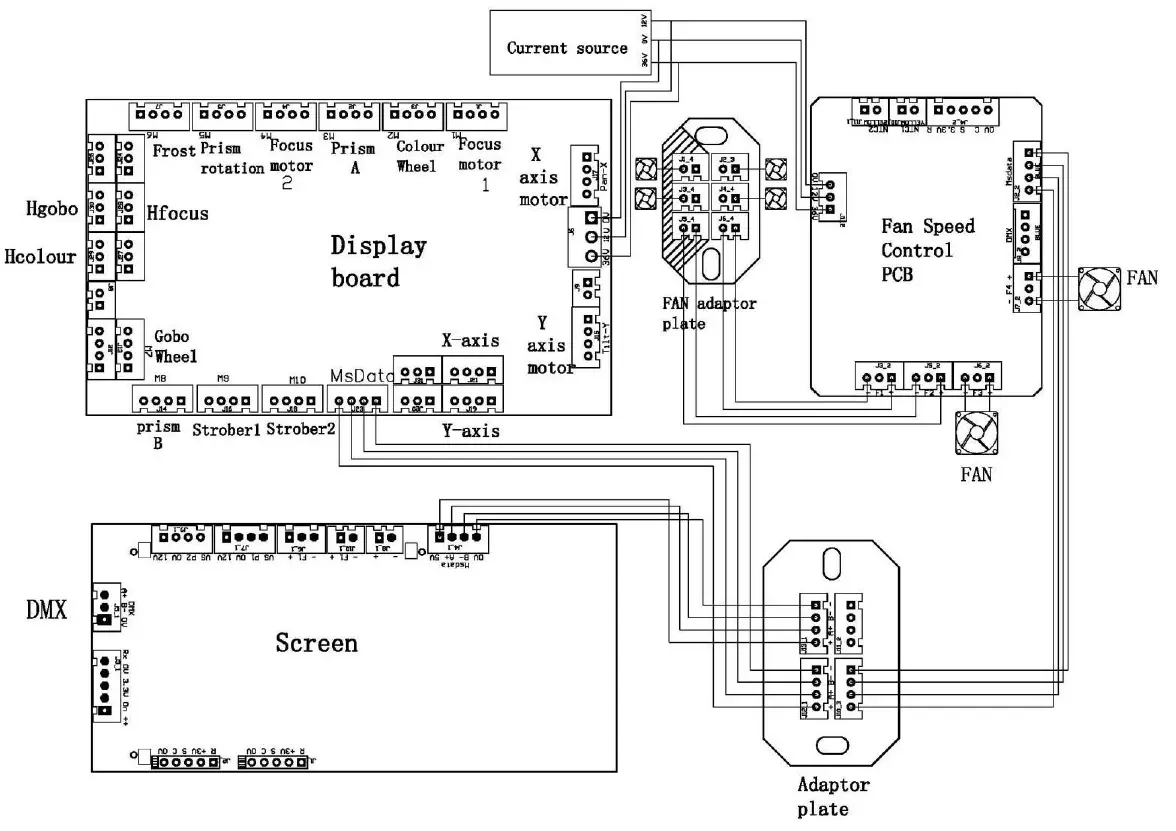
CIRCUIT DIAGRAM
COMPONENT ORDER CODES
| Name | Code No. | Qty | Remarks |
| Pan Motor | 50300-00096 | 1 | |
| Tilt Motor | 50300-00097 | 1 | |
|
Color wheel | 50502-00157 | 1 |
14colors, each code no. stands for one color, colors start from red and so on |
| 50502-00158 | 1 | ||
| 50502-00159 | 1 | ||
| 50502-00160 | 1 | ||
| 50502-00161 | 1 | ||
| 50502-00162 | 1 | ||
| 50502-00163 | 1 | ||
| 50502-00164 | 1 | ||
| 50502-00165 | 1 | ||
| 50502-00166 | 1 | ||
| 50502-00167 | 1 | ||
| 50502-00168 | 1 | ||
| 50502-00169 | 1 | ||
| 50502-00170 | 1 | ||
| Fixed gobo wheel | 70502-00015 70502-00011 | 1 | |
| Switching power supply | 50400-00008 | 1 | |
| Lamp | 50203-00019 | 1 | MSD Platinum 300S Flex |
| Ballast | 50406-00018 | 1 |
APPENDIX: SOME ITEMS REQUIRING ATTENTION AS FOR THE USE OF DISCHARGE LAMP
For the effective extension of the lifespan of discharge lamp, some factors impacting its lifespan are specially listed below, based on manufacturing technology and working mechanism of discharge lamps., physical attributions of the lamps including lamp striking theory( ignited by focused high voltage—highly pressurized air broken down and burning—lamp on at high temperature with thermal protection— stable running) and lamp off theory( lamp off power —lamp off at high temperature and thermal protection-highly pressurized air vaporizing evenly—-completion of lamp off.
- The sequence of lamp striking: Power on→lamp striking by controller(advised not to strike lamp via power on), the sequence of lamp off: lamp off by controller→mains power shut off (advised not to turn off lamp by shutting off mains power)
- Within 1 min after lamp striking, it shouldn’t re-strike it frequently. ONLY more than 10 min after the projector is cooled after lamp off, can the lamp be re-stricken again.
- Within 5 min after lamp striking, it can’t be turned off. During the lamp striking process, it’s forbidden to turn off lamp via shutting off mains power, but via controller. More than 5 min after the projector is cooled after lamp off, can the mains power be shut off.
- The projector is advised not to point to the same point for long time, i.e., it shouldn’t be used for long time at a fixed angle.
- The projector is advised not to use double colors for long time, i.e., it shouldn’t use 2 or more colors for long time.
- The projector is advised not to keep shutters closed while lamp on for long time, i.e., it should be less than 1 hr after shutters closed after lamp on.
It is advised not to use lamp half power function for long time.
PR LIGHTING LTD.
1582 Xingye Avenue, Nancun Panyu Guangzhou, 511442 China
TEL: +86-20-3995 2888
PR lighting will try its best to offer accurate and overall information about a product’s technical data. Any changes won’t be notified if necessary. Patented Products. Counterfeiting Will be Prosecuted!
 PR LIGHTING LTD.