
H52V215 Quick Set Two Steps
Adjust different battery types:
Press and hold the SET button for about 3 seconds to display P1. Press and hold SET again for about 3 seconds to enter the battery type selection mode. At this time, release the button and shortly press the SET button or U/D button, the voltage cycle displays 12V_3. 7V_3. 2V_2.V_1 .2V
♦12V: stands for lead-acid battery, single-cell voltage is 12V
♦3. 7V: stands for polymer lithium battery, single-cell voltage is 3. 7V
♦3. 2V: on behalf of the lithium iron phosphate battery, the single-cell voltage is 3.2V
♦2. 0V: on behalf of the lead-acid battery, the single-cell voltage is 2.0V
♦1.2V: stands for Ni-MH battery, single-cell voltage is 1.2V
♦Default display: 12V
♦ When switching to the corresponding battery type, release the button, wait until the screen flashes to save the setting, and exit the setting mode
Adjust the number of battery sections:
Press and hold the SET button for about 3 seconds to display P1, and the short SET button will switch to display P2. Press and hold SET again for about 3 seconds to enter the battery number setting mode. At this time, after releasing the button, short press the SET button to increase the value. Press the U/D key to decrease the value downward; the adjustable range of “number of cells” for different types of batteries is as follows:
♦12V lead-acid battery: 1-10 cells
♦3.7V lithium battery: 4-34 cells
♦3. 2V lithium-ion battery: 4-40 cells
♦2.0V lead-acid battery: 5-60 cells
♦1.2V inlaid hydrogen battery: 10-93 cells
♦Default display: 1
♦When switching to the corresponding battery number, release the button, wait for the screen to flash to save the setting, and exit the setting mode Non-alarm parameter adjustment menu operating instructions
| Main Menu | A menu | Defaults | |
| P-1 (Set battery type) | 12.0 (representing a 12-cell lead-acid battery) | 12.0 | |
| 3.7 (representing a 3.7 polymer lithium battery for a single cell) |
| 3.2 (Representing a single cell of 3.2V lithium iron phosphate battery) | |||
| 2 (representing a single 2V lead-acid battery) | |||
| 1-2 (representing a single cell of 1.2V Ni-MH battery) | |||
| P-2 (Set the number of battery cells) | 1-99 (number of battery cells) | 1 | (P-l)*(P-2)<=90 |
| P-3 (Set capacity calculation method) | P1 (normal discharge) | P1 | Calculate the corresponding capacity percentage according to the internal setting interval of the program |
| P2 (Custom discharge interval) | You can set the corresponding voltage value when the battery is 0% or 100% | ||
| P-4 (Custom discharge upper limit) | Corresponding voltage value when the power is 100% | 0 | This value is valid only when P2 is selected in P-3 setting “Capacity calculation method” |
| P-5 (Custom discharge lower limit) | The corresponding voltage value when the battery is 0% | 0 | |
| P-6 (Display mode of voltage and percentage) | S1-V (Only display voltage) | ||
| S2-% (only the percentage is displayed) | |||
| S3-V% (Voltage and percentage are displayed cyclically in 4 seconds) | S3-V% | ||
| P-7 (Charging display mode of battery bar) | 01 (Static display) | 01 | During the battery charging process, the power bar dynamically displays the charging status visually |
| 02 (dynamic display) | |||
| P-8 (Set the brightness of the backlight) | 0/1/2/3/4 | 3 | When set to 0, turn off the backlight, 4 is the highest brightness |
| P-9 (Set energy-saving mode)) | BL (Backlight off) | BL | |
| DS (backlight and display are both off) | |||
| P10 (Set energy-saving delay time) | 0-999 (seconds) set to 0 means the backlight is always on | 15 | Delayed execution time of BL/DS in F-9 |
| P11 (Voltage fine-tuning calibration) | Voltage value fine-tuning calibration | OFF | When the displayed voltage value has a deviation, it can be adjusted within a certain range |
| P12 (Restore factory settings) | N0 (do not restore the default parameters) | NO | Select YES, the current parameters are all restored to the factory settings |
| YES (restore default parameters) |
- The key operation is divided into long press and short press;
Long press: press the button for more than 3 seconds to release;
Short press: release the button within 1 second after pressing the button; - Button definition
Short press SET (set key): switch the same level menu or adjust parameters, manually switch display voltage or display percentage
Short press U/D (operation key): switch the menu at the same level or adjust parameters, turn off the backlight display;
Long press SET (set key): enter the next menu
When adjusting the value, if you need to make a large adjustment, you can press and hold the SET key or the U/D key, the displayed value will continue to increase or decrease, and the speed will gradually increase. When it is close to the set value, release the key and press again Fine-tune under - Save and return the parameter value
After 5 seconds without any key operation, the screen will flash twice to save the parameters and return to the previous menu.
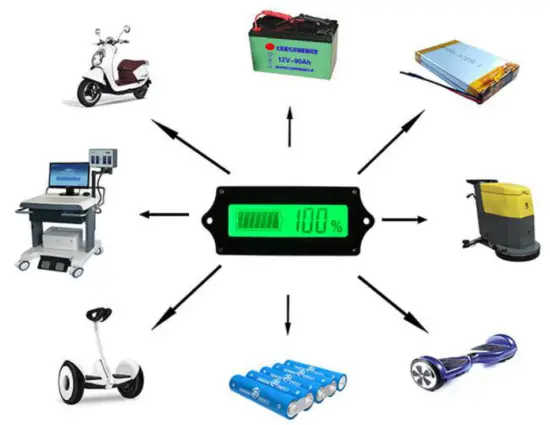
Applicable battery types: ternary lithium batteries, polymer lithium batteries, lithium-ion batteries, storage batteries, water batteries and other lithium batteries, lead-acid batteries. Application: Suitable for various instruments and meters, mobile portable equipment, mobile power supplies, medical equipment, electric vehicles, balance vehicles, unicycles, etc.
| Product name | LCD liquid crystal battery indicator | Working humidity | 10~80% (no condensation) |
| Product number | H52V212CUP | Working pressure | 80~106kPa |
| Power supply | No need external power supply | Sunlight | No direct exposure |
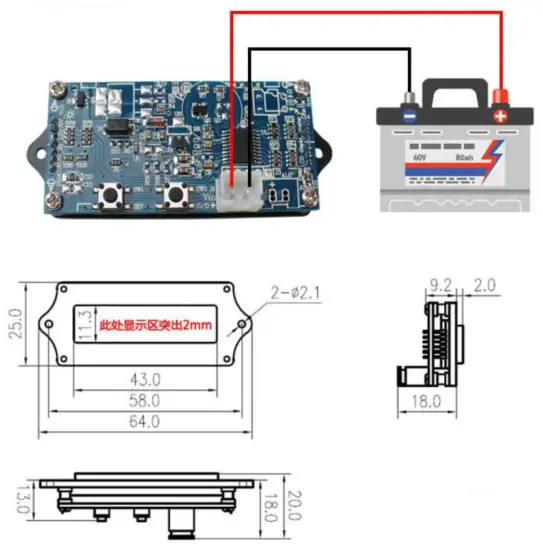
| Measuring range | 9-120V (wide range) | External dimensions | 61.5×33.5×15.3mm, length x width x thickness |
| Minimum tidal rate | 0.1V | External opening size | Suggest 58.5×28.5mm, length x width |
| Error | 1% (±1 word) | Built-in external size | 64x 25 x16.8mm, length x width x thickness |
| Working current | <5mA (including backlight) | Built-in opening size | Recommend 43×11.3mm, length x width |
| Refresh rate | >=500mS/time | Lead length | 150mm |
| Display method | LCD liquid crystal display | Net weight | 20g |
| Backlight color | Green | Gross weight | 23g |
| Operating temperature | -10~+65℃ |