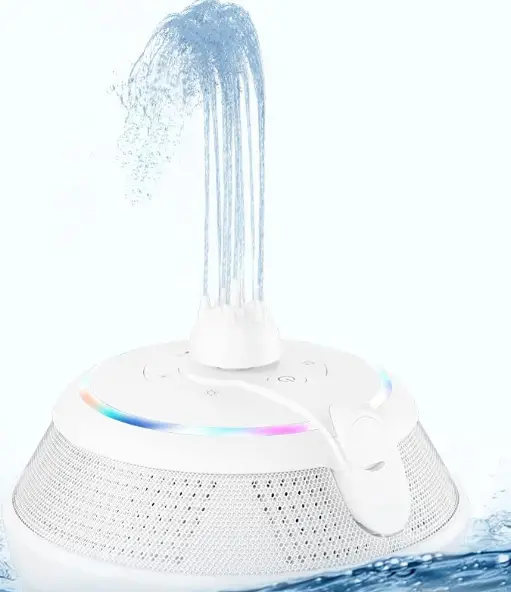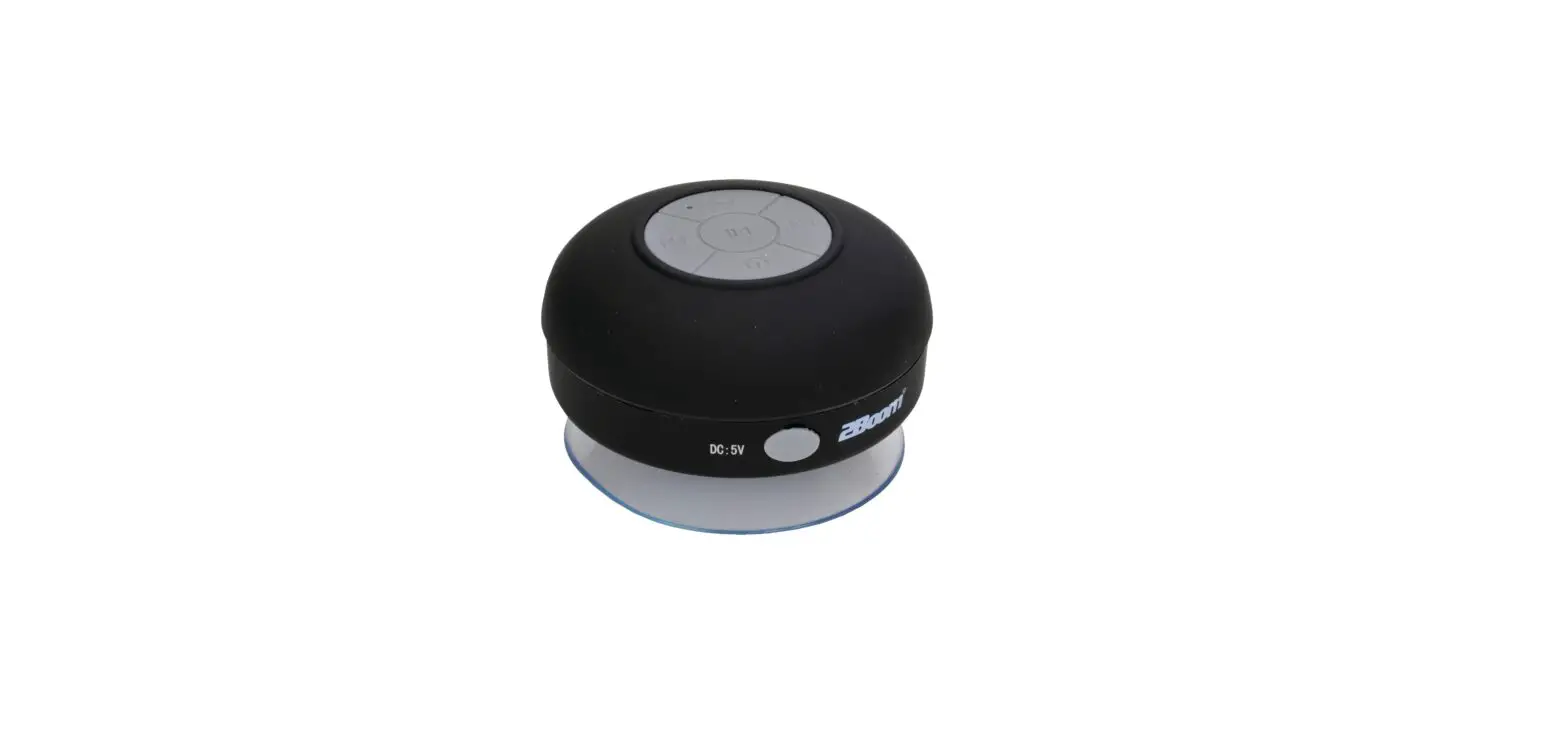

JENSEN SMPS-626 Waterproof Bluetooth Shower Speaker
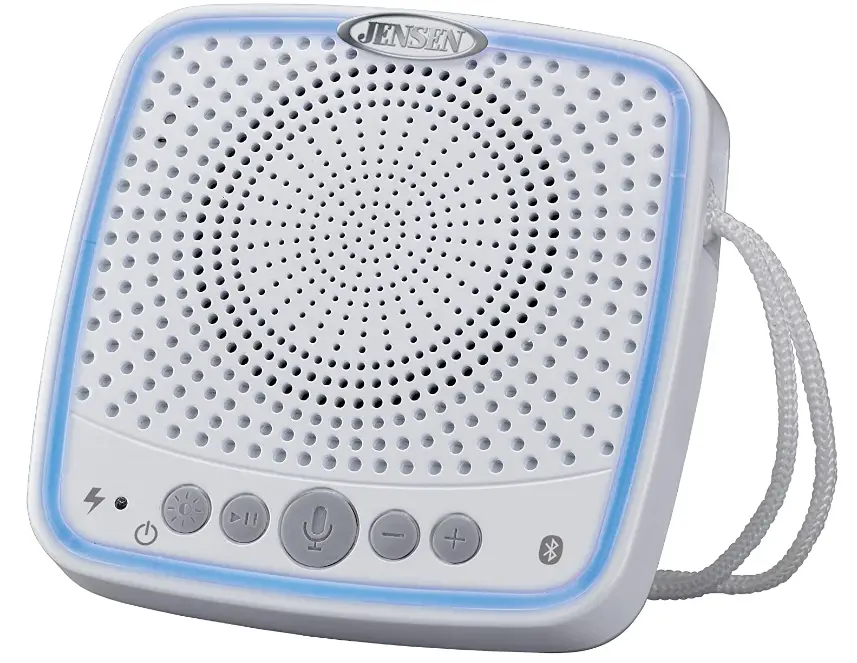
OverView
THIS UNIT AND RETAIN THIS BOOKLET FOR FUTURE REFERENCE
COMPLIANCE WITH FCC REGULATIONS FCC ID
LMZ-30300 this device complies with Part 15 of the FCC Rules.
Operation is subject to the following two conditions:
- This device may not cause harmful interference, and
- This device must accept any interference received, including interference that may cause undesired operation.
This equipment has been tested and found to comply with the limits for a class B digital device, pursuant to Part 15 of the FCC Rules. These limits are designed to provide reasonable protection against harmful interference in a residential installation. This equipment generates uses and can radiate radio frequency energy and, if not installed and used in accordance with the instructions, may cause harmful interference to radio communications.
However, there is no guarantee that interference will not occur in a particular installation. If this equipment does cause harmful interference to radio or television reception, which can be determined by turning the equipment off and on, the user is encouraged to try to correct the interference by one or more of the following measures:
- Reorient or relocate the receiving antenna.
- Increase the separation between the equipment and receiver.
- Connect the equipment into an outlet on a circuit different from that to which the receiver is connected.
- Consult the dealer or an experienced radio/TV technician for help.
CAUTION Changes or modifications not expressly approved by the party responsible for compliance could void the user’s authority to operate the equipment.
PROTECT YOUR FURNITURE
this system is equipped with non-skid rubber ‘feet’ to prevent the product from moving when you operate the controls. These ‘feet’ are made from non-migrating rubber material specially formulated to avoid leaving any marks or stains on your furniture. However certain types of oil based furniture polishes, wood preservatives, or cleaning sprays may cause the rubber ‘feet’ to soften and leave marks or a rubber residue on the furniture. To prevent any damage to your furniture we strongly recommend that you purchase small self-adhesive felt pads, available at hardware stores and home improvement centers everywhere, and apply these pads to the bottom of the rubber ‘feet’ before you place the product on fine wooden furniture
DEAR JENSEN CUSTOMER
Selecting fine audio equipment such as the unit you’ve just purchased is only the start of your musical enjoyment. Now it’s time to consider how you can maximize the fun and excitement your equipment offers. This manufacturer and the Electronic Industries Association’s Consumer Electronics Group want you to get the most out of your equipment by playing it at a safe level. One that lets the sound come through loud and clear without annoying blaring or distortion and, most importantly, without affecting your sensitive hearing. Sound can be deceiving. Over time your hearing “comfort level” adapts to higher volumes of sound. So what sounds “normal” can actually be loud and harmful to your hearing. Guard against this by setting your equipment at a safe level BEFORE your hearing adapts
To establish a safe level:
- Start your volume control at a low setting.
- Slowly increase the sound until you can hear it comfortably and clearly, and without distortion.
- Once you have established a comfortable sound level: Set the dial and leave it there. Taking a minute to do this now will help to prevent hearing damage or loss in the future. After all, we want you listening for a lifetime. We want you to listen for a Lifetime Used wisely; your new sound equipment will provide a lifetime of fun and enjoyment. Since hearing damage from loud noise is often undetectable until it is too late, this manufacturer and the Electronic Industries Association’s Consumer Electronics Group recommend you avoid prolonged exposure to excessive noise.
- Customer’s Record: The serial number of this product is found on its bottom. You should note the serial number of this unit in the space provided as a permanent record of your purchase to aid in identification in the event of theft of loss.
- Model Number: SMPS-626 The Bluetooth® word mark and logos are registered trademarks owned by Bluetooth SIG, Inc. and any use of such marks by Spectra Merchandising Intl, Inc. is under license. Other trademarks and trade names are those of their respective owners.
CHARGING INSTRUCTIONS
The SMPS-626 operates on a built-in rechargeable Li-ion battery. The internal battery can be recharged using the included cable connected to either the USB port on your computer or to a USB power adaptor (not included) rated at DC 5V and 1A or higher.
Note: The MICRO USB CHARGING JACK (#10) located on this unit is only designed for charging the built-in Li-ion battery.
WARNING: Do not dispose of batteries in fire, batteries may explode or leak.
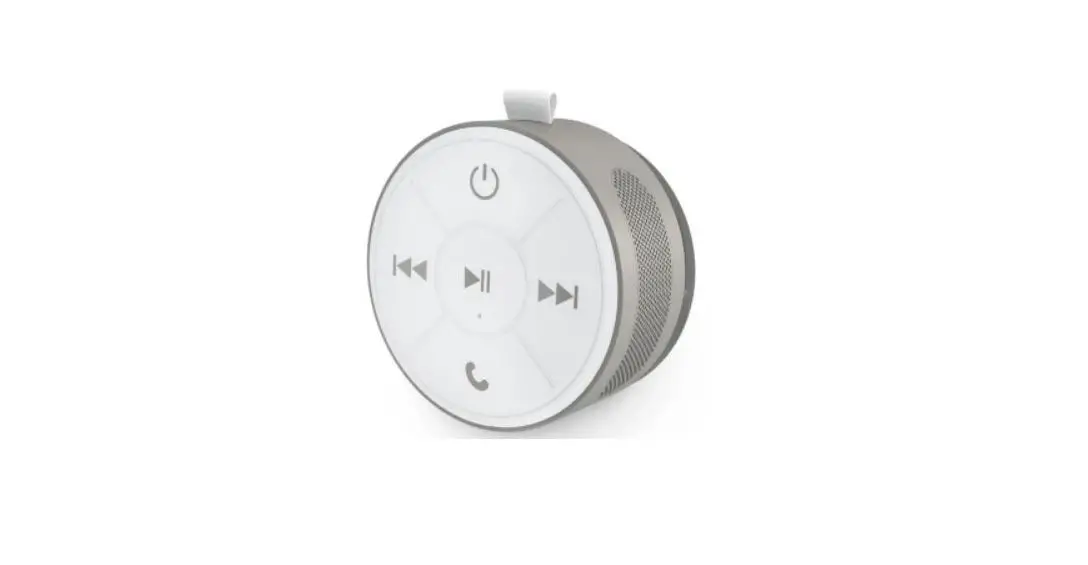
LOCATION OF CONTROLS
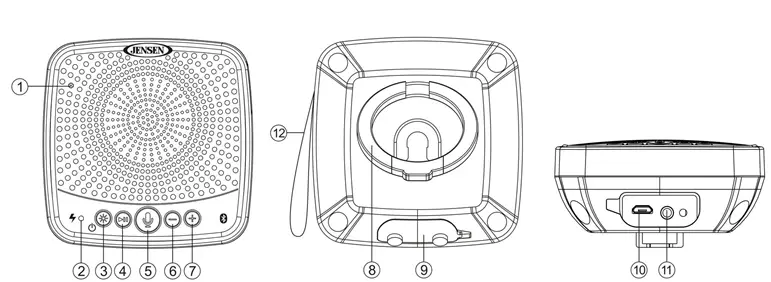
- MIC
- CHARGING INDICATOR RED (charging), OFF (fully charged)
- POWER / LIGHT MODE BUTTON
- PLAY/PAUSE / RECEIVE CALL /BLUETOOTH PAIR BUTTON
- TALK / TWS BUTTON
- VOLUME – / BUTTON
- VOLUME + / BUTTON
- BUILT-IN STAND
- USB AND AUX-IN COVER
- MICRO USB CHARGING JACK
- (CABLE INCLUDED)
- AUX-IN JACK (CABLE INCLUDED)
- ROPE HANGER
PLACEMENT OPTIONS FOR THE SMPS-626
The SMPS-626 features 3 different ways to listen:
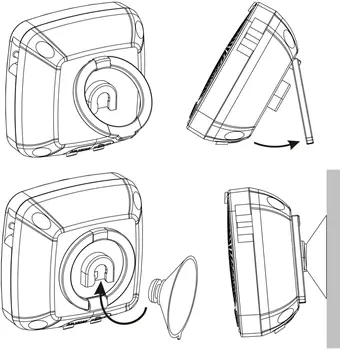
- BUILT-IN STAND
unclips the stand from the back of the speaker and pull it outward. Place the speaker on a flat surface like a counter top or desk. - SUCTION CUP WALL MOUNTING
Insert the included suction cup into the hole located on the back of the unit. Once attached, press the suction cup up against a flat surface or wall for easy mounting. - ROPE HANGER
The attached rope hanger allows you to easily hang the unit from a hook or shower head.
CAUTION: When using the suction cup, please make sure the surface you are attaching it to is completely smooth and clean. Any type of dirt or texture in the surface you are attaching the speaker to may prevent the suction cup from attaching securely, and the unit could fall and get damaged. Please remove the unit from the flat surface when not in use.
MULTI-COLOR LIGHT MODE
The SMPS-626 features a multi-color light ring with user selectable light options.
- Press and hold the POWER / LIGHT MODE BUTTON (#3) to turn on the speaker, you will hear a confirmation voice alert and sound when the unit is ON.
- The SMPS-626 ring flashes BLUE (Bluetooth pairing) the first time you turn on the unit.
- Tap the POWER / LIGHT MODE BUTTON (#3) to step through the 6 different solid color light modes and the 3 different multi-color light changing modes. The light mode will change every time you tap the POWER / LIGHT MODE BUTTON (#3).
Light mode options
- Solid Blue
- Solid Green
- Solid Red
- Solid Yellow
- Solid Purple
- Solid Cyan
- Warm color-changing mode
- Cool color changing mode
- All color changing mode
- Light Ring OFF
BLUETOOTH OPERATION
PAIRING THE SMPS-626 WITH A BLUETOOTH-ENABLED CELLPHONE
- Press and hold the POWER / LIGHT MODE BUTTON (#3) to turn the speaker ON. You will hear a voice prompt telling you the power is ON followed by a voice prompt confirming the unit is in Bluetooth mode.
- You will then hear a confirmation tone and the light ring flashes blue indicating the unit is in Bluetooth pairing mode.
- Turn on the Bluetooth feature of your cell phone and make sure the output media volume on your cell phone is turned down to avoid sudden loud music from the unit.
- Enable the search or scan feature on your cell phone and locate the SMPS-626 on the device list.
- Select the SMPS-626 and if needed, enter the pass code “0000” to pair (link) the speaker with your cell phone.
- After pairing (linking) your cell phone with the SMPS-626, you will hear a confirmation tone indicating the pairing was successful.
STREAMING MUSIC FROM YOUR CELLPHONE TO THE SMPS-626
- Once you’ve successfully paired your cellphone with the SMPS-626, select the music our audio source you want to stream.
- Begin playing music on your cellphone, and it will be heard on the SMPS-626.
- Tap the VOLUME +/- BUTTONS (#7/6) to adjust the desired volume level.
- Press and hold the VOLUME +/- BUTTONS (#7/6) to skip the next/previous song
- Tap the PLAY/PAUSE BUTTON (#4) to pause or resume playback.
ANSWERING A PHONE CALL ON THE SMPS-626
- Once you’ve successfully paired your cellphone with the SMPS-626, you can answer incoming calls using the SMPS-626.
- Tap the PLAY/PAUSE BUTTON (#4) on the SMPS-626 once to answer a call.
- When the call is completed, tap the PLAY/PAUSE BUTTON (#4) once to end the call.
- To ignore an incoming call, press and hold the PLAY/PAUSE BUTTON (#4) for about 3 to 4 seconds and the call will be ignored. The unit will resume playing automatically.
MICROPHONE ACTIVATE BUTTON FOR VOICE ASSISTANCE
- Once you’ve successfully paired your cellphone with the SMPS-626, you can use the
- SMPS-626 to access your cellphone’s built-in voice assistant.
- Tap the TALK BUTTON (#5) to enable Siri® when using an iPhone® or Google Assistant® When using an Android cellphone.
- The built-in microphone on the SMPS-626 now becomes an extension of your cellphone Microphone. You can access Siri® on your iPhone or the Google Assistant® on your
- Android phone with your voice just like you would on your cellphone.
- The responses to your questions will be heard through the SMPS-626 speaker.
Remark:
- Refer to manual of your cellphone or other Bluetooth enabled device for Bluetooth operation, since it may vary from model to model.
- If your Bluetooth enabled device does not support A2DP, it will not play the music through the speaker, even after it’s paired (linked).
- If you want to connect the SMPS-626 to another cell phone after pairing successfully, you can press and hold the PLAY/PAUSE BUTTON (#4) to set the speaker to pairing mode again
- If your Android phone does not have Google Assistant® pre-installed, please download and install the Google Assistant® app from the Play Store before attempting to use the Microphone Activate feature on the SMPS-626.
TRUE WIRELESS STEREO (TWS)
Two SMPS-626 units are required to use the True Wireless Stereo (TWS) feature. TWS allows you to link 2 x SMPS-626 speakers and enjoy stereo sound.
- Press and hold the POWER / LIGHT MODE BUTTON (#3) on each speaker to turn them
- You will hear a voice prompt telling you the power is ON followed by a voice prompt confirming the unit is in Bluetooth mode.
- Follow the Bluetooth pairing instructions above to pair only one of the SMPS-626 speakers with your cellphone.
- Press and hold the TALK/TWS BUTTON (#5) for 2 seconds on the speaker you just paired with your cellphone. You will hear a confirmation tone and the light ring flashes green indicating this speaker is now the master (LEFT) speaker.
- This master speaker will automatically search for another available speaker that is nearby with the power ON, and not currently paired with another device via Bluetooth.
- Once the master speaker locates the other available SMPS-626, it will pair with that speaker and the speaker will become the slave (RIGHT) Speaker.
- Both SMPS-626 speakers will now play in stereo when you stream music from your cellphone.
- Press and hold the TALK/TWS BUTTON (#5) on either speaker to unlink the two speakers.
NOTE
Once you link two speakers using TWS, you must RESET the master speaker and repeat the steps above if you want to link the master speaker to another speaker with TWS.
AUX IN OPERATION
You can play other music sources (iPod, MP3 or other digital audio players) through the SMPS-626 speaker when you connect the AUX IN JACK (#11) to your external player’s audio output jack or headphone jack.
- Plug one end of an audio cable (included) into the AUX-IN JACK (#11). The unit will automatically switch to Aux-in mode and you will hear a confirmation tone.
- Plug the other end of the cable to the headphone jack of your digital audio player.
- Turn on the external device you plugged into the AUX-IN JACK (#11).
- Adjust the sound output level by slowly adjusting the volume control on your SMPS-626 and
The volume control on the external device.
Notes:
- If you connect the SMPS-626 to the Line-Out Jack of your external device, you only need to adjust the VOLUME +/- BUTTON (#7/6) of the SMPS-626. If you connect to the, Headphone Jack of your external device, you may need to adjust both the volume controls of your external device and the SMPS-626 to obtain the desirable listening level.
- Remember to turn off the SMPS-626 when you are done listening. Don’t forget to turn off the power of your external audio device as well.
POWER SAVING (BLUETOOTH ONLY)
When in Bluetooth mode, the unit will automatically go into power saving mode after 15 minutes if no music is playing, or if the music is left in pause mode.
RESETTING THE SPEAKER
To reset the speaker, press and hold the TALK / TWS BUTTON #5 for 10 seconds. The light ring will flash white 3 times and turn OFF. All memory settings including the TWS speaker and paired mobile device will be cleared.
CARE AND MAINTENANCE
- Do not subject the unit to excessive force, shock, dust or extreme temperature.
- Do not tamper the internal components of the unit.
- Clean your unit with a dry cloth. Solvent or detergent should never be used.
- Avoid leaving your unit in direct sunlight or in hot, humid or dusty places.
- Keep your unit away from heating appliances and sources of electrical noise such as fluorescent lamps or motors.
CLEANING THE UNIT
- To prevent fire or shock hazard, disconnect your unit from the AC power source when cleaning.
- The finish on the unit may be cleaned with a dust cloth and cared for as other furniture, use caution when cleaning and wiping the plastic parts.
- If the cabinet becomes dusty wipe it with a soft dry dust cloth. Do not use any wax or polish sprays on the cabinet.
- If the front panel becomes dirty or smudged with fingerprints it may be cleaned with a soft cloth slightly dampened with a mild soap and water solution. Never use abrasive cloths or polishes, as these will damage the finish of your unit.
CAUTION: Never allow any water or other liquids to get inside the unit while cleaning.
SPECIFICATION
Power requirement: DC input: Battery
DC 5V 1A (micro USB) Built-in rechargeable Lithium-ion battery
At Spectra, environmental and social responsibility is a core value of our business. We are dedicated to continuous implementation of responsible initiatives with an aim to conserve and maintain the environment through responsible recycling. Please visit us at http://www.spectraintl.com/green.htm for more information on Spectra’s green initiatives or to find a recycler in your area.
90-DAY LIMITED WARRANTY AND SERVICE VALID IN THE U.S.A. ONLY
SPECTRA MERCHANDISING INTERNATIONAL, INC. warrants this unit to be free from defective materials or factory workmanship for a period of 90 days from the date of original customer purchase and provided the product is utilized within the U.S.A. This warranty is not assignable or transferable. Our obligation under this warranty is the repair or replacement of the defective unit or any part thereof, except batteries, when it is returned to the SPECTRA Service Department, accompanied by proof of the date of original consumer purchase, such as a duplicate copy of a sales receipt.
You must pay all shipping charges required to ship the product to SPECTRA for warranty service. If the product is repaired or replaced under warranty, the return charges will be at SPECTRA’s expense. There are no other express warranties other than those stated herein.
This warranty is valid only in accordance with the conditions set forth below:
- The warranty applies to the SPECTRA product only while:
- It remains in the possession of the original purchaser and proof of purchase is demonstrated.
- It has not been subjected to accident, misuse, abuse, improper service, usage outside the descriptions and warnings covered within the user manual or non-SPECTRA approved modifications.
- Claims are made within the warranty period.
- This warranty does not cover damage or equipment failure caused by electrical wiring not in compliance with electrical codes or SPECTRA user manual specifications, or failure to provide reasonable care and necessary maintenance as outlined in the user manual.
- Warranty of all SPECTRA products applies to residential use only and is void when products are used in a nonresidential environment or installed outside the United States.
This warranty gives you specific legal rights, and you may also have other rights which vary from state to state. TO OBTAIN SERVICE please remove all batteries (if any) and pack the unit carefully and send it freight prepaid to SPECTRA at the address shown below. IF THE UNIT IS RETURNED WITHIN THE WARRANTY PERIOD shown above, please include a proof of purchase (dated cash register receipt) so that we may establish your eligibility for warranty service and repair of the unit without cost. Also include a note with a description explaining how the unit is defective. A customer service representative may need to contact you regarding the status of your repair, so please include your name, address, phone number and email address to expedite the process.
IF THE UNIT IS OUTSIDE THE WARRANTY PERIOD, please include a check for $15.00 to cover the cost of repair, handling and return postage. All out of warranty returns must be sent prepaid.
It is recommended that you contact SPECTRA first at 1-800-777-5331 or by email at [email protected] for updated information on the unit requiring service. In some cases, the model you have may be discontinued, and SPECTRA reserves the right to offer alternative options for repair or replacement. SPECTRA MERCHANDISING INTERNATIONAL, INC. 4230 North Normandy Avenue, Chicago, IL60634, USA. 1-800-777-5331 To register your product, visit the link on the website below to enter your information. http://www.spectraintl.com/wform.htm
Frequently Asked Questions
To charge, plug the included USB cord into a computer or a DC 5V power converter. The LED indication light on the speaker will become red as it charges. The red LED on the speaker will stop glowing when it is fully charged (the charging time is approximately 3 hours).
Different sound pitches are produced by the drivers by the mechanical energy they create from electrical energy. With the assistance of the drivers, the crossovers separate the audio signal and divide the sound pitches into a number of distinct audio bands.
Yes! It’s paired with both iPhone and android
The instructions could do this better. To scan and save the radio stations, long-press the play/pause button. To switch between the saved stations, long press the “+” or “-” buttons.
Choose Bluetooth options from the settings menu on your phone (both Android and iOS). Under Bluetooth settings, navigate to the other devices area. Ensure that discoverable mode is selected on your phone. Choose the speaker you wish to pair under “other devices” and click it.
Yep! When I take a shower, I always utilize it. It has a very strong sucker.
My iPhone 6s functions perfectly.
There is a “no light” option, indeed. Your light selections can be changed by using the “TWS” button.
Outstanding Sound Quality