
Instruction Manual
READ AND SAVE THESE INSTRUCTIONS
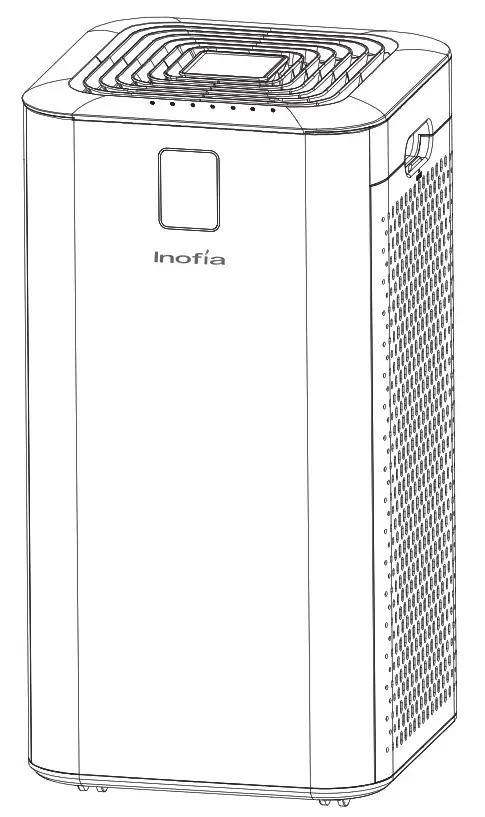
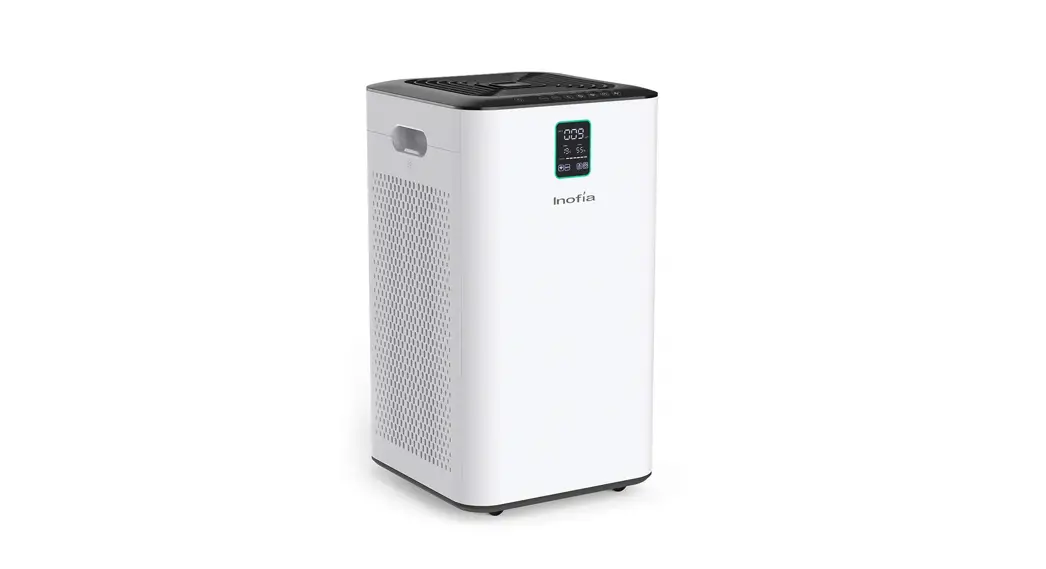
AIR PURIFIER
MODEL: Inofia1539
Important Safety Information
Please follow the safety precautions and read these instructions carefully before using it for the first time.
| |||
| Do not insert fingers or any objects into the air inlet or air outlet. Otherwise, internal parts may be touched and cause electric shock or damage. |
| Do not use corrosive cleaners, volatile fluids, and/or detergents when cleaning the product. Otherwise, the air purifier may be damaged or even cause a short circuit, resulting in an electric shock or fire accident. |
| Check if the voltage indicated on the back of the product matches the local voltage. The use of universal sockets or devices that exceed the specified values may cause overheating and fire accidents. |
| This appliance is not a substitute for proper ventilation regular vacuum cleaning or use of an extractor hood or fan while cooking. |
| Before connecting the appliance to the mains supply please check the plug, power cord, and the product itself. Do not use bundled wires when using this unit. Damaged wires may cause electric shock and short circuits or a fire accident. Prohibit cutting, refitting, excessively twisting, twisting, screwing and wiring wires, or installing on electrical outlets put heavy things. |
| Do not use this appliance when you have used indoor smoke-type insect repellents or in places with oily residues, burning incense, or chemical fumes. |
| Do not modify or repair the product and accessories on your own. If there is faults in the product, disconnect the power plug and contact customer service for repair. |
| Always unplug the appliance before you clean it. Otherwise, the air purifier may suddenly operate, resulting in electric shock and overheating, and even cause a fire accident. |
 Enforce!
 Enforce!
| |||
| When connecting the appliance to the mains supply, make sure to use dry hands to hold the end of the plug. Otherwise, an electric shock may occur. |
| Do not use in high temperature or humid places such as bathrooms. Otherwise, electric leakage, electric shock, short circuit, or fire may occur. |
| Do not get wet! Failure to do so may result in electric shock and fire due to a short circuit. |
| Do not use near flammable gases and materials such as insecticides, fragrances, and lit cigarettes, fire may occur. |
| Periodically remove dust from the power plug.If dust accumulates on the power plug, its moisture may damage the insulation of the plug, resulting in fire accidents. Unplug the power plug and wipe it with a dry cloth. Do not use a damp cloth!If the appliance is not used for a Long time, it should be unplugged…. |
| If the air purifier is used with a heater, the room must be ventilated. Otherwise, carbon monoxide poisoning may occur. The appliance does not remove carbon monoxide (CO). |
| Before the air purifier is started Please plug the plug fully into a power outlet. Failure to fully insert the plug into the socket may result in electric shock and overheating can even cause a fire accident. |  Enforce! Enforce! | When connecting the appliance to the mains supply, make sure to use dry hands to hold the end of the plug. Do not pull the power cord to cut off the power supply. Otherwise, electric shock, short circuit, or fire may occur. |
| If this air purifier causes interference to radio or television reception,try to correct the interference by one or more of the following measures: Reorient or relocate the receiving antenna. Increase the distance between the unit and the radio/TV receiver. Connect the equipment into a different outlet. |
| Always lift or move the appliance by the handgrips at two sides of the appliance. |
Caution | For the best result, leave at least 35cm free space on each side of the appliance. |
| Unattended children and disabled people are prohibited to use the air purifier alone. Children should not play with the steam oven as a toy. |
| This appliance has a polarized plug (one blade is wider than the other). To reduce the risk of electric shock, this plug is intended to fit in a polarized outlet only one way. If the plug does not fit fully in the outlet, reverse the plug. If it still does not fit, contact a qualified electrician. Do not attempt to defeat this safety feature. | ||


The warranty will be invalid the product is not used properly. Our company will not be responsible for damages caused by improper use.
Product Parts
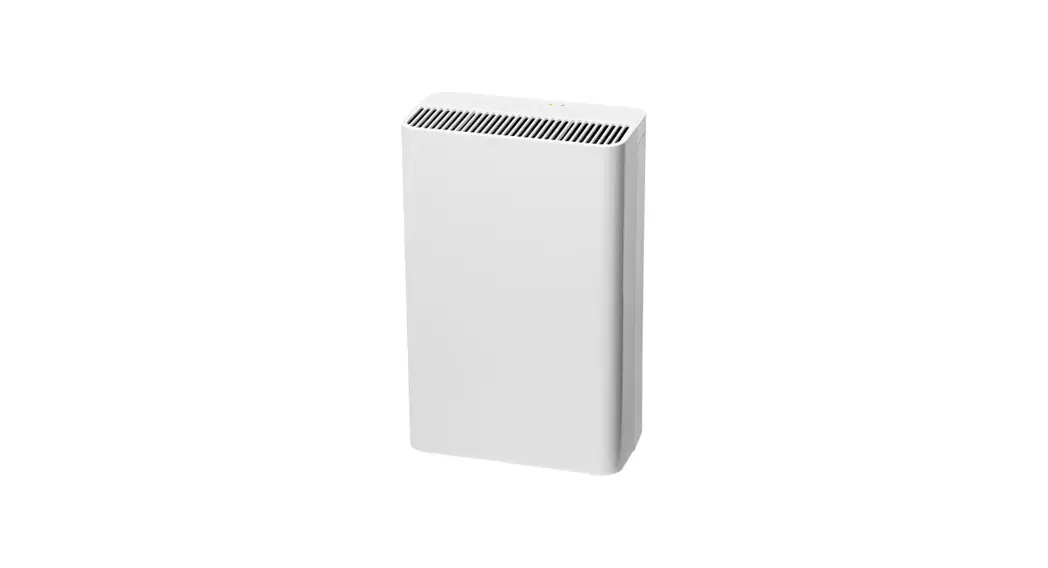
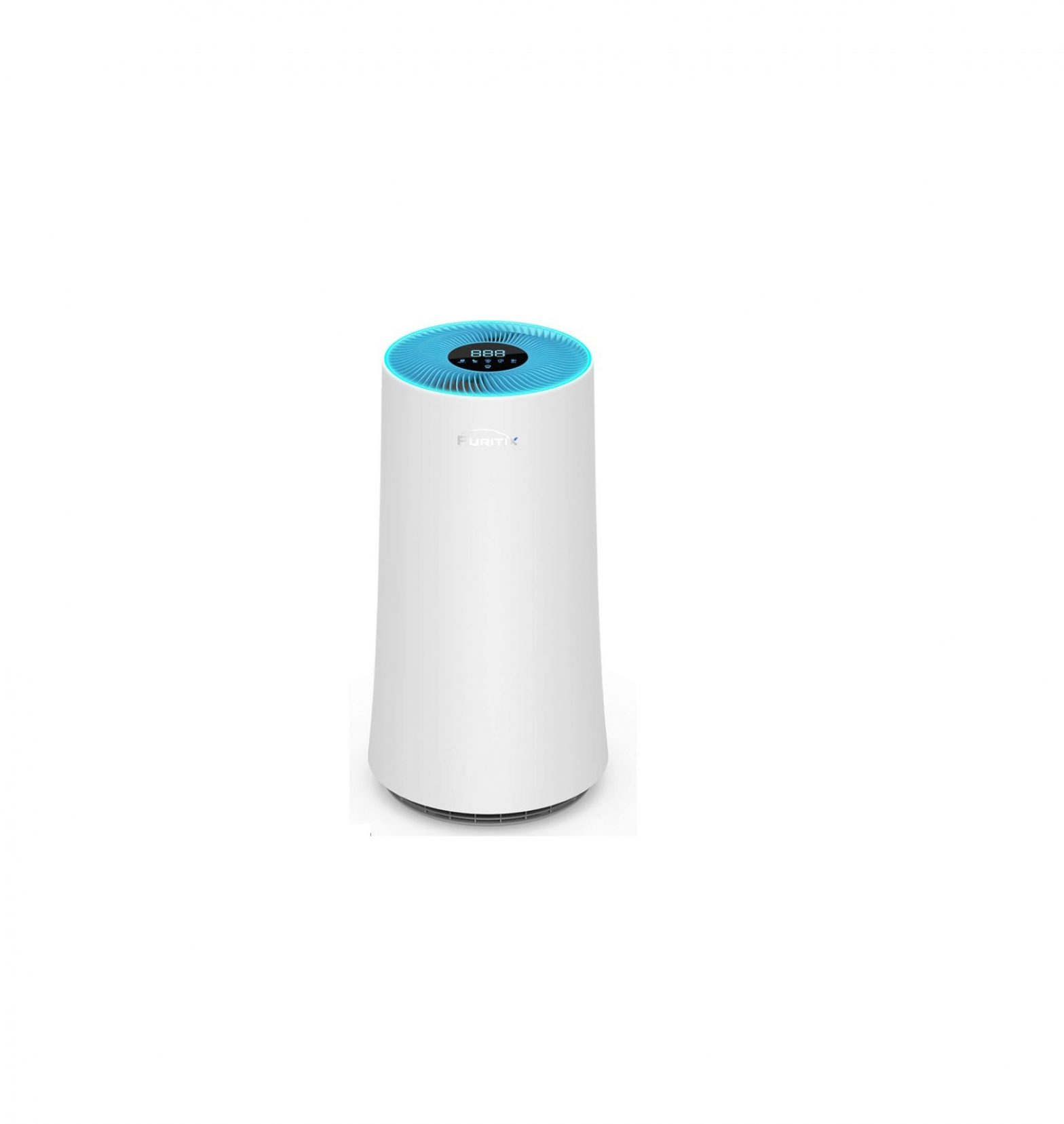
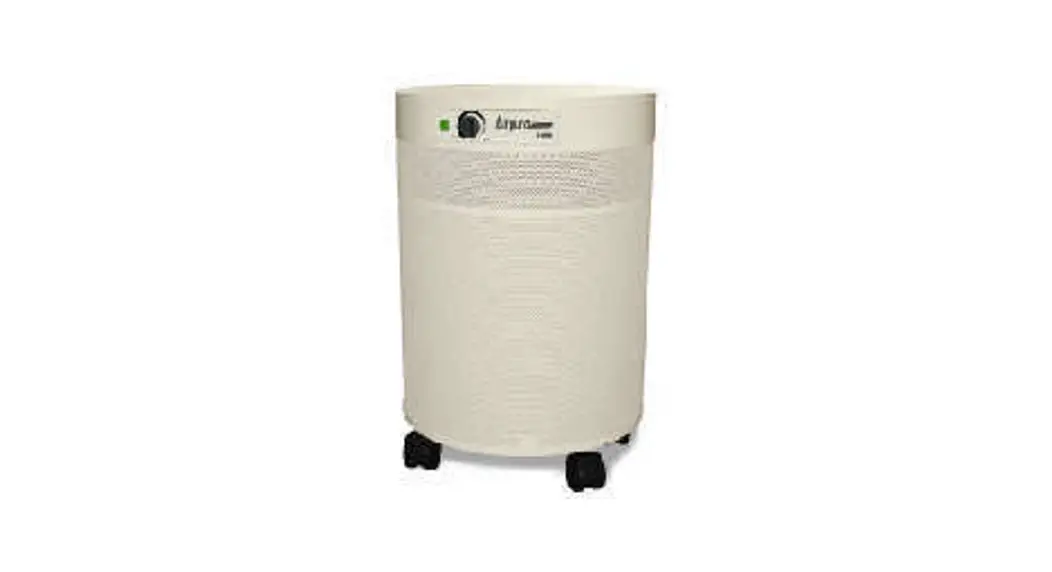
Structures and Names of Product Parts
① Filter Cover
② Composite filter (Carbon filter+HEPA filter)
③ Main engine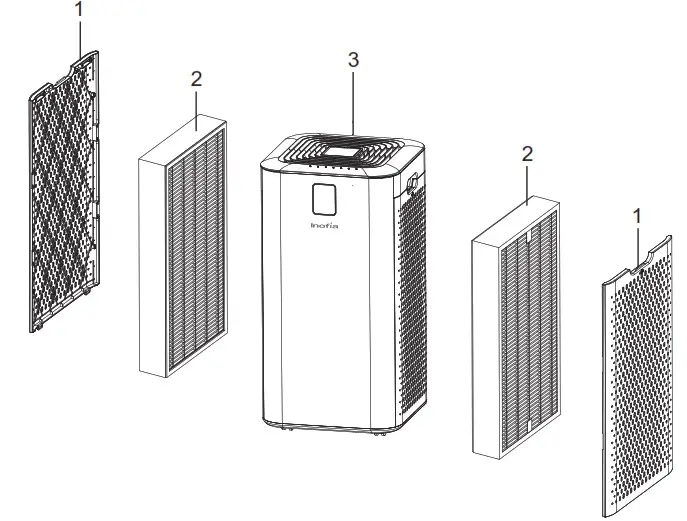
In case of discrepancy between product picture and real product, the real product will prevail.
Packing List
| Item | Quantity |
| Inofia1539 | 1 set |
| Composite filter | 2 pieces (assembled in the appliance) |
| Power line | 1 piece (in accessories box) |
| Instruction Manual | 1 copy (in accessories box) |
Product Features
Integrating multiple functions
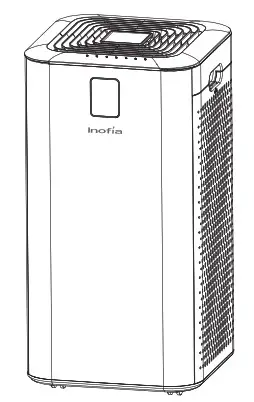
- High-efficiency Purification of PM 2.5, Smog, Pollen, and Other Particulate Pollutants.
- Removal of HCHO、Toluene、Dimethylbenzene、C6H6, VOC, etc.
- 5 – Gear Wind Speed Design
- Timer Setting
- Replacement of Filter Remind
- Availability of Multiple Operation Modes, e.g. Manual, Auto and Sleep Mode
- Sensor Detection of Indoor Temperature and Humidity
- Childproof Lock Function
- Real-time Display of PM2.5 Value
Unique 3 Purification Technologies
Pre-filter→ High Efficiency Particulate Air Filter→ Modified activated carbon
| Pre-filter | Block the hairs, fibers, big particulate matters, scurf, etc. It can be washed regularly. |
| HEPA layer | Efficiently filter out the particles as small as 0.01microns, e.g. PM2.5, smog, pollen, acarid, and other pollutants. |
| Improved Activated Carbon | High-quality modified activated carbon and catalyst are adopted, and they are modified with special proprietary technology, and can efficiently purify ethanol, benzene series, VOC, and other odorous pollutants. |
[Note] Pre-filter, High-efficiency activated carbon and high-efficiency HEPA are incorporated in the same filter.
Operation Instructions
 Precautions for use
- All filters have been installed in this air purifier.
- Check filters are installed properly.
- Check filter handle is toward you.
Installation of Filters
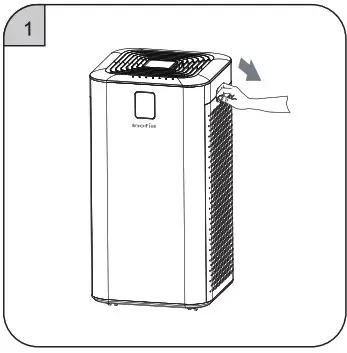
① Place your fingers on the handclasp position of the filter cover and pull it outwards gently.
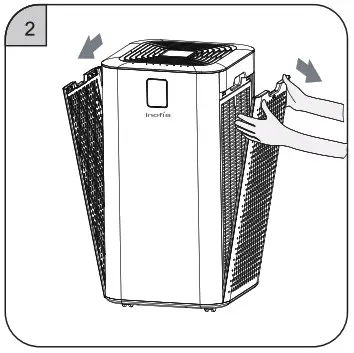
 ② Move upward to remove the filter cover.
 ③ Take out the new filters with plastic film from the appliance.
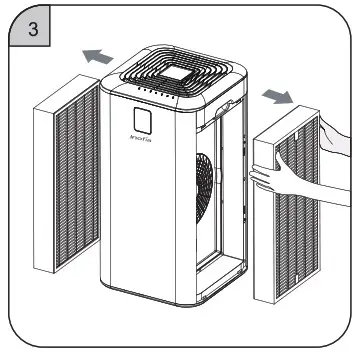 ④ Remove all packaging films on the filters.
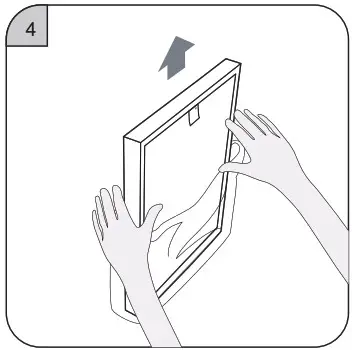
⑤ Install the filters.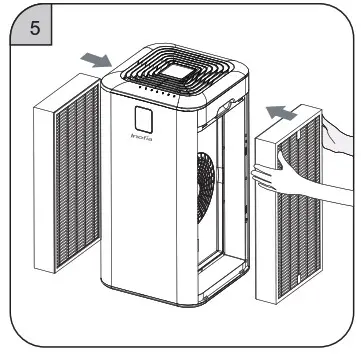 ⑥ Install the filter covers.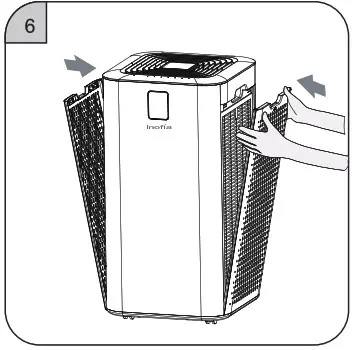
Start
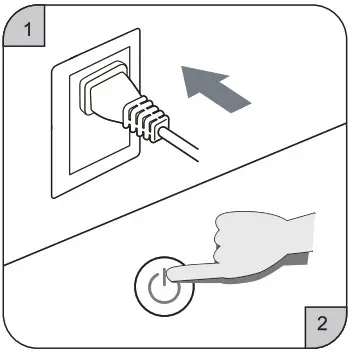 ① Power on the appliance, and there will have a “tinkle” sound.
② Press the power switch button to start up the appliance.
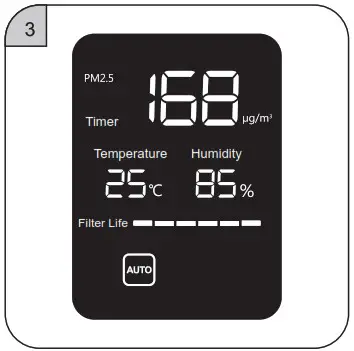 ③ The screen will light up and the appliance starts running.
Display Status
Display Status
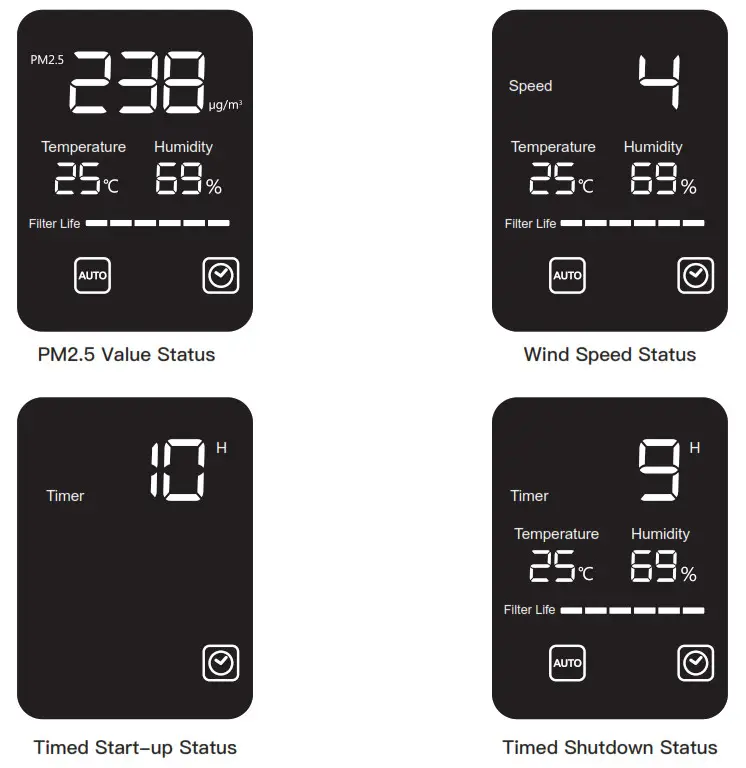
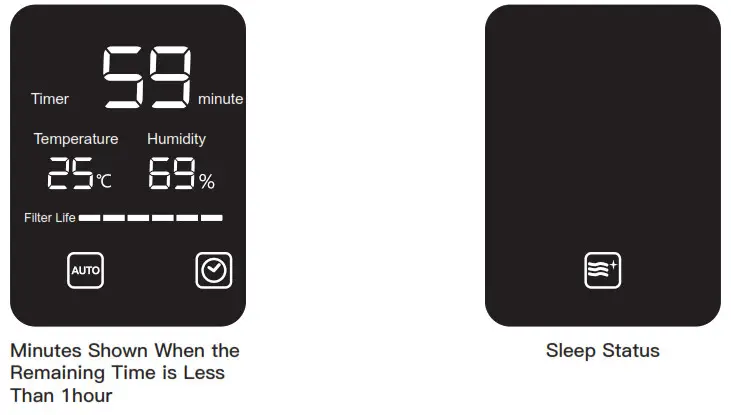
Display Symbols and Meanings
Display Symbols and Meanings
Symbol | Symbol Name | Meaning |
 | Auto mode | If such a symbol is lit on, it means auto mode is enabled, and the wind speed will select the corresponding gear automatically according to the environmental pollution situation. If such the symbol is lit off, it means manual mode is enabled, and the wind speed gear will be selected by the user. |
 | Sleep mode | Symbol lights on – sleep mode, the screen all lights off, but sleep symbol. And 10sec later, all lights off. |
 | Child lock | Symbol lights on – childproof lock mode, and all buttons unable to operate. |
 | Timer | Symbol lights on-timer function is enabled. Symbol lights off – timer function is off. |
 | Filter Life | A symbol will reduce one grid Every time the usage period of filter is reduced for 500 hours, and when the remaining usage period of filter is one, such symbol will flash to remind the user to replace with a new filter. |
| Symbol | Name | Meaning |
 | Power | When the machine is in the standby state, touch the power switch button and the appliance will turn on, and when it is in a working state, touch such a button and it will enter the standby state. |
| Auto mode | When the appliance is in a working state, touch the auto mode button, and the working mode will switch between auto and manual mode; when the appliance is in auto mode, the wind speed will be automatically adjusted among Gear 1 “0-12”, Gear 2 “13-35”, Gear 3 “36-55”, and Gear 4 “>55”. |
| Sleep mode | When the appliance is in a working state, touch the sleep mode button and the appliance will enter sleep mode, and except the sleep mode icon and sleep indicator lamp, all indicator lamps, icon signs, and numbers will be lit off. The fan will be running at Gear 1. 10sec later, the sleep mode icon and sleep indicator lamp will be lit off. When the appliance is in sleep mode, touch any function button to exit the sleep mode (except the button of the power switch.) |
| Child lock | When the machine is in a working state, long press child lock key (for more than 3sec) and the machine will enter the child lock state, the child lock icon and child lock indicator the lamp will be lit on, and the functions of all operation keys will be invalid. When the machine is in the child lock state, long press child lock key (for more than 3sec) to remove the child lock state, the child lock icon and child lock indicator lamp will be lit off, and the functions of all operation keys will be recovered. |
 | Filter replacement | Usage period grid lefts one and flashes, please replace new filters and press and hold the filter replacement button for more than 3s to reset the usage period of filter. Usage period grids refilled. When the usage period off filter is more than 10%, it cannot be reset. Forced to reset – If reset is required, press “Auto” and “Sleep” for more than 5 in the standby state, there is a “tinkle” sound and LED flashes for six times, it is resettled. |
Cleaning and Maintenance
Symbol | Name | Meaning |
 | Wi-Fi | In the machine operating status, long-press the “Wi-Fi ”button it will ring 3 times and enter to Wi-Fi distribution network, the Wi-Fi indicator light flashing during network connection, the Wi-Fi indicator light will keep on after the success of the distribution network, if Wi-Fi connection one minute is unsuccessful, the light will turn off. |
| Timer | Standby status, press the “Timer” button to set start-up time. Operating status, press the “Timer” button to set shutdown time. If the timer is set as “0”, the timer function is canceled. |
 | Speed | Standby status, press the “Speed” Button once, the wind speed gear plus +1 gear. Gear 1~5 is a cycle. When the wind speed is settled and displayed for 3s, the display switches to PM2.5 display status.In Auto mode, press the “Speed” button to switch to manual mode. |
The power plug must be unplugged before maintenance of the machine.
1. Cleaning of the appliance body
- Wipe off the stain with a soft cloth.
- The stubborn stain that cannot be wiped off easily can be wiped off with a soft cloth dipped with an appropriate amount of mild detergent.
Note: Do not scratch the appliance shell with a hard object; Please read carefully and follow the Instruction Manual to clean the appliance parts.
2. Cleaning and replacement of filter
- The user will be reminded of replacement of filter by built-in program; however, the service cycle of filter may be different according to the pollution degree of the actual application environment, and the filter can be replaced in time according to the volume of sound and odor gave off by the appliance.
Suggestions: Clean the filter at an interval of 1 month; if the operating environment is poor, increase the cleaning frequency. - When there is dust on the surface of composite filter, remove it with dust collector, so as to extend the usage period of filter. (It is advised to clean the filter at an interval of 1 month)
| Replacement Period | Condition | |
| Composite Filter | The filter shall be replaced at an interval of about 6 months. | Absorb the emission amount of 3 cigarettes every day |
- According to the application place and use method (e.g. the family where there are many cigarette smokers), the replacement period of the filter may be shortened; in a word, please replace the filter when the filtration effect is poor.
- The used filter shall be disposed of as non-combustible refuse.
Replacement of Filters
Replacement of Filter
① Put your hand on the handclasp position of the filter mesh cover, and pull it outwards gently.
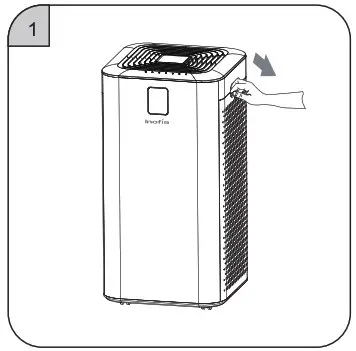 ② Move upward to remove the filter mesh cover.
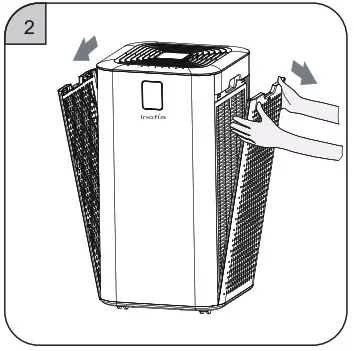 ③ Take out the new filter meshes with plastic film in the machine. Take out the new filter meshes with plastic film in the machine.
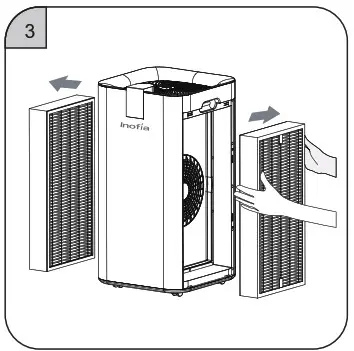 ④ Remove all packaging films on filter meshes.
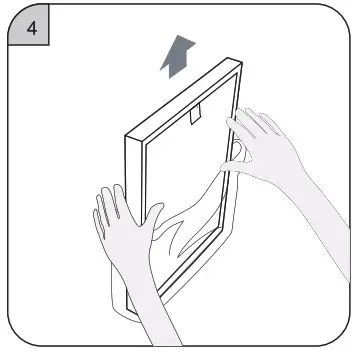 ⑤ Assemble the new filter meshes.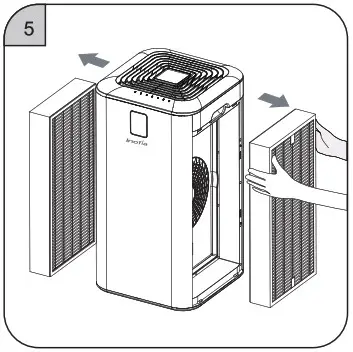
6.Assemble the filter mesh cover and reset the service life of filter mesh (details can be seen on Page 10 for the operation of filter mesh service life reset key).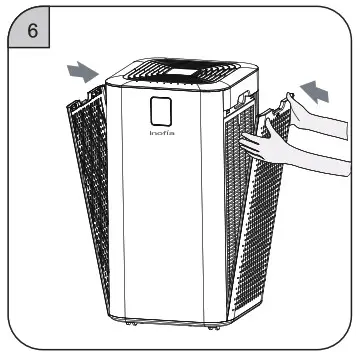
Replacement of Sensor
Replacement of Sensor (sensor should be replaced by professionals)
① Pry up the sensor cover with a straight screwdriver.
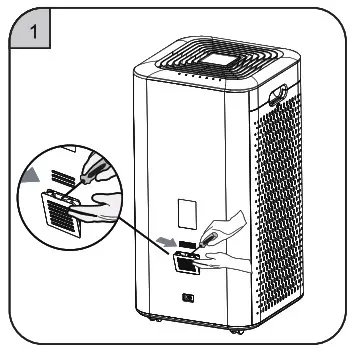 ② Take down the sensor cover.
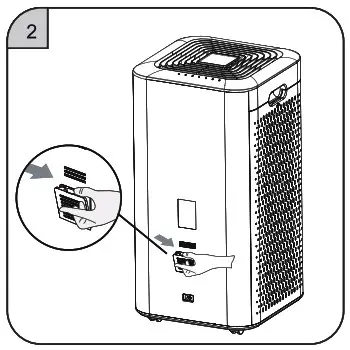 ③ Pull the metal handle to pull out the sensor module.
 ④ Pull out the connecting terminal from the old sensor module and replace it with a new sensor module.
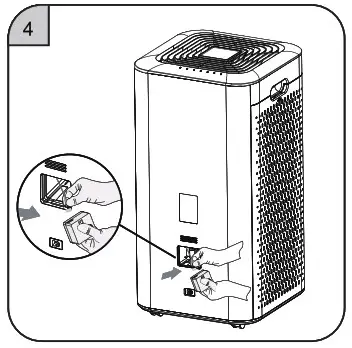 ⑤ Put back the sensor module into the machine cavity, and cover it.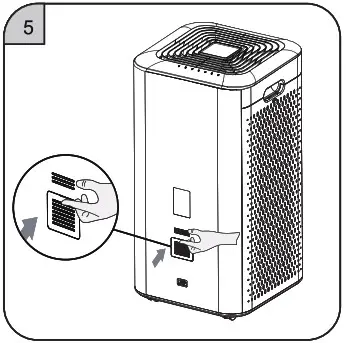
Technical Specification
Product Specification Parameters
| Model | Inofia1539 |
| Rated Voltage | 120V~ |
| Rated Frequency | 60Hz |
| Rated Power | 65W |
| CADR(Smoke) | 330CFM |
| CADR(Dust) | 330CFM |
| CADR(Pollen) | 330CFM |
| N.W. | 10.6kg |
| G.W. | 13.2kg |
| Product Size | 335x335x606mm(Wheels included) |
Real-time Display of Air Quality Situation
| PM2.5 value | Air Quality | Symbol Colour | Wind Speed Gear |
| 0-12 | Excellent | Green | 1 |
| 13-35 | Good | Blue | 2 |
| 36-55 | Mild pollution | Yellow | 3 |
| >55 | Heavy pollution | Red | 4 |
Common Problems and Solutions
| Problem | Possible Causes | Remedial Action |
| Product work abnormally | 1. There is a problem with the connection. 2. The filter cover is not placed properly. | 1.Please check whether the plug is inserted into the socket and the “On/Off” button status. 2. Re-install the filter. |
| Fresh air cannot be delivered from air outlet smoothly. | 1. The plastic package of the new filter is not removed. 2. The air outlet of purified is blocked by foreign matter. | 1.Unpackage the filter plastic package. 2. Clear away the foreign matter. |
| Poor odor removal effect | 1. The ambient air quality of the room is very poor. 2. The high-efficiency activated carbon filter is in failure due to environmental factors. 3. The room exceeds the effective area of this product. | 1. Open the window to improve air ventilation. 2. Please replace the high-efficiency activated carbon filter mesh. |
| The appliance generates abnormal sounds during running | 1. The air inlet or air outlet is blocked by foreign matter. 2. Foreign matter falls into the air tube of the appliance. | 1. Please clear the blocking object. 2. Clear the fallen foreign matter. |
| PM2.5 values cannot reduce and, stay in high values. | 1. The sensor cover is the very duty and stayed a lot of dust. 2. The unit operated in a dusty environment. | 1. Clean the sensor cover. 2. Adjust the air purifier operating speed to high speed. |
Warranty Description
Warranty Period and Warranty Period of Parts
| Product | Warranty period | The warranty period of parts |
| Inofia1539 | One year (Only for home use) | One year |
1. This product has passed strict quality inspection.
2. In case of performance and function fault under the condition of normal use within the warranty period of the product, our company will be responsible for repairing it for free and for replacing it if the machine cannot be repaired. In the event of failure for the following reasons, our company will provide paid repair service:
- Poor performance and machine fault occurs after the warranty period expires.
- Machine fault caused by consumer intentionally or due to negligence.
- The fault that occurs when the machine is repaired in the sales service center or agent not designated by our company.
- The fault that is caused by power supply nonconformity or poor quality of power socket (irrelevant to warranty period).
- Product fault or defect caused by natural disaster.