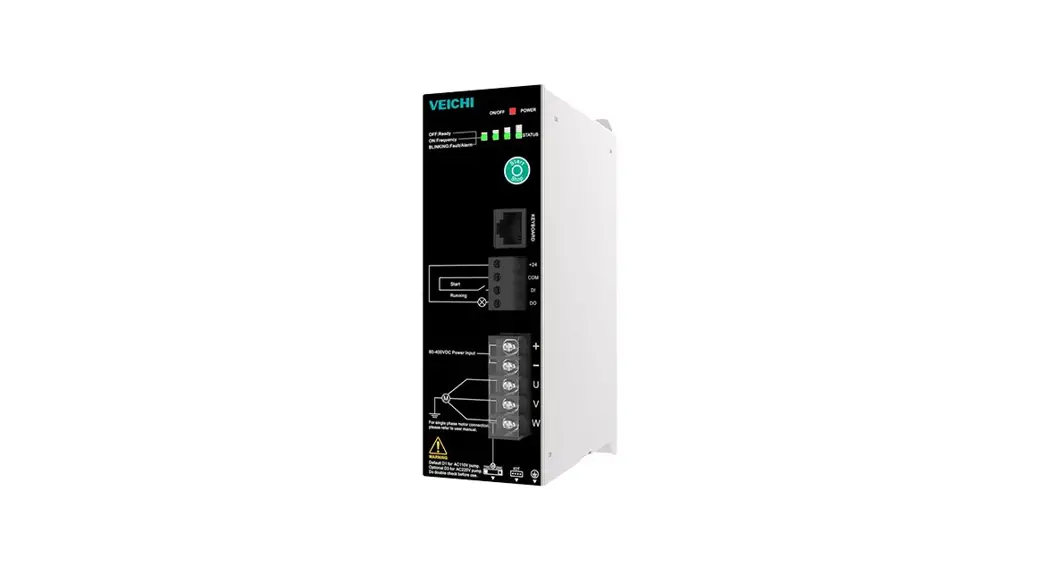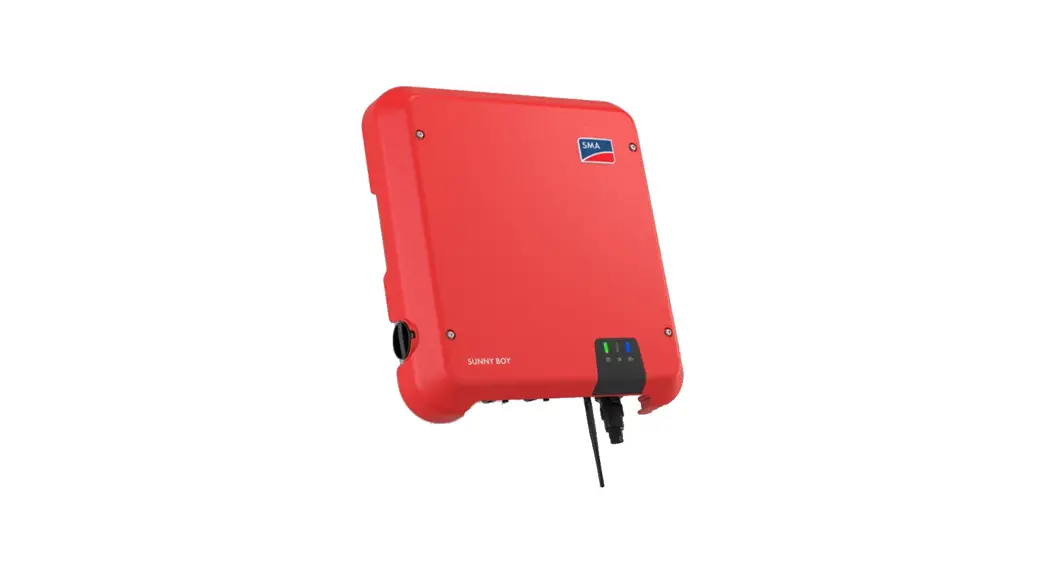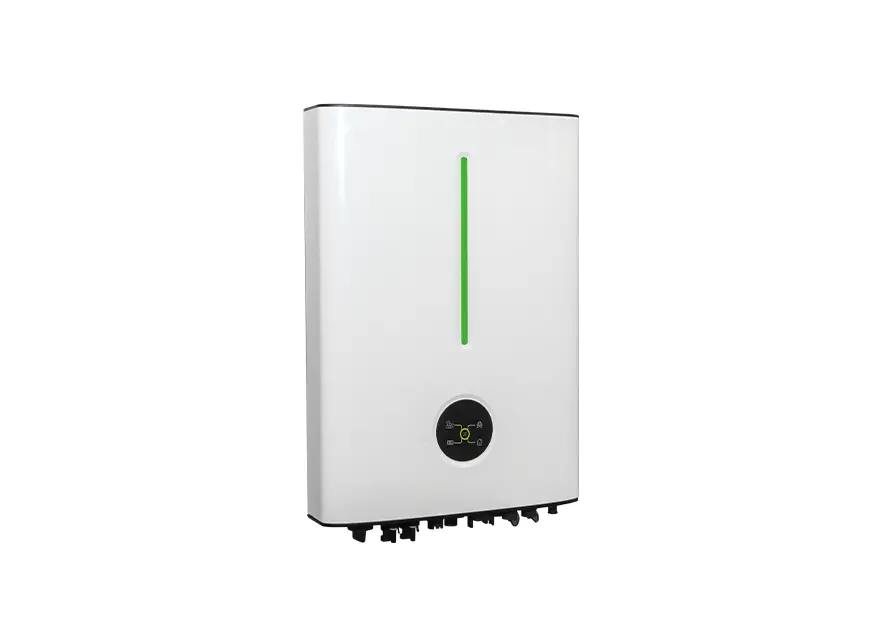
 SGP-SI Series Solar Pumping Inverter
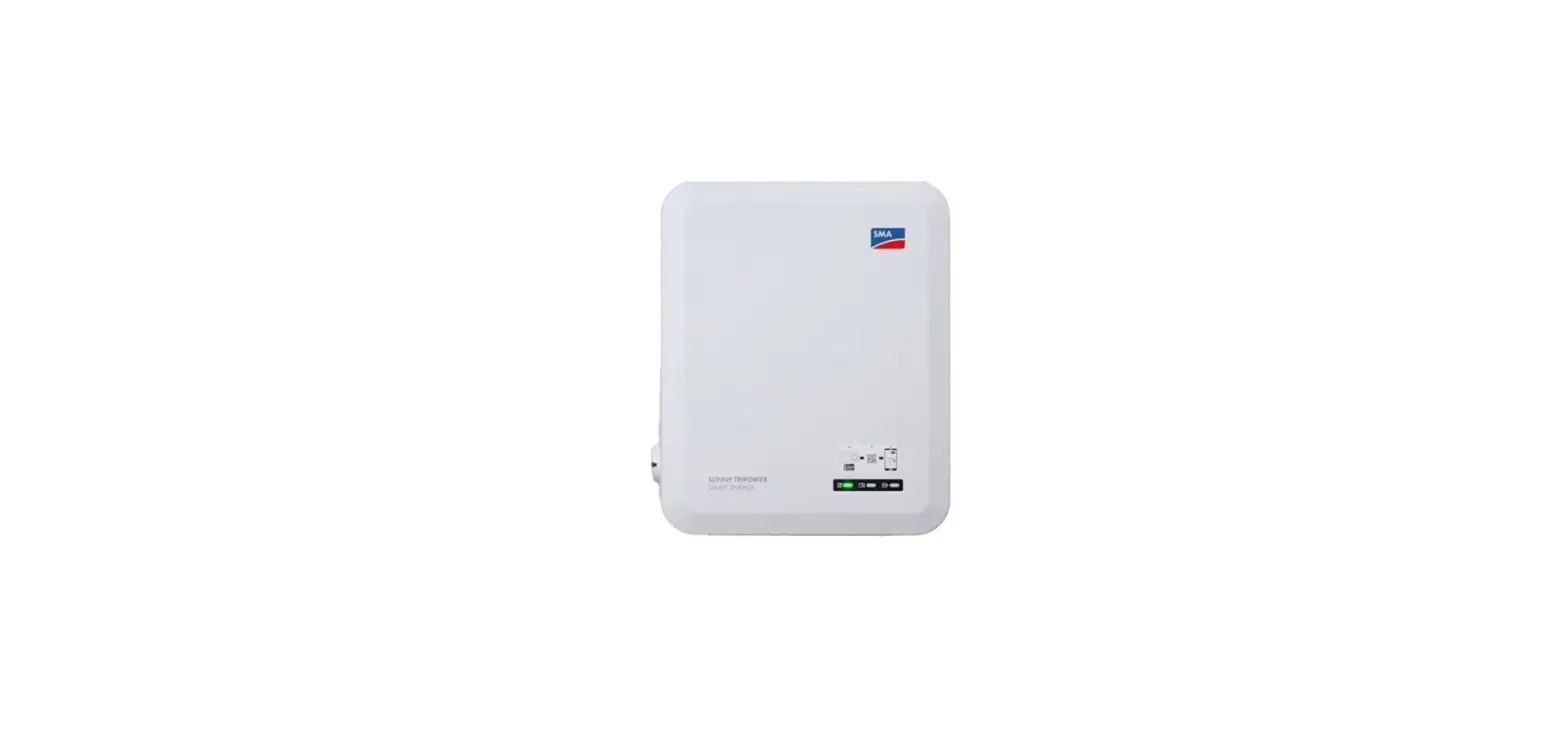
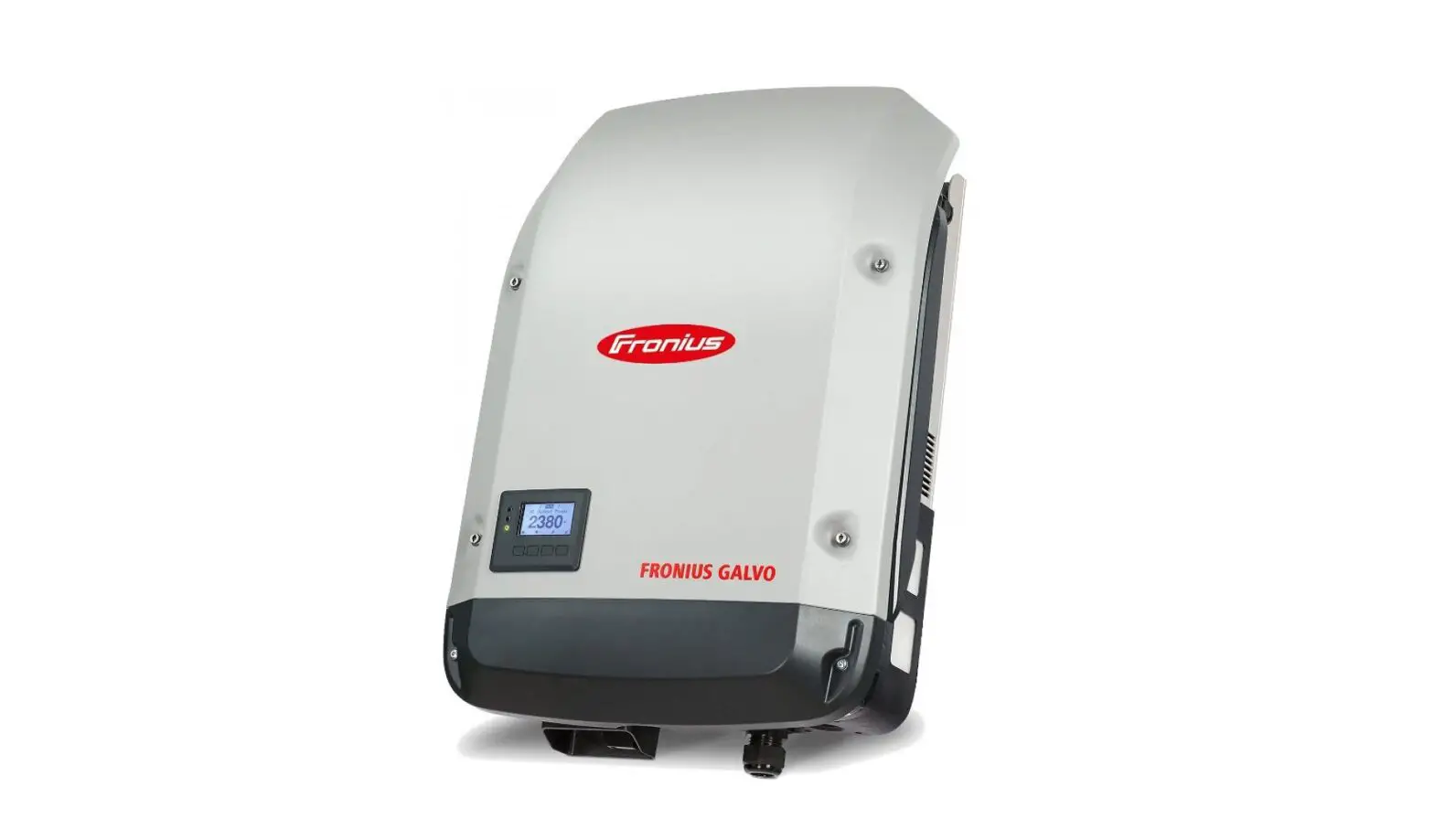
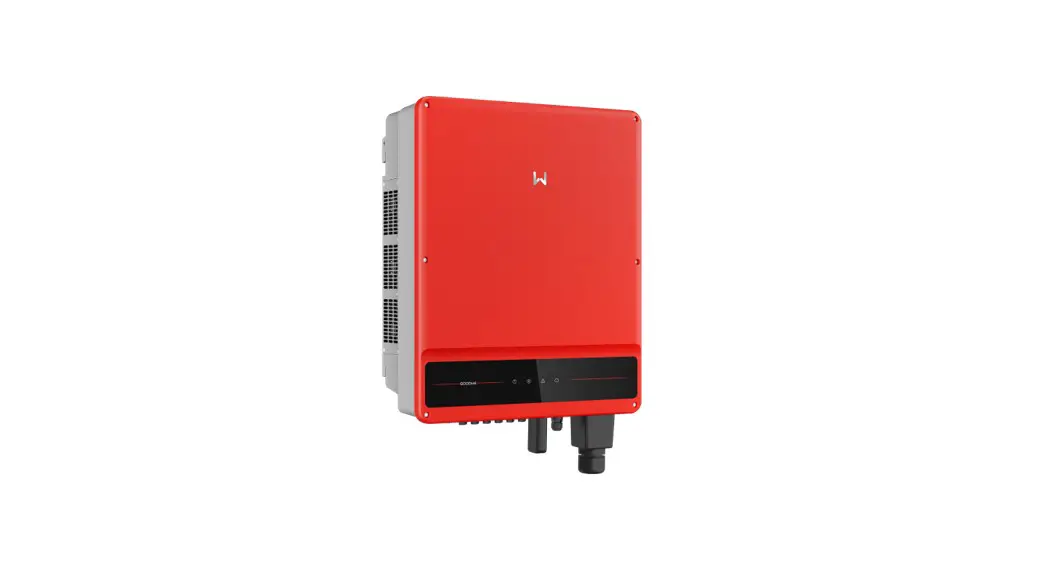
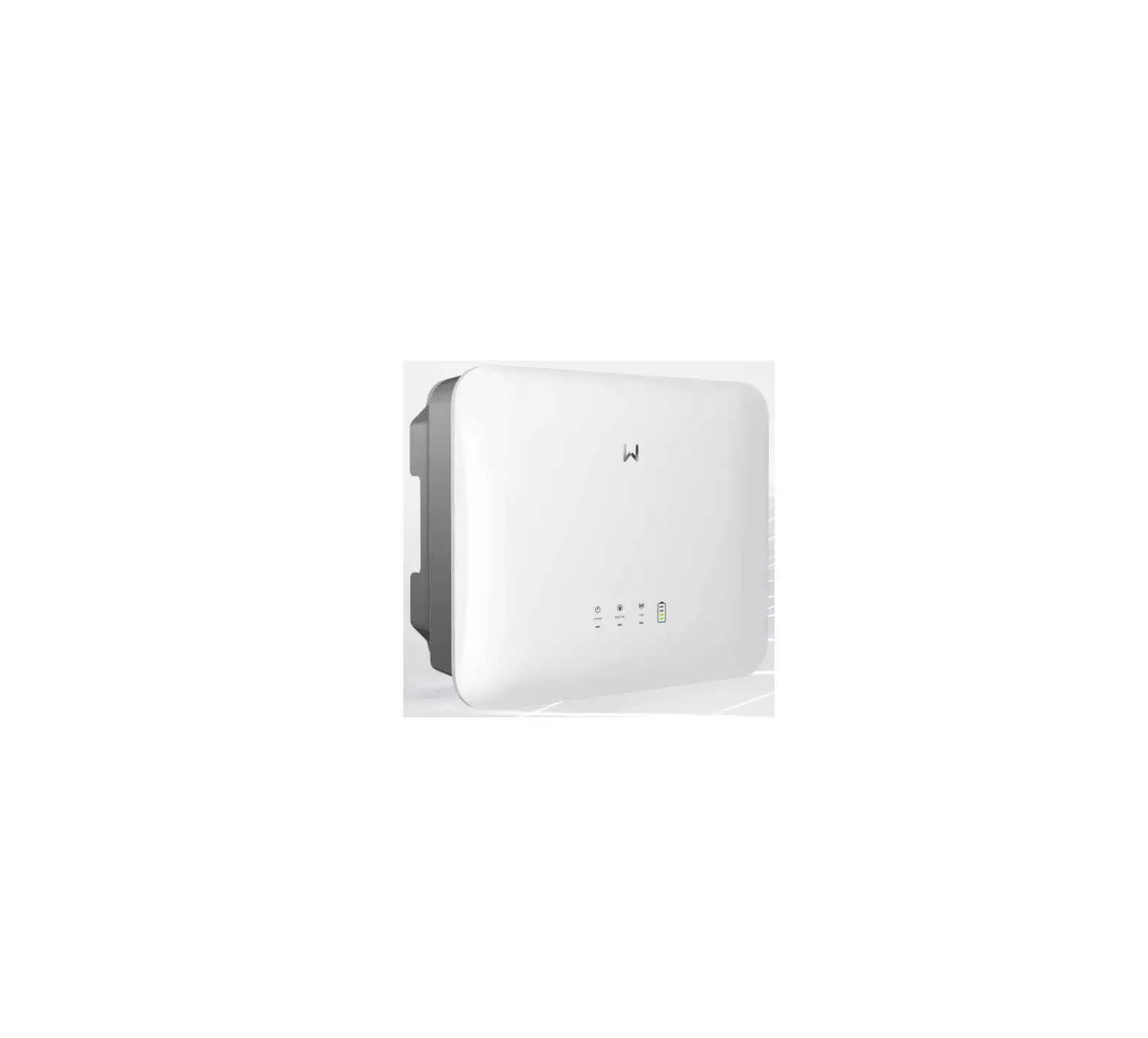
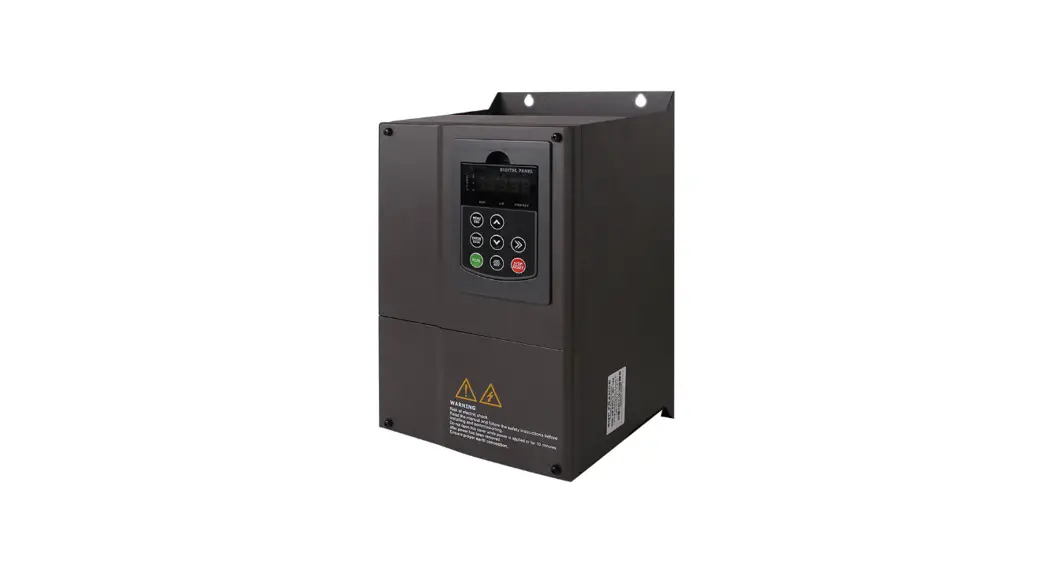
User Manual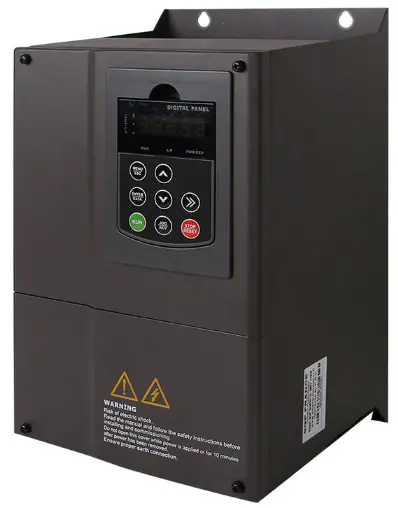 Figure 1 SGP solar pumping inverter
Safety Instruction
To ensure safe operation of solar pumping inverter, it must choose the right way of transportation, installation, operation and maintenance. Please be aware of the safety notices before operation: Warning: Misuse will result in fire, serious injury to person or even death.
 Caution: misuse will cause low or middle-grade injury to person or equipment damage.
 Prompt: Point out some useful information
First InspectionCaution
If inverter is damaged or missing parts, no installation allowed in case of any accidents.
InstallationCaution
- It must be installed vertically for good convection cooling effect .
- Keep under the condition of good ventilation opening or ventilating device. Never exposes directly to the sunlight.
ConnectionCaution
- All wire cable connection must be under the instruction of correct wiring diagram .
- Handling by qualified electrical professionals, all wire cable should be wrapped with electrical tape for safety.
StorageCaution
Placed in dry, dust‐free, no corrosive gas, liquid.
Temperature of the storage location must be at the ‐20℃ to +70℃.
Relative Humidity of the storage location must be between 5% to 90% range, and no condensation.
Chapter 1 System Introduction
1.1 Brief Introduction
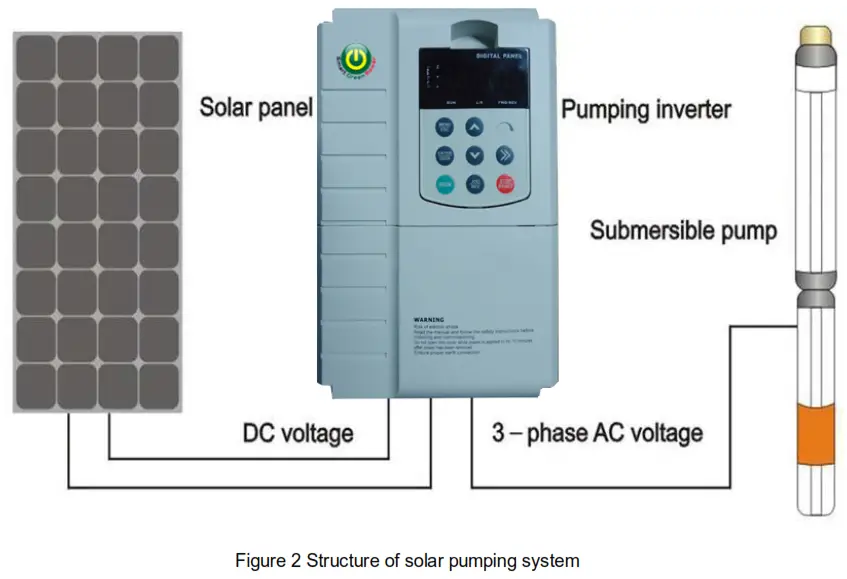
A complete solar pumping system consist of solar array, pump and solar pumping inverter. SGP-SI series solar pumping inverter can convert the DC power from solar PV array to AC power to run pump motors.
Solar array, an aggregation of many solar modules connected in series and parallel, absorbs sunlight radiation and converts it into electrical energy, providing dynamical water for the whole system.
Inverter controls the system operation and adjust the output frequency in real-time according to the variation of sunlight intensity to realize the maximum power point tracking (MPPT).
Pump, drive by 3-phase AC motor, can draw water from the deep wells or rivers and lakes to pour into the storage tank or reservoir, or directly connect to the irrigation system, fountain system, etc.
Chapter 2 Solar Pumping Inverter
2.1 Inverter Specification
Model Description
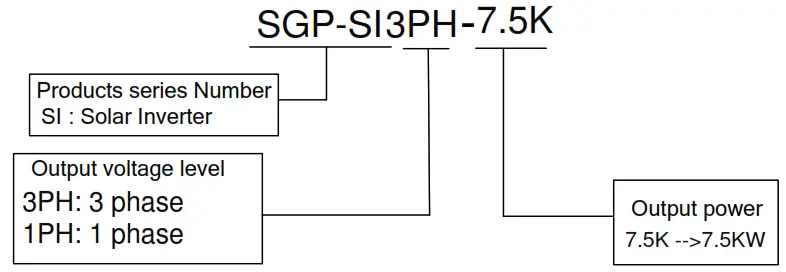
Model numbers on name plate consist of numbers, symbols, and letters, to express its respective series, suitable power type, power level and other information.
2.2 Inverter Features
- Apply to all kinds of single phase or 3 phase AC induction motor .
- With Infineon IGBT .Maximum power point tracking (MPPT) algorithm for dynamic VI, fast response speed,
- Good stability, the efficiency of MPPT 99.99%;
- Both AC and DC input, but can not use DC and AC at the same time.
- For single phase inverter , MPPT working voltage is 180V~450V ; for three phase inverter , MPPT working voltage is 250V~800V .
- Remote control , support RS323/RS485 protocol.
- Outdoor working environment temperature: ‐10℃~+40℃
- Start in the morning and stop in the late afternoon full automatically.
- Full protections : overload , over current, over voltage , undervoltage ,short circuit , dry pumping etc, PV reversed connection protection.
2.3 Parameters:
| Solar Pump Inverter | Solar Array | AC Pump | |||||
| Model | Rated Power(KW) | Max. DC Input Voltage(V) | MPPT Voltage(V) | Rated output Voltage(V) | Output Frequency(Hz) | DC Power(KW) | Rated Power(KW) |
| SGP-SI1PH 2.2K | 2.2 | 450 | 250-400 | Single PH 220 | 0-50/60 | 3.3 | 2.2 |
| SGP-SI1PH 4.0K | 4 | 450 | 250-400 | Single PH 220 | 0-50/60 | 6.0 | 4.0 |
| SGP-SI3PH 5.5K | 5.5 | 800 | 450-800 | 3PH380 | 0-50/60 | 8.25 | 5.5 |
| SGP-SI3PH 7.5K | 7.5 | 800 | 450-800 | 3PH380 | 0-50/60 | 11.25 | 7.5 |
| SGP-SI3PH 11K | 11 | 800 | 450-800 | 3PH380 | 0-50/60 | 16.5 | 11 |
| SGP-SI3PH 15K | 15 | 800 | 450-800 | 3PH380 | 0-50/60 | 20 | 15 |
| SGP-SI3PH 18.5K | 18.5 | 800 | 450-800 | 3PH380 | 0-50/60 | 24 | 18.5 |
| SGP-SI3PH 22K | 22 | 800 | 450-800 | 3PH380 | 0-50/60 | 29 | 22 |
| SGP-SI3PH 30K | 30 | 800 | 450-800 | 3PH380 | 0-50/60 | 39 | 30 |
| SGP-SI3PH 37K | 37 | 800 | 450-800 | 3PH380 | 0-50/60 | 48 | 37 |
| SGP-SI3PH 45K | 45 | 800 | 450-800 | 3PH380 | 0-50/60 | 54 | 45 |
| SGP-SI3PH 55K | 55 | 800 | 450-800 | 3PH380 | 0-50/60 | 66 | 55 |
| SGP-SI3PH 75K | 75 | 800 | 450-800 | 3PH380 | 0-50/60 | 90 | 75 |
| SGP-SI3PH 90K | 90 | 800 | 450-800 | 3PH380 | 0-50/60 | 108 | 90 |
| SGP-SI3PH 110K | 110 | 800 | 450-800 | 3PH380 | 0-50/60 | 132 | 110 |
| SGP-SI3PH 132K | 132 | 800 | 450-800 | 3PH380 | 0-50/60 | 160 | 132 |
| SGP-SI3PH 160K | 160 | 800 | 450-800 | 3PH380 | 0-50/60 | 185 | 160 |
| SGP-SI3PH185K | 185 | 800 | 450-800 | 3PH380 | 0-50/60 | 200 | 185 |
| SGP-SI3PH 200K | 200 | 800 | 450-800 | 3PH380 | 0-50/60 | 220 | 200 |
| SGP-SI3PH 220K | 220 | 800 | 450-800 | 3PH380 | 0-50/60 | 250 | 220 |
| SGP-SI3PH 250K | 250 | 800 | 450-800 | 3PH380 | 0-50/60 | 280 | 250 |
| Solar Pump Inverter | Solar Array | AC Pump | |||||
| Model | Rated Power(KW) | Max. DC Input Voltage(V) | MPPT Voltage(V) | Rated output Voltage(V) | Output Frequency(Hz) | DC Power(KW) | Rated Power(KW) |
| SGP-SI3PH 280K | 280 | 800 | 450-800 | 3PH380 | 0-50/60 | 315 | 280 |
| SGP-SI3PH 315K | 315 | 800 | 450-800 | 3PH380 | 0-50/60 | 355 | 315 |
| SGP-SI3PH 355K | 355 | 800 | 450-800 | 3PH380 | 0-50/60 | 400 | 355 |
| SGP-SI3PH 400K | 400 | 800 | 450-800 | 3PH380 | 0-50/60 | 450 | 400 |
| SGP-SI3PH 455K | 455 | 800 | 450-800 | 3PH380 | 0-50/60 | 500 | 455 |
| SGP-SI3PH 500K | 500 | 800 | 450-800 | 3PH380 | 0-50/60 | 560 | 500 |
| SGP-SI3PH 560K | 560 | 800 | 450-800 | 3PH380 | 0-50/60 | 630 | 560 |
| SGP-SI3PH 630K | 630 | 800 | 450-800 | 3PH380 | 0-50/60 | 710 | 630 |
2.4 Technical Parameter Table
2.4.1 Single phase inverter
| Input specification | |
| PV Input | |
| Maximum Input DC Voltage | 450VDC |
| Recommended MPPT Voltage Range | 250~400VDC |
| Recommended Input Operation Voltage | 310VDC (Vmpp) |
| Grid or backup generator input | |
| Input voltage | 1PH &3PH 220V(-15%~30%) |
| Output specification | |
| Rated output voltage | 1PH &3PH 220V |
| Output frequency | 0~600.00Hz(default: 0~60.00Hz) |
| Protection | |
| Built-in Protection | Lighting Protection, over-current, over voltage, output phase-lose, under-load, under-voltage, short circuit, overheating, water pump run dry etc. |
2.4.2 Three Phase inverter
| Input specification | |
| PV Input | |
| Maximum Input DC Voltage | 800VDC |
| Recommended MPPT Voltage Range | 450~600VDC |
| Recommended Input Operation Voltage | 540VDC (Vmpp) |
| Grid or backup generator input | |
| Input Voltage | Three phase 380V(-15%~30%) |
| Output specification | |
| Rated output voltage | 3PH 380V |
| Output frequency | 0~600.00Hz(Default 0~60.00Hz) |
| Protection | |
| Built-in Protection | Lighting Protection, over-current, over voltage, output phase-lose, under-load, under-voltage, short circuit, overheating, water pump run dry etc. |
| General Parameters | |
| Application Site | No direct sunshine, no dust, corrosive gas, combustible gas, oil mist, steam, dripping or salinity etc. |
| Altitude | 0 ~2000 m Derated use above 1000m,per 100m, the rated output current decrease 1%. |
| Environment Temperature | -10℃ ~40℃ (Environment Temperature be 40℃ ~50℃, please keep derated use.) |
| Humidity | 5 ~95%,non-condensation |
| Vibration | less than 5.9 m/s² (0.6g) |
| Storage Temperature | -20℃ ~+70 ℃ |
| Efficiency | Rated Power Run ≥93% |
| Installation | Wall or rail mounting |
| Cooling | Forced Air Cooling |
2.5 Inverter Introduction
2.5.1 Brief Instruction
2.5.2 Operation panel button and potentiometer function
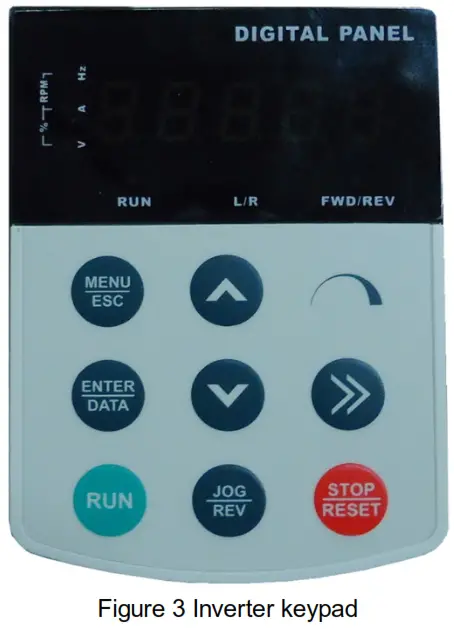
 | MENU/ESC | Enter or exit Level I menu |
 | ENTER/DATA | Enter the menu interfaces level by level, and confirm the parameter setting |
 | UP | Increase data or function code |
 | DOWN | Decrease date or function code |
 | SHIFT | Select the displayed parameters in turn in the stop or running state, and select the digit to be modified when modifying parameters |
 | RUN | Start the inverter in the keypad control mode |
 | STOP/RESET | Stop the inverter when it is in the running state and perform the reset operation when it is in the fault state |
 | JOG/REV | Perform function switchover (such as jog run and quick switchover of command source or direction) |
2.5.3 Main Circuit Terminals
2.5.3.1 Schematic Diagram for Connection of Main Circuit Terminals
- Connection diagram of main circuit for the inverter of 220 v
 Figure 4 Terminals Connection diagram of main circuit for the inverter of 220 v
 - Connection diagram of main circuit for the inverter of 380 v below 2.2 KW
 Figure 5 Connection diagram of main circuit for the inverter of 380 V below 2.2 KW
 - 3.7 kW~15 kW Connection diagram of main circuit for the inverter of 380 v 3.7 KW-15 KW
 Figure 6 Connection diagram of main circuit for the inverter of 380 V 3.7 kw-15 kw
 - Connection diagram of main circuit for the inverter of 380 v up 18.5 kw
 Figure 7 Connection diagram of main circuit for the inverter of 380 V over 18.5 kw
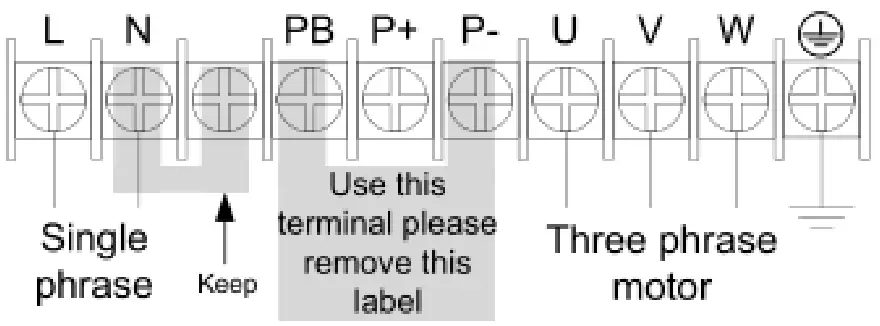 Figure 4 Terminals Connection diagram of main circuit for the inverter of 220 v
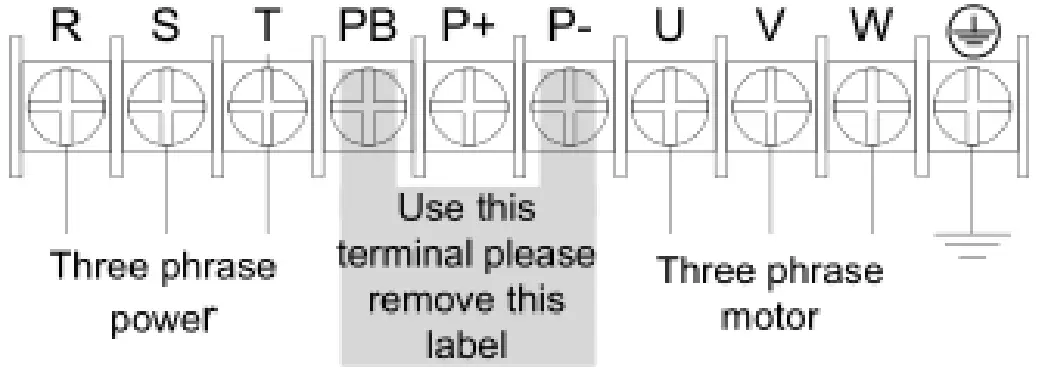 Figure 5 Connection diagram of main circuit for the inverter of 380 V below 2.2 KW
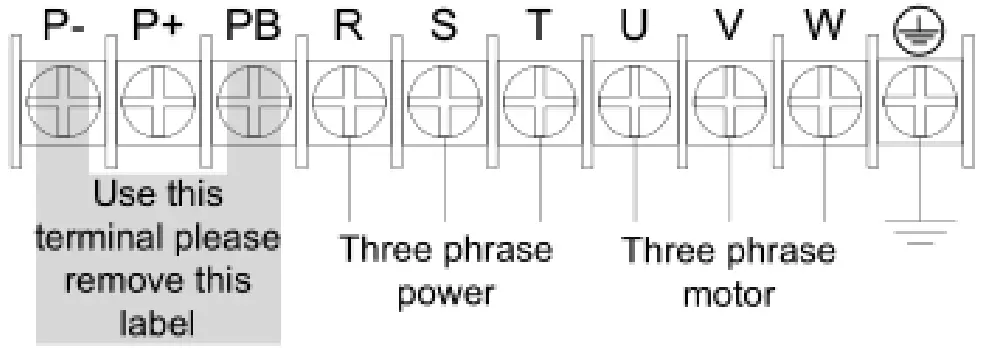 Figure 6 Connection diagram of main circuit for the inverter of 380 V 3.7 kw-15 kw
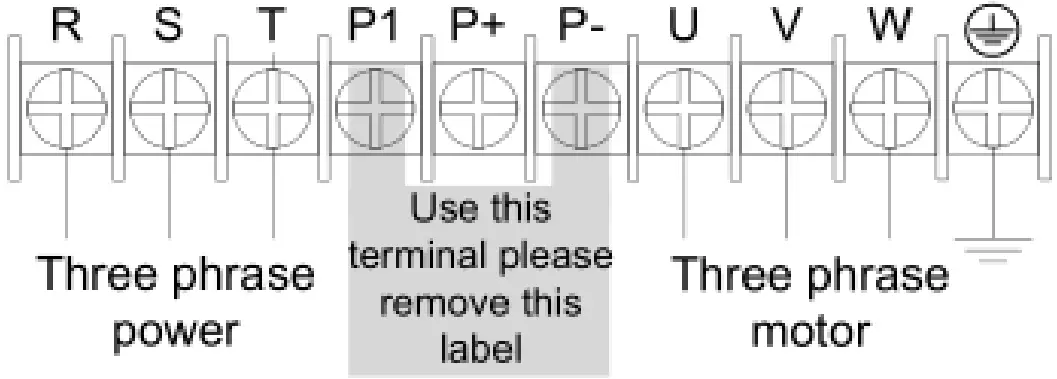 Figure 7 Connection diagram of main circuit for the inverter of 380 V over 18.5 kw
2.5.3.2 Instructions of main circuit terminals of inverter:
| Terminals | Function Instruction |
| L,N | single-phase 220V input terminal, external connection of grid single phase 220V AC power |
| R,S,T | input terminal of AC 3-phase power, external connection of grid 3 phase AC power |
| U,V,W | output terminal of 3 phase power, external connection of AC 3 phase motor |
| P+,P- | Negative and positive terminals of DC power, external connection of brake unit terminal |
| P+,PB | External connecting of brake resistor terminal |
| P1,P+ | External connection of DC electric reactor terminal |
 | Earth terminal |
 DANGER
- the voltage class of VD 300 A series inverter 3 phase power has 2 class: 220V, 380 V, before connecting power, please make sure the power class on inverter nameplate is the same with the accessing power. Otherwise do not connect.
- DC bus P+ P-terminal: take note that when power outrage there is residual voltage on DC bus P+ P- terminal, need to wait for a while until CHARGE LED off. Otherwise it is danger of electric shock.
- When selecting external brake unit, note the polarity of P= P- cannot be reversely connected, otherwise it can result in damage or even fire.
Do not directly connect brake resistor to DC bus, it may result damage or fire.
WARNING
- Input power L,N or R, S T: the cable connection at input side of the inverter has no phase sequence requirement.
- Brake unit cable length should not exceed 10m, twisted pair or double cable parallel wiring should be used.
- Brake resistor connecting terminal P+ P-: confirm whether the device has built-in brake unit, its brake resistor connecting terminal is effect. The brake resistor selection table 2-4 recommending value and the wiring distance should less than 5M.
Other it can damage inverter. - External DC electric reactor connecting terminal P1 P+: for external DC reactor to 18.5 Kw and above power inverter, get rid off the connector between P1 P+ terminal during installation, reactor is installed between the 2 terminal.
- Inverter output side U V W: the output side cannot connect capacitor or surge absorbed, otherwise it will affect inverter in self-protection frequently or damage.
- In case the motor cable is too long, it may generate electrical resonance easily due to the impact of distributed capacitance, thus damaging the motor insulation or generating higher leakage current to invoke over current protection of the inverter. When the length of motor cables longer than 100 meters, it needs to install a AC output reactor.
- Earth terminal PE:
This terminal shall be earthed reliably, with resistance of earth cable of less than 10Ω.Otherwise, it may cause fault or damage the inverter.
Do not share the earth terminal with zero line N terminal, otherwise it will result equipment abnormal running or damage.
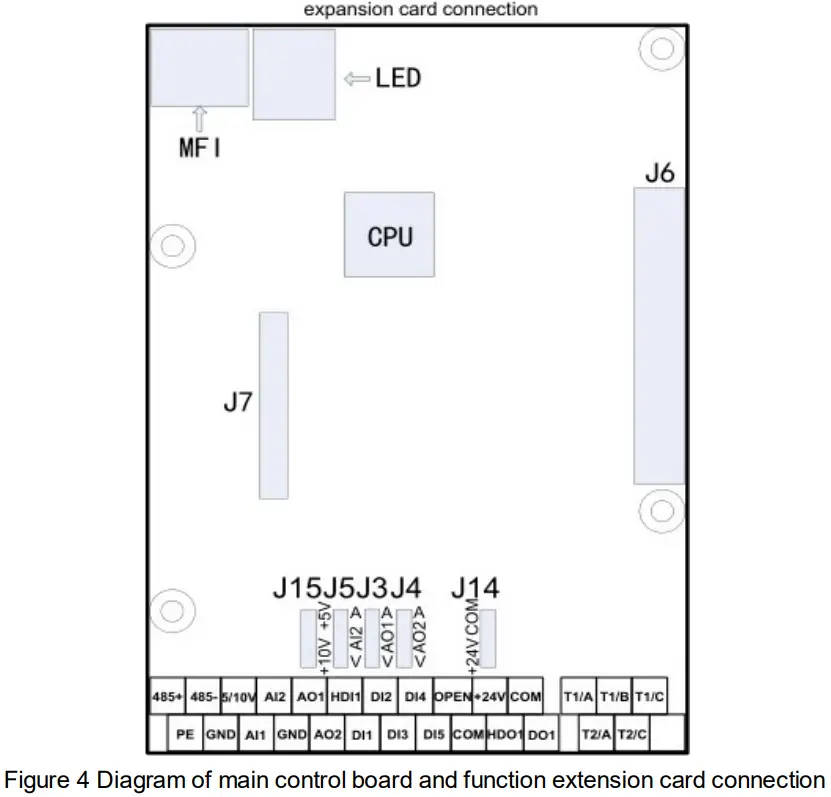
2.5.4 Control Circuit terminal
- Control terminals and Functional

- Function description of control circuit
Type Terminal sign Terminal name Function Power supply 5V/10 V-GND External 5V/10 V power supply 1. provide +5V/10 V power supply for external-units, the maximum output current is 20 mA. J 15 jumper on main control board to select 5V or 10 V power output, default is 10 V.
2. It is generally used as the operating power supply for the external potentiometer. The potentiometer resistance range is 1 kΩ~10 KΩ+24 V-COM 24 V power supply 1.Provide +24 V power supply for external units. It is generally used as the operating power supply for digital input/output terminals and the external sensor. The maximum output current is 200 mA. OPEN External power input terminal 1. Connect to 24 V by default, J14 jumper on main control board to select +24 V or COM connection.
2. When external power is used to drive DI1~DI5, HDI1, OPEN needs to connect to the external power supply and disconnect J14(disconnecting with +24 V/COM).Communication 485+-485- RS-485 terminals Standard RS-485 communication terminal, should use twisted pair cable Ana log input Al1-GND Ana log input terminal 1 1. Input Voltage range :DC 0 V to 10 V
2. input resistance :22 kΩAl2-GND Ana log input terminal 2 1. Input range :DC 0 V to 10 V or 0/4 mA~20 mA, can be selected by J 5 jumper on main control board.
2. input resistance: under voltage input-22 kΩ, Under current input-500Ω.Digital input DI1-COM Digital input 1 1. Optical coupling isolation, compatible with dual polarity input, internal resistance 3.3 kΩ;
2. Multi-function digital input, through P05.01-P05.05 to set function.
3. The inverter default +24 v power supply built-in, COM is common terminal.
4. when using external power, JP 14 should be suspended, external +24 V connect to OPEN, COM is common terminal(external voltage range +24 V±10%.
5. internal resistance 1.65 Kω.DI2-COM Digital input 2 DI3-COM Digital input 3 DI4-COM Digital input 4 DI5-COM Digital input 5 HDI1-COM Rapid pulse input terminal 1. When used as general digit input, it is the same function as DI1 to DI5; can combine with OPEN as bipolar rapid pulse input terminal. Max input frequency is 100 kHz.
3. When use external power, input voltage range +24 V±10%;
4. The internal impedance 1.65 kΩAnalog output
AO1-GND Ana log output terminal 1 0V~10V voltage and 0/4mA~20mA current output AO2-GND Ana log output terminal 2 0 V~10 V voltage 0/4 mA~20 mA current output Digital output DO1-COM Digital output 1 1. Optical coupling isolation, dual polarity open collector output
2. Output voltage range: 5V~24V
3. Output current range:2mA~50mA.HDO1-COM Rapid pulse input terminal 1. when used as general digital output, same function as DO1.
2. pull-up voltage range:5V-24V(pull-up impedance range: 0.48 kΩ~10kΩ).
3. output current range: 2 mA~50 mARelay output T1/A-T1/B Relay T1 normally closed terminal Contact driving capacity: AC 250V, 3 A,DC 30 V, 1A T1/A-T1/C Relay T 1 normally open terminal T 2/A-T 2/C Relay T 2 normally open terminal Ground PE Shield cable ground terminal 1. control cable shield grounding, when the interference is big on site or control cable is too long, the PE should be well grounded to reduce EMC affect.
2. PE is not allowed to connect with power N line, otherwise it can damage inverter - Jumper switch function description
Jumper Code Jumper wire Function J3 A terminal When jump cap plug connect to A, AO1 terminal select DC0/4mA-20mA current output V terminal When jump cap plug connect to V, AO1 terminal select DC0V-10V voltage output J4 A terminal When jump cap plug connect to A, AO1 terminal select DC0/4mA-20mA current output V terminal When jump cap plug connect to V, AO1 terminal select DC0V-10V voltage output J5 A terminal When jump cap plug connect to A, AI2 terminal select DC0/4mA-20mA current output V terminal When jump cap plug connect to V, AI2 terminal select DC0V-10V voltage output J14 24 V terminal When jump cap plug connect to 24V, OPEN terminal connect with +24V, and HDI1, DI1~DI5 with COM short circuit input effective. COM terminal When jump cap plug connect to 24V, OPEN terminal connect with COM, and HDI1, DI1~DI5 with +24V short circuit input effective. J15 +5V terminal When jump cap plug connect to +5V, terminal +5V/10V-GND on main board provide power supply +5V +10V terminal When jump cap plug connect to +10V, terminal +5V/10V-GND on main board provide power supply +10V - Jack connection function description
Jack Code Function Description J 6 Control board-power board J 6 is connection port of main control board and power board, power board supply power to main control board and is electric signal gateway between the 2 parts J 7 Control board-extension card J 7 is connection port of extension card and main control board, main control board supply power to extension card and is electric signal gateway between the 2 parts LED Control board-LED panel This plug is connection port of main control board and LED panel, main control board supply power to LED panel and is electric signal gateway between the 2 parts MFI Control board-MFI interface This plug is connection port of main control board and MFI port, main control board supply power to MFI port and is electric signal gateway between the 2 parts
2.5.5 Tank water full and Well water dry protection:
Tips:
- Use the signal wire connect some screw or conductor to put the sensor inside the well or tank;
- Use the water as conductor to connect A, B or disconnect A, B to control the pump inverter ;
A, Tank water full protection
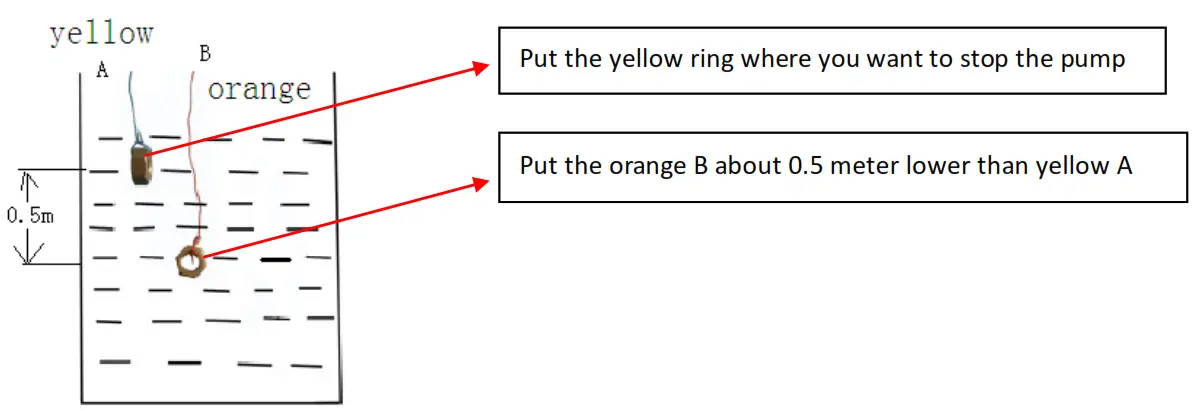
Reminder:
- Only two ring connected by water, and that can stop the pump; when disconnect in air or only one in water, pump continue its working.
- The distance 0.5 meter means not too close that stop the pump without water full, or not too far away that can’t connect each other even both of them inside water.
- Yellow A and Orange B can exchange the position.
B, Well water dry protection
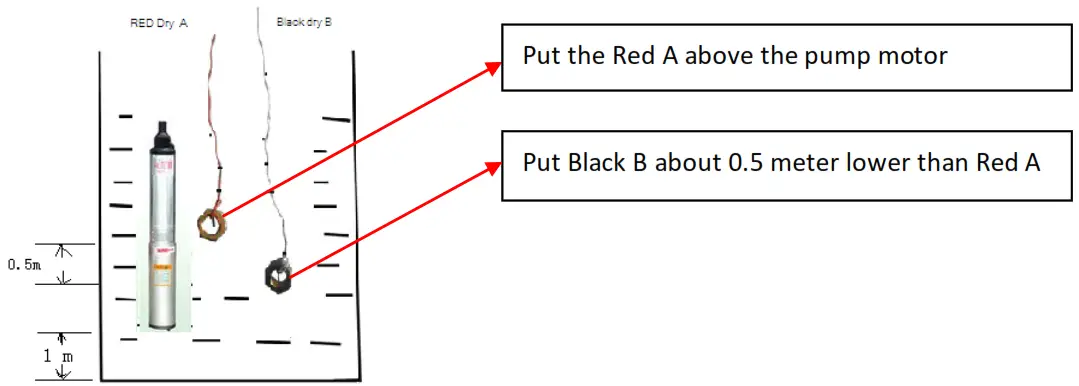
Reminder:
- Only two ring disconnected from water, and that can stop the pump; when connect inside the water, pump continue its working.
- The distance 0.5 meter means not too close that can’t stop the pump when water dry, or not too far away that pump can’t start since always disconnected.
- Red A and Black B can exchange the position.
Important remark:
For water dry protection, after the sensor connected ready, we need set: P11.33 = 1.
For water full protection, no need parameter setting.
For the Screw or conductor, we’d better use Anti-oxidant material. otherwise, we need to change a new one in case of rusty or corrosion after few months.
Chapter 3 Function Parameters
3.1 The Basic Function Parameters
The symbols in the function code table are described as follows:
“○” means the value of this parameter can be modified in stop and running status of drive;
“◎” means the value of this parameter cannot be modified when drive is running;
“●” means this parameter is a measured value that cannot be modified;
Default: The value when restored to factory default. Neither measured parameter value nor recorded value will be restored.
Setting Range: the scope of setting and display of parameters.
| Code | Name | Description | Factory Default | Attribute |
| P 00.01 | Command Source Selection of Run/Start | 0: Operation Panel(LED off) 1: Terminal Panel(L/R on) 2: Computer Communications(L/R flash) | 1 | ○ |
| P 00.14 | Acceleration Time 0 | 0.0s~3600.0s | 2.0s | ○ |
| P 00.15 | Deceleration Time 0 | 0.0s~3600.0s | 0.1s | ○ |
| P 01.05 | Stop mode | 0:Ramp to stop 1:Coast to stop | 1 | ○ |
| P 01.22 | Terminal Control When Power-On | 0: Terminal Command Enabled 1: Terminal Command Disabled | 1 | ○ |
| P 01.23 | Restart when Power-off | 0:Forbid to Restart 1:Allow to restart | 1 | ○ |
| P 01.24 | Wait Time of Restart When Power-off | 0.0~3600.0 s(when P 01.23, 1 Mean Enabled) | 1.0 s | ○ |
| P 02.00 | Motor1 type | 0:Asynchronous motor | 0 | ● |
| P 02.01 | Motor 1 Rated Power | 0.4 kW~1000.0 kW | Model Set | ◎ |
| P 02.02 | Motor 1 Rated Voltage | 0 V~1500 V | Model Set | ◎ |
| P 02.03 | Motor 1 Rated Current | 0.0 A~2000.0 A | Model Set | ◎ |
| P 02.04 | Motor 1 Rated Frequency | 0.00 Hz~650.00 Hz | Model Set | ◎ |
| P 02.05 | Motor 1 Rated Rotational Speed | 0 RPM~65535 RPM | Model Set | ◎ |
| P 05.01 | Terminal DI1 Function Selection | 0: Disabled 1: Forward run 49: PV Inverter Forbid 50: Full-Water 51: Dry -Water | 1 | ◎ |
| P 05.02 | Terminal DI2 Function Selection | 50 | ◎ | |
| P 05.03 | Terminal DI3 Function Selection | 51 | ◎ | |
| P 05.04 | Terminal DI4 Function Selection | 49 | ◎ | |
| P05.05 | Terminal DI5 Function Selection | 0 | ◎ | |
| P 05.11 | Terminal DI1~DI5 Positive/Negative Logic | 0 x 00~0 x 1 FF | 4 | ◎ |
| P 05.12 | DI Terminal Filtering Time | 0.000~1.000 s | 0.010 s | ○ |
| P06.02 | Output Terminal Positive/Negative Logic | 0x0~0x1F | 0x0 | ○ |
| P06.03 | DO1 Output Function | 0:Disabled 16:Weak Light Pre-Warning 17:Full-Water Pre-Warning 18:Reservoir Dry-Water 19: Ana log Reservoir Dry Pumping 20:Terminal Reservoir Dry-Water | 16 | ○ |
| P06.04 | HDO1 Output Function | 0 | ○ | |
| P06.05 | Relay T1 Output Function | 17 | ○ | |
| P06.06 | RelayT2 Output Function | 20 | ○ | |
| P08.26 | PID Dormancy Wait Time | 0.0s~6000.0s | 1.0 s | ○ |
| P11.16 | PV Inverter Selection | 0:Disabled 1:Enabled | 1 | ○ |
| P11.17 | Vmpp Voltage Selection | 0:Constant Voltage 1:Max. Power Point Tacking(MPPT) | 1 | ○ |
| P11.18 | Vmpp Voltage Keypad Set | 0.0~6553.5 Vdc | 555.0 V | ○ |
| P11.19 | PID Off set Limits | 0.0~100.0%(100.0% P 11.18) | 0.0% | ◎ |
| P11.20 | PID Max. Output Frequency | 0~100.0% | 100.0% | ○ |
| P11.21 | PID Min. Output Frequency | 0.0%~100.0% | 0.0% | ○ |
| P11.22 | KP1 | 0.00~100.00 | 1.00 | ○ |
| P11.23 | KI1 | 0.00~100.00 | 1.00 | ○ |
| P11.24 | KP2 | 0.00~100.00 | 4.00 | ○ |
| P11.25 | KI2 | 0.00~100.00 | 4.00 | ○ |
| P11.26 | PI Amplitude | 0.0~6553.5 Vdc | 50.0V | ○ |
| P11.27 | Analog Channel Selection of Reservoir Water Level | 0: Disabled 1: All 2: Al2 3: A13 | 0 | ○ |
| P11.28 | Dry-Water Threshold | 0.0-100.0% | 25.% | ○ |
| P11.29 | Delay Time of Dry-Water | 0-10000s | lOs | o |
| P11.30 | Wake-up Delay Time of Dry-Water | 0-10000s | 300s | o |
| P11.31 | Dry Pumping Threshold | 0.0-50.0% | 0.0% | o |
| – P11.32 | Delay Time of Full-Water | 0.0-1000.0s | 60.0s | o |
| P11.33 | Dry Pumping Function | 0: Disabled 1: Enabled | 0 | 0 |
| P11.34 | Reset Delay of Full-Water | 0.0-1000.0s | 300.0s | o |
| P11.35 | Frequency of Weak Light | 0-50Hz | 5.00Hz | o |
| P11.36 | Delay Time of Weak Light | 0.0-3600.0s | 100.0s | ○ |
| P11.37 | Reset Delay of Weak Light | 0.0-3600.0s | 300.0s | o |
| P11.38 | Reference Voltage of Given Display | 0.0-2000.0V | OV | o |
| P11.39 | Min. Voltage of MPPT | 0.0-6553.5Vdc | 100.0V | o |
| P11.40 | Max. Voltage of MPPT | 0.0-6553.5Vdc | 800.0V | o |
| P14.01 | Fault Code | 0: No Fault A-LS Warning of Weak Light A-LL Warning of Dry-water A-TF Warning of Full -water Er1: Acceleration Over current ( Hardware) Er2: Deceleration Over current ( Hardware) Er3: Constant-speed Over current ( Hardware) Er4: Acceleration Over current Er5: Deceleration Over current Er6: Constant-speed Over current Er7: Acceleration Over voltage Er8: Deceleration Over voltage Er9: Constant-speed Over voltage Er10: Bus Under voltage protection Er11: Motor Overload Er12: Inverter Overload Er13: Input Open-phase Er14: Output Open-phase Er15: Overheat Er16: Over Current Fault Er17: External Input Fault Er18: Communication Fault | 0 | ● |
| Er19: Current Inspect Fault Er20: Self-identification Fault Er21: EEPROM Version Incompatible Er22: PID Feedback Over Limit Er23: PID feedback Disconnection on Running Er24: Motor Ground Circuit Fault Er25:- Er26:- Er27:Run Time Over Er28:Power-on Time Over Er29:Off Load Er30:- Er31:- Er32:- Er33:- Er34: Motor Over Heat Er35:- Er36: Electronic Over Load Er037-Er040: — Er41: User Defined Fault 1 Er42: User Defined Fault 2 Er43: User Defined Fault 3 Er44: User Defined Fault 4 Er60: User Time Lock Er61: Factory Time Lock | ||||
| P14.02 | Output Frequency When Fault | 0.00-650.00Hz | 0.00 | • |
| P14.03 | Output Current When Fault | 0.0-2000.0A | 0.0 | • |
| P14.04 | Output Voltage When Fault | 0-2000V | 0 | • |
| P14.05 | Busbar Voltage when Fault | 0.0-2000.0V | 0.0 | • |
| P14.06 | Input Terminal Status When Fault | Ox00-0x1FF | Ox00 | • |
| P14.07 | Output Terminal Status When Fault | Ox00-0x1F | Ox00 | • |
| P14.08 | Inverter Temperature When Fault | -20.0-120.0°C | 0.0 | • |
| P14.09 | Run Time When Fault | 0-65535min | 0 | • |
| P14.10 | Power-On Time when Fault | 0-65535min | 0 | • |
| P14.11 | Total Run Time when Fault | 0-65535h | 0 | • |
| P14.12 | Total Power-on When Fault | 0-65535h | 0 | • |
| P28.00 | Run Frequency | 0.00Hz-300.00 | 0.00 | • |
| P28.01 | Set Frequency | 0.00Hz-300.00 | 0.00 | • |
| P28.02 | Slope Set Frequency | 0.00Hz-300.00 | 0.00 | • |
| P28.03 | Busbar Voltage | 0.0-2000.0V | 0.0 | • |
| P28.04 | Output Voltage | 0-1200V | 0 | • |
| P28.05 | Output Current | 0.0-2000.0A | 0.0 | • |
| P29.00 | User Password | 0-65535 | 0 | o |
| P29.01 | Parameter Initialization | 0: No Operation 1: Factory Reset 2: Remove Factory Record 3: Remove Total Run/Power-On Time | 0 | ◎ |
| P29.02 | Item Code | 0-65535 | Factory Set | • |
| P29.03 | Software Version | 1.00-10.00 | Factory Set | • |
| P29.04 | Inverter Rated Power | 0.4-1000.0kW | Factory Set | • |
| P29.05 | Inverter Rated Voltage | 220-1140V | Factory Set | • |
| P29.06 | Inverter Rated Current | 2.4-2000.0 A | Factory Set | • |
SGP-SI series Solar Pumping Inverter