 OMSI 2 ADDON
IRISBUS Intercity Pack
MANUAL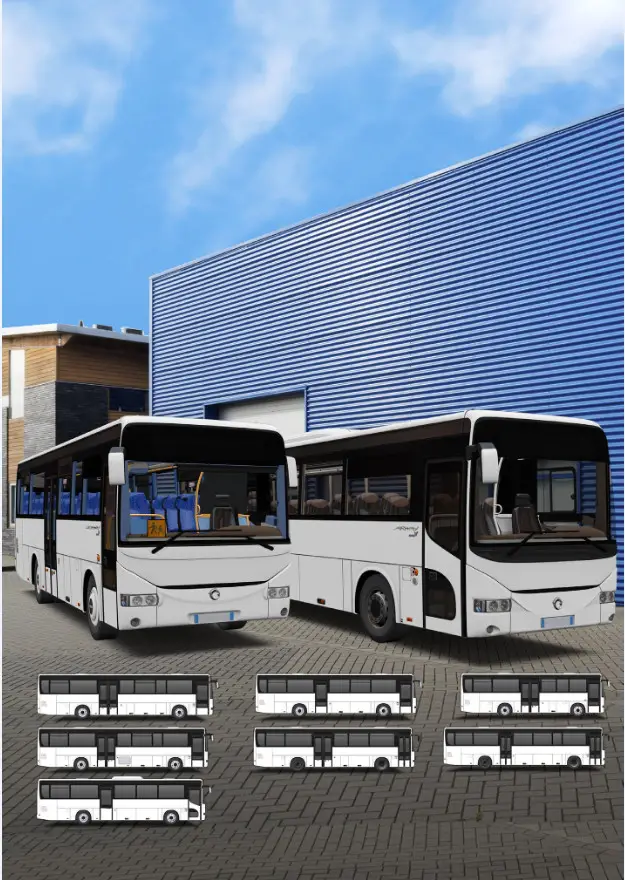 V 1.0 ENG
EPILEPSY WARNING
When playing over a long period, you should take a 15-minute break after every hour of gameplay. Please do not play when tired. Play in a well-lit room, and sit as far away from the screen as possible.
A very small portion of the population has a condition that may cause them to experience epileptic seizures or momentarily lose consciousness when they are exposed to certain kinds of flashing lights or light patterns that are commonly present in our daily environment. Such people may experience seizures while watching television images or playing certain video games. Players who have not had any previous seizures may nonetheless have an undetected epileptic condition.
If you suffer from epilepsy, please consult your doctor prior to playing computer games. Please speak to your doctor immediately if you encounter any of the following symptoms while playing: vertigo, impaired vision, twitches or any kind of uncontrolled motion, loss of consciousness, disorientation, and/or cramps.
SYSTEM REQUIREMENTS
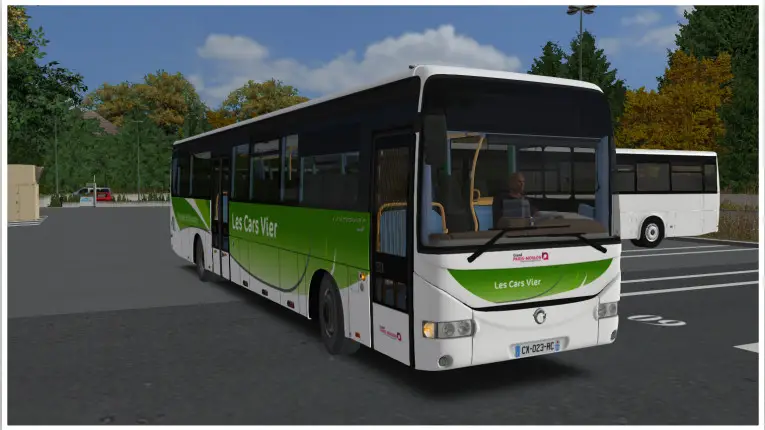
In order to play the add-on “OMSI2-AddOn Irisbus“, you need a PC-compatible computer with the following minimum specifications:
- An installed the full version of OMSI 2 – The Bus Simulator (version 2.3 or higher)
- Windows 8.1 or Windows 10 recommended/ 64 bit
- Dual-core processor (Core i5 with 2.8 GHz or similar), Quad-core with 3.0 GHz recommended
- RAM: 4 GB (8 GB recommended)
- 3D graphics card with at least 2.048 MB graphics memory
- Sound card
- 2.0 GB of free disk space minimum for installation
- Keyboard and mouse as well as an active steam account and internet connection
- DirectX 9.0c compatible hardware and software
- The 4GB patch for OMSI 2 is recommended.
ACTIVATING AND INSTALLING THE STEAM VERSION
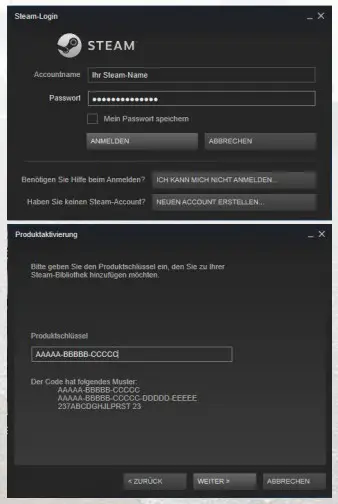
Start the Steam software and log in with your account name and password.
Then select the option “+ ADD GAME”.
Enter your personal product key to add the product to your Steam library.
Steam will then add the OMSI add-on files to your OMSI installation.
Note: To be able to install this OMSI add-on via Steam, you need to be logged onto your PC with an administrator rig.
TECHNICAL INFORMATION
TIPS TO MAXIMISE PERFORMANCE
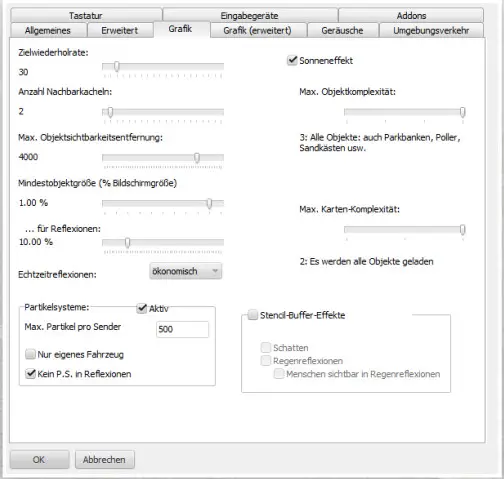
During the development of this addon, special attention was paid to making the best possible use of the computer‘s resources through optimized 3D models. The aim was to achieve the highest possible gameplay quality, both in the technical and visual sense. Nevertheless, it can happen that the performance is not always satisfactory, so here are some tips to improve it.
The stencil buffer effects, especially the display of shadows, consume the most resources. Therefore it is recommended to deactivate them completely. Furthermore, it has the advantage to set the neighboring tiles to a maximum of 2. Besides the graphical settings mentioned above, the surrounding traffic can also be set lower. 200 to 300 cars, 50% of the parking, are good values here. The same for pedestrians, here too the value can be reduced to achieve a better speed.
These settings can of course be set higher individually, depending on available resources. Just try a little bit with the values to get an optimal setting for your computer.
TECHNICAL SUPPORT
Unfortunately, due to a large number of different hardware and software combinations, technical problems can sometimes occur when using our software.
Please make sure that you use the latest drivers for your graphics and sound card. In case of technical problems, please check the OMSI data via the Steam software. This is the only way to ensure that no files are faulty or missing. Updates are also transferred in this way so that the latest program versions of the extensions are available. For more information, refer to the FAQs section of this manual. Check the FAQs section of the www.halycon.de website to see if the problem is already known. Most difficulties have already been reported and then listed there or there is an explanation/help for the problem.
If you cannot find what you are looking for here, you can easily contact us using the contact form on the website: www.halycon.de/kontakt.html.
We cannot offer telephone support or support via Facebook. In case of OMSI startup problems, we need the log file generated by OMSI at startup. This has the name logfile.txt and is located in the OMSI main directory.
A very good way to get support is the OMSI Webdisk online page. This is an OMSI forum by users for users. There you help each other and very competently.
OMSI Irisbus will get its own area there: https://reboot.omsi-webdisk.de.
TIP: If you are having difficulties, check the Halycon Media website www.halycon.de under FAQs to see if this problem is known there.
The FAQs are constantly being expanded and frequently reported problems are added to them.
FAQS – FREQUENTLY ASKED QUESTIONS
Updates via Steam
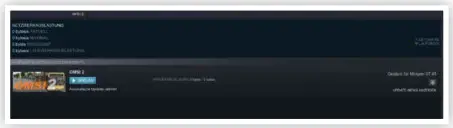
If a steam update is available, the transfer does not necessarily take place immediately, but the data transfer can also be scheduled for a later date. To get an update immediately, which is available from Steam, please select the entry „Downloads“ at the end of the list in the Steam menu „Library“. If you select this entry, all upcoming downloads (including updates) will be displayed. On the right side of the listed downloads, you can see the scheduled time and a button. If this icon is clicked, the immediate download will
be performed.
Check Steam data
In exceptional cases, Steam products may have errors, the cause of which is that not all data is correctly available on the computer. This can be caused, for example, by an interrupted WLAN connection or a faulty data memory. In this case, Steam offers the possibility to check the data. To do this, select the appropriate Steam program in the Steam library, in this case, OMSI 2, display the properties and select the entry „Check files for errors“. This process may take some time, depending on how many OMSI Steam titles are installed and which Internet line is available. If faulty or missing data is found, the Steam software will initiate a data transfer of these files.
Which OMSI-AddOn version do I currently have on my computer?
The current version of the Halycon OMSI AddOns can be found in the respective OMSI AddOn folder under ..\OMSI 2\AddOn\[product name]\ There you will find
a version file with the name of the current version, for example, OMSI2-AddOn_Irisbus_1-02 for version 1.02 of the AddOn.
Information about OMSI add-ons in general and Irisbus Intercity Pack in particular
The range of OMSI2 extensions is constantly changing. Numerous updates and bonus downloads are also published. If you would like to stay up to date here, we recommend that you register with us for one or more news channels. This is free of charge and can be canceled at any time.
So you are always up to date on the status of our products.
| www.facebook.com/halyconmedia | |
| www.twitter.com/HalyconMedia | |
| Newsletter | www.halycon.de/newsletter.html |
| Telegram – Push service | https://t.me/halyconmedia |
You can also find us on YouTube. There, numerous videos of our products are presented:
YouTube www.youtube.com/user/YTHalycon
We wish you a lot of fun with MyHalycon
USING THE 4GB-PATCH FOR OMSI 2
If white areas appear in the OMSI 2 simulator on the buses, AI vehicles and other 3D objects, the computer‘s memory are heavily used. OMSI 2 is a 32bit application and accesses by default a maximum of 2 GB of the working memory, regardless of how much working memory the computer actually contains. To provide OMSI with more working memory (RAM), the so-called 4GB patch can be used. You can obtain this patch, for example, at www.ntcore.com/4gb_patch.php Please note that this patch must be reloaded when updating OMSI 2.
IMPORTANT: Please note that after each update or data check it may be necessary to reactivate the 4Gb patch.
THE OMSI2-ADDON IRISBUS INTERCITY PACK
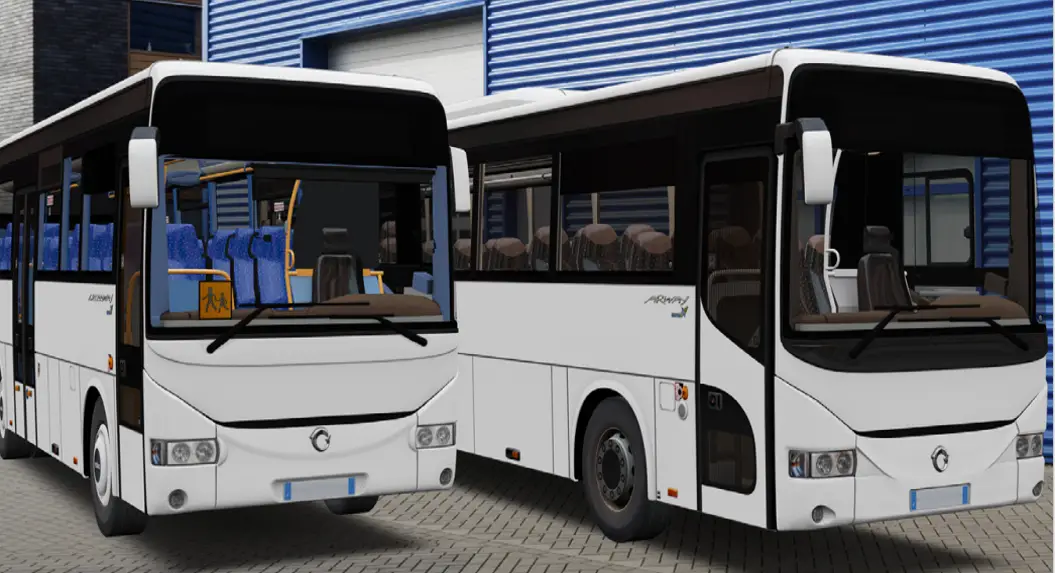
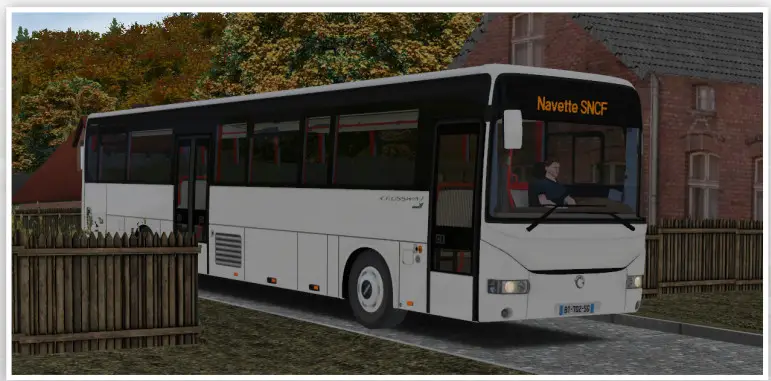
Since the arrival of the new Irisbus range in 2006, these coaches have been on the road in France non-stop. From school buses to regional coaches, Irisbus has been able to export on an international scale, in particular thanks to its quality ratio, price, its ability to adapt to carrier requirements, and its longevity.
How would it be to drive these buses in their various versions now in OMSI 2? Discover the exciting collection of Irisbus coaches in OMSI 2.
This collection includes seven coaches in the range, ranging in length from 10.6 meters to 12.8 meters, with rich customization, ideal for your school or periurban trips.
Crossway, available in three lengths: 10.6 meters, 12 meters, and 12.8 meters. Intended for the peri-urban line, they combine comfort and practicality.
Its luggage racks, seats with armrests, and reduced seating arrangement provide a comfortable and personal space for each passenger. Recreo, available in two lengths: 12 meters and 12.8 meters. Designed for school lines, they are optimized for maximum passenger capacity. With its light interior design and school-type seats, they will be perfectly capable of transporting schoolchildren in complete safety.
These coaches will be able to adapt to any type of mission, even in its 10.6 meters length: although it gains in mobility, the comfort dedicated to passengers remains the same.
Its High-Value version offers air conditioning and automatic transmission as standard.
Arway, available in one length: 12 meters.
Intended to make the regional line, it is optimized for passenger comfort. Ultra-comfortable reclining seats, passenger lights and individual air intake, double glazing, and air
conditioning as standard, this coach is made to transport your passengers, in all comfort, on the long road.
We hope you enjoy the Irisbus Intercity Pack.
OVERVIEW OF THE INCLUDED BUSES
The OMSI2-AddOn Irisbus Intercity Pack contains the 7 bus models from the Crossway, Recreo, and Arway model ranges. These can be used in configuring different equipment variants.
The following vehicles are included:
- Crossway Euro 5 / 10.6 meters / 45 seats
- Crossway Euro 5 / 12 meters / 55 seats
- Crossway Euro 5 / 12.8 meters / 59 seats
- Crossway Euro 5 / High Value 12.8 meters / 59 seats
- Recreo Euro 5 / 12 meters / 59 seats
- Recreo Euro 5 / 12,8 meters / 61 seats
- Arway Euro 5 / 12 meters / 49 seats
Below are the more detailed technical specifications.
CROSSWAY 10 METER

| Length: | 10.6 meter |
| Width: | 2.5 meter |
| Height (without AC/with AC): | 3.3 meter /3.45 meter |
| Empty Weight: | 12 t |
| Front door width: | single wing 800mm |
| Middle door width: | single wing 1200mm |
| Tank capacity: | 310 liters |
| Capacity passengers: | 45 |
| Seated: | 45 |
| Stand up: | 0 |
| Engine: | IVECO CURSOR 8 EURO 5, 6 cylinders |
| Power: | 243kW/330hp |
| Torque: | 1500Nm@1100-1500rpm |
| Gearboxes: | Manual 6 speeds Automatic 4 speeds |
CROSSWAY 12 METER

| Length: | 12 meter |
| Width: | 2.5 meter |
| Height (without AC/with AC): | 3.3 meter /3.45 meter |
| Empty Weight: | 12 t |
| Front door width : | single wing 800mm |
| Middle door width : | single wing 800mm |
| Tank capacity: | 310 liters |
| Capacity passengers: | 55 |
| Seated: | 55 |
| Stand up: | 0 |
| Engine: | IVECO CURSOR 8 EURO 5, 6 cylinders |
| Power: | 243kW/330hp |
| Torque: | 1500Nm@1100-1500rpm |
| Gearboxes: | Manual 6 speeds |
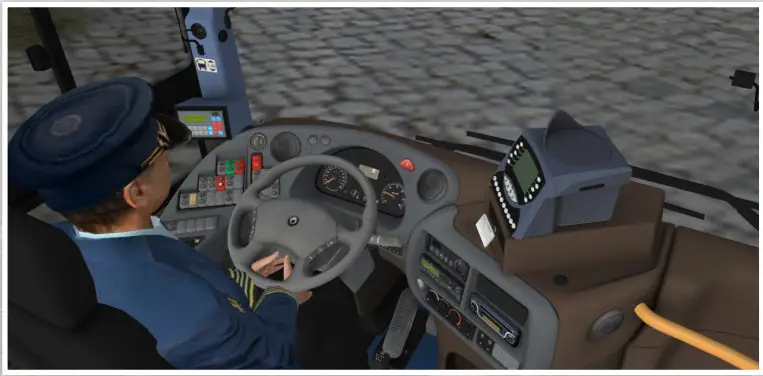
CROSSWAY 12.8 METER

| Length: | 12.8 meter |
| Width: | 2.5 meter |
| Height (without AC/with AC): | 3.3 meter /3.45 meter |
| Empty Weight: | 12 t |
| Front door width : | single wing 800mm |
| Middle door width : | double wings 1200mm |
| Tank capacity: | 310 liters |
| Capacity passengers: | 59 |
| Seated: | 59 |
| Stand up: | 0 |
| Engine: | IVECO CURSOR 8 EURO 5, 6 ylinders |
| Power: | 243kW/330hp |
| Torque: | 1500Nm@1100-1500rpm |
| Gearboxes: | Manual 6 speeds |
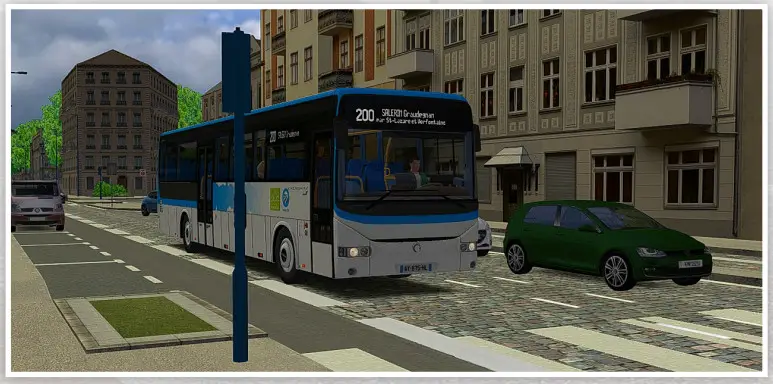
CROSSWAY 12.8 METER HIGH VALUE

| Length: | 2.8 meter |
| Width: | 2.5 meter |
| Height (without AC/with C): | 3.3 meter /3.45 meter |
| Empty Weight: | 12 t |
| Front door width : | single wing 800mm |
| Middle door width : | single wing 1200mm |
| Tank capacity: | 310 liters |
| Capacity passengers: | 59 |
| Seated: | 59 |
| Stand up: | 0 |
| Engine: | IVECO CURSOR 8 EURO 5, 6 cylinders |
| Power: | 243kW/330hp |
| Torque: | 1500Nm@1100-1500rpm |
| Gearboxes: | Automatic 4 speeds |
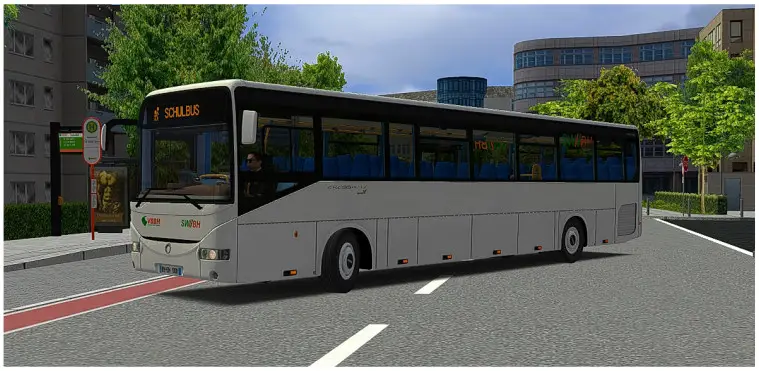
RECREO 12 METER
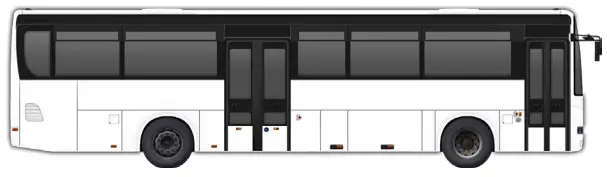
| Length: | 12 meter |
| Width: | 2.5 meter |
| Height (without AC/with C): | 3.3 meter |
| Empty Weight: | 12 t |
| Front door width : | single wing 800mm |
| Middle door width : | single wing 1200mm |
| Tank capacity: | 310 liters |
| Capacity passengers: | 59 |
| Seated: | 59 |
| Stand up: | 0 |
| Engine: | IVECO CURSOR 8 EURO 5, 6 cylinders |
| Power: | 243kW/330hp |
| Torque: | 1500Nm@1100-1500rpm |
| Gearboxes: | Manual 6 speeds |
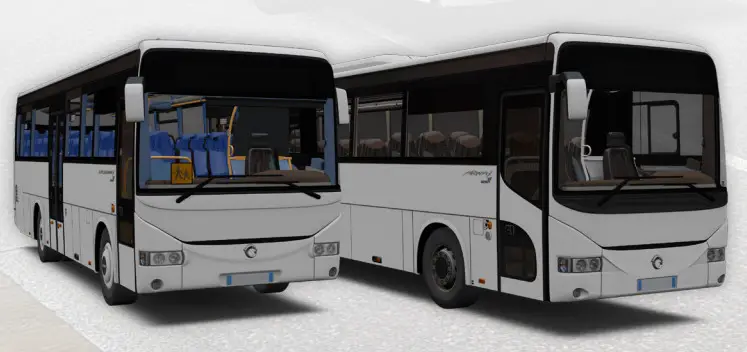
RECREO 12.8 METER

| Length: | 12.8 meter |
| Width: | 2.5 meter |
| Height (without AC/with C): | 3.3 meter |
| Empty Weight: | 12 |
| Front door width : | single wing 800mm |
| Middle door width : | single wing 800mm |
| Tank capacity: | 310 liters |
| Capacity passengers: | 61 |
| Seated: | 61 |
| Stand up: | 0 |
| Engine: | IVECO CURSOR 8 EURO 5, 6 cylinders |
| Power: | 243kW/330hp |
| Torque: | 1500Nm@1100-1500rpm |
| Gearboxes: | Manual 6 speeds |
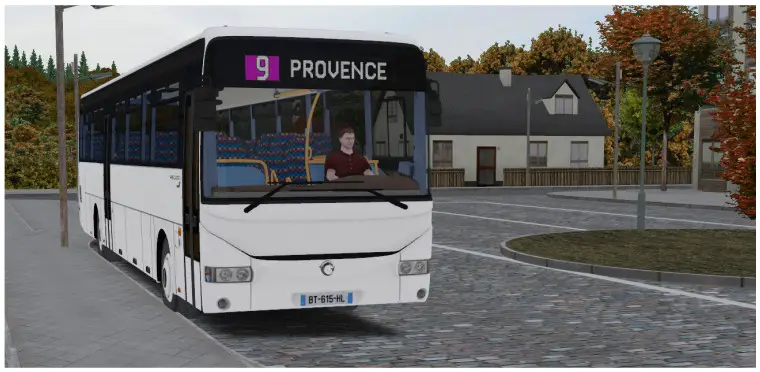
ARWAY 12 METER

| Length: | 12 meter |
| Width: | 2.5 meter |
| Height (without AC/with C): | 3.3 meter /3.45 meter |
| Empty Weight: | 12 t |
| Front door width : | single wing 800mm |
| Middle door width : | single wing 800mm |
| Tank capacity: | 310 liters |
| Capacity passengers: | 55 |
| Seated: | 55 |
| Stand up: | 0 |
| Engine: | IVECO CURSOR 8 EURO 5, 6 cylinders |
| Power: | 243kW/330hp |
| Torque: | 1500Nm@1100-1500rpm |
| Gearboxes: | Automatic 4 speeds |
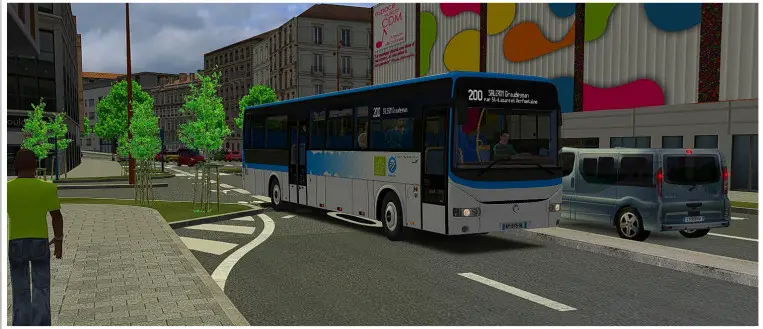
OVERVIEW DRIVER WORKSTATION
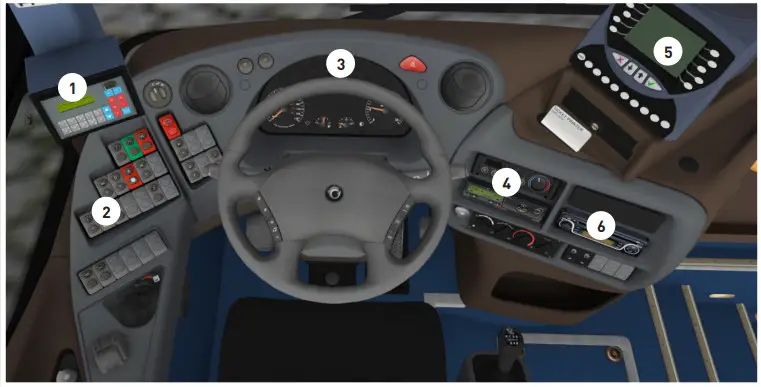
- IBIS device
- Driver Buttons Side Area
- Dashboard
- Air conditioning/heating
- ticket printer TP5400
- Radio
Driver buttons Upper Area
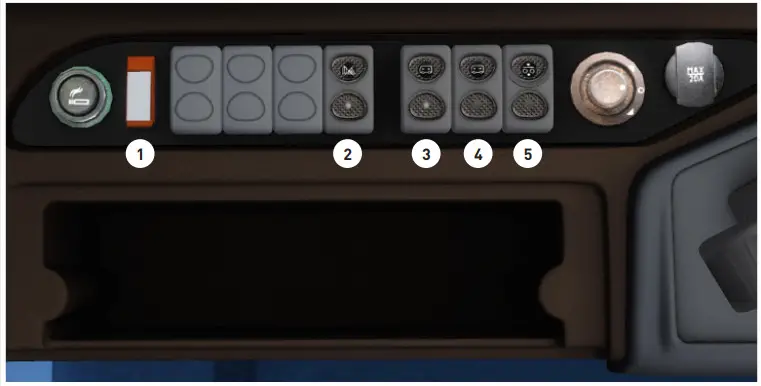
- Switch to disable or enable the automatic door brake when doors are open (default is set to enable)
- Disable or enable warning lights when doors are open (default is set to enable)
- When pressed, this switch increases the bus suspensions. When released, it stops increasing the bus.
- Same as the #3; but this switch decrease the bus suspensions
- Reset the bus suspensions to the default height
Driver Buttons Side Area
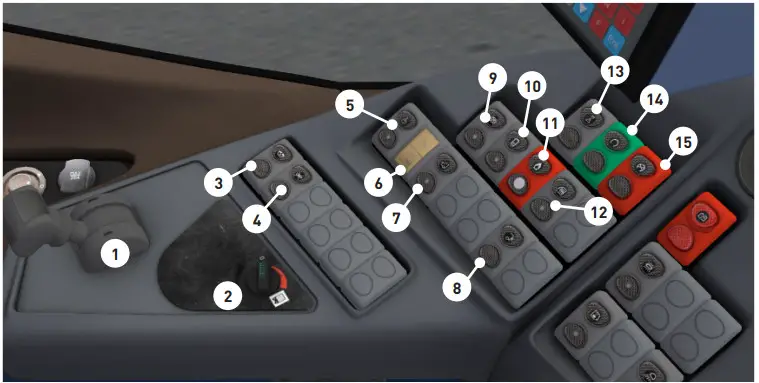
- Parking brake. Pull left to park the vehicle, pull right to release the brake
- Auxiliary fan
- Electric driver roller blind (press up the button to move up; press down the button to move down)
- Press up to not prevent the driver about stop requests from passengers (turn off cockpit lights related to stop requests). If a stop was requested, cockpit lights turn off. Press down to trigger a stop request. The cockpit lights will turn on.
- Enable/disable commands for disabled person ramp (not working here, only fictional switch)
- LCD screen for the #5 command. Not used here.
- Air extractor
- Disable or enable the reverse audio signal when the reverse gear is engaged. By default, this function is enabled.
- Disable or enable automatic retarder brake system when the brake pedal is used. By default, this function is enabled
- Enable or disable mirrors defrosting
- Enable or disable fire emergency (in case of fire at the engine; on OMSI it only make audio alarms things)
- Enable or disable front door window defrosting
- Emergency lights
- Engine start
- Engine stop
Dashboard
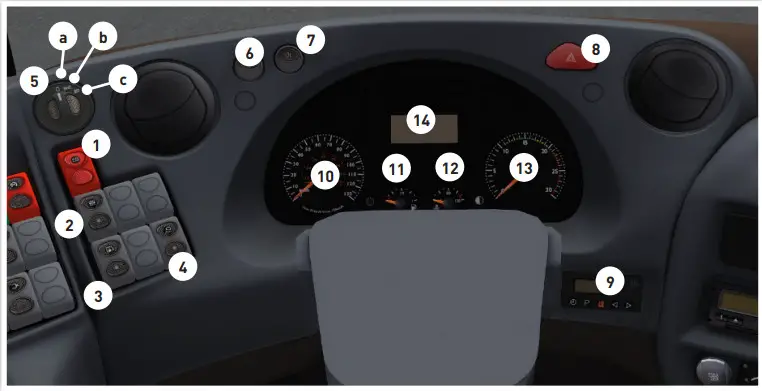
- Emergency battery switch. When activated, the battery is fully disconnected. To get the ignition back, this switch should be in its default position and then, but the key or use thee”
- Passenger lights. Press up the switch to enable the full light intensity. Press down to enable the lower intensity
- Exterior baggage compartments lights
- Driver lights area. Pressing up the switch will enable the driver’s lights only if the front door is open. Press down will enable the driver’s lights without any conditions
- Exterior light switch
a. Off
b. Stand lights
c. Abby lights - Front anti-fog tights (need Abbl lights enabled)
- Rear anti-fog lights
- Warning lights
- Engine heater switch Ion/off)
- Vehicle speed in kilometers per hour
- Vehicle fuel available
- Vehicle engine temperature
- Vehicle engine rpm
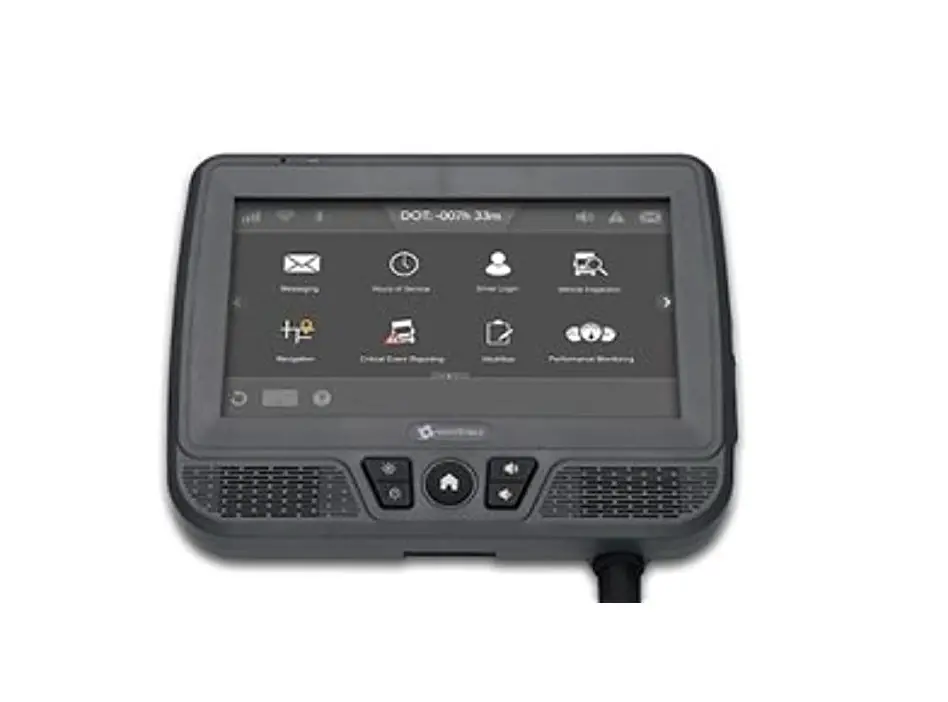
- Onboard computer
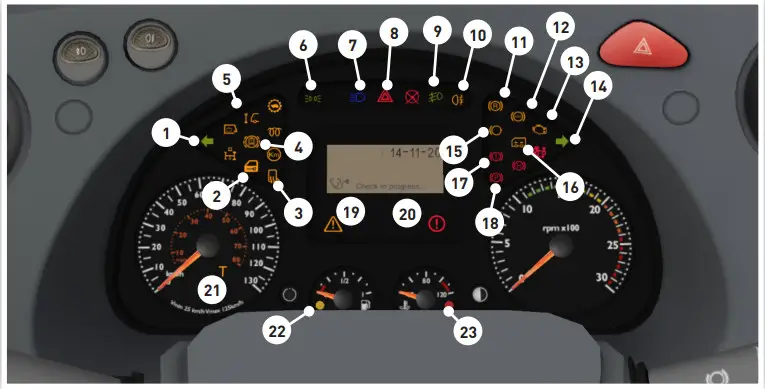
- left blinker active
- a door is closed by a key
- defrosting mirrors enabled
- door bremse active
- stop request
- stand lights active
- fern lights active
- warning lights active
- front fogs light active
- rear fogs light active
- electric retarder active
- abs active
- engine light
- turn right blinker active
- engine brake active
- bus suspension „Up“ active
- default air pressure active (not enough air pressure)
- parking brake active
- warning message (very low exterior temperature/internal issues)
- alert message (too low air pressure/too high engine temperature/a the door is open)
- Chrono tachygraph driver card missing
- fuel level low (orange light)
- Engine temperature too high (red light)
Air-condition and driver area heater
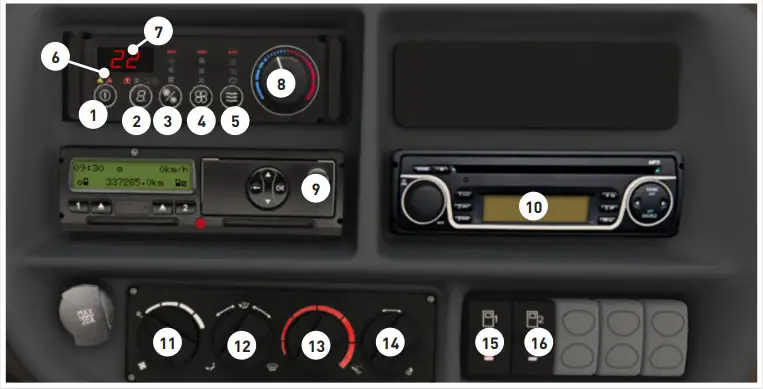
1 to 8 air conditioner
- power on/off
- change data on LCD screen (7) > driver aera temperature/ passengers aera temperature/ setpoint temperature
- change mode > automatic/ cool/heat
- change fans speed > automatic/high/medium/low
- change air damper > automatic/fresh air/recirculate
- if the yellow light is on: manual sets are incompatible (too low/high-temperature set point red light is on: internal failure
- LCD screen (if error, „Ht.“ means too high-temperature set point, „Fr.“ too low temperature set point)
- temperature setpoint (range 17°c to 27°c)
- Mileage counter (time, velocity, kilometers)
- FM tuner – click on the left round button to power it on/off
11 to 14 driver area heater - – fan speed
- – position
- – temperature
- – fresh air or recycled
- first door – push up to open/push down to close
- rear door – push up to open/push down to close
Onboard-Computer
Home Screen
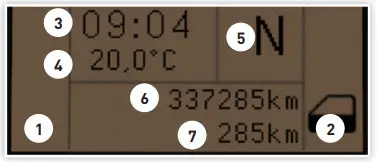
- warning messages
- critical messages (a door is
open/low air pressure/engine
temperature too high) - time
- exterior temperature
- engaged gear speed
- bus kilometers counter
- trip 1 kilometers counter
Pressure Screen
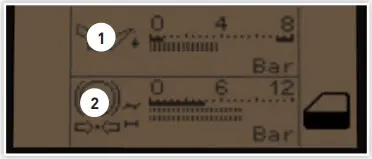
- engine oil pressure
- air pressure
Trip 1 Screen
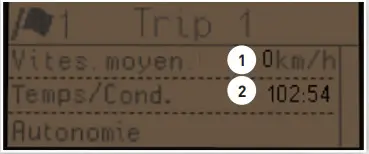
- Average speed in km/h
- Driving time
* Trip 1 can be reset aside from the fuel indicator
AdBlue Screen
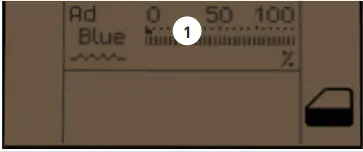
- AdBlue level
IBIS – Device
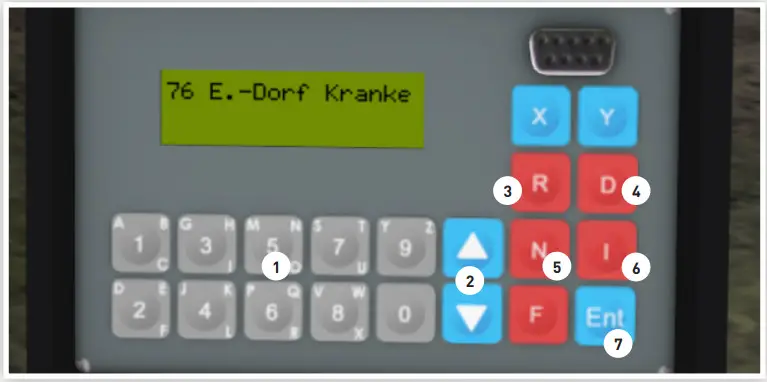
- Number pad
- Up / Down Up: Next bus stop position,
down: previous bus stop position - Route
- Line
- Pay announcement of the next bus stop
- Destination
- Enter
If you want to drive a line, you need to push 4 and enter your line.
After this, please push 3 and enter the valid route (most 1 & 2).
THE TICKET PRINTER TP5400
Below is a description of the ticket printer TP5400 included in the Irisbus.
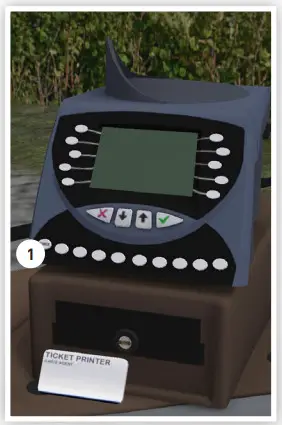
Please press the Button (1) to switch on this device
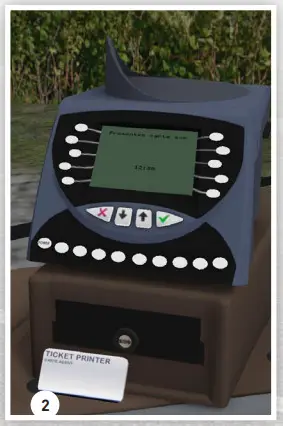
Please place your driver card (2) on this device. For this, you just need to click on the driver card (2)
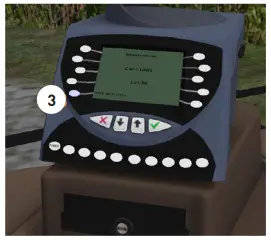
Click on the button (3) to sell tickets to passengers
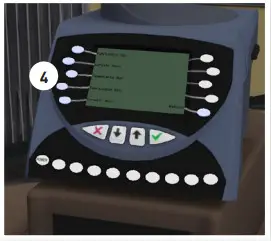
You can now select the available tickets. To do so, click on the corresponding button to the left of the ticket (4)
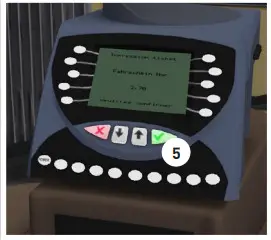
You will now be shown your selected ticket. Confirm this with the green button (5)
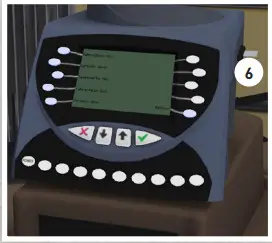
The ticket is now printed and the passenger can take it (6)
CREDITS / LEGAL NOTICE
| Development, Sounds, 3D Objects, Scripts Kescrole | Repaints K6ndrick Trans QB Le Trainzeur du 42 | Product management Weinberger |
| Beta Testers K6ndrick | Translation/ Documentation Erilambus | Packaging/manual layout BD Media |
| Creation Fonts /Scripts Bamp | Render Benedikt Steffens | |
| Additional Scripts Jan | Publishing Halycon Media www.halycon.de Volker Rieck | Special thanks go to … Andreas Mügge, Marie Armbrecht, Vanessa Quandt und Winfried Diekmann (Aerosoft) |
See www.halycon.de for further information. Note on image rights © 2020 Cover: BD-Media Bernhard Doeller, Inlay/Cover: bus render Benedikt Steffens Copyright © / Published 2020 Halycon Media GmbH&Co. KG. All rights reserved. The content of this manual and the software add-on it covers are the property of Halycon Media or the respective owners and copyrighted. Any reproduction, even in part, is strictly prohibited. Microsoft, DirectX, Windows are registered trademarks of Microsoft Corporation
in the US and/or other countries. All other brand names or registered trademarks mentioned in this product are properties of the respective owners.
OMSI AddOns by a specialist
More information on www.halycon.de
 BD MEDIA - Grafikagentur
 Log into Facebook
 4GB Patch – NTCore
 twitter.com/HalyconMedia
 Wineberger
 Halycon Media GmbH&Co.KG - YouTube
 OMSI 2 Mods Download - OMSI - WebDisk & Community