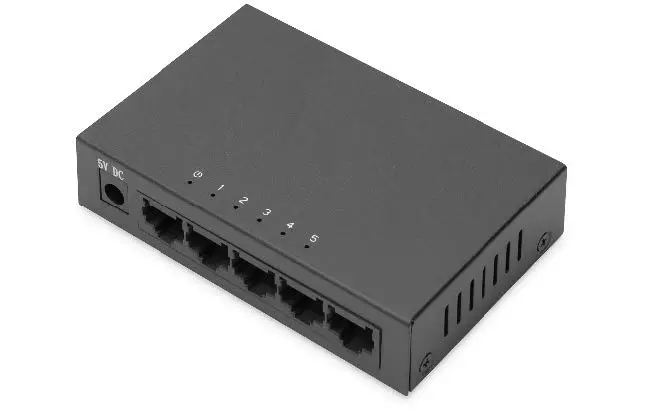
DN-80063-1 5-Port Gigabit Ethernet Switch
Gigabit Ethernet Switch
Product Information:
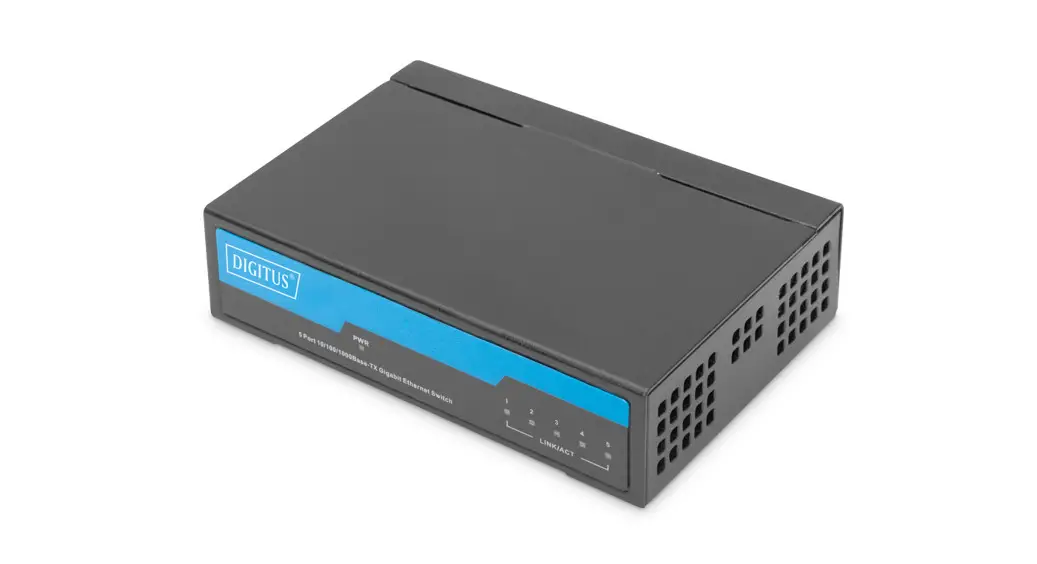
The Gigabit Ethernet Switch is a 5-port, unmanaged switch
designed for desktop use. It allows you to easily expand your
network with five additional RJ45 network ports. The switch is
compliant with the network standards IEEE 802.3, IEEE 802.3u, and
IEEE 802.3ab. It supports auto-negotiation for network speeds of
10/100/1000Mbps and features auto-MDI/MDI-X detection for each
RJ-45 port. The switch has a noiseless design without a fan and
comes with an external power supply. It is compatible with various
operating systems, including Windows, Mac OS, Linux, and Sun.
Product Specifications:
| Interface | 5 10/100/1000/Mbps RJ45 Ports AUTO Negotiation/AUTO MDI/MDIX |
|---|---|
| Chip | EN8850DH |
| Switching Capacity | 10 Gbps |
| Housing | Plastic housing |
| Power Input | External Power adapter 5V DC/1A |
| LED | Power, 10/100M,1000M, LINK, ACT |
| Fan | Fanless |
| Transfer Method | Store and forward |
| Dimension | Product Size: 82.6*48.6*20.5 mm ; Box Size: 90*84*62mm |
| Weight | Product Weight: 48.5g; Product with Box weight: 135.5g |
| Advanced Functions | Green Technology, saving power up to 85% 802.3X Flow Control, Back Pressure Auto-Uplink Every Port |
| Operating Temperature | 0~40°C (32~104°F) |
| Storage Temperature | -20~70°C (-4~158°F) |
| Operating Humidity | 10%~90% non-condensing |
| Storage Humidity | 5%~90% non-condensing |
Product Usage Instructions:
Installation:
- Precautions for Installation:
- Do not install the device in an unstable location such as on an
unsteady table or an inclined surface. - Do not place another hub or object that generates heat on this
unit. - Please route all cables properly to prevent people from
tripping over them. - Ensure the air vents on the product are not blocked by other
equipment or walls. - Only use the power cable included with the product. Using other
power cables may result in damage or fire.
- Do not install the device in an unstable location such as on an
- Mounting to a Wall:
- To mount the unit directly to the wall, use 2 screws (not
included). - Install the screws apart and slide the mounting holes on the
base of the switch over them.
- To mount the unit directly to the wall, use 2 screws (not
- Install on the Desk:
- Put the switch on the desk.
- Connect it with the network cable and the power adapter.
Connection Diagram:

Troubleshooting:
If you are unable to connect to a network, check the
following:
- Is the power cable connected correctly? Also, is the power
cable plugged into an outlet or surge protector? - Is the Ethernet cable connected correctly? Are any cables
damaged or loose?
Gigabit Ethernet Switch 5-port, unmanaged, Desktop
Quick Installation Guide
DN-80063-1
Installation
Precautions for Installation Do not install the device in an unstable location such as on an
unsteady table or an inclined surface. Do not place another hub or object that generates heat on this
unit. Please route all cables properly to prevent people from tripping
over them. Ensure the air vents on the product are not blocked by other
equipment or walls. Only use the power cable included with the product. Using other
power cables may result in damage or fire.
Mounting to a Wall To mount the unit directly to the wall, use 2 screws (not included). Install the screws apart and slide the mounting holes on the base of the switch over them.
Install on the Desk Put on the Desk, connect with the Network Cable and the power adapter
1. INTRODUCTION
With this Gigabit Ethernet Switch you can easily expand your Network with five additional RJ45 Network ports. Thanks to the Auto-MDI/MDI-X cable detection every port can be used as uplink. Automatic detection of network speeds 10/100/1000Mbps. No driver of software installation necessary.
2
2. FEATURES
1. 5-port 10/100/1000Mbps Gigabit Ethernet Switch 2. Compliant to the network standards IEEE 802.3, IEEE 802.3u and
IEEE 802.3ab 3. Auto-negotiation for 10/100/1000 Mbps 4. Auto-MDI/MDI-X detection for each RJ-45 port 5. Noiseless design – without fan 6. External power supply 7. Operating system independent, supports e.g. Windows, Mac OS,
Linux and Sun
3. SPECIFICATIONS
Interface
5 10/100/1000/Mbps RJ45 Ports AUTO Negotiation/AUTO MDI/MDIX
Chip
EN8850DH
Switching Capacity
10 Gbps
Housing
Plastic housing
Power Input External Power adapter 5V DC/1A.
LED
Power, 10/100M,1000M, LINK, ACT
Fan
Fanless
Transfer Method
Store and forward
Dimension
Product Size:82.6*48.6*20.5 mm ; Box Size: 90*84*62mm
Weight
Product Weight: 48.5g; Product with Box weight: 135.5g
Advanced Functions
Green Technology, saving power up to 85% 802.3X Flow Control, Back Pressure Auto-Uplink Every Port
Operating Temperature: 0~40 (32~104)
Environment
Storage Temperature: -20~70 (-4~158) Operating Humidity: 10%~90% non-condensing.
Storage Humidity: 5%~90% non-condensing
3
4. PACKAGE CONTENT
The package contains the items shown below. If any items are missing, please contact the dealer where you purchased this product. The appearance of this product may vary from the illustration. 1 pcs Switch 1 pcs Power Adapater 1 pcs Quick installation Quide
5. CONNECTION DIAGRAM
1
Network Cable
2
Power Cable
Check whether the connection is correct according to the indicator status in the table below.
LED PWR
1-5Port
Name Power Indicator
Port Indicator
Status Always on Always On
Flashing
Description Already Power On Port Connected Normally Port is transmitting data
After the connection is completed correctly, the switch does not require any settings.
4
6. Troubleshooting
If you are unable connect to a network, check the following: Is the power cable connected correctly? Also, is the power cable
plugged into an outlet or surge protector? Is the Ethernet cable connected correctly? Are any cables
disconnected or. Is the link/act/speed LED on? If not, manually set the
communication mode of the connected device to 100 Mbps half duplex or 10 Mbps half duplex.
Hereby Assmann Electronic GmbH declares that the Declaration of Conformity is part of the shipping content. If the Declaration of Conformity is missing, you can request it by post under the below mentioned manufacturer address. www.assmann.com ASSMANN Electronic GmbH Auf dem Schüffel 3 58513 Lüdenscheid Germany
5
 ASSMANN Electronic GmbH | Germany