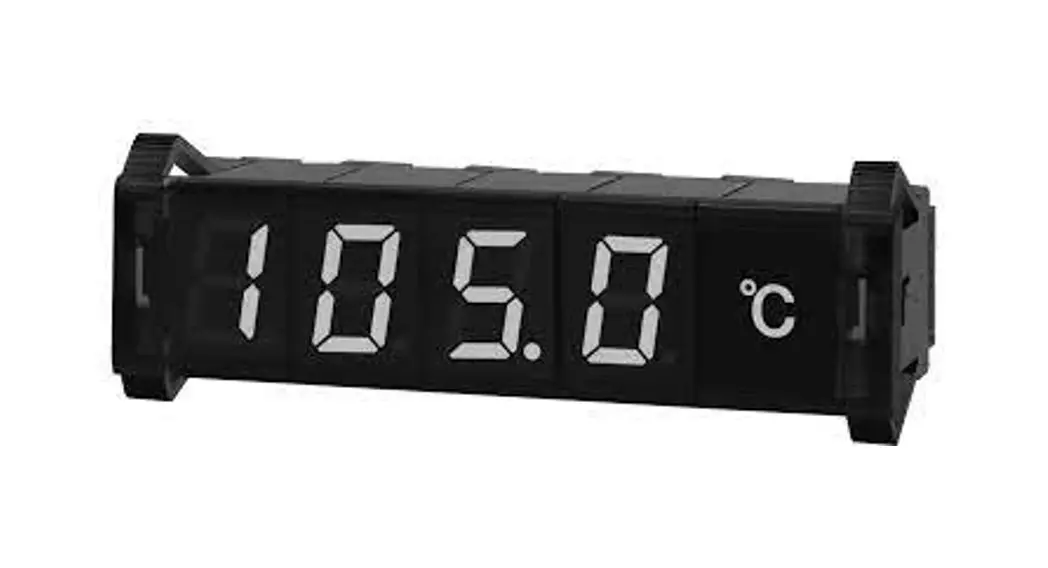
 High Performance Display Units : RS485 Input
Ordering Information
DS / DA Series
INSTRUCTION MANUAL
TCD210084AD
DS-DA Series High Performance Display Units
Thank you for choosing our Autonics product.
Read and understand the instruction manual and manual thoroughly before using the product.
For your safety, read and follow the below safety considerations before using.
For your safety, read and follow the considerations written in the instruction manual, other manuals and Autonics website.
Keep this instruction manual in a place where you can find easily.
The specifications, dimensions, etc. are subject to change without notice for product improvement. Some models may be discontinued without notice.
Follow Autonics website for the latest information.
Safety Considerations
- Observe all ‘Safety Considerations’ for safe and proper operation to avoid hazards.
 symbol indicates caution due to special circumstances in which hazards may occur.Warning Failure to follow instructions may result in serious injury or death.
- Fail-safe device must be installed when using the unit with machinery that may cause serious injury or substantial economic loss. (e.g. nuclear power control, medical equipment, ships, vehicles, railways, aircraft, combustion apparatus, safety equipment, crime/disaster prevention devices, etc.)
Failure to follow this instruction may result in personal injury, economic loss or fire. - Do not use the unit in the place where flammable/explosive/corrosive gas, high humidity, direct sunlight, radiant heat, vibration, impact or salinity may be present. Failure to follow this instruction may result in explosion or fire.
- Install on a device panel to use.
Failure to follow this instruction may result in fire. - Do not connect, repair, or inspect the unit while connected to a power source.
Failure to follow this instruction may result in fire. - Check ‘Unit Descriptions’ before wiring.
Failure to follow this instruction may result in fire. - Do not disassemble or modify the unit.
Failure to follow this instruction may result in fire.
 Caution Failure to follow instructions may result in injury or product damage.
- Use the unit within the rated specifications.
Failure to follow this instruction may result in fire or product damage. - Use a dry cloth to clean the unit, and do not use water or organic solvent.
Failure to follow this instruction may result in fire. - Keep the product away from metal chip, dust, and wire residue which flow into the unit.
Failure to follow this instruction may result in fire or product damage.
Cautions during Use
- Follow instructions in ‘Cautions during Use’. Otherwise, it may cause unexpected accidents.
- 12 – 24 VDC
 model power supply should be insulated and limited voltage/current or Class 2, SELV power supply device.
 - Install a power switch or circuit breaker in the easily accessible place for supplying or disconnecting the power.
- Keep away from high voltage lines or power lines to prevent inductive noise. In case installing power line and input signal line closely, use line filter or varactor at power
line and shielded wire at input signal line.
Do not use near the equipment which generates strong magnetic force or high frequency noise. - This unit may be used in the following environments.
– Indoors (in the environment condition rated in ‘Specifications’)
– Altitude max. 2,000 m
– Pollution degree 2
– Installation category I
Ordering Information
This is only for reference.
For selecting the specific model, follow the Au tonics web site.

- Display method
S: 7-segment
A: 16-segment - Size
16 : W 16 × H 24 mm
22: W 20 × H 33 mm
40: W 40 × H 60 mm
60: W 60 × H 96 mm - Display color
R: Red
G: Green - Input method (basic unit)
T: RS485 communication input
C: RS485 communication input (synchronous time display)
Product Components
- Product
- 16 / 22 mm Cap (left-right 1 set)× 1
- Instruction manual
- 22 mm Connector × 1
Sold Separately
- Expansion unit (DS□-□E / DA□-□E)
: select the same size/display color of basic unit (available to mix the display method) - 16 / 22 mm Middle bracket (BK-D□R)
- 16 / 22 mm Unit-display unit (DU□-□)
Specifications
| Model | DS16-□□ | D□22-□□ | D□40-□□ | D□60-□□ |
| Display color | Red / green model | |||
| Power supply | 12 – 24 VDC | |||
| Allowable voltage range | 90 to 110 % of power supply | |||
| Current consumption (red) | ≤ 20 mA | ≤ 25 mA | ≤ 55 mA | ≤ 65 mA |
| Current consumption (green) | ≤ 15 mA | ≤ 20 mA | ≤ 40 mA | ≤ 45 mA |
| Size (W×H) | 9 × 16 mm | 11.2 × 22.5 mm | 22.4 × 40 mm | 33.6 × 60 mm |
| Noise immunity | ±500 V the square wave noise (pulse width: 1 μs) by the noise simulator | |||
| Ambient temperature | -10 to 55 ℃, storage: -25 to 65 ℃ (non freezing or condensation) | |||
| Ambient humidity | 35 to 85%RH, storage: 35 to 85%RH (non freezing or condensation) | |||
| Protection rating | IP40 (front part) | |||
| Approval |  | |||
| Weight (packaged) 01) | ≈ 12 g (≈ 52 g) | ≈ 17 g (≈ 58 g) | ≈ 28 g (≈ 63 g) | ≈ 60 g (≈ 110 g) |
- The package weight of 16 mm / 22 mm expansion unit varies, it based on 3 packages.
16 mm: ≈ 77 g / 22 mm: ≈ 92 g
| Model | D□□-□T | DS□-□C |
| Input method | RS485 communication | RS485 communication (time) |
| Directly connected Autonics Series | CT6, CT4, MP5, MT4, TK / TX, TM2, TM4, THD | – |
| Display character (range) | 64 characters and symbols display: 0 to 9, A to Z, 27 symbols, decimal point | World local time, 12/24-hour, summer time |
| Max. number of multi- stage | 24-unit | 10-unit |
Communication Interface
RS485
| Model | D□□-□T | DS□-□C |
| Protocol | Modbus RTU | |
| Application standard | Compliance with EIA RS485 | |
| Max. connections (setting address) | Master 1-unit (01, fixed) / Slave 31-unit (01 to 32) | 31-unit (226, fixed) |
| Comm. type | Two-wire half duplex | |
| Comm. distance | Max. 800 m | |
| Comm. speed | 4800, 9600, 19200, 38400 bps | |
| Comm. response time | (Slave) 5 ms, 20 ms | – |
| Start bit | 1-bit (fixed) | |
| Data bit | 8-bit (fixed) | |
| Parity bit | NONE (fixed) | |
| Stop bit | 1-bit (fixed) | |
Dimensions
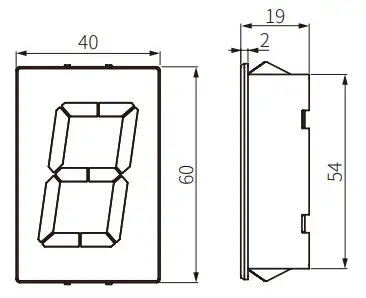
- Unit: mm, For the detailed drawings, follow the Autonics website.
- N: number of units
16 mm size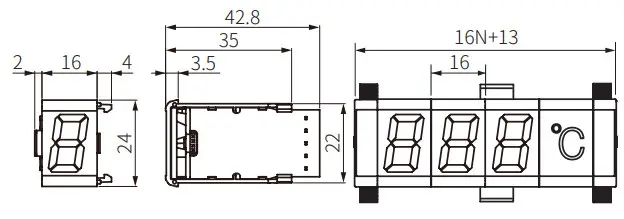 22 mm size
 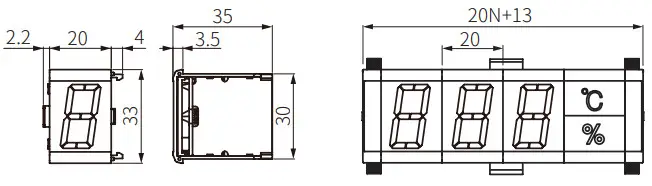 40 mm size
 60 mm size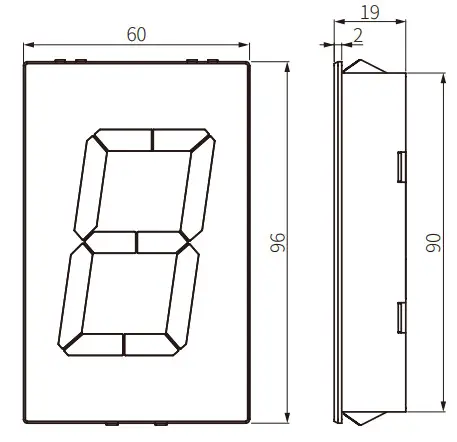
Panel cut-out
- Panel thickness: 1.5 to 4 mm
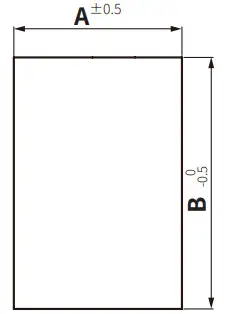
| Model | A | B |
| 16 mm | 16N+11 | 23 |
| 22 mm | 20N+11 | 31 |
| 40 mm | 40N-2 | 55 |
| 60 mm | 60N-3 | 91 |
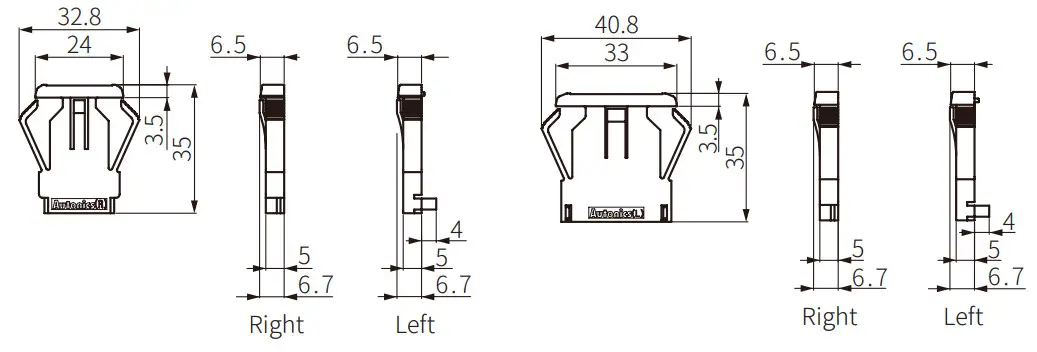
Cap
- 16 mm size
- 22 mm size
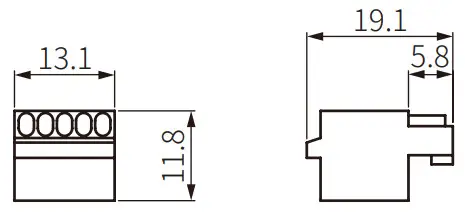
Connector
- 22 mm size
Connection of Units
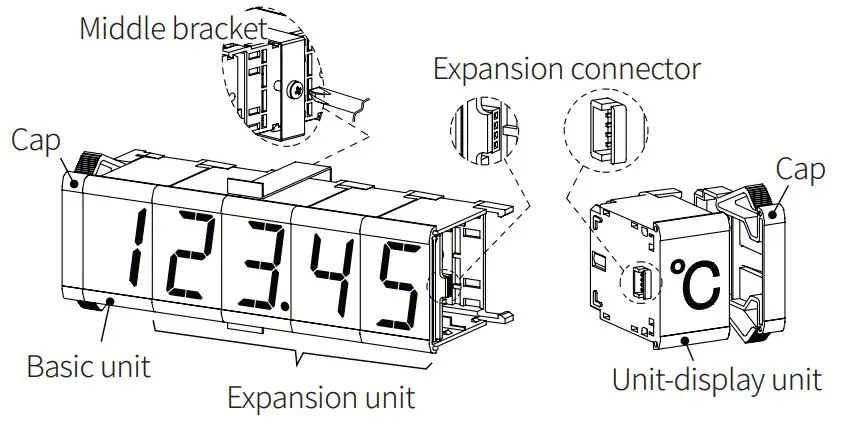
16 / 22 mm size
- Connect a basic unit, expansion units, a unit-display unit from the left and connect the caps the end of right and left.
- Use the middle bracket (sold separately) to protect deflection when connecting over 7 units. Use one middle bracket per 7 units. (tightening torque: ≤ 0.5 N m)
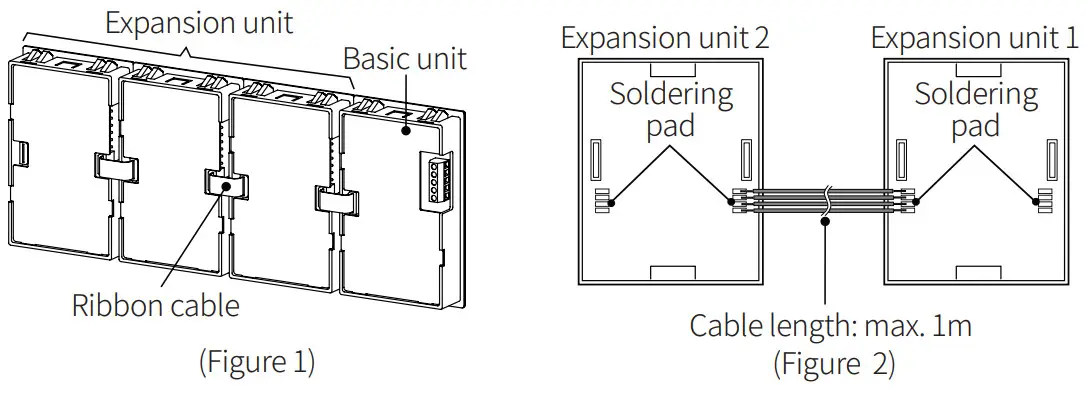
40 / 60 mm size
- Connect expansion connectors of units using a ribbon cable. (Figure 1)
- If the distance between expansion units is far as (Figure 2), you can connect the cable at the soldering pad. To use a soldering pad, remove the protection cover which only expansion units have.
- See ‘Removing Protection Cover of Expansion Unit’ to detach the cover.
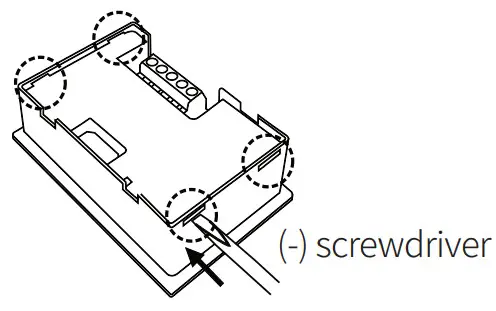
Removing Protection Cover of Expansion Unit
Press the connection parts (4-point) of the protection cover at the top/bottom of the 40 / 60 mm expansion unit with (-) screwdriver and the protection cover is removed. To operate the function set switches, you should remove the protection cover on the rear part.Caution: Before removing the protection cover, power must be turned OFF.
Software
- Download the installation file and the manuals from the Autonics website.
DAQMaster
• DAQ Master is the comprehensive device management program for Autonics’ products, providing parameter setting, monitoring and data management.
Example Programs
Download the various example programs from the Autonics website.
[RS485 Input Model] Unit Descriptions
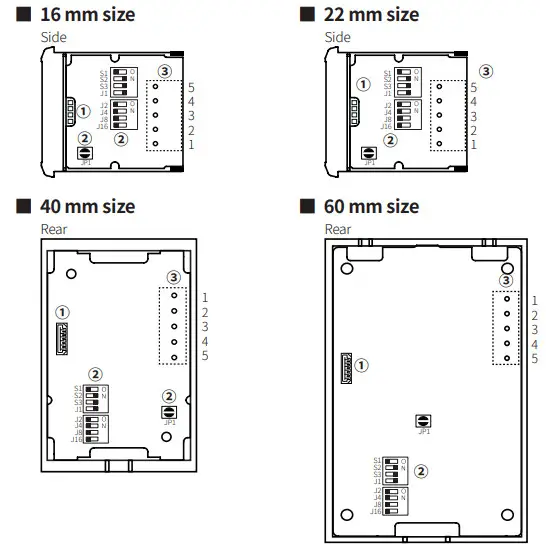
- Expansion connector Using for connecting expansion unit. See ‘Connection of Units.’
- Function set switches Basic unit only
• Slave mode (JP1 OFF: Open )
)
 )
)| No. | Setting value (OFF □■ ON) | Function | Default | ||||||||||||||||||||||||||||||||
| Comm. response time | 5 ms (OFF) | |||||||||||||||||||||||||||||||||
| Comm. speed (bps) | 38400 (S2 / S3: ON) | |||||||||||||||||||||||||||||||||
| Comm. address | 1 Comm. address (J1: ON / J2 to 16: OFF) | |||||||||||||||||||||||||||||||||
• Master mode (JP1 ON: Short  )
)
| No. | Setting value | Function | Default | ||||||||||
| Connection setting method | Manual (OFF) | |||||||||||
| 4800 | 9600 | 19200 | 38400 | Comm. speed (bps) | 38400 (S2 / S3: ON) | ||||||||
| S2 | OFF | ON | OFF | ON | |||||||||
| S3 | OFF | OFF | ON | ON | |||||||||
| J1 to J8 | • If the connection setting method (S1) is the manual (OFF), see the ‘Directly Connected Autonics Series.’ | Directly connected Autonics Series | CT 4 (J1: ON / J2 to 8: OFF) | ||||||||||
| J16 | Not used | Use | Unit-display unit | Not used (OFF) | |||||||||
- Input terminal Basic unit only
[RS485 Input Model] Directly Connected Autonics Series
- Connecting to a device which supports Master mode displays current value or current value and setting value without PC / PLC.
- Only for RS485 communication output model supports it among the directly connected Autonics Series. Connect input terminal 4 (A+) and 5 (B-) of display unit to RS485 communication output terminal of the dedicated device.
| CT6 | CT4 | MP5 | MT4 | TK/TX | TM2 | TM4 | THD | |
| J1 | OFF | ON | OFF | ON | OFF | ON | OFF | ON |
| J2 | OFF | OFF | ON | ON | OFF | OFF | ON | ON |
| J4 | OFF | OFF | OFF | OFF | ON | ON | ON | ON |
| J8 | OFF | OFF | OFF | OFF | OFF | OFF | OFF | OFF |
Not using the highest digit (using manual setting)
| CT6 | MP5 | MT4 | TK/TX | |
| J1 | OFF | ON | OFF | ON |
| J2 | OFF | OFF | ON | ON |
| J4 | OFF | OFF | OFF | OFF |
| J8 | ON | ON | ON | ON |
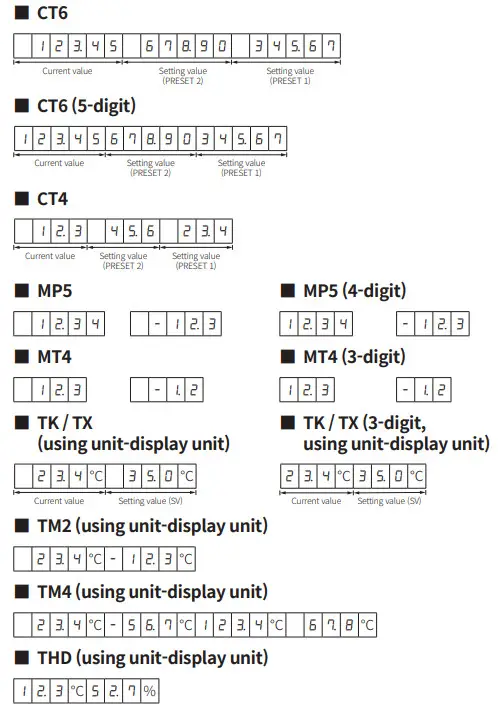
[RS485 Input Model] Example of Display
- In case of manual setting, the highest digit may be not used.
[Refer to CT6(5digit), MP5(4digit), MT4(3digit), TK/TX(3digit, using unit-display unit)] - To display the set value (PRESET or SV), connect the same number of units as the current value.
- CT Series: Displayed in the PRESET 2 position when using the 1-state PRESET model.
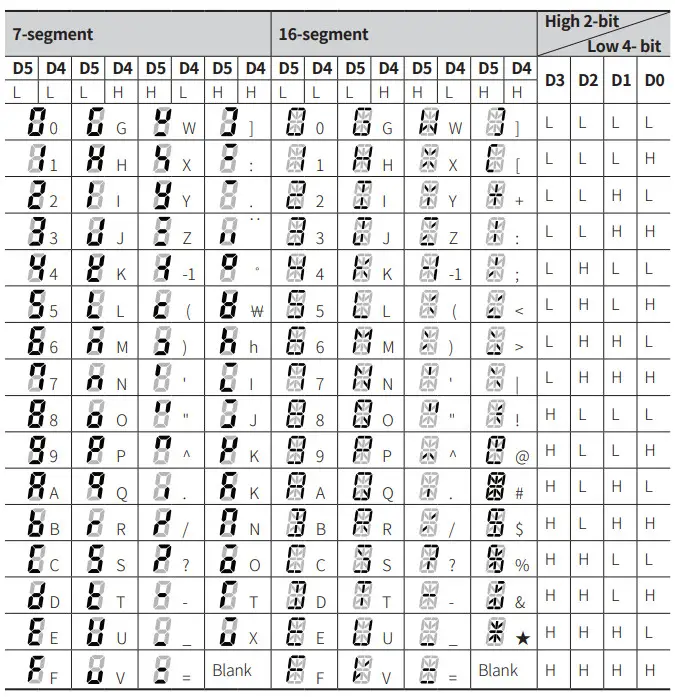
[RS485 Input Model] Input Data Chart
- Based on the Slave mode.
- If there is no input data after supplying the power, the basic unit displays input method character (T).
[RS485 (synchronous time display) Model] Unit Descriptions
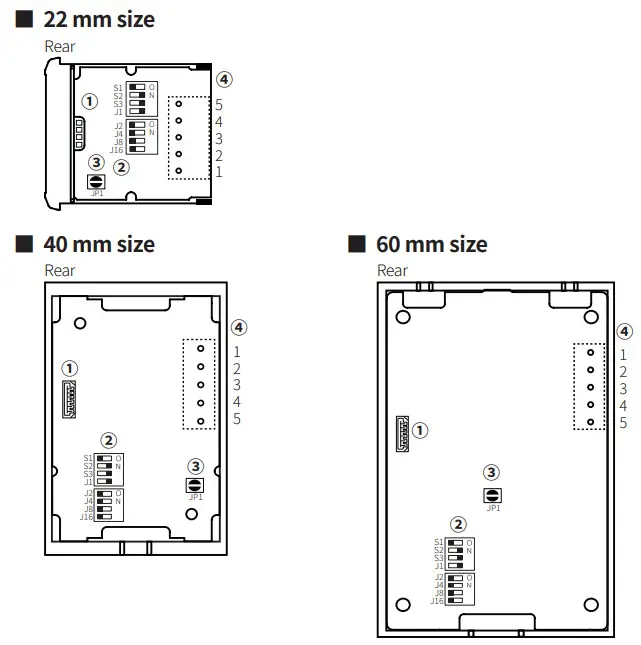
- Expansion connector Using for connecting expansion unit. See ‘Connection of Units.’
- Function set switches Basic unit only
No. Setting value (OFF □■ ON) Function Default 24-hour 12-hour 01) S1 OFF ON Time display 24-hour (OFF) 4800 9600 19200 38400 S2 OFF ON OFF ON S3 OFF OFF ON ON 01) When setting the 12-hour display, use 16-segment expansion unit for displaying ‘M’ of AM/PM.
Comm. speed (bps) 38400 (S2 / S3: ON) J1 to J16 See the ‘World Time Zone.’ Select world time zone UTC-11:00 (J1: ON / J2 to 16: OFF) - Delimiter for hour/min/sec Basic unit only
JP1 Setting value Expansion unit Display e.g.: PM 6 hour 60 min 15 sec (based on 12-hour display) Open Sign [ ] DA Series (16-segment) 
Short Decimal point[.] DS Series (7-segment) 
- Input terminal Basic unit only


| No. | Code | Function |
| 1 | VCC | 12 – 24 VDC |
| 2 | GND | 0 V |
| 3 | – | – |
| 4 | A (+) | RS485 A (+) |
| 5 | B (-) | RS485 B (-) |
- The basic unit supplies the power for expansion unit and the unit-display unit and DATA input.
- For the 22 mm size model, connect the connector to the input terminal.
[RS485 (synchronous time display) Model] World Time Zone
- Display the switch setting OFF=0, ON=1.
| J1 | J2 | J4 | J8 | J16 | Time zone | Region |
| 0 | 0 | 0 | 0 | 0 | UTC-12:00 | International Date Line West |
| 1 | 0 | 0 | 0 | 0 | UTC-11:00 | Coordinated Universal Time -11 |
| 0 | 1 | 0 | 0 | 0 | UTC-10:00 | Hawaii |
| 1 | 1 | 0 | 0 | 0 | UTC-09:00 | Alaska |
| 0 | 0 | 1 | 0 | 0 | UTC-08:00 | Pacific Time(US&Canada), Baja California |
| 1 | 0 | 1 | 0 | 0 | UTC-07:00 | Mountain Time(US&Canada), Arizona, Chihuahua, La Paz, Mazatlan |
| 0 | 1 | 1 | 0 | 0 | UTC-06:00 | Guadalajara, Mexico City, Monterrey, Saskatchewan, Central America, Central Time(US&Canada) |
| 1 | 1 | 1 | 0 | 0 | UTC-05:00 | Eastern Time(US&Canada), Indiana(East), Bogota, Lima, Quito, Rio Branco, Chemical |
| 0 | 0 | 0 | 1 | 0 | UTC-04:00 | Atlantic Time(Canada), Asuncion, Georgetown, La Paz, Manaus, San Juan, Cuiaba |
| 1 | 0 | 0 | 1 | 0 | UTC-03:30 | Newfoundland |
| 0 | 1 | 0 | 1 | 0 | UTC-03:00 | Greenland, Montevideo, Buenos Aires, Brasilia, Santiago, Salvador, Cayenne, Fortaleza |
| 1 | 1 | 0 | 1 | 0 | UTC-02:00 | Coordinated Universal Time -02 |
| 0 | 0 | 1 | 1 | 0 | UTC-01:00 | Cabo Verde Is., Azores |
| 1 | 0 | 1 | 1 | 0 | UTC 00:00 | Coordinated Universal Time, Dublin, Edinburgh, Lisbon, London, Monrovia, Reykjavik, Casablanca |
| 0 | 1 | 1 | 1 | 0 | UTC+01:00 | Belgrade, Bratislava, Budapest, Ljubljana, Prague, Brussels, Copenhagen, Madrid, Paris, Windhoek, Sarajevo, Skopje, Warsaw, Zagreb, West Central Africa, Amsterdam, Berlin, Bern, Rome, Stockholm, Vienna |
| 1 | 1 | 1 | 1 | 0 | UTC+02:00 | Damascus, E.Europe, Beirut, Athens, Bucharest, Amman, Jerusalem, Istanbul, Cairo, Kaliningrad, Tripoli, Harare, Pretoria, Helsinki, Kyiv, Riga, Sofia, Tallinn, Vilnius |
| 0 | 0 | 0 | 0 | 1 | UTC+03:00 | Nairobi, Moscow, St. Petersburg, Volgograd, Minsk, Bagh- dad, Kuwait, Riyadh |
| 1 | 0 | 0 | 0 | 1 | UTC+03:30 | Tehran |
| 0 | 1 | 0 | 0 | 1 | UTC+04:00 | Baku, Abu Dhabi, Muscat, Yerevan, Izhevsk, Samara, Tbilisi, Port Louis |
| 1 | 1 | 0 | 0 | 1 | UTC+04:30 | Kabul |
| 0 | 0 | 1 | 0 | 1 | UTC+05:00 | Ashgabat, Tashkent, Ekaterinburg, Islamabad, Karachi |
| 1 | 0 | 1 | 0 | 1 | UTC+05:30 | Sri Jayewardenepura, Chennai, Kolkata, Mumbai, New Delhi |
| 0 | 1 | 1 | 0 | 1 | UTC+05:45 | Kathmandu |
| 1 | 1 | 1 | 0 | 1 | UTC+06:00 | Novosibirsk, Dhaka, Astana |
| 0 | 0 | 0 | 1 | 1 | UTC+06:30 | Yangon(Rangoon) |
| 1 | 0 | 0 | 1 | 1 | UTC+07:00 | Bangkok, Hanoi, Jakarta, Krasnoyarsk |
| 0 | 1 | 0 | 1 | 1 | UTC+08:00 | Beijing, Chongqing, Hong Kong, Urumqi, Ulaanbaatar, Irkutsk, Kuala Lumpur, Singapore, Taipei, Perth |
| 1 | 1 | 0 | 1 | 1 | UTC+09:00 | Seoul, Yakutsk, Osaka, Sapporo, Tokyo |
| 0 | 0 | 1 | 1 | 1 | UTC+09:30 | Darwin, Adelaide |
| 1 | 0 | 1 | 1 | 1 | UTC+10:00 | Guam, Port Moresby, Magadan, Brisbane, Vladivostok, Canberra, Melbourne, Sydney, Hobart |
| 0 | 1 | 1 | 1 | 1 | UTC+11:00 | Solomon Is., New Caledonia, Chordate |
| 1 | 1 | 1 | 1 | 1 | UTC+12:00 | Coordinated Universal Time +12, Anadyr, Petropavlovsk- SK, Auckland, Wellington, Fiji |
18, Ban song 513Beon-gil, Sundae, Busan, Republic of Korea, 48002
www.autonics.com
+82-2-2048-1577
[email protected]
 autonics.com