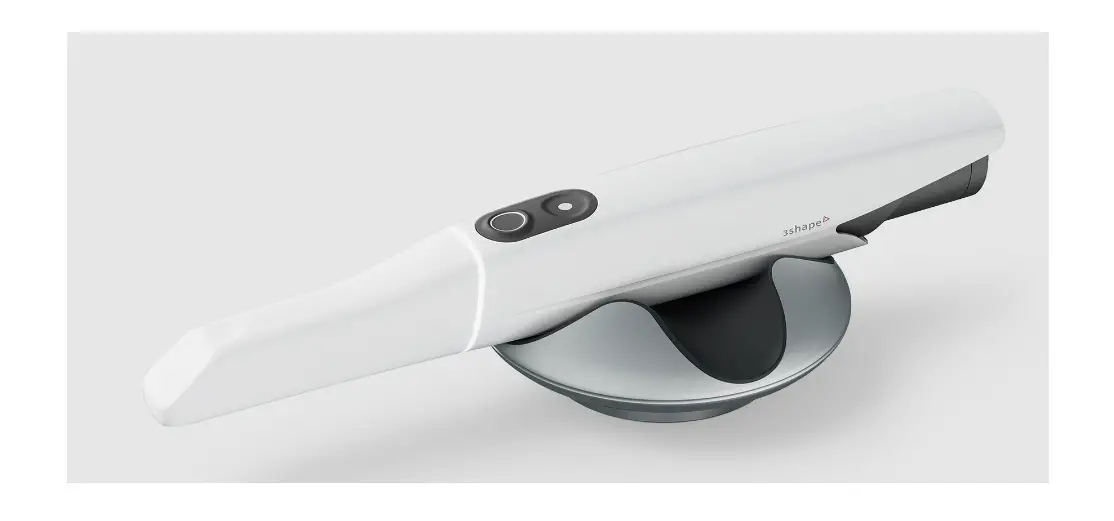
3shape L1P-1 Trios 5 Wireless Intraoral Scanner User Guide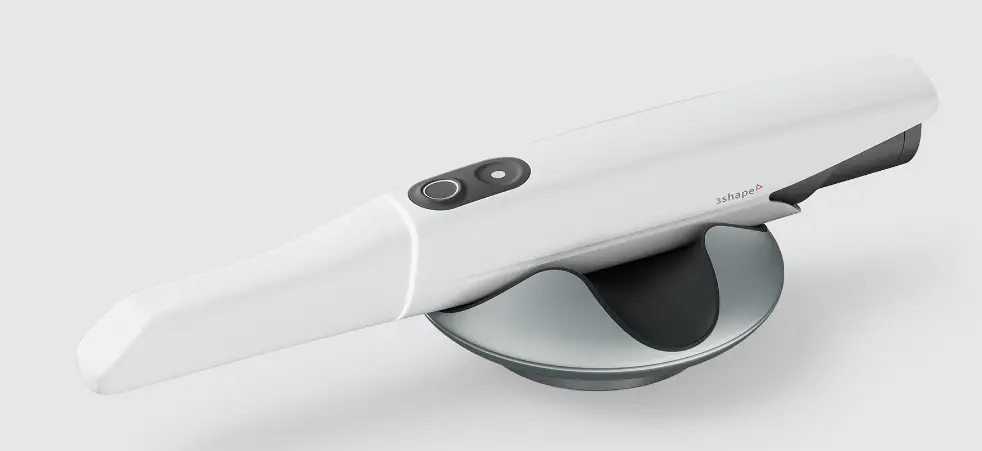
Welcome Note
Dear Customer,
Thank you for purchasing your TRIOS system from 3Shape TRIOS A/S.
The TRIOS system enables you to obtain oral scans of patient’s teeth for use in dental CAD/CAM systems. This TRIOS system safety and setup guide describes safety precautions, warnings, and considerations related to your TRIOS system. For step-by-step instructions regarding configuration and operation of the TRIOS system, please refer to the online help.
Before assembling or using your TRIOS system, please carefully read and follow the instructions in this safety and setup guide and in the online help system. Please always keep this safety and setup guide near the system.
Please follow all safety information and warnings to avoid personal injury, material damage or damage to your TRIOS system.
Thank you, 3Shape TRIOS A/S
Conformity
This guide is published by 3Shape TRIOS A/S, who reserves the right to improve and modify the contents without prior notice. Modifications will, however, be published in future editions. All rights reserved.
TRIOS is a trademark of 3Shape TRIOS A/S.
Manufacturer Information
3Shape TRIOS A/S located at Holmens Kanal 7, 1060 Copenhagen, Denmark is legal manufacturer for devices listed in this guide.
To learn more about 3Shape, our products and global office locations please visit our website: www.3shape.com
Declaration of Conformity (EU):
3Shape TRIOS A/S hereby declares that the TRIOS observes the provisions of:
- Medical Device Regulation (EU) 2017/745, (MDR),
- Restriction of Hazardous Substances in Electrical and Electronic Equipment Directive 2011/65/EU (RoHS),
- Waste electrical and electronic equipment Directive 2012/19/EU (WEEE)
- Registration, Evaluation, Authorization and Restriction of Chemicals Regulation 1907/2006/EC (REACH)
- Radio Equipment Directive (RED) 2014/53/EU
- 94/62/EEC Packaging and Waste Directive
and is in compliance with the following standards: EN (IEC) 60601 1, EN (IEC) 60601-1-2, EN (IEC) 60601-1-6, EN (IEC) 62471.
General Information
 IMPORTANT NOTICE
Be sure to observe all warnings! Please observe all safety information and warnings to prevent personal injury, material damage or damage to your TRIOS system. Safety information and warnings are highlighted in this guide using the words
WARNING,
CAUTION or NOTICE.
About this Document – Symbols
 | WARNING Warnings regarding situations where a medium risk of injury to persons exists if the information is not observed. |
 | CAUTION Information which can affect system functionality if not observed. |
| IMPORTANT NOTICE Important information that is not a warning/caution but must be strictly observed. |
Legend of Labels and Symbols
 | Date of manufacture |
 | Manufacturer |
| General warning |
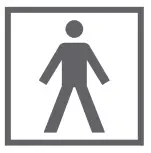 | Type BF applied part |
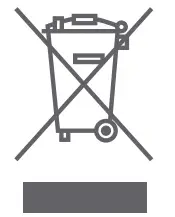 |
WEEE Product disposal |
| Caution |

| CE marking applicable for European Union |
 | Lot number |
 | Serial Number |
 | Consult instructions for use |
 | Alternating Current |
 | Protective earth (ground) |
| Warning – dangerous voltage |
 | Expiry Date |
 | Standby |
 | Refer to instruction manual / booklet. Follow instructions for use |
 | Electrical insulation Class II |
 | Medical Device |
 | Global Trade Item Number |
 | Prescription Only (applicable for United States of America) |
 | Model Number |
 | UKCA (applicable for Great Britain) |
 | Disposal information: Li-ion battery recycling |
 | Device Quantity – indicates the number of pieces in the package |
 | Do not re-use |
 | Country of manufacture – “CC” denotes the country code |
 | Unique Device Identifier |
| CAUTION – EU only CE mark for connected products Further products which are connected to this unit must also bear the CE marking. |
|
| IMPORTANT NOTICE To comply with the CE marking of the TRIOS system, the TRIOS scanner must only be used indoors. |
Electrical Safety
This system has been tested to conform with the EN (IEC) 60601-1 Safety Standard for medical electrical devices with a Patient applied part (the standard title is: Medical electrical equipment – Part 1: General requirements for basic safety and essential performance), EN (IEC) 60601-1-2 Electromagnetic compatibility – Requirements and tests, and EN (IEC) 62471 Photobiological safety of lamps.
The system has also been tested to conform with CAN/CSA-C22.2 No. 60601-1:14 and AAMI/IEC 60601-1:2005 + AMD 1:2012.
| CAUTION Any person who assembles or modifies a medical electrical equipment or system complying with the standard EN (IEC) 60601-1 (safety requirements for medical electrical equipment) by combining it with other equipment is responsible for conducting appropriate inspection and testing to ensure continued safe use of the equipment and for ensuring that the requirements of this regulation are met to their full extent for the safety of the patients, the operators and the environment. |
| CAUTION The product needs special precautions regarding electromagnetic compatibility (EMC) and needs to be installed and put into service according to the EMC information. |
| IMPORTANT NOTICE The system is to be used in a Professional Healthcare Environment. |
Intended Use
L1P-1: The 3Shape TRIOS system is intended to obtain 3D digital images of the topographical characteristics of teeth, including bite, gingivae and palate directly from the patient’s mouth or models of the teeth.
L1P-1F (Indications for use): The L1P-1F intraoral scanner (IOS) System is intended to obtain 3D digital images of the topographical characteristics of teeth, including bite, gingivae and palate directly from the patient’s mouth or models of the teeth including the visualizatio and comparison of the 3D scans of the secondary dentition. The L1P-1F system is also intended for aid in diagnostics of caries
CAUTION
Unintended use of the TRIOS system can result in physical injury to patients, operators and damage the system.
Users of the TRIOS System
The 3Shape TRIOS system is to be operated by legally qualified healthcare professionals in dental clinics. Using the TRIOS system for any purpose other than the “intended use” described above may damage the TRIOS system and harm operators and patients. Proper use of the TRIOS system includes following the operation and maintenance instructions, and observing warnings and caution descriptions in this user guide.
Contra-indications
None
Patient Target Group
The are no restrictions in patient population amongst the patient target group of the TRIOS system.
System Description
The system is available in these variants:
Regional variation can occur regarding the contents of the systems
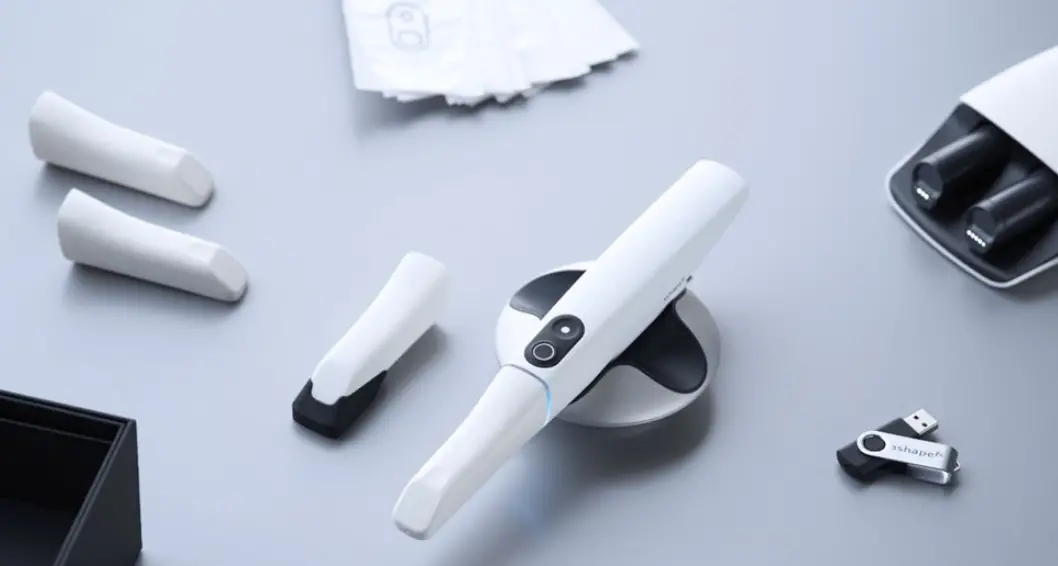
| L1P-1 | TRIOS scanner, supplied with scanner tips, protection tip, sleeve, pod (holder), batteries, and battery charger. |
| L1P-1F | TRIOS scanner, supplied with scanner tips, protection tip, sleeve, pod (holder), batteries, battery charger, TRIOS Patient Monitoring (TPM) software. |
Description of TRIOS
Certification and Compliance Notes
CE marking
This product bears CE marking in accordance with the provisions of Medical Device Regulation (EU) 2017/745, (MDR); Restriction of Hazardous Substances in Electrical and Electronic Equipment Directive 2011/65/EU (RoHS 2); Waste electrical and electronic equipment Directive 2012/19/EU (WEEE); Registration, Evaluation, Authorization and Restriction of Chemicals Regulation 1907/2006/EC (REACH); Radio Equipment Directive (RED) 2014/53/EU and is in compliance with the following standards: EN (IEC) 60601-1, EN (IEC) 60601-1-2, EN (IEC) 60601-1-6, EN (IEC) 62471.
TRIOS Scanner, TRIOS Scanner Tip and TRIOS
Protection Tip Description
TRIOS system consists of:
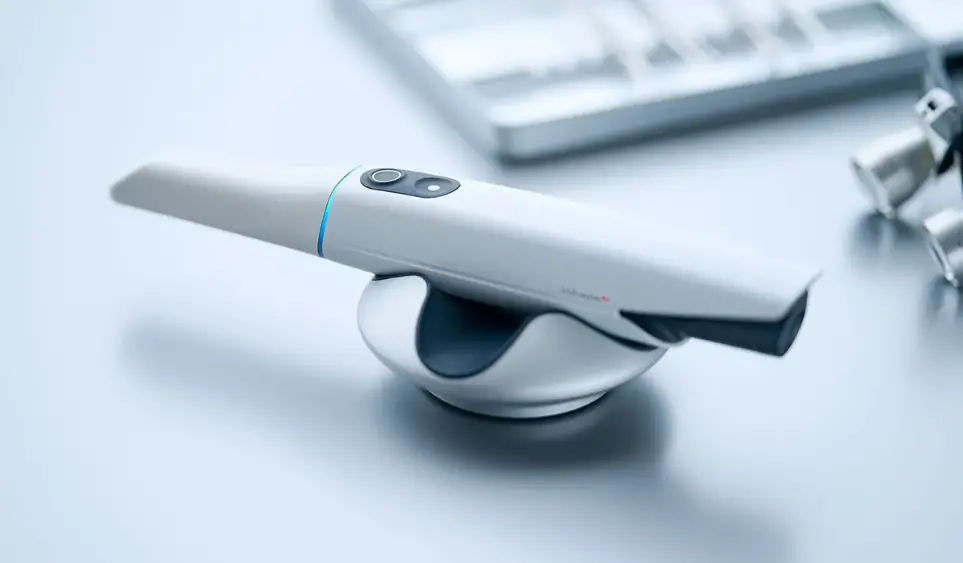
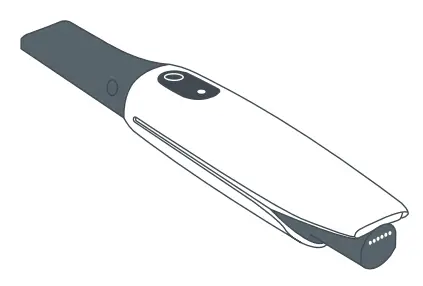 | TRIOS Scanner (L1-2): Wireless handheld dental intraoral scanner for scanning a patient. Two main areas of the TRIOS scanner are referred to in this guide: mirror housing and scanner body. |
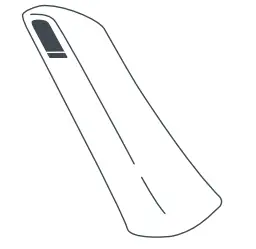 | TRIOS Scanner tip (TST-11): Re-usable TRIOS scanner tip attached to the TRIOS scanner. A tip is needed for the scanner to be able to scan. |
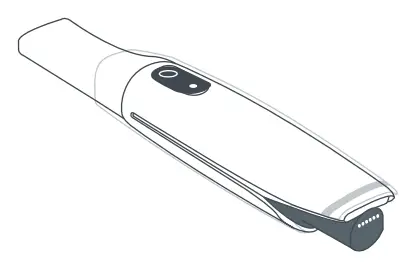 | TRIOS Sleeve (TSL-01): Single use sleeve to cover the TRIOS scanner. |
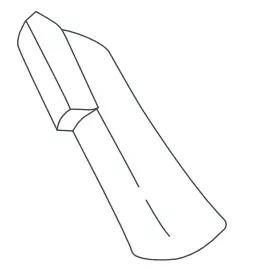 | TRIOS Protection Tip (TST-13): Protects the optical window of the TRIOS scanner from damage and dirt when the TRIOS scanner is not in use. Enables the scanner to run self-test, when mounted. |
Please follow the steps below for attaching and detaching the scanner tip and protection tip:
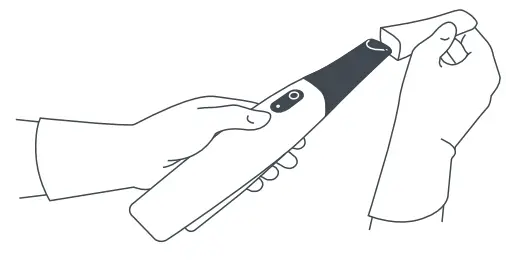 | 1. To attach the tip, place the tip over the mirror housing facing downwards until it clicks. 2. To detach the tip, pull the tip away from the mirror housing. |
The TRIOS scanner has built-in tip detection.
A set of TRIOS scanner tips are delivered with the TRIOS scanner.
The TRIOS scanner tip is the only applied part
 | IMPORTANT NOTICE The TRIOS scanner tips can only be mounted one way |
Battery and Battery Charger Description
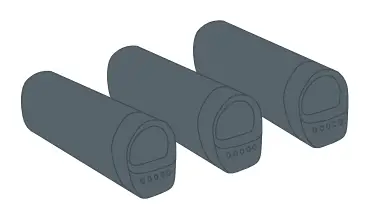 | A set of batteries for the TRIOS scanner (TB-04): Batteries for the TRIOS scanner with LED light to indicate battery status. Be aware that the batteries must be stored and operated under correct conditions, see section 4.13. |
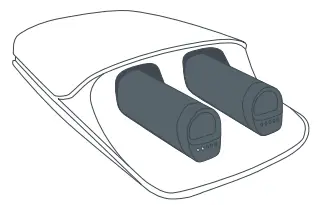 | A battery charger (C2BP): With two ports to charge TB-04 batteries. Be aware that the battery charger must be stored and operated under correct conditions, see section 4.13. |
Power (mains) cable and plug:
The charger has a detachable cable (C8 connector) appropriate for your location, supplied in the packaging.
Other System Elements Description
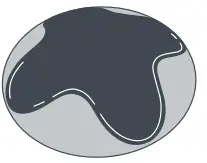 | Pod (LP1-2): Holder for the scanner. |
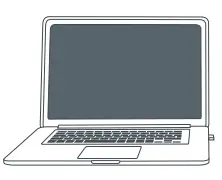 | A USB wireless dongle for the PC. A USB license dongle. |
For L1P-1F systems:
TRIOS Patient Monitoring (TPM) Software:
Software for aid in diagnostics of caries.
Setting up TRIOS
It is recommended that unpacking, assembly and connection of the TRIOS System be performed by TRIOS authorized technical service personnel.
It is recommended to fully charge batteries for the TRIOS scanner before use.
| CAUTION Let the system adjust to room temperature before use. |
| WARNING Examine all parts of the system. Look for physical damage, loose parts or signs of wear that could interfere with proper use and functionality. Contact your service provider if there is visible damage or malfunctioning. |
Charging batteries
| Before you start: Place the battery charger on a flat surface horizontally. |
| Step 1: Attach the power cord to the charger and plug it into mains power. |
| Step 2: Push the batteries one by one into the charger until they click into place. When charging, the 5 LEDs on the end of the battery will indicate the status: |
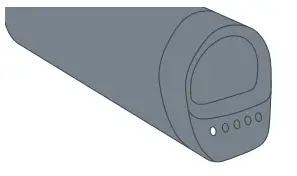 | Each LED represents 20% of the battery capacity. |
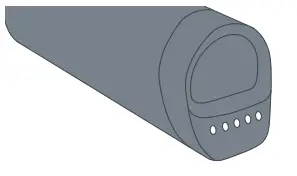 | Five constant LEDs means that the charging is complete. |
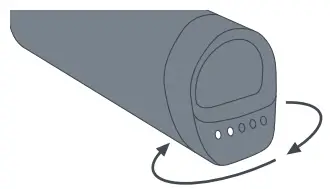 | While charging is ongoing each LED will light up one at a time. The battery status will then be shown, with each LED representing 20% battery capacity. |
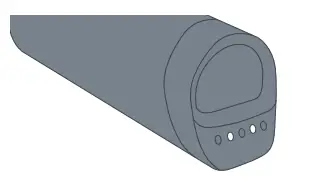 | If any other charging pattern appears, a charging error has occurred. In this case, remove the batteries from the charger and reinsert them. If charging errors continue, please contact 3Shape support ([email protected]). |
There is an LED under the battery charger. The LED has the following indications:
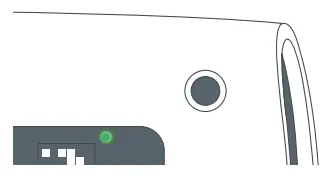 | A green light indicates the battery charger is on and working |
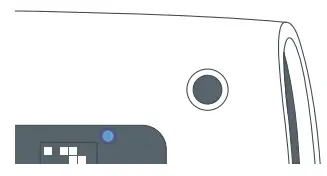 | A blue light indicates the power is unstable. Unplug and reinsert the power for the charger. If the LED continues to indicate a blue light please contact support ([email protected]). |
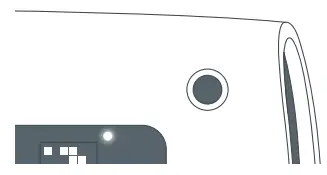 | A white light indicates the battery may have been inserted incorrectly. Try to insert the battery again. If the LED continues to indicate a white light, please contact support ([email protected]). |
Please follow the steps below for assembling the TRIOS system:
| Before you start: Place the pod on a flat and horizontal surface optimally in relation to the patient chair and your work position. Attach the TRIOS protection tip to the TRIOS scanner if not already in place. | |
| Step 1: Insert a fully charged battery into the rear of the TRIOS scanner. | 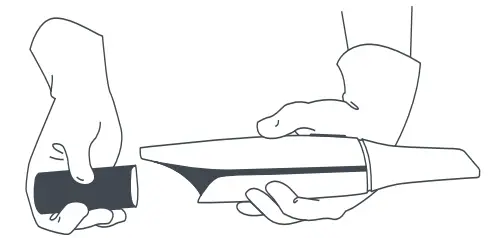 |
| Step 2: Place the TRIOS scanner in the pod. | |
| Step 3: Clean and sterilize a TRIOS scanner tip prior to first time usage. See section 7 for cleaning and sterilization instructions. | |
Starting and Shutting Down the TRIOS System
Please follow the steps below to start TRIOS system for the first time:
| Step 1: Turn the PC on. Start 3Shape software. |
| Step 2: Log on using a default TRIOS Operator. |
| Step 3: Configure and use your TRIOS system. Follow on-screen instructions for connecting to the wireless TRIOS scanner. When using the TRIOS system, the user is guided by messages shown in the TRIOS software. |
The TRIOS scanner has an LED ring which indicates the status of the scanner:
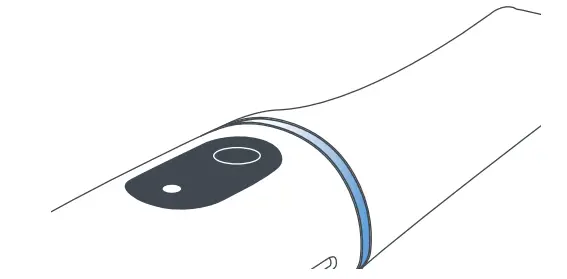 | A rotating blue light indicates that the TRIOS scanner is waiting for the TRIOS software to connect to it. |
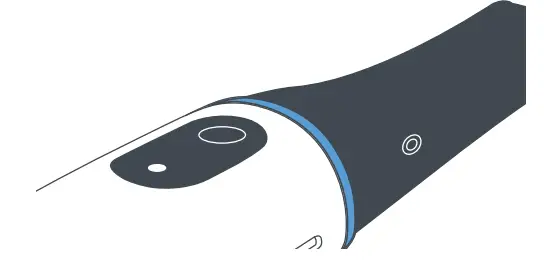 | Three blue blinks indicate that the TRIOS scanner is searching for a scanner application to connect to. |
| A constant blue light indicates that the TRIOS scanner is connected to the system, but no scanner tip is mounted. |
| A rotating green light indicates that the TRIOS scanner is heating the TRIOS scanner tip. |
| A constant green light indicates that the TRIOS scanner is ready to scan. |
| A rotating white light indicates that the TRIOS scanner is waiting for scan data. |
| A constant white light indicates that the TRIOS scanner is scanning. The light intensity decreases if the TRIOS scanner loses registration. |
| Solid yellow indicates that the battery is low. |
Scanner operation
The scanner has two buttons for operation; the button closests to the tip controls scanning operation, the button farthest from the tip controls navigation.
Power saving
The TRIOS scanner has integrated power control, and will go into sleep mode when not used, unless the software is on the Scan page.
Starting TRIOS Online Help
The TRIOS online help can be started from the TRIOS software by clicking on the Help button and choosing User Manual.
Storage, Operating and Transport Conditions
| Operating Conditions Ambient temperature range: +15 – +26 °C (+59 – +78.8 °F) Relative humidity: 10 – 85 % (non-condensing) Atmospheric pressure: 800 – 1100 hPa The TRIOS scanner should be used in an environment maintaining a consistent room temperature. |
| Storage Conditions Ambient temperature range: -10 – +50 °C (+14 – +122 °F) Relative humidity: 10 – 85 % (non-condensing) Atmospheric pressure: 800 – 1100 hPa |
| Transport Conditions Ambient temperature range: -10 – +50 °C (+14 – +122 °F) Relative humidity: 10 – 85 % (Non-condensing) Atmospheric pressure: 620 – 1200 hPa |
Technical Specifications
| Light source specifications | Do not view directly with optical instruments, such as spectacle microscopes. The product complies with EN (IEC) 62471 (Photobiological safety of lamps and lamp systems and UL-standard US code of federal regulations, 21 CF 1040.10 and 1040.11. |
| Sterilization | Sterilize by autoclave (see section 7 for autoclave specifications) |
| Power input | C2BP: Battery charger Power input: 100-240 VAC 0.6 A, 50/60 Hz Protection class: IP20 Insulation class Class II L1-2 scanner. Wireless, battery powered 3Shape TB-04 Battery: 3,6 V, 3300 mAh, 12 Wh |
| Wireless | The TRIOS scanner contains an IEEE 802.11ac module |
| Wireless Transmit Power | Maximum 100 mW |
| Wireless Frequency Band | 2.401-2.483 GHz 5.15-5.725 GHz (the actual frequencies are dependent on local regulations and the configuration of the product.) |
IT Network equipment
| Network characteristics | 802.11ac (5GHz) Capacity for at least 40 Mbps per scanner. |
| Network configuration | Bi-directional traffic permitted between TRIOS scanner and PC. mDNS enabled (required for scanner discovery). Redirection of traffic must be disabled. Channel width set to at least VHT40 (40MHz).
Ports used: • TCP ports (Scanner): 20-21, 80 and 23795 • UDP Ports (Scanner): 58218 and 58220-58230 • UDP Ports (PC and Router): 67 (DHCP), 5353 (mDNS) |
| Security specification | WPA2-PSK authentication |
|
| IMPORTANT NOTICE If you connect your TRIOS intraoral scanner system to your IT Network equipment, it is strongly recommended to apply network security measures and to analyse, evaluate, and control the IT network. |
Electromagnetic Compability
The TRIOS system has been tested according Medical electrical equipment – Part 1-2: General requirements for basic safety and essential performance – Collateral Standard: Electromagnetic disturbances – Requirements and tests, EN/(IEC) 60601-1-2 ed. 4.0, 2015
| WARNINGMedical electrical equipment needs special precautions regarding EMC and needs to be installed and put into service according to the EMC information provided in this document. |
| IMPORTANT NOTICEPortable and mobile RF communications equipment can affect medical electrical equipment. |
Declaration – Electromagnetic Emissions
The TRIOS system complies with the requirements EN/(IEC) 60601-1-2 (Edition 4.0) clause 7 Emissions.
The TRIOS system is intended for use in the electromagnetic environment specified below. The user or users of the TRIOS system should assure that it is used in such an environment.
| Emission measurement | Conformity | Electromagnetic environment – guidelines |
| RF emissionCISPR11 | Group 1 | The TRIOS system uses RF energy only for its internal functions. Therefore, Its RF emissions are very low and are not likely to cause any interference in nearby electronic equipment. |
| RF emissionCISPR11 | Class B | |
| Harmonic emissionIEC 61000-3-2 | Class A | The TRIOS system is intended for usein dental clinical settings, including domestic establishments and those directly connected to the public low-voltage power supply network that supplies buildings usedfor domestic purposes |
| Voltage fluctuation and flicker IEC 61000-3-3 |
Complies |
Electromagnetic Immunity
The TRIOS system complies with the requirements EN/(IEC) 60601-1-2 (ed. 4.0) clause 8 Immunity. The test levels for immunity to RF electromagnetic fields are selected according to general test conditions for medical equipment.
The TRIOS system is intended for use in a Professional Healthcare Facility Environment with the electromagnetic environment specified below. The user of The TRIOS system should assure that it is used in such an environment.
| Immunity test | IEC 60601 test level | Compliance level | Electromagnetic environment – guidelines |
| Electrostatic discharge ESDIEC 61000-4-2 | Contact +/- 8kV.Air:+/-15kV. | Contact+/-8kV.Air:+/-15kV. | Floors should be wood, concrete or ceramic tile. If floors are covered with synthetic materials, the relative humidity should be at least 30 %.The TRIOS system is allowed to have a temporary lossof function, which requires operator intervention or system reset. |
| Electrical fast transients/burstIEC 61000-4-4 | +/- 2 kV for power supply lines+/-1 kV for input/ output lines | +/- 2 kV for power supply lines+/-1 kV for input/ output lines | Mains power quality should be that of a typical commercialor hospital environment.During electrical fast transient/burst the TRIOS system is allowed to have a temporary loss of function, which requires operator intervention or system reset. |
| SurgeIEC 61000-4-5 | +/-1 kV Line(s) to earth:+/-2 kV. Line to line. | +/-1 kV Line(s) to earth:+/-2 kV. Line to line. | Mains power quality should be that of a typical commercial or hospital environment. |
| Voltage dips, short interruption and voltage variationsIEC 61000-4-11 | 0 % UT for 0.5cycle (1 phase)0 % UTfor 1 cycle70 % UT for 25/30 cycles (50/60 Hz) | 0 % UT for 0.5cycle (1 phase)0 % UT for 1 cycle70 % UT for 25/30 cycles (50/60 Hz) | During the testing the TRIOS system is allowed to have a temporary loss of function which requires operator intervention or reset. |
| Power frequency (50/60Hz)Magnet field IEC 61000-4-8 | 30 A/m. | 30 A/m. | Power frequency magnetic fields should be at levels characteristic of a typical location in a typical domestic or hospital environment. |
| Note: UT is the ac mains voltage prior to application of the test level | |||
| Immunity test | IEC 60601 test level | Compliance level |
| Conducted RF | 3 Vrms | [V1] 3 Vrms |
| IEC 61000-4-6 | 150 kHz to 80 MHz. | [V2] 6 Vrms (Note b) |
| 6 Vrms in ISM bands | ||
| between 0,15 MHz and 80 MHz (Note b) | ||
| Radiated RFIEC 61000-4-3 | 3 V/m80 MHz to 2.7 GHz. | [E1] 3 V/m80 MHz to 2.7 GHz. |
Electromagnetic environment – guidelines
Portable and mobile RF communications equipment should be used no closer to any part of the TRIOS system, including cables, than the recommended separation distance calculated from the equation applicable to the frequency of transmitter.
Recommended separation distance
d = 1,2 √P
d = 1,2 √P 80 MHz to 800 MHz
d = 2,3 √P 800 MHz to 2,7 GHz
where P is the maximum output power rating of the transmitter in watts (W) according to the transmitter manufacture and d is the recommended separation distance in meter (m), V1 is the conducted RF compliance level, and E1 is the RF radiated compliance level.
Field strengths from fixed RF transmitters, as determined by an electromagnetic site survey, (note a, b and c) should be less than the compliance level in each frequency range.
Interference may occur in the vicinity of equipment marked with the following symbol:
Note 1: At 80 MHz and 800 MHz, the higher frequency range m applies.
Note 2: These guidelines may not apply in all situations. Electromagnetic propagation is affected by absorption and reflection from structures, object and people.
Note a: Field strengths from fixed transmitters, such as base stations for radio (cellular/ cordless) telephones and land mobile radios, amateur radio, AM and FM radio broadcast and TV broadcast cannot be predicted theoretically with accuracy. To assess the electromagnetic environment due to fixed RF transmitter, an electromagnetic site survey should be considered. If abnormal performance of the TRIOS system is observed, additional measures may be necessary, such as re-orienting or relocating the TRIOS system.
Note b: Over the frequency range 150 kHz to 80 MHz, field strengths should be less than 3 V/m.
Note c: The ISM (industrial, scientific and medical) bands between 0,15 MHz and 80 MHz are 6,765 MHz to 6,795 MHz; 13,553 MHz to 13,567 MHz; 26,957 MHz to 27,283 MHz; and 40,66 MHz to 40,70 MHz. The amateur radio bands between 0,15 MHz and 80 MHz are 1,8 MHz to 2,0 MHz, 3,5 MHz to 4,0 MHz, 5,3 MHz to 5,4 MHz, 7 MHz to 7,3 MHz, 10,1 MHz to 10,15 MHz, 14 MHz to 14,2 MHz, 18,07 MHz to 18,17 MHz, 21,0 MHz to 21,4 MHz, 24,89 MHz to 24,99 MHz, 28,0 MHz to 29,7 MHz and 50,0 MHz to 54,0 MHz.
Enclosure port immunity to RF wireless communications equipment
| Band (MHz) | Service | Immunity test level (V/m) |
| 380-390 | TETRA 400 | 27 |
| 430-470 | GMRS460, FRS 460 | 28 |
| 704-787 | LTE Band 13, 17 | 9 |
| 800-960 | GSM 800/900, TETRA 800,iDEN 820,CDMA 850,LTE Band 5 | 28 |
| 1700-1990 | GSM 1800;CDMA 1900;GSM 1900;LTE Band 1,3,4, 25; UMTS | 28 |
| 2400-2570 | Bluetooth, WLAN,802.11 b/g/n, RFID 2450LTE Band 7 | 28 |
| 5100-5800 | WLAN 802.11 a/n | 9 |
Distances Between System and Other Equipment
The TRIOS system is intended for use in an electromagnetic environment in which radiated RF disturbances are controlled. The customer or the user of the TRIOS system can help prevent electromagnetic interference by maintaining a minimum distance between portable or mobile RF communications equipment (transmitters) and the TRIOS system as recommended below, according to the maximum output power of the communication equipment.
| Rated maximum output power of transmitter, W | Separation distance according to frequency of transmitter, m | ||
| 150 kHz to 80 MHz
d = 1,2 P | 80 MHz to 800 MHz
d = 1,2 P | 800 MHz to 2,5 GHz
d = 2,3 P | |
| 0,01 | 0,12 | 0,12 | 0,23 |
| 0,1 | 0,38 | 0,38 | 0,73 |
| 1 | 1,2 | 1,2 | 2,3 |
| 10 | 3,8 | 3,8 | 7,3 |
| 100 | 12 | 12 | 23 |
For transmitters rated at a maximum output power not listed above, the recommended separation distance d in metres (m) can be estimated using the equation applicable to the frequency of the trans-mitter, where P is the maximum output power rating of the transmitter in watts (W) according to the transmitter manufacturer
Note 1: At 80 MHz and 800 MHz, the separation distance for the higher frequency range applies.
Note 2: These guidelines may not apply in all situations. Electromagnetic propagation is affected by absorption and reflection from structures, objects and people.
Models L1P-1 & L1P-1F
| Connection | Type | Recommended use distances |
| Scanner – PC | Wireless | Distance between TRIOS scanner and wifi dongle/ access point should be between 0.5 and 5m for best performance. |
System Safety
Prerequisites
CAUTION
Read all instructions carefully, including all warnings and caution notices. You must comply with the warnings in this manual to prevent injury to persons and damage to equipment. Proper functionality and safety can only be guaranteed if the safety precautions in this safety guide and on the TRIOS system are observed.
For L1P-1F
CAUTION
In fluorescence scanning mode:
- Limit exposure of the oral mucosa.
Preventive inspection before use of the system
WARNING
Please examine the TRIOS system for any mechanical damage on:
- All enclosures.
- All cables.
Safety can only be guaranteed if NO DAMAGE to the TRIOS system is observed
Modifications of the system
Warning
Do not modify the TRIOS system without authorization of the manufacturer
Approved software only
CAUTION
Install only approved software – to prevent interference with TRIOS system performance.
Only connect specified items
Warning
Only connect items that have been specified as part of the TRIOS system or have been specified as being compatible with the TRIOS system.
Training
WARNING
Before you attempt to use the TRIOS system with patients:
- You must have read and understood all sections of this guide describing correct operation.
- You must be thoroughly familiar with the safe operation of the TRIOS system as described in this documentation.
- If the instructions for operating the TRIOS system as described in this guide are NOT observed and followed, the intended function and its safety for the user and patient may be impaired
In case of equipment failure
CAUTION
If at any time the TRIOS system malfunctions, or if you suspect in any way that the TRIOS system is not working correctly:
- Remove the TRIOS scanner contact to patient immediately.
- Unplug the charger and make sure it cannot be used before it is checked.
- Contact your 3Shape support.
- Do not attempt to open any covers on the TRIOS system.
Wireless Connection
The wireless TRIOS scanner is intended to be used indoors, in a domestic or commercial electromagnetic environment. The wireless connection is intended to relay image stream data and control data between the TRIOS scanner and the TRIOS software. The communication between TRIOS Scanner and TRIOS software is handled by 3Shape communication services.
| CAUTIONOther portable and mobile RF communication equipment could interfere with the wireless TRIOS scanner, even if the other equipment complies with CISPR emission requirements. |
| CAUTIONThe wireless TRIOS scanner could interfere with other portable and mobile RF communication equipment. |
 | IMPORTANT NOTICEIt is recommended to keep a line of sight between the wireless TRIOS scanner and the USB wireless dongle attached to the PC. |
Potential Mechanical Damages
Inspect TRIOS scanner tip before using
| | WARNINGDamaged tip may cause injuries to the patient. Inspect TRIOS scanner tips before use to ensure that there is no damage to the TRIOS scanner tip surfaces. | 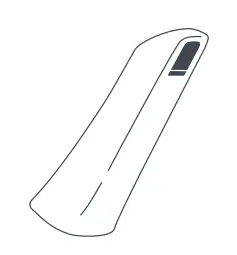 |
Dropped or damaged equipment
WARNING
Performance of the scanner tip is compromised when dropped. If the TRIOS scanner tip is dropped on the floor, the tip must be disposed of and not to be used for scanning. (see this guide’s instructions on 9. Disposal)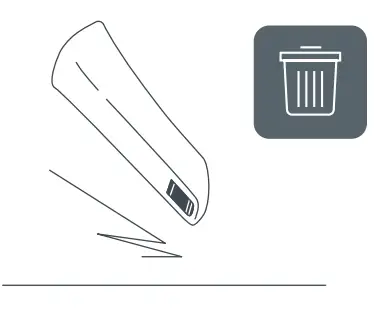
WARNING
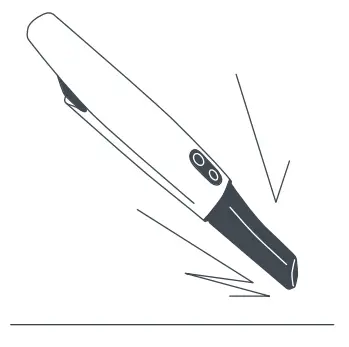
The performance of the TRIOS scanner may be compromised when dropped. If the handheld scanner is dropped or bumped, it must be checked immediately before further use.
- Unplug the system and make sure it cannot be used before it is checked.
- examine the TRIOS system for any mechanical damage or malfunction.
- If at any time the TRIOS system malfunctions, or if you suspect in any way that the TRIOS system is not working correctly contact your reseller or 3Shape.
- Do not attempt to open any covers on the TRIOS system

WARNING
The performance of the battery charger may be compromised when dropped, If the
battery charger is dropped, it must be checked immediately before further use:
- Unplug the TRIOS system and make sure it cannot be used before it is checked.
- Battery charger must be examined for any mechanical damages or malfunction.
- If mechanical damage or malfunction is observed, please contact support
([email protected])
WARNING
To avoid injuries from falling object, always place the TRIOS system on a horizontal surface.
Explosion Hazards
Flammable liquids or gases
WARNING
The TRIOS system is not designed to be used in potentially explosive environments. Do not use the TRIOS system in close proximity to flammable liquids or gaseous flammable anaesthetic, or in oxygenenriched atmospheres.
Electrical Safety
Do not access the inside of any part of the system
WARNING
There is a risk of electrical shock if you attempt to access the inside of any part of the system. Only authorized and qualified service personnel may access the inside of any part of the system.
WARNING
The electrical safety of the system may be compromised if it is exposed to any liquids. Do not bring liquids, such as beverages, near the TRIOS system. Do not spill liquids, such as cleaning agent, on the TRIOS system.
Do not use a power strip
WARNING
Failure to establish a ground connection may compromise electrical safety. Do not connect the Battery Charger to an ordinary power strip or extension cord.
Stress on cables
CAUTION
External cables must never be subjected to pulling stress.
Condensation
CAUTION
Variations in temperature or humidity may cause water to condense inside the system, which can cause damage. Always let the system reach room temperature before you plug it into the power source.
If the system has been subject to major temperature or humidity changes, wait until the system has reached room temperature before plugging it into the power source.
If there is visible evidence of condensation, wait at least 8 hours before plugging it into the power source, to ensure that no internal condensation occurs.
Please see operating conditions for further information.
Disconnect the battery charger before cleaning
WARNING
The electrical safety of the system may be compromised if it is exposed to excessive amounts of cleaning liquids. Disconnect the battery charger from power before cleaning and allow to dry before reconnecting
Disconnecting from mains
WARNING
The electrical safety of the system may be compromised if it is exposed to excessive amounts of cleaning liquids. Disconnect the battery charger from power before cleaning and allow to dry before reconnecting.
Disconnecting from mains
IMPORTANT NOTICE
There is no power ON/OFF switch on the system; therefore, the only reliable means to disconnect the system from mains is to unplug the charger power cord. Do not position the system so that it is difficult to unplug the charger power cord.
PC connection options and requirements
CAUTION
The PC should be located at least 1.5 m away from the patient. Do not scan the patient and touch the PC at the same time! You must not touch any peripherals connected with a cable to the PC while scanning a patient. See the PC’s instructions for use for further details.
Eye Safety
CAUTION
The TRIOS scanner emits bright light from its TRIOS scanner tip during operation. The TRIOS scanner complies with EN (IEC) 62471 (Photobiological safety of lamps and lamp systems). However, we recommend caution when handling the TRIOS scanner.
A brief glimpse of the light into the eye is not dangerous, but do not stare into the beam or view directly with optical instruments, and do not aim the beam towards other people’s eyes. In general, viewing bright light sources (e.g. headlights), which have a high secondary exposure potential due to their blinding effect, may cause temporary reduction in visual acuity and afterimages, leading to irritation, annoyance, visual impairment, and even accidents, depending on the situation.
Hygiene
For instructions on how to mount the single-use sleeve see the TRIOS Sleeve instructions for use.
For instructions on cleaning and disinfection or sterilization go to section 7.
Always wear gloves
WARNING
To maintain a clean work environment and the safety of the patient, wear clean examination gloves when:
- Handling the TRIOS scanner tip – changing the tip or handling the window.
- Handling the TRIOS protection tip.
- Applying the TRIOS scanner for scanning patients.
- Touching the TRIOS system.
Prepare the TRIOS scanner
WARNING
In order to avoid cross contamination between patients before each use you must:
- apply a newly sterilized TRIOS scanner tip to the TRIOS scanner.
- apply a new TRIOS scanner sleeve to cover the TRIOS scanner. See the detailed instruction in the TRIOS Sleeve Instructions for use.
Reprocess system after each patient
WARNING
In order to avoid cross contamination between patients you must before each use:
- clean and disinfect or sterilize relevant parts of the TRIOS system.
- clean and disinfect the TRIOS scanner before attaching the TRIOS protection tip. Do not allow patient contact with the TRIOS protection tip.
- dispose the TRIOS scanner sleeve
Clean and disinfect TRIOS scanner before mounting TRIOS protection tip
WARNING
Always clean and disinfect the TRIOS scanner before attaching the TRIOS protection tip. Do not allow patient contact with the TRIOS protection tip.
Scan only with TRIOS scanner tip on
WARNING
In order to avoid cross contamination between patients and maximal electrical safety the scanner tip must be mounted when the scanner is inserted into the patient’s mouth or when the scanner comes in contact with the patient in any way. Mounting of the scanner tip is required for the intended function of the scanner.
IMPORTANT NOTICE
Before each patient, make sure any PC connected to the system and its peripherals are disinfected. It is recommended to use medical-grade peripherals (e.g., keyboards and mice) that can be cleaned and
disinfected easily.
Safety when Scanning
CAUTION
The TRIOS scanner is a highly precise optical instrument and must be handled carefully. Do not drop, shake or bump the TRIOS scanner,M as these actions could cause it to break or malfunction. Follow these guidelines:
- Always return the TRIOS scanner to its mount when not inM use.
- Do not submerge the TRIOS scanner in any liquids.
- Do not place the TRIOS scanner on heated or wet surfaces.
- Grip the TRIOS scanner firmly during scanning and when removing/ returning it to its mount
IMPORTANT NOTICE
The TRIOS scanner will get warm during use. This is normal but not part of any patient treatment
CAUTION
The TRIOS scanner tip is fragile and contains a delicate window.
To avoid damage to the tip and window, take care not to bump the tip onto the patient’s teeth or restorations.
CAUTION
When the TRIOS system is used for pediatric patients, please pay extra attention while scanning the patient.
Epileptic Seizure
WARNING
There is a risk of injuries if the scanner tip is bitten. As a direct effect of an epileptic seizure, various degrees of involuntary biting can occur. Avoid any patient biting on the scanner tip or bumping the scanner tip into the teeth.
Protection from Overheating
WARNING
The scanner may become uncomfortably warm and eventually shut down if the ventilation is obstructed.
The ventilation openings in the rear of the handheld scanner must never be blocked or obstructed.
EMC Safety
WARNING
Use of accessories, transducers, and cables other than those specified or provided by the manufacturer of this equipment could result in increased electromagnetic emissions or decreased electromagnetic immunity of this equipment and result in improper operation.
WARNING
Use of the TRIOS system adjacent to or stacked with other equipment should be avoided because it could result in improper operation. If such use is necessary, the TRIOS system and the other equipment should be observed to ensure normal operation in the used configuration.
Portable RF communications equipment
WARNING
Portable RF communications equipment (including peripherals such as antenna cables and external antennas) should be used no closer than 30 cm (12 inches) to any part of the TRIOS system, including cables specified by the manufacturer. Otherwise degradation of the performance of system may occur.
TRIOS Sleeve
The TRIOS Sleeve is a protective barrier to minimize the risk of microbial cross-contamination. For mounting, please see the TRIOS Sleeve instructions for use.
CAUTION
It is recommended to use the TRIOS Sleeve to cover the TRIOS scanner during patient examination.
WARNING
The TRIOS Sleeve must only be used once to avoid cross contamination.
Cleaning, Disinfection, and Sterilization
The following TRIOS system items shall be cleaned and disinfected or sterilized. Instructions are described in the following sections: 7.1, 7.2 and 7.3.
TRIOS scanner body and mirror housing
Cleaning and disinfection. See section 7.1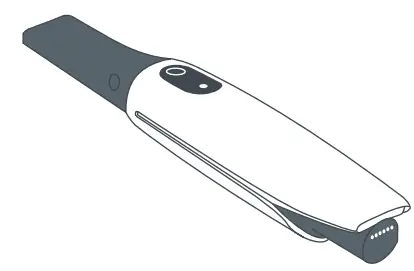
Pod
Cleaning and disinfection. See section 7.2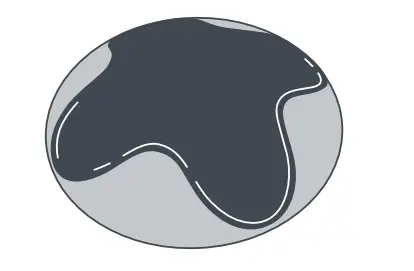
TRIOS scanner tip
Cleaning and sterilization. See section 7.3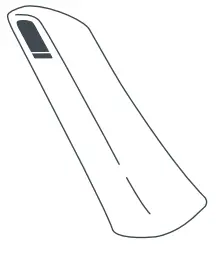
Accessories and materials: Cleaning and disinfection
The following Accessories and materials are recommended to use
for cleaning and disinfection.
Examination gloves
Cleaning/disinfectant wipes containing Isopropanol (17.2%)
and Ammonium Chloride
e.g. CaviWipes.

Soft bristled brush
E.g. Curaprox ultra soft toothbrush
A non-enzymatic pH neutral detergent
E.g. Intercept.|
Non-woven swab
E.g. Abena non-woven swabs.
FDA-cleared sterilization pouch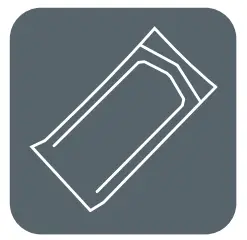
TRIOS Scanner Body and Mirror Housing: Cleaning and Disinfection
Clean and disinfect the TRIOS scanner body and mirror housing after each patient treatment(step 1-4). Also note that the scanner window is a delicate optical component and should be handled with extra care during cleaning and disinfection (see below)
Step 1: Remove gross contaminants
Wearing gloves, remove TRIOS Sleeve and TRIOS scanner tip from TRIOS scanner body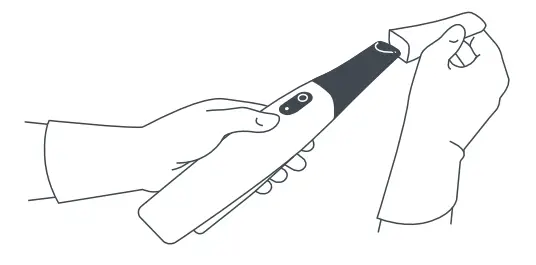
Take a CaviWipe.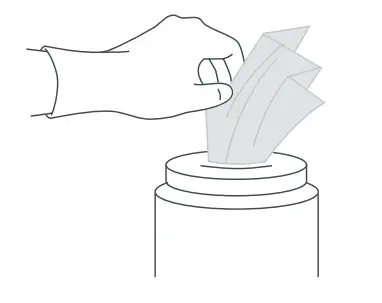
Wipe the surface of the TRIOS scanner body and mirror housing with a CaviWipe to remove any gross contaminants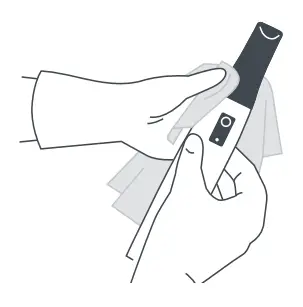
Dispose of the CaviWipe.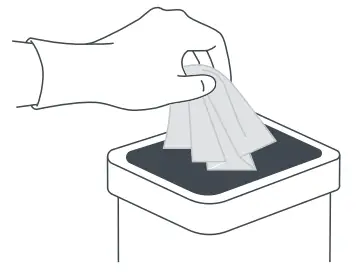
Step 2: Clean with brush
While still wet from the CaviWipe, use a dry soft bristled brush to clean around the gasket area (where the TRIOS scanner body and mirror housing connect).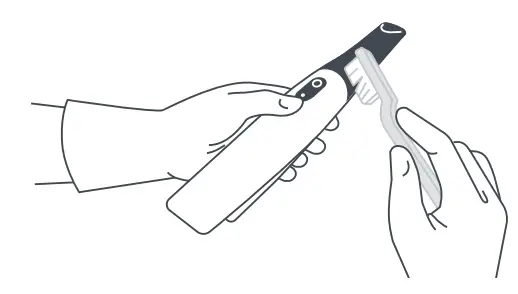
Use the brush to clean around the silicone button area.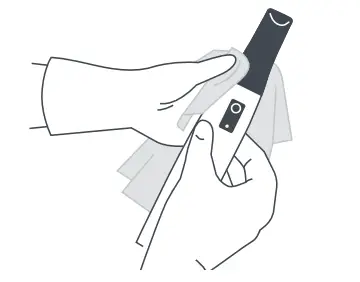
Step 3: Wipe clean
Take another CaviWipe.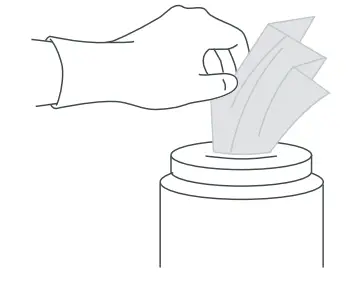
Wipe the surface of the TRIOS scanner body and mirror housing with a CaviWipe.
Dispose of the CaviWipe
Step 4: Disinfect
Take a CaviWipe.
Wet the surface of the TRIOS scanner body and mirror housing with the CaviWipe for a minimum of 120 seconds to disinfect. Allow to dry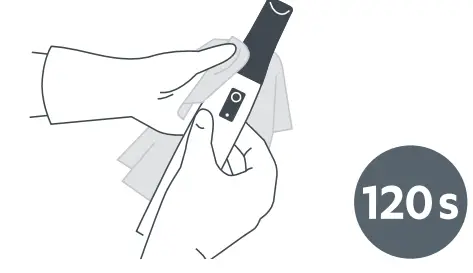
Dispose of the CaviWipe.
Place TRIOS protection tip on TRIOS scanner. CAUTION
The TRIOS scanner’s window is a delicate optical component. Its clean and undamaged surface is critical for the scan quality. The window should be handled with care. Make sure it is free from lint, stains, and other kinds of dirt.
CAUTION
Never submerge the TRIOS scanner into any cleaning or disinfection solution
CAUTION
Before returning the TRIOS scanner to its holder, ensure both are dry
IMPORTANT NOTICE
The TRIOS scanner shell might get yellow-toned over a long period of use.
Cleaning and Disinfection
It is recommended to disassemble the pod in order to thoroughly clean it. Follow the instructions below (step 1-6)\
Step 1: Disassemble pod
Wearing gloves, remove the rubber insert from the pod (holder) by pressing down on the middle using a thumb and gripping the outer edge with the index finger.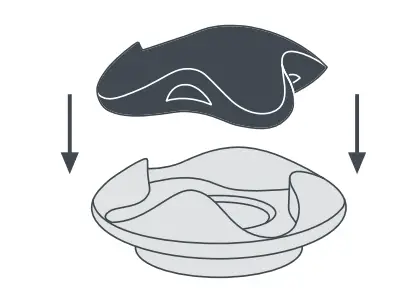
Step 2: Remove gross contaminants from rubber insert
Take a CaviWipe.
Wipe the surface of the top rubber insert to remove any gross contaminants.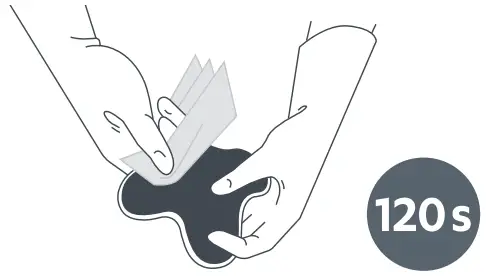
Dispose of the CaviWipe.
Step 3: Remove gross contaminants from metal holder
Take a CaviWipe
Wipe the surface of the metal holder to remove any gross contaminants.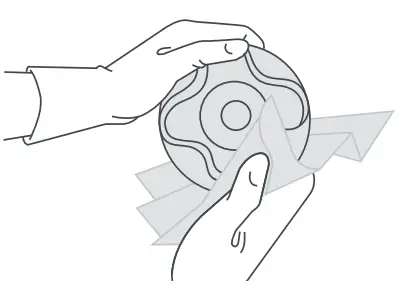
Dispose of the CaviWipe.
Step 4: Disinfect rubber insert
Take another CaviWipe.
Wet the surface of the rubber insert for minimum 120 seconds to disinfect.
Dispose of the CaviWipe.
Step 5: Disinfect metal holde
Take a CaviWipe.
Wet the surface of the metal part for minimum 120 seconds to disinfect.
Dispose of the CaviWipe.
Step 6: Assemble pod
TRIOS Scanner Tip: Cleaning and Sterilization
The TRIOS scanner tip is the part of the TRIOS scanner that is inserted into the patient’s mouth during scanning. The TRIOS scanner tip can be re-used up to 60 times. The TRIOS scanner tip should be cleaned and sterilized prior to its first use on patients and after each use on a patient to avoid cross-contamination.
Step 1: Clean TRIOS scanner tip
Wearing gloves, clean the TRIOS scanner tip manually using detergent diluted accordingto manufacturer’s instructions.
Apply the detergent directly on a soft bristled brush.
Wash the TRIOS scanner tip under running lukewarm (30-40 °C) utility water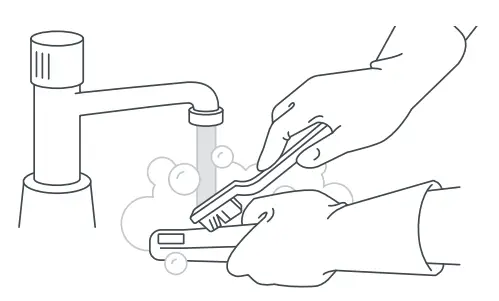
Inspect the window of the TRIOS scanner tip after cleaning. If the window appears with stains, smudged or with a milky haze, repeat this step.
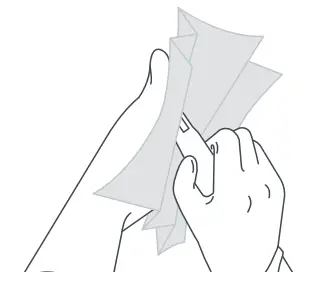
Step 2: Rinse and dry TRIOS scanner tip
Rinse with lukewarm (30-40 °C) tap water
Dry the TRIOS scanner tip carefully with a nonwoven swab.
Step 3: Sterilize TRIOS scanner tip
Put the TRIOS scanner tip in a sterilization pouch.
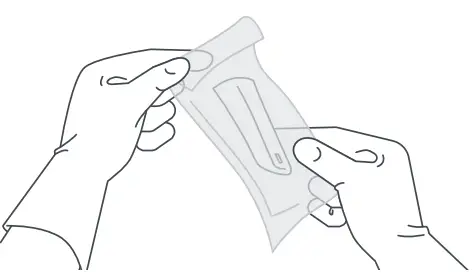
Sterilize the pouched TRIOS scanner tip in a Dynamic-Air-Removal Steam Sterilizer (Class B autoclave) with one of the two programs depending on your region:
In the US: Autoclave the TRIOS scanner tip at 132 °C (269.6 °F) with a cycle of 4 minutes exposure time and 30 minutes dry time.
In the EU: Autoclave the TRIOS scanner tip at 134 °C (273.2 °F) with a cycle of 3 minutes exposure time and 30 minutes dry time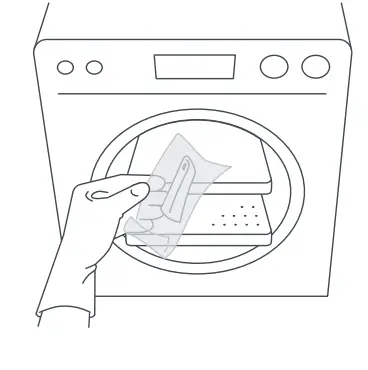
| CAUTIONThe window in the TRIOS scanner tip is a delicate optical component. Its clean and undamaged surface is critical for the scan quality.The window should be handled with care. Do not scratch it. Be careful not to smudge it before scanning a patient. |
| CAUTIONAlways clean the TRIOS scanner tip immediately after use.If biological materials (bioburden) are allowed to dry on equipment, disinfection and sterilization processes may not be effective. |
| CAUTIONNever autoclave a TRIOS scanner tip that is not wrapped, since this will leave unremovable stains on the mirror. See the autoclave manualfor more information. |
| CAUTIONNew TRIOS scanner tips must be cleaned and sterilized before using them for the first time. |
| CAUTIONA class B Vacuum autoclave according to EN 13060 is required for sterilization of the TRIOS scanner tip. |
| CAUTIONThe TRIOS scanner tip can be re-sterilized up to 60 times and must be disposed afterwards as described in section 9 Disposal. |
Cleaning of Batteries, Battery Charger and Other Parts of the System
For cleaning of batteries, battery charger, and other parts of the system, please follow the instructions below:
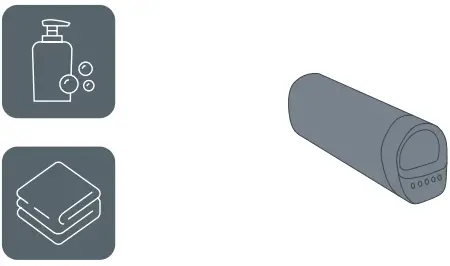 | Cleaning of battery: Apply a mild detergent to a soft, damp cloth and wipe the surface of the battery. |
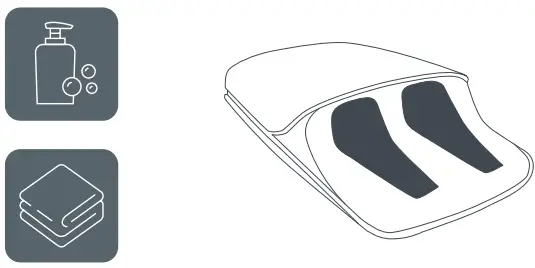 | Cleaning of battery charger: Apply a mild detergent to a soft, damp cloth and wipe the surface of the battery charger. |
For general cleaning, apply a mild detergent to a soft, damp cloth.
CAUTION
Do not spray directly onto any parts of the system, as the liquid solution can accumulate at the seals and leak into the TRIOS scanner, cords or pod.
Optical Maintenance
In case of smudges or stains on the TRIOS scanner tip window or the TRIOS scanner window, follow these steps for optimal scan quality:
Step 1: Take a damp non-woven swab and gently rub it on the inside and outside of the TRIOS scanner tip window as well as on the window on the mirror housing.
Step 2: Use a dry non-woven swab to dry the windows.
CAUTION
Do not use acetone, IPA, alcohol, or any oxidizing solutions to clean
the TRIOS scanner tip window or the TRIOS scanner window.
If the problem persists, please contact support ([email protected]).
Disposal
 Electronic waste must not be treated as unsorted municipal waste, but must be collected separately! Please contact support ([email protected]) who can inform you about the local requirements for disposal of electronical, clinical waste. By disposing of the device in the proper manner, you help to avoid possible hazards for the environment and public health that could otherwise be caused by improper treatment of waste equipment.
Disposal of the TRIOS scanner tip and TRIOS Sleeve
Please dispose according to standard operating procedures or local regulations for disposal of contaminated medical waste.
CAUTION
Dispose the TRIOS scanner tip and TRIOS Sleeve as clinical waste
Disposal of the TRIOS System and packaging
Please dispose according to standard operating procedure or local regulations for disposal of general waste and electronic waste.
CAUTION
Batteries need to be removed and recycled or disposed of properly.
TRIOS scanner batteries need to be disposed of as lithium-ion batteries. Lithium-ion batteries are recyclable and must not be treated as unsorted municipal waste, but must be collected separately
If in doubt, please contact support ([email protected]).
Consumable Accessories
The consumable accessories to the TRIOS system are the scanner tips, batteries and TRIOS sleeves. New consumable accessories can be re-ordered by contacting 3Shape.
Replacements
| TRIOS Tip | Tips 3-pack TST-11-3 |
| TRIOS Sleeve | TRIOS Sleeve TSL-01 |
| TRIOS Battery | Battery 3-pack TB-04-3 |
Vigilance
In case of any serious incident that has occurred in relation to the use of the device, please report the incident t 3Shape at email: [email protected] and you can also report it to the competent authority of the state in which the user and/or patient is established.
 Dental 3D Scanners & Software for CAD/CAM Dentistry | 3shape
 Dental 3D Scanners & Software for CAD/CAM Dentistry | 3shape