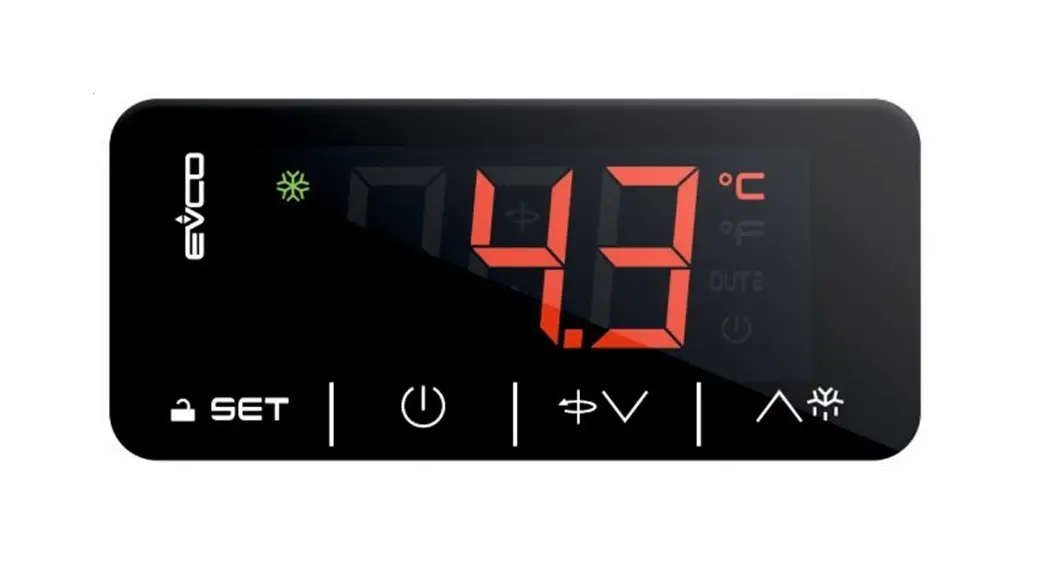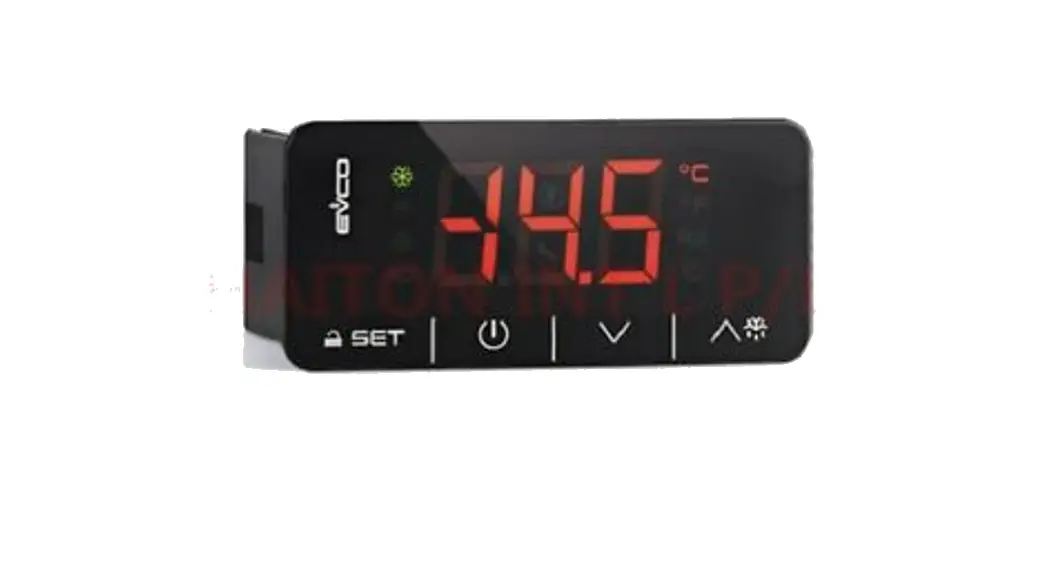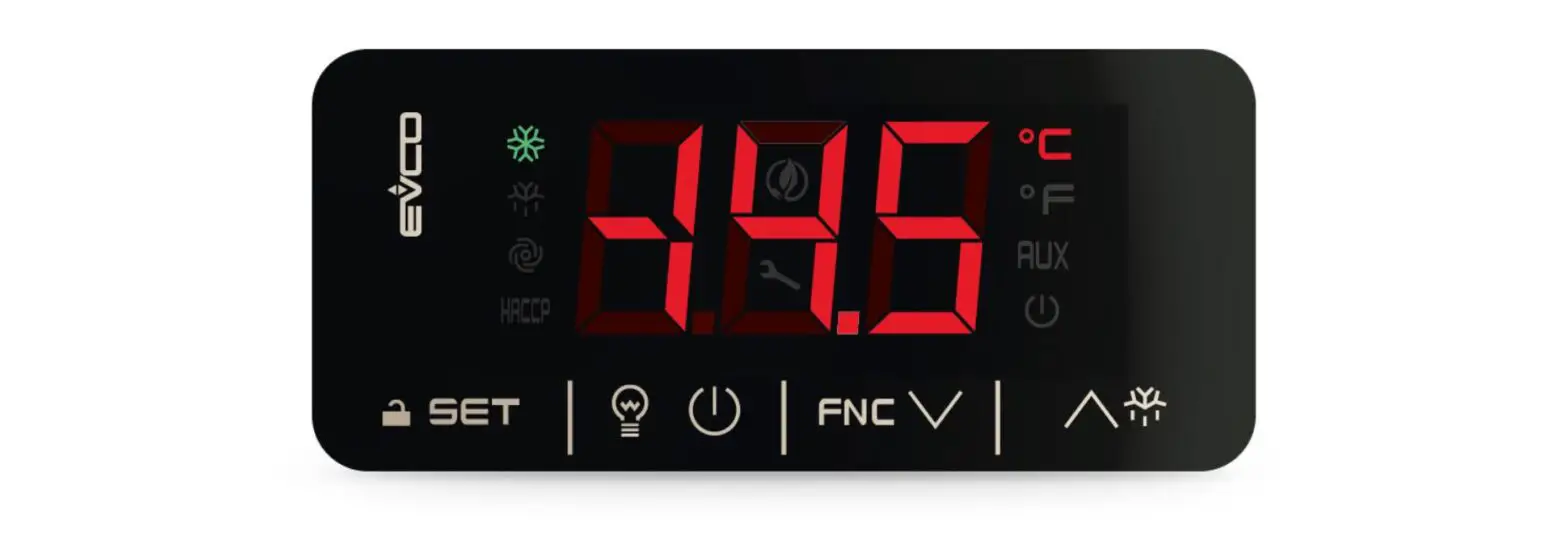

EVCO EV3294 Controllers and Displays
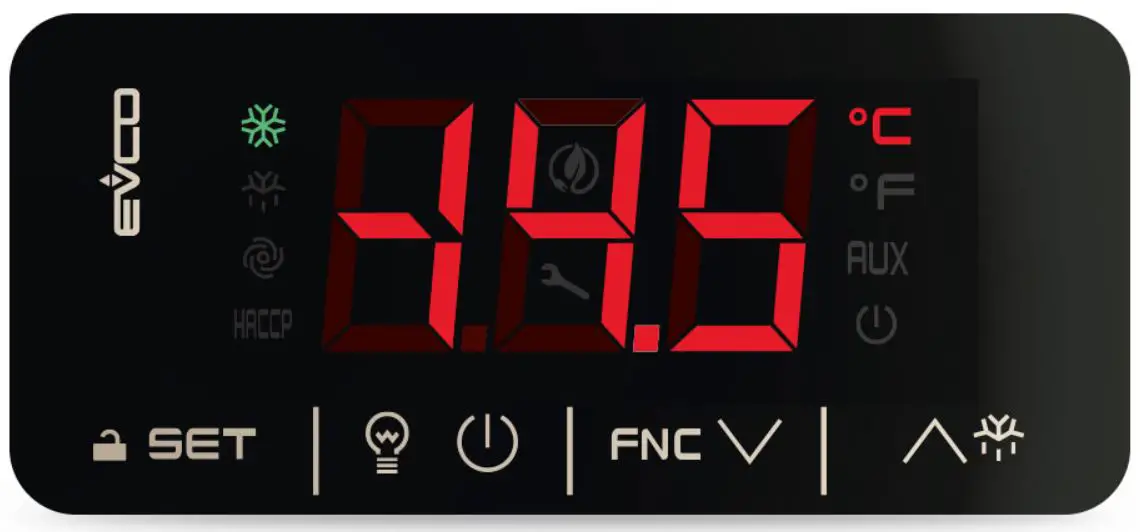
- Controllers for low temperature units.
- Power supply 115… 230 VAC or 12-24 VAC/DC according to the model.
- Incorporated clock according to the model.
- Cabinet probe and evaporator probe PTC/NTC.
- Door switch input.
- Compressor relay 16 Ares 250 VAC.
- Alarm buzzer.
- Incorporated Bluetooth Low Energy sensor according to the model.
- TTL MODBUS slave port for EVconnect app, EPoCA remote monitoring system or for BMS according to the model.
- Cooling or heating operation.
MEASUREMENTS AND INSTALLATION
Measurements in mm inches. To be fitted to a panel, snap-in brackets provided 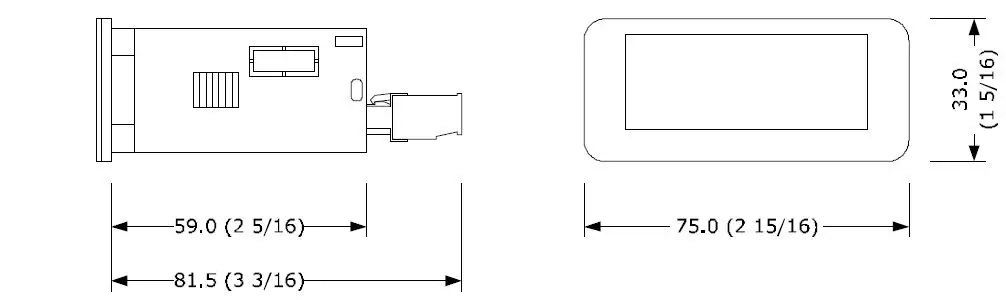
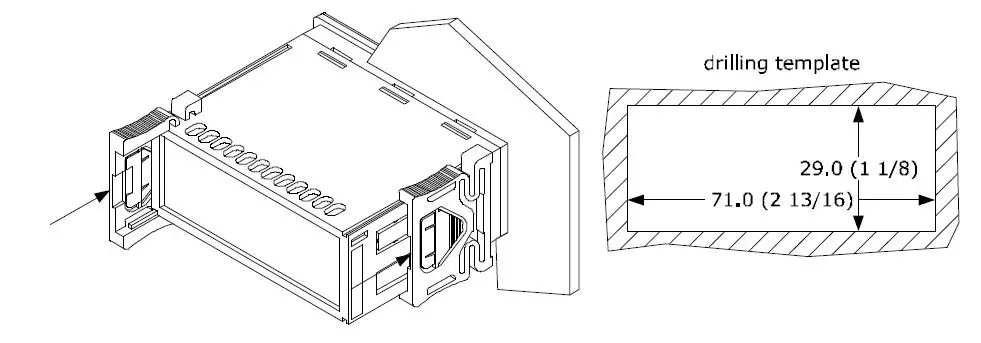
INSTALLATION PRECAUTIONS
The thickness of the panel must be between 0.8 and 2.0 mm 1/32 and 1/16 in.Ensure that the working conditions are within the limits stated in the TECHNICAL
SPECIFICATIONS section
Do not install the device close to heat sources, equipment with a strong magnetic field, in places subject to direct sunlight, rain, damp, excessive dust, mechanical vibrations
or shocks. In compliance with safety regulations, the device must be installed properly to ensure adequate protection from contact with electrical parts. All protective parts must be fixed in such a way as to need the aid of a tool to remove them.
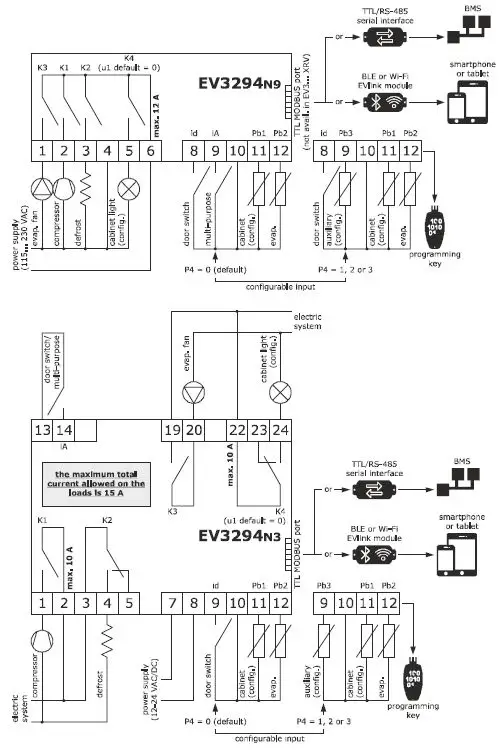
ELECTRICAL CONNECTION
N.B.
- Use cables of an adequate section for the current running through them.
- To reduce any electromagnetic interference connect the power cables as far away as possible from the signal cables.
 PRECAUTIONS FOR ELECTRICAL CONNECTION
If using an electrical or pneumatic screwdriver, adjust the tightening torque. If the device has been moved from a cold to a warm place, the humidity may have caused condensation to form inside. Wait about an hour before switching on the power. Make sure that the supply voltage, electrical frequency and power are within the set
limits. Disconnect the power supply before doing any type of maintenance. Do not use the device as safety device For repairs and for further information, contact the EVCO sales network.
FIRST TIME
- Install following the instructions given in the section MEASUREMENTS AND INSTALLATION.
- Power up the device as shown in the section ELECTRICAL CONNECTION and an internal test will be run.
- The test normally takes a few seconds, when it is finished the display will switch off.
- Configure the device as shown in the section Setting configuration parameters.
- Recommended configuration parameters for first time use.
| PAR. | DEF. | PARAMETER | MIN… MAX. |
| SP | 0.0 | setpoint | r1..r2 |
| P0 | 1 | probe type | 0 = PTC 1 = NTC |
| P2 | 0 | temperature unit of measurement | 0 = °C 1 = °F |
| d1 | 0 | defrost type | 0 = electric 1 = hot gas 2 = compressor stopped |
Then check that the remaining settings are appropriate.
- Disconnect the device from the mains.
- Make the electrical connection as shown in the section ELECTRICAL CONNECTION without powering up the device.
- For the connection in an RS-485 network connect the interface EVIF22TSX or EVIF23TSX, to activate real time functions connect the module EVIF23TSX, to use the
device with the APP EVconnect connect the interface EVIF25TBX or use EV3… XRV. - To use the device with the EPoCA remote monitoring system, connect the EVIF25TWX module; see the relevant instruction sheets.
- EVIF22TSX or EVIF23TSX is used, set parameter bLE to 0.
- Power up the device.
USER INTERFACE AND MAIN FUNCTIONS
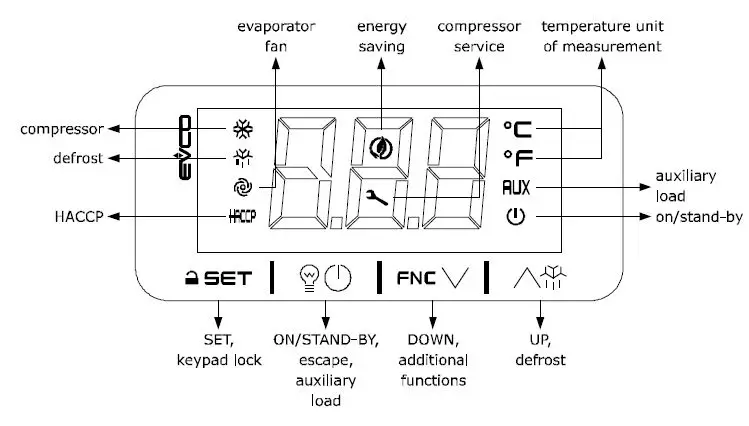
Switching the device on/off
| LED | ON | OFF | FLASHING |
 | compressor on | compressor off | Compressor protection active set point setting active |
 | defrost or pre-dripping active | Defrost delay active dripping active | |
 | evaporator fan on | evaporator fan off | Evaporator fan stop active |
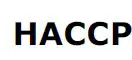 | saved HACCP alarm in EVlink | ||
 | energy saving active | ||
 | Request for compressor service | Settings active access to additional functions active operation with EVconnect APP active | |
| °C/°F | View temperature | overcooling or overheating active | |
| AUX | auxiliary load on | auxiliary load off | auxiliary load on by digital input auxiliary load delay active |
 | device off | device on | device on/off active |
If Loc = 1 (default) and 30 s have elapsed without the keys being pressed, the display will show the “Loc” label and the keypad will lock automatically.
Unlock keypad
Touch a key for 1 s: the display will show the label UnL.
Set the setpoint
Check that the keypad is not locked.
| 1. |  | Touch the SET key. |
| 2. |  | Touch the UP or DOWN key within 15 s to set the value within the limits r1 and r2 default -50… 50 |
| 3. | | Touch the SET key or do not operate for 15 s. |
Activate manual defrost if r5 = 0, default
Check that the keypad is not locked and that overcooling is not active.Touch the UP key for 2 s. If P3 = 1 (default), defrost is activated provided that the evaporator temperature is lower than the d2 threshold.
Cabinet light on/off if u1 = 0, default
Touch the ON/STAND-BY key if u1 = 1, the demisting switch on for the duration if u1 = 2 and the keypad is not locked, the button-operated load switches on/off.
Silence buzzer
Touch a key. If u1 = 3 and u4 = 1, the alarm output switches off.
ADDITIONAL FUNCTIONS
Activate/deactivate overcooling, overheating and manual energy saving
Check that the keypad is not locked.
| FUNCTION | CONDITION | CONSEQUENCE |
| overcooling | r5 = 0, r8 = 1 and defrost not active | the setpoint becomes setpoint r6, for the r7 duration |
| overheating | r5 and r8 = 1 | the setpoint becomes “setpoint + r6, for the r7 duration |
| energy saving | r5 = 0 and r8 = 2 | the setpoint becomes setpoint + r4 at maximum for HE2 duration |
View/delete compressor functioning hours and view comp start up number
Check that the keypad is not locked
| 1. |
| Touch the DOWN key for 4s. | |
| 2. | | Touch the UP or DOWN key within 15s to select a label. | |
| LAB. | DESCRIPTION | ||
| CH | view compressor functioning hours (hundreds) | ||
| rCH | delete compressor functioning hours | ||
| nS1 | compressor start up number thousands | ||
| 3. |
| Touch the SET key. | |
| 4. | | Touch the UP or DOWN key to set 149 when label rCH is selected. | |
| 5. | | Touch the SET key. |
| 6. |  | Touch the ON/STAND-BY key (or do not operate for 60 s) to exit the procedure. |
View the temperature detected by the probes
Check that the keypad is not locked.
| 1. |  | Touch the DOWN key for 4s. | |
| 2. | | Touch the UP or DOWN key within 15 s to select a label. | |
| LAB. | DESCRIPTION | ||
| Pb1 | cabinet temperature (if P4 = 0, 1 or inlet air temperature if P4 = 3 | ||
| Pb2 | evaporator temperature if P3 = 1 or 2 | ||
| Pb3 | auxiliary temperature if P4 = 1, 2 or 3 | ||
| Pb4 | calculated product temperature CPT; if P4 = 3 | ||
| 3. | | Touch the SET key. | |
| 4. | | Touch the ON/STAND BY key or do not operate for 60s to exit the procedure. | |
SETTINGS
Setting configuration parameters
| 1. | | Touch the SET key for 4s: the display will show the label PA. |
| 2. | | Touch the SET key. |
| 3. | | Touch the UP or DOWN key within 15 s to set the PAS value default 19 |
| 4. | | Touch the SET key or do not operate for 15 s: the display will show the label SP |
| 5. | | Touch the UP or DOWN key to select a parameter. |
| 6. | | Touch the SET key. |
| 7. | | Touch the UP or DOWN key within 15 s to set the value. |
| 8. | | Touch the SET key or do not operate for 15s. |
| 9. | | Touch the SET key for 4s or do not operate for 60s to exit the procedure. |
Set the date, time and day of the week
Available in EV3… XRV or if EVIF23TSX, EVIF25TWX or interface EVIF25TBX is connected. N.B. Do not disconnect the device from the mains within two minutes since the setting of the time and day of the week. if the device communicates with the EVconnect app, the date, time and day of the week will be automatically set by the smartphone or tablet.Check that the keypad is not locked.
| 1. | | Touch the DOWN key for 4s. | |
| 2. | | Touch the UP or DOWN key within 15 s to select the label rtc. | |
| 3. | | Touch the SET key: the display will show the label yy followed by the last two figures of the year. | |
| 4. | | Touch the UP or DOWN key within 15 s to set the year. | |
| 5. | Repeat actions 3 and 4 to set the next labels. | ||
| LAB. | DESCRIPTION OF THE NUMBERS FOLLOWING THE LABEL | ||
| n | month (01… 12) | ||
| d | day (01… 31) | ||
| h | time (00… 23) | ||
| n | minute (00… 59) | ||
| 6. | | Touch the SET key: the display will show the label for the day of the week. | |
| 7. | | Touch the UP or DOWN key within 15 s to set the day of the week. | |
| LAB. | DESCRIPTION | ||
| Mon | Monday | ||
| tuE | Tuesday | ||
| UEd | Wednesday | ||
| thu | Thursday | ||
| Fri | Friday | ||
| Sat | Saturday | ||
| Sun | Sunday | ||
| 8. | | Touch the SET key: the device will exit the procedure. | |
| 9. | | Touch the ON/STAND BY key to exit the procedure beforehand. | |
CONFIGURATION PARAMETERS
| N. | PAR. | DEF. | SETPOINT | MIN… MAX. | |
| 1 | SP | 0.0 | setpoint | r1… r2 | |
|
| N. | PAR. | DEF. | ANALOGUE INPUTS | MIN… MAX. |
| 2 | CA1 | 0.0 | cabinet probe offset | -25… 25 °C/°F if P4 = 3, air in probe offset | |
| 3 | CA2 | 0.0 | evaporator probe offset | -25… 25 °C/°F | |
| 4 | CA3 | 0.0 | auxiliary probe offset | -25… 25 °C/°F | |
| 5 | P0 | 1 | probe type | 0 = PTC 1 = NTC | |
| 6 | P1 | 1 | enable °C decimal point | 0 = no 1 = yes | |
| 7 | P2 | 0 | temperature unit of measure- ment | 0 = °C 1 = °F | |
| 8 | P3 | 1 | evaporator probe function | 0 = disabled 1 = defrost + fan 2 = fan | |
| 9 | P4 | 0 | configurable input function | 0 = digital input 1 = condenser probe 2 = critical temperature probe 3 = air out probe if P4 = 3, regulation temperature = product temperature (CPT) | |
| 10 | P5 | 0 | value displayed | 0 = regulation temperature 1 = setpoint 2 = evaporator temperature 3 = auxiliary temperature 4 = air in temperature | |
| 11 | P7 | 5 | air in weight for calculated prod- uct temperature (CPT) | 0… 10 % x 10 CPT = {[(P7 x (air in)] + [(100 – P7) x (air out)] : 100} | |
| 12 | P8 | 5 | display refresh time | 0… 250 s : 10 | |
|
| N. | PAR. | DEF. | REGULATION | MIN… MAX. |
| 13 | r0 | 2.0 | setpoint differential | 1… 15 °C/°F | |
| 14 | r1 | -50 | minimum setpoint | -99 °C/°F… r2 | |
| 15 | r2 | 50.0 | maximum setpoint | r1… 199 °C/°F | |
| 16 | r4 | 0.0 | setpoint offset in energy saving | 0… 99 °C/°F | |
| 17 | r5 | 0 | cooling or heating operation | 0 = cooling 1 = heating | |
| 18 | r6 | 0.0 | setpoint offset in overcool- ing/overheating | 0… 99 °C/°F | |
| 19 | r7 | 30 | overcooling/overheating duration | 0… 240 min |
| 20 | r8 | 0 | DOWN key additional function | 0 = disabled 1 = overcooling/overheating 2 = energy saving | |
| 21 | r12 | 0 | position of the r0 differential | 0 = asymmetric 1 = symmetric | |
|
| N. | PAR. | DEF. | COMPRESSOR | MIN… MAX. |
| 22 | C0 | 0 | compressor on delay after pow- er-on | 0… 240 min | |
| 23 | C2 | 3 | compressor off minimum time | 0… 240 min | |
| 24 | C3 | 0 | compressor on minimum time | 0… 240 s | |
| 25 | C4 | 10 | compressor off time during cabi- net probe alarm | 0… 240 min | |
| 26 | C5 | 10 | compressor on time during cabi- net probe alarm | 0… 240 min | |
| 27 | C6 | 80.0 | threshold for high condensation warning | 0… 199 °C/°F differential = 2 °C/4 °F | |
| 28 | C7 | 90.0 | threshold for high condensation alarm | 0… 199 °C/°F | |
| 29 | C8 | 1 | high condensation alarm delay | 0… 15 min | |
| 30 | C10 | 0 | compressor hours for service | 0… 999 h x 100 0 = disabled | |
| 31 | C11 | 0 | second compressor switch on delay not available in EV3… N3 | 0… 240 s | |
| 32 | C13 | 0 | number of start-ups for compres- sor rotation not available in EV3… N3 | 0… 10 0 = disabled | |
|
| N | PAR | DEF | DEFROST (if r5 = 0) | MIN… MAX. |
| 33 | d0 | 8 | automatic defrost interval | 0… 99 h 0 = only manual if d8 = 3, maximum interval | |
| 34 | d1 | 0 | defrost type | 0 = electric 1 = hot gas 2 = compressor stopped | |
| 35 | d2 | 8.0 | threshold for defrost end | -99… 99 °C/°F | |
| 36 | d3 | 30 | defrost duration | 0… 99 min se P3 = 1, maximum duration | |
| 37 | d4 | 0 | enable defrost at power-on | 0 = no 1 = yes | |
| 38 | d5 | 0 | defrost dealy after power-on | 0… 99 min | |
| 39 | d6 | 2 | value displayed during defrost | 0 = regulation temperature 1 = display locked 2 = dEF label | |
| 40 | d7 | 2 | dripping time | 0… 15 min | |
| 41 | d8 | 0 | defrost interval counting mode | 0 = device on hours 1 = compressor on hours 2 = hours evaporator tem- perature < d9 3 = adaptive 4 = real time | |
| 42 | d9 | C | evaporation threshold for auto- matic defrost interval counting | -99… 99 °C/°F | |
| 43 | d11 | 0 | enable defrost timeout alarm | 0 = no 1 = yes | |
| 44 | d15 | 0 | compressor on consecutive time for hot gas defrost | 0… 99 min | |
| 45 | d16 | 0 | pre-dripping time for hot gas de- frost | 0… 99 min | |
| 46 | d18 | 40 | adaptive defrost interval | 0… 999 min if compressor on + evapora- tor temperature < d22 0 = only manual | |
| 47 | d19 | 3.0 | threshold for adaptive defrost (relative to optimal evaporation temperature) | 0… 40 °C/°F optimal evaporation tempera- ture – d19 | |
| 48 | d20 | 180 | compressor on consecutive time for defrost | 0… 999 min 0 = disabled | |
| 49 | d21 | 200 | compressor on consecutive time for defrost after power-on and overcooling | 0… 500 min if regulation temperature setpoint > 10°C/20 °F 0 = disabled | |
| 50 | d22 | -2.0 | evaporation threshold for adap- tive defrost interval counting (relative to optimal evaporation temperature) | -10… 10 °C/°F optimal evaporation tempera- ture + d22 | |
|
| N. | PAR. | DEF. | ALARMS | MIN… MAX. |
| 51 | AA | 0 | select value for high/low temper- ature alarms | 0 = regulation temperature 1 = evaporator temperature 2 = auxiliary temperature | |
| 52 | A1 | -10.0 | threshold for low temperature alarm | -99… 99 °C/°F | |
| 53 | A2 | 2 | low temperature alarm type | 0 = disabled 1 = relative to setpoint 2 = absolute | |
| 54 | A4 | 10.0 | threshold for high temperature alarm | -99… 99 °C/°F | |
| 55 | A5 | 2 | high temperature alarm type | 0 = disabled 1 = relative to setpoint 2 = absolute | |
| 56 | A6 | 12 | high temperature alarm delay af- ter power-on | 0… 99 min x 10 | |
| 57 | A7 | 15 | high/low temperature alarms de- lay | 0… 240 min | |
| 58 | A8 | 15 | high temperature alarm delay af- ter defrost | 0… 240 min | |
| 59 | A9 | 15 | high temperature alarm delay af- ter door closing | 0… 240 min | |
| 60 | A10 | 10 | power failure duration for alarm recording | 0… 240 min | |
| 61 | A11 | 2.0 | high/low temperature alarms re- set differential | 1… 15 °C/°F | |
|
| N. | PAR. | DEF. | FANS | MIN… MAX. |
| 62 | F0 | 1 | evaporator fan mode during normal operation | 0 = off 1 = on 2 = according to F15 and F16 if compressor off, on if compressor on 3 = thermoregulated (with F1) 4 = thermoregulated (with F1) if compressor on | |
| 63 | F1 | -4.0 | threshold for evaporator fan op- eration | -99… 99 °C/°F differential = 1 °C/2 °F | |
| 64 | F2 | 0 | evaporator fan mode during de- frost and dripping | 0 = off 1 = on 2 = according to F0 | |
| 65 | F3 | 2 | evaporator fan off maximum time | 0… 15 min | |
| 66 | F4 | 0 | evaporator fan off time during energy saving | 0… 240 s x 10 | |
| 67 | F5 | 10 | evaporator fan on time during energy saving | 0… 240 s x 10 | |
| 68 | F7 | 5.0 | threshold for evaporator fan on after dripping (relative to setpoint) | -99… 99 °C/°F setpoint + F7 | |
| 69 | F9 | 0 | evaporator fan off delay after compressor off | 0… 240 s if F0 = 2 | |
| 70 | F11 | 15.0 | threshold for condenser fan on | 0… 99 °C/°F differential = 2 °C/4 °F | |
| 71 | F12 | 30 | condenser fan off delay after compressor off | 0… 240 s if P4 ≠ 1 | |
| 72 | F15 | 0 | evaporator fan off time with compressor off | 0… 240 s if F0 = 2 | |
| 73 | F16 | 1 | evaporator fan on time with compressor off | 0… 240 s if F0 = 2 | |
|
| N. | PAR. | DEF. | DIGITAL INPUTS | MIN… MAX. | ||||
| 74 | i0 | 5 | door switch input function | 0 | disabled compressor + evaporator fan off evaporator fan off cabinet light on compressor + evaporator fan off, cabinet light on evaporator fan off + cabinet light on | ||||
| 1 | |||||||||
| 2 | |||||||||
| 3 | |||||||||
| 4 | |||||||||
| 5 | |||||||||
| 75 | i1 | 0 | door switch input activation | 0 | with contact closed | ||||
| 1 | with contact open | ||||||||
| 76 | i2 | 30 | open door alarm delay | -1… 120 min | |||||
| -1 = disabled | |||||||||
| 77 | i3 | 15 | regulation inhibition maximum | -1… 120 min | |||||
| time with door open | -1 = until the closing | ||||||||
| 78 | i5 | 2 | door switch/multi-purpose input | 0 | disabled energy saving iA alarm button operated load on device on/off Cth alarm th alarm compressor + evaporator fan off, cabinet light on evaporator fan off + cabinet light on | ||||
| function | (options | 7 | and 8 not | 1 | |||||
| available in EV3… N9) | 2 | ||||||||
| 3 | |||||||||
| 4 | |||||||||
| 5 | |||||||||
| 6 | |||||||||
| 7 | |||||||||
| 8 | |||||||||
| 79 | i6 | 0 | door switch/multi-purpose input | 0 | with contact closed | ||||
| activation | |||||||||
| 80 | i7 | 0 | multi-purpose input alarm delay | -1… 120 min | |||||
| -1 = disabled | |||||||||
| if i5 = 5 or 6, compressor on | |||||||||
| delay after alarm reset | |||||||||
| 81 | i10 | 0 | door closed consecutive time for | 0… 999 min | |||||
| energy saving | after regulation temperature | ||||||||
| < SP | |||||||||
| 0 = disabled | |||||||||
| 82 | i13 | 180 | number of door openings for de- | 0… 240 | |||||
| frost | 0 = disabled | ||||||||
| 83 | i14 | 32 | door open consecutive time for | 0… 240 min | |||||
| defrost | 0 = disabled | ||||||||
|
| N. | PAR. | DEF. | DIGITAL OUTPUTS | MIN… MAX. | ||||
| 84 | u1 | 0 | auxiliary | output | configuration | 0 | cabinet light | ||
| (option 8 not available in EV3… | 1 | demisting | |||||||
| N3) | 2 | buttonoperated load | |||||||
| 3 | alarm | ||||||||
| 4 | = door heaters | ||||||||
| 5 | = heater for neutral zone | ||||||||
| 6 | condenser fan | ||||||||
| 7 | on/stand-by | ||||||||
| 8 | second compressor | ||||||||
| 85 | u2 | 0 | enable cabinet light and button- | 0 no 1 yes | |||||
| operated load in stand-by | manual | ||||||||
| 86 | u4 | 0 | enable alarm output off silencing | 0 | no 1 yes | ||||
| the buzzer | |||||||||
| 87 | u5 | -1.0 | threshold for door heaters on | -99… 99 °C/°F | |||||
| differential = 2 °C/4 °F | |||||||||
| 88 | u6 | 5 | demisting on duration | 1… 120 min | |||||
| 89 | u7 | -5.0 | neutral zone threshold for heat- | -99… 99 °C/°F | |||||
| ing (relative to setpoint) | differential = 2 °C/4 °F | ||||||||
| setpoint + u7 | |||||||||
| N. | PAR. | DEF. | ENERGY SAVING (if r5 = 0) | MIN… MAX. | |||||
| 90 | HE2 | 0 | energy saving maximum duration | 0… 999 min -1 = until the door opening | |||||
|
| N. | PAR. | DEF. | REAL TIME ENERGY SAVING (if r5 = 0) | MIN… MAX. | ||||
| 91 | H01 | 0 | Monday energy saving time | 0… 23 h | |||||
| 92 | H02 | 0 | Monday energy saving maximum duration | 0… 24 h | |||||
| 93 | H03 | 0 | Tuesday energy saving time | 0… 23 h | |||||
| 94 | H04 | 0 | Tuesday energy saving maximum duration | 0… 24 h | |||||
| 95 | H05 | 0 | Wednesday energy saving time | 0… 23 h | |||||
| 96 | H06 | 0 | Wednesday energy saving maxi- mum duration | 0… 24 h | |||||
| 97 | H07 | 0 | Thursday energy saving time | 0… 23 h | |||||
| 98 | H08 | 0 | Thursday energy saving maxi- mum duration | 0… 24 h | |||||
| 99 | H09 | 0 | Friday energy saving time | 0… 23 h | |||||
| 100 | H10 | 0 | Friday energy saving maximum duration | 0… 24 h | |||||
| 101 | H11 | 0 | Saturday energy saving time | 0… 23 h | |||||
| 102 | H12 | 0 | Saturday energy saving maxi- mum duration | 0… 24 h | |||||
| 103 | H13 | 0 | Sunday energy saving time | 0… 23 h | |||||
| 104 | H14 | 0 | Sunday energy saving maximum duration | 0… 24 h | |||||
|
| N. | PAR. | DEF. | REAL TIME DEFROST (if d8 = 4) | MIN… MAX. | ||||
| 105 | Hd1 | h | 1st daily defrost time | h- = disabled | |||||
| 106 | Hd2 | h | 2nd daily defrost time | h = disabled | |||||
| 107 | Hd3 | h | 3rd daily defrost time | h- = disabled | |||||
| 108 | Hd4 | h | 4th daily defrost time | h = disabled | |||||
| 109 | Hd5 | h | 5th daily defrost time | h = disabled | |||||
| 110 | Hd6 | h | 6th daily defrost time | h= disabled | |||||
| N. | PAR. | DEF. | SAFETIES | MIN… MAX. | |||||
| 111 | POF | 0 | enable ON/STAND-BY key | 0 | = no 1 = yes | ||||
| 112 | PAS | -19 | password | -99… 999 | |||||
| 113 | PA1 | 426 | level 1 password | -99… 999 | |||||
| 114 | PA2 | 824 | level 2 password | -99… 999 | |||||
| N. | PAR. | DEF. | REAL TIME CLOCK | MIN… MAX. | |||||
| 115 | Hr0 | 0 | enable clock | 0 | = no 1 = yes | ||||
|
| N. | PAR. | DEF. | DATA-LOGGING EVLINK | MIN… MAX. | ||||
| 116 | bLE | 1 | enable Bluetooth | 0 | = no 1 = yes | ||||
| 117 | rE0 | 15 | data-logger sampling interval | 0… 240 min | |||||
| 118 | rE1 | 1 | recorded temperature | 0 2 3 4 5 | none 1 = cabinet evaporator auxiliar cabinet and evaporator all | ||||
|
| N. | PAR. | DEF. | MODBUS | MIN… MAX. | ||||
| 119 | LA | 247 | MODBUS address | 1… 247 | |||||
| 120 | Lb | 2 | MODBUS baud rate | 0 = 2,400 baud 1 = 4,800 baud 2 = 9,600 baud 3 = 19,200 baud parity even | |||||
ALARMS
| COD. | DESCRIPTION | RESET | REMEDIES |
| Pr1 | cabinet probe alarm | automatic | check P0 check probe integrity check electrical connection |
| Pr2 | evaporator probe alarm | automatic | |
| Pr3 | auxiliary probe alarm | automatic | |
| rtc | clock alarm | manual | set date, time and day of the week |
| AL | low temperature alarm | automatic | check AA, A1 and A2 |
| AH | high temperature alarm | automatic | check AA, A4 and A5 |
| id | open door alarm | automatic | check i0 e i1 |
| PF | power failure alarm | manual | touch a key check electrical connection |
| COH | high condensation warning | automatic | check C6 |
| CSd | high condensation alarm | manual | switch the device off and on check C7 |
| iA | multi purpose input alarm | automatic | check i5 and i6 |
| Cth | compressor thermal switch alarm | automatic | check i5 and i6 |
| th | global thermal switch alarm | manual | switch the device off and on check i5 and i6 |
| dFd | defrost timeout alarm | manual | touch a key check d2, d3 and d11 |
TECHNICAL SPECIFICATIONS
| Purpose of the control device | Function controller | |||
| Construction of the control device | Built-in electronic device | |||
| Container | Black, self-extinguishing | |||
| Category of heat and fire resistance | D | |||
| Measurements | ||||
| 75.0 x 33.0 x 59.0 mm (2 15/16 x 1 5/16 x 2 5/16 in) with fixed screw terminal blocks; 75.0 x 33.0 x 73.0 mm (2 15/16 x 1 5/16 x 2 7/8 in) in EV3… N3 | 75.0 x 33.0 x 81.5 mm (2 15/16 x 1 5/16 x 3 3/16 in) with removable screw terminal blocks; 75.0 x 33.0 x 83.0 mm (2 15/16 x 1 5/16 x 3 1/4 in) in EV3… N3 | |||
| Mounting methods for the control device | To be fitted to a panel, snap-in brackets pro- vided | |||
| Degree of protection provided by the cover- ing | IP65 (front) | |||
| Connection method | ||||
| Fixed screw terminal blocks for wires up to 2,5 mm² | Removable screw terminal blocks for wires up to 2,5 mm²; by request | Micro-MaTch connector | ||
| Maximum permitted length for connection cables | ||||
| Power supply: 10 m (32.8 ft) | Analogue inputs: 10 m (32.8 ft) | |||
| Digital inputs: 10 m (32.8 ft) | Digital outputs: 10 m (32.8 ft) | |||
| Operating temperature | From 0 to 55 °C (from 32 to 131 °F); from 0 to 50 °C (from 32 a 122 °F) in EV3… N3 | |||
| Storage temperature | From -25 to 70 °C (from -13 to 158 °F) | |||
| Operating humidity | Relative humidity without condensate from 10 to 90% | |||
| Pollution status of the control device | 2 | |||
| Conformity | ||||
| RoHS 2011/65/CE | WEEE 2012/19/EU | REACH (EC) Regulation 1907/2006 | ||
| EMC 2014/30/UE | LVD 2014/35/UE | |||
| Power supply | ||||
| 115… 230 VAC (+10% -15%), 50/60 Hz (±3 Hz), max. 3.2 VA insulated in EV3… N9 | 12-24 VAC/DC +10% -15%, 50/60 Hz ±3 Hz max. 4 VA/3 W in EV3… N3, provided by a SELV class 2 source | |||
| Earthing methods for the control device | None | |||
| Rated impulse-withstand voltage | 2,5 KV 4 KV in EV3… N3. | |||
| Over-voltage category | III in EV3… N3 | |||
| Software class and structure | A | |||
| Clock | Incorporated secondary lithium battery available in EV3… XRV | |||
| Clock drift | ≤ 60 s/month at 25 °C 77 °F | |||
| Clock battery autonomy in the absence of a power supply | > 24 h at 25 °C 77 °F | |||
| Clock battery charging time | 24 h the battery is charged by the power supply of the device | |||
| Analogue inputs | 2 for PTC or NTC probes cabinet probe and evaporator probe | |||
| PTC probes | Sensor type | KTY 81-121 990 W 25 °C, 77 °F | ||
| Measurement field | From -50 to 150 °C from -58 to 302 °F | |||
| Resolution | 0.1 °C (1 °F) | |||
| NTC probes | Sensor type | ß3435 10 KW 25 °C, 77 °F | ||
| Measurement field | From -40 to 105 °C from -40 to 221 °F | |||
| Resolution | 0.1 °C (1 °F) | |||
| Digital inputs | 1 dry contact (door switch/multi purpose | |||
| Dry contact | Contact type | 5 VDC, 1.5 mA | ||
| Power supply | None | |||
| Protection | None | |||
| Other inputs | Input configurable for analogue input (auxiliary probe or digital input door switch/multi-purpose input | |||
| Digital outputs | 4 electro mechanical relays compressor, defrost, evaporator fan and auxiliary relay
| |||
| Compressor relay (K1) | SPST, 16 A res250 VAC | |||
| Defrost relay (K2) | SPST, 8 A res 250 VAC; SPDT, 8 A res 250 VAC in EV3… N3 | |||
| Evaporator fan relay K3 | SPST, 5 A res 250 VAC; SPST, 2 A res 250 VAC 30,000 cycles in EV3… N3 | |||
| Auxiliary relay (K4) | SPST, 5 A res 250 VAC; SPDT, 16 A res 250 VAC in EV3… N3 | |||
| Type 1 or Type 2 Actions | Type 1 | |||
| Additional features of Type 1 or Type 2 ac- tions | C | |||
| Displays | 3 digits custom display, with function icons | |||
| Alarm buzzer | Incorporated | |||
| Incorporated sensors | Bluetooth Low Energy available in EV3… XRV. | |||
| Communication ports | TTL MODBUS slave port for EVconnect app, EPoCA remote monitoring system or for BMS not available in EV3… XRV | |||
For EV3… XRV According to European R&TTE Declaration of Conformity this device can beused in the following Countries: Austria, Belgium, Cyprus, Czech Republic, Denmark, Estonia, Finland, France, Germany, Greece, Hungary, Ireland, Italy, Latvia, Lithuania, Luxembourg, Malta, Norway, Poland Portugal, Slovakia, Slovenia, Spain, Sweden, Switzerland, The Netherlands and The United Kingdom.
N.B.
The device must be disposed of according to local regulations governing the collection of electrical and electronic waste. This document and the solutions contained therein are the intellectual property of EVCO and thus protected by the Italian Intellectual Property Rights Code (CPI). EVCO imposes an absolute ban on the full or partial reproduction and disclosure of the content other than with the express approval of EVCO. The customer (manufacturer, installer or end-user) assumes all responsibility for the configuration of the device. EVCO accepts no liability for any possible errors in this document and reserves the right to make any changes, at any time without prejudice to the essential functional and safety features of the equipment.
 EVCO - Advanced Controllers