WA conception On.e Connected Swimming Pool Module Instruction Manual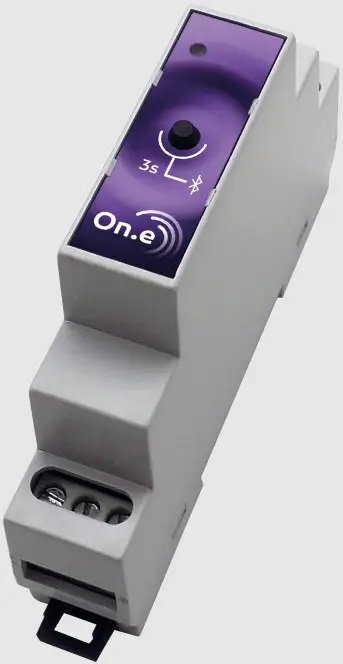
PRESENTATION
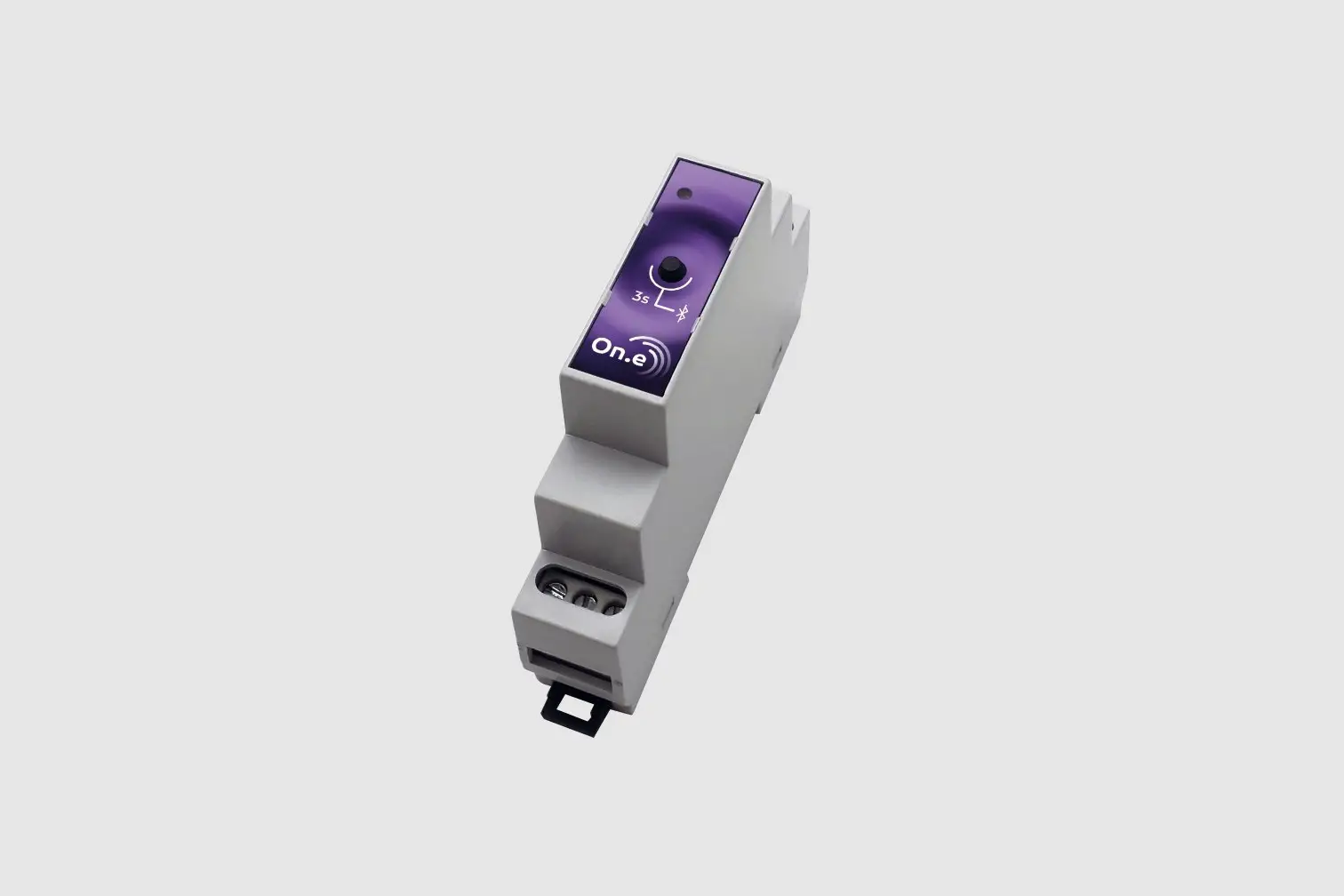
The On.e module is a solution that offers your pool a first step towards going online. It comes in the form of a module that can be integrated into an electrical box and an On.e application that controls the pump and lighting via Bluetooth®.
BOX CONTENTS
The On.e solution includes:
1 On.e module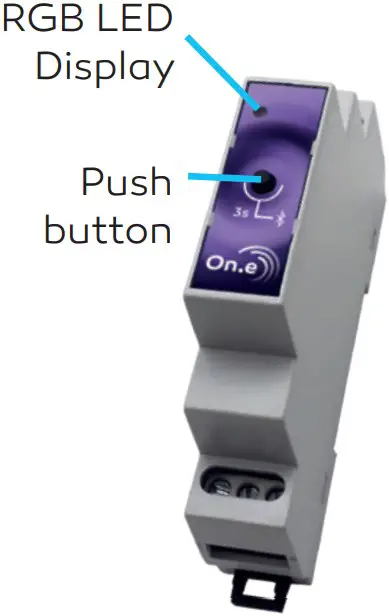
1 ready-to-install “renovation” wiring kit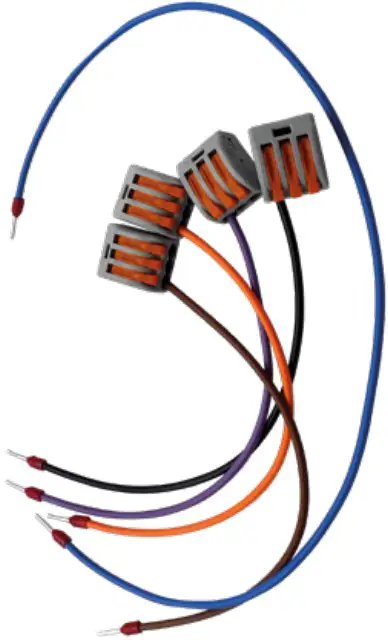




INSTALLATION
Basic version (filtration and lighting)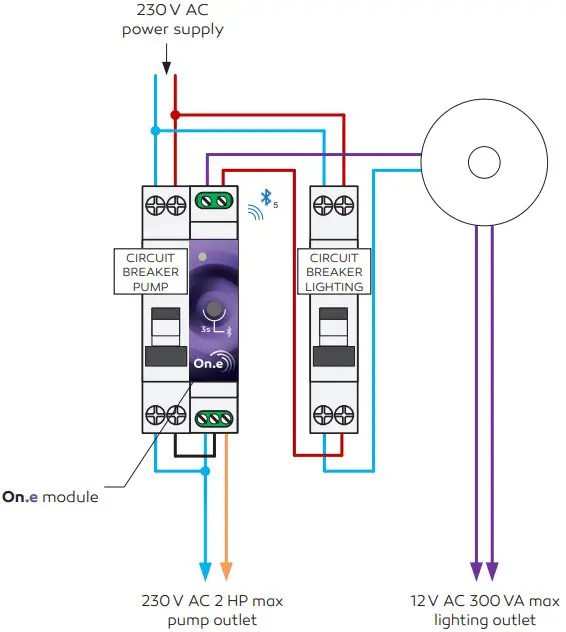
- The entire wiring diagram shown above must be integrated into an electrical box.
- The electrical installation must comply with the NF C15-100 standard in force.
- The filter pump outlet must be protected by a motor protection adapted to the pump.
- The rating of the motor circuit breaker should not exceed 7 A.
- The lighting outlet must be protected by a phase/neutral circuit breaker, or any other, adapted to the power consumption of the lighting and the transformer.
- The 12 V transformer for lighting must not exceed 300 VA.
With outlet controlled by fi ltration (e.g.: treatment)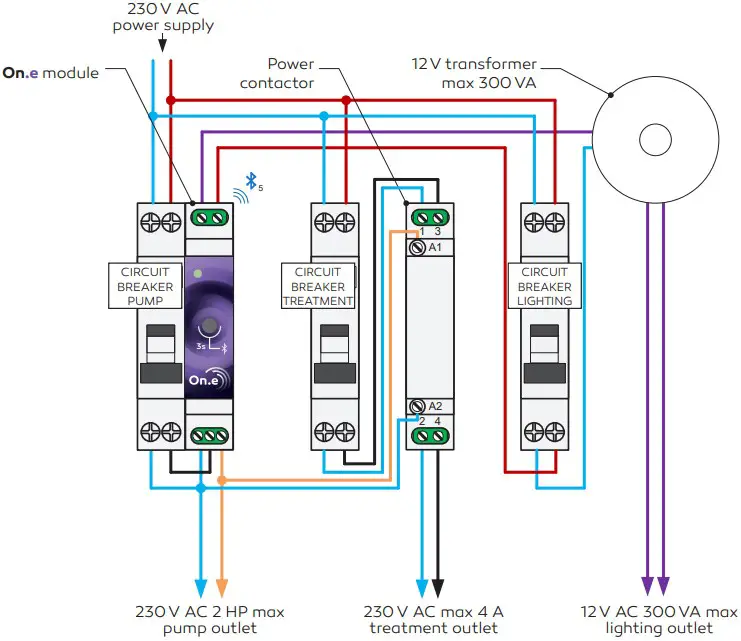
- The entire wiring diagram shown above must be integrated into an electrical box.
- The electrical installation must comply with the NF C15-100 standard in force.
- The filter pump outlet must be protected by a motor protection adapted to the pump.
- The rating of the motor circuit breaker should not exceed 7 A.
- The lighting outlet must be protected by a phase/neutral circuit breaker, or any other, adapted to the power consumption of the lighting and the transformer.
- The 12 V transformer for lighting must not exceed 300 VA.
- The controlled outlet (e.g.: Treatment) must be protected by a protection adapted to the device.
- The power contactor must be adapted to the power allowed by the protection.
PRODUCT OPERATION
Filtration
The filtration control is similar to that offered by traditional picot clocks.
OPERATING MODE
It is divided into 3 distinct operating modes:
| OPERATING MODE | DESCRIPTION |
| ON | The filter pump works in forced operation |
| OFF | The filter pump is not powered on |
| TIMER | The filter pump operates according to the programmed timer.The timer can be programmed per day or week via the smartphone application On.e. |
The operating mode can be selected from the front panel of the product directly, and via the On.e smartphone application
FROM THE PRODUCT: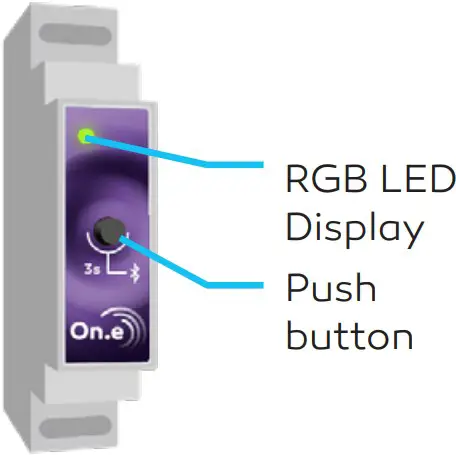
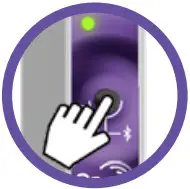 From the product, every time the push button is pressed, the operating mode changes: ON, OFF, TIMER, ON, etc
LED DISPLAY:
The LED display indicates the operating mode applied:
| LED COLOUR RGB | OPERATING MODE |
| Green | ON |
| Red | OFF |
| White | TIMER |
Lighting
The lighting control is similar to that offered by traditional picot clocks.
OPERATING MODE
It is divided into 3 distinct operating modes:
| OPERATING MODE | DESCRIPTION |
| ON | The lighting works in forced operation |
| OFF | The lighting is not powered on |
| TIMER | The lighting works according to the programmed timer.The timer can be programmed per day or week via the smartphone application On.e. |
The operating mode can only be selected via the On.e smartphone application.
CHANGE OF LIGHTING COLOUR
The On.e product is compatible with most standard commercial color lights. The color change of these lights is controlled by a power interruption for a specific time. This duration is generally provided by the manufacturer in the lighting manual.. This duration must be programmed in the lighting parameters of the On.e smartphone application. Make sure you are first connected via Bluetooth to your On.e smartphone application.
POOL BOTTOM” FUNCTION
This function blurs the bottom of the pool when the lights are on. If activated from the lighting configuration via the On.e smartphone application, this function forces the filter pump to start when the lighting is switched on. The filter pump is automatically shut-down when the lighting is turned off, or by changing the operating mode of the filter pump.
OPERATION OF THE ON.E SMARTPHONE APPLICATION
Smartphone Bluetooth connection with the device
The device can only be connected to one On.e smartphone application at a time.
STARTING FOR THE FIRST TIME
- Download the On.e Smartphone application from Google Play or Apple store
- Open the On.e application on your smartphone.
- Press the button Add an On.e product 3 s.
- On the product, keep the push button pressed for a minimum of 3 seconds 3s The LED will flash blue indicating that it is ready to be added to the On.e application within the next 3 minutes.

- Press the large center On.e button, and wait a few seconds …
- Congratulations, the product will now work with your On.e smartphone application!

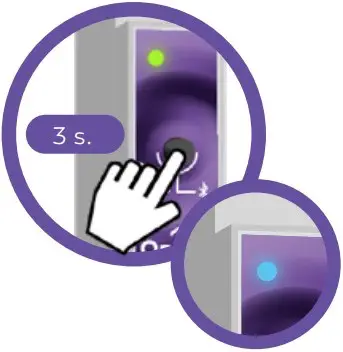
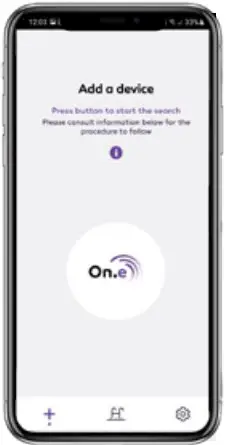
ADDING UP TO 3 “ON.E” DEVICES IN THE “ON.E” APPLICATION
- In the On.e application, select the tab at the bottom of the page. 3 s.
- On the product, keep the push button pressed for a minimum of 3 seconds 3s The LED will flash blue indicating that it is ready to be added to the On.e application within the next 3 minutes.
- In the On.e application, click on the large On.e button to start the search.
- Congratulations, the product will now work with your On.e smartphone application!
As your device is now recognized by the application, it is no longer necessary to repeat this operation. The On.e application will automatically connect to the device the next time it is opened after selecting it. However, make sure that your smartphone is close enough to detect the On.e product.
 Filtration
MAIN SCREEN:
The main screen offers the essential features: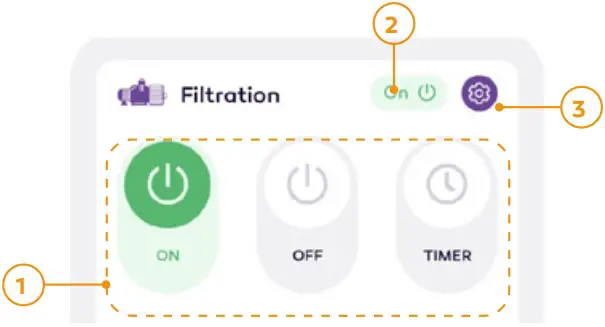
| N° | DESCRIPTION |
| 1 | Choice of operating mode |
| 2 | Indication of the control status (on/off) of the power relay |
| 3 | Access to the filtration configuration |
FILTRATION CONFIGURATION
The filtration configuration enables programming of the timer in TIMER mode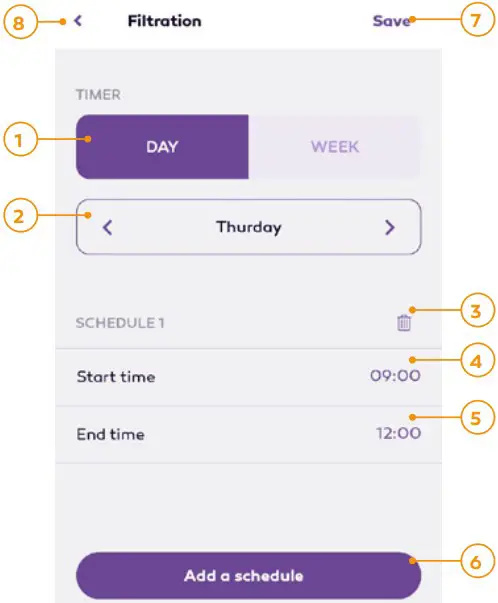
| N° | DESCRIPTION |
| 1 | Selection of the timer type:Day: Enables to set a different timer for every day of the weekWeek: Enables to set the same timer for every day of the week |
| 2 | Selection of the day of the week to be set (day timer type only) |
| 3 | Delete the schedule |
| 4 | Adjust the starting time of the filter pump in the schedule |
| 5 | Adjust the stopping time of the filter pump in the schedule |
| 6 | Add an operating schedule for the filter pump |
| 7 | Save the changes to be taken into account by the device |
| 8 | Return to the main screen of the On.e application |
Lighting
MAIN SCREEN:
The main screen offers the essential features:
| N° | DESCRIPTION |
| 1 | Choice of operating mode |
| 2 | Indication of the control status (on/off) of the power relay |
| 3 | Access to the lighting configuration |
CONFIGURATION OF THE LIGHTING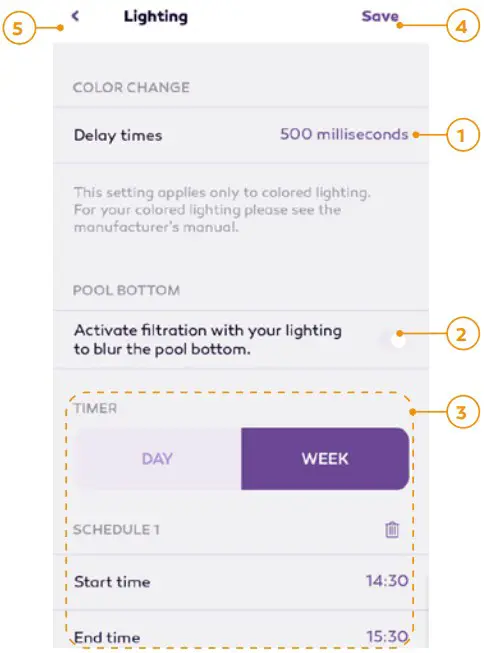
| N° | DESCRIPTION |
| 1 | For standard commercial color projectors, where a momentary interruption in its power supply causes the color program to change. The duration to be programmed via the application is usually indicated in the color projector’s manual. |
| 2 | Enables/disables the “Pool bottom” function |
| 3 | Programming the timer for the lighting TIMER mode (see 4.2.1). The timer is programmed in the same way as the Filtration timer (see 5.2.2) |
| 4 | Save the changes to be taken into account by the device |
| 5 | Return to the main screen of the On.e application |
General information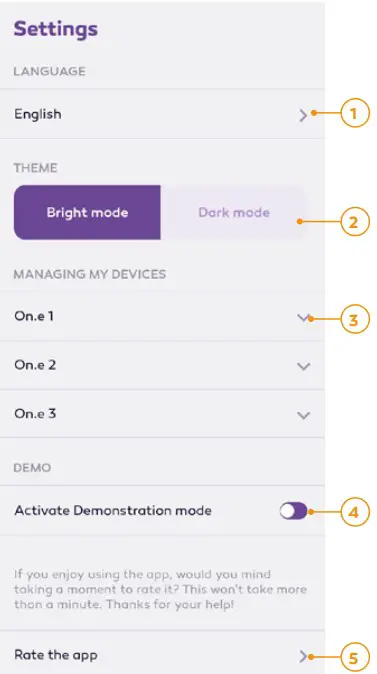
| N° | DESCRIPTION |
| 1 | Language selection.By default, the application selects the phone language. |
| 2 | Selecting the application’s color theme. |
| 3 | Enables to delete the product from the On.e application, or to restore all device settings to their original configuration (reset). |
| 4 | Enables/disables the demo mode of the On.e applicationThe demo mode enables to use the On.e application without a device. The password: “demo” |
| 5 | This link will redirect you to Google Play or the App Store to rate this application. The 4 developers from Bordeaux (France) who made this application thank you in advance for your feedback. |
MAINTENANCE
General
The LED display is turned off:
| POSSIBLE CAUSES | RECOMMENDATIONS AND SOLUTIONS |
| The circuit breaker of the filterpump is OFF | Raise the lever of the filter pump circuit breaker.Check the rating of your motor protection. If the problem persists, have your installation checked by a professional. |
| The product is not powered. | Measure the supply voltage at the circuit breakeroutput of the filter pump.It must be between 207 V and 253 V.Ü Then, switch-off and switch-on the product.If the problem persists, return the product to your supplier |
The On.e product is not on time:
| POSSIBLE CAUSES RECOMMENDATIONS AND SOLUTIONS | |
| The On.e product has remained disconnected for very long. | Select the product on the On.e application once. The time is then automatically reset. |
Filtration
The filter pump is not operating:
| POSSIBLE CAUSES | RECOMMENDATIONS AND SOLUTIONS |
| The operating mode is OFF, the product LED is red. | Set the operating mode to ON (product LED green). |
| The circuit breaker of the filter pump is OFF upstream. | Raise the lever of the filter pump circuit breaker If the problem persists, return the product to your supplier. |
| The operating program is TIMER (White LED), and the timer is not programmed to operate at the current time. | Change the setting of the operating program so that it operates as you desire. |
The filter pump does not stop:
| POSSIBLE CAUSES | RECOMMENDATIONS AND SOLUTIONS |
| The operating mode is ON, the product LED is green. | Set the operating mode to OFF (product LED red). |
| The operating program is set to OFF, or to TIMER whose timer is set to turn off the pump at the current time. | Make sure that there is no electrical connection problem on the terminal board of the On.e product. If the problem persists, return the product to yoursupplier. |
| The “pool bottom” function is activated (Lighting parameter via the On.e smartphone application), and the lighting is switched on. | The pump can be stopped:By switching off the lighting (operating mode OFF).Or by modifying the operating mode of the filter pump.Or by disabling the “pool bottom” function which is enabled (Lighting parameter via the On.e smartphone application). |
Lighting
The lighting does not work:
| POSSIBLE CAUSES | RECOMMENDATIONS AND SOLUTIONS |
| The operating mode is set to OFF. | Set the operating mode to ON using your On.e smartphone application. |
| The circuit breaker of the lighting is on OFF upstream. | Raise the lever of the lighting circuit breaker.If the problem persists, return the product to your supplier |
| The operating program is TIMER, and the timer is not programmed to operate at the current time. | Change the setting of the operating program, using your On.e smartphone application, so that it operates as desired. |
The lighting does not turn off:
| POSSIBLE CAUSES | RECOMMENDATIONS AND SOLUTIONS |
| The operating mode is set to ON. | Ü Set the operating mode to OFF using your On.e smartphone application. |
| The operating program is set to OFF, or to TIMER whose timer is set to turn off the lighting at the current time. | Ü Make sure that there is no electrical connection problem on the terminal board of the On.e product.If the problem persists, return the product to your supplier. |
Bluetooth®
I am unable to connect the On.e product to the On.e application:
| POSSIBLE CAUSES | RECOMMENDATIONS AND SOLUTIONS |
| The smartphone application has reached the maximum number of supported devices (3 devices max) | Delete a device from the application (see 5.4) before adding a new one(see 5.1.2). |
| Bluetooth® is not enabled on your smartphone. | Enable Bluetooth® connectivity on your smartphone, usually accessible from the notifications area. |
| There are too many Bluetooth® devices around. | Move away from other Bluetooth® devices, or try again laterAs soon as the area has fewer Bluetooth® devices around, the connection will be possible again. |
| The On.e product is too far from the smartphone. | Get closer or move the box to a more accessible area of the smartphone’s area of use. Depending on the weather (e.g. humidity in the air), the radio range may fluctuate slightly. |
| The On.e is installed on a product that emits interfering radio waves in the Bluetooth® radio frequency. | Move the boxes away from one another. |
| Another smartphone is already connected to the On.e product | Close the application on the connected smartphone. |
Preventive maintenance
- The tightening of the terminal board should be checked once a year to ensure the safety of the electrical contacts.
- Never place chemicals (e.g. acid containers) under or near the devices. Their presence creates oxidation over time. These oxidations may affect the product life of the appliance as well as its operational safety.
- Make sure that the watertight door of the electrical box is always closed. Only open it intermittently, during an intervention.
TECHNICAL SPECIFICATIONS
| CHARACTERISTICS | NOTES | |
Power supply of the product | Voltage | 230VAC (min. 207 /max. 253) |
| Power | 1.5W max. | |
| Network frequency | 47-63Hz | |
| Cabling section | Max. 2.5 mm² (flexible and rigid) | |
| Terminal boards tightening torque | Max. 0.5 Nm | |
| Service life of the internal battery | Year | > 3 years without power. |
| Bluetooth® | Version | Bluetooth LE 5.2 |
| Free field range noted | 40 to 70 meters | |
Filtration pump outlet | Voltage | 230VAC (min. 207 /max. 253) |
| Current/Intensity | Max 7 A (2 HP pump) | |
| Cabling section | Max. 2.5 mm² (flexible and rigid) | |
| Terminal boards tightening torque | Max. 0.5 Nm | |
Lighting Outlet | Voltage | 230VAC (min. 207 /max. 253) |
| Power | Max 300 VA | |
| Cabling section | Max. 2.5 mm² (flexible and rigid) | |
| Terminal boards tightening torque | Max. 0.5 Nm | |
| Product environment | Ambient temperature | -10 à +40°C |
| Altitude | max. 3000m | |
| Protection rating | min. IP55 (electrical box) | |
PROTECTION OF THE ENVIRONMENT
Protection of the environment is essential. Our company is strongly committed to it. Our products are designed and manufactured with high quality, environmentally friendly, reusable and recyclable materials and components. However, the different parts that comprise them are not biodegradable. European environmental directives (WEEE) regulate the end-of-life of electronic equipment. The objective is to reduce and recycle waste, avoid the dangerousness of their components and encourage the reuse of products.
COMPLIANCE
The product complies with the following directives:
- LV Directive 2014-35-EU (Electrical safety)
- EMC Directive 2014-30-EU (Electromagnetic Compatibility)
- Directive 2011-65-UE (Use of hazardous products)
- RED Directive 2014-53-UE (Radio communicating object)
- WEEE Directive 2012-19-UE (Waste Electrical and Electronic Equipment)
- NF EN 60335-1:2013, NF EN 60335-1/A14:2019: Electrical domestic and similar appliances – safety
- NF EN 62368-1:2020: Audio, video, information and communication technology equipment – Part 1: Safety requirements
WA Conception
15 route de Cablanc
24100 CREYSSE – FRANCE
[email protected]
www.wa-conception.com
 conception.com - This website is for sale! - conception art Resources and Information.
 Page d'accueil - WA Conception