
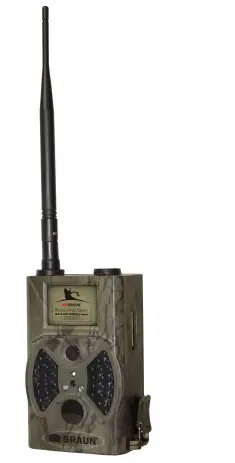
BRAUN 57660 Scouting Cam BLACK300phone
Introduction
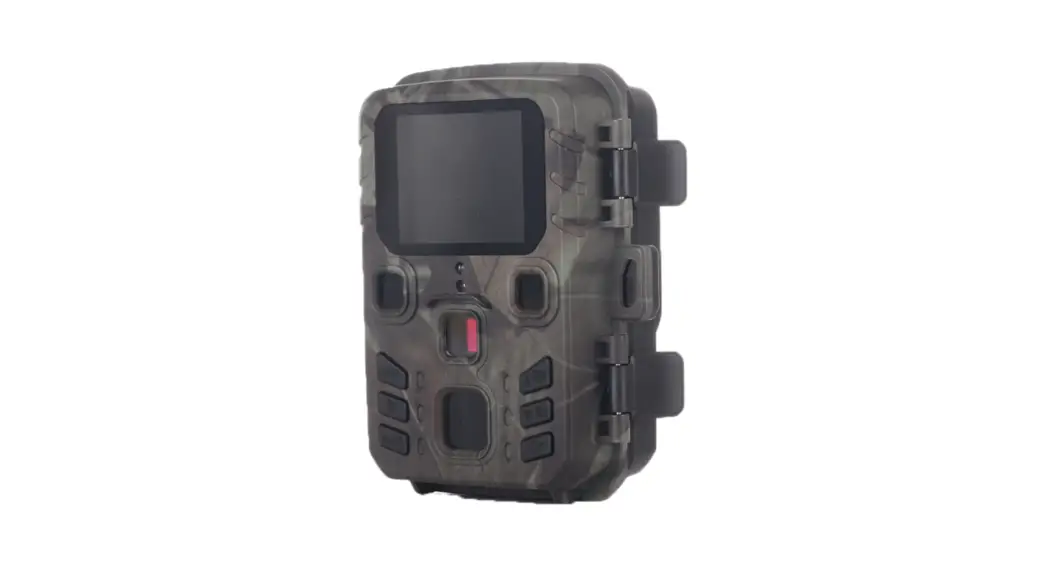
Thank you for choosing one of our highly qualified GSM Scouting Trail Camera. This 12MP HD digital camera was developed in-house based on feedback and requirements from global customers.
Application
This digital camera, with its camouflage appearance, is ideal for home security, warehouse surveillance and particularly monitoring wild animals. It is easy to install and can be used to capture photos manually or long-term videos.
- Surveillance camera for home, office, construction site, warehouse, etc.
- Motion-triggered infrared night vision
- Animal observation
Power Supply
AA Alkaline Batteries
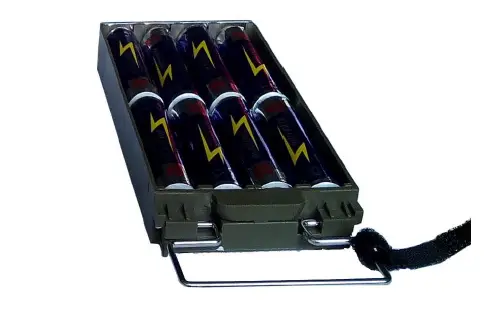
This camera can either work with 4 or 8 AA alkaline batteries.
Please note that the voltage of rechargeable AA batteries (1.2V) is insufficient to power this device. Batteries should be inserted as indicated inside the battery case. Solar Panel
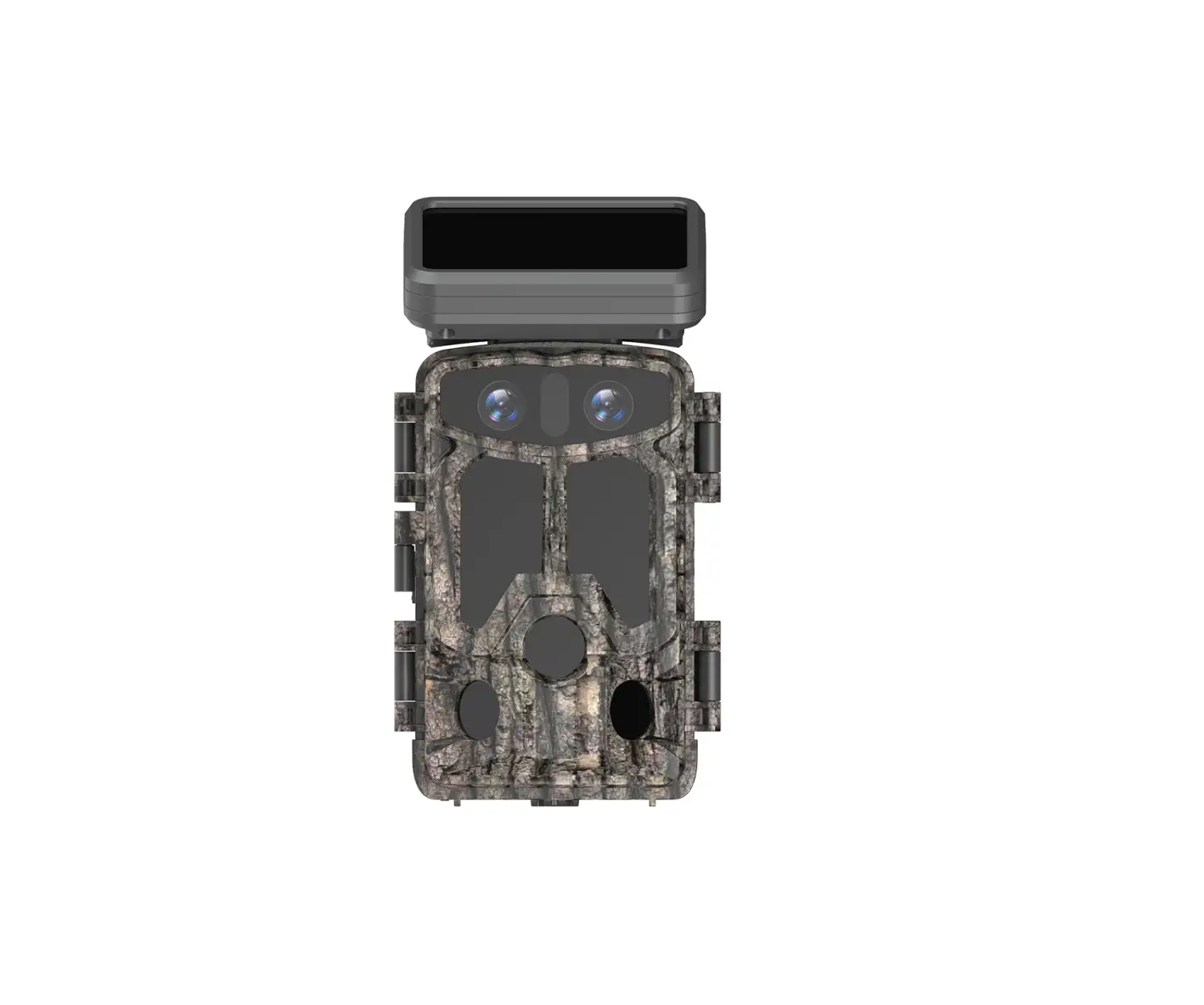
For best user experience, this camera can work with most standard 6V lithium batteries charged by solar panels. We strongly recommend the original solar panel. Power Adapter
This camera can also be powered by an external 6VDC adapter. Remove the alkaline batteries when using the power adapter.
Caution
- Insert the TF card with the power switch in OFF position.
- Do not insert or remove the TF card with the power switch in ON position.
- Format the TF card in the camera when first used.
- The camera is in USB mode when connected to a USB port of your computer. In this case, the TF card is displayed as removable disk.
- Ensure sufficient power when upgrading the firmware; otherwise malfunctions are possible.
Key Features
| 1 | Built-in 2.0″ TFT color screen to review photos and videos on camera |
| 2 | 36 IR LEDs with range of 20 meters |
| 3 | Programmable 5/8/12 megapixel high-definition resolution |
| 4 | Color images during the day; black and white at night |
| 5 | Quick trigger time: 1.1s |
| 6 | Multi-shot photos: 1, 3, 6, 9 |
| 7 | Adjustable delay between recordings: 1/5/10/30 seconds/minutes |
| 8 | Adjustable video length: 10/30/60/90 seconds |
| 9 | With 8 AA alkaline batteries max. standby time 6 months |
| 10 | Operating temperature: -30°C to 70°C |
| 12 | Timer for camera to work only during preset time period per day |
| 13 | Date stamp with time, temperature and moon phase |
| 14 | Sound recording |
| 15 | Supports 2G SIM cards for real-time photos |
| 16 | MMS/SMTP function to transmit photos to 1-4 preset mobile phones or emails |
| 17 | SMS to enable camera to capture/send photo, switch on/off, get number of captured images and battery status |
Camera Overview
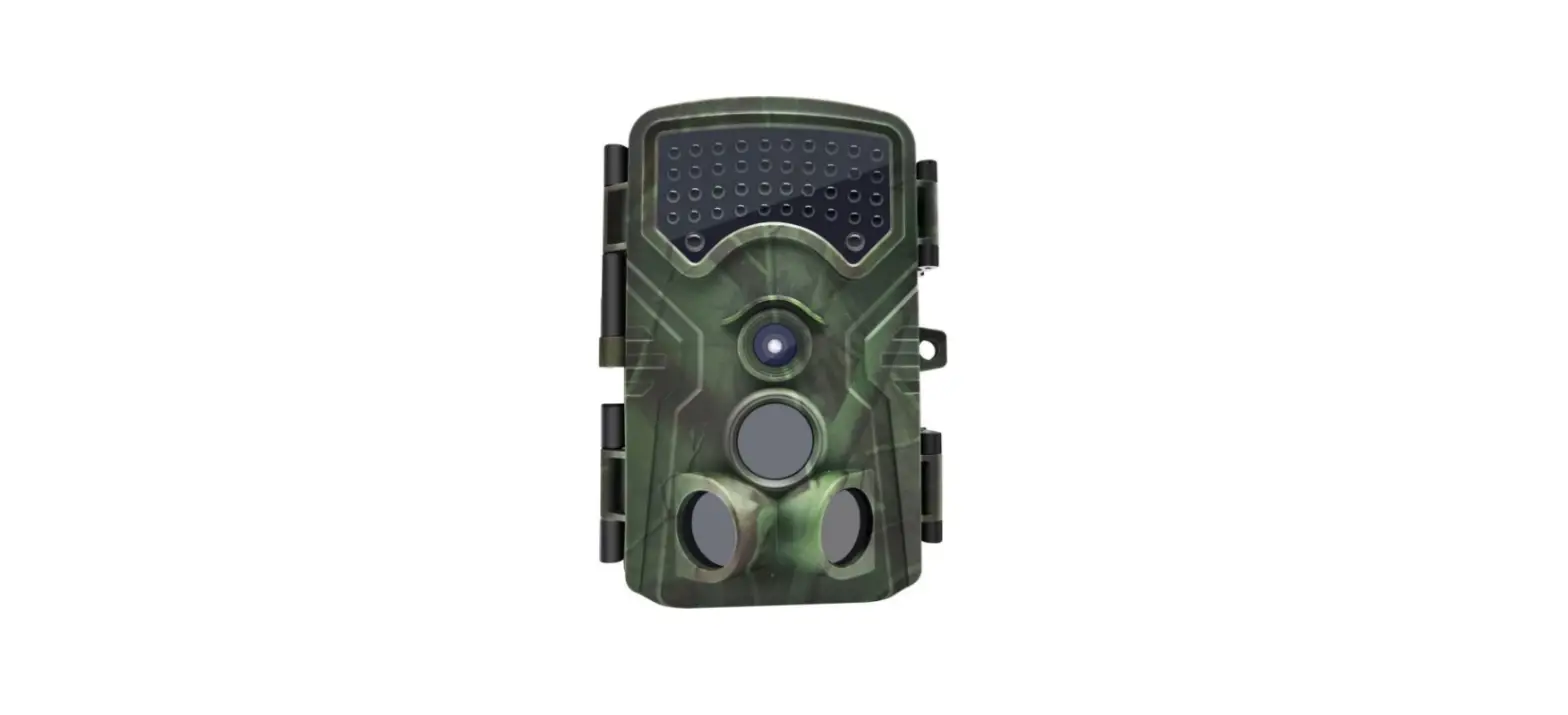
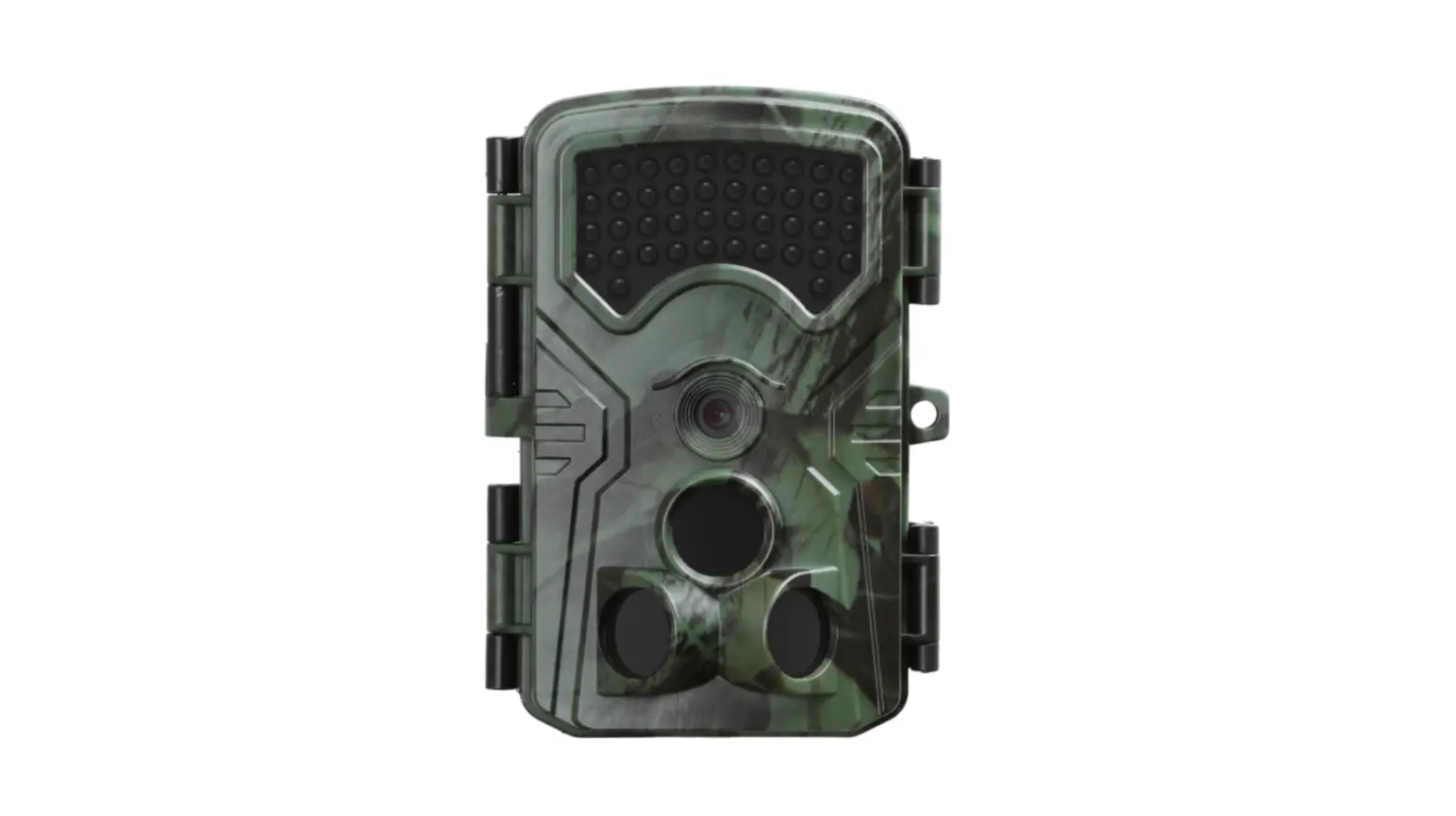
Front View
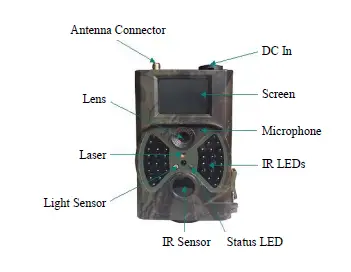
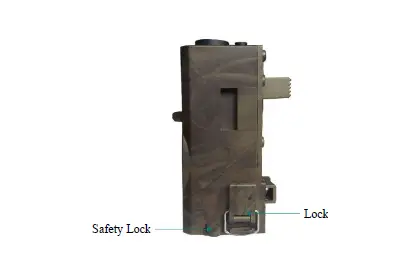
Side View (Right)
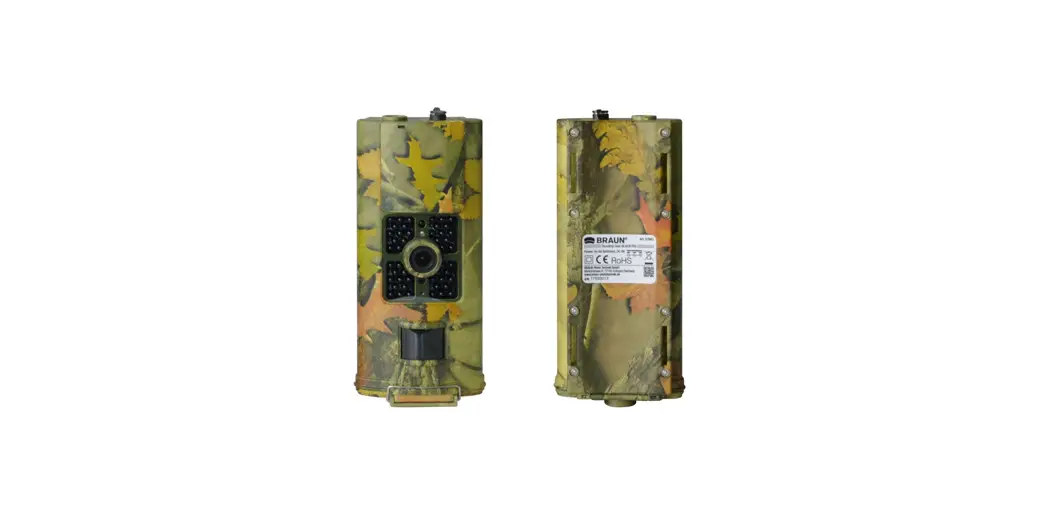
Rear View
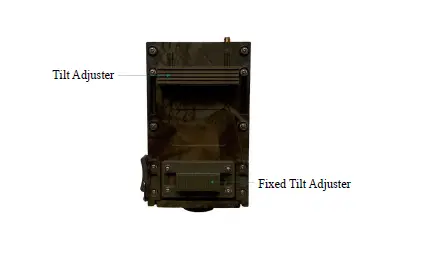
Bottom View
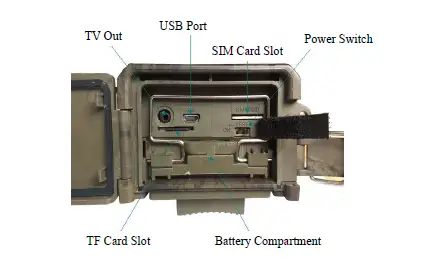
Remote Control
The infrared remote control is primarily used to customize settings. The maximum range is 9 meters.
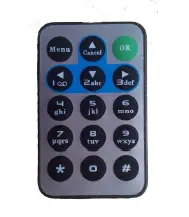
Note: Press * for laser pointer.
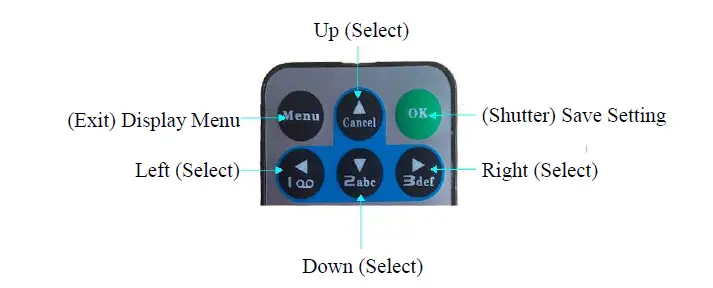
Note:
- Press OK to capture a photo or start video recording.
- Press Right to preview photo or video recording.
- Press Up or Down to view photos.
- Press Left to start video preview, press again to stop video preview.
Screen Information Display
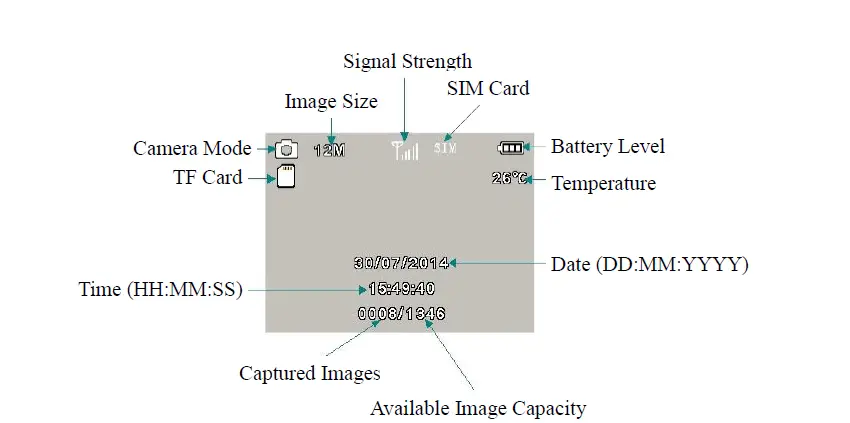
Note: To activate MMS or SMTP functions, the camera must find a signal and SIM card must be inserted.
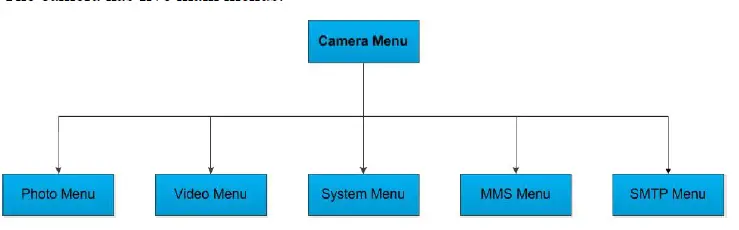
The camera has five main menus:
Quick Operation
Inserting Batteries
Inserting TF and SIM Cards
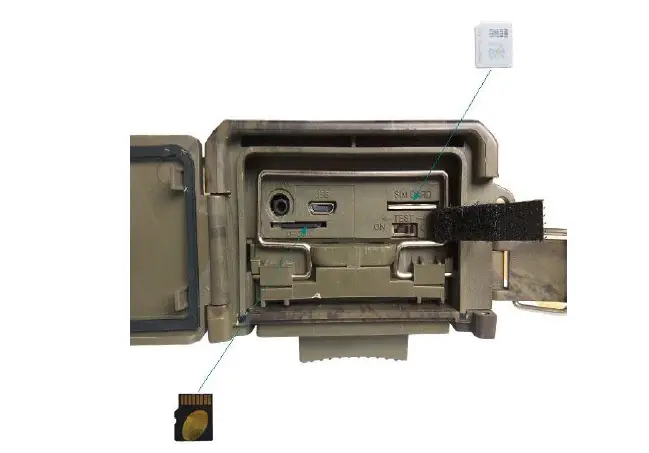
Note: To activate the MMS or SMTP functions, save settings file Parameter.dat under MMSCONFIG to TF card.
Powering On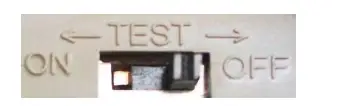
To power the camera on, slide the Power switch to TEST or ON position.
TEST
In TEST mode the screen lights up. The following operations are available via remote control:
- Settings in Camera Menu, including Photo, Video and System Menus
- Capturing photo or video
- Viewing photos or videos
ON
In ON mode, the screen is dark, the camera works automatically.
3.4 Menu Settings
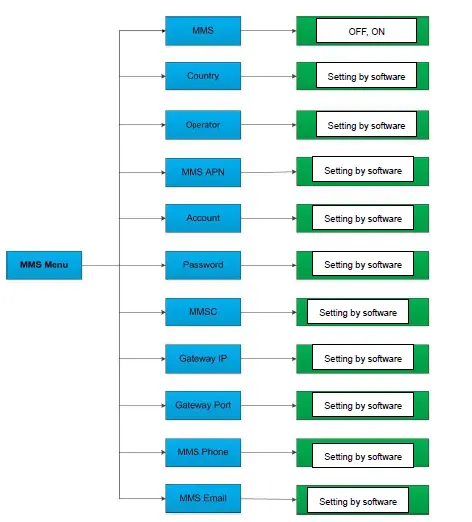
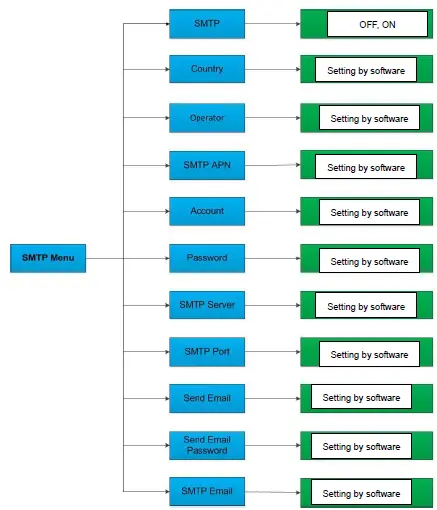
Settings in Photo, Video and System Menus can be adjusted by remote control; settings in MMS and SMTP Menus can only be adjusted by MMSCONFIG software on the CD.
Photo Menu Settings
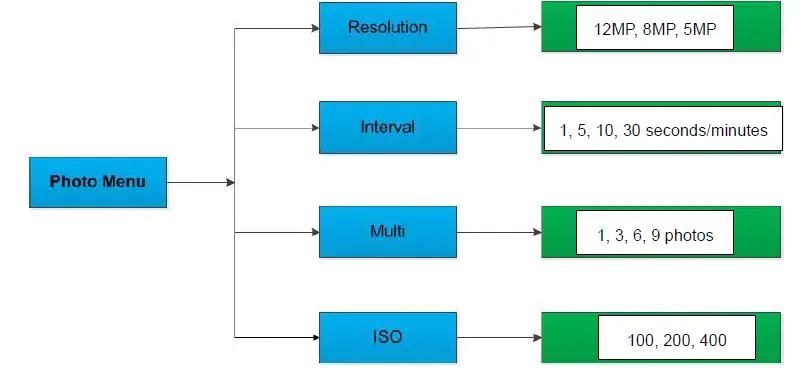
Description:
| Submenu | Content | Description |
| Resolution | 12MP, 8MP, 5MP | Photo size |
| Interval | 1/5/10/30 s/min | Waiting time to next capture |
| Multi | 1/3/6/9 | Number of photos captured in succession |
| ISO | 100, 200, 400 | Camera exposure level |
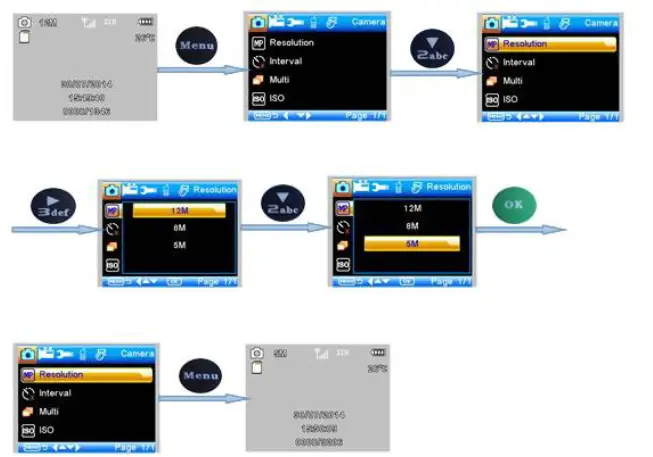
Note:
- Mode is Camera or Camera &Video.
- Interval, Multi and ISO settings follow the same pattern.
Video Menu
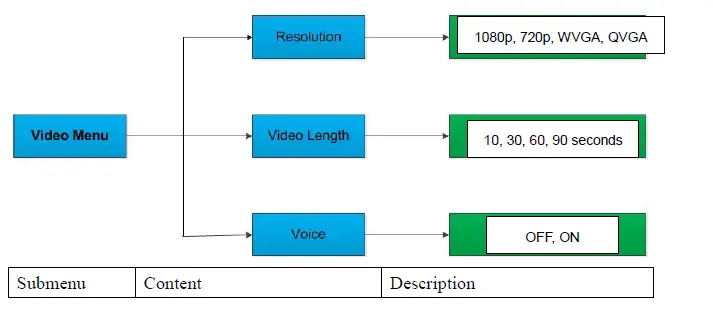
| Resolution | 1080p, 720p, WVGA, QVGA | Video size |
| Video Length | 10s, 30s, 60s, 90s | Length of the video in seconds |
| Voice | On, Off | If On, video sound is recorded |
To change Resolution from 1080p to 720p press the following buttons on the remote control: 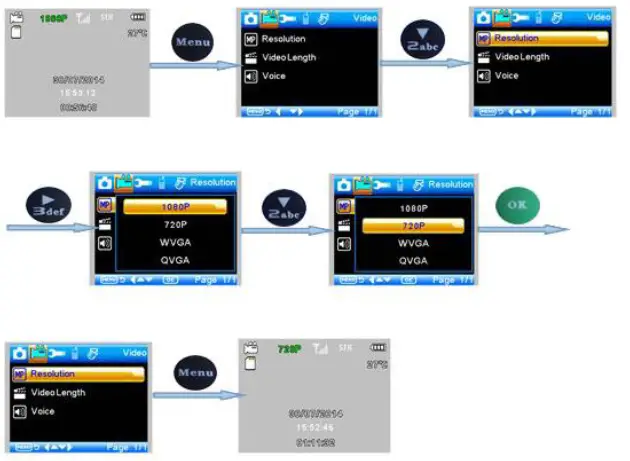
Note:
- Mode is Video.
- Video Length and Voice settings follow the same pattern.
System Menu
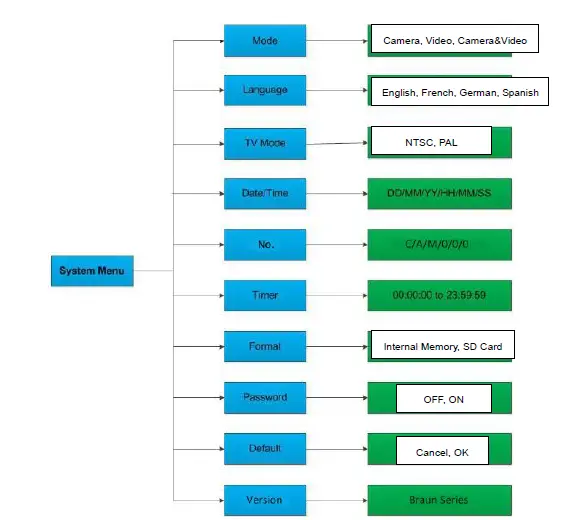
| Submenu | Content | Description |
| Mode | Camera, Video, Camera&Video | Capturing photo, video, photo and video |
| Language | English, French, German, Spanish | Camera menu language |
| TV Mode | NTSC, PAL | TV playback mode |
| Date/Time | 31-07-2014 15:49:40 | Date-Month-Year Hour:Minute:Second |
| Password | ON, OFF | Password protection |
| Password | **** | If ON, 4 digits |
| Timer | On, Off | If On, camera only works in specified period |
To change Mode from Camera to Video press the following buttons on the remote control:
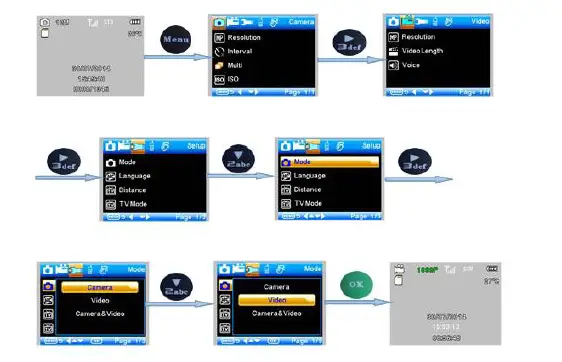
Note:
- Language, Distance, TV Mode, Format and Default settings follow the same pattern.
- For Date/Time, Timer and Password settings:
Press or to select the value.
Press to enter the next submenu. - After selecting Default, the setting is:
| Setting | Default | Items |
| Mode | Camera | Camera, Video, Camera&Video |
| Resolution (Camera) | 12M | 12M, 8M, 5M |
| Delay | 1 second | 1-30 seconds, 1-30 minutes |
| Multi | Single | Single, 3, 6, 9 Pictures |
| ISO | 400 | 100, 200, 400 |
| Resolution (Video) | 1080p | 1080p, 720p, WVGA, QVGA |
| Video Length | 10s | 10s, 30s, 60s, 90s |
| Date/Time | Same as last time | YY/MM/DD, MM/DD/YY, DD/MM/YY Adjust |
| Language | English | English, French, German, Spanish, Russian |
| Timer | 00:00:00 to 23:59:59 | Adjust |
| Format | Internal Memory | Internal Memory, SD Card |
| TV Mode | NTSC | NTSC, PAL |
| Password | Off | Off, On |
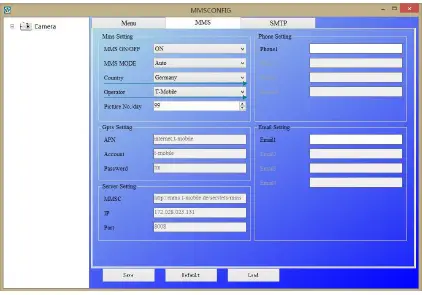
MMS Menu
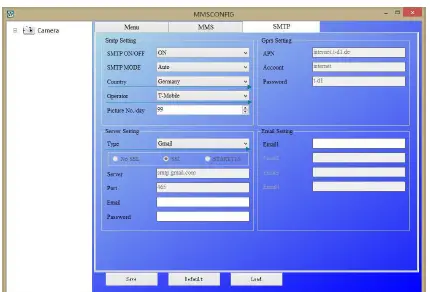
SMTP Menu
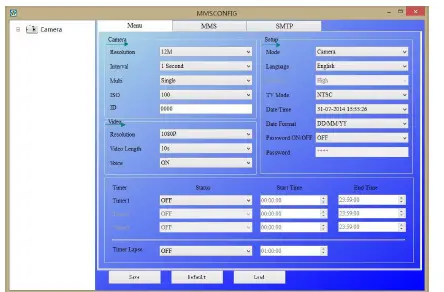
MMSCONFIG Setting
- Load the CD in the computer.
- Run MMSCONFIG.exe file from MMSCONFIG folder.
- Adjust Camera, Video and System Menu settings.
 Note: After adjusting the settings with the remote control they can be skipped.
 - Adjust MMS Setting
A. MMS Mode: Auto
In Auto MMS Mode, select:- Country
- Operator
- Add phone numbers for receiving photos
- Add email addresses for receiving photos
 MMS Mode: Manual
If there is no configured information to select, select Manual MMS Mode. Contact SIM card provider to obtain APN, Account, Password, MMSC, IP and Port information; then - phone number for receiving photos
- Add email address for receiving photos
- Adjust SMTP Setting
Sending images to email accounts.
A. SMTP Mode: Auto In Auto SMTP Mode, select:- Country
- Operator
- Type of email
- Add sender email address on the left
- Add sender email address password on the left
- Add receiver email addresses on the right
 B. SMTP Mode: Manual
If there is no configured information to select, select Manual SMTP Mode. Contact SIM card provider to obtain APN, Account, Password information; contact sender email provider to obtain Server, Port information. - Add sender email address on the left
- Add sender email address password on the left
- Add receiver email addresses on the right
 Note: After adjusting the settings with the remote control they can be skipped.
 MMS Mode: Manual
 B. SMTP Mode: Manual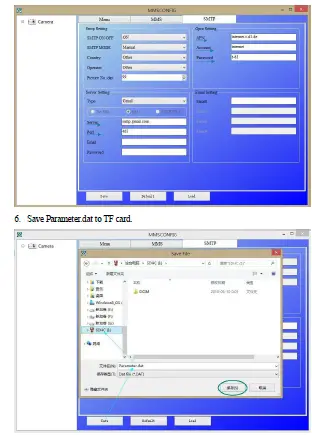
SMS Control
Control the camera by sending SMS:
- Send SMS code
| Code | Function | Description |
| *530* | Camera Start | Start Working |
| *531* | Camera Sleep | Stop Working |
| *500* | Capture | Camera captures a photo and sends it to the configured phone or email |
| *505* | Capture and get pic (MMS mode) | Camera captures a photo and sends it to the current phone |
| *520* | Get Pic information | Camera sends a text with number of photos, SD card capacity, battery level |
Firmware Upgrade
This camera is equipped with an automatic upgrade function. Upgrade is only necessary if improved firmware is available. Follow the steps below:
- Unzip the upgrade file.
- Copy file FWF900.bin to TF card.
- Insert the TF card in the camera.
- Power on the camera (in Test Mode).
- The camera will read the TF card and update automatically. During upgrade process the screen is black.
- The screen will light up after successful upgrade.
- Remove the TF card and insert in PC. Delete file FWF900.bin on TF card (otherwise the camera will enter upgrade mode when powered on again).
- Insert the TF card in the camera.
Specifications
| Image Sensor | 5 megapixels color CMOS |
| Memory | TF Card up to 32GB |
| Lens | F=3.1; FOV=60° |
| Size | 145mm * 80mm * 55 mm |
| IR Filter | Fully automatic IR filter |
| TFT Display Screen | 2.0” |
| IR LEDs | Black invisible 940nm |
| PIR Sensor Sight Angle | 60° |
| PIR Sensing Distance | 20 meters |
| Number of IR LEDs | 36 LEDs |
| Max Night Vision Range | 20 meters |
| Trigger Speed | 1.1 seconds |
| Trigger Interval | 1/5/10/30 sec/min (default 1 sec) |
| Image Resolution | 12MP/8MP/5MP |
| Multiple Photos per Detection | 1/3/6/9 |
| Video Resolution | 1080p/720p/VGA |
| File Format | JPEG/AVI |
| Date Time Stamp | Yes |
| Moon Phase Stamp | Yes |
| Exposure | Auto |
| Password Security | 4-digit PIN code |
| Frequency Bands | 2G GSM 850/900/1800/1900 MHz |
| Remote Control | SMS |
| GPRS Transmission | Data transfer by email |
| MMS to Phone | 1-4 phone numbers |
| MMS to Email | 1-4 email addresses |
| Periodic Shot | 1 second to 24 hours |
| Stand-By Current | 0.2mA |
| Stand-By Time | 6 months |
| Interface | TV out (NTSC/PAL), USB, SD card slot, 6VDC In |
| Fixing Method | Belt, Tripod |
| Operating Temperature | -30 to +70°C |
| Power Supply | 8 × AA batteries |
| Camera Socket | Yes |
| Waterproof | IP54 |
| Certifications | FCC, CE, RoHS |
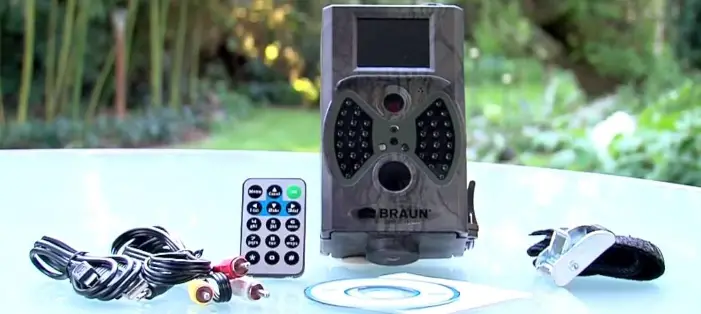
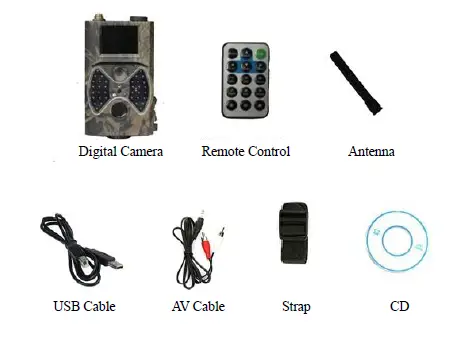
Packing List
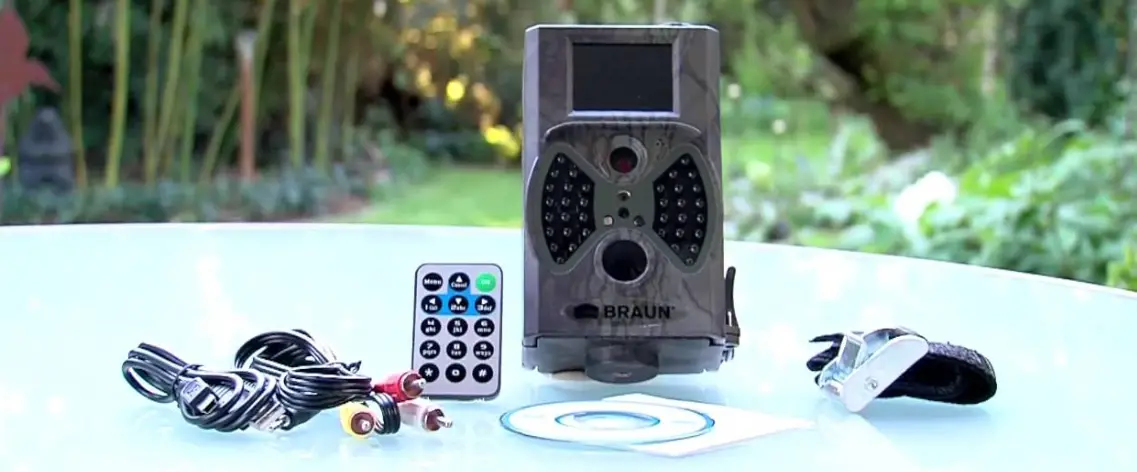
 BRAUN Photo Technik Germany – Since 1915