650261 12V Mini Control Box
Product Information: YNN + 12V Mini Control Box
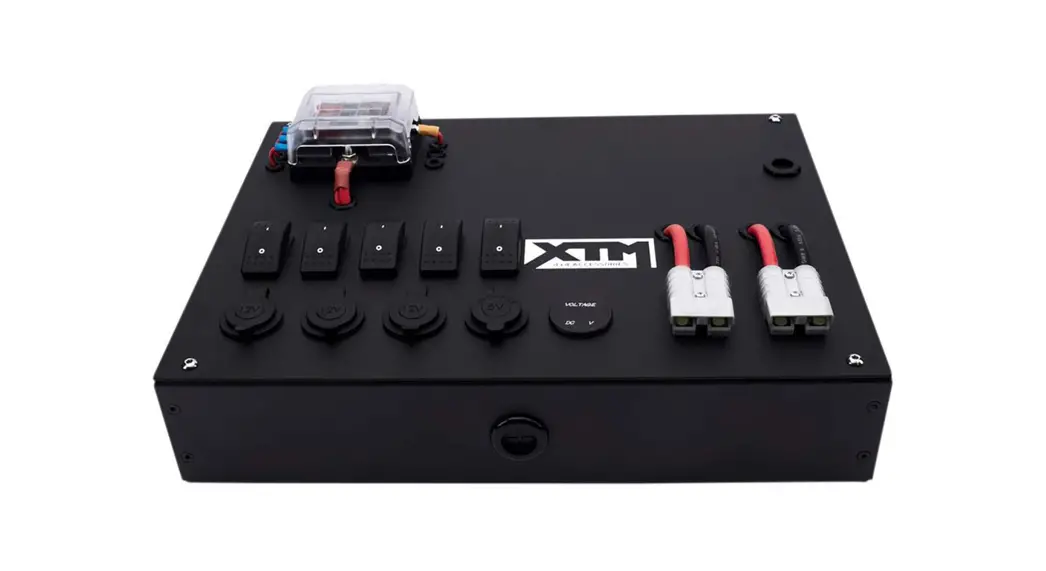
The YNN + 12V Mini Control Box is a pre-wired DIY solution for
powering most of your 12V accessories in one central location. It
is suitable for most 4WD, trailer or caravan applications. The
control box features 2 x quick connect plugs, 4 x USB ports, 1 x
Type-C port, 1 x QC3.0 port, 3 x CIG sockets, and an LED voltmeter
with multi-colour display. The box comes with a built-in LED light
and has a maximum cumulative amp of 50A. It is pre-wired with a
fuse and circuit breaker for quick connect plug and has an
automatic reset feature.
Specifications:
- Maximum Cumulative Amp: 50A
- Voltmeter: Multi-colour display, d.c. 12V
- USB Port(each): d.c. 5V 2.1A outlet
- Type-C Port: d.c. 5V 18W outlet
- QC 3.0 Port: d.c. 5V 18W outlet
- Cig Socket (each): d.c. 12V 15A
- Quick Connect Plug: 50A total (support max 50A when single
use) - Pre-wired Fuse: 30A for 3 x Cig sockets
- Circuit Breaker for Quick Connect Plug: Automatic reset,
50A - Operating Temperature:
- Box Dimensions: 180mm x 120mm x 60mm
- Weight:
Features:
- 12V Control Panel, pre-wired suitable for most 4WD, trailer or
caravan applications - Built-in LED light
- Input Connection: 50A quick connect plug with 90cm cable
- LED voltmeter with multi-colour display
Safety Warnings:
- Keep children and pets away from the control box.
- Installation by a licensed auto electrician is
recommended. - Always use appropriate personal protective equipment when
installing. - Always disconnect any power source, eg car battery before
commencing any electrical work, to ensure person and vehicle
safety. - Do not insert any body parts or tooling into any
components. - Ensure all exposed wires are covered.
- Do not expose the control box to wet weather.
- Provide as much ventilation as possible for the control box to
decrease heat accumulation.
Product Usage Instructions:
- Ensure the installation area is a flat surface and
accessibility to the unit is not obstructed. - Ensuring the unit is level use two M4 screws to secure. We
recommend predrilling the mounted surface first and fastening the
screws by hand screwdriver only. Do not over tighten the mounting
screws. - Connect the 12Volt supply via the input quick connect plug.
This is either a permanent supply from a battery or it could also
be from an extension cable of quick connect plug from a portable
battery box when using the unit for portable use. The unit is now
ready for use. - Once complete, the two switch indicators light up while the
power goes into the panel. If there is no power, check cabling,
wiring, 12v switch is on, test using a 12v multimeter, or contact a
licensed auto electrician. - If the fuse needs to be replaced, disassemble the unit from the
wall or other surface, unscrew the screws to open the box and take
out the melted fuse. Replace with a new 30A fuse.
YNN
+ 12V MINI CONTROL BOX
Instruction Manual
’30/5
PLU: 650261 CODE: DT220719 Manufactured and packaged for SRGS PTY LTD ABN 23 113 230 050 6 Coulthards Avenue, Strathpine QLD 4500, Australia MADE IN CHINA
#”$,
YNN
+ 12V MINI CONTROL BOX
Instruction Manual
+ The XTM 12V mini control box is the perfect pre-wired DIY solution to power most of your 12V accessories in one central location. Please read and understand all the instructions carefully before installation and operation.
120MM
+ SPECIFICATIONS
MAXIMUM CUMULATIVE AMP: VOLTMETER: USB PORT(EACH): TYPE-C PORT: QC 3.0 PORT: CIG SOCKET (EACH): QUICK CONNECT PLUG: PRE-WIRED FUSE: CIRCUIT BREAKER FOR QUICK CONNECT PLUG: OPERATING TEAMPERATURE: BOX DIMENSIONS: WEIGHT:
50A MULTI-COLOUR DISPLAY, d.c. 12V d.c. 5V 2.1A OUTLET d.c. 5V 18W OUTLET d.c. 5V 18W OUTLET d.c. 12V 15A 50A TOTAL (SUPPORT MAX 50A WHEN SINGLE USE) 30A FOR 3 X CIG SOCKETS
AUTOMATIC RESET, 50A
-5-45°C 18 X 12 X 6CM 845G
180MM
60MM
+ FEATURES
+ 12V CONTROL PANEL, PRE-WIRED SUITABLE FOR MOST 4WD, TRAILER OR CARAVAN APPLICATIONS
+ FEATURES 2 X QUICK CONNECT PLUGS, 4 X USB PORTS, 1 X TYPE-C PORT, 1 X QC3.0 PORT, 3 X CIG SOCKETS , LED VOLTMETER WITH MULTI-COLOUR
+ BUILT-IN LED LIGHT + INPUT CONNECTION: 50A QUICK CONNECT PLUG WITH 90CM CABLE
Voltmeter Mounting Point Voltmeter Switch
4 x USB ports 1 x TYPE-C port 1 x QC3.0 port Quick Connect Plug
Output/Input
Quick Connect Plug Input ( Connected to a suitably fused output from a power source to save wires melting on the product)
LED Lights
3 x CIG Sockets
Light Switch
Mounting Point
Quick Connect Plug Output/Input
1
1
YNN
+ SAFETY WARNINGS
+ Keep children and pets away from the control box. + Installation by a licensed auto electrician is recommended. + Always use appropriate personal protective equipment when installing. + Always disconnect any power source, eg car battery before commencing any electrical work, to
ensure person and vehicle safety. + Do not insert any body parts or tooling into any components. + Ensure all exposed wires are covered. + Do not expose the control box to wet weather. + Provide as much ventilation as possible for the control box to decrease heat accumulation.
+ INSTALLATION INSTRUCTIONS
+ Ensure the installation area is a flat surface and accessibility to the unit is not obstructed.
+ Ensuring the unit is level use two M4 screws to secure. We recommend predrilling the mounted surface first and fastening the screws by hand screwdriver only. Do not over tighten the mounting screws.
+ Connect the 12Volt supply via the input quick connect plug. This is either a permanent supply from a battery or it could also be from a extension cable of quick connect plug from a portable battery box when using the unit for portable use. The unit is now ready for use.
+ Once complete, the two switch indicators light up while the power go into the panel. If there is no power, check cabling, wiring, 12v switch is on, test using a 12v multimeter, or contact a licensed auto electrician.
+ FUSE REPLACING INSTRUCTION
+ Disassemble the unit from wall or other surface
+ Unscrew the screws to open the box
+ Take out the melted fuse and replace with a new 30A fuse
+ WARRANTY
Our product is guaranteed to be free from quality and manufacturing defects for a period of 12 months.
If your product becomes defective during this period, SRGS PTY LTD will offer you either a replacement, credit or refund where a product is faulty; wrongly described; different from the sample shown to you or do not do what they are supposed to do.
This warranty will not cover substantially modified product; misuse or abuse of the product contrary to user instructions or packaging label; change of mind and normal wear and tear.
Our goods come with guarantees that cannot be excluded under the Australian Consumer Law. You are entitled to a replacement or refund for a major failure and for compensation for any other reasonably foreseeable loss or damage. You are also entitled to have the goods repaired or replaced if the goods fail to be of acceptable quality and failure does not amount to a major failure.
To claim the warranty, take the product to the front Service Desk of your nearest store of purchase. You will need to show receipt or other proof of purchase. Additional information may be required to process your claim. Should you not be able to provide proof of purchase with a receipt or bank statement, identification showing name, address and signature may be required to process your claim.
Any expenses relating to the return of your product to the store will normally have to be paid by you. For online store purchases, SRGS PTY LTD will pay for the return freight for any product assessed as having a major failure.
The benefits to the customer given by this warranty are in addition to other rights and remedies of the Australian Consumer Law in relation to the goods or services to which this warranty relates.
This warranty is provided by SRGS PTY LTD, 6 Coulthards Avenue, Strathpine QLD 4500, Australia. Phone: 1300 880 764.
1
1