Your vacuum has a built in Thermal Protector that turns the main vacuum motor off if it begins to overheat
- To test if this have been activated > Turn machine On > Turn Brush button On
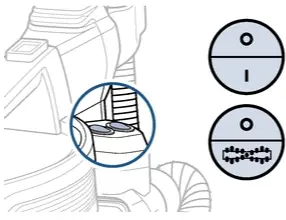
- Is the Brush turning?
- Yes > This indicates the Thermal Protector has been activated > Machine needs to cool down for approximately 30 minutes
- This can be due to dirty Filters or a clogged air path > For steps to resolve > Go to No Suction
- No > Turn OFF & Unplug vacuum
- Run hand along entire length of power cord, it should be smooth
- Check plug for damage
- Is either the cord (not smooth or exposed wires) or plug (prongs) damaged?
- Yes > Contact Us
- No > Check to see if outlet is working
- Test outlet by plugging in a small appliance
- If no power to outlet > Test a different outlet in a separate room
- Reset circuit breaker if needed
- Has this resolved the issue?
- Yes > Great! Glad we can get you back to cleaning!
- No > Contact Us
- Is either the cord (not smooth or exposed wires) or plug (prongs) damaged?
- Yes > This indicates the Thermal Protector has been activated > Machine needs to cool down for approximately 30 minutes