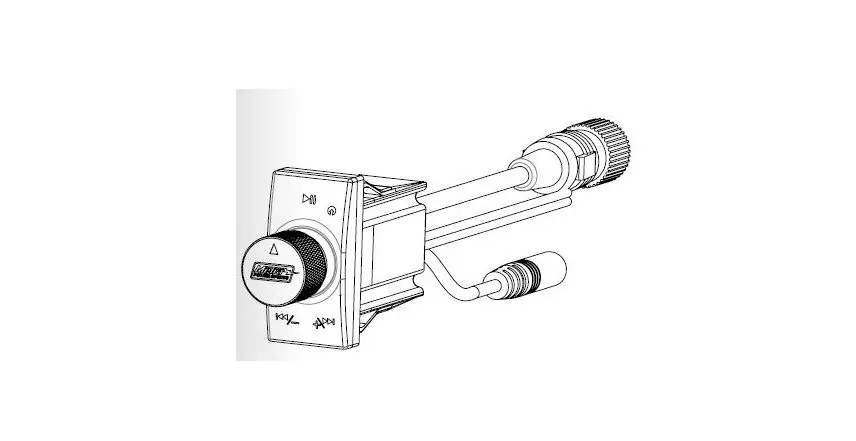
TD25 Bluetooth Audio
Product Information: The product is a Bluetooth-enabled
device with various functions, including playing music, playing
games on a cellphone, answering phone calls, and adjusting bass
settings. It has a Bluetooth icon and displays “CONNRE” when
successfully connected to a Bluetooth device. The device has
multiple buttons for different functions, such as power on/off,
mode selection, volume control, track selection, tuning, and clock
display. It also has ports for USB and AUX connections. Product
Usage Instructions: 1. To use Bluetooth functionality: – Turn
on Bluetooth on your cellphone. – Search for Bluetooth devices and
select “CAR BT” from the list. – Press the “match” or “connect”
button. – Once connected, a Bluetooth icon will appear, and the
word “CONNRE” will be displayed on the screen. – In BT AUD mode,
you can play music, play games on your cellphone, answer phone
calls by pressing the Volume button, and hang up by pressing the
BND button. 2. Power/Mode Function: – Short press the POW/MOD
button to start the device, long press to shut down. – Each short
press will switch between different functions (radio-USB-SD-AUX-BT)
if USB/SD card is inserted. – After pressing for 3 seconds, the
device will automatically enter shutdown or power-on state. 3.
BND/AMS Function: – Repeatedly short press the BND/AMS button to
cycle through FM1, FM2, FM3 radio stations. – Long press for 3
seconds to automatically store the current radio station. – In the
radio interface, short press buttons 1-6 for backward selection of
radio stations, long press to store a station. 4. SEL Function: –
Press the SEL button when the device is powered on to select
different functions: BAS (Bass adjustment), TRE (Treble
adjustment), LOUD (Bass enhancement switch), RTC.OFF (Clock display
switch). 5. VOL+ / VOL- Function: – Rotate the VOL+ button
clockwise to increase the volume (0-40). – Rotate the VOL- button
anticlockwise to lower the volume. 6. TUNE/TRACK Buttons: – Long
press the TUNE/TRACK button (more than 2 seconds) during playback
for fast forward or rewind. – Short press the button during
playback to skip to the next track or go back to the previous
track. 7. Other Functions: – PAU button on USB/SD mode: Used for
play/pause. – INT button on USB/SD mode: Short press to enter
preset station, long press to automatically save the current
station. – RPT button on USB/SD mode: Switch between repeat modes
(REP1, REP ALBUM, REP ALL). – RDM button on USB/SD mode: Used for
random playback. – CLK button: Short press to enter clock function,
use SEEK+/- buttons to adjust hour and minute. Note: Consult the
complete user manual for more detailed instructions and information
on other functions and features of the product.
Instructions for Bluetooth
Turn on Bluetooth on the cellphone, search
Bluetooth device name “CAR BT” and press
match or connect, there will be a Bluetooth icon besides the successful connected Bluetooth
1
devices and the word CONNRE will display on
the screen. If paring is successful, BT AUD 2
mode will show in MOD function mode. In BT
AUD mode, users can play music, play games
on cellphone, answer phone calls by pressing
Volume button and hang up by pressing BND
button.
16
POW MOD
AUX
15
1
2
5
INT
6
BND AMS
CLK
MUT
USB
14
VOL-
SEL
VOL+
3 RPT
4 RDM
12 6 8 5 10 3 11 4 9 7 13
1.POW/MOD/ 2.BND/AMS/ 3.SEL 4.VOL+ 5.VOL6.Tracks selecting button( ) 7.Tuning selecting button( ) 8.1/PAU
9.2/INT 10.3/RPT 11.4/RDM 12.5/CLK 13.6/MUT 14.USB 15.AUX 16.LCD
FUNCTION
1PWR/MOD/ Short press start, long press shut down.Short press
on boot status is a function of [mode button]. If there is [USB / SD card] in the computer, each short press will switch to another function.The state is switched back and forth between [radio-USB-SD-AUX-BT], and the power-on state automatically enters the shutdown after pressing 3 seconds.Machine status, shutdown status will be automatically booted by a short press. 2BND/AMS/
Repeated short press this key, the display screen will show [FM1], [FM2], [FM3], in the radio state, long press this key for 3 seconds, will automatically store the radio. APS: In the radio state, press this button to execute browsing memory on the digital button, long press can automatically search and store in the digital button 1-6. In the radio interface, short press 1-6 radio station backward selection (jumping platform), long press for storage station. 3.SEL
When power is on, press SEL button to select functions: BAS/TRE/LOUD/RTC.OFF.
BAS: Bass adjustment. Turn clockwise to enhance the bass and the maximum +7; Turncounterclockwise to reduce the bass and the maximum is -7. Users can use this mode to adjust the bass.
LOUD: Switch for bass enhancement. Turn clockwise to switch LOUD ON and OFF.
RTC. OFF: Switch for clock display. Turn clockwise to switch clock display ON and OFF.
2
FUNCTION
4/5VOL+ /VOL-
. Rotate the button “VOL” clockwise to increase volume”0-40″,
Rotate the button”VOL” anticlockwise to lower volume.
6/ 7 TUNE/TRACK BUTTONS ( A. When long pressing the TUNE/TRACK button (more than 2 seconds) during play. The speed B. Short press the button during playback to skip to next to track or back one track. 81 / PA U
On the Radio mode :Store stations when on Radio mode , short press on will enter preset station. Long press on 3 seconds will automatically save current station . On USB/SD mode :It’s used for PLAY/PAUS . 92/INT
On the Radio mode :Store stations when on Radio mode ,short press on will enter preset station. Long press on 3 seconds will automatically save current station . On USB/SD mode :Press on, it is 10 seconds preview function. 103/RPT
On the Radio mode :Store stations when on Radio mode , short on will enter preset station. Long press on 3 seconds willautomatically save current station . On USB/SD mode :Press this ,it will switch over form REP1, REP ALBUM and REP ALL 114/RDM
On the Radio mode :Store stations when on Radio mode , short press on will enterpreset station. Long press on 3 seconds will automatically save current station . On USB/SD mode :It’s used for RDM . 125/CLK On the Radio mode :Store stations when on Radio mode ,short press on will enter preset station. Long press on 3 seconds will automatically save current station .Short press on is CLK function, On clockstation, Press SEEK+ to adjust hour time, SEEK- to adjust minute. . 136/MUT
On the Radio mode :Store stations when on Radio mode , short press on will enter preset station. Long press on 3 seconds will automatically save current station .Press it to mute down sound.Press it again to release this mode and recover previous volume level. 14USB 15AUX 16LCD
3
(
FCC Warning
15.19 Labeling requirements. This device complies with part 15 of the FCC Rules. Operation is subject to the following two conditions: (1) This device may not cause harmful interference, and (2) this device must accept any interference received, including interference that may cause undesired operation.
15.21 Information to user. Any Changes or modifications not expressly approved by the party responsible for compliance could void the user’s authority to operate the equipment.
15.105 Information to the user. Note: This equipment has been tested and found to comply with the limits for a Class B digital device, pursuant to part 15 of the FCC Rules. These limits are designed to provide reasonable protection against harmful interference in a residential installation. This equipment generates uses and can radiate radio frequency energy and, if not installed and used in accordance with the instructions, may cause harmful interference to radio communications. However, there is no guarantee that interference will not occur in a particular installation. If this equipment does cause harmful interference to radio or television reception, which can be determined by turning the equipment off and on, the user is encouraged to try to correct the interference by one or more of the following measures: -Reorient or relocate the receiving antenna. -Increase the separation between the equipment and receiver. -Connect the equipment into an outlet on a circuit different from that to which the receiver is connected. -Consult the dealer or an experienced radio/TV technician for help.
FCC RF Radiation Exposure Statement:
1.This Transmitter must not be co-located or operating in conjunction with any other antenna or transmitter. 2.This equipment complies with RF radiation exposure limits set forth for an uncontrolled environment. This equipment should be installed and operated with minimum distance 20cm between the radiator and your body.
IC Warning This device complies with Industry Canada’s licence-exempt RSSs. Operation is subject to the following two conditions: (1)This device may not cause interference; (2)This device must accept any interference, including interference that may cause undesired operation of the device.
Le présent appareil est conforme aux CNR d’Industrie Canada applicables aux appareils radio exempts de licence. L’exploitation est autorisée aux deux conditions suivantes: (1)l’appareil ne doit pas produire de brouillage, et (2)l’utilisateur de l’appareil doit accepter tout brouillage radioélectrique subi, même si le brouillage est susceptible d’en compromettre le fonctionnement.
The information listed above provides the user with information needed to make him or her aware of a RF exposure, and what to do to assure that this radio operates within the FCC exposure limits of this radio.
The device complies with RF specifications when the device used at 20cm from the body. Third-party belt-clips, holsters, and similar accessories used by this device should not contain any metallic components. Body-worn accessories that do not meet these requirements may not comply with RF exposure requirements and should be avoided. Use only the supplied or an approved antenna