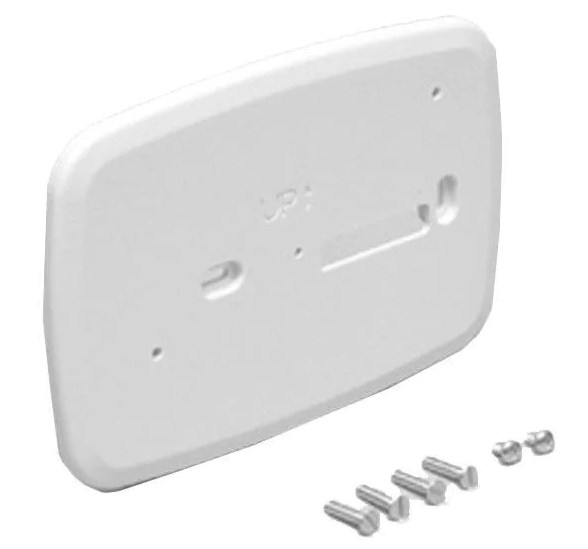
FPED Series Fixed Pedestal Cover Plate and Mount
Product Information
The CP-FP17 and FPED Series Fixed Pedestal Cover Plate and Mount is
a component used for mounting and securing a monitor onto a
pedestal. It is designed to provide stability and support to the
monitor while allowing for easy cable routing and sealing. The
product includes a fixed pedestal cover plate, mounting hardware,
and screws.
Product Usage Instructions
- Prepare the mounting surface for the pedestal installation,
referring to Figure 1. - Install the pedestal onto the selected mounting surface,
considering strength, cable routing, and sealing. Use appropriate
hardware and methods for installation. - Prior to installing the fixed pedestal cover plate onto the
rear of the monitor, remove and discard the eight screws and
washers marked A in Figure 2. - Set aside (do not discard) the twelve screws and washers marked
B in Figure 2. - Install cables into the monitor and secure them by fully
tightening all strain relief screw locks and securing strain relief
clips. If using a KVM2-PED workstation, use the cables provided in
the bag labeled CABLES FOR FIXED PEDESTAL. - Route cables through the cable access hole on the fixed
pedestal cover plate, as shown in Figure 3. - Install two M4 sealing screws and washers in the locations
marked C in Figure 3. - Use the twelve 10-32 screws and washers removed in step 4.
Install them in the locations marked B in Figure 3. Tighten all
screws until the gasket is approximately 1/16 to 3/32 thick. - Route cables into the pedestal by positioning and supporting
the monitor so that the cables exiting from the monitor can be
easily routed into the top of the pedestal, as shown in Figure
3. - Attach the monitor to the pedestal using the provided four
10-32 acorn nuts and nylon washers in the locations marked D in
Figure 3.
Note: Ensure to follow the instructions carefully for proper
installation and secure attachment of the monitor to the fixed
pedestal.
Installation Instructions
CP-FP17 and FPED Series Fixed Pedestal Cover Plate and Mount
1. Refer to Figure 1. Prepare the mounting surface for the pedestal installation.
2. Install the pedestal using appropriate hardware and methods for the selected mounting surface taking strength, cable routing, and sealing into consideration.
152.4 mm (6.00″)
127.0 mm (5.00″)
Ø 10.4 mm
(0.41″)
FRONT
3. Prior to installing the fixed pedestal cover plate onto the rear of the monitor, remove and discard the eight screws and washers
from the locations marked “A” in Figure 2.
203.2 mm 177.8 mm (8.00″) (7.00″)
4. Remove and set aside (do not discard) the twelve screws and washers from the locations marked “B” in Figure 2.
FIGURE 1 PEDESTAL BASE PLATE
5. Install cables into the monitor. Secure all cables by fully tightening all strain relief screw locks and securing strain relief clips.
NOTE: For workstations with a KVM2-PED installed, use the cables in the bag labeled “CABLES FOR FIXED PEDESTAL.”
6. Refer to Figure 3. Route cables through the cable access hole on the fixed pedestal cover plate.
7. Install the provided two M4 sealing screws and washers in the locations marked “C” in Figure 3.
A
B A
B A
B
B
B
B
A
A A
B A
B A
B
B
B
B
FIGURE 2
UM17 MONITOR REAR COVER
8. Use the twelve 10-32 screws and washers that were removed in step 4 and install them in the locations marked “B” in Figure 3. Tighten all screws until the gasket is approximately 1/16″ to 3/32″ thick.
9. Refer to Figure 3. Route cables into the pedestal by positioning and supporting the monitor so that the cables exiting from the monitor can be easily routed into the top of the pedestal.
10. Attach the monitor to the pedestal using the provided four 10-32 acorn nuts and nylon washers in the locations marked “D” in Figure 3.
C
B
B D
B
D
B
B
B
C
B
B D
B
D
B
B
B
CABLE ACCESS HOLE
FIGURE 3
UM17 MONITOR
FIXED PEDESTAL COVER PLATE
FIXED PEDESTAL
99042B · December 20, 2022 · www.HopeIndustrial.com · International: +1 (678) 762-9790 · UK: +44 (0) 20 7193 2618 · © 2023 Hope Industrial Systems, Inc.
 Industrial Monitors & Touch Screens - Hope Industrial Systems