GOLD MEDAL 3119 Top Half Antique Unifloss Candy Machine Frame Instruction Manual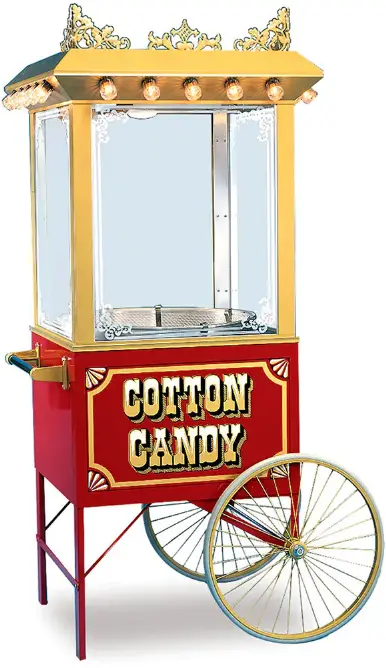
SAFETY PRECAUTIONS
 DANGER
 Machine must be properly grounded to prevent electrical shock to personnel. Failure to do so could result in serious injury, or death. Make sure all machine switches are in the OFF position before plugging the equipment into the receptacle. Keep cord and plug off the ground and away from moisture. Always unplug the equipment before cleaning or servicing.
DO NOT immerse any part of this equipment in water.
DO NOT use a water jet or excessive water when cleaning
DANGERImproper installation, adjustment, alteration, service, or maintenance can cause property damage, injury, or death. Any alterations to this equipment will void the warranty and may cause a dangerous condition. This appliance is not intended to be operated by means of an external timer or separate remote-control system. NEVER make alterations to this equipment. Read the Installation, Operating, and Maintenance Instructions thoroughly before installing, servicing, or operating this equipment.
WARNINGImproper installation, adjustment, alteration, service, or maintenance can
cause property damage, injury, or death. Any alterations to this equipment will void the warranty and may cause a dangerous condition. This appliance is not intended to be operated by means of an external timer or separate remote-control system. NEVER make alterations to this equipment. Read the Installation, Operating, and Maintenance Instructions thoroughly before installing, servicing, or operating this equipment.
WARNINGFloss head rotates at high speeds. Operator MUST keep hands and face clear of the floss head to avoid injury. Operator must wear eye protection. Keep all spectators at a reasonable distance, and use a Floss Bubble for added customer protection.
WARNINGKeep all foreign objects out of floss head. To avoid eye injury, DO NOT fill floss head with sugar while the head is on and rotating. WARNING Burn Hazard. DO NOT touch spinner head. Allow to cool before cleaning or
servicing. Avoid contact with molten sugar.
WARNING ALWAYS wear safety glasses when servicing this equipment.
WARNINGNo user serviceable parts inside. Refer servicing to qualified service personnel.
WARNING Read and understand operator’s manual and all other safety instructions before using this equipment. To order copies of the operator’s manual go to gmpopcorn.com or write to Gold Medal Products Co., 10700 Medallion Drive, Cincinnati, OH 45241 USA 1-(800)-543-0862.
WARNING DO NOT allow direct contact of this equipment by the public when used in
food service locations. Only personnel trained and experienced in the equipment operation may operate this equipment. Carefully read all instructions before operation.
WARNING
This machine is NOT to be operated by minors.
CAUTION
If the supply cord is damaged, it must be replaced by Gold Medal Products Co., its service agent or similarly qualified persons in order to avoid a hazard.
Note: Improvements are always being made to Gold Medal’s equipment. This information may not be the latest available for your purposes. It is critical that you call Gold Medal’s Technical Service Department at 1-800-543-0862 for any questions about your machine operations, replacement parts, or any service questions. (Gold Medal Products Co. does not assume any liability for injury due to careless handling and/or reckless operation of this equipment.) General images may be used in manual for reference only.
INSTALLATION INSTRUCTIONS
Inspection of Shipment
After unpacking, check thoroughly for any damage which may have occurred in transit. Claims should be filed immediately with the transportation company. The warranty does not cover damage that occurs in transit, or damage caused by abuse, or consequential damage due to the operation of this machine, since it is beyond our control (reference warranty in back of manual).
Manual
Read and understand the operator’s manual and all other safety instructions before using this equipment. To order copies of the operator’s manual go to gmpopcorn.com or write to Gold Medal Products Co., 10700 Medallion Drive, Cincinnati, OH 45241 USA 1 (800)-543-0862.
Model Description
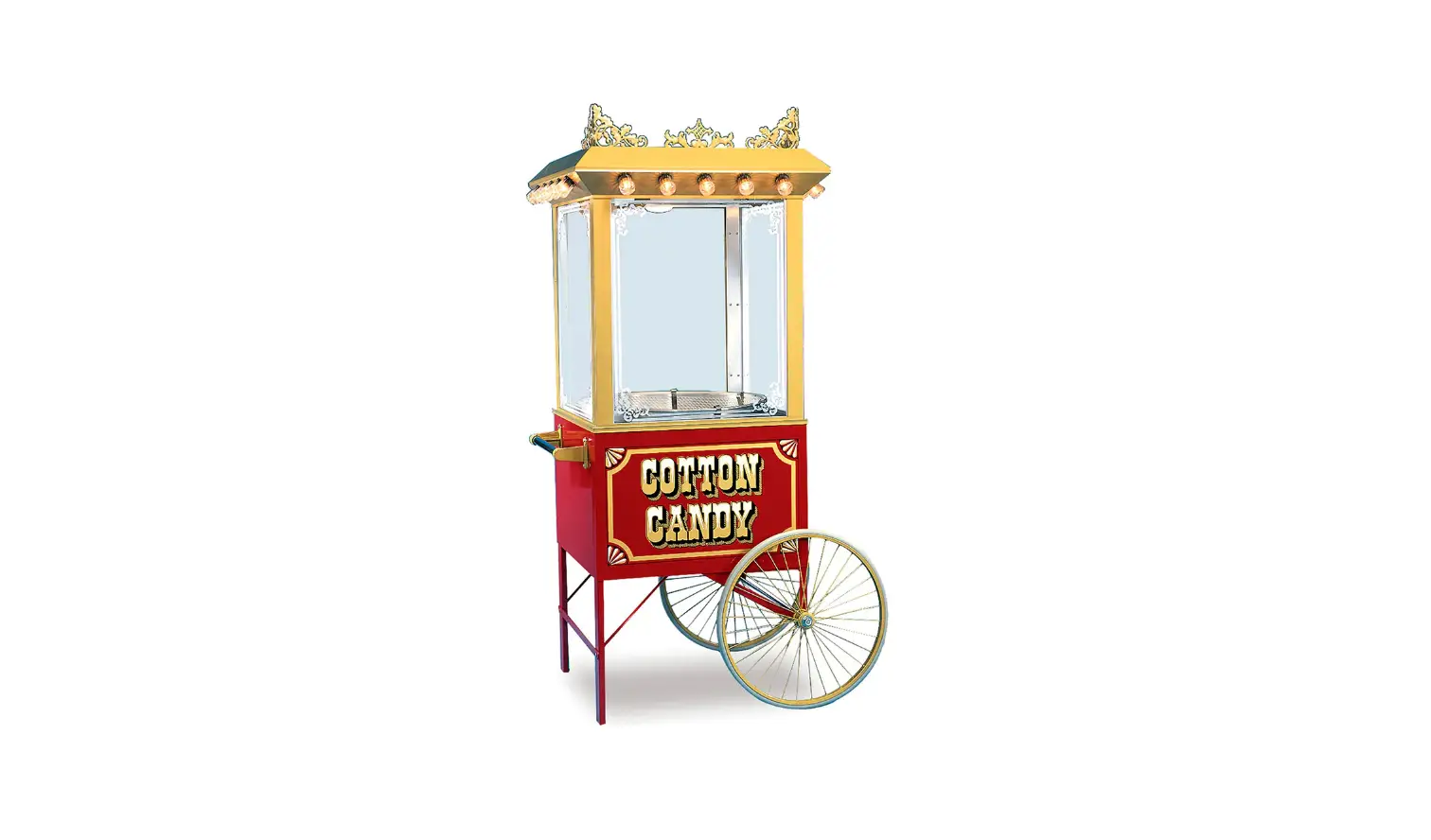
3119 (100): Top Half Antique Unifloss, gold color cabinet with 15 vintage LED display lights. (Top Half Antique Unifloss mounts on a cart, base, or countertop for use with a cotton candy machine, items not included with unit.)
3119NL: Top Half Antique Unifloss, gold color cabinet; no display lights.
(Top Half Antique Unifloss mounts on a cart, base, or countertop for use with a cotton candy machine, items not included with unit.)
Items Included with this Unit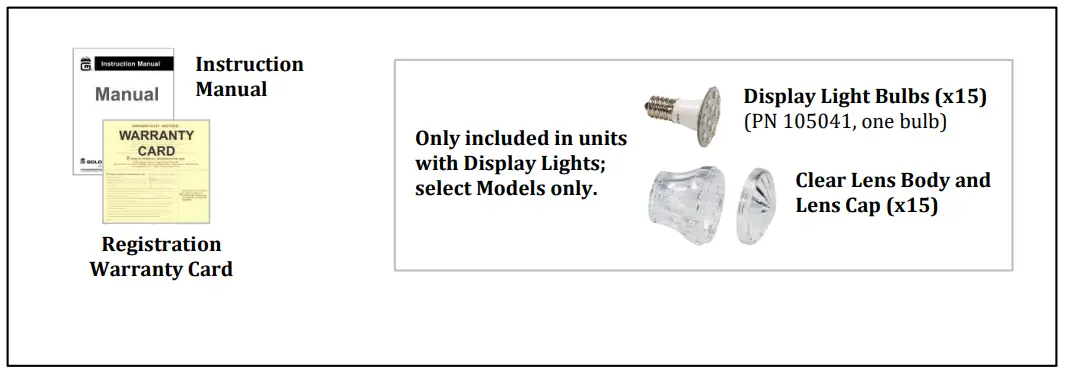
Setup
This unit has been tested at the factory.
- Remove all packaging and tape prior to operation.
- Place the unit on a sturdy, level base, or cart. For Countertop installation, place the unit over a cutout in the countertop. A shelf (sold separately) is required under the counter to set the floss unit on.
- Blower vents out the top of unit, allow adequate clearance for airflow.
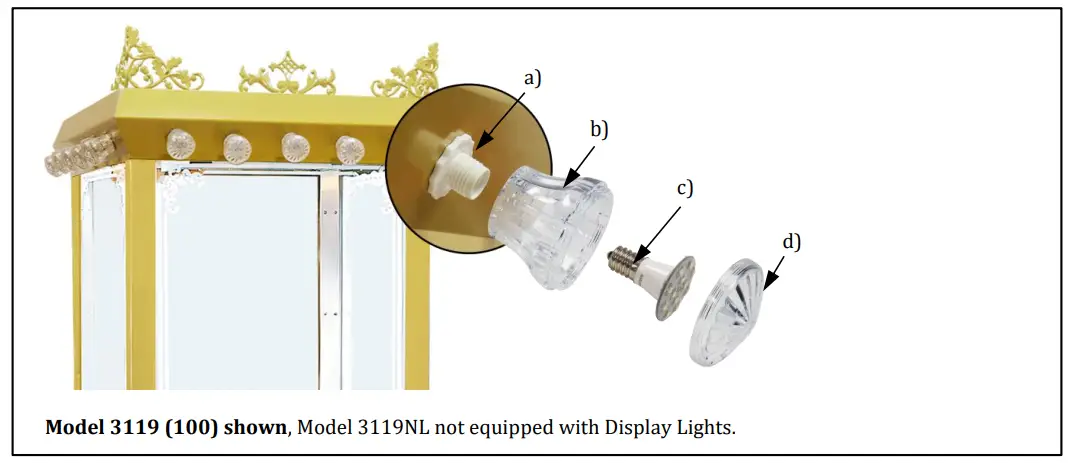
- To Install the Display Lights (if equipped, select Models only): There are 15 Display Lights on the unit. Each light has an LED bulb, clear lens body, and a clear lens cap. Unpack the display light parts and assemble as shown below.
To Install Display Lights:- a) Make sure socket is securely fastened in place.
- b) Thread the Clear Lens Body onto socket.
- c) Screw LED Bulb into socket.
- Screw Clear Lens Cap onto Lens Body.
To Replace an LED Bulb: Unscrew Lens Cap, then remove old bulb
- After setup, unit should be cleaned prior to use (see Care and Cleaning section).
Electrical Requirements
The following power supply must be provided (reference unit Data Plate for Wattage requirement):
120 V~, 60 Hz
Danger
 Machine must be properly grounded to prevent electrical shock to personnel.
Failure to do so could result in serious injury, or death.
Make sure all machine switches are in the OFF position before plugging the equipment into the receptacle. Keep cord and plug off the ground and away from moisture. Always unplug the equipment before cleaning or servicing.
DO NOT immerse any part of this equipment in water.
DO NOT use a water jet or excessive water when cleaning.
A certified electrician must furnish sufficient power for proper machine operation and install any supplied receptacle (reference unit Data Plate for model specific Volts AC, Hertz, and Wattage requirements). We recommend this equipment be on a dedicated and protected circuit. Failure to wire properly will void the warranty and may result in damage to the machine. It is Gold Medal Products Co.’s recommendation that this machine be plugged directly into a wall outlet. The use of extension cords is not recommended due to safety concerns, and may cause sacrificed and/or reduced performance. Make sure cord is located to prevent a trip hazard or unit upset.
Before You Plug In Machine
- Make sure all machine switches are OFF before plugging equipment into receptacle.
- Make sure wall outlet can accept the grounded plugs (where applicable) on the power supply cord.
- The wall outlet must have the proper polarity. If in doubt, have a competent electrician inspect the outlet and correct if necessary.
- DO NOT use a grounded to un-grounded receptacle adapter (where applicable).
- Install unit in a level position
Caution
If the supply cord is damaged, it must be replaced by Gold Medal Products Co., its service agent or similarly qualified persons in order to avoid a hazard.
OPERATING INSTRUCTIONS
Controls and Their Functions
LIGHTS SWITCH
Two position, ON/OFF lighted rocker switch – supplies power to the exterior display lights (if equipped, on select Models only) and interior cabinet light. The green switch light ON indicates there is power to the lights.
FAN SWITCH
Two position, ON/OFF lighted rocker switch – supplies power to the exhaust blower. The green switch light ON indicates there is power to the blower.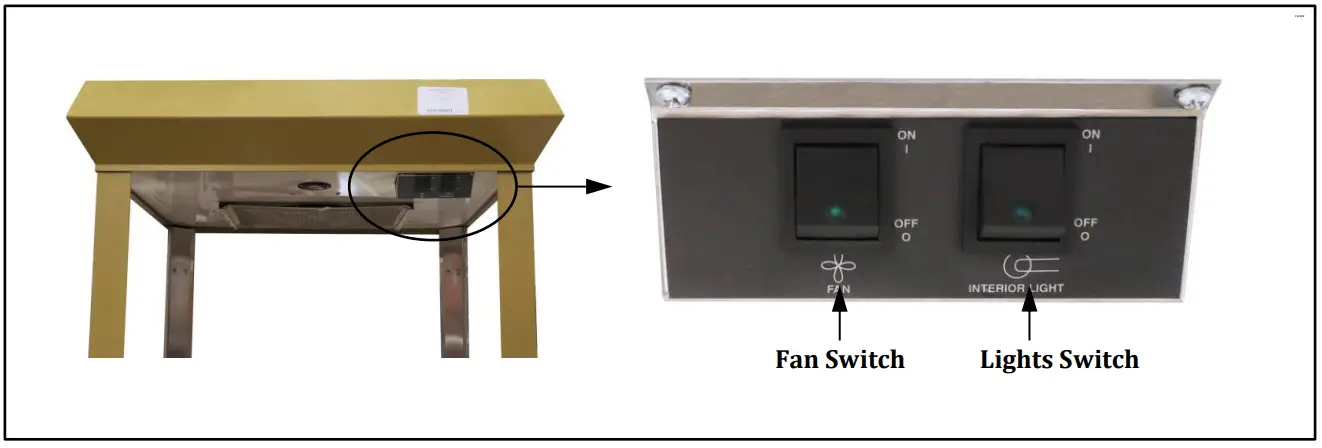
Care and Cleaning
Danger
Machine must be properly grounded to prevent electrical shock to personnel.
DO NOT immerse in water. DO NOT clean appliance with a water jet or steam
cleaner. Always unplug the equipment before cleaning or servicing
Good sanitation practice demands that all food preparation equipment be cleaned regularly (only use non-toxic, food grade cleaners).
Daily Unit Cleaning Instructions
- Refer to the Floss Unit Manual for instructions on cleaning the floss machine.
- Turn Floss Machine and the Antique Unifloss OFF, unplug the units and allow them to cool before attempting to clean.
- Take a clean, SLIGHTLY damp cloth and wipe unit.
- Wipe stainless steel parts with a clean cloth and cleaner designed for stainless steel, such as Gold Medal Watchdog Stainless Cleaner (Item No. 2088).
DO NOT use oven cleaners or abrasive materials as they will damage parts of machine. - Clean glass panels with glass cleaner. Gold Medal Watchdog Glass Cleaner (Item No. 2588) is recommended.
Daily Filter Cleaning Instructions
The Antique Unifloss is equipped with an efficient and durable filtration system. The filter should be cleaned each day after use.
Steps to Clean Filter
Step 1: Turn unit OFF. Filter is located on the ceiling inside the unit.
Step 2: Remove filter by sliding it out of the filter retaining angles.
Step 3: Clean filter in warm soapy water, then rinse and allow to dry overnight. Reinstall filter to its original position (reference image shown).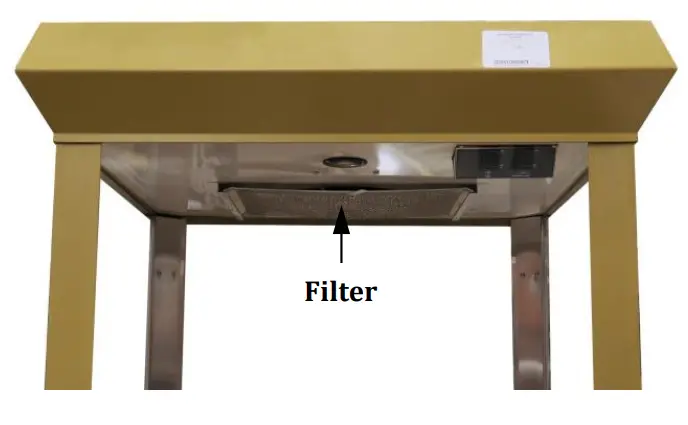
- THE FOLLOWING SECTIONS ARE FOR QUALIFIED SERVICE PERSONNEL ONLY
MAINTENANCE INSTRUCTIONS
Danger
Machine must be properly grounded to prevent electrical shock to personnel.
Failure to do so could result in serious injury, or death. Make sure all machine switches are in the OFF position before plugging the equipment into the receptacle. Keep cord and plug off the ground and away from moisture. Always unplug the equipment before cleaning or servicing.
DO NOT immerse any part of this equipment in water.
DO NOT use a water jet or excessive water when cleaning.
Danger
Improper installation, adjustment, alteration, service, or maintenance can cause property damage, injury, or death. Any alterations to this equipment will void the warranty and may cause a dangerous condition. This appliance is not intended to be operated by means of an external timer or separate remote-control system. NEVER make alterations to this equipment. Read the Installation, Operating, and Maintenance Instructions thoroughly before installing, servicing, or operating this equipment.
Warning
No user serviceable parts inside. Refer servicing to qualified service personnel.
Caution
THE FOLLOWING SECTIONS OF THIS MANUAL ARE INTENDED ONLY FOR QUALIFIED SERVICE PERSONNEL WHO ARE FAMILIAR WITH ELECTRICAL EQUIPMENT. THESE ARE NOT INTENDED FOR THE OPERATOR.
ORDERING SPARE PARTS
- Identify the needed part by checking it against the photos, illustrations, and/or parts list. (General images may be used in manual for reference only.)
- Use only approved replacement parts when servicing this unit.
- When ordering, please include part number, part name, and quantity needed.
- Please include your model number, serial number, and date of manufacture (located on the machine nameplate/data plate) with your order.
- Address all parts orders to Parts Department, Gold Medal Products Co., 10700 Medallion Drive, Cincinnati, Ohio 45241-4807
Phone: (800) 543-0862
(513) 769-7676
Fax: (800) 542-1496
(513) 769-8500
E-mail: [email protected]
Web Page: gmpopcorn.com
Replacing Broken Glass
Broken glass panels can be easily replaced. Gold Medal Products Co. does not ship glass. It can be obtained from a local glass shop, always purchase tempered glass.
GLASS DIMENSIONS (Height x Width x Thickness)
Front and Side Glass: 28 1/8” x 23 3/16” x 1/8”
- Turn machine OFF, unplug unit and allow it to cool before attempting to replace glass.
- Carefully remove all loose pieces of broken glass.
- Lift out the corn pan (bottom pan).
- Locate the Glass Retainer Strips on each corner post holding in the glass panel, and remove the screws to unfasten the retainers.
- Carefully remove the rest of the broken glass.
- Remove all rigid glass channels from around the glass to be replaced, set channels aside for reuse.
- Apply decals (if desired) to new glass panel.
- Slide rigid glass channels over the exposed sides and bottom of new glass panel.
- Fasten new glass panel in machine with existing glass strips and screws.
- Reinstall corn pan (bottom pan).
Cabinet Exterior – Front View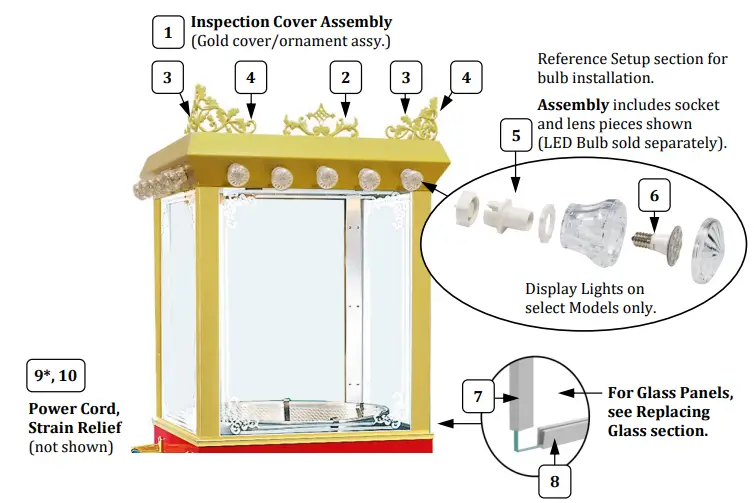
- CAUTION: If supply cord is damaged, it must be replaced by Gold Medal Products Co., its service agent, or similarly qualified persons in order to avoid a hazard.
- General 3119 (100) image shown for parts reference only (Cart, Floss Machine and Floss Pan sold separately); (Model 3119NL not equipped with display lights).
| Item | Part Description | Part Number | |
| 3119-00-100 | 3119NL | ||
| 1 | INSPECT COVER, W/A GOLD (Top Inspection Cover and Ornament Assembly – Gold) | 13124 | 13124 |
| 2 | ORNAMENT WELDMENT (center ornament) | 17078G | 17078G |
| 3 | CORNER ORNAMENT NEW STYLE (left mount) | 47402LG | 47402LG |
| 4 | CORNER ORNAMENT NEW STYLE (right mount) | 47402RG | 47402RG |
| 5 | ANTIQUE LED SOCKET (see image reference) | 105040 | |
| 6 | ANTIQUE LED BULB (not included in socket assy.) | 105041 | |
| 7 | 27 13/16” GLASS CHANNEL (used on side edges of glass panels) | 47697 | 47697 |
| 8 | 22 7/8” GLASS CHANNEL (used on top andbottom edges of glass panels) | 47694 | 47694 |
| 9* | POWER SUPPLY CORD | 22038 | 22038 |
| 10 | STRAIN RELIEF SR-6P3-4 | 76026 | 76026 |
Cabinet Interior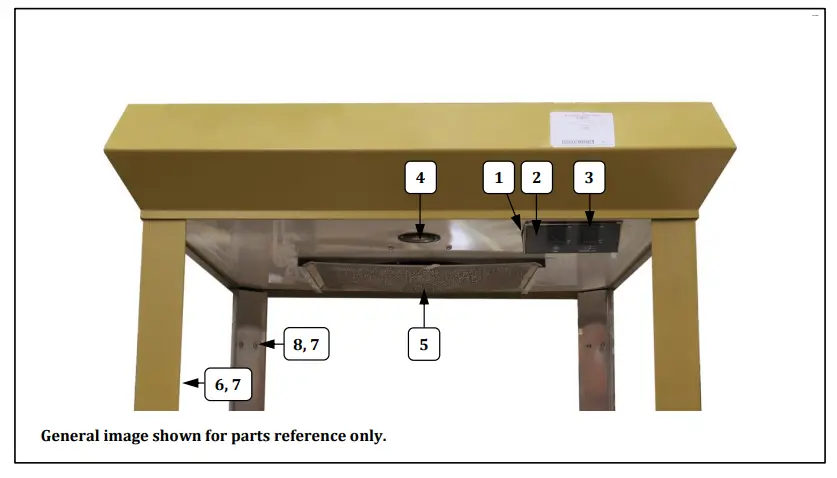
| Item | Part Description | Part Number |
| 1 | ROCKER SWITCH BOX 2 C/O | 74887 |
| 2 | ROCKER SWITCH LABEL | 13014 |
| 3 | LIGHTED ROCKER SWITCH | 42798 |
| 4 | LED LIGHT 800 LUMENS | 55590 |
| 5 | ALUMINUM MESH FILTER | 13013 |
| 6 | GLASS RETAINER REAR (2 required) | 47592 |
| 7 | SCREW #8-32X1/2 PAN HD PH (fastensrear/front retainers) | 74147 |
| 8 | GLASS RETAINER FRONT (2 required) | 47593 |
Dome Interior – Safety Labels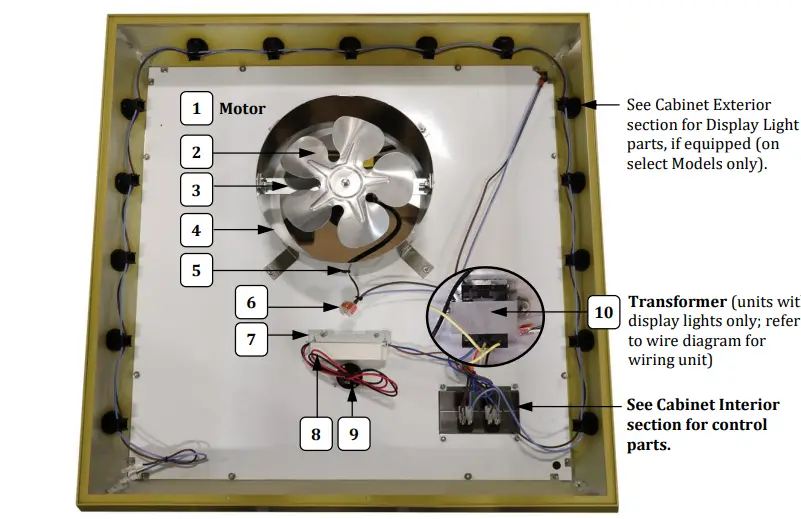
Safety Labels
Unit Labels
Power Cord Label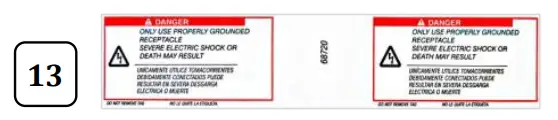
| Item | Part Description | Part Number | |
| 3119-00-100 | 3119NL | ||
| 1 | MOTOR | 13010 | 13010 |
| 2 | FAN BLADE | 13009 | 13009 |
| 3 | FAN MOUNT BRACKET | 13028 | 13028 |
| 4 | FAN HOUSING ASSY | 13105 | 13105 |
| 5 | BUSHING, SNAP .500 IN | 47236 | 47236 |
| 6 | 3 POSITION WIRE CONNECTOR | 55244 | 55244 |
| 7 | 20W POWER SUPPLY BRACKET | 55414 | 55414 |
| 8 | POWER SUPPLY 24VDC 20W | 55394 | 55394 |
| 9 | LED LIGHT 800 LUMENS | 55590 | 55590 |
| 10 | TRANSFORMER, 12/24 VOLT | 39459 | |
| 11 | LABEL UNPLUG TO CLEAN | 76097 | 76097 |
| 12 | MAIN GROUND LABEL | 42375 | 42375 |
| 13 | WARNING LABEL CORD | 68720 | 68720 |
Wiring Diagram
Model No: 3119-00-100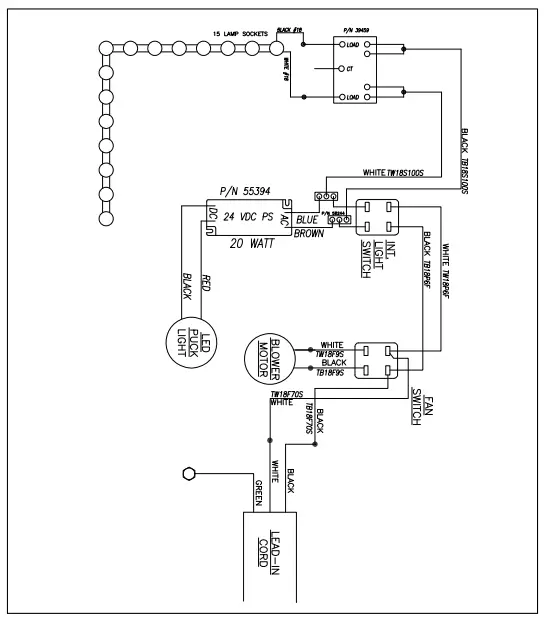
Model No: 3119NL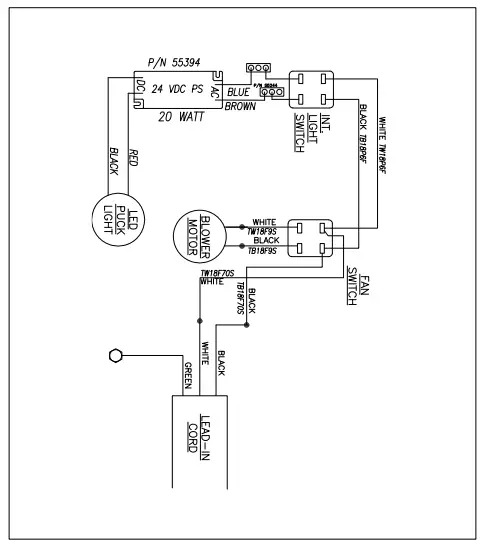
WARRANTY
Gold Medal Products Co. warrants to the original purchaser each item of its manufacture to be free of defects in workmanship and material under normal use and service. Gold Medal Products Co.’s obligation under this warranty is limited solely to repairing or replacing parts, f.o.b. Cincinnati, Ohio, which in its judgment are defective in workmanship or material and which are returned, freight prepaid, to its Cincinnati, Ohio factory or other designated point. Except for “Perishable Parts” on specific machines, the above warranty applies fora period of two (2) years from the date of original sale to the original purchaser of equipment when recommended operating instructions and maintenance procedures have been followed. These are packed with the machine. Parts warranty is two (2) years, labor is six (6)months.
THIS WARRANTY IS IN LIEU OF ALL OTHER WARRANTIES EXPRESSED OR
IMPLIED, AND OF ALL OTHER OBLIGATIONS OR LIABILITIES ON OUR PART,
INCLUDING THE IMPLIED WARRANTY OF MERCHANTABILITY. THERE ARE
NO WARRANTIES WHICH EXTEND BEYOND THE DESCRIPTION ON THE FACE
HEREOF. In no event shall Gold Medal Products Co. be liable for special, incidental or consequential damages. No claim under this warranty will be honored if the equipment covered has been misused, neglected, damaged in transit, or has been tampered with or changed in any way. No claim under this warranty shall be honored in the event that components in the unit atthe time of the claim were not supplied or approved by Gold Medal Products Co. This warranty is effective only when electrical items have been properly attached to city utility lines only at proper voltages. This warranty is not transferable without the written consent of Gold Medal Products Co.
The term “Original Purchaser” as used in this warranty shall be deemed to mean that person, firm, association, or corporation who was billed by the GOLD MEDAL PRODUCTS CO., or their authorized distributor for the equipment.
THIS WARRANTY HAS NO EFFECT AND IS VOID UNLESS THE ORIGINAL PURCHASER FIRST CALLS GOLD MEDAL PRODUCTS CO. AT 1-800-543 0862 TO DISCUSS WITH OUR SERVICE REPRESENTATIVE THE EQUIPMENT PROBLEM, AND, IF NECESSARY, FOR INSTRUCTIONS CONCERNING THE REPAIR OR REPLACEMENT OF PARTS.
NOTE: This equipment is manufactured and sold for commercial use only.
Costumer Support
© 2023 – The text, descriptions, graphics, layout, and other material in this publication are the exclusive property of Gold Medal Products Co. and shall not be used, copied, reproduced, or published in any fashion, including website display, without its express written consent.
10700 Medallion Drive, Cincinnati, Ohio 45241-4807 USA
gmpopcorn.com
Phone: (800) 543-0862 Fax: (800) 542-1496
(513) 769-7676 (513) 769-8500

 Concession Supplies & Equipment | Gold Medal Products Co.