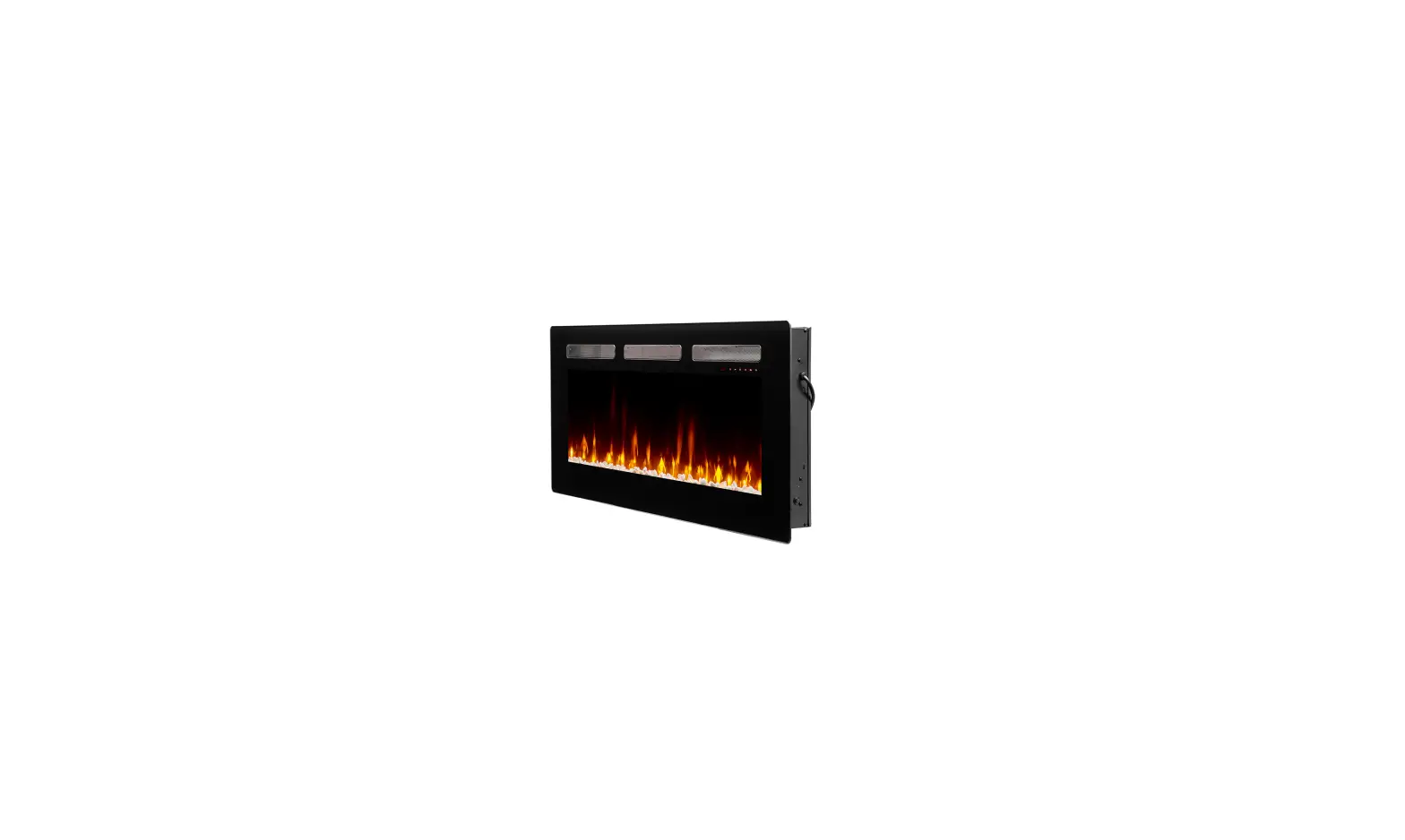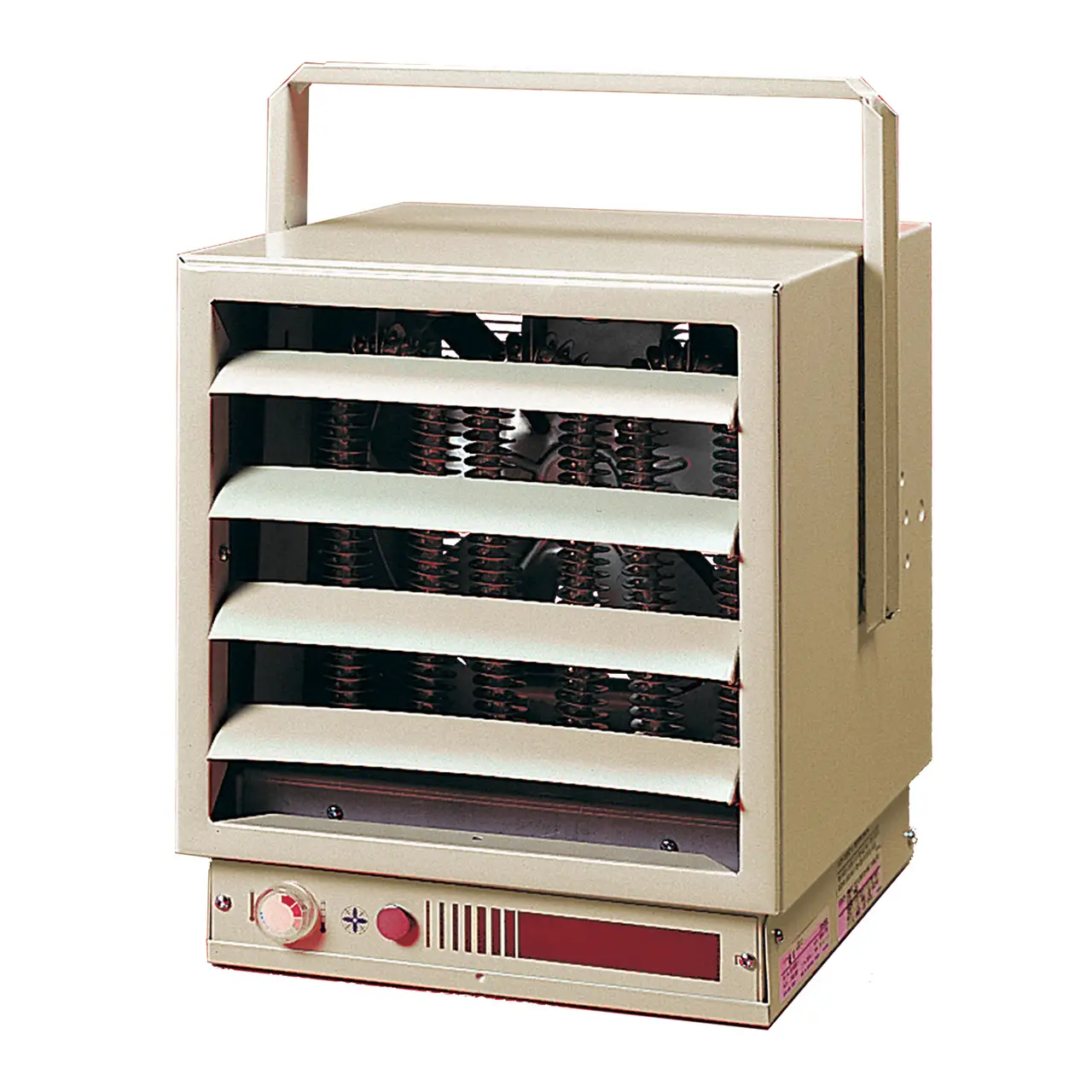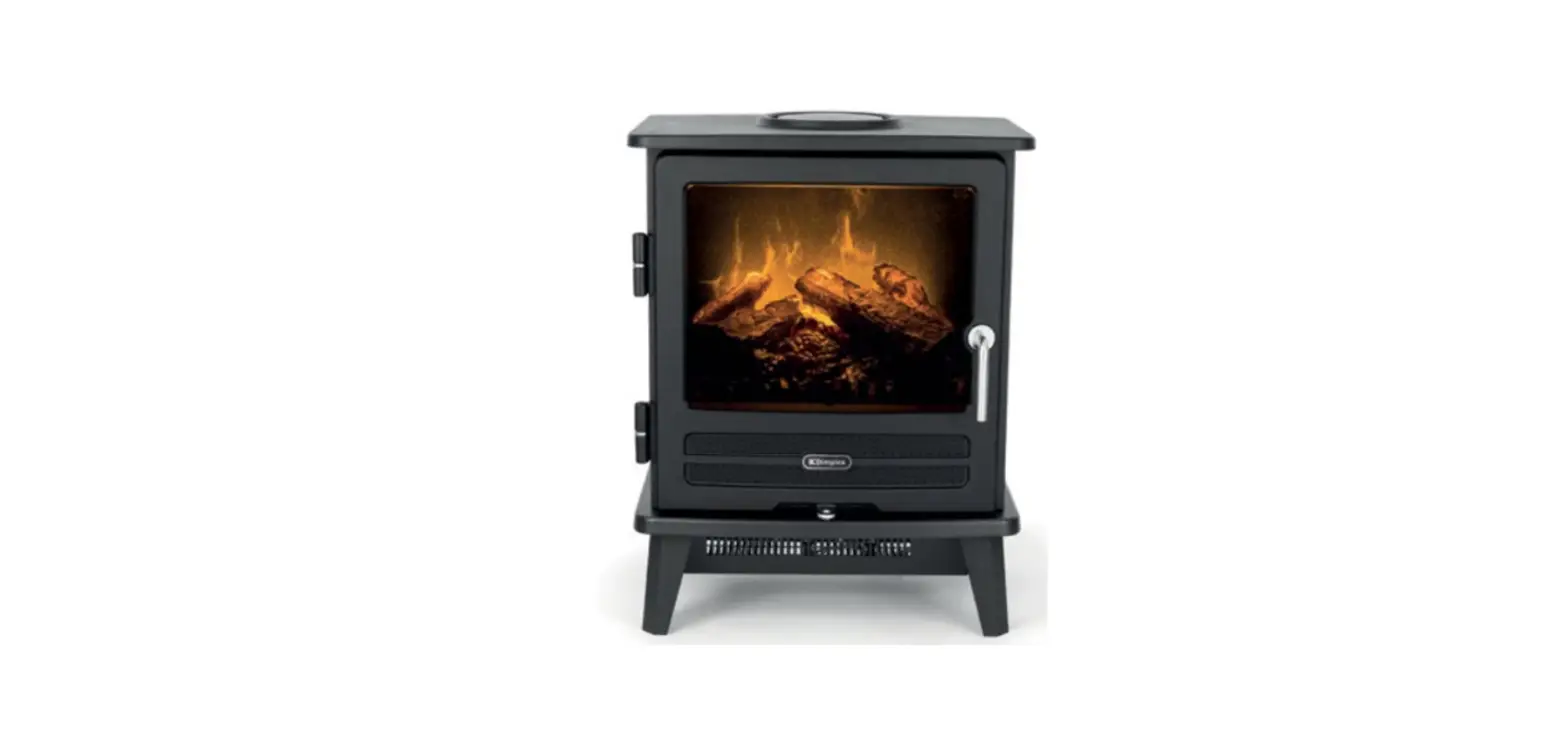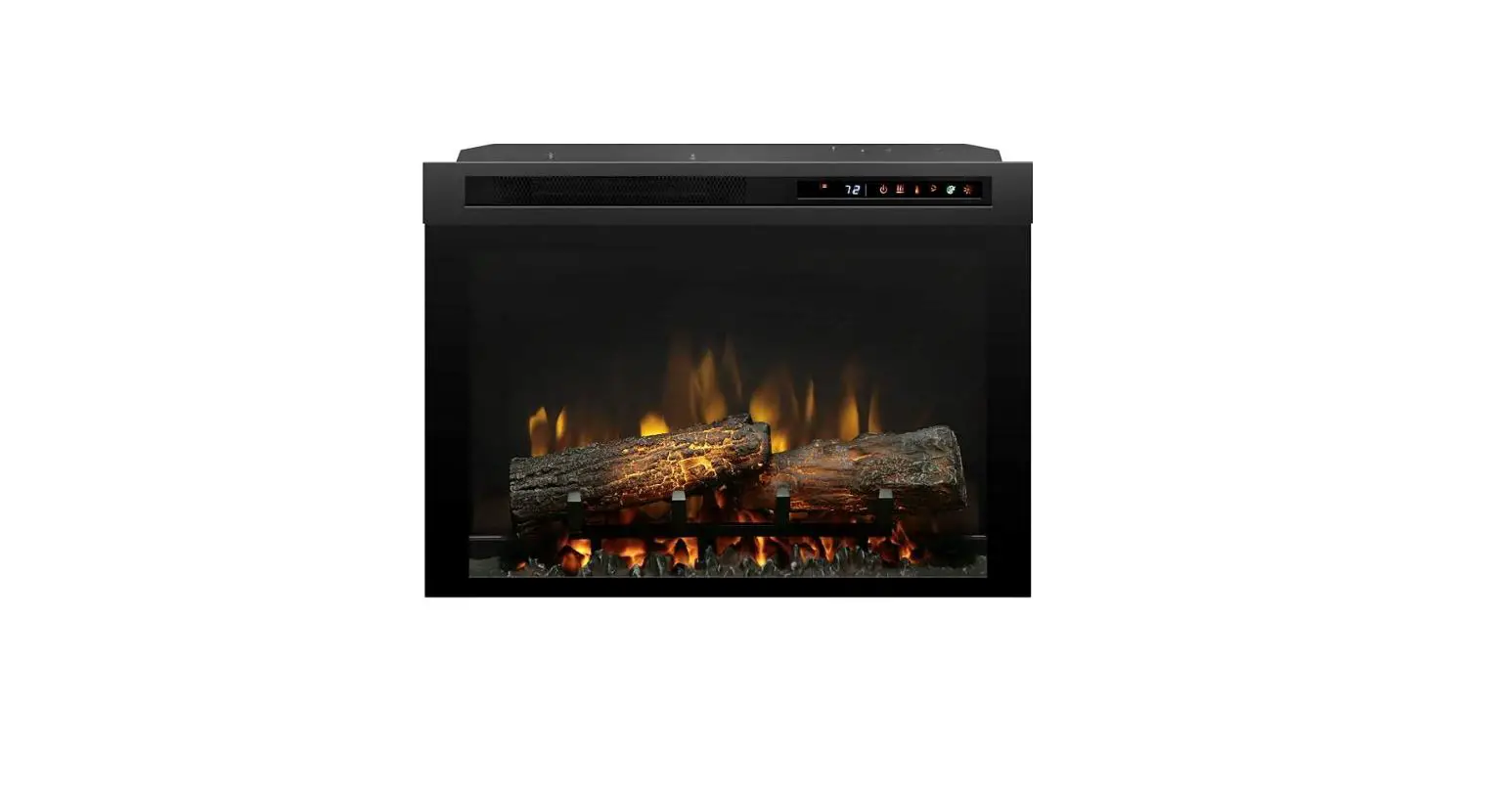

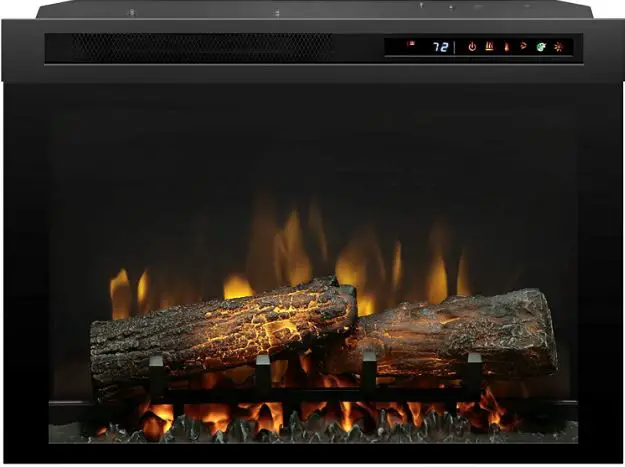
Dimplex DF2600 Mor Electric Heating Associates Inc
OPERATION
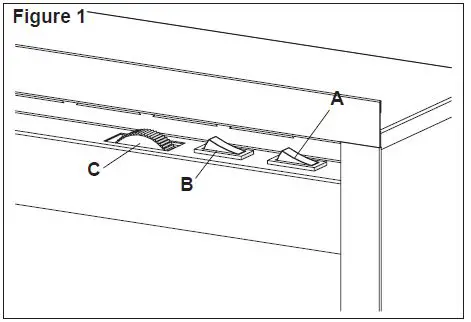
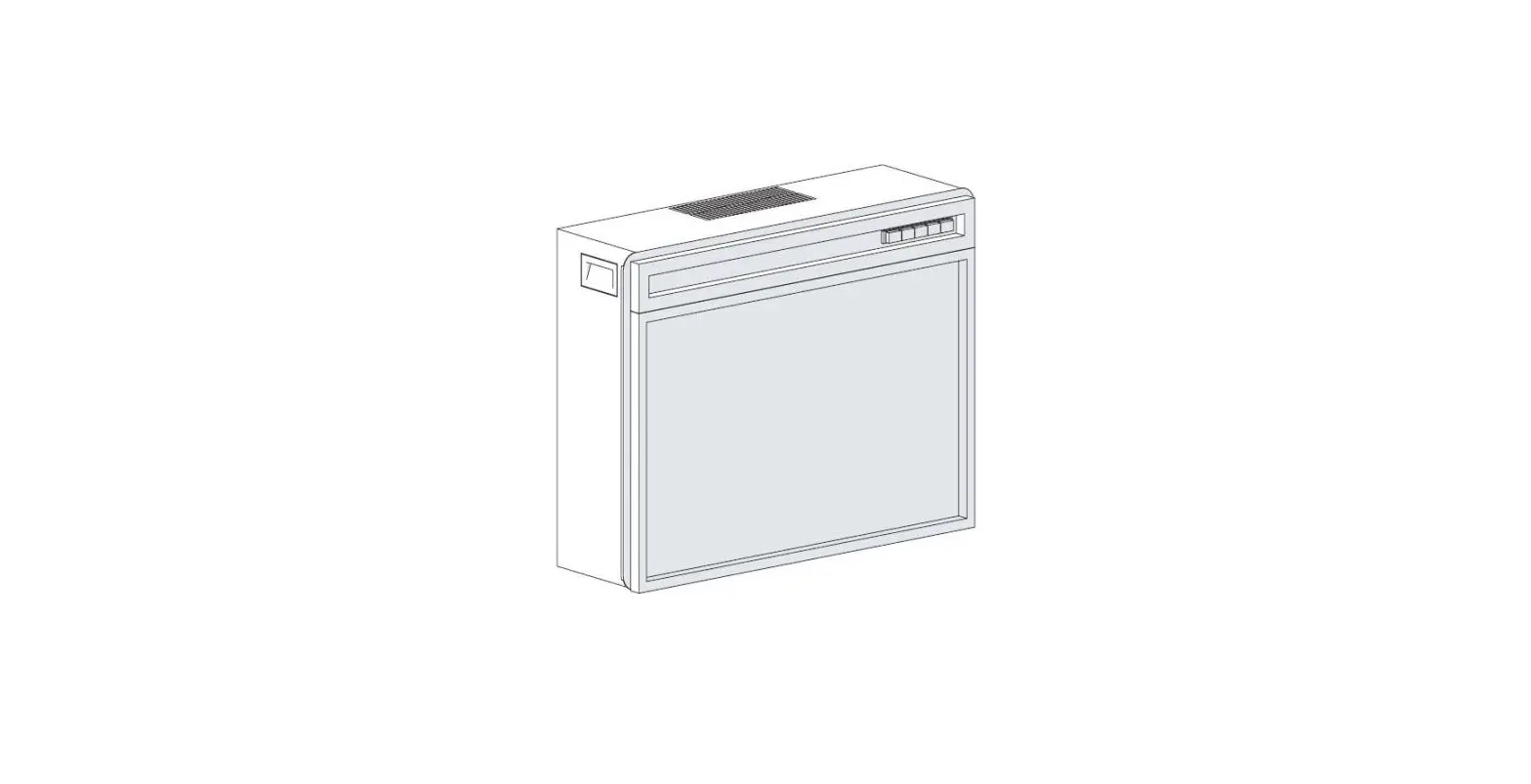
The controls are located on the upper right of the fireplace. (Figure 1)
- 3-Position Switch
The switch has two ON positions marked with “ I “ and “ II “ . The “ I “ position is for manual operation. In this position the built-in remote control is by-passed.
The “ II “ position is for operating the unit with the provided remote control.
When in the “ II “ position the unit is operated with the ON and OFF buttons of the remote control. When the switch is in the center position the unit is off. - Heater ON/OFF Switch
The Heater ON/OFF Switch supplies power to the heater fan and the heater element. When the switch is in the ON position the heater operates if the thermostat calls for heat.
NOTE: The fan will continue running even when the heater is not, when the Heater Switch is in the ON position. - Heater Thermostat Control
To adjust the temperature to your individual requirements, turn the thermostat control clockwise all the way to turn on the heater. When the room reaches the desired temper-ature, turn the thermostat knob counter clockwise until you hear a click. Leave in this position to maintain the room temperature at this setting. For additional heat, turn clock-wise until you hear the click again and the heater will turn on.
Resetting The Temperature Cutoff Switch
Should the heater overheat, an automatic cut out will turn the heater off and it will not come back on without being reset. It can be reset by switching the 3-Position Switch to OFF and waiting 5 minutes before switching the unit back on.
CAUTION: If you need to continuously reset the heater, unplug the unit and call technical support at 1-888-346-7539.
NOTE: The heater may emit a slight, harmless odor when first used. This odor is a normal condition caused by initial heating of internal heater parts and will not occur again.
Remote Operation
The fireplace is supplied with an integrated On/Off remote control.
! NOTE: Ensure that the fireplace 3 position switch is set to the remote control setting, “II”. To operate, push the ON button to turn fireplace on, push the OFF button to turn the fireplace off.
! NOTE: Before attempting any operation with the remote control, pull the plastic insulator strip out from between the remote casing and battery cover (Figure 5).
Remote Control Initialization/Reprogram
In the event that your remote control ceases to operate your fireplace, follow these steps to reinitialize the remote control and the remote control receiver in the fireplace:
- Place the 3-Position Switch (Figure 1A) in the OFF (“O”) position.
- Wait a minimum of 5 seconds and then place the 3-Po-sition Switch in the Remote Control position.
- Within 10 seconds of changing the switch position, press the ON button located on the remote control (Figure 2). This will synchronize the remote control and the fireplace receiver.
NOTE: You will have only 10 seconds to perform this last step. Failure to do so will result in these steps needing to be followed again.
Battery Replacement
To replace the battery: 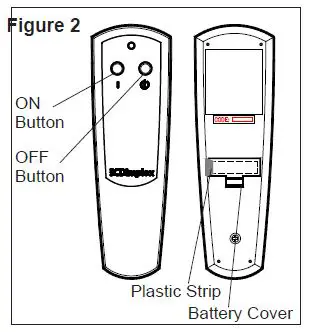
- Slide battery cover open on the remote control (Figure 2).
- Correctly install one 12 Volt (A23) battery in the battery holder.
- Close the battery cover.
Battery must be recycled or disposed of properly. Check with your Local Authority or Retailer for recyc-ling advice in your area
MAINTENANCE
WARNING: Disconnect power before attempting any maintenance or cleaning to reduce the risk of fire, electric shock or damage to persons.
Glass Cleaning
The glass is cleaned in the factory during the assembly operation. During shipment, installation, handling, etc., the front glass panel may collect dust particles; these can be removed by dusting lightly with a clean dry cloth.
To remove fingerprints or other marks, the front glass panel can be cleaned with a damp cloth. The front glass panel should be completely dried with a lint free cloth to prevent water spots. To prevent scratching, do not use abrasive cleaners or spray liquids on the clear door surface.
Compact Fireplace Surface Cleaning
Use warm water only to clean painted surfaces of the Compact Fireplace. Do not use abrasive cleaners.
Servicing
Except for light bulb replacement and cleaning described above, an authorized service representative should perform any other servicing.
EXPLODED PARTS DIAGRAM
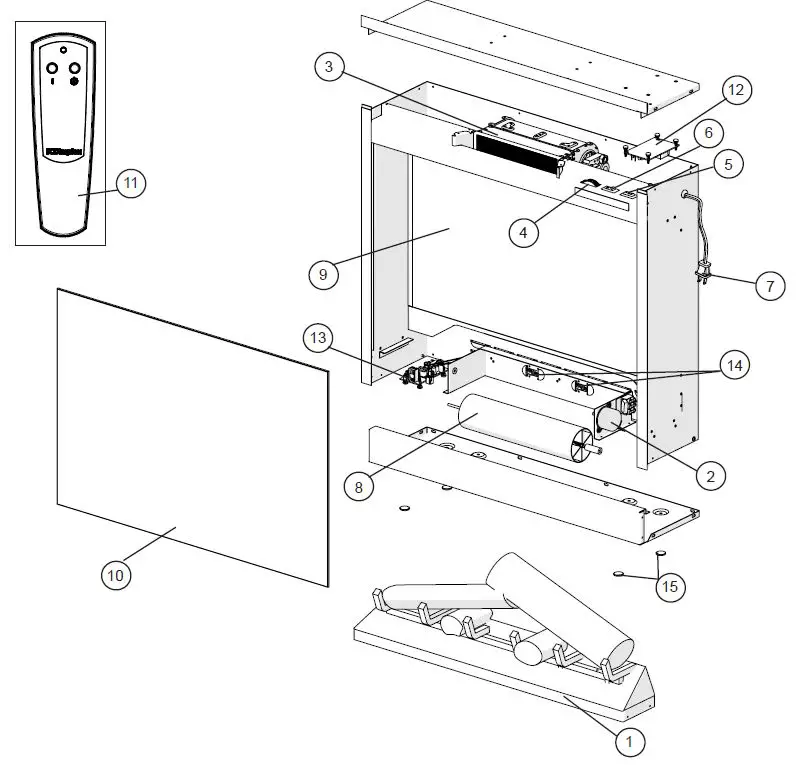 REPLACEMENT PARTS
- Log Set Assembly . . . . . . . . . . . . . . . . 0439560300RP
- Flicker Motor MOD 0. . . . . . . . . . . . . . .2000220100RP
MOD A. . . . . . . . . . . . . . . 2000500100RP - Heater Assembly (with Cutout). . . . . . .2203610100RP
- Thermostat with Knob . . . . . . . . . . . . . 2600090100RP
- 3 Position Switch. . . . . . . . . . . . . . . . . 2800071100RP
- Heater On/Off Switch . . . . . . . . . . . . . .2800070700RP
- Cord Set. . . . . . . . . . . . . . . . . . . . . . . .4100090203RP
- Flicker Rod. . . . . . . . . . . . . . . . . . . . . .5902620100RP
- Partially Reflective Panel . . . . . . . . . . .5902580300RP
- Front Glass . . . . . . . . . . . . . . . . . . . . . 5902570200RP
- Remote Control. . . . . . . . . . . . . . . . . . .3000370500RP
- Remote Control Reciever . . . . . . . . . . . .3000380200RP
- LED Driver Board. . . . . . . . . . . . . . . . . 3001170100RP
- LED Light Assembly (2 LED’s). . . . . . .3001180100RP
- Felt Feet Pads (set of 4) . . . . . . . . . . . 8600140101RP
- Mounting L-Bracket. . . . . . . . . . . . . . . 9600870100RP
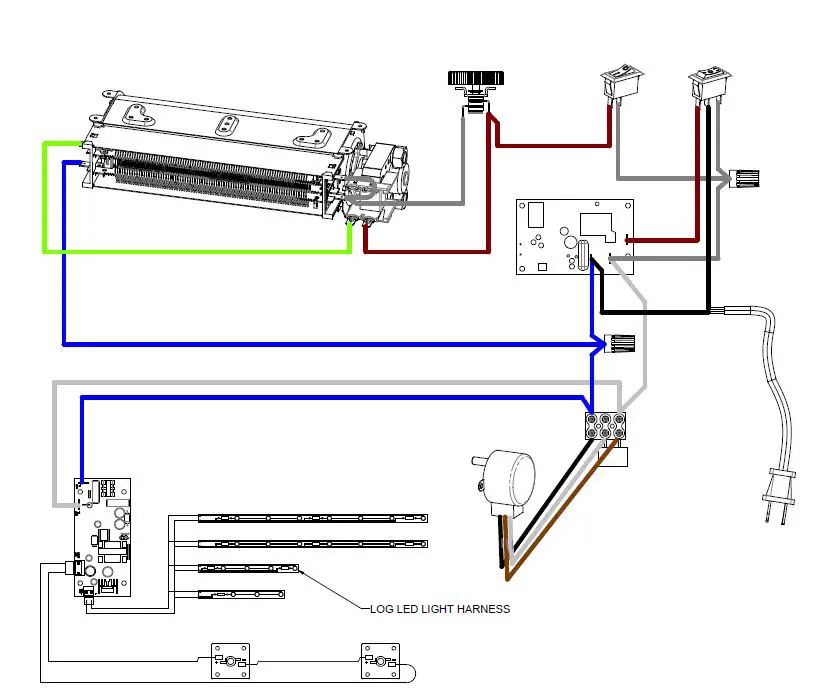
WIRING DIAGRAM
3-POSITION SWITCH REPLACEMENT
Tools Required: Phillips Head Screwdriver
Flat Head Screwdriver
CAUTION: If unit was operating prior to servicing allow at least 10 minutes for lights, heating elements and top panel to cool off to avoid accidental burning of skin.
WARNING: Disconnect power before attempting any maintenance to reduce the risk of electric shock or damage to persons. 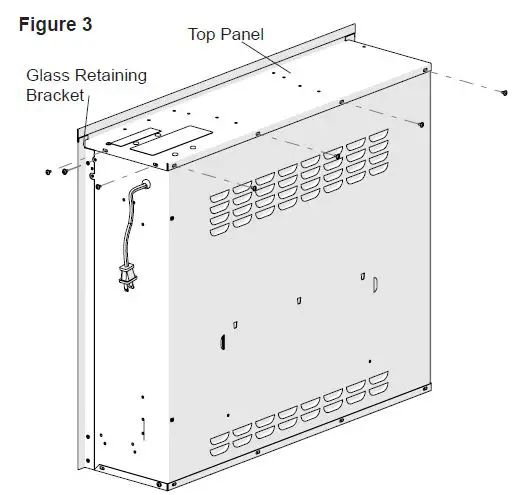
- Unplug the unit from power outlet.
- Remove the firebox from the back of the mantel by removing the retaining screws which secure the firebox brackets to the mantel.
- Remove the four screws along the back of the unit, the two on either side along the top edge and the two at the top of the glass retaining bracket on both sides.(Figure 3)
- Lay the Compact Fireplace on its back.
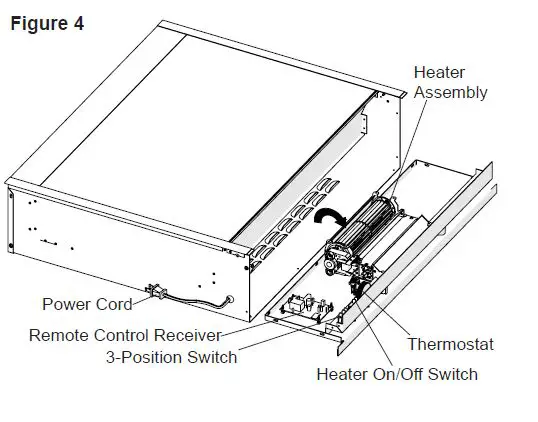
- Gently open the top panel, laying it on the work sur-face so that all of the components can easily be seen.(Figure 4)
- Locate the Main Power switch and disconnect the wir-ing connections noting their original locations.
! NOTE: A flat head screwdriver can be used to gently pry between the end of the connector and the switch to release the wires. - Depress the retainer clips on the rear of the switch and push the switch out through the opening.
- Properly orient and insert the new switch and connect all of the wiring.
- Reassemble in the reverse order as above.
HEATER ON/OFF SWITCH REPLACEMENT
Tools Required: Phillips Head Screwdriver
Flat Head Screwdriver
CAUTION: If unit was operating prior to servicing allow at least 10 minutes for lights, heating elements and top panel to cool off to avoid accidental burning of skin.
WARNING: Disconnect power before attempting any maintenance to reduce the risk of electric shock or damage to persons.
- Unplug the unit from power outlet.
- Remove the firebox from the back of the mantel by removing the retaining screws which secure the firebox brackets to the mantel.
- Remove the four screws along the back of the unit, the two on either side along the top edge and the two at the top of the glass retaining bracket on both sides.(Figure 3)
- Lay the Compact Fireplace on its back.
- Gently open the top panel, laying it on the work sur-face so that all of the components can easily be seen.(Figure 4)
- Locate the Heat On/Off switch and disconnect the wir-ing connections noting their original locations.
! NOTE: A flat head screwdriver can be used to gently pry between the end of the connector and the switch to release the wires. - Depress the retainer clips on the rear of the switch and push the switch out through the opening.
- Properly orient and insert the new switch and connect all of the wiring.
- Reassemble in the reverse order as above.

THERMOSTAT CONTROL REPLACEMENT
Tools Required: Phillips Head Screwdriver
Flat Head Screwdriver
CAUTION: If unit was operating prior to servicing allow at least 10 minutes for lights, heating elements and top panel to cool off to avoid accidental burning of skin.
WARNING: Disconnect power before attempting any maintenance to reduce the risk of electric shock or damage to persons.
- Unplug the unit from power outlet.
- Remove the firebox from the back of the mantel by removing the retaining screws which secure the firebox brackets to the mantel.
- Remove the four screws along the back of the unit, the two on either side along the top edge and the two at the top of the glass retaining bracket on both sides.(Figure 3)
- Lay the Compact Fireplace on its back.
- Gently open the top panel, laying it on the work sur-face so that all of the components can easily be seen.(Figure 4)
- Locate the thermostat assembly and disconnect the wiring connections noting their original locations.
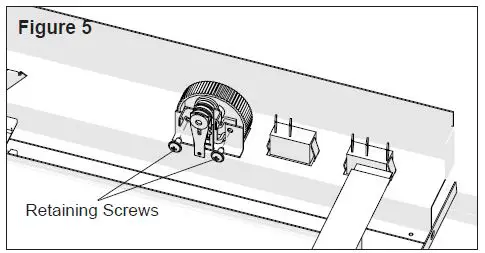
! NOTE: A flat head screwdriver can be used to gently pry between the end of the connector and the switch to release the wires. - Remove the two retaining screws from the mounting flange. (Figure 5).
- Properly orient and install the new thermostat assembly and connect all of the wiring.
- Reassemble in the reverse order as above.
REMOTE RECEIVER REPLACEMENT
Tools Required: Phillips Head Screwdriver
Flat Head Screwdriver
CAUTION: If unit was operating prior to servicing allow at least 10 minutes for lights, heating elements and top panel to cool off to avoid accidental burning of skin.
WARNING: Disconnect power before attempting any maintenance to reduce the risk of electric shock or damage to persons.
- Unplug the unit from power outlet.
- Remove the firebox from the back of the mantel by removing the retaining screws which secure the firebox brackets to the mantel.
- Remove the four screws along the back of the unit, the two on either side along the top edge and the two at the top of the glass retaining bracket on both sides.(Figure 3)
- Lay the Compact Fireplace on its back.
- Gently open the top panel, laying it on the work sur-face so that all of the components can easily be seen.(Figure 4)
- Locate the remote control receiver and disconnect the wiring connections noting their original locations.
! NOTE: A flat head screwdriver can be used to gentlypry between the end of the connector and the switch to release the wires. - Release the receiver from the top panel by using needle nose pliers to depress the tab on the mounting standoffs and gently lift the receiver off.
- Properly orient and install the new remote control re-ceiver and connect all of the wiring.
- Reassemble in the reverse order as above.
HEATER ASSEMBLY REPLACEMENT
Tools Required: Phillips Head Screwdriver
Flat Head Screwdriver
CAUTION: If unit was operating prior to servicing allow at least 10 minutes for lights, heating elements and top panel to cool off to avoid accidental burning of skin.
WARNING: Disconnect power before attempting any maintenance to reduce the risk of electric shock or damage to persons.
- Unplug the unit from power outlet.
- Remove the firebox from the back of the mantel by removing the retaining screws which secure the firebox brackets to the mantel.
- Remove the four screws along the back of the unit, the two on either side along the top edge and the two at the top of the glass retaining bracket on both sides.(Figure 3)
- Lay the Compact Fireplace on its back.
- Gently open the top panel, laying it on the work sur-face so that all of the components can easily be seen.(Figure 4)
- Locate the heater assembly and disconnect the wiring connections noting their original locations.
! NOTE: A flat head screwdriver can be used to gently pry between the end of the connector and the switch to release the wires. - Remove the 4 screws that secure the top panel to the heater assembly
- Properly orient and install the new assembly and con-nect all of the wiring.
WARNING: Ensure wires do not come in contact with moving parts by securing wires in wiring tie wraps. - Reassemble in the reverse order as above.
POWER CORD REPLACEMENT
Tools Required: Phillips Head Screwdriver
CAUTION: If unit was operating prior to servicing allow at least 10 minutes for lights, heating elements and top panel to cool off to avoid accidental burning of skin.
WARNING: Disconnect power before attempting any maintenance to reduce the risk of electric shock or damage to persons.
- Unplug the unit from power outlet.
- Remove the firebox from the back of the mantel by removing the retaining screws which secure the firebox brackets to the mantel.
- Remove the four screws along the back of the unit, the two on either side along the top edge and the two at the top of the glass retaining bracket on both sides.(Figure 3)
- Lay the Compact Fireplace on its back.
- Gently open the top panel, laying it on the work sur-face so that all of the components can easily be seen.(Figure 4)
- Locate the power cord and disconnect the wiring con-nections noting their original locations.
! NOTE: A flat head screwdriver can be used to gently pry between the end of the connector and the switch to release the wires. - With needle nose pliers, grasp the power cord strain relief grommet from inside the back of the bottom panel and push while twisting to remove.
- Install the new power cord.
- Reassemble in the reverse order as above.

FLICKER MOTOR & FLICKER ROD REPLACEMENT
Tools Required: Phillips Head Screwdriver
CAUTION: If unit was operating prior to servicing allow at least 10 minutes for lights, heating elements and top panel to cool off to avoid accidental burning of skin.
WARNING: Disconnect power before attempting any maintenance to reduce the risk of electric shock or damage to persons.
- Unplug the unit from power outlet.
- Remove the firebox from the back of the mantel by removing the retaining screws which secure the firebox brackets to the mantel.
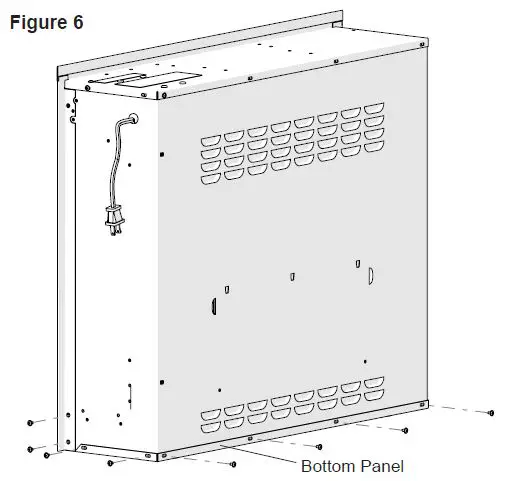
- Remove the three screws along the back of the unit, the two that hold the glass retaining bracket on both sides and the two on either side along the bottom edge.(Figure 6)
- Lay the Compact Fireplace on its back.
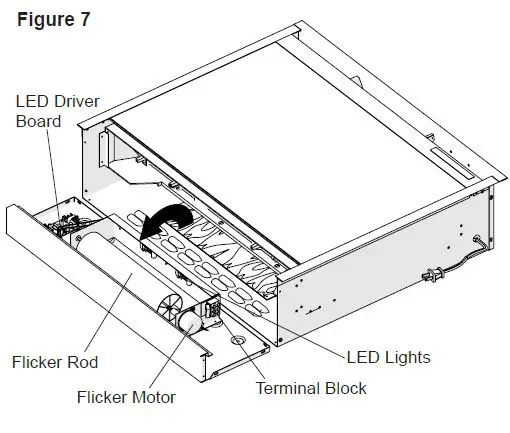
- Gently open the bottom panel, laying it on the work sur-face so that all of the components can easily be seen.(Figure 8)
- Locate the flicker motor, flicker rod and terminal block.
- a) If the old and new flicker motors have the same number of wires: replace the old wires with the new wires.
b) If the old flicker motor has 3 wires and the new flicker motor has 2: disconnect the wiring connections and the capacitor, install the 2 wires in the two holes where the capacitor was installed. - Remove the 2 motor mounting screws.
- Separate the motor from the flicker connector and remove.
- Slide the flicker rod out of the snap-in bushing and remove.
- Reassemble in the reverse order as above.

LED DRIVER BOARD REPLACEMENT
Tools Required: Phillips Head Screwdriver
CAUTION: If unit was operating prior to servicing allow at least 10 minutes for lights, heating elements and top panel to cool off to avoid accidental burning of skin.
WARNING: Disconnect power before attempting any maintenance to reduce the risk of electric shock or damage to persons.
- Unplug the unit from power outlet.
- Remove the firebox from the back of the mantel by removing the retaining screws which secure the firebox brackets to the mantel.
- Remove the three screws along the back of the unit, the two that hold the glass retaining bracket on both sides and the two on either side along the bottom edge.(Figure 6)
- Lay the Compact Fireplace on its back.
- Gently open the bottom panel, laying it on the work surface so that all of the components can easily be seen. (Figure 8
- Locate the LED driver board and disconnect the wiring connections noting their original locations.
! NOTE: A flat head screwdriver can be used to gently pry between the end of the connector and the switch to release the wires. - Release the driver board from the top panel by using needle nose pliers to depress the tab on the mounting standoffs and gently lift the driver board off.
- Properly orient and install the new LED driver board and connect all of the wiring.
- Reassemble in the reverse order as above.
LED LIGHT ASSEMBLY REPLACEMENT
Tools Required: Phillips Head Screwdriver
CAUTION: If unit was operating prior to servicing allow at least 10 minutes for lights, heating elements and top panel to cool off to avoid accidental burning of skin.
WARNING: Disconnect power before attempting any maintenance to reduce the risk of electric shock or damage to persons.
- Unplug the unit from power outlet.
- Remove the firebox from the back of the mantel by removing the retaining screws which secure the firebox brackets to the mantel.
- Remove the three screws along the back of the unit, the two that hold the glass retaining bracket on both sides and the two on either side along the bottom edge.(Figure 6)
- Lay the Compact Fireplace on its back.
- Gently open the bottom panel, laying it on the work sur-face so that all of the components can easily be seen.(Figure 8)
- Locate the LED lights along the back. Each light is secured with four screws and there is a light filter that is sandwiched between the light assembly and the sheet metal bracket.
NOTE: New light filters are not provided with replacement lights and will need to be reinstalled in the original locations. - Disconnect the wiring connections noting their original location.
- Properly orient and install the new LED lights and con-nect all of the wiring.
- Reassemble in the reverse order as above.
LOG SET ASSEMBLY REPLACEMENT
Tools Required: Phillips Head Screwdriver
CAUTION: If unit was operating prior to servicing allow at least 10 minutes for lights, heating elements and top panel to cool off to avoid accidental burning of skin.
WARNING: Disconnect power before attempting any maintenance to reduce the risk of electric shock or damage to persons.
- Unplug the unit from power outlet.
- Remove the firebox from the back of the mantel by removing the retaining screws which secure the firebox brackets to the mantel.
- Remove the two screws on each side of the firebox that secure the log set to the outside panels.
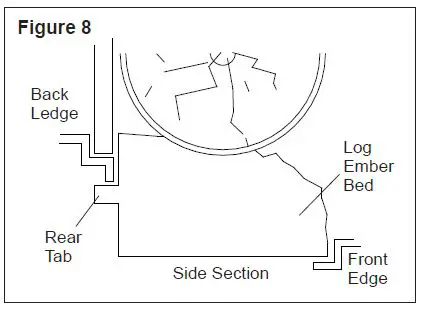
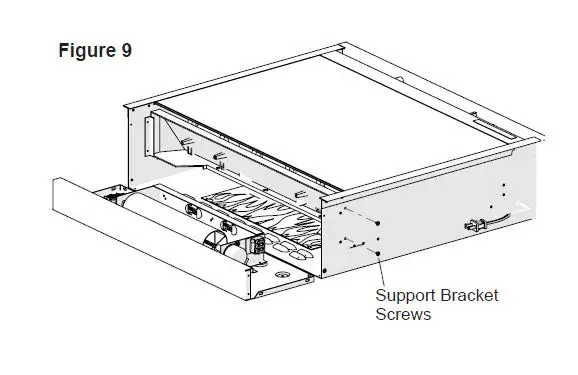
- Pull the front edge of the plastic Ember Bed or plastic grate up and forward until the rear tab releases from the ledge located at the bottom of the Partially Reflective Panel. (Figure 9)
IMPORTANT: Only handle the Log Set by the Ember Bed.
! NOTE: Log Set fits tightly into firebox, some force may be necessary to remove. - Disconnect the wiring connections noting their original location.
- Remove the two screws on each side that secure the log set support brackets to the firebox remove the partially reflective panel by sliding it out of the side channels towards the bottom. (Figure 9)
- Reassemble in the reverse order as above.


TROUBLESHOOTING GUIDE
| PROBLEM | CAUSE | SOLUTION |
| General | ||
| Circuit breaker trips or fuse blows when unit is turned on | Short in unit wiring. | Trace wiring in unit. |
| Improper circuit current rating | Additional appliances may exceed the current rating of the circuit breaker or fuse. Plug unit into another outlet or install unit on a dedicated 15 amp circuit. | |
| Unit turns on or off by itself | Remote control has a similar frequency to other remotes in the area. | The remote control and the remote control receiver needs to be replaced. Reinitialize the remote control to the remote control receiver after installation. |
| Radio frequency disturbance from out- side sources. | ||
| Defective Remote Control Receiver | ||
| Lights dim in room while the unit is on | Unit is drawing close to circuit current rating | Move the unit to another outlet or install unit on a dedi- cated 15 amp circuit |
| Power cord gets warm | Normal Operation | The power cord may get slightly warm to the touch when the heater is on |
| Defective power cord | Replace power cord if cord gets hot to the touch. | |
| Appearance | ||
| Fireplace does not turn on Manu- ally | Improper operation | Refer to Operation Section |
| No incoming voltage from the electrical wall socket | Check Fuse/Breaker Panel | |
| Loose wiring | Check wiring connections | |
| Defective 3 Position Switch | Replace 3 Position switch | |
| Fireplace does not turn on with the Remote Control | Improper operation | Refer to Operation Section |
| Remote control not initialized to fireplace | Initialize the remote control | |
| The batteries in the remote control are dead. | Install new battery into the remote control Reinitalize remote if necessary | |
| Defective remote control | Replace Remote Control and Remote Control Re- ceiver, reinitialize | |
| Flame Frozen | Loose wiring | Check wiring connections |
| Defective Flicker Motor | Replace Flicker Motor | |
| Flame is not visible | Loose wiring | Check wiring connections |
| LED light assembly is not working | Replace LED light assembly | |
| LED driver board is not working | Replace LED driver board | |
| Flame Shudder | Defective Flicker Motor | Replace Flicker Motor |
| The logset assembly does not light up. | Loose wiring | Check wiring connections |
| LED log set is not working | Replace LED log set | |
| LED driver board is not working | Replace LED driver board | |
| Light leaking around the log set | Log set not positioned properly | Check log set for proper fit |
| PROBLEM | CAUSE | SOLUTION |
| Heater | ||
| Heater is not turning off | Improper operation | Refer to Operation Section |
| Defective Heater On/Off Switch | Replace Heater On/Off Switch | |
| Defective Thermostat | Replace Thermostat | |
| Heater is not turning on, but flame effect is still functioning | Improper operation | Refer to Operation Section |
| Loose wiring | Trace wiring in unit | |
| Defective Heater On/Off Switch | Replace Heater On/Off Switch | |
| Defective Heater Assembly | Replace Heater Assembly | |
| Heater is turning off after a couple of minutes of operation | Build up of dirt/dust in Heater Assembly | Ensure that exterior intake louvers and firebox cavity are free of dirt/dust. |
| Defective Heater Assembly | Replace Heater Assembly | |
| Heater emits an odor | Normal Operation | Normal operation is when the heater emits an odor for a brief period after the heater is initially turned on. The heater is burning off any dust accumulated during manufacturing or operation. |
| Defective Heater Assembly | Replace Heater Assembly | |
| Heating element is glowing red | Normal Operation | Small glowing sections of the element are considered normal. |
| Defective heater assembly | If larger glowing sections are causing the heater to trip the thermal cutout, unplug unit, discontinue use and replace heater assembly. | |
| Heater fan runs continuously | Normal Operation | Small glowing sections of the element are considered normal. |
| Defective Heater On/Off Switch | Replace Heater On/Off Switch | |
| Noise | ||
| Excessive noise with the heater on | Dirty Heater Assembly | Ensure that exterior intake louvers and firebox cavity are free of dirt/dust. |
| Defective Heater Assembly | Replace Heater Assembly | |
| Grinding or excessive noise with the heater off | Flicker rod hitting or rubbing against internal components | Ensure rod is straight and mounted properly in the bracket, spinning freely away from other components. Replace if necessary. |
| Defective Flicker Motor | Replace Flicker Motor | |
 Electric Fireplace & Heating Solutions | Dimplex