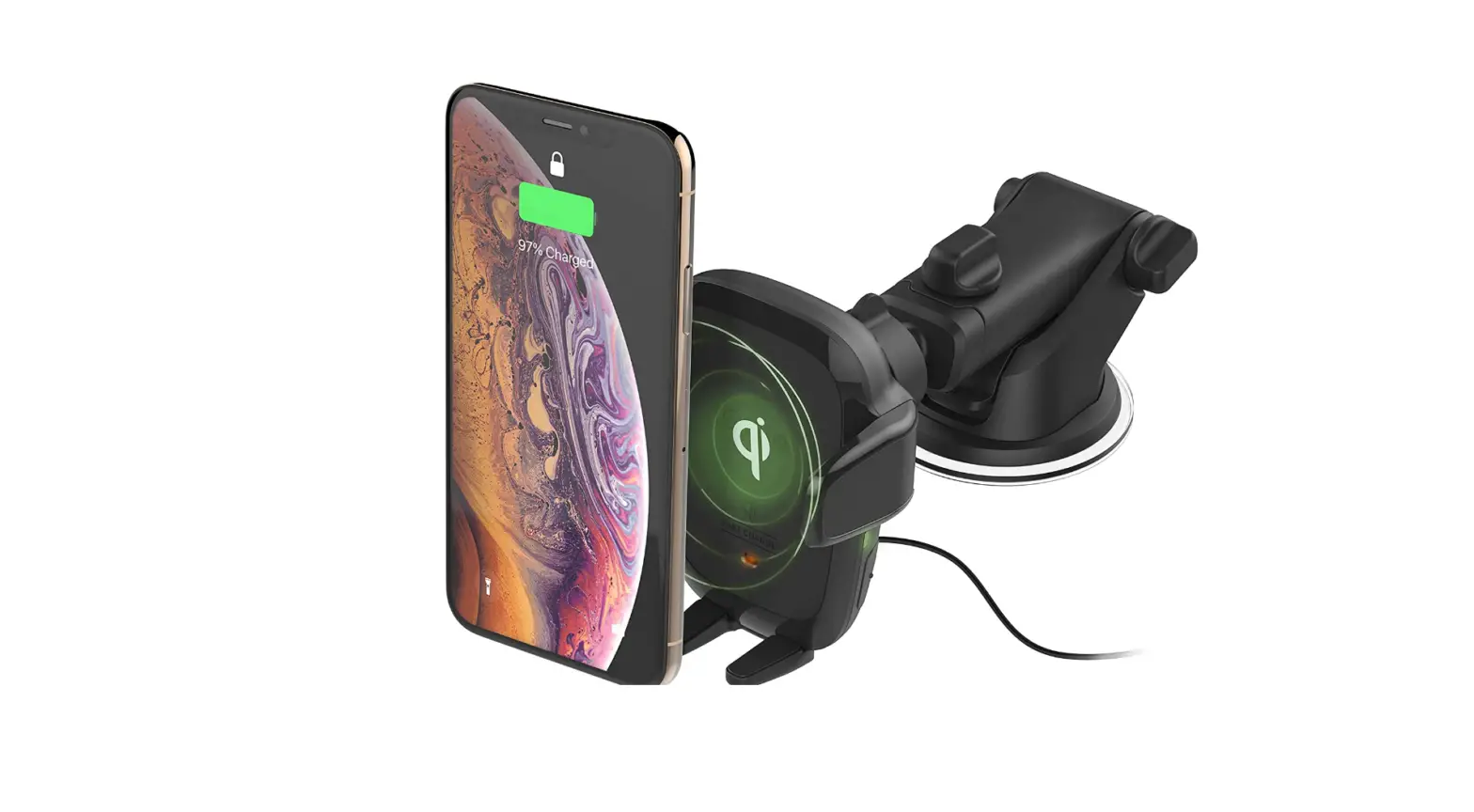
 iOttie HLCRIO161 Wireless Car Charger Auto Sense
 iOttie HLCRIO161 Wireless Car Charger Auto Sense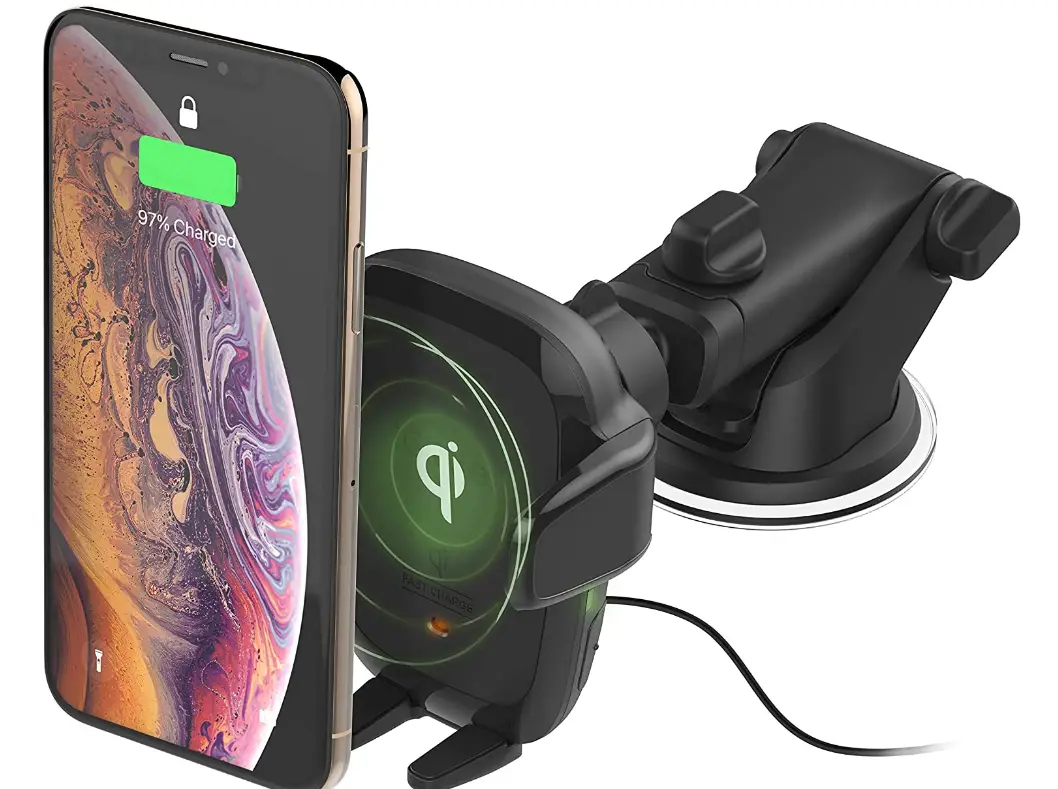
Getting Started
For optimal mounting and charging, please follow the detailed instructions within this manual when using the Auto Sense Wireless Charging Mount. iOttie is not liable for possible damages due to product misuse.
- Mount should be aligned so that all 3 spacers contact the inner wall of the cup holder.
- Twist dial to extend spacers so they securely contact the inner wall of the cup holder.
Critical Information
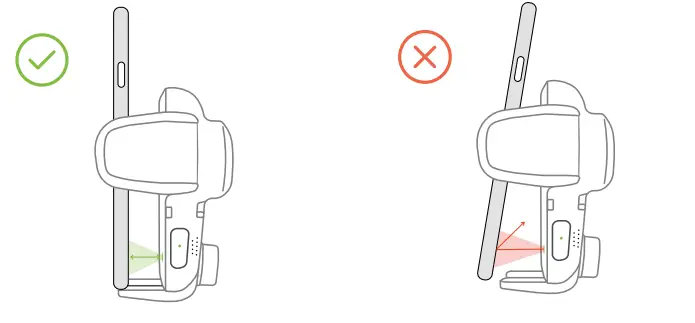
Mounting at a perpendicular angle to the mount works best with the proximity sensor.
If mountiAng at an angle, phone will need to be very close to sensor for arms to open.
Smartphone cases
Reflective Smartphone cases work best. Dark colored or textured cases do not reflect light well, making it difficult for the Proximity Sensor to detect phone. If using a dark-colored or textured case, the phone will have to be very close to mount for arms to open automatically.
Compatibility
Before using product, make sure your device is Qi Wireless compatible. Compatible devices include iPhone X, iPhone Xs, iPhone XR, Samsung Galaxy S10, S10+, Note9+, and Google Pixel 3.
Qi Wireless Charging in Vehicle
Use the included iOttie Car Charger and Micro USB Cable. If you do use a third party car charger, use a Qualcomm Quick Charge 2.0 or equivalent adapter to receive a wireless charge (with compatible devices).
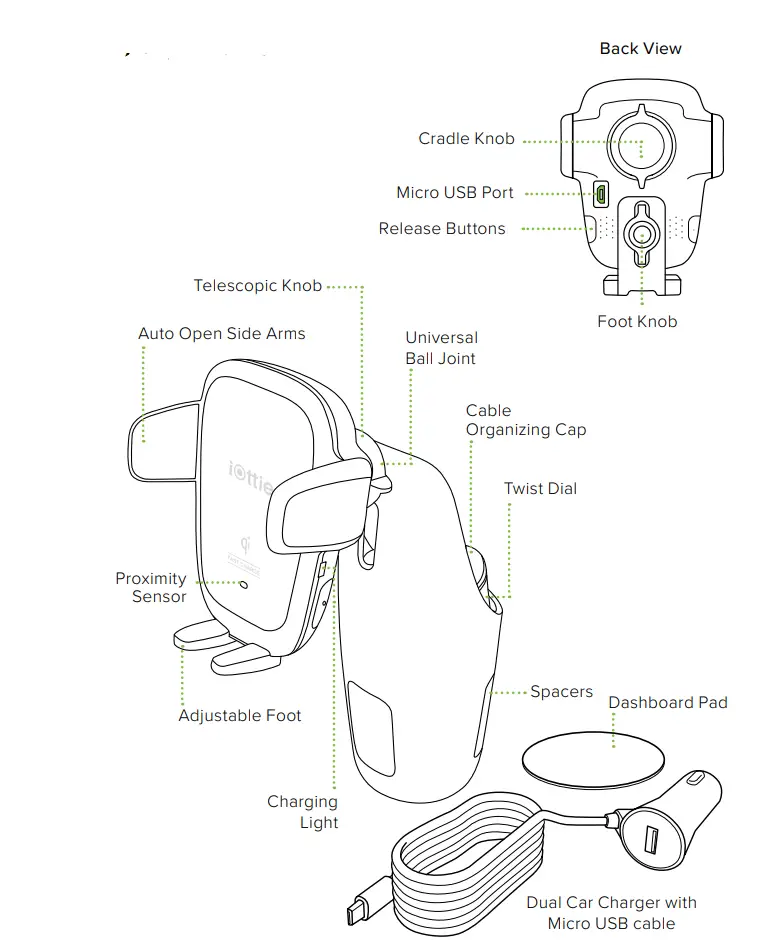
At a Glance
Connecting Power
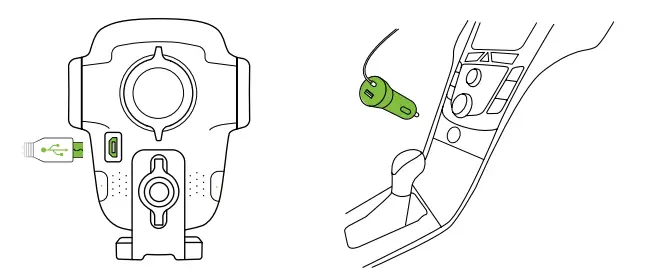
- Plug the micro-USB cable into the USB port on the back of the Mounting Head.
- Insert Car Charger into your vehicle’s power port.

- Twist Dial to ensure spacers are secure in the cup holder walls.
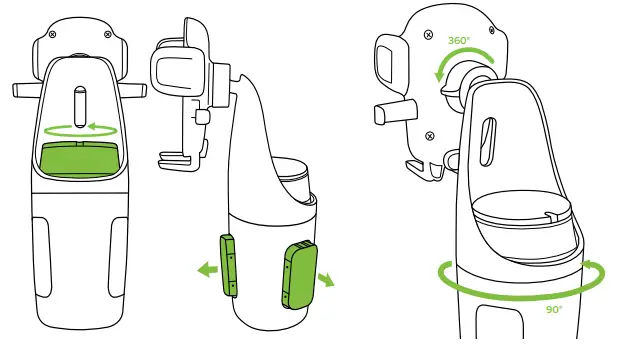
Top half of mount rotates 90 de-grees for optimal viewing.
Mount rotates 360 degrees for optimal viewing angles.
Adjusting the Mount
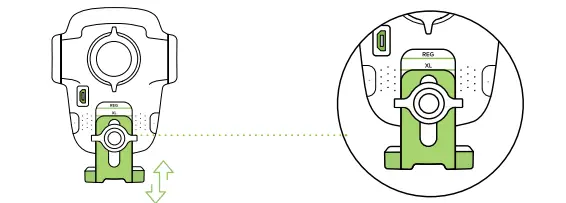
Foot Knob
Out of box, the foot knob is set to regular sized phones. Foot will need to be adjusted for plus sized phones or cases with thicker bottoms. Move the knob down until laser etching is aligned appropriately as shown in line drawing.
Using the Auto Sense Mechanism
Once it is unplugged or car is turned off, the Auto Sense’s internal battery keeps a charge for up to one hour.
Mounting and Charging
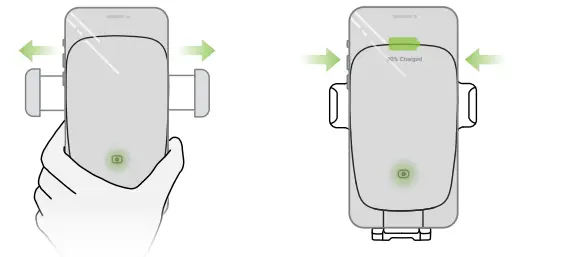
- Side arms on mount automatically open via silent step motor for one second when phone is detected in front of Proximity Sensor on mount.
- Once phone is placed in mount, arms will automatically close after one second. Qi wireless charging will start immediately.
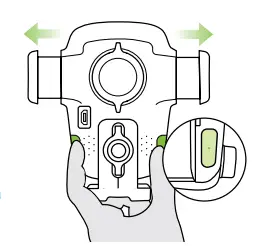
Releasing Devic - Buttons under the light on both sides of device can also open and close the arms. One or both buttons can be pressed.

The Auto Sense is powered via a micro-USB cable and coil cell battery. There is no on/off switch on the device. Once it is plugged in, the device will remain on unless the vehicle shuts off power when in parking mode.
Qi Alignment Guide
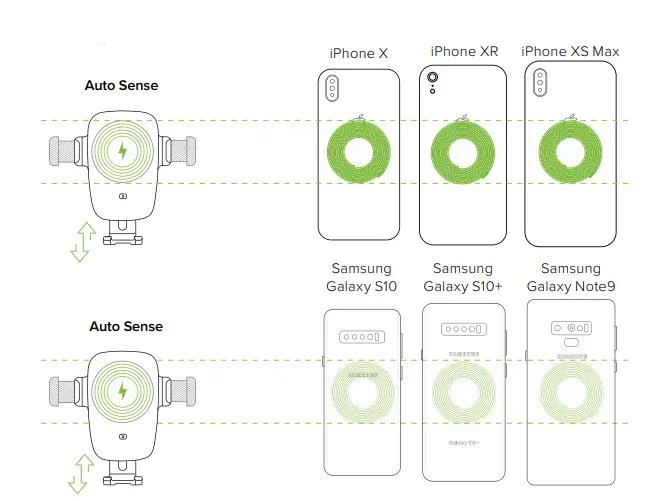
The Qi Receiver Coil is usually located in the center area of the phone. Check with your phone’s manufacturer for Qi coil location. Below are some examples for commonly used phones.
- For larger/plus phones or larger cases, knob on mount will need to be adjusted as indicated by laser etching on back for proper alignment with Qi coils.
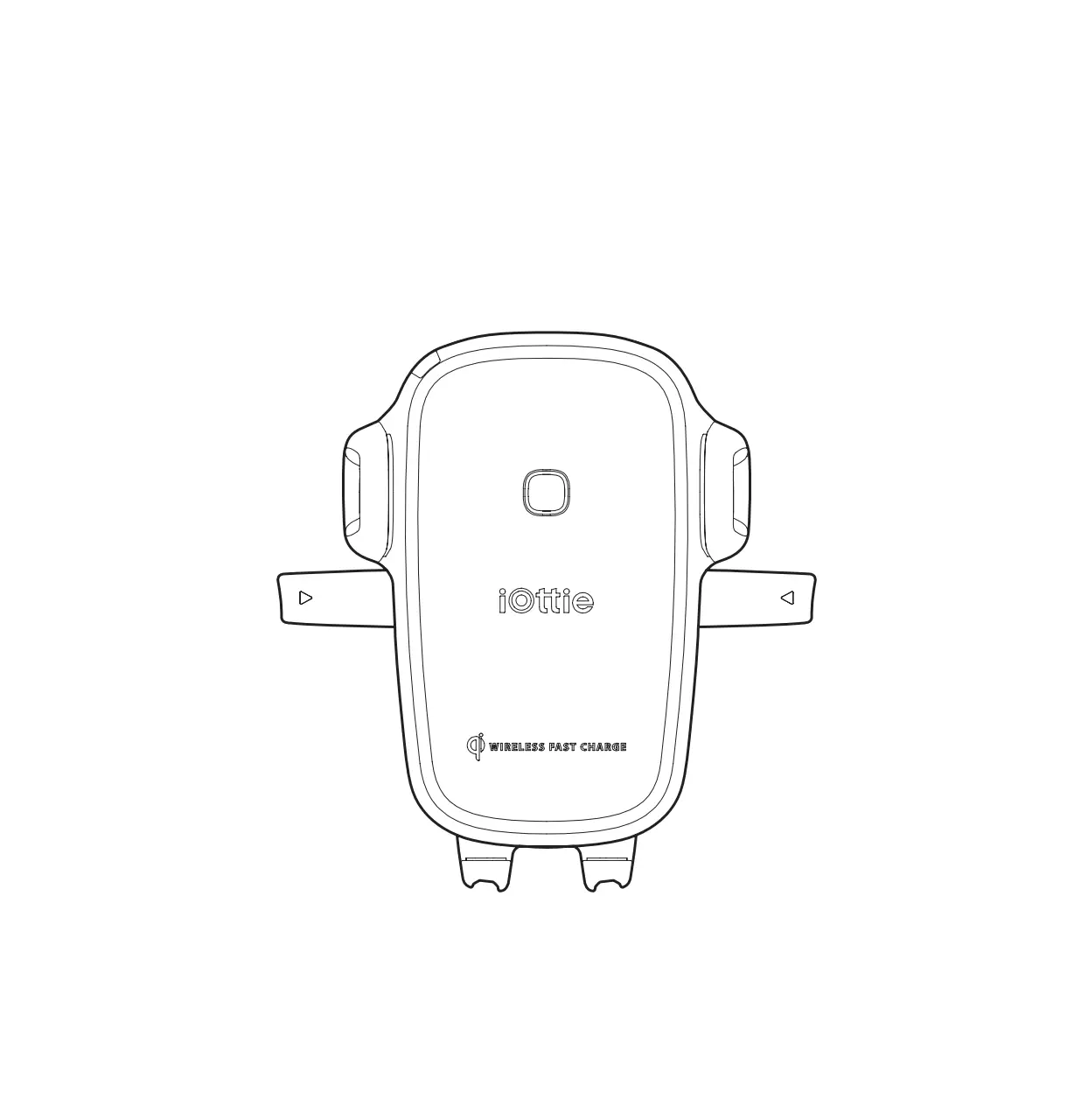
- The Qi coil on the mount is located at the top, above the iOttie logo. Please follow the guide below to line up your phone with the device for an optimal wireless charging.

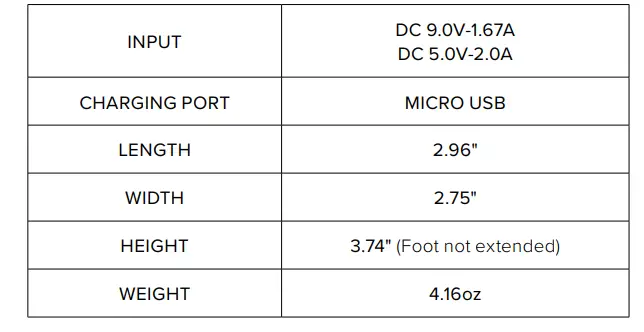
Wireless Charger Specifications
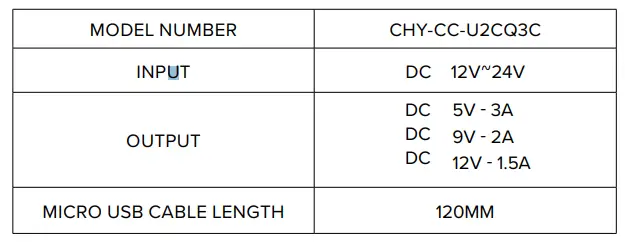
Car Charger Specifications
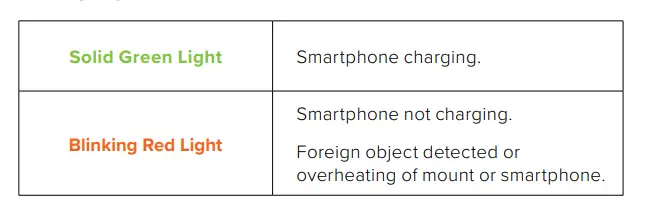
Charging Indicator
Frequently Asked Questions
What are the charging specifications of the Auto Sense?
Per the documentation link included in post, the charger specs are given as 3 possible output levels: 5V 3A, 9V 2A, 12V 1.5A but uses a standard USB charger and cable. Therefore it is NOT compatible with fast Qi charge and you cannot hook up a USB C charging line to the holder. I’ll wait for the upgrade.
Auto sense only works once after plugging in, then won’t work at all unless you unplug and plug in again. What the heck?
It’s only to load your phone on the Mount, I know it’s hard to press a button to release the phone but trust me, you will get used to it.
Does the open button close the mount if the automatic detector doesn’t work on a given case/phone?
The mount opens when it detects movement of a cell phone getting close to the mount. It closes automatically after 1 or 2 seconds whether it detects a cell phone case or not.
A useful tool for every home and also for me
It’s pretty much a phone charger for your car.
Is this compatible with Samsung galaxy a52?
I know the A42 5G does not have wireless charging capabilities. Not sure if that’s the same phone or if you made a typo. I don’t specifically know about the a52. That said, I haven’t had any luck with thicker cases like OtterBox Defender.
Will this work for a Note8 with an Otter box case ?
I have a iPhone 12 with an otter box defender case and it charger just fine. Although, I did notice that the defender case is thinner than the one on my older model iPhone.
How do i remove my phone from the auto sense mount?
There are two buttons on either side of the mount cradle that should be pressed to release the cradle arms. You can press one or both to release your phone.
How long does the internal battery last or stay charged?
You need a constant power feed to power charging and arms opening and closing. It comes with a cable with a lighter plug but I bought a shorter USB-style
cable.
Will this work with an lg neon plus?
If it charges wirelessly, yes.
Will this be updated to fit the iPhone 12 Pro Max?
No need to be updated- other than the description. It will fit any model of the iPhone 12.